


Staring at a screen with noticeable motion blur during fast-paced matches can be frustrating. You want a display that keeps every frame sharp, but finding the right balance between price and performance is tricky. Many buyers struggle with mismatched refresh rates or limited desk space for larger panels. This guide analyzes 6 Monitor Best Buy 144hz options to help you make an informed decision. We look at specifications like response time, panel technology, and connectivity to ensure the monitor fits your workflow. Whether you are gaming competitively or working on long coding sessions, these details matter. Understanding eye comfort features is also crucial for daily use.
The selected models range from budget-friendly 22-inch screens to larger 27-inch displays. Each option offers a 144Hz refresh rate, which provides smooth motion for both gaming and general computing. You will see differences in panel types, such as IPS for color accuracy and VA for contrast. Some monitors include built-in speakers, while others rely on external audio. Stand adjustability varies too, with some offering full height and pivot adjustments. These factors influence how comfortable your setup will be over long periods. Comparing high refresh displays can help you understand the value proposition here.

Pros
- High refresh rate (144Hz O/C) and 1ms MBR for smooth, responsive gameplay.
- Vibrant IPS colors with HDR10 and wide sRGB coverage.
- Adaptive sync support works with both NVIDIA and AMD GPUs.
- Useful gaming features like Crosshair, Black Stabilizer, and Dynamic Action Sync.
- Affordable price point for a feature-rich 24-inch gaming monitor.
Cons
- 1ms MBR is motion blur reduction, not true 1ms GtG response time; some motion blur may still be noticeable.
- 24-inch size may feel small for gamers preferring larger immersive displays.
- Tilt-only stand lacks height and swivel adjustments, limiting ergonomic flexibility.
The LG 24G411A-B UltraGear gaming monitor is a 24-inch Full HD (1920x1080) IPS display designed for gamers who want a responsive, color-accurate screen without breaking the bank. It features a native 120Hz refresh rate that can be overclocked to 144Hz, along with 1ms Motion Blur Reduction (MBR) to keep fast-moving action sharp. This monitor is best suited for competitive and casual PC gamers, esports players, and streamers who need a reliable, low-latency display for FPS, MOBA, and racing titles. Its compact size also makes it a great fit for college gamers, work-from-home setups, or anyone with a smaller desk.
In real-world gaming, the 144Hz overclocked refresh rate and 1ms MBR work together to deliver smooth, fluid visuals that reduce motion blur and ghosting. Combined with NVIDIA G-Sync Compatibility and AMD FreeSync, screen tearing and stuttering are virtually eliminated, giving you a competitive edge in fast-paced matches. The Dynamic Action Sync feature further reduces input lag, helping you react quicker in-game. For FPS players, the built-in Crosshair overlay provides a handy accuracy boost without modifying game settings.
The IPS panel offers vibrant HDR10 color with up to 99% sRGB coverage, making games look rich and lifelike. Blacks are decent for an IPS display, and the Black Stabilizer helps brighten dark areas so you can spot enemies hiding in shadows. Color accuracy is solid out of the box, which is a bonus if you also do light photo editing or content creation.
Build quality is typical for LG's UltraGear line - a slim, plastic body with a minimal bezel that looks clean on any desk. The stand is simple and tilt-adjustable but lacks height, swivel, or pivot adjustments, so you may want to invest in a VESA-compatible arm (100x100mm) for better ergonomics. Connectivity includes HDMI and DisplayPort, which cover most modern GPUs and consoles, but there's no USB hub or built-in speakers.
Setup is straightforward: plug in the cables, attach the stand with a few screws, and you're ready to go. The on-screen display (OSD) is intuitive, and the LG Switch app makes it easy to split your screen into multiple sections for multitasking during streams or work. The slim footprint and lightweight design (7.3 pounds) make it easy to move or mount.
While the 24-inch size and tilt-only stand may limit some users, the LG 24G411A-B offers excellent value for budget-conscious gamers who prioritize high refresh rates and adaptive sync. It's a practical choice for competitive play, casual gaming, and even light productivity, making it a versatile addition to any gaming setup.


Pros
- 144Hz refresh rate for smooth gaming performance at a very competitive price.
- Built-in speakers eliminate need for external audio for basic use.
- Minimal bezels make for an immersive multi-monitor experience.
- Blue-Light Shift helps reduce eye fatigue during long sessions.
Cons
- Only 22-inch screen may feel small for immersive single-monitor gaming.
- Built-in speakers typically lack depth and volume for serious gaming audio needs.
- No VESA mount support mentioned, limiting desk mounting options.
The Sceptre E225W-FW144 Series is a 22-inch Full HD gaming monitor built for gamers who prioritize smooth performance on a tight budget. With a 144Hz refresh rate and 1080p resolution, this display offers a noticeable upgrade over standard 60Hz office monitors, especially in fast-paced games like Call of Duty, Valorant, or Apex Legends. The combination of HDMI and DisplayPort inputs makes it easy to connect to most modern gaming PCs or laptops, and the integrated speakers provide basic audio without needing extra gear on your desk.
This monitor is best suited for casual gamers, competitive players looking for a low-cost secondary screen, and college gamers setting up a dorm room battle station. The 22-inch size keeps the desk footprint small, and the nearly bezel-free design means it pairs well in a dual-monitor arrangement for streaming or productivity. Gamers who play mostly esports titles will appreciate the 144Hz responsiveness, which helps reduce motion blur and gives a slight edge in competitive play.
Build quality is typical for this price range a lightweight plastic frame that feels sturdy enough for desk use but not rugged for frequent moves. The Blue-Light Shift feature is a practical addition for those who game or work late, as it filters some harmful blue light and may reduce eye fatigue over time. The stand offers basic tilt adjustment, but you won't find height, swivel, or pivot options, which is expected at this price point.
Setup is straightforward: attach the stand, plug in power and video cable, and the monitor is ready to go. The on-screen display (OSD) menus are simple to navigate for adjusting brightness, contrast, and gaming presets. Cable management is minimal since there are no integrated routing channels, but the compact size keeps wires from getting too messy.
One realistic limitation is the lack of VESA mounting support, so you cannot easily attach this monitor to an arm or wall mount. Also, the built-in speakers are functional but won't satisfy gamers who want rich sound for immersion or crisp audio for competitive footstep detection. Most users will want to pair this monitor with a dedicated gaming headset or external speakers.
Overall, the Sceptre 22-Inch 144Hz Monitor is a solid choice for budget-minded PC gamers, streamers needing a secondary display, or anyone building a cost-effective gaming setup. It delivers the essential performance needed for smooth 1080p gaming without the premium price. If you're focused on high-refresh-rate gameplay and keeping your budget in check, this monitor is worth considering for your desk.

Pros
- Excellent 144Hz refresh rate and 1ms MPRT offer fluid, competitive-level responsiveness
- IPS panel provides wide viewing angles and accurate color reproduction out of the box
- Frameless design makes multi-monitor stacking seamless and visually clean
- Affordable price point delivers strong value for budget-minded gamers and students
- Plug-and-play setup with HDMI 2.0 and DisplayPort connections works with PC and consoles
Cons
- 1080p resolution on a 27-inch screen may appear less sharp for users accustomed to higher pixel density
- Built-in speakers are basic; external speakers or headset recommended for better audio
- Stand only offers tilt adjustment; height and swivel require aftermarket VESA mount or arm
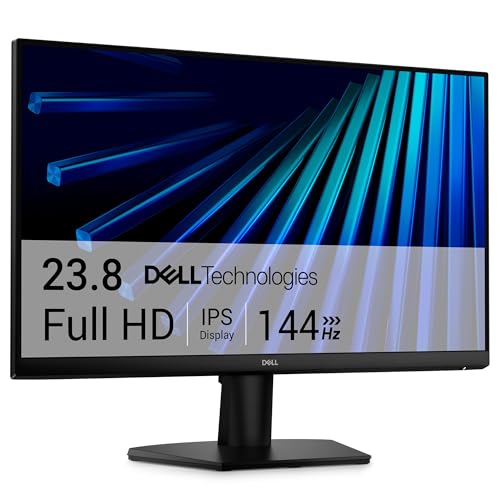
The AOC 27G51F is a 27-inch Full HD gaming monitor that combines a fast 144Hz refresh rate with an IPS panel and a slim, frameless design. It is tailored for PC gamers who want smooth motion without breaking the bank, and for console players looking to take advantage of up to 120Hz output on PS5 or Xbox Series X/S. This monitor also suits casual gamers, college students building their first gaming setup, and streamers needing a reliable secondary display for chat or previews.
In terms of real-world performance, the 144Hz refresh rate and 1ms MPRT (moving picture response time) keep fast-moving scenes crisp and responsive. Adaptive-Sync technology matches the monitor's refresh rate to your GPU's frame output, reducing screen tearing and stuttering in games like Valorant, Apex Legends, or Call of Duty. The low input lag further enhances the feeling of direct control, which is critical for competitive players. The IPS panel provides consistent colors from almost any angle, and its 116% sRGB coverage makes games look vibrant without oversaturation. HDR compatibility adds extra pop in supported titles, though brightness (typical 250 nits) is modest for true HDR impact.
Build quality is solid for the price: the monitor feels sturdy, with a clean black finish and thin bezels on three sides. The stand is functional but only offers tilt adjustment, so you may want to use the VESA 100x100 mount if height or swivel is important. The included cables (HDMI and DisplayPort) are adequate, and the OSD menu is easy to navigate via a joystick on the back. Setting up the monitor is straightforward - just plug in the video cable and power, and it auto-detects the source. Cable management is helped by the simple stand design, but there is no integrated cable routing.
One realistic limitation is the 1080p resolution on a 27-inch screen. While it keeps hardware demands lower and maintains high frame rates, text and fine details are not as sharp as on a 1440p or 4K display. Users sitting close may notice pixel structure. Also, the maximum HDMI bandwidth is HDMI 2.0, which supports 144Hz at 1080p on PC but limits console to 120Hz (depending on the game). The monitor lacks USB ports, a headphone jack is present, but built-in speakers are weak - external audio is recommended.
Overall, the AOC 27G51F is a smart, budget-friendly pick for esports players and casual gamers who prioritize high refresh rates and color quality over resolution and advanced ergonomics. It works well in a multi-monitor gaming station, a dorm room desk, or as a secondary streaming companion. If you are looking for an affordable 144Hz IPS monitor that does the job without extra fuss, this is a strong contender.
Pros
- Impressive 144Hz refresh rate and 1ms response time at an affordable price point
- TUV certified eye-care features reduce fatigue during extended use
- Adaptive-Sync compatibility minimizes screen tearing without added cost
- Slim bezels make it great for multi-monitor gaming setups
- Lightweight and VESA mountable for flexible desk arrangements
Cons
- Limited to 1920x1080 resolution, which may not satisfy users seeking higher pixel density
- Only one HDMI port and a VGA port, which could limit modern connectivity options
- Built-in speakers if present are typically basic; external speakers may be needed for quality audio
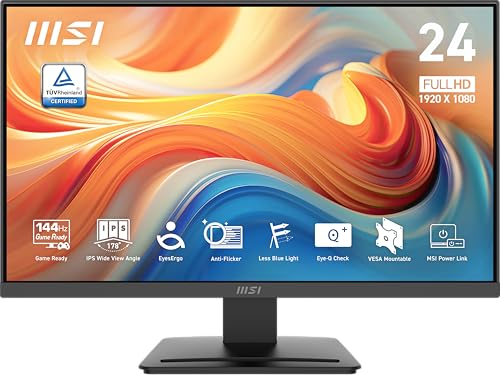
The MSI PRO MP243L E14 is a 24-inch IPS monitor that sits at the intersection of office productivity and gaming performance. With a Full HD 1920x1080 resolution, a 144Hz refresh rate, and a 1ms response time, it delivers smooth, responsive visuals that cater to both competitive gamers and casual users. This display is designed to handle fast-paced action without introducing noticeable blur, making it a solid choice for esports titles like Valorant or Apex Legends.
Who is this monitor for? It's a versatile option suitable for PC gamers looking for an affordable high-refresh-rate panel, streamers who need a secondary display with low latency, college gamers building a budget-friendly desk setup, and even work-from-home professionals who want a reliable screen for daily tasks. The 4-side slim bezel design also appeals to gaming setup builders aiming for a clean, modern aesthetic without distracting borders.
In terms of real-world performance, the 144Hz refresh rate and 1ms response time provide a noticeable upgrade over standard 60Hz monitors. Gamers will appreciate the Adaptive-Sync feature, which works to reduce screen tearing without adding latency. The IPS panel ensures consistent colors and wide viewing angles, so whether you're battling in a MOBA or editing a video, the visuals remain sharp and accurate. HDR readiness, though not a dedicated HDR standard, still offers improved contrast and brightness for a more immersive experience.
Build quality is typical for MSI's PRO series: a sturdy plastic frame with a VESA mountable back panel for easy wall mounting or arm attachment. The tilt adjustment allows you to find a comfortable viewing angle, but the lack of height or swivel adjustment may require careful desk positioning. Connectivity includes one HDMI port and a VGA port, which covers most gaming and office peripherals, though you won't find USB-C or DisplayPort here. Cable management is straightforward given the simple I/O layout, but users with multiple devices may need a switch or adapter.
Ease of setup is painless: mount it on a stand or VESA arm, plug in your power and video cables, and the monitor is ready to go. The on-screen display menu is intuitive and lets you tweak brightness, contrast, and game-related settings like response time overdrive. Eye-care features like Anti-Flicker and a low blue light mode are built in, which is a thoughtful addition for long gaming sessions or late-night work. The monitor is also relatively light at 9.5 pounds, making it easy to reposition on a desk or move between rooms.
Realistic limitations include the 1080p resolution, which may feel a bit dated for users accustomed to 1440p or 4K panels, and the limited port selection (only one HDMI). The built-in speakers, if present, are typically underwhelming, so investing in a separate speaker or headset is recommended. Overall, for PC gamers, streamers, or anyone building a high-refresh-rate gaming PC on a budget, the MSI PRO MP243L E14 offers excellent value. It balances performance, eye comfort, and practicality in a package that won't break the bank, making it a smart addition to any gaming desk or home office.
Frequently Asked Questions
Is 144Hz enough for competitive gaming?
Yes, 144Hz is widely considered the standard for competitive play. It significantly reduces motion blur compared to 60Hz displays. This smoothness helps you track moving targets more easily in fast-paced titles.
Do these monitors support console gaming?
Most models listed here support console gaming via HDMI. You should check the specific port version for 4K support. Many gamers prefer these displays for their low input lag features.
Which panel type is better for text?
IPS panels are generally preferred for text sharpness and color accuracy. They offer wide viewing angles, which is useful for multi-monitor setups. VA panels provide higher contrast but may have slower response times.
Do I need a VESA mount?
VESA mounting is optional but useful for saving desk space. It allows you to attach the monitor to an arm. This setup can improve ergonomics and reduce cable clutter on your desk.
What is the difference between MPRT and MBR?
MPRT and MBR both refer to motion blur reduction techniques. They measure how quickly the screen clears an image. Lower numbers indicate faster response times, which reduces ghosting artifacts.


Write Your Review
No reviews yet. Be the first to share your experience!