


Check the memory details before you buy
A mini PC’s installed memory isn’t automatically a suitable upgrade option for a laptop. The products here are complete desktop computers, not laptop RAM kits, so their specifications can help you compare system configurations but can’t confirm which memory will fit your laptop. Check the exact laptop model’s documentation for supported DDR generation, SODIMM form factor, maximum capacity, memory slots, and whether any RAM is soldered before ordering an upgrade.
This roundup of best mini pcs with ryzen 7 and 32gb ram includes systems with different memory arrangements, including DDR4, DDR5, and LPDDR5. For example, the BOSGAME P3 Lite lists 32GB DDR5 in dual-channel configuration and expansion up to 64GB, while the GMKtec K16 lists dual 16GB LPDDR5 at 6400MT/s. LPDDR5 is not interchangeable with a laptop SODIMM just because both use a DDR5-family name. For laptop-specific upgrade planning, see our laptop RAM replacement guidance and laptop memory upgrade options and specifications.


Pros
- Compact and space-saving design fits easily on any desk or entertainment center
- Strong CPU and RAM configuration handles modern games at 1080p medium settings and daily productivity tasks with ease
- Triple 4K display output and dual 2.5GbE LAN provide excellent connectivity for multi-monitor gaming and streaming setups
Cons
- Integrated Radeon graphics limit high-fps gaming at higher resolutions; best suited for 1080p medium settings
- Fan noise may become noticeable under sustained load during gaming sessions
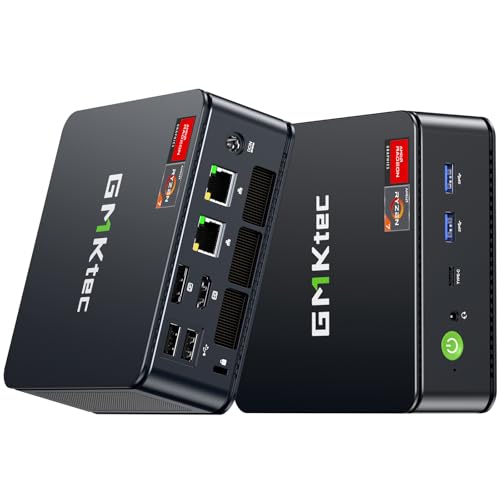
The GMKtec M5 Ultra is a compact mini PC designed for PC gamers, streamers, content creators, and work-from-home users who need a small yet capable desktop. Powered by the AMD Ryzen 7 7730U processor with 8 cores and 16 threads, this mini PC offers enough horsepower for everyday gaming, streaming, and multitasking without taking up much desk space. With 32GB of DDR4 RAM and a 512GB PCIe SSD, it handles game loading and app switching smoothly.
In terms of gaming performance, the M5 Ultra relies on the integrated AMD Radeon graphics, which can run popular titles like Fortnite, Valorant, and League of Legends at 1080p with medium settings and playable frame rates. It is not built for high-refresh-rate competitive gaming at max details, but it handles casual and esports gaming well. The dual 2.5GbE LAN ports provide low-latency wired networking, which is a plus for online gaming and streaming. WiFi 6E and Bluetooth 5.2 ensure reliable wireless connections for peripherals and internet access.
Build quality is solid for a mini PC, with a compact metal chassis that feels durable and fits easily on a desk or next to a monitor. The M5 Ultra supports triple 4K displays through HDMI, USB-C, and DisplayPort, making it a great choice for multi-monitor productivity setups or immersive gaming environments. Setup is straightforward: plug in the power, connect displays and peripherals, and the system is ready to go. The included SSD is accessible for upgrades, and the RAM can be expanded up to 64GB.
One realistic limitation is the integrated graphics, which cannot match the performance of a dedicated GPU for demanding AAA titles at high settings. Fan noise becomes noticeable under load, but it is not excessive. The M5 Ultra is best suited for gamers who prioritize a small footprint and versatility over raw graphical power, and for streamers or content creators who need a reliable secondary machine for encoding or light editing.
Overall, the GMKtec M5 Ultra is a practical choice for college gamers, work-from-home users, and anyone building a compact gaming setup. It delivers solid performance for its size, excellent connectivity, and the ability to drive multiple 4K displays. If you need a space-saving desktop for 1080p gaming, streaming, and productivity, this mini PC is worth considering.


FAQs
How do I check whether my laptop supports a RAM upgrade?
Check the manufacturer’s documentation for your exact laptop model. Confirm whether memory is soldered, how many slots are available, and the supported generation, form factor, maximum capacity, and data rate before buying.
Can I use DDR4 and DDR5 memory interchangeably?
No. Your laptop must support the memory generation you buy, and DDR4 and DDR5 modules are not interchangeable. These mini PCs illustrate the distinction: the GMKtec M5 Ultra listing specifies DDR4, while the BOSGAME P3 Lite specifies DDR5.
Does a mini PC’s RAM specification tell me which laptop module to buy?
No. A mini PC’s memory details don’t establish laptop compatibility. The K16 listing specifies LPDDR5, while the MINISFORUM UM870 listing specifies two DDR5 SO-DIMM slots; neither detail confirms compatibility with a separate laptop model.
How much memory can my laptop support?
Use the laptop manufacturer’s stated maximum for your exact model and configuration. Slot count, soldered memory, and system limits can affect the total, so don’t assume a capacity listed for a mini PC applies to your laptop.
Will advertised memory speed run at the listed rate?
Not necessarily. The laptop’s supported data rate and configuration determine the operating speed. The K16 listing gives 6400MT/s for its LPDDR5 memory, but that specification does not predict the speed supported by a different computer.
Should I add one module or install a matched kit?
Follow the laptop maker’s supported configuration and check what is already installed. A matched configuration may be appropriate when the system supports it, but available slots, soldered RAM, and capacity limits can rule out a simple add-on.



Write Your Review
No reviews yet. Be the first to share your experience!