


Buying the wrong memory module can leave your laptop running slow or refusing to boot. Many users face confusion over DDR4 compatibility, soldered limits, or unsupported speeds. This guide helps you navigate Best Ddr4 Ram For Laptop choices without guesswork. We focus on practical specs like capacity, data rate, and form factor. You can avoid common pitfalls like mixing kits or exceeding maximum capacity. The goal is a stable, cost-effective upgrade that matches your system’s needs.
Based on product specifications and user feedback, these three options cover different budgets and needs. The G.SKILL Ripjaws kit offers dual-channel performance for power users. The Samsung 16GB module is a solid single-stick choice for multitasking. The A-Tech 16GB provides a budget-friendly entry point with lifetime warranty support. Each listing details the exact voltage, rank, and pin count. Verify your laptop’s manufacturer specs before purchasing to ensure a perfect fit. This approach saves money and prevents compatibility headaches.
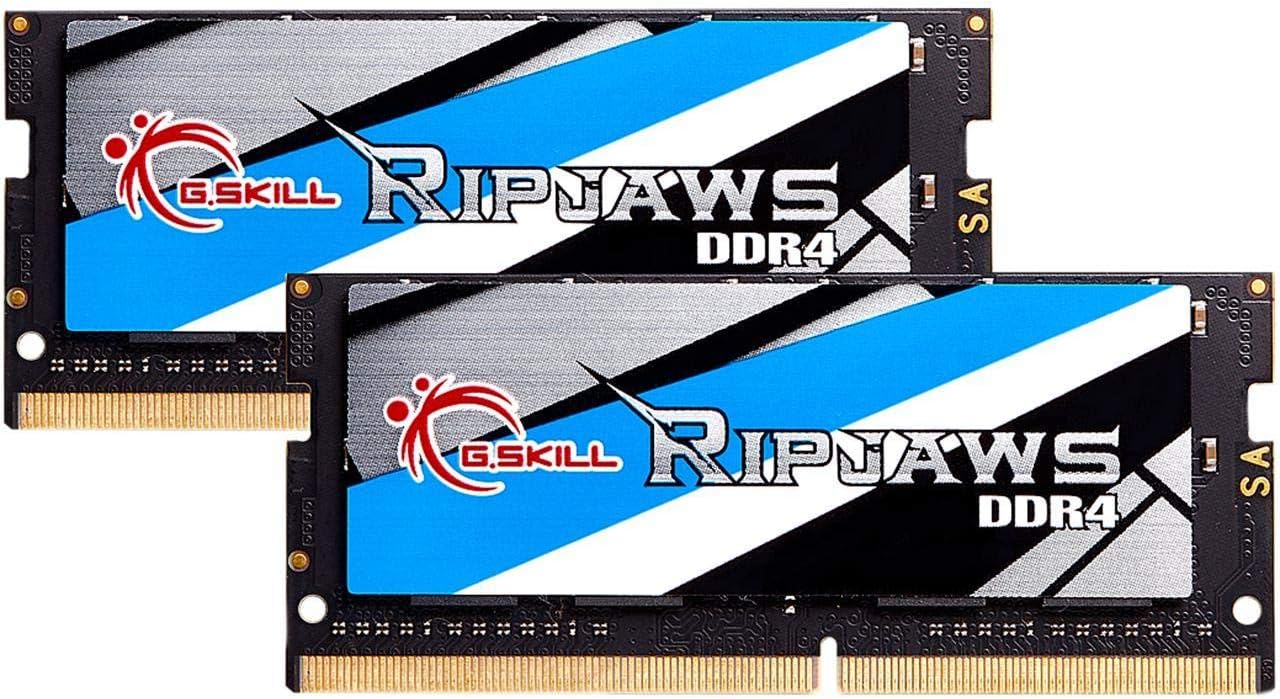
Pros
- Seamless plug-and-play installation with no BIOS configuration needed on compatible systems
- Excellent value for a 32GB DDR4 kit at 3200MHz, significantly boosting gaming and productivity
- Broad laptop compatibility includes popular gaming models from ASUS, MSI, Dell, and others
- Consistent performance with low failure rates reported by users over long-term use
- Low power draw (1.2V) helps maintain battery life in portable gaming rigs
Cons
- Some users reported rare compatibility issues with specific laptop models; verify your motherboard QVL before purchase
- CL22 latency is standard for SO-DIMM but not as tight as desktop DDR4 kits, which may slightly impact latency-sensitive tasks
- Requires careful handling during installation as it's a small PCB; packaging could be more protective against ESD or physical damage
The G.SKILL Ripjaws DDR4 SO-DIMM 32GB kit is a straightforward laptop memory upgrade designed for gamers, streamers, and PC enthusiasts who need more RAM without the hassle. This 2x16GB DDR4-3200 CL22 kit runs at 1.2V, offering a solid speed boost over stock 2400MHz or 2666MHz modules. It's aimed at anyone with a compatible DDR4 gaming laptop, Intel NUC, or small form factor PC who wants to handle heavier multitasking, smoother gameplay, and faster load times.
For competitive and casual gamers, adding 32GB of RAM can be a game-changer. Many modern titles and streaming software use over 16GB, especially when running Discord, OBS, and a browser in the background. This kit helps reduce stuttering and improves 1% lows in games like Call of Duty, Fortnite, and Elden Ring. The 3200MT/s speed is a sweet spot for DDR4 laptops, balancing cost and performance without overwhelming the integrated memory controller. While response times are not as tight as desktop overclocked kits, the real-world difference is minimal in most gaming scenarios.
Build quality is in line with G.SKILL's reliable standards. The modules are well-constructed with sturdy PCBs and heat spreaders that help dissipate thermal load during long sessions. User feedback consistently highlights the longevity and stability of these sticks. Installation is simple: power down, open the laptop's back panel, and seat the modules. The kit uses JEDEC default profiles, so it boots at rated speed on compatible systems without any BIOS changes. That said, it's wise to check your laptop's QVL before ordering, as a few users experienced boot issues with certain MSI or Dell models that resolved after reseating or clearing CMOS.
Practical limitations include the CL22 latency, which is standard for DDR4 SO-DIMM but not ideal for extreme memory tuning. Also, some laptops may require both slots populated; if your machine has only one slot, you'd need a different kit. The packaging is minimal, so handle with care to avoid static damage. Despite these points, the kit is a dependable upgrade for most gaming laptops and mini PCs.
Overall, the G.SKILL Ripjaws 32GB DDR4-3200 SO-DIMM kit is a smart choice for PC gamers looking to extend their laptop's lifespan and performance. It's especially useful for streamers juggling multiple apps, content creators editing videos on the go, or college gamers who want a smoother experience in their dorm setup. If you have a compatible DDR4 laptop and need more headroom, this is a reliable, cost-effective option that won't disappoint.

Pros
- High-speed 3200MHz DDR4 improves gaming and multitasking performance
- Low power consumption at 1.2V helps maintain cooler laptop temperatures
- Trusted Samsung brand with rigorous quality testing
- Plug-and-play installation with no configuration needed
- Great value for upgrading laptop memory on a budget
Cons
- CL22 latency may be slightly higher than premium gaming RAM (though standard for SODIMM)
- Single module only - requires matching stick for dual-channel in some laptops
- Not compatible with desktop DDR4 motherboards (requires SODIMM slot)
The Samsung 16GB DDR4 3200MHz SODIMM module is a straightforward upgrade for anyone looking to breathe new life into a gaming laptop or compact PC. As a high-speed memory stick designed for notebooks, it directly addresses a common bottleneck in older or budget systems: insufficient RAM and slower frequencies. For PC gamers, streamers, and content creators who rely on laptops for their setup, this Samsung module offers a solid path to smoother multitasking and more responsive gameplay.
In real-world gaming, 16GB at 3200MHz is the sweet spot for modern titles. Games like Call of Duty, Fortnite, and Cyberpunk 2077 benefit from faster memory speeds, reducing stutter and improving load times. Streamers running OBS alongside demanding games will appreciate the extra headroom, while college gamers juggling study apps and games will notice snappier switching between tasks. This module is particularly well-suited for competitive esports players who prioritize low-latency performance and consistent frame rates.
Build quality is typical of Samsung: reliable, well-tested, and compliant with JEDEC standards. The module is dual-rank (2Rx8), which can offer a slight performance boost over single-rank sticks in certain workloads. Its 1.2V operating voltage keeps power draw low, which is a plus for thin laptops where heat dissipation is limited. While not designed for overclocking or extravagant RGB, this is a practical, no-nonsense component for gamers who value stability above all.
Installation is simple: power off your laptop, access the memory slot, and click the module into place. No software, drivers, or BIOS tweaks are needed for standard operation. Cleaning and maintenance are non-issues as the module is sealed. Just ensure your laptop has a free SODIMM slot and supports DDR4 3200MHz (some older chipsets may run it at lower speeds).
A realistic limitation is the CL22 CAS latency, which is standard for 3200MHz SODIMMs but slightly higher than desktop gaming RAM. In most gaming scenarios, the difference is negligible, and the speed benefit outweighs the latency. Also, note that this is a single 16GB stick; for peak dual-channel performance, you'll need two matched sticks if your laptop supports only two slots.
Overall, this Samsung 16GB DDR4 3200MHz module is a recommended upgrade for gamers, streamers, and content creators using DDR4-based laptops. It delivers a tangible boost in responsiveness and multitasking without breaking the bank. Whether you're building a dorm room gaming setup, upgrading a work-from-home machine for occasional gaming, or optimizing a streaming laptop, this memory offers reliable performance that will keep your system feeling fresh.

Pros
- Adheres to standard JEDEC DDR4 operating parameters (1.2V, CL22, non-ECC unbuffered) for predictable baseline operation.
- Supports automatic downclocking to match laptop platforms limited to 2666MHz or 2400MHz DDR4 speeds.
- Backed by manufacturer lifetime warranty coverage and direct customer support.
- Offers a straightforward 16GB capacity boost for laptops with an accessible 260-pin SODIMM slot.
Cons
- Not compatible with laptops designed strictly for DDR5 memory, older DDR3 systems, or desktop-sized DIMM slots.
- Cannot be used in ultra-thin laptops or devices where system memory is permanently soldered to the motherboard.
- Dual-channel performance or seamless operation is not guaranteed when paired with a mismatched pre-installed memory stick.
The A-Tech 16GB DDR4 3200MHz SODIMM module is designed as an unbuffered, non-ECC memory upgrade for notebooks, laptops, mini PCs, and all-in-one systems. Operating at standard JEDEC DDR4 specifications of 1.2 volts and CAS latency 22, it provides a dependable hardware specification for machines built around DDR4 memory architecture. Shoppers seeking to add capacity to an existing system running short on memory headroom will find this single 16GB stick a straightforward option, provided their laptop supports removable 260-pin SODIMM hardware.
Before choosing this module, shoppers should verify their exact laptop model documentation. Memory generations are not cross-compatible; this DDR4 module will not physically fit or function in laptops requiring DDR5 or older DDR3 modules due to differing notch positions and electrical pinouts. Additionally, many compact laptops utilize soldered RAM that cannot be upgraded, while others feature one soldered bank and one open SODIMM slot. Checking your manufacturer maintenance guide confirms whether your system has a physical, accessible slot and verifies the maximum memory capacity supported by your processor and motherboard.
The module is rated for a data transfer speed of 3200MHz (PC4-25600). The speed at which the module actually operates depends on the host system's chipset and CPU memory controller. If your laptop supports 3200MHz DDR4, the module is rated to operate at that frequency. If your system caps memory at 2666MHz or 2400MHz, DDR4 memory is designed to automatically downclock to the highest speed supported by the host machine. While adding a 16GB stick can help reduce slowdowns caused by memory bottlenecks, it will not bypass system-level frequency caps, nor does it guarantee specific frame-rate or processing gains if performance is limited by the processor or storage drive.
In terms of configuration, this product includes a single 16GB memory stick with 1Rx8 or 2Rx8 rank configuration. If your laptop currently has an empty slot alongside an existing 8GB or 16GB module, adding this module can increase overall system capacity. However, dual-channel memory benefits and timing synchronization are best achieved when memory modules match in specifications. When mixing modules from different manufacturers or with differing internal timings, the system will adjust to the lowest common denominator, and dual-channel operation is contingent on motherboard architecture.
Installing laptop memory requires following the device manufacturer's recommended service procedures. Users should ensure the laptop is fully powered down, the power adapter is disconnected, and the internal battery is disabled or unplugged per system service instructions. Memory modules must be handled by the edges to protect against electrostatic discharge. Because laptops vary widely in accessibility, some require simple access doors while others demand complete removal of the bottom chassis.
For owners of DDR4-compatible laptops who have verified slot availability and capacity allowances, this A-Tech 16GB 3200MHz SODIMM provides a reliable, standard-spec memory upgrade. It is backed by a lifetime manufacturer warranty and direct technical support. As long as device documentation confirms DDR4 SODIMM support and sufficient capacity overhead, this module offers a sensible way to expand multitasking headroom on compatible machines.
Compatibility depends entirely on your exact laptop or mini PC specifications. You must confirm that your computer utilizes DDR4 SODIMM memory with a 260-pin configuration. This module cannot be installed in desktop computers requiring 288-pin DIMMs, nor can it be used in devices designed for DDR5 or DDR3 memory.
Shoppers should check whether their laptop has accessible memory slots rather than soldered onboard memory. Consult your device manufacturer manual to verify the maximum supported memory per slot, total system capacity limits, and supported frequencies before making an upgrade decision.
A-Tech covers this memory module with a manufacturer lifetime warranty against hardware defects. The company also provides direct technical support assistance to help buyers address questions regarding memory identification and compatibility before or after installation.
Frequently Asked Questions
How do I check if my laptop supports DDR4?
Check the laptop manufacturer’s specifications or use the system information tool. Most modern laptops use DDR4, but some older models use DDR3. The product listing specifies the exact generation and pin count. This ensures you buy the correct SODIMM form factor for your device.
Can I mix different brands of RAM?
No, it is best to avoid mixing brands or kits. The G.SKILL description warns that mixing kits causes stability issues. Matched kits are designed to run together as a set. Using identical modules ensures optimal performance and system stability.
What is the difference between single and dual rank?
Rank refers to how memory chips are organized on the module. The Samsung module is listed as 2Rx8, which is dual rank. This configuration may offer better compatibility with certain laptops. Check your laptop’s supported memory types for the best match.
Is 3200MHz speed always supported by my laptop?
Not always, as laptops may cap the maximum supported data rate. The modules are rated for up to 3200MT/s, but your system may run slower. It will boot at JEDEC default speeds if the higher rate is unsupported. This is normal and does not indicate a defect in the RAM.
Do I need ECC memory for my laptop?
Most consumer laptops do not support ECC memory. All three products listed here are non-ECC and unbuffered. This standard configuration is suitable for typical notebook and desktop upgrades. Using ECC in a non-ECC system will prevent the computer from booting.




Write Your Review
No reviews yet. Be the first to share your experience!