


Match the screen and graphics to your workload
A large display is useful for games and creative work, but an 18-inch chassis is a substantial choice if you plan to carry your laptop often. These 18 inch gaming laptops range from FHD+ 144Hz configurations with an RTX 5060 to QHD+ 240Hz models with an RTX 5070, plus a premium RTX 5090 option. The GPU name alone doesn’t establish game performance, so consider the display resolution, graphics configuration, memory, and your own workload together.
The ASUS TUF A18 models pair Ryzen 7 260 processors and RTX 5060 graphics with 16GB of DDR5 and a 1TB SSD. Their 1920 x 1200, 144Hz displays are a different balance from the MSI Crosshair and ASUS ROG Strix configurations, which list 2560 x 1600 panels at 240Hz and RTX 5070 graphics. The MSI options include 32GB RAM, with listed storage configurations of 1TB or 2TB. For buyers comparing graphics tiers and gaming workloads, this laptop graphics card guide offers related context.
At the top of this lineup, the ASUS ROG Strix SCAR 18 lists an RTX 5090, 32GB DDR5, 2TB SSD, and a 240Hz Mini LED display. Its specifications stand apart, but the available information doesn’t establish real-world frame rates or battery runtime. Check the exact seller configuration, operating system, ports, and any upgrade or warranty terms before ordering, especially for listings that disclose reseller memory or storage changes. The broader gaming laptop noise and specs overview may help frame questions about sound, since this product information does not provide measured fan-noise results.
Product options



Pros
- Top-tier Intel Core Ultra 9 and RTX 5070 deliver exceptional gaming and productivity performance.
- 18" 240Hz QHD+ display with 100% DCI-P3 offers smooth, vibrant visuals for gaming and color-critical work.
- 32GB DDR5 RAM and 1TB NVMe SSD provide fast load times and ample space for games and files.
- Comprehensive connectivity with Thunderbolt 4, HDMI 2.1, and Wi-Fi 6E for flexible setup.
- SteelSeries RGB keyboard and Dynaudio audio enhance the gaming experience.
Cons
- The premium gaming hardware may lead to shorter battery life during intensive use.
- At 6.83 pounds, it's less portable than smaller gaming laptops.
- The built-in 720p webcam is functional but not ideal for high-quality streaming.
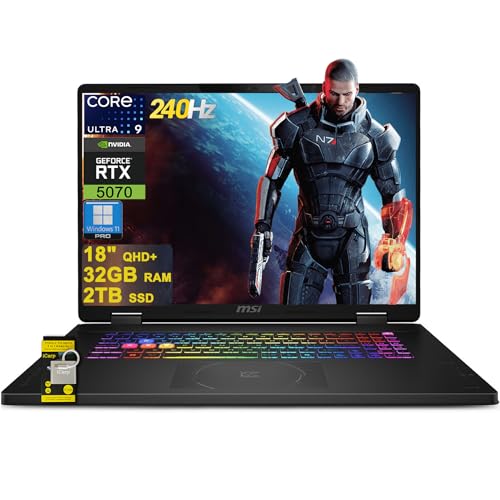
The MSI Crosshair 18 HX AI is a powerhouse gaming laptop that brings desktop-class performance to a portable form factor. It's designed for serious PC gamers, esports players, streamers, and content creators who demand high frame rates and responsive gameplay without being tied to a desk. With the latest Intel Core Ultra 9 processor and NVIDIA RTX 5070 graphics, this machine handles even the most demanding titles and creative applications with ease.
At the heart of the Crosshair 18 is the Intel Core Ultra 9 275HX, a 24-core CPU that boosts up to 5.4 GHz, paired with 32GB of DDR5-5600 RAM. This combination ensures buttery-smooth multitasking, whether you're streaming on Twitch, editing video, or running the latest AAA shooters. The RTX 5070 with 8GB GDDR7 VRAM delivers stunning ray-traced visuals and high frame rates at the laptop's native QHD+ resolution. Games like Call of Duty: Modern Warfare III or Cyberpunk 2077 will look incredibly detailed and run fluidly, especially with DLSS support.
The 18-inch display is a standout feature. Its 2560x1600 resolution, 240Hz refresh rate, and 100% DCI-P3 color coverage make it ideal for both competitive gaming and color-sensitive work. Fast-paced titles feel incredibly responsive thanks to the high refresh rate, while the vibrant colors and sharp resolution bring single-player adventures to life. The screen also works great for photo and video editing, making it a versatile tool for creators.
Build quality feels solid for a large gaming laptop, weighing just under seven pounds. The SteelSeries keyboard with 24-zone RGB offers satisfying feedback and anti-ghost keys for precise inputs during intense gaming sessions. The Dynaudio speakers with dedicated woofers provide surprisingly rich sound, reducing the need for external speakers during casual use. Connectivity is comprehensive with Thunderbolt 4, HDMI 2.1, and multiple USB ports, allowing you to connect external monitors, gaming mice, and other peripherals effortlessly.
Setting up the Crosshair 18 is straightforward right out of the box. Windows 11 Home comes preinstalled, and MSI's software suite lets you customize performance profiles, fan speeds, and RGB lighting. The 720p webcam with a privacy shutter is basic but functional for video calls. While the laptop's 90Whr battery offers decent run time for everyday tasks, heavy gaming will require being plugged into the 240W adapter.
One limitation is battery life under load; you'll want to keep it plugged in for gaming sessions. The built-in webcam is adequate for Discord calls but not ideal for professional streaming. Some users may find the 6.83-pound weight a bit heavy for daily commuting. However, if you need a laptop that can replace a desktop for gaming and content creation, the MSI Crosshair 18 HX AI is an excellent choice. It's a well-rounded machine that delivers high-end performance in a portable package, making it a strong contender for any mobile gamer or creator.
The MSI Crosshair 18 HX AI delivers outstanding gaming performance thanks to its Intel Core Ultra 9 275HX and RTX 5070 combination. In demanding titles like Fortnite, Apex Legends, and Baldur's Gate 3, you can expect high frame rates at the laptop's native QHD+ resolution with graphics settings maxed out. The 240Hz display ensures every frame is rendered smoothly, giving competitive gamers an edge in fast-paced shooters. The 32GB of DDR5 RAM prevents any stutter during intense battles or when streaming in the background. The RTX 5070's ray-tracing capabilities bring realistic lighting and reflections to supported games, enhancing immersion without sacrificing performance.
For esports players, the combination of low-latency connectivity (Wi-Fi 6E and Ethernet) and the high-refresh screen makes a noticeable difference in reaction times. The laptop also handles content creation tasks like video rendering and 3D modeling with ease, thanks to the powerful CPU and ample RAM. Overall, this is a system built to excel across gaming and productivity workloads.


Pros
- High-refresh 240Hz display with excellent color accuracy and fast response times for competitive edge.
- Powerful Intel Ultra 9 and RTX 5070 combo handles demanding games and creative workloads with ease.
- Large 18-inch screen provides immersive gaming experience without sacrificing portability.
- Ample 32GB RAM and 1TB SSD deliver snappy performance and plenty of storage out of the box.
- Rich connectivity options including Thunderbolt 4, HDMI 2.1, and Wi-Fi 7 future-proof your setup.
Cons
- Premium price point may be steep for budget-conscious gamers.
- Large 18-inch chassis reduces portability and may require a spacious desk setup.
- Limited user reviews available, so long-term reliability and real-world performance are not yet widely confirmed.
The ASUS ROG Strix G18 G815 is a premium gaming laptop designed for enthusiasts who demand desktop-class performance in a portable form. Featuring an 18-inch 2560x1600 IPS display with a 240Hz refresh rate and 100% DCI-P3 color gamut, this laptop is built to deliver smooth, vibrant visuals for competitive gaming and content creation. Under the hood, it packs an Intel 24-core Ultra 9 275HX processor and an NVIDIA GeForce RTX 5070 GPU with 8GB GDDR7 memory, making it a beast for modern games, streaming, and multitasking.
For serious PC gamers, especially those into fast-paced esports titles like Valorant or Call of Duty, the 240Hz panel combined with a 3ms response time offers near-instantaneous visual feedback, reducing motion blur and giving you a competitive advantage. The high core-count processor also handles streaming and recording without hiccups, making it a solid choice for Twitch streamers and YouTube content creators. Casual gamers and open-world explorers will appreciate the large screen and vivid colors for immersive single-player experiences.
Build quality is typical of ASUS ROG's Strix lineup: a robust chassis with a sleek black finish, a 4-zone RGB backlit keyboard for customizable lighting, and a comprehensive port selection including Thunderbolt 4, HDMI 2.1 FRL, three USB-A 3.2 ports, and a USB-C 3.2 port. Wi-Fi 7 ensures fast wireless connectivity, while the included Windows 11 Pro and Copilot AI features enhance productivity. The 32GB of RAM and 1TB SSD mean you can jump straight into gaming without worrying about upgrades.
Setting up this laptop is straightforward: it comes with Windows 11 Pro pre-installed, and the ROG Armoury Crate software allows easy customization of performance profiles, RGB lighting, and cooling fans. The large 18-inch screen does require a spacious desk, but the anti-glare coating helps reduce reflections during long sessions. Maintenance is simple, with accessible panels for future RAM or SSD upgrades, though many users may not need them immediately.
One realistic limitation is the price: at over $2300, it's a significant investment. The laptop's size also makes it less portable than 15- or 16-inch models, so it's best suited for gamers who primarily use it at a dedicated desk. Additionally, since there are no user reviews yet, long-term reliability and thermal performance under heavy load remain unverified by the community.
Overall, the ASUS ROG Strix G18 G815 is a compelling choice for competitive gamers, streamers, and creators who want a large, high-refresh-rate display and top-tier internal specs. It's less ideal for those on a tight budget or who need maximum portability. If you're building a high-end gaming setup and want a laptop that can double as a powerhouse desktop replacement, this model deserves serious consideration.
The 18-inch 2560x1600 IPS display on the ASUS ROG Strix G18 G815 is a standout feature for gamers and content creators. With a 240Hz refresh rate and 3ms response time, it delivers exceptionally smooth motion in fast-paced games, reducing ghosting and input lag. The 100% DCI-P3 color coverage ensures vibrant, accurate colors, making it suitable for photo and video editing as well. The anti-glare coating helps maintain visibility in brightly lit rooms, and the 16:10 aspect ratio provides extra vertical screen real estate for productivity tasks. For competitive players, the high refresh rate and quick response give a clear edge in titles where every millisecond counts.
Pros
- Exceptional gaming performance with high frame rates and smooth 240Hz display.
- Large 18-inch screen with excellent color accuracy and brightness for immersive gaming and creative work.
- Solid build quality and lightweight design (6.83 lbs) for a desktop replacement laptop.
- Ample storage (2TB NVMe) and memory (32GB DDR5) out of the box, with upgrade potential.
Cons
- Runs hot under sustained gaming loads; a cooling pad is recommended for extended sessions.
- Battery life is limited, as typical for high-performance gaming laptops, so expect to stay plugged in during gaming.
- Some users report driver conflicts with third-party peripherals (e.g., Razer) and pre-installed MSI software that may need removal for optimal performance.
The MSI Crosshair 18 HX AI is a top-tier gaming laptop designed for PC gamers who want desktop-level performance without being tied to a desk. It's best suited for competitive gamers, streamers, content creators, and college gamers who need a powerful machine for both gaming and productivity. With an 18-inch QHD+ 240Hz display, Intel Core Ultra 9 275HX processor, and NVIDIA RTX 5070 graphics, this laptop aims to deliver high frame rates and stunning visuals in the latest titles.
In real-world gaming, the combination of the 240Hz refresh rate and RTX 5070 ensures smooth, tear-free gameplay in fast-paced shooters like Valorant or Call of Duty, while the 100% DCI-P3 color gamut makes open-world adventures like Cyberpunk 2077 look vibrant. The 32GB of DDR5-5600 RAM handles multitasking with ease, whether you're streaming on Twitch, running Discord, or editing video. The 2TB NVMe SSD provides lightning-fast load times, so you're never waiting long to jump into a match. However, users report that the laptop gets hot during extended gaming sessions, so investing in a quality cooling pad is wise for maintaining performance and comfort.
Build quality is solid, with a sleek black chassis that feels premium despite being relatively lightweight at 6.83 pounds for an 18-inch machine. The SteelSeries keyboard offers 24-zone RGB lighting and anti-ghost keys, providing responsive feedback for both gaming and typing. The Dynaudio speakers deliver surprisingly rich audio with clear mids and decent bass, though for competitive gaming you'll still want a dedicated headset. Connectivity is generous: Thunderbolt 4 USB-C, HDMI 2.1 for external monitors, RJ45 Ethernet, and Wi-Fi 6E ensure you can hook up all your peripherals and networks without adapters.
Setup is straightforward: Windows 11 Home comes pre-installed, and the laptop is ready to use out of the box. Some users suggest removing MSI's preloaded software to avoid potential driver conflicts, especially with third-party gaming mice or headsets. The 720p webcam with privacy shutter is adequate for video calls but not ideal for streaming. The laptop's dimensions are large, so it will take up considerable desk space, but the 18-inch screen makes it a true desktop replacement.
Realistic limitations include the battery life, which is typical for a gaming powerhouse—expect only a couple of hours for light tasks and significantly less during gaming. The heat output is notable, and you'll likely need a cooling pad for marathon sessions. Additionally, the premium price tag reflects the high-end specs, but it offers solid long-term value given the upgradeable RAM and storage (two SSD slots).
Overall, the MSI Crosshair 18 HX AI is an excellent choice for competitive PC gamers, streamers, and content creators who need a portable yet powerful gaming setup. It shines in desktop-replacement scenarios where you prioritize performance over battery life, and it's well-suited for dorm rooms, home offices, or LAN parties. If you can handle the heat and the upfront cost, this laptop delivers an impressive gaming experience that rivals many desktop rigs.

Pros
- Incredible performance from RTX 5090 and Intel Core Ultra 9, handles any game or creative workload with ease.
- Stunning 18-inch Mini LED display with high brightness, deep blacks, and smooth 240Hz refresh rate ideal for competitive gaming.
- Advanced cooling system keeps temperatures manageable even under sustained load, with quiet fan operation on balanced profiles.
- Tool-less upgrade design simplifies adding more RAM or storage, a rare convenience in gaming laptops.
Cons
- RTX 5090 stability issues reported by some users, requiring driver tweaks or third-party tools to prevent crashes in demanding games.
- Premium pricing at over $3,800 may be hard to justify for those who don't need the absolute highest performance.
- Liquid metal thermal paste application can be inconsistent out of the box, potentially requiring a repaste for optimal cooling.
The ASUS ROG Strix SCAR 18 (2025) is a flagship gaming laptop designed for the most demanding PC gamers, esports players, streamers, and content creators who refuse to compromise on performance. It packs the latest Intel Core Ultra 9 275HX processor and an NVIDIA GeForce RTX 5090 Laptop GPU running at 175W TGP, making it one of the most powerful portable gaming machines available. The 18-inch ROG Nebula HDR Mini LED display with a 2560x1600 resolution, 240Hz refresh rate, and over 2,000 dimming zones delivers incredibly vibrant and smooth visuals, perfect for competitive FPS games, open-world adventures, or color-accurate video editing.
Real-world gaming performance is outstanding, with user reports of consistent 100+ FPS in the most demanding titles at ultra settings. The MUX Switch with Advanced Optimus provides a noticeable 5-10% boost in raw frame rates by routing frames directly from the dGPU, while automatically switching to integrated graphics for better battery life during office tasks. The combination of a powerful CPU and GPU makes this laptop equally capable for 3D modeling, coding, and streaming. However, some users have encountered stability issues with the RTX 5090, including black screen crashes in demanding games that require workarounds like capping core clock speeds or using third-party software to manage power profiles.
Build quality is typical of ASUS ROG: a solid aluminum chassis with a premium feel, weighing 6.28 pounds and measuring just 0.93 inches thick. The 18-inch form factor is large but still portable enough for a laptop bag. The cooling system is a highlight, featuring a vapor chamber, tri-fan design, and Conductonaut Extreme liquid metal on the CPU and GPU. Under sustained gaming loads, temperatures reportedly stay around 70°C, and fan noise is manageable on the performance profile. That said, some users have noted poor application of liquid metal from the factory, which can lead to higher temps or thermal throttling. A quick repaste with quality thermal compounds may solve this, but it is an extra step most buyers wouldn't expect at this price point.
Setting up the SCAR 18 is straightforward, with Windows 11 Pro pre-installed and a straightforward OOBE. The tool-less access to the bottom panel makes upgrading RAM or SSDs a breeze no screwdrivers needed. The included Armoury Crate software provides extensive control over performance profiles, RGB lighting (including the customizable AniMe Vision on the lid), and system monitoring. That said, some users have reported that Armoury Crate can be resource-heavy, and many opt for the lighter G-Helper alternative. The keyboard has good travel and per-key RGB, and the trackpad is responsive, but serious gamers will likely use an external gaming mouse.
Connectivity is top-notch with Wi-Fi 7, Bluetooth 5.4, three USB 3.0 ports, HDMI 2.1, and a Thunderbolt 4 port, ensuring compatibility with fast peripherals and external displays. The 90Wh battery gives around 4-5 hours of light use, though gaming will drain it much faster. The speakers are surprisingly good for a laptop, with clear sound for casual listening or Discord calls. One realistic limitation is the price over $3,800 is a huge investment, and the RTX 5090 stability issues (though not universal) are a potential dealbreaker for those who want a plug-and-play experience.
Overall, the ASUS ROG Strix SCAR 18 (2025) is an exceptional gaming laptop for users who need the best performance and are willing to invest time in optimizing stability. It shines for competitive gamers who want the highest frame rates on a large display, content creators who need a color-accurate screen, and streamers who need a portable workstation. However, casual users or those who prefer a hassle-free experience may be better served by a laptop with a more mature RTX 5080 or 5070 Ti configuration. If you are ready to potentially tweak drivers and apply thermal paste, the SCAR 18 can be a beast. If not, wait for ASUS to address the reported issues or consider other options.

FAQs
What should you compare first in an 18-inch gaming laptop?
Start with the GPU, display resolution and refresh rate, RAM, and SSD capacity. Match those specifications to the games and other tasks you plan to run. The supplied listings don’t include comparable performance tests, so component names alone can’t predict frame rates.
Is 16GB or 32GB of RAM listed on these models?
Both capacities appear in the supplied configurations. The ASUS TUF A18 listings specify 16GB, while several MSI Crosshair and ASUS ROG Strix models list 32GB. Don’t assume the memory is upgradeable unless the specific listing confirms it.
Do these laptops have high-refresh-rate displays?
Yes, the listed displays range from 144Hz to 240Hz. The TUF A18 models use 1920 x 1200 panels at 144Hz, while multiple RTX 5070 configurations list 2560 x 1600 panels at 240Hz. A higher refresh rate is a display specification, not a guarantee of a particular game’s frame rate.
Can these 18 inch gaming laptops replace a work computer?
They include Windows configurations and specifications that may suit mixed gaming and general-use workloads. Check the exact model’s operating system, webcam, ports, and memory before relying on it for office work or video calls. The listings don’t establish battery runtime for unplugged work.
Are the laptops easy to carry to class or work?
The 18-inch display size makes portability worth considering, but most supplied listings don’t state weight or dimensions. One MSI configuration lists a weight of 6.83 lbs. Compare the exact model’s measurements and your travel needs before buying.
Do the listings confirm battery life or fan noise?
No comparable runtime or measured fan-noise results are provided. One ASUS TUF listing specifies a 90Wh battery, but that capacity does not establish how long it will last in your workload. Treat runtime and noise as questions to verify for the exact configuration.





Write Your Review
No reviews yet. Be the first to share your experience!