


Tangled display cables, power cords, and peripheral dongles quickly crowd your desk and create unnecessary friction before ranked matches. Connecting a high-performance gaming rig to multiple external screens, an optical mouse, and wired Ethernet often requires fumbling with several ports every single day. Equipping your setup with the best docking station for msi laptop machines simplifies this entire routine into one single connection. That single cord routes high-speed data, gigabit networking, and video feeds without degrading display bandwidth or creating messy cord nests. If you run a budget gaming laptop or a sleek MSI stealth machine, dedicated port expansion keeps your battlestation organized and ready for action.
Modern MSI port layouts often pack impressive USB-C and Thunderbolt interfaces supporting DisplayPort Alt Mode and fast data transfers up to 10Gbps. Selecting the right hardware dock ensures your external panels maintain fluid refresh rates without signal dropouts during frantic firefights. High-wattage pass-through power delivery keeps secondary devices energized, while dedicated USB 3.2 hubs eliminate input lag across your gaming gear. Pairing your laptop with clean connectivity belongs among the best upgrades for gaming PC setups because it protects delicate laptop ports from physical wear. Based on product specifications and user feedback, a reliable dock transforms any portable MSI laptop into an anchored battlestation.

Pros
- Integrated 1 Gbps Ethernet port provides a reliable hardwired connection for gaming laptops.
- Dual USB-A 3.0 ports easily accommodate standard desktop peripherals like keyboards and mice.
- Up to 85W power pass-through reduces the need for multiple power bricks when using a compatible 100W adapter.
- Compact, lightweight build fits easily into desk cable trays or laptop travel bags.
Cons
- Dual display output drops to 4K at 30Hz, which is restrictive for fast-paced gaming monitors.
- Does not include the required 100W PD wall charger or USB-C to USB-C charging cable.
- macOS does not support Multi-Stream Transport (MST), forcing dual external monitors to mirror identical images.
The Anker PowerExpand 8-in-1 USB-C PD Media Hub (Model A8380) is a compact connectivity accessory built for laptop users seeking to expand a single USB-C, USB4, or Thunderbolt port into a multi-port workstation. For PC gamers using a modern laptop as their primary battle station, this hub provides a centralized way to hook up external displays, high-speed networking, and essential peripherals without juggling multiple cables on the laptop chassis itself. It is particularly well-suited for hybrid setups where users regularly alternate between mobile use and docked desktop gaming.
When evaluating this hub for gaming setup connectivity, display output and peripheral management are the critical factors. The hub provides two USB-A 3.0 data ports rated up to 5 Gbps, making them practical for connecting wired gaming mice, mechanical keyboards, or 2.4 GHz wireless peripheral receivers. It also integrates a dedicated 1 Gbps Gigabit Ethernet port, ensuring a stable wired network connection that avoids the potential interference of household Wi-Fi. Video output is handled through two HDMI ports. A single monitor setup supports up to 4K resolution at 60Hz on DisplayPort 1.4 systems. However, hooking up dual external displays caps each output at 4K at 30Hz on Windows. For fast-paced competitive gaming, a 30Hz refresh rate will feel noticeably choppy, making this dual-display configuration far better suited for secondary chat or stream-monitoring screens rather than active gameplay displays.
In terms of physical design, the hub measures 4.65 by 2.01 by 0.69 inches and weighs approximately 3.2 ounces, giving it a lightweight profile that easily rests on a desk mat or behind a monitor stand. The gray exterior houses ports along both long edges, while an integrated USB-C cable extends from one end to connect to the computer. Compatibility covers Windows 10 and 11, ChromeOS, and macOS laptops that support DisplayPort Alt Mode and USB Power Delivery. The hub is explicitly incompatible with Linux, Nintendo Switch, and external optical drives like the Apple USB SuperDrive.
Setting up the hub requires consideration of desk ergonomics and power distribution. The unit supports up to 85W pass-through charging to the connected laptop, but it requires a separate 100W USB-C Power Delivery wall charger and a compatible cable to reach that output, as no power supply is included in the box. User feedback highlights that the short integrated host cable can cause the lightweight hub to hang suspended if your laptop is elevated on a tall cooling pad or vertical stand. Several user reviews also note that the enclosure tends to become warm during prolonged sessions running dual displays and continuous peripheral data transfer.
Operating system constraints represent another realistic limitation. While Windows systems use Multi-Stream Transport (MST) to extend independent desktop spaces across both HDMI monitors, macOS does not support MST over this hub. On a Mac, dual connected HDMI monitors will simply mirror each other, displaying the exact same image. In addition, user feedback indicates that the two USB-A ports sit close to one another, which can cause physical interference if you use a wide flash drive alongside a standard peripheral cable.
The Anker PowerExpand 8-in-1 hub offers a dependable, space-saving docking option for laptop gamers who need a hardwired Gigabit Ethernet port, SD card slots, and USB peripheral consolidation in one unit. Before purchasing, verify that your laptop supports DisplayPort Alt Mode over USB-C, assess whether the 30Hz refresh rate ceiling on dual monitors fits your gaming needs, and make sure you have an external 100W PD charger on hand if you plan to power your machine through the hub.
The Anker PowerExpand 8-in-1 hub connects to host laptops via a short integrated USB-C cable compatible with standard USB-C, USB4, and Thunderbolt ports. Full video and charging functionality requires host hardware support for DisplayPort Alt Mode and USB Power Delivery. The hub is officially supported on Windows 10 and 11, ChromeOS, and macOS, while Linux distributions and the Nintendo Switch are not supported.
Display capabilities depend on the DisplayPort version supported by your host machine CPU or dedicated GPU. Systems with DisplayPort 1.4 support single display outputs up to 4K at 60Hz and dual displays up to 4K at 30Hz. Dual extended monitors are supported on Windows via Multi-Stream Transport, but macOS devices will mirror the same external image across both HDMI screens.
This hub operates via plug-and-play functionality across supported operating systems without requiring third-party software drivers for basic peripheral or display detection. Because the integrated host cable is roughly six inches long, positioning the laptop on an elevated vertical stand or monitor riser may leave the hub suspended unless you place the laptop close to the desk surface.
To take advantage of the 85W pass-through laptop charging, users must connect a standalone 100W USB-C Power Delivery charger and USB-C to USB-C cable directly into the hub PD-IN port. According to user reviews, the hub generates noticeable warmth when simultaneously running dual HDMI monitors and active network transfers, so maintaining clear airflow around the unit on your desk is recommended.
Model Number: A8380 (PowerExpand 8-in-1 USB-C PD Media Hub). Dimensions: 4.65 x 2.01 x 0.69 inches. Product Weight: 3.2 ounces. Exterior Color: Gray.
Ports include: two HDMI ports supporting 4K at 60Hz single or 4K at 30Hz dual display; one 1 Gbps Gigabit Ethernet port; two 5 Gbps USB-A 3.0 data ports; one SD card reader; one microSD card reader; and one USB-C Power Delivery input port supporting up to 85W host charging. Package includes the hub, welcome guide, and an 18-month warranty.

Pros
- Triple 4K@60Hz display support for immersive gaming and multitasking.
- Fast 10Gbps data ports and Gigabit Ethernet for low-latency peripherals.
- 100W PD charging keeps laptop powered during long sessions.
- Ergonomic stand improves cooling and viewing angle.
- Wide compatibility with Windows and Mac laptops with USB-C DP Alt Mode.
Cons
- Requires a USB-C port with DisplayPort Alt Mode – not all devices support it.
- Some users report occasional driver issues; may need troubleshooting.
- Power adapter not included; need a 100W+ charger for full functionality.
The Acer 11-in-1 USB-C Docking Station is more than just a port expander – it’s a hub designed to streamline your gaming setup. For PC gamers and streamers who rely on multiple monitors for an immersive edge, this dock offers triple display support with resolutions up to 4K@60Hz on two screens and 1080p on the third. That means you can keep your game full-screen on one monitor, Discord or streamlabs on another, and a browser or performance overlay on the third – all without swapping cables.
When it comes to real-world performance, this docking station delivers where it counts. The built-in Gigabit Ethernet port provides a stable, low-latency wired connection that’s a must for competitive online gaming and smooth streaming. With 10Gbps USB-C and 5Gbps USB-A ports, your gaming mouse, keyboard, and headset stay responsive without lag. And the 100W Power Delivery (85W to your laptop) ensures your rig stays charged even during marathon sessions, so you never have to pause for a battery save.
Build quality is solid, with a sleek aluminum shell that looks right at home on any gaming desk. The integrated laptop stand elevates your device for better airflow – a key feature for gaming laptops that run hot. The detachable USB-C cable adds flexibility, letting you position the dock for optimal cable management. Some users have noted that the rubber pads can peel off, but overall the construction feels premium and durable.
Setup is straightforward: plug the USB-C cable into your laptop’s DP Alt Mode port, connect your monitors and peripherals, and you’re good to go. There’s no software to install on most systems, though a few users have reported needing to reinstall drivers after initial hiccups. It’s a small trade-off for the convenience of a single-cable solution that cleans up your desk.
Realistic limitations? This dock relies on your laptop’s USB-C port supporting DisplayPort Alternate Mode – not all devices do, so check compatibility before buying. Also, the power adapter is not included, so you’ll need your own 100W+ charger for full PD functionality. Some Mac users should note that triple display works only in specific configurations (A-AAA or A-BBB).
Overall, the Acer 11-in-1 Docking Station is a smart pick for PC gamers, streamers, and content creators who want a clean, multi-monitor setup with fast wired internet and reliable charging. It’s especially suited for gamers with USB-C laptops who need to expand connectivity without clutter. If your device supports DP Alt Mode, this dock will elevate both your gaming and productivity.
For gamers, the biggest draw is the triple monitor support. Running two displays at 4K@60Hz and a third at 1080p gives you plenty of screen real estate for game, chat, and tools. The Gigabit Ethernet provides a stable connection for online play – a noticeable upgrade over Wi-Fi in terms of ping consistency. The 10Gbps data ports ensure your gaming peripherals respond instantly, with no input lag from the hub itself. While not a graphics card replacement, this dock eliminates the bottleneck of a single USB-C port, letting your laptop drive multiple displays smoothly.
The dock features an aluminum body that feels sturdy and dissipates heat well. Its compact footprint means it won’t crowd your desk, and the detachable USB-C cable adds convenience for travel. The rubber pads on the stand help keep your laptop secure, though some users report they may come loose over time. Overall, the construction is in line with Acer’s reputation for reliable accessories.
This dock works with Windows and Mac laptops that have a USB-C port supporting DisplayPort Alternate Mode. It’s compatible with major brands like Acer, Dell, Lenovo, HP, ASUS, and MacBook. For Mac users, triple display is limited to A-AAA or A-BBB configurations (mirrored setups). Always check your device’s USB-C specs before purchase. The dock also supports SD and MicroSD cards, adding versatility for content creators.

Pros
- True triple 4K monitor support on Windows with DSC for expanded gaming and multitasking views.
- Strong 110W power adapter included, so no extra brick needed for laptop charging.
- Solid aluminum construction feels premium and stays cool even under load.
- Reliable Ethernet and fast USB data transfer (5Gbps) for low-latency streaming and file transfers.
Cons
- MacOS users cannot use extended desktop mode across multiple monitors only mirroring is supported.
- Some users reported the power cord getting hot during initial use though this may be an isolated issue.
- Larger footprint than portable hubs; not ideal for travel but great for a permanent desk setup.
The Acer Premium 13-in-1 Docking Station is exactly the kind of hub that can elevate a gaming or streaming setup from cluttered to clean and efficient. While not a traditional gaming peripheral like a mouse or keyboard, this docking station is a must-have accessory for any PC gamer, esports player, or content creator who uses a laptop as their primary machine. It turns a single USB-C port into a full desktop experience with triple monitor support, high-speed data ports, and 85W power delivery to keep your laptop charged during long sessions.
For competitive gamers and streamers, the ability to run three displays is a huge advantage. On Windows laptops that support Display Stream Compression (DSC), you can drive three 4K monitors at 30Hz, which is fantastic for keeping game stats, chat streams, and OBS controls visible while gaming. Even without DSC, dual 4K at 60Hz via HDMI and DP is smooth. The docking station handles triple displays flawlessly no flicker or disconnects, according to many user reviews. Mac users should note that macOS only allows mirroring across multiple screens, so this dock is best for Windows gamers and streamers.
Build quality is a strong point here. The enclosure is made of aluminum, which not only looks sleek in a gaming room but also acts as a heatsink. Reviews mention that the dock stays cool to the touch even when running multiple monitors and USB devices for hours. The included 110W power adapter delivers steady 85W to the laptop, so you won't see battery drain during intense gaming or streaming. All ports USB-A, USB-C, HDMI, DP, Ethernet, audio, and SD/TF reader are responsive and work without additional drivers. Setup is truly plug-and-play: connect the USB-C cable to your laptop, attach monitors and peripherals, and you're good to go.
From a practicality standpoint, this dock helps eliminate cable chaos. Instead of multiple adapters and power bricks, everything connects to one central hub. The security lock slot is a nice touch for college gamers or anyone using a shared desk in a dorm or office. You can lock both the dock and your laptop to the desk with a standard cable lock, deterring theft. The only real limitation is that the dock is relatively large about 8 inches long so it's not meant for travel. It's built for a permanent spot on your desk, where its size allows for stable connectivity and heat management.
As for limitations, the most notable is the MacOS restriction. If you're a Mac user wanting an extended triple display setup, this isn't the right dock. Also, one reviewer reported the power cord getting very hot right out of the box, though that appears to be an isolated incident most reviews praise the dock's reliability. Another minor point is that the dock can feel warm under heavy load, but as multiple users note, that's expected and doesn't affect performance. Overall, for Windows gamers, streamers, and productivity users, this dock delivers exactly what it promises: a clean, stable, and powerful hub that simplifies your gaming setup.
If you're a PC gamer using a laptop with a Windows system, or a streamer who needs multiple monitors for OBS and chat, the Acer Premium 13-in-1 Docking Station is a solid investment. It's also great for work-from-home gamers and college students who want to build a compact yet powerful desk setup. Priced competitively, it offers real value by reducing cable clutter and providing reliable triple monitor support. Just be sure your laptop supports DSC for the best 4K triple experience, and you'll have a hub that handles everything from fragging in Valorant to editing videos.

Pros
- Fast USB 3.2 Gen 2 connectivity for quick file transfers and responsive peripheral use
- Multiple USB ports (5 total) reduce the need for separate hubs, simplifying cable management
- Wired connection ensures stable, low-latency performance for competitive gaming and streaming
Cons
- Only one USB 2.0 port may limit compatibility with older devices requiring faster data speeds
- Premium price point compared to basic USB hubs, though justified by performance and brand reliability
- Wired design may restrict placement flexibility compared to wireless alternatives
The MSI USB C Docking Station 2nd gen is a practical wired hub designed to expand your gaming or streaming setup with additional USB ports and monitor support. This device is best suited for PC gamers, esports players, streamers, content creators, and gaming setup builders who need reliable connectivity for multiple peripherals like gaming mice, keyboards, headsets, microphones, or external drives. Its USB 3.2 Gen 2 interface ensures fast data transfer speeds, which is crucial for competitive gaming where low latency and quick response times matter.
In real-world use, this docking station enhances gaming responsiveness by providing stable, wired connections for your gaming gear. The five USB ports let you connect your mouse, keyboard, headset, and a capture card or external storage simultaneously without sacrificing performance. Many users may appreciate the ability to connect a monitor through the docking station, streamlining their desk setup for both gaming and productivity. The compact black design fits neatly on most desks, helping reduce cable mess and improving overall setup aesthetics.
Build quality is solid, reflecting MSI's reputation for durable gaming hardware. The metal-reinforced housing feels sturdy, and the wired USB Type-C host connection ensures a secure, reliable link to your gaming PC or laptop. The docking station is easy to set up: simply plug it into a USB-C port, and your system recognizes it instantly without additional driver installations. This makes it a convenient choice for college gamers or anyone who frequently switches between devices.
One realistic limitation is the inclusion of only one USB 2.0 port, which may be slower for high-bandwidth devices like external SSDs. However, the other four USB 3.2 Gen 2 ports provide ample speed for most gaming peripherals and streaming gear. The premium price point may be a consideration for budget-conscious buyers, but the performance and build quality offer good long-term value for dedicated gamers and streamers.
Overall, the MSI USB C Docking Station 2nd gen is a reliable and practical accessory for any gaming or streaming setup. It excels in providing fast, low-latency connectivity while keeping your desk organized. Whether you're a competitive gamer needing quick peripheral swaps, a streamer managing multiple devices, or a content creator transferring large files, this docking station delivers consistent performance and ease of use.
Pros
- Triple display support (up to 4K@30Hz each in mirror mode) provides excellent screen real estate for gaming, streaming, and productivity.
- Fast data transfer speeds (10Gbps on USB 3.1 ports) speed up file copies for large game installs or video projects.
- Reliable wired Ethernet reduces lag and packet loss for competitive gaming and stable streams.
- All-in-one connectivity reduces cable clutter – single USB-C cable connects everything to your laptop.
- Affordable price point compared to many brand-name docks, offering great value for the feature set.
Cons
- Requires a USB-C port that supports DisplayPort Alt Mode for video output – not all laptops will work.
- The hub can get warm during heavy use with multiple peripherals; adequate ventilation is recommended.
- Some users reported difficulty setting up dual monitors – may require checking laptop graphics capabilities and using appropriate cables.
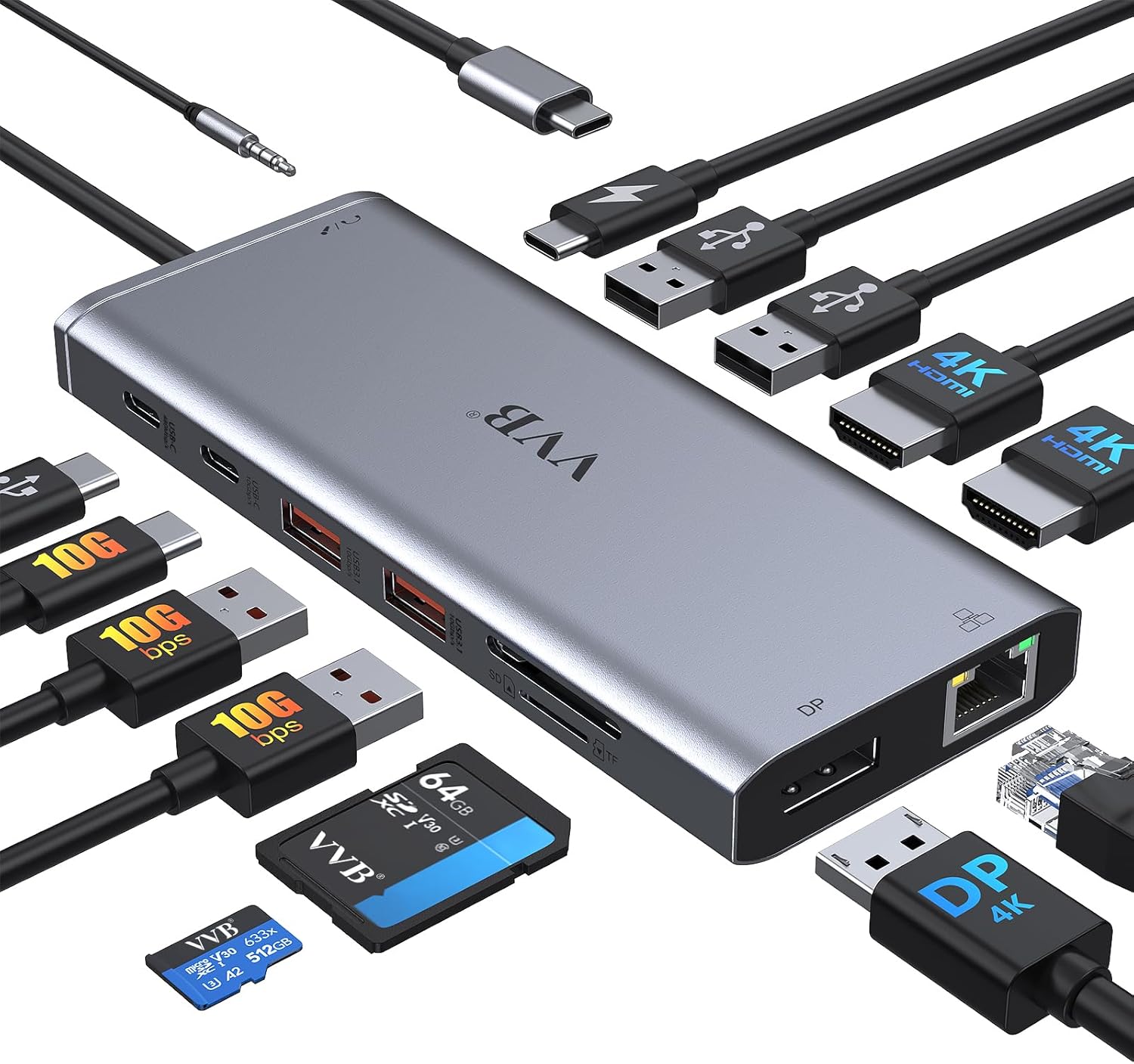
The VVB 14-in-1 USB-C docking station is a versatile hub designed to transform a single USB-C laptop port into a full-fledged desktop setup. While it's not a traditional gaming peripheral, this dock is a practical solution for gamers, streamers, and content creators who need to hook up multiple monitors, peripherals, and a wired network connection without fumbling with a mess of cables. After diving into the product specs and real user feedback, here's what you can expect.
For PC gamers and esports players, the ability to run dual or even triple monitors is a game-changer – you can keep a game full-screen on one display while having Discord, OBS, or stream alerts on another. The hub supports dual monitors at up to 4K@30Hz plus 1080P@60Hz (depending on your laptop's DisplayPort version). That means you won't miss details in fast-paced shooters or open-world adventures. The included Gigabit Ethernet port is a standout for competitive gaming, providing a stable low-latency connection that Wi-Fi can't match – essential for ranked matches and smooth streaming.
Streamers and content creators will appreciate the fast data transfer speeds from the USB 3.1 ports (up to 10Gbps) and the SD/Micro SD card slots. You can quickly offload footage from a camera or transfer large game recordings to an external drive. The 100W Power Delivery passthrough keeps your laptop charged even while using all ports, so you don't have to hunt for a second power brick. The 3.5mm audio jack also lets you plug in your headset or mic directly, keeping your audio setup simple for Discord calls or recording.
Build quality is solid for a hub in this price range – the aluminum-like casing dissipates heat reasonably well, though it does get warm after hours of heavy use. That's normal for any hub with this many active connections. The compact size (just over 6 inches wide) means it won't take over your desk, and the attached USB-C cable is short enough to keep tidy. Setup is genuinely plug-and-play: plug it into a compatible laptop, and Windows or macOS will recognize the displays and peripherals right away. Just note that not all USB-C ports support video output – you need one with DisplayPort Alt Mode (like Thunderbolt 3/4 or newer USB-C ports).
One realistic limitation is that dual monitor performance can vary based on your laptop's graphics card and cable quality. Some users found they needed to upgrade their HDMI cables or check their laptop's DisplayPort version to get the advertised resolutions. Also, the hub doesn't include a power adapter (you use your laptop's charger), so make sure you have at least a 65W charger for reliable PD output. Overall, the VVB dock handles well for streaming setups, college gaming rigs, and work-from-home battle stations.
If you're a PC gamer, streamer, or content creator running a modern laptop with a USB-C port that supports video, this dock is a smart, affordable way to expand your connectivity. It cleans up cable clutter, adds essential ports like Ethernet and SD card slots, and powers your laptop all through one cable. For the price, it's a solid investment for anyone looking to turn their portable gaming laptop into a full desktop powerhouse without breaking the bank.
Pros
- Versatile dual-form design: full dock for desk setup, detachable hub for travel
- Triple 4K display capability enhances productivity and gaming immersion
- High 100W power delivery supports demanding gaming laptops
- Fast 10 Gbps data transfer speeds reduce wait times for large files
- Comprehensive port selection eliminates need for multiple adapters
Cons
- Some laptops may have port alignment issues where the hub blocks adjacent ports
- macOS users face mirrored displays on external monitors, not extended desktops
- USB-C upstream port does not support video output, limiting some configurations
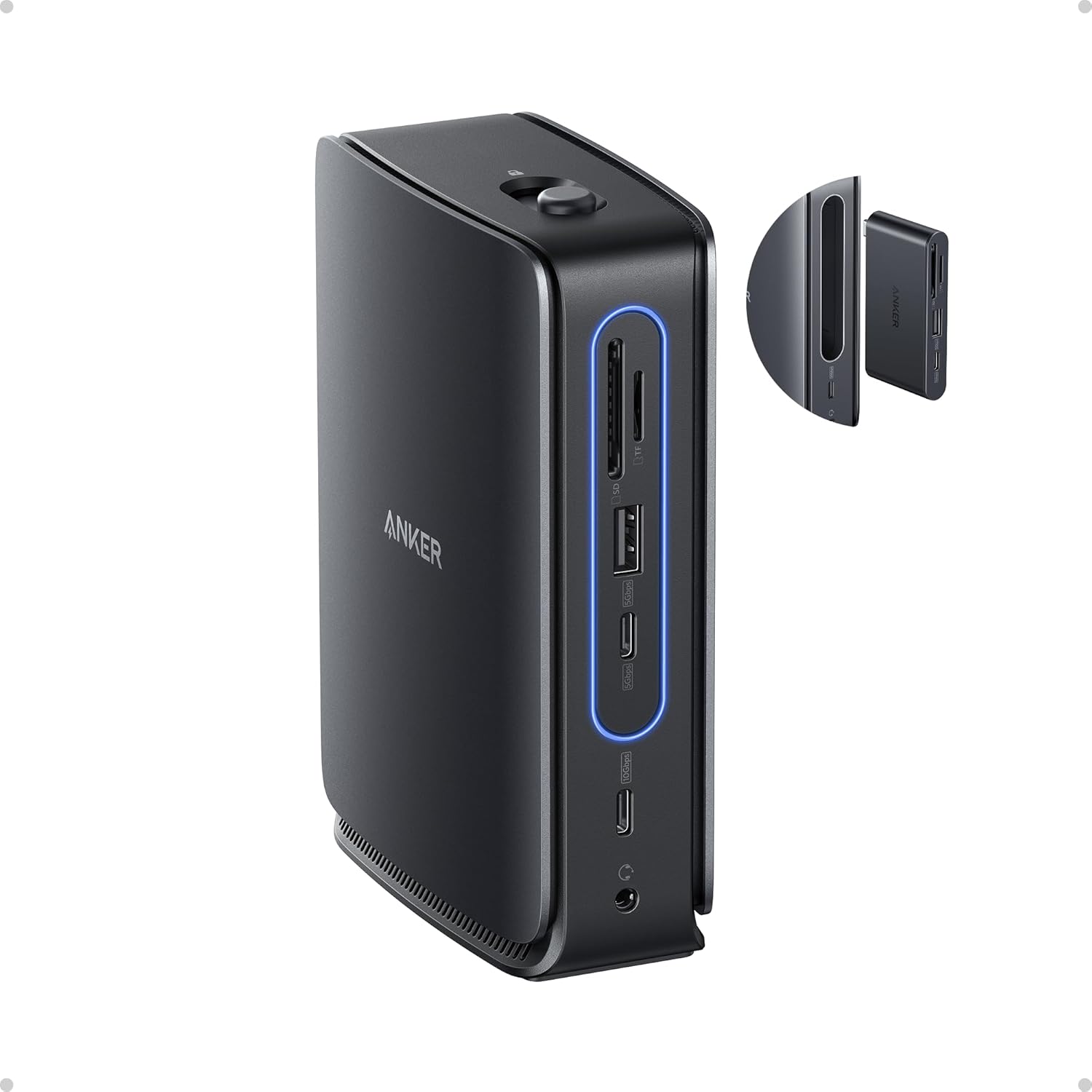
The Anker Nano Laptop Docking Station (13-in-1, Triple Display, Built-In Removable Hub) is a smart addition for any PC gamer, streamer, or gaming setup builder looking to simplify connectivity. This dock combines a full-featured 13-port station with a detachable 6-port hub, letting you maintain a clean desk while staying flexible for on-the-go use. It's designed for USB-C laptops and works with Windows 10/11 and macOS 13.5 or above, making it a practical choice for diverse setups.
Who is this for? It's ideal for PC gamers who want to hook up multiple monitors for immersive gameplay or streamers juggling a gaming PC, capture card, and streaming peripherals. Competitive gamers will appreciate the reliable Ethernet port for low-latency connections, while content creators can benefit from the SD/TF card slots and fast USB-C data transfers. Casual gamers and college gamers will find the compact form factor perfect for dorm rooms or small desks.
Real-world performance stands out with triple display support via 2 HDMI and 1 DisplayPort, allowing up to 4K resolution on each screen. This is great for racing games, open-world titles, or multitasking with Discord, OBS, and game overlays. The 100W Power Delivery keeps your laptop charged during long sessions, and the 10 Gbps USB-C ports handle high-speed data from external SSDs or gaming mice. The detachable hub retains all dock functions when removed, so you can quickly grab your laptop without unplugging everything.
Build quality is solid with a compact aluminum-like finish and a sleek light strip that glows blue when connected. The included 140W power adapter and 3 ft USB-C cable are well-made, though the cable length may be short for some desk arrangements. The dock's 3.74 x 1.57 x 5.51 inch footprint is small enough to fit beside a monitor stand or under a desk mount. Setup is plug-and-play on Windows, but macOS users should note that external monitors mirror content rather than extend the desktop.
Ease of use is a highlight: just connect the USB-C upstream cable to your laptop, attach the power adapter, and you're ready. The detachable hub clicks in and out with a button, making it simple to switch between desk and mobile modes. Cable management is straightforward with the compact power brick and included cable. One realistic limitation is that some laptops with side USB-C ports may have the hub block adjacent ports, so checking dimensions beforehand is wise. Also, the USB-C port does not support video output, so you'll rely on HDMI and DisplayPort for monitors.
Overall, the Anker Nano Docking Station is a practical investment for gamers and creators who need a reliable, space-saving dock with flexible connectivity. It's especially useful for those with a single USB-C laptop who want to expand to a triple-monitor gaming setup or streamline their streaming gear. If you prioritize clean desk organization and versatility without sacrificing performance, this dock is worth considering.
This dock offers 13 ports in total: 2 HDMI, 1 DisplayPort, 2 USB-C data ports (10 Gbps), 3 USB-A data ports, Ethernet, audio jack, SD and TF card slots, and a DC input. The detachable hub adds 6 essential ports for mobile use. All ports work simultaneously, though macOS limits external displays to mirroring. The Ethernet port provides stable wired internet for competitive gaming or streaming.
The Anker Nano features a sturdy plastic and metal construction with a compact footprint. The light strip indicates connection status and adds a modern look. The detachable hub mechanism feels secure with a click-in design. Included accessories: a 140W power adapter with built-in 5 ft cord and a 3 ft USB-C to USB-C cable. The overall build is durable enough for daily desk use and occasional travel.

Pros
- Triple 4K@60Hz output for immersive multitasking and gaming setups.
- Extensive port selection including 9 USB ports, 3 HDMI, Ethernet, and audio jack.
- Compact size saves desk space while maintaining robust connectivity.
- 100W PD charging supports most modern laptops, reducing cable clutter.
- Affordable price for an 18-in-1 dock compared to competing models.
Cons
- Does not include a power supply; requires a separate 65W+ USB-C charger for stable operation.
- Not recommended for Mac users due to compatibility limitations with macOS.
- Some laptops may show a low-power warning with third-party chargers, though it doesn't affect normal use.
If you are a PC gamer, streamer, or content creator who needs to expand your laptop's connectivity, the TobenONE 18-in-1 USB-C Docking Station delivers an impressive array of ports in a compact form. Designed primarily for Windows and Chrome OS laptops, this dock lets you connect up to three 4K@60Hz monitors, giving you a massive, responsive display setup for spreadsheets, video editing, or even monitoring your stream dashboard while gaming. The triple HDMI output ensures crisp visuals without noticeable lag, which is crucial for fast-paced games or real-time production work.
Performance-wise, this docking station handles multiple peripherals smoothly thanks to its nine USB ports, including USB 3.0 and Type-C options. You can plug in your gaming mouse, mechanical keyboard, external hard drive, and a headset all at once without bottlenecking. The integrated Gigabit Ethernet port adds wired connectivity, reducing latency during online multiplayer sessions. For gamers who demand low ping and stable internet, this is a reliable upgrade over Wi-Fi. The 100W Power Delivery (PD) pass-through charging keeps your laptop topped off, but you will need to supply your own 65W+ power adapter since it is not included.
Build quality is solid for the price point. The dock's metal-like finish feels durable, and its compact footprint (4.9 x 3.5 x 1.6 inches) easily fits on a desk or behind a monitor stand. The ports are well-spaced, allowing multiple cables to connect without interference. One downside is that some laptops with proprietary PD protocols may show a low-power warning, but the product description and user feedback indicate that normal operation is unaffected. Also, this dock is not recommended for Mac users, so stick with Windows or Chromebooks for best compatibility.
Setup is straightforward: plug the included USB-C cable into your laptop's full-featured USB-C port, connect your monitors via HDMI, and attach your peripherals. If you run into issues, the manufacturer suggests ensuring the power supply exceeds 65W and that your laptop's USB-C port supports display output. Reconnecting cables often resolves HDMI hiccups. For gamers and creators who like a clean desk, this docking station simplifies cable management, turning a tangle of wires into a single connection to your laptop.
Realistically, the main limitation is the lack of an included power adapter, which adds to your initial cost if you don't already have a compatible charger. Additionally, while the dock supports triple 4K@60Hz, ensure your laptop's USB-C port supports DisplayPort Alt Mode or Thunderbolt 3/4 for full performance. For college gamers, work-from-home professionals, or esports players setting up a permanent desk, this dock offers versatile, reliable connectivity without breaking the bank. It's a practical accessory for anyone who wants to transform their laptop into a full-fledged gaming or productivity station.
All things considered, the TobenONE 18-in-1 Docking Station is a strong choice for Windows laptop users who need multiple displays, rapid peripheral connectivity, and stable wired networking. Its triple 4K capability, generous USB ports, and 100W PD charging make it a valuable addition to a gaming desk or streaming setup. Just remember to budget for a power supply, and you will have a hub that simplifies your daily workflow and enhances your gaming experience.

Pros
- Triple monitor support (2x HDMI + DP) for immersive gaming or productivity.
- Fast charging up to 85W for laptop plus 18W for phone/tablet simultaneously.
- 10Gbps data ports and gigabit Ethernet ensure low latency and quick file transfers.
- Worked reliably with Windows and Linux laptops according to user reviews.
- Solid build quality and compact footprint save desk space.
Cons
- MacOS only supports mirrored displays across external monitors, not extended desktops.
- Some Dell laptops may show a slow-charging warning due to proprietary charging protocol.
- Occasional reports of SD card slot being tight or malfunctioning after extended use.
The Anker 13-in-1 USB-C Docking Station (PowerExpand) is a comprehensive hub designed to turn a single USB-C port on your laptop into a full-fledged desktop workstation. For PC gamers, streamers, content creators, and even work-from-home professionals, this dock delivers the connectivity you need without breaking the bank.
Best suited for Windows users, this dock excels at driving up to three external displays at 1080p 60Hz via its dual HDMI and single DisplayPort outputs. That means you can have your game on one screen, Discord or streaming software on another, and a browser or chat on the third – a huge productivity boost for competitive and casual gamers alike. The 85W power delivery keeps your laptop charged during long sessions, while a separate 18W USB-C port can fast-charge your phone or tablet.
In terms of performance, the dock provides 10Gbps USB-C and 5Gbps USB-A data ports, so transferring large game files or video projects is snappy. Gigabit Ethernet ensures a stable, low-latency connection for online gaming and streaming, which is especially valuable in dorms or homes with spotty Wi-Fi. Setup is genuinely plug-and-play on Windows 10/11 – just connect the included USB-C cable and you’re ready to go. Linux support is also reported to work well with many distributions.
Build quality is typical of Anker: solid, compact, and with a rubberized base that prevents sliding. The power button is a nice touch, letting you cut power to all peripherals at once. However, there are a few limitations to consider. First, macOS users will find that all external monitors mirror the same content instead of extending the desktop – a macOS limitation, not the dock’s fault. Second, some Dell laptops may trigger a slow-charging warning because Dell uses a proprietary charging protocol; the dock still charges the laptop, but at a reduced rate. Finally, a small number of users had issues with the SD card slot being too tight or failing over time.
Overall, the Anker 13-in-1 USB-C Docking Station is a practical investment for any PC gamer or streamer who needs more ports and multi-monitor support from a modern laptop. It’s especially valuable for competitive gamers who want low-latency Ethernet, content creators who need fast file transfers, and any setup builder aiming to reduce cable clutter. Just make sure your laptop’s USB-C port supports DisplayPort Alt Mode and Power Delivery for full functionality.
The Anker 13-in-1 dock is a connectivity powerhouse. It includes: 1x USB-C port with 85W Power Delivery for laptop charging, 1x USB-C port with 18W PD for fast device charging, 1x USB-C data-only port at 10Gbps, 3x USB-A ports (one at 10Gbps, two at 5Gbps), 2x HDMI ports (4K@30Hz single or 1080p@60Hz triple), 1x DisplayPort (same resolution capabilities), 1x gigabit Ethernet jack, SD and microSD card slots (UHS-I), and a 3.5mm combo audio jack. This array covers virtually every peripheral a gamer or streamer might need: keyboards, mice, headsets, microphones, capture cards, external drives, and monitors.
This dock works with Windows 10/11, Chrome OS, and most Linux distributions that support USB-C DisplayPort Alt Mode and Power Delivery. It’s compatible with USB-C, USB4, and Thunderbolt 3/4/5 ports that follow the same standards. Mac users are supported but limited to mirroring external displays due to macOS Single Stream Transport (SST) restrictions. The dock is not compatible with Linux, according to the manufacturer’s note, but user reviews indicate it works well with Ubuntu and other distros. For best results, use the included USB-C cable, as third-party cables may not support full 85W charging.

Pros
- Consolidates up to nine USB peripherals, wired networking, and audio through a single laptop cable.
- Built-in GaN AC-DC power supply eliminates the need for an external power brick.
- Smart screen interface gives direct visual feedback on per-port wattage draw.
- Compact vertical footprint measuring 5.51 by 3.82 inches saves desk space.
Cons
- macOS systems only support mirrored external displays across both HDMI ports.
- Incompatible with Linux operating systems and cannot charge Lenovo Legion gaming laptops.
- Downstream USB-C data ports do not support display output or device charging.
The Anker Prime 14-Port Docking Station is a powered desktop connectivity hub designed for laptop-based workstations and peripheral-heavy desk configurations. For gamers running a gaming or multi-use laptop as their primary machine, a central dock provides a single-cable bridge to mechanical keyboards, gaming mice, audio interfaces, and external storage without exhausting the laptop built-in ports.
Setting up a gaming station around a multi-port dock requires attention to peripheral routing and data flow. This unit features five USB-A ports and four USB-C ports, with select data ports supporting speeds up to 10Gbps, which suits high-throughput peripherals and external solid-state drives. The inclusion of an RJ-45 Ethernet port allows players to connect directly to home network equipment for stable wired networking. Keep in mind that dedicated IQ ports handle power delivery only without data transmission, while downstream USB-C data ports do not output video or provide charging, making port assignment an important setup consideration.
Display routing is another key factor for gaming setups. The dock includes dual HDMI ports, and supported output depends on the host machine DisplayPort specification. On Windows systems with DisplayPort 1.4, dual display configurations support resolutions up to 2K at 60Hz across two monitors, or 1080p at 60Hz on DisplayPort 1.2 laptops. While dual 4K at 60Hz is referenced for compatible setups, the dock does not support ultra-wide 5120x1440 panels. Players looking for high-refresh-rate gaming monitors should verify their laptop GPU and display connection standards before routing displays through the dock.
Physically, the dock uses a vertical orientation measuring 5.51 by 3.82 by 1.85 inches and weighing 1.96 pounds. Its integrated GaN AC-DC power module eliminates the bulky external power bricks common to high-wattage hubs, helping keep cable runs tidy. The front panel features a real-time LCD smart display that reports active wattage output, complemented by an internal cooling design with ActiveShield 2.0 temperature controls. The package includes a 3.3-foot USB-C host cable rated for 100W and 10Gbps, which establishes a practical placement boundary of about three feet from the computer.
While versatile, this dock has documented limitations that affect setup planning. It officially supports Windows 10 and 11 as well as ChromeOS on fully functional USB-C laptops with Power Delivery and DP Alt Mode, but it is explicitly not compatible with Linux. For macOS devices, dual external displays will only mirror each other rather than extend. Furthermore, the dock cannot charge Lenovo Legion gaming laptops due to specific power negotiation constraints, meaning those users must retain their original laptop charger. User feedback also notes that the smart screen occasionally toggles between view modes automatically rather than retaining a fixed user preference.
The Anker Prime Docking Station serves as a practical, space-conscious hub for Windows laptop gamers who want to anchor wired peripherals, gaming mice, wired Ethernet, and external storage through one central hub. Buyers should evaluate whether their laptop USB-C port supports DisplayPort Alt Mode and adequate Power Delivery, and ensure that a 60Hz refresh rate ceiling on dual displays aligns with their visual preferences before integrating the dock into their gaming battlestation.
Host compatibility requires a fully functional USB-C, USB4, or Thunderbolt port supporting DisplayPort Alternate Mode and USB Power Delivery. The dock officially supports Windows 10, Windows 11, and ChromeOS. It is not compatible with Linux operating systems.
For multi-monitor gaming or productivity setups, Windows users on DisplayPort 1.4 systems can output to dual displays at up to 2K resolution at 60Hz, while DisplayPort 1.2 hosts output at 1080p at 60Hz. Dual external monitors on macOS will only mirror each other due to platform display limitations. The dock does not support 5120x1440 ultrawide monitors.
Laptops with specialized high-wattage charging requirements, such as the Lenovo Legion series, cannot receive power from this dock due to compatibility restrictions. Those machines require their original power adapter while using the dock strictly for data, display, and peripheral passthrough.
Integrating the dock into a gaming battlestation is straightforward thanks to its built-in GaN power supply, which avoids the need for an external power brick behind the desk. Its vertical design occupies a compact 5.51 by 3.82 inch footprint, making it easy to tuck beside a laptop stand or monitor arm.
High-speed peripherals such as external SSDs are best connected to the front-facing USB ports to leverage the 10Gbps data rating. Input devices like keyboards and mice can occupy the rear USB-A ports, while the integrated RJ-45 Ethernet port provides direct local area network routing to bypass wireless interference.
Users can customize dynamic power distribution using the companion Dock Manager application on their computer. The front LCD screen shows real-time wattage draw across active charging ports, though reviewers note that display settings may cycle periodically between aggregate and per-port views.
Frequently Asked Questions
Can a USB-C docking station power an MSI gaming laptop during heavy sessions?
No, standard USB-C Power Delivery caps out between 85W and 100W, which cannot satisfy power-hungry dedicated gaming GPUs under full load. Most MSI gaming models draw between 150W and 330W via their dedicated AC brick during peak performance. Keeping your factory power supply plugged in alongside the dock ensures your battery never drains during long gaming sessions.
Will using a docking station add input lag to gaming mice and mechanical keyboards?
No noticeable latency occurs when connecting peripherals to native USB 3.0 or USB 2.0 ports on a quality hub. Modern docks handle high-speed data at 5Gbps to 10Gbps, easily processing standard 1,000Hz polling rates without dropped inputs. To avoid rare 2.4GHz wireless interference, keep wireless mouse receiver dongles separated from heavily loaded USB 3.0 video cables.
Can an MSI laptop output to multiple external monitors through the best docking station for msi laptop in 2026?
Yes, MSI laptops with DisplayPort 1.4 and Display Stream Compression support dual and triple screens via Windows Multi-Stream Transport (MST). Dual monitors run smoothly at 4K 60Hz or 1440p high-refresh, while triple screens divide available bandwidth. If you connect high-resolution screens like top gaming monitors under 500, using DisplayPort connections yields the most stable refresh rates.
Does an MSI laptop require Thunderbolt to run external displays through a dock?
No, Thunderbolt is not required because standard USB-C ports with DisplayPort Alternate Mode (DP Alt Mode) handle external monitors effortlessly. While Thunderbolt provides 40Gbps for massive bandwidth, USB-C 3.2 Gen 2 ports handle 10Gbps data alongside DP 1.4 video signals. Verify that your specific MSI laptop USB-C port explicitly lists video output or DP Alt Mode.
Do these docking stations support high-refresh ultrawide and curved screens?
Yes, modern docks support ultrawide resolutions like 3440×1440 seamlessly over HDMI 2.0 or DisplayPort 1.4 links. Setting up curved monitors for immersive gaming gives you broad peripheral vision without plugging multiple video cords into your laptop chassis. Just check that your host GPU supports the required resolution and refresh rate across the dock.






Write Your Review
No reviews yet. Be the first to share your experience!