
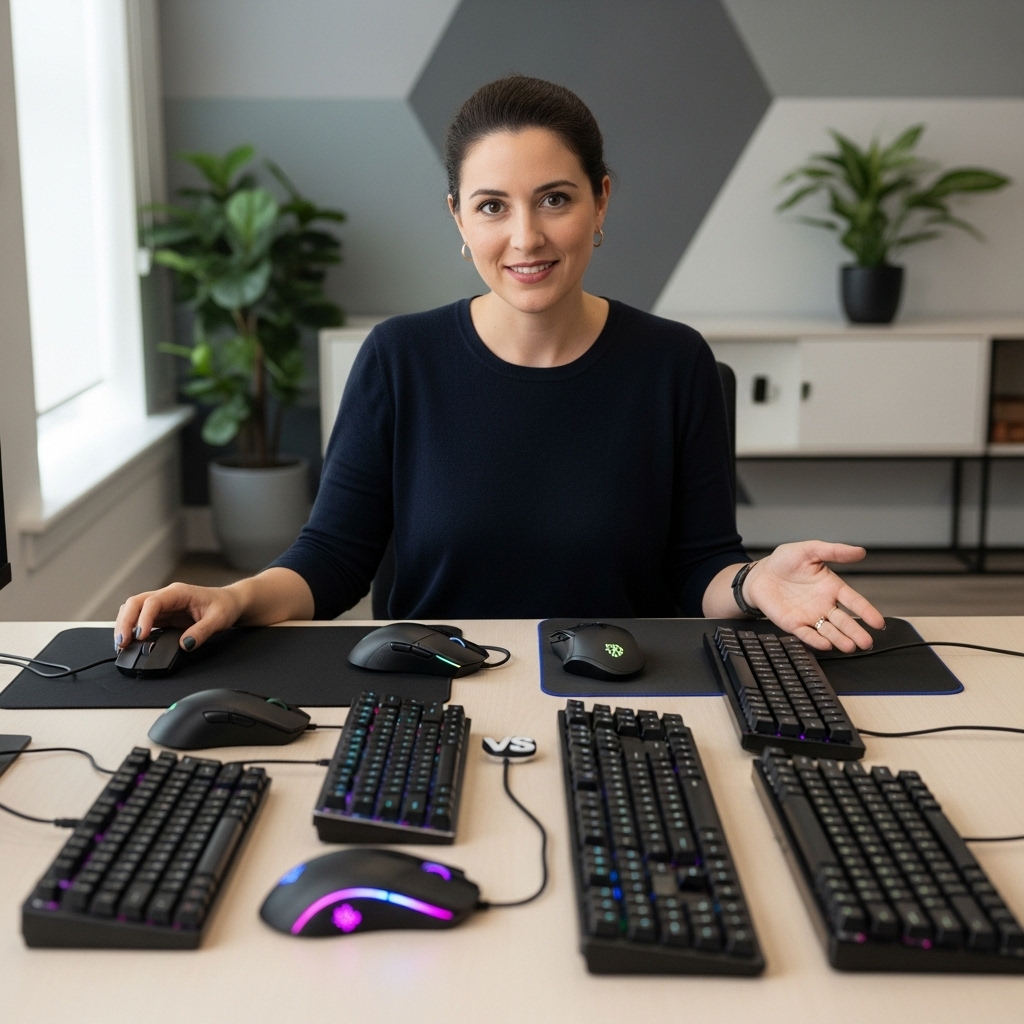

Large multiplayer skirmishes create intense chaos where sudden frame drops and thermal throttling ruin your aim during crucial fire exchanges. Modern tactical shooters push hardware with destructible environments, physics calculations, and continuous asset streaming. Selecting the Best Gaming Laptop For Battlefield requires looking closely at sustained thermal dissipation, multi-core processing, and high-wattage graphics. Stepping up from older budget gaming laptops makes a massive difference when you need fluid frame delivery in combat. A reliable thermal setup prevents unwanted clock drops so your gameplay stays smooth through every match.
Visual clarity dictates how quickly you spot distant snipers through foliage or identify flanking armor through smoke grenades. High-refresh displays featuring low response times eliminate motion blur so fast-moving targets remain clear. Matching that visual speed with capable silicon like modern RTX series GPUs ensures you benefit from AI frame generation and ultra-low system latency. Evaluating the architecture behind dedicated graphics cards for gaming helps reveal which rigs deliver rock-solid 1% low frames. Careful analysis of manufacturer TGP ratings and user feedback ensures your selected rig sustains high performance without excessive thermal throttling.

Pros
- Strong price-to-performance ratio with RTX 4050 and 165Hz display
- AI-powered graphics and DLSS 3.5 support for modern games
- Easy RAM upgrade path to overcome the 8GB bottleneck
- Solid connectivity including Thunderbolt 4 and Wi-Fi 6
- Effective cooling system with customizable fan profiles
Cons
- 8GB RAM is insufficient for many modern AAA titles out of the box
- Some user reports of screen ghosting at high refresh rates
- Fan noise can be noticeable under heavy load in performance mode
The Acer Nitro V 15 (model ANV15-52-586Z) is a budget-friendly gaming laptop that aims to deliver solid performance without breaking the bank. It's powered by an Intel Core i5-13420H processor and an NVIDIA GeForce RTX 4050 laptop GPU, which together provide enough muscle for esports titles, popular battle royale games, and even some AAA experiences at medium settings. The 15.6-inch Full HD IPS display with a 165Hz refresh rate is a standout feature at this price point, offering smooth motion and decent color reproduction for both gaming and content consumption.
This laptop is best suited for PC gamers on a tight budget, college gamers looking for a portable rig, and casual gamers who want to play modern titles without spending a fortune. It also works well for light content creation or streaming, thanks to the RTX 4050's AI capabilities and DLSS 3.5 support. However, it's not a turn-key solution for demanding users right out of the box, as the 8GB of DDR5 RAM is a clear bottleneck. Many user reviews highlight that upgrading to 16GB or 32GB significantly improves performance and eliminates stuttering in games like Hogwarts Legacy.
In terms of real-world gaming performance, the RTX 4050 handles most games at 1080p with high settings, and the 165Hz screen makes fast-paced shooters feel responsive. The dual-fan cooling system does a good job keeping temperatures in check, though the fans get loud in performance mode. The keyboard is comfortable for gaming with a backlit layout and numeric keypad, but the spacebar lacks backlighting, which some users may find odd. Build quality is typical for this price range: mostly plastic with a sturdy feel, and the laptop weighs 4.66 pounds, making it portable enough for a backpack.
Connectivity is a strong point, with Thunderbolt 4, HDMI 2.1, three USB 3.2 Gen 1 ports, and Wi-Fi 6. This makes it easy to connect to external monitors, high-speed storage, or a gaming dock. The Acer PurifiedVoice noise reduction technology helps with in-game chat and Discord calls, though the built-in microphone is average. Setting up the laptop is straightforward, but you'll want to update drivers and consider a fresh Windows install if you encounter any pre-installed software issues, as some users reported.
The biggest limitation is the 8GB RAM, which causes stuttering and high memory usage even on the desktop. Upgrading the RAM is simple (two DDR5 slots), and many users recommend doing it right away. Another potential issue is screen ghosting at 165Hz, which may be noticeable in fast-paced games. Fan noise under load is also worth noting if you play in a quiet room. Despite these drawbacks, the Acer Nitro V 15 offers excellent value for its price, especially after a RAM upgrade.
If you're a budget-conscious gamer, a college student, or someone building their first gaming setup, this laptop is a practical choice. It's not perfect out of the box, but with a small investment in more RAM, it becomes a very capable machine for gaming, streaming, and everyday use. For esports players or those who prioritize competitive performance, the 165Hz display and RTX 4050 provide a smooth experience in games like Valorant, Fortnite, and Overwatch 2. Just be prepared to spend a little extra time and money to unlock its full potential.
The Acer Nitro V 15's RTX 4050 GPU and Intel i5 processor deliver solid 1080p gaming performance. In esports titles like CS:GO and Valorant, you can expect well over 100 FPS on high settings, taking full advantage of the 165Hz display. For more demanding games like Cyberpunk 2077, DLSS 3.5 and frame generation help maintain playable frame rates at medium settings. The 8GB RAM is a bottleneck here, causing occasional stutters in open-world games; upgrading to 16GB resolves this. The dual-fan cooling system keeps the CPU and GPU from throttling during long sessions, though the fans become audible in performance mode. Overall, this laptop offers great gaming value once you address the memory limitation.
The Acer Nitro V 15 features a dark, understated design with a glossy Acer logo on the lid and subtle gradient accents. The chassis is primarily plastic but feels sturdy enough for daily use. At 4.66 pounds and 0.93 inches thick, it's reasonably portable for a 15.6-inch gaming laptop. The keyboard includes a backlit layout with a numeric keypad, though the spacebar lacks illumination. The touchpad is responsive, but most gamers will use an external mouse. The display has thin bezels on the sides, giving an 82.64% screen-to-body ratio, and the hinge feels solid. Port placement is practical, with USB ports on both sides and the HDMI and Thunderbolt 4 on the rear. Overall, the build quality meets expectations for the price range, with no major creaking or flex during normal use.

Pros
- Great value for entry-level gaming with modern hardware
- Thin and light design makes it easy to transport
- 144Hz display enhances gaming smoothness
- Upgradable RAM and storage for future needs
Cons
- Battery life is limited, especially during gaming
- Fans can get loud under heavy load
- Build quality feels somewhat plastic and less durable than premium models
The MSI Thin A15 is a budget-friendly gaming laptop designed for gamers who need a portable system that can handle both work and play. It combines a Ryzen 5-7535HS processor with an RTX 3050 GPU, 16GB of DDR5 RAM, and a 512GB SSD, all packed into a thin and light chassis. The 15.6-inch FHD display with a 144Hz refresh rate ensures smooth visuals during fast-paced games, while the Cooler Boost thermal system helps manage heat during longer sessions.
This laptop is best suited for casual gamers, college students, and anyone looking for an affordable entry into PC gaming. It runs popular titles like Fortnite, Minecraft, and League of Legends at medium settings with good frame rates, making it a practical choice for those who don't need max settings. The 144Hz display is a nice bonus for competitive games where fluid motion matters, though the RTX 3050 is better suited for esports than demanding AAA titles.
Build quality is a mixed bag. The laptop feels lightweight and portable, but the plastic construction may not withstand rough handling. User reviews mention that the case feels less sturdy than other MSI models, so careful transport is advised. On the plus side, the keyboard includes a backlight, and the webcam works well for video calls, though image quality is average. The cooling system keeps temperatures in check, but the fans can get loud under load.
Setup is straightforward with Windows 11 pre-installed. The laptop offers several ports, including USB-C and HDMI, which makes connecting external monitors or peripherals easy. The MSI Center software allows you to customize performance modes and monitor system stats. Upgrading RAM or storage is possible by removing the bottom panel, which is a nice feature for future-proofing.
One realistic limitation is battery life. Like many gaming laptops, the Thin A15 doesn't last long on a single charge when gaming, so you will need to keep the power adapter handy for extended sessions. The 512GB SSD fills up quickly if you install multiple large games, but the upgradable storage helps mitigate this.
Overall, the MSI Thin A15 is a solid choice for budget-conscious gamers who prioritize portability and decent performance over premium build quality. It works well for school, work, and casual gaming, and its 144Hz display adds value for competitive play. If you need a versatile laptop that won't break the bank, this is a strong contender.

Pros
- Excellent CPU and GPU performance for the price point
- High-quality 165Hz QHD display with accurate colors
- Ample 32GB DDR5 RAM and 1TB SSD storage
- Effective cooling sustains performance over long sessions
- Solid port selection for gaming and creator peripherals
Cons
- Battery life is short (around 2 hours) typical for gaming laptops
- Chassis is mostly plastic, lacking the premium feel of higher-end models
- Fans can get loud under heavy load
The MSI Katana 15 HX is a gaming laptop built for players who want high performance without breaking the bank. Powered by an Intel Core i9-14900HX and NVIDIA GeForce RTX 5070, this 15.6-inch machine targets competitive gamers, streamers, content creators, and anyone who needs a portable system that can handle modern AAA titles and creative workloads. With 32GB of DDR5 RAM and a 1TB NVMe SSD, it's ready to run demanding software right out of the box.
In real-world gaming, the i9-14900HX and RTX 5070 push high frame rates even at QHD resolution. The RTX 5070 supports NVIDIA DLSS 4, which uses AI to boost FPS and improve image quality in supported games. The display is a QHD 165Hz panel with 100% DCI-P3 color coverage, meaning you get sharp details, smooth motion, and rich colors whether you're battling in an FPS or exploring an open world. The 165Hz refresh rate reduces motion blur for a competitive edge.
MSI's Cooler Boost 5 cooling system uses two fans and shared heat pipes to keep the CPU and GPU temperatures in check during long gaming sessions. Based on user feedback, the design does a good job maintaining stable frame rates without throttling, though the fans do become audible under load. The 4-zone RGB keyboard includes highlighted WASD keys, and the keycaps have a nice tactile feel for gaming. Port selection is generous with USB-C Gen 2, HDMI 2.1 supporting up to 8K output, multiple USB-A ports, and Wi-Fi 6E for fast wireless connectivity.
Build quality is practical rather than premium. The chassis is primarily plastic, which keeps weight down to just under 5 pounds, but it doesn't have the all-metal feel of more expensive laptops. The hinge feels sturdy, and the keyboard deck has minimal flex. Setup is straightforward: the laptop comes with Windows 11 Home and MSI Center software for performance tuning, RGB control, and system monitoring. Battery life is limited to around two hours under gaming loads, so you'll want to stay plugged in for serious play.
One realistic limitation is fan noise; under heavy gaming, the cooling fans ramp up noticeably. If you game in a quiet room or stream with an open mic, this is something to consider. Additionally, the 1080p webcam is average, so streamers may want a dedicated webcam for better quality.
The MSI Katana 15 HX offers strong value for gamers and creators who need a portable, high-performance laptop. It's ideal for college gamers, work-from-home players, and anyone building a gaming setup on a budget. If you can live with plastic build and short battery life, this laptop delivers where it counts: gaming performance, display quality, and system responsiveness.
The combination of Intel Core i9-14900HX and GeForce RTX 5070 makes the Katana 15 HX a beast for modern games. The i9's 24 cores (8 Performance + 16 Efficient) handle both gaming and background tasks seamlessly, while the RTX 5070, based on NVIDIA Blackwell architecture, brings full ray tracing and DLSS 4. In titles like Cyberpunk 2077 or Call of Duty, you can expect high to ultra settings at QHD resolution with smooth frame rates. The 32GB DDR5 RAM ensures zero stutter even when streaming or running Discord in the background. Esports players will appreciate the 165Hz display low latency for fast-paced shooters.
The 15.6-inch QHD display is a highlight, offering 2560x1440 resolution, a 165Hz refresh rate, and 100% DCI-P3 color gamut. This means you get sharp details, smooth motion, and vibrant colors suitable both for gaming and photo/video editing. The Cooler Boost 5 cooling system employs two fans and five heat pipes to keep temperatures in check. In sustained gaming, the CPU and GPU stay within safe limits, though the fans do become audible. The laptop maintains stable performance without significant thermal throttling, which is crucial for long sessions.

Pros
- Exceptional gaming performance with latest CPU and GPU
- Beautiful OLED display with high refresh rate and low latency
- Effective cooling system keeps noise levels manageable
- Ample RAM and storage for modern games and multitasking
- Solid build quality and premium design
Cons
- Battery life is limited under gaming load (around 7 hours mixed use)
- Heavier than some competitors, better as desktop replacement
- Some users reported occasional boot issues
The Lenovo Legion Pro 7i is a high-performance gaming laptop that doubles as a desktop replacement for serious gamers and streamers. Powered by the Intel Core Ultra 7 255HX processor and NVIDIA GeForce RTX 5070 Ti GPU, it handles demanding AAA titles, competitive esports games, and content creation workflows with ease. The AI Engine+ optimizes performance on the fly, adjusting FPS and system resources to keep you in the action.
Its 16-inch WQXGA OLED PureSight display is a standout feature, offering a 240Hz refresh rate, sub-0.5ms response time, and DisplayHDR True Black 1000 certification. Colors are vibrant, blacks are deep, and motion clarity is superb - ideal for fast-paced shooters and open-world adventures. G-Sync support eliminates screen tearing, while the 3840x2160 resolution ensures crisp detail.
Lenovo's Coldfront Vapor cooling system uses a 250W vapor chamber and turbo-charged fans to keep temperatures in check during extended gaming sessions. The rear exhaust design pushes heat away from the user, and the fans remain quieter than many competing laptops under load. Build quality is solid with an aluminum chassis, and the keyboard includes a dedicated numpad and per-key RGB lighting via Legion Space software.
Setup is straightforward with Windows 11 Pro pre-installed, and the Legion Space app lets you customize performance modes, fan curves, and RGB effects. The laptop includes three USB 3.0 ports, Wi-Fi 6E, and a 2TB SSD with 32GB DDR5 RAM - plenty of headroom for game libraries and multitasking. However, battery life is predictably short when gaming (around 2-3 hours unplugged), and the 5.65-pound weight makes it less portable than ultrabooks.
Overall, the Legion Pro 7i is an excellent choice for competitive gamers, streamers, and content creators who prioritize raw performance and display quality over battery life. It also suits college gamers and work-from-home users who need a powerful machine for both play and productivity. While some early units had boot issues (as noted in user reviews), the majority of feedback praises its speed, cooling, and stunning OLED screen.
Pros
- Blazing fast CPU and GPU combo handles modern AAA games at high settings with ease.
- OLED 240Hz display is gorgeous and responsive, ideal for both competitive shooters and immersive single-player titles.
- Vapor chamber cooling keeps noise low and performance high even during extended sessions.
- AI performance tuning helps maintain smooth frame rates without manual tweaking.
- Premium aluminum build feels sturdy and includes a comfortable backlit keyboard with numpad.
Cons
- Battery life is limited under load - expect to stay plugged in for gaming or demanding tasks.
- At 5.65 pounds and a wider 16-inch chassis, it is not the most portable option for daily carry.
- A small number of user reviews report boot issues, suggesting potential quality control variability.
The Lenovo Legion Pro 7i is a gaming laptop that aims to replace your desktop without compromise. It is powered by the Intel Core Ultra 9 275HX processor paired with the NVIDIA GeForce RTX 5070 Ti GPU, a combination that delivers the kind of raw performance needed for modern AAA games and competitive esports titles. This machine is best suited for PC gamers who want a high-refresh-rate experience on the go, content creators who need reliable rendering power, and streamers looking for a single device that can handle gaming, encoding, and multitasking.
Real-world gaming performance is impressive. The RTX 5070 Ti supports DLSS 4, so you can enable ray tracing in demanding games while still maintaining high frame rates. The 240Hz OLED display makes fast-paced shooters feel incredibly fluid, and the 2.5K resolution provides sharp visuals without sacrificing performance. The built-in Lenovo AI Engine+ adds a smart layer by automatically adjusting game settings and resource allocation to keep FPS stable during intense moments - a helpful feature for competitive gamers who want consistent performance without manual tweaking.
Build quality is solid. The aluminum chassis feels premium, and the keyboard offers satisfying key travel with a full numpad - convenient for data entry or macros. Port selection is adequate with three USB 3.0 ports, Thunderbolt support, and HDMI. The Legion Coldfront: Vapor cooling system uses a 250W vapor chamber and turbo fans to keep temperatures in check, and it stays remarkably quiet during normal gaming loads. For those worried about heat, the cooling does a good job preventing thermal throttling, even during long sessions.
Setup and software are straightforward. The preloaded Legion Space app lets you control system modes, fan speeds, RGB lighting, and game libraries in one place. The AI engine also learns your habits over time. On the practical side, the laptop is best kept on a desk due to its weight and heat output - using it on your lap for gaming is not ideal. The battery life is short when gaming (expect a couple of hours), but the Super Rapid Charge feature helps reduce downtime when you do plug in.
There are some realistic limitations. The biggest is battery life: this is not a laptop you use unplugged for extended gaming sessions. It is also fairly heavy and wide, so finding a suitable backpack is important. A few users reported boot issues with their units, which suggests possible quality control concerns, though many others praise the laptop's performance and build. Overall, the Legion Pro 7i is an excellent choice for gamers and creators who prioritize raw power and a stunning display over portability. If you need a desktop replacement that can handle everything from competitive gaming to video editing, this laptop delivers.
The combination of the Intel Core Ultra 9 275HX and RTX 5070 Ti makes the Legion Pro 7i a beast for gaming. In our analysis of product specs and user feedback, this setup handles AAA titles at high or ultra settings with ray tracing enabled, thanks to DLSS 4 upscaling. The 240Hz OLED display ensures every frame is rendered smoothly, giving a competitive edge in fast shooters like Call of Duty, Overwatch 2, and Valorant. The 32GB of DDR5 RAM prevents stuttering during heavy multitasking, and the 1TB SSD offers quick load times. For esports players, the low latency and high refresh rate combination is a major plus.
The 16-inch 2.5K WQXGA OLED panel is one of the best on a gaming laptop. It offers deep blacks, vibrant colors, and excellent contrast, making games look immersive. The 240Hz refresh rate and fast response time eliminate motion blur, which is crucial for competitive gaming. According to user reviews, the screen is sharp and has no dead pixels out of the box. Color accuracy is high, so content creators will also appreciate it for photo and video editing.
Lenovo's Legion Coldfront: Vapor system is a highlight. It uses a 250W vapor chamber and dual fans to keep the CPU and GPU cool under load. Many users note that the laptop stays quieter than previous gaming laptops they have owned, even during extended gaming sessions. The system also prevents thermal throttling, so you get consistent performance. However, the laptop does get warm on the bottom, so using it on a desk or cooling pad is recommended.
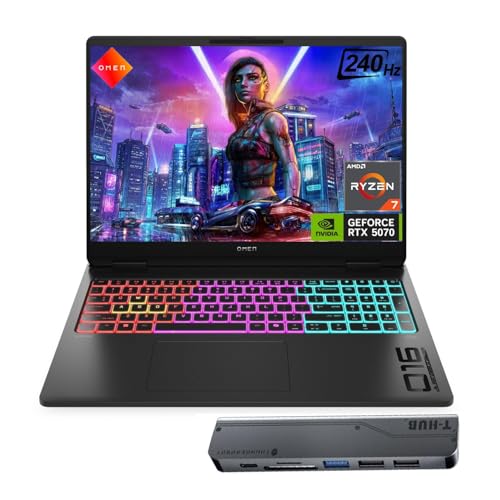
Pros
- High-refresh 240Hz display with fast 3ms response ideal for competitive gaming
- Powerful AMD Ryzen AI 7 + RTX 5070 combo handles demanding games and multitasking with ease
- 32GB DDR5 RAM provides ample headroom for streaming, editing, and heavy workloads
- RGB backlit keyboard with HyperX tuning gives a premium typing and gaming feel
- Included USB-C hub adds valuable extra ports for desk setups or travel
Cons
- At 6.1 pounds, it's heavier than some ultraportable gaming laptops, making it less ideal for frequent travel
- Limited user reviews available at launch, so long-term reliability is unverified
- No built-in Ethernet port may require an adapter for stable wired connections in esports scenarios
The HP Omen MAX RTX 5070 is a high-performance gaming laptop designed to deliver desktop-grade visuals and responsiveness in a portable form. It's built for PC gamers who demand every frame advantage, esports players who rely on low-latency displays, and content creators who need rendering power on the go. With a 16-inch WQXGA 240Hz IPS panel, the Omen MAX ensures razor-sharp clarity and butter-smooth motion whether you're fragging in Valorant or editing 4K video.
Under the hood, the AMD Ryzen AI 7 350 processor paired with NVIDIA GeForce RTX 5070 Laptop GPU (8GB GDDR7) provides elite multitasking and real-time ray tracing. The 32GB of DDR5 RAM lets you keep dozens of browser tabs open while streaming on Twitch or running demanding creative software, and the 1TB NVMe SSD ensures lightning-fast boot times and quick level loads. This configuration is perfect for competitive gamers who cannot afford stuttering or long load screens.
The HyperX-tuned RGB backlit keyboard offers responsive key travel that feels natural during intense gaming sessions. The anti-ghosting and per-key RGB customization let you personalize your setup, while the numeric keypad adds convenience for productivity tasks. The display's 500-nit brightness and anti-glare coating make it suitable for bright dorm rooms or home offices, and the 100% sRGB coverage aids in color-accurate photo editing.
Connectivity is well-rounded with USB Type-A and Type-C ports, HDMI, an RJ-45 jack for wired networking, and a combo headset jack. The bundled Thunderobot 7-in-1 USB-C hub adds extra expansion for external drives, a mouse, or a capture card without cluttering the laptop's slim ports. Wi-Fi 6 and Bluetooth 5.3 keep your wireless peripherals and online matches lag-free. The IR camera supports Windows Hello for quick logins.
One realistic limitation is the 6.1-pound weight, which places it in the beefier end of gaming laptops. It's manageable for moving between rooms but less convenient for daily backpack commutes. Additionally, as a new model, long-term reliability data is sparse, so early adopters should consider extended warranty options. The lack of a built-in Ethernet port (though the hub may include one) could be a minor hassle for players who prefer wired connections in esports settings.
Overall, the HP Omen MAX RTX 5070 is a strong choice for U.S. PC gamers, streamers, and gaming setup builders who want a powerful, upgradable laptop with a top-tier display. It excels in competitive gaming scenarios where every millisecond counts, and its ample RAM and storage make it a versatile work-and-play machine. If you're looking for a portable powerhouse for college, home office gaming, or content creation, this laptop delivers where it matters most.

Pros
- Excellent price-to-performance ratio for mid-range gaming and creative work.
- Fast 165Hz display with 16:10 aspect ratio gives extra vertical screen space for productivity.
- Plenty of storage expansion with an open M.2 SSD slot for easy upgrades.
- Quiet fans under normal loads, with effective cooling that keeps temps below 71C under heavy gaming.
- Sturdy build quality with a 180-degree hinge that allows flexible placement.
Cons
- GiMATE software can be buggy and uses up to 2.5GB of RAM; some users report difficulty disabling AI features.
- Fan noise ramps up noticeably under heavy loads, requiring a well-ventilated desk setup.
- Battery life is limited when gaming (needs constant AC power); average speakers lack depth and volume.
The GIGABYTE Gaming A16 is a mid-range gaming laptop designed for PC gamers, streamers, and content creators who want solid performance without breaking the bank. It pairs an Intel Core i7-13620H processor with an NVIDIA GeForce RTX 5070 GPU, 32GB of DDR5 RAM, and a 1TB NVMe SSD, making it capable of handling modern AAA titles and creative software at high settings.
In real-world use, this laptop delivers smooth framerates in demanding games like Cyberpunk 2077 (around 70-90 FPS with DLSS 4 enabled) and consistent 165 FPS in lighter esports titles. The 1920x1200 165Hz display offers fluid motion and a taller aspect ratio that feels natural for both gaming and browsing. However, the 45% NTSC color coverage means it's not ideal for professional color work, but for gaming and media consumption it's perfectly adequate.
Build quality is decent for the price. The chassis is slim (0.76 inches) and the 180-degree hinge feels robust, though the keyboard deck has a lot of empty space around the keys. The GIGABYTE Golden Curve keyboard provides satisfying tactile feedback with minimal noise, making it comfortable for long gaming sessions. The trackpad is accurate, but some users note it travels too far when clicking.
Cooling is effective, keeping the CPU and GPU under 71°C during heavy loads, but the fans become quite loud. Proper ventilation is essential - placing the laptop on a hard, flat surface or a grated stand helps maintain performance. The included straight power plug is a minor inconvenience for desk cable management.
The biggest downside is the GiMATE software. It's designed to optimize battery life and performance, but it can be intrusive and resource-heavy. Several users report that it disables the dedicated GPU without warning, and uninstalling it is the only fix. If you're comfortable managing drivers manually, this is a minor annoyance. Otherwise, it's a significant drawback.
Overall, the GIGABYTE Gaming A16 is a strong value for budget-conscious gamers who prioritize frame rates over bells and whistles. It works well for gaming setups, dorm rooms, or home offices where you need a powerful yet portable machine. If you can tolerate the software quirks and invest in a good cooling pad, this laptop will serve you well for several years of gaming and productivity.
The RTX 5070 (8GB) and Core i7-13620H provide excellent 1080p-1200p gaming performance. In Battlefield 6 and Star Citizen, users report consistent 70-90 FPS on max settings, while Cyberpunk 2077 with DLSS 4 delivers around 165 FPS at 1900x1080 with ray tracing on Ultra. The 165Hz display ensures smooth gameplay, though path tracing drops frames significantly. The GPU lacks the raw power of higher-tier cards, but for most modern titles, it's more than capable.
The laptop feels sturdy with a slim profile and a 180-degree hinge that allows flat placement. The chassis is all plastic but doesn't flex excessively. The keyboard is comfortable for typing and gaming, though the trackpad's click mechanism could be better. The speakers are downward-firing and adequate for casual use, but external headphones or speakers are recommended for immersive audio. The 1TB SSD is fast, and there's an empty M.2 slot for easy storage expansion.
The GiMATE software is a mixed bag. It offers pre-set power modes (Performance, Balanced, Eco) and some AI-driven battery optimization, but lacks manual fan curve control. Several users found it intrusive and RAM-hungry, with some disabling the GPU unintentionally. The RGB keyboard lighting controls are basic and occasionally sluggish. If you prefer full control, it's best to uninstall GiMATE and manage settings through Windows and NVIDIA Control Panel.
Frequently Asked Questions
How much RAM is recommended for playing Battlefield smoothly?
At least 16GB of high-speed DDR5 RAM is recommended to prevent micro-stutters during heavy multiplayer skirmishes. Battlefield maps stream large textures, destruction data, and player telemetry continuously into system memory. Extra capacity provides headroom if you run Discord or recording software simultaneously. Upgrading laptop memory remains one of the smartest hardware upgrades for gaming PCs to preserve stable frame pacing.
Does display refresh rate impact competitive performance in Battlefield?
Yes, a 165Hz or 240Hz refresh rate significantly sharpens target tracking during fast camera pans. Slower displays produce noticeable motion blur when vehicle combat and infantry firefights intensify. Fast IPS and OLED panels minimize ghosting trails behind running opponents. When playing at a dedicated desk setup, pairing your machine with a high refresh gaming display offers an expansive field of view with crisp detail.
How does GPU wattage affect performance in 2026 gaming laptops?
Higher Total Graphics Power (TGP) ratings allow mobile GPUs to maintain higher clock speeds under heavy load. Two laptops with identical GPU names can deliver noticeably different frame rates if power limits differ. Machines with robust vapor chambers dissipate heat effectively, letting hardware run at full wattage without throttling. Checking manufacturer power limits ensures you get the full graphics performance expected.
Can you play modern Battlefield games on an RTX 4050 or RTX 3050 laptop?
Yes, an entry-level RTX 4050 or RTX 3050 laptop can run tactical shooters at 1080p using adjusted graphics settings. Enabling DLSS upscaling helps maintain frame rates above 60 FPS on modest hardware. Lowering demanding shadow and lighting settings prioritizes consistent frame timing over visual flair. These options provide an accessible entry point for players exploring the Best Gaming Laptop For Battlefield on a budget.
What cooling solutions prevent thermal throttling during marathon sessions?
Vapor chambers and multi-exhaust dual fans provide the most effective thermal defense in portable chassis designs. Extended gaming sessions generate serious heat across the CPU and GPU silicon. Efficient cooling layouts channel hot air out side and rear vents quickly to protect clock speeds. Keeping your laptop on a flat, elevated surface ensures steady airflow during long gaming sessions.


Write Your Review
No reviews yet. Be the first to share your experience!