


Thermal throttling and sudden frame drops can turn a casual multiplayer match into a frustrating slideshow. Many compact machines struggle when handling fast-paced esports, spinning fans to loud volumes while temperatures rise. Striking the right balance between low chassis heat and fluid frame rates requires smart component pairing rather than noisy wattage. Targeting the Best Laptop For Light Gaming 2026 That Balances Fun And Performance means prioritizing efficient processors, capable graphics, and responsive displays. Verified user feedback and thermal architecture details show that modern power-efficient silicon keeps your favorite casual titles responsive without requiring a massive power brick.
Older portable builds frequently struggled with tight VRAM limits, producing stutter in busy game scenes. Today, modern entry-level dedicated chips and competent integrated Radeon graphics maintain stable frame pacing. When comparing lightweight machines to older budget mobile configurations, current architectures deliver far superior efficiency. Thoughtful thermal layouts keep keyboard surfaces comfortable during long sessions, while fast NVMe storage and fluid panels ensure games launch rapidly.

Pros
- High-refresh 180Hz display ideal for fast-paced FPS and esports titles
- Strong CPU and GPU combo for smooth 1080p gaming and creative workloads
- Generous 32GB RAM and 1TB SSD for heavy multitasking and quick load times
- Excellent connectivity including Wi-Fi 6E, USB-C 4, HDMI 2.1, and ethernet
- Comes with a handy USB-C hub for extra ports
Cons
- 720p webcam may feel dated for streamers relying on built-in camera quality
- At 5.38 pounds, it's on the heavier side for frequent travel
- Fan noise can be noticeable under heavy gaming loads, based on similar Nitro models
The Acer Nitro V 16 AI Gaming Laptop is a solid mid-range gaming rig designed for U.S. PC gamers, competitive esports players, streamers, content creators, and even college gamers who need a powerful machine that can handle both work and play. With its 16-inch WUXGA IPS display running at 180Hz, a six-core AMD Ryzen 5 240 processor, and a dedicated NVIDIA GeForce RTX 5050 GPU with 8GB VRAM, this laptop aims to deliver smooth and responsive gaming without breaking the bank.
Gaming performance is the star here. The 180Hz refresh rate paired with a 1920x1200 resolution gives you buttery-smooth motion in fast-paced shooters like Valorant or Call of Duty, while the RTX 5050 handles modern titles at medium to high settings. The 32GB of DDR5 RAM is overkill for pure gaming, but it's a blessing for streamers running OBS, Discord, and a game simultaneously. The 1TB NVMe SSD ensures level load times and enough space for a decent game library. Wi-Fi 6E keeps latency low for online matches.
Build quality is typical of Acer's Nitro line: a sturdy plastic chassis with a black finish, measuring 14.2 x 10.9 x 0.96 inches and weighing about 5.38 pounds. It's not the thinnest or lightest, but it feels durable enough for a dorm room or living room setup. The backlit keyboard is comfortable for long sessions, and port selection is generous: three USB-A 3.2 ports, one USB-C 4, HDMI 2.1, gigabit ethernet, a microSD card reader, and an included USB-C hub that adds extra connectivity for monitors or peripherals.
Setup is straightforward thanks to Windows 11 Pro pre-installed. The bundled USB-C hub makes it easy to plug in a mouse, headset, and external drive right out of the box. One limitation to note is the 720p webcam: while fine for quick video calls, streamers may want to invest in a dedicated webcam for better quality. Also, during extended gaming sessions, the cooling fans can get audible, though they keep temperatures in check.
Overall, the Acer Nitro V 16 AI is a well-rounded gaming laptop that offers excellent value for its spec sheet. It suits competitive gamers who crave high refresh rates, streamers who need multitasking headroom, and college gamers who want a single device for gaming and productivity. If you prioritize a high-quality webcam or ultra-portability, you might look elsewhere, but for raw performance and connectivity at this price point, it's a strong contender.
The combination of an AMD Ryzen 5 240 six-core processor and an NVIDIA GeForce RTX 5050 GPU allows the Acer Nitro V 16 to hit high frame rates in popular competitive titles. Expect well over 100 FPS in esports games like Fortnite, Apex Legends, and Overwatch 2 at medium to high settings. For more demanding games such as Cyberpunk 2077 or Baldur's Gate 3, the RTX 5050 manages smooth 60 FPS at medium settings with DLSS enabled. The 180Hz display ensures every frame is rendered smoothly, reducing motion blur and giving you a competitive edge. The 32GB of DDR5 RAM also helps prevent stuttering during intense gameplay, especially when streaming or running background apps.
Pros
- Exceptional processing power for modern games, streaming, and creative software.
- Generous 64GB RAM and 2TB SSD storage eliminates need for immediate upgrades.
- High-refresh 144Hz display with anti-glare and low blue light features reduces eye fatigue.
Cons
- Heavy at 13.14 pounds, which reduces portability for frequent travel.
- Premium price point may be a significant investment for budget-conscious buyers.
- Battery life may be limited under heavy gaming loads, typical for high-performance gaming laptops.
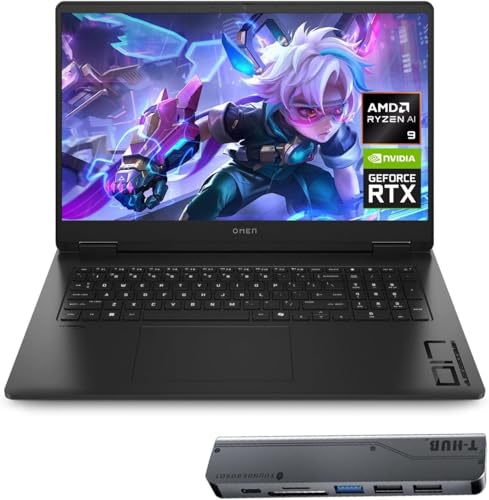
The HP OMEN 17.3 RTX 5070 AI Gaming Laptop is a high-performance gaming machine designed for PC gamers, competitive esports players, streamers, and content creators who need raw power for demanding tasks. With its AMD Ryzen AI 9 365 processor and NVIDIA GeForce RTX 5070 graphics, this laptop delivers smooth frame rates in AAA games, supports ray tracing, and accelerates creative workflows like video editing and 3D rendering.
Real-world performance is impressive: the combination of 64GB DDR5 RAM and a 2TB NVMe SSD means you can run multiple heavy applications, stream on Twitch or YouTube, and edit 4K video without stuttering. The 17.3-inch FHD 144Hz display offers a responsive 7ms response time, anti-glare coating, and low blue light certification to reduce eye strain during extended sessions. The RTX 5070's 8GB GDDR7 memory handles modern titles at high settings with ease.
Build quality is solid with a classic black chassis, but at 13.14 pounds, it is a heavy laptop that is best suited for desktop replacement or limited mobility. The RGB backlit keyboard adds a gaming aesthetic, and the numeric keypad is convenient for data entry. Connectivity is robust with three USB-A ports, one USB-C, HDMI, RJ-45 Ethernet, and a headphone/microphone combo jack. Wi-Fi 6 and Bluetooth support ensure fast wireless connections.
Setup is straightforward out of the box. Windows 11 Pro is pre-installed, and the included Thunderobot 7-in-1 USB-C Hub provides extra ports for peripherals. The laptop's cooling system features dual fans and multiple heat pipes, which can keep temperatures manageable during gaming, though the fan noise may be audible under load. Maintenance involves occasional cleaning of the vents to prevent dust buildup.
One realistic limitation is the weight: this is not a laptop you want to carry around all day. It's best used as a stationary gaming station or a powerful desktop replacement. Battery life is also typical for a gaming laptop, so you will need to stay plugged in for extended gaming periods. The price is high, but the specs justify the investment if you need top-tier performance.
Overall, the HP OMEN 17.3 RTX 5070 AI Gaming Laptop is an excellent choice for serious PC gamers, streamers, and content creators who want a high-end desktop replacement. It offers incredible multitasking capabilities, a fast display, and strong gaming performance, making it a solid investment for those who prioritize power over portability.
The combination of the AMD Ryzen AI 9 365 processor and NVIDIA GeForce RTX 5070 graphics provides excellent gaming performance for modern titles. The 144Hz display ensures smooth motion in fast-paced games like shooters and racing sims, while the 7ms response time reduces motion blur. The 64GB RAM allows for heavy multitasking during gameplay, such as running Discord or streaming software in the background.
The HP OMEN features a sturdy black chassis with a micro-edge display that minimizes bezels. The RGB backlit keyboard offers per-key lighting customization, and the numeric keypad is a nice addition for productivity. The overall construction feels durable, though the weight makes it less portable than thinner laptops.

Pros
- Very affordable for a Windows 11 laptop with a Full HD display
- Lightweight and compact - easy to slip into a backpack for school or work
- Backlit keyboard is a nice bonus for typing in dim settings
- Solid-state drive makes everyday tasks feel responsive
- Renewed quality with Amazon's guarantee provides peace of mind
Cons
- Intel Celeron processor and 4GB RAM are not suited for modern gaming or heavy multitasking
- Only 128GB of storage may fill up quickly with games or large software
- Built-in graphics can't handle demanding games or video editing work
This renewed ASUS 15.5-inch laptop is a straightforward budget machine meant for light computing, not high-end gaming. With an Intel Celeron processor, 4GB of LPDDR4 RAM, and a 128GB SSD, it targets users who need a basic Windows 11 laptop for web browsing, document editing, video streaming, and email. It's a decent pick for college gamers who need a secondary laptop for classwork, or for casual users who don't want to overspend.
For gamers and streamers, this won't handle modern titles like Fortnite, Valorant, or Apex Legends. The integrated Intel graphics and limited RAM are simply not powerful enough. However, it could work as a productivity companion for editing stream notes, browsing Discord, or managing your gaming setup on the go. Work-from-home gamers might use it for lightweight office tasks while keeping their main rig for gaming.
Performance is adequate for basic everyday use. The SSD helps the system feel snappy when opening apps and booting up, but the Celeron processor can bog down with multiple browser tabs or large spreadsheets. According to user feedback, loading times can be slow for heavier tasks, so it's best to keep expectations in check. The 15.5-inch Full HD display is sharp enough for watching videos and reading, though brightness levels are average.
Build quality is typical for an affordable laptop: a plastic chassis that feels light but not premium. At 3.45 pounds, it's easy to throw in a bag. The backlit keyboard is a nice touch at this price point, making typing in dark dorm rooms or late-night study sessions more comfortable. Port selection includes two USB-A ports and one USB-C, which covers basic peripherals like a mouse or external drive, but there's no Thunderbolt or HDMI if you need high-resolution external monitors.
Setup is straightforward since it comes with Windows 11 Home pre-installed. Just unbox, connect to Wi-Fi, and you're ready. Being a renewed product, it has been inspected and tested by Amazon's program, and many buyers reported units looking and functioning like new. However, a few users noted initial software quirks or slow Wi-Fi connections, so you may want to check for driver updates right away. The only included accessory is a generic AC charger - there's no carrying case or mouse in the box.
Realistic limitations are clear: this is not a gaming laptop. Don't expect to run any modern game at playable settings. For light productivity, web browsing, and schoolwork, it gets the job done at a low cost. If you're a gamer looking for a cheap secondary laptop for assignments or managing your streaming chat, this could be a practical buy. But for anyone wanting to play PC games on the go, you'll need something with at least an Intel i3 and 8GB of RAM. Overall, it's a solid value for very basic needs.

Pros
- Strong CPU performance for multitasking and light gaming
- Upgradeable RAM and storage extend the laptop's lifespan
- Good port selection and Wi-Fi 6 for connectivity
- Backlit keyboard useful for low-light gaming environments
Cons
- Integrated Vega 8 graphics limit modern AAA gaming at high settings
- Only 512GB storage base; heavier users may need immediate upgrade
- Fan noise can be noticeable under sustained load
The KAIGERR 2026 LX16PRO is a 16-inch laptop positioned as a budget-friendly option for users who want a mix of productivity and light gaming capabilities. While it carries a 'gaming laptop' label, it's best understood as a versatile work-and-play machine, thanks to its AMD Ryzen 7 7730U processor and integrated Radeon RX Vega 8 graphics. This setup is well-suited for casual gamers, college students, content creators, and work-from-home users who don't require a dedicated graphics card but still want smooth everyday performance and the ability to enjoy less demanding games like Fortnite, Minecraft, or League of Legends at reasonable settings.
For PC gamers on a tight budget, the CPU's 8 cores and 16 threads provide snappy responsiveness in gaming and multitasking. You'll see minimal lag when switching between a game, Discord, and a few browser tabs. The 16-inch IPS display offers decent color accuracy and a high refresh rate, making motion look smoother than standard 60Hz panels - a plus for esports and casual titles. However, the Vega 8 integrated graphics are not powerful enough for modern AAA games at high details; expect to run older or less demanding games at medium to low settings to maintain playable frame rates.
Build quality is reasonable for the price point. The chassis is lightweight at under 4 pounds, making it easy to carry between classes or to a friend's place. The backlit keyboard is a welcome addition for late-night gaming sessions, and the Wi-Fi 6 support ensures stable online connectivity for streaming or multiplayer matches. Port selection is generous, with USB 3.2, HDMI, a full-featured Type-C (for display and data), and a TF card slot - so you can easily connect a gaming mouse, headset, or external monitor.
One major strength is upgradeability: the laptop supports up to 64GB of DDR4 RAM and a 2TB NVMe SSD. This means you can start with the base 16GB/512GB config and expand as your needs grow, giving it better long-term value. The storage is enough for a few games and files, but heavy users might want to invest in an SSD upgrade sooner rather than later.
There are some realistic trade-offs. The integrated GPU won't handle demanding games well, and fan noise can become noticeable during extended gaming sessions. Battery life is typical for a budget laptop - expect around 5-7 hours of mixed use, less under load. The screen is bright enough indoors but may struggle in direct sunlight.
Overall, the KAIGERR 2026 LX16PRO is a practical choice for casual gamers, students, and anyone who needs a well-rounded laptop for school, work, and entertainment on a budget. It's not for hardcore esports players or AAA gaming enthusiasts, but for light gaming, streaming, and everyday tasks, it delivers solid performance and flexibility.

Pros
- Portable design at just 4.29 pounds, ideal for students and on-the-go gamers.
- RTX 5060 delivers strong 1080p gaming performance with DLSS 4 support for newer titles.
- 144Hz display offers smooth visuals in competitive games like Valorant, Fortnite, and Apex Legends.
- Backlit keyboard with translucent keycaps looks great and works well in low light.
- Generous 1TB SSD and 16GB DDR5 RAM for fast loading and multitasking.
Cons
- Graphics card listed as RTX 4050 in specs (possible error) - verify before purchase for RTX 5060 expectation.
- Plastic build may feel less premium than metal chassis alternatives.
- Battery life under gaming load may be limited; best used plugged in for full performance.
The MSI Cyborg A15 AI is a gaming laptop that tries to balance portability with real gaming power. It's a 15.6-inch machine that weighs just over four pounds, making it a solid choice for college gamers, esports players, and streamers who need to move between classes, dorm rooms, and gaming setups without lugging a heavy brick. With its Ryzen 7 260 processor and NVIDIA GeForce RTX 5060 graphics, it's aimed at gamers who want to play modern titles at 1080p with high settings and smooth frame rates.
In terms of real-world performance, the 144Hz FHD display is a key feature for competitive gamers. It provides fluid motion in fast-paced shooters like Valorant, Call of Duty, and Overwatch 2, and the RTX 5060's DLSS 4 support helps boost frame rates in more demanding ray-traced games. The 16GB of DDR5 RAM and 1TB SSD ensure quick load times and snappy multitasking, whether you're streaming on Twitch, running Discord, or editing clips between matches. The shared-pipe cooling design is a practical solution for keeping temperatures in check during long gaming sessions, though you'll still want a cooling pad for extended use.
Build quality is where the Cyborg A15 AI shows its budget-friendly side. The chassis is mostly plastic, which keeps weight down but doesn't feel as robust as metal alternatives. That said, the translucent keyboard area and backlit keycaps add a distinctive look that RGB enthusiasts will appreciate. The keyboard itself is comfortable for both gaming and typing, with decent key travel. Port selection includes three USB 3.0 ports, HDMI, and a headphone jack, which covers the basics for a gaming laptop setup.
Setting up the Cyborg A15 AI is straightforward - it comes with Windows 11 Home pre-installed, and MSI's software allows you to tweak performance profiles, fan speeds, and keyboard lighting. The laptop also includes a fingerprint reader for quick logins, which is a nice convenience. Cable management is minimal since it's a laptop, but the thin design means you'll want a compact mouse and headset to keep your desk uncluttered.
One realistic limitation is the battery life. Like most gaming laptops, you'll want to keep it plugged in for full performance, especially when gaming or streaming. The specs also list an RTX 4050 in one field, which may be a listing error - buyers should confirm the GPU is indeed the RTX 5060 advertised in the title. Additionally, the plastic build may not hold up as well over years of heavy use compared to more expensive metal laptops.
Overall, the MSI Cyborg A15 AI is a practical choice for budget-conscious gamers, students, and streamers who need a portable machine that can handle modern games and daily tasks. It won't replace a high-end desktop, but for someone who wants a capable gaming laptop that's easy to carry to class or LAN parties, it's a solid buy. Just double-check the GPU configuration and be ready to keep it plugged in for the best gaming experience.
Frequently Asked Questions
Can a light gaming laptop handle competitive esports titles smoothly?
Yes, laptops equipped with modern Ryzen processors or dedicated RTX graphics easily achieve high frame rates in esports titles. Games like Rocket League and Valorant run smoothly above 100 FPS on 1080p displays. High-refresh panels eliminate ghosting, giving players clear motion without stutter.
How much RAM is ideal for the Best Laptop For Light Gaming?
Sixteen gigabytes of high-speed DDR4 or DDR5 RAM is the sweet spot for light gaming and multitasking. While entry configurations with 4GB or 8GB run basic titles, 16GB of high-speed memory prevents background apps from causing frame drops. Enthusiasts planning heavier workflows often research internal hardware upgrade options for extra headroom.
Is dedicated graphics necessary for light gaming?
Integrated graphics can handle casual titles, but dedicated GPUs offer smooth frame rate consistency across diverse game engines. Modern integrated chips run lighter games at lower settings without drawing much battery power. However, selecting dedicated mobile silicon, much like choosing discrete graphics cards, provides DLSS support and higher visual presets.
Will thermal throttling reduce performance during extended play in 2026?
Dual-fan cooling and ventilated chassis designs prevent noticeable throttling during casual gaming sessions. Because light games demand less continuous power than heavy ray-traced titles, components stay within safe thermal limits. Keeping intake vents unobstructed on a flat surface ensures quiet fan acoustics and sustained clock speeds.
Does a high refresh rate display benefit casual games?
Yes, screens offering 144Hz or 180Hz refresh rates deliver fluid motion that benefits both gaming and daily computing. Faster refresh cycles reduce input latency and eliminate cursor blur. This responsive feel makes casual gaming sessions noticeably smoother compared to standard 60Hz panels.



Write Your Review
No reviews yet. Be the first to share your experience!