


Cramped coffee shop tables and small dorm desks make wired mouse drag an immediate headache for mobile players. A stiff cable tangling against notebook chassis edges ruins micro-adjustments in fast-paced shooters. Finding the best wireless mouse for laptop gaming solves this hassle by combining sub-millisecond wireless responsiveness with compact portability. Modern 2.4GHz connections match the speed of wired mice without the annoying desk clutter, allowing smooth flick shots on any standard mousepad surface. Pairing reliable tracking with portable gaming laptops ensures you stay competitive away from a home desktop battlestation.
Battery longevity and reliable optical sensors like the Pixart PAW3325 or Logitech HERO sensor make on-the-go play far more practical. Gamers no longer need to worry about constant charging dropouts or sudden sensor stutter mid-match. Compact shells with built-in nano receiver storage slots fit neatly into laptop sleeves, while programmable macro keys and multi-level DPI switches let you swap profiles instantly. Investing in ergonomic, responsive peripherals remains one of the most effective practical PC upgrades for boosting in-game consistency. Whether tracking enemies in tactical shooters or managing hotkeys in MMOs, the right wireless pointer keeps your reflexes sharp without draining power excessively.

Pros
- Exceptional value for the price; performs like higher-end mice.
- Long battery life eliminates need for frequent charging or battery swaps.
- Reliable LIGHTSPEED wireless with minimal latency.
- Lightweight and comfortable for extended gaming sessions.
Cons
- Uses AA battery instead of rechargeable internal battery.
- Scroll wheel feels basic and may lack durability.
- Side buttons may be accidentally pressed for some hand sizes (especially for claw grip).
The Logitech G305 Lightspeed is a wireless gaming mouse designed to deliver high performance without the hassle of cords. It features the HERO optical sensor, capable of up to 12,000 DPI with zero acceleration or smoothing, making it a solid choice for competitive gamers who need pinpoint accuracy. The LIGHTSPEED wireless technology ensures a 1ms report rate, so it feels as responsive as a wired mouse, even during fast-paced FPS or MOBA games.
At just 99 grams, the G305 is lightweight enough for quick flicks and long gaming sessions without causing fatigue. Its symmetrical design suits a variety of grip styles, including claw and fingertip, and the six programmable buttons can be customized via Logitech G HUB for macros, DPI adjustments, or media controls. The built-in storage for the nano receiver makes it easy to take on the go with a gaming laptop.
One of the standout features is the battery life: up to 250 hours on a single AA battery. In Endurance mode (via G HUB), it can last up to nine months, so you don't have to worry about charging mid-game. The mouse uses a standard AA battery, which is both a pro and a con – it's convenient to swap in a fresh battery, but some users prefer a rechargeable internal pack.
Setup is straightforward: plug the included USB receiver into your PC or Mac, and the mouse is ready to use. The Logitech G HUB software offers additional customization, but the mouse also has onboard memory to save your settings. On the downside, the scroll wheel is fairly basic and might not feel as premium as on higher-priced models, and the side buttons can be accidently pressed if you use a claw grip – though this is common with many mice.
Overall, the Logitech G305 is an excellent wireless gaming mouse at an entry-level price. It's ideal for PC gamers who want top-tier performance without spending a fortune, whether you're grinding ranked matches, streaming on Twitch, or just enjoying casual games. Its lightweight design, long battery life, and reliable sensor make it a smart addition to any gaming setup, especially for those who value affordability and practicality.

Pros
- Excellent battery life for marathon gaming sessions
- Low latency wireless performance matches wired mice
- Lightweight and comfortable symmetrical design for various grip styles
- Programmable buttons with onboard memory for easy profile switching
- Affordable price point for a feature-rich wireless gaming mouse
Cons
- No Bluetooth connectivity, only USB wireless receiver
- Requires AA battery, not rechargeable
- Side buttons may feel small for users with larger hands
The Logitech G305 Lightspeed Wireless Gaming Mouse is a compact and lightweight mouse designed for gamers who want high-performance wireless without the bulk or the high price tag. It features Logitech's HERO optical sensor, capable of up to 12,000 DPI, and LIGHTSPEED wireless technology for a 1 ms response time. This makes it an excellent option for competitive gamers, esports players, and anyone who needs precise, low-latency input in fast-paced games like FPS and MOBA titles.
Based on the product specifications, the G305 is built for practical, no-nonsense gaming. Its symmetrical shape and 99-gram weight make it easy to maneuver, and the ambidextrous design works well for both claw and fingertip grips. The six programmable buttons include two side buttons, and the onboard memory lets you store DPI settings and macros directly on the mouse. That means you can plug it into any PC or Mac and have your customizations ready without extra software.
Performance-wise, the HERO sensor is known for its accuracy and power efficiency. With 250 hours of battery life on a single AA battery, this mouse can last through weeks of daily gaming. LIGHTSPEED wireless ensures that input lag is virtually identical to a wired connection, which is critical for competitive play. Many users may appreciate not having to worry about charging cables or battery packs during intense sessions.
Build quality is typical of Logitech's G series: a durable plastic shell with a matte finish that resists fingerprints and sweat. The main buttons use mechanical switches rated for tens of millions of clicks. The mouse feet are smooth and glide well on most mouse pads. The included USB receiver stores neatly inside the mouse, making it easy to take the G305 to LAN parties or on the go.
One realistic limitation is the lack of Bluetooth connectivity. The G305 uses a dedicated USB receiver, which means it won't pair with devices that lack a USB-A port or need Bluetooth convenience. Also, it runs on a single AA battery rather than a built-in rechargeable cell, so you'll need to keep spares handy. Some users with larger hands might find the side buttons a bit small or the overall shape too compact for palm grip.
In terms of setup, the G305 is essentially plug-and-play. For advanced customization, Logitech G HUB software offers DPI adjustment, button remapping, and macro creation. The software is straightforward and works on both Windows and macOS. For gamers building a clean, cable-free desk setup, this mouse is a great fit. It's also ideal for streamers who want reliable performance without extra wires, and for casual gamers who want a dependable wireless mouse that doesn't break the bank.
The G305's HERO sensor tracks smoothly from 200 to 12,000 DPI with zero acceleration or smoothing, which is exactly what competitive gamers need for flick shots and precise aim. The 1 ms LIGHTSPEED wireless ensures that every click and movement registers instantly, matching wired mice in responsiveness. This makes it a solid choice for FPS, MOBA, and real-time strategy games where every millisecond counts.
Battery life is a standout feature: up to 250 hours on a single AA battery. That means you can play for weeks without needing to change the battery, even with heavy daily use. The mouse also has a power-saving mode that extends battery life further during idle periods.

Pros
- Excellent wireless performance with low latency and no noticeable lag.
- Comfortable ergonomic shape for extended use, with a solid build quality that feels durable.
- High DPI range and easy on-the-fly adjustment suitable for various game genres.
- Great value with lots of features – programmable buttons, RGB, and long battery life.
- Simple software for remapping buttons and customizing lighting without bloatware.
Cons
- The mouse is relatively lightweight (8.8 oz) – some users used to heavier mice may need time to adjust.
- The included USB-C cable uses a snap-in design that may not work with standard cables, limiting replacement options.
- Software is basic but functional; advanced users might want more detailed customization.
The Redragon M810 Pro is a wireless gaming mouse built to deliver solid performance without the premium price tag. It's aimed at PC gamers who want low-latency wireless freedom, customizable controls, and RGB flair for their desk setup. Whether you're into competitive FPS shooters, casual MOBA sessions, or just need a reliable mouse for work and play, this model packs a surprising amount of features for its cost.
At the heart of the M810 Pro is a Pixart 3325 optical sensor that supports up to 10,000 DPI with five adjustable levels (500/1000/2000/3000/10000). Combined with a 1ms polling rate over the 2.4Ghz wireless connection, the mouse feels snappy and responsive. According to user feedback, the tracking is accurate and there's no perceptible lag – important for fast-paced gaming where every millisecond counts. The 8 programmable buttons, including a dedicated rapid fire key and two side macros, give you plenty of room for customizing hotkeys for games like Fortnite, Apex Legends, or even productivity tasks in Photoshop or Excel.
Build quality is reassuring for a budget-friendly mouse. The right-hand ergonomic shape with a skin-friendly matte finish fits well for medium to large hands, and the grooved scroll wheel adds a nice tactile feel. Many users report it's comfortable for long hours of gaming or browsing, with minimal hand fatigue. The mouse also features full RGB backlighting that you can control via the Redragon Pro driver – choose from breathing, wave, or fixed colors to match your setup. The software also lets you remap all buttons and set macro sequences, though it's straightforward rather than feature-packed.
One standout feature is battery life. In eco mode, the M810 Pro can last up to 45 hours on a single charge, and it automatically goes to sleep after 8 minutes of inactivity. Recharging is easy via the included USB-C cable, though note that the cable has a snap-in locking mechanism – it's not a standard USB-C plug, so you'll want to keep the included cable handy. The mouse also works wired while charging, so you can switch between modes as needed. The 2.4Ghz dongle stores neatly underneath the mouse for travel.
On the downside, the lightweight design (8.8 ounces) might not suit everyone – those used to heavier mice like the Logitech G502 might find it too light for their taste. The software, while sufficient for most, could be more intuitive for advanced users. Also, the proprietary charging cable is a minor inconvenience if you misplace it. However, these are small trade-offs given the price point.
Overall, the Redragon M810 Pro is a smart buy for PC gamers on a budget who want reliable wireless performance, customizable features, and decent ergonomics. It's especially well-suited for competitive and casual gamers, streamers who need quick button access, and anyone building a gaming setup without overspending. If you value performance and comfort without the high cost, this mouse deserves a spot on your desk.
The M810 Pro's Pixart 3325 sensor delivers accurate tracking up to 10,000 DPI with a 1ms report rate, making it suitable for both twitch shooters and strategy games. The 2.4Ghz wireless connection is stable and feels like wired – no dropped inputs or interference during normal use. The rapid fire key (next to left click) is a nice bonus for games that require fast repeated clicks like MMOs or battle royales. Eight programmable buttons let you assign critical actions directly without reaching for the keyboard.
Designed with a right-hand, contoured shape, the M810 Pro offers a comfortable grip for palm, claw, or fingertip styles. The matte finish resists fingerprints and provides a secure hold even during sweaty sessions. Weighing 8.8 ounces, it's on the lighter side, which many gamers prefer for quick flicks. The side buttons are well-placed and easy to reach without accidental presses. Most users report minimal fatigue even after hours of use, making it a solid choice for both gaming and everyday computing.

Pros
- Excellent value for money with high-end features under $30.
- Long battery life with quick recharge via USB-C.
- Comfortable ergonomic shape suitable for small to average hands.
- Wireless performance feels as responsive as a wired mouse for most users.
- Programmable buttons add versatility for MMOs and productivity.
Cons
- Software is Windows-only, limiting customization for Mac or Linux users.
- Some users report occasional DPI shifting or connectivity issues after extended use.
- Battery life may drain faster with RGB always on during heavy use.
The UHURU Wireless Gaming Mouse is a budget-friendly wireless gaming mouse that punches well above its price point. Designed for PC gamers, streamers, and casual users alike, it offers a compelling mix of performance and customizability without the premium cost. With up to 12000 DPI and 7 programmable buttons, this mouse is well-suited for competitive gaming, MMO RPGs, and even everyday productivity tasks.
In terms of real-world performance, the 2.4GHz wireless connection delivers low-latency responsiveness that feels near-instantaneous during gameplay. Users report smooth tracking and accurate input across a variety of games, from fast-paced shooters like CS to MOBAs like League of Legends. The 5-level DPI adjustment (1000/1800/3600/5800/12000) allows you to fine-tune sensitivity on the fly, making it easy to switch between sniper precision and quick flick shots. The PTFE feet provide a smooth glide, reducing friction during intense sessions.
Build quality is solid for the price, with a durable plastic shell and a comfortable ergonomic shape that accommodates claw, palm, and fingertip grips. The side buttons are well-placed and easy to reach, though some users note they may cave in after heavy use over a couple of years. The rechargeable battery is a standout feature: you can expect around 60 hours of use with RGB on, and up to 80 hours with lighting off, with auto-sleep after 8 minutes to save power. Charging is quick via the included USB-C cable, and you can even use the mouse while it charges.
Setup is straightforward: plug the nano receiver into your PC or laptop, and the mouse is ready to go. The optional driver software (Windows only) lets you remap buttons and create macros, adding versatility for games and productivity. The mouse is compatible with Windows, Mac, and Linux, though the software is limited to Windows. The RGB lighting cycles through 7 colors automatically, which may be a pro or con depending on your preference for static colors, but it adds a nice glow to your desk setup. You can turn the lights off by pressing the DPI buttons for a few seconds, a handy feature for conserving battery.
Realistic limitations include occasional reports of DPI shifting or connectivity hiccups after extended use, though many users find the mouse lasts 2 to 3 years with heavy daily usage. The side buttons may wear out over time, but the seller's customer service is noted as responsive for replacements. For those with larger hands, the mouse might feel a bit small, but it's ideal for small to average-sized hands. If you need extensive customization or prefer static RGB colors, this mouse's auto-cycle lighting may not be for you.
Overall, the UHURU Wireless Gaming Mouse is an excellent choice for budget-conscious PC gamers, streamers, and gamers who want a reliable wireless mouse without spending over $50. It's particularly well-suited for casual and competitive gamers, college students, and work-from-home users who need a comfortable, programmable mouse for both gaming and daily tasks. If you're building a gaming setup on a budget and want a feature-rich mouse that won't let you down, this is a solid pick.

Pros
- Affordable price point with solid wireless performance and no noticeable input lag.
- Quiet clicks and smooth scroll wheel provide a pleasant user experience in quiet environments.
- Rechargeable battery eliminates the need for disposable batteries and charges via USB-C.
- Easy plug-and-play setup with nano receiver stored under the mouse.
Cons
- Battery life can be limited when RGB lighting is always on; users may need to recharge every few days.
- Sleep mode requires a click to wake, which may be inconvenient for some users during intense gaming.
- DPI range is limited to 1600 max, which may not satisfy competitive gamers needing higher sensitivity.
The VersionTECH Wireless Gaming Mouse is a budget-friendly peripheral that punches above its weight. Designed for PC gamers, casual users, and streamers, it combines a reliable 2.4G wireless connection with stylish RGB lighting and quiet click buttons. At its price point, it offers exceptional value for anyone building a gaming setup on a tight budget, whether you're a college gamer, a work-from-home enthusiast, or just starting out with esports.
Performance-wise, the mouse uses a 2.4G nano receiver for a stable, low-latency connection within 33 feet. Users report smooth, lag-free cursor movement during gaming and everyday tasks. The three adjustable DPI levels (800, 1200, 1600) let you quickly shift sensitivity for different scenarios – slower for sniping in FPS games, faster for MOBA or browsing. While the max DPI is modest compared to high-end gaming mice, it's more than sufficient for most casual and competitive play. The optical sensor tracks accurately on most surfaces, though a mouse pad is recommended for best results.
Build quality is solid for the price. The plastic body feels sturdy and lightweight at just over 5 ounces, and the textured sides provide a secure grip. Both main buttons use silent switches that have been tested for over 5 million clicks – they are quiet but still provide tactile feedback. The scroll wheel is rubberized and smooth, with distinct notches. The forward/backward side buttons are convenient for in-game actions or browser navigation. The 7-color breathing LED lighting adds a nice aesthetic to any desktop, though it does drain the battery faster – you can turn it off to conserve power.
Setup is incredibly simple: remove the nano receiver from the bottom compartment, plug it into a USB-A port, flip the power switch on, and the mouse connects automatically. The rechargeable battery charges via USB-C cable (included), taking about 2 hours for a full charge. The mouse enters sleep mode after 8 minutes of inactivity to save power, and a red LED on the scroll wheel indicates charging status. One minor limitation: the mouse must wake with a click rather than just moving it, which some gamers might find slightly disruptive during a session.
Battery life is decent but not exceptional. With RGB on, expect around a week of moderate use before needing a recharge. You can extend it significantly by turning off the lights. Users have noted that when the battery is low, cursor movement becomes erratic – a clear sign to plug in. The mouse can be used while charging, but the cable is for charging only, not data, so you must keep the receiver plugged in.
Overall, the VersionTECH Wireless Gaming Mouse is an excellent entry-level choice for gamers and PC users who want wireless freedom and RGB flair without spending a lot. It's especially well-suited for casual gamers, streamers with multiple devices, and anyone who needs a quiet mouse for shared spaces. While it won't satisfy hardcore esports players needing ultra-high DPI or zero-latency wireless, it delivers reliable performance for everyday use and most gaming genres. If you're looking to build a cohesive RGB setup on a budget or need a reliable backup mouse, this is a smart pick.

Pros
- Excellent value for the price – delivers solid wireless performance under $20.
- Comfortable ergonomic shape that suits medium to large hands.
- Reliable 2.4GHz connection with no noticeable lag during gaming.
- User-replaceable AA battery (long life with energy-saving features).
Cons
- Maximum DPI of 4000 is lower than many high-end gaming mice – may not satisfy extreme sensitivity users.
- Scroll wheel LED only lights up when adjusting DPI, not continuously – could be a letdown for RGB enthusiasts.
- Some users report occasional accidental tracking on dark surfaces when mouse is lifted – may require a light-colored mouse pad.
The Redragon M656 Gainer Wireless Gaming Mouse is a budget-friendly option that punches above its weight for PC gamers who want reliable wireless performance without breaking the bank. Designed for casual and competitive gamers alike, this 2.4GHz mouse brings stable, low-latency tracking to your setup, making it a solid choice for FPS, MOBA, or even streaming use. With a 4000 DPI optical sensor (PAW3104) and 500Hz polling rate (adjustable via software), it offers smooth and accurate movement that keeps up with fast-paced gameplay.
Comfort is a strong suit here. The ergonomic, right-handed shape fits medium-to-large hands nicely, and the textured side grips help maintain control during intense sessions. The seven programmable buttons, including two side macros, are responsive and clicky – great for assigning important actions like reloads or abilities. According to user feedback, the clicks feel durable and satisfying for extended use, though some may find them a bit loud initially.
Setup is straightforward: plug the nano receiver into a USB port, insert a single AA battery (not included), and you're ready to go. The included Redragon Pro software allows you to remap buttons, adjust DPI levels, and create macros, which is a nice bonus at this price point. The red LED backlight on the logo adds a subtle glow, but note that the scroll wheel only lights up when you cycle through DPI settings – not a dealbreaker, but something to be aware of.
Build quality is solid for the cost. The plastic shell feels sturdy, though the rubber feet may need a short break-in period to smooth out. Battery life is decent thanks to an auto-sleep mode that kicks in after one minute of inactivity, though you should remember to turn off the mouse manually to avoid draining the battery overnight. The lack of a battery indicator can be a minor inconvenience – some users noticed erratic behavior when the battery is low.
One limitation is the max 4000 DPI, which is fine for most gamers but may not satisfy those who prefer very high sensitivity settings. Additionally, the mouse can sometimes track on dark surfaces when lifted, so a light-colored or non-reflective mousepad is recommended. Overall, these are minor quirks for a mouse that costs under $20.
If you're a college gamer on a tight budget, a casual player upgrading from a basic office mouse, or someone building a secondary setup, the Redragon M656 Gainer is a practical buy. It offers dependable wireless performance, solid comfort, and enough customization for everyday gaming and work. While it won't replace a premium esports mouse, it delivers exceptional value and reliability for its price.
Pros
- Exceptional battery life that lasts for months even with daily gaming
- Accurate and responsive HERO sensor that rivals more expensive mice
- Lightweight yet sturdy build with a comfortable ambidextrous shape
- Easy setup with plug-and-play USB receiver and intuitive software
- Excellent value for a wireless gaming mouse at this performance level
Cons
- Scroll wheel feels a bit basic and lacks tactile steps for some users
- Uses a AA battery instead of a built-in rechargeable battery, though battery life minimizes swaps
- No Bluetooth connectivity - requires the included USB dongle, which may be an issue for devices with limited ports
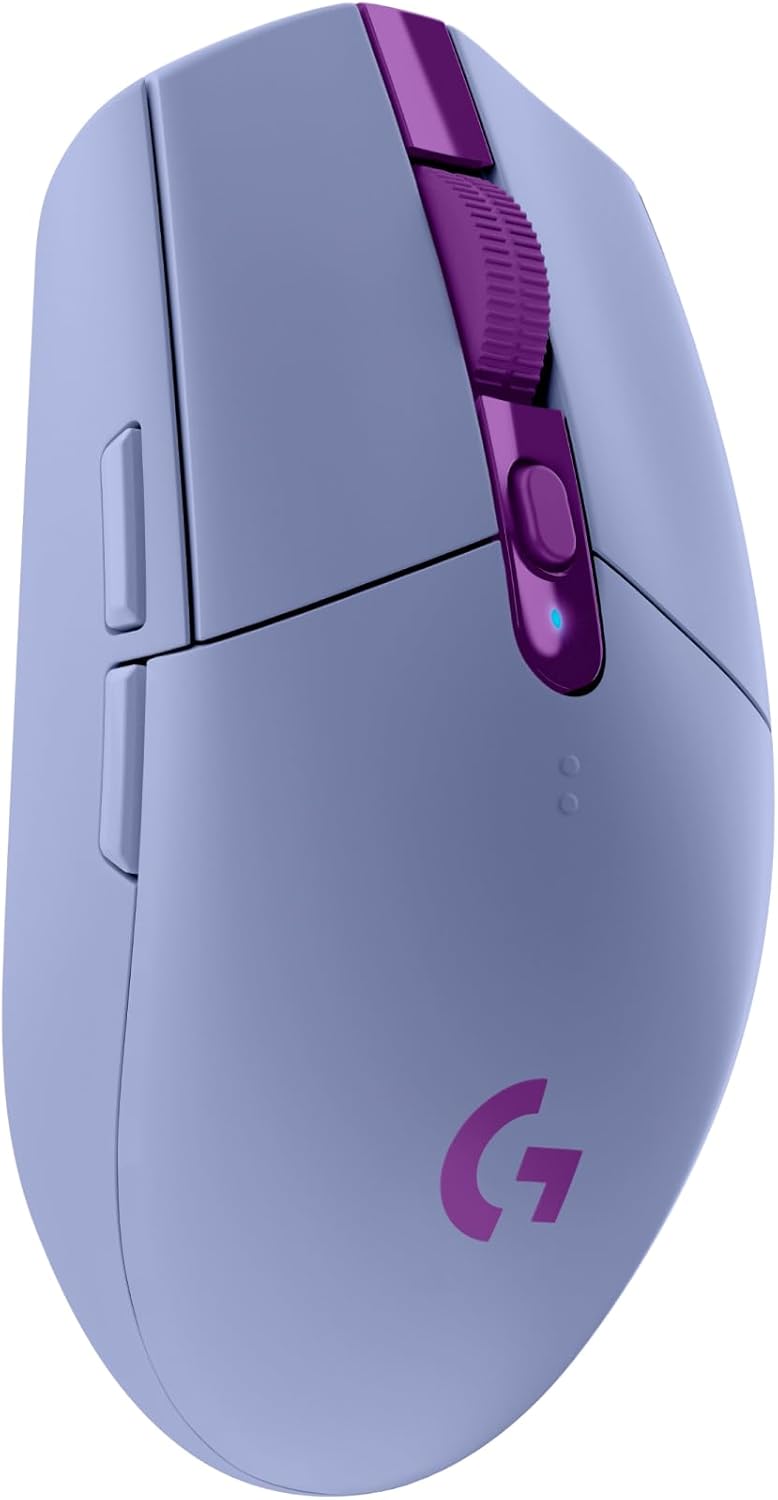
The Logitech G305 Lightspeed Wireless Gaming Mouse is a compact, wireless mouse designed for PC gamers who want reliable performance without breaking the bank. It is well-suited for competitive gamers, casual players, esports enthusiasts, streamers, content creators, and even work-from-home or college gamers who need a versatile peripheral for both gaming and daily tasks.
At the heart of the G305 is Logitech's HERO sensor, which offers a DPI range from 200 to 12,000 with remarkable accuracy and no acceleration or smoothing. Combined with LIGHTSPEED wireless technology delivering a 1ms report rate, this mouse feels as responsive as a wired option. In real-world gaming - whether you are fragging in Valorant, laning in League of Legends, or exploring open worlds - the cursor tracking is precise and lag-free, giving you confidence in every click.
Build quality is solid for its price point. The mouse weighs only 99 grams, making it easy to flick and reposition during intense matches. The symmetrical shape works well for claw and fingertip grips, and the matte Lilac finish resists fingerprints and adds a unique splash of color to your desk. Battery life is a standout feature: a single AA alkaline battery can last up to 250 hours in performance mode, and switching to Endurance mode via G HUB extends that to about 9 months. Users report months of heavy use without changing batteries, though the scroll wheel is not as premium as some higher-end models.
Setting up the G305 is straightforward. The USB nano receiver stores inside the mouse, making it easy to take on the go. Simply plug the receiver into your PC or Mac, and you are ready to play. Logitech G HUB software allows you to customize DPI levels, assign commands to the six buttons, and create macros. On-board memory means your settings travel with the mouse, so you do not need to install software on every computer. The mouse is also comfortable for long sessions, with no noticeable fatigue after hours of use.
One limitation is that the G305 uses a AA battery rather than a built-in rechargeable pack. However, given the exceptional battery life, this is a minor trade-off for many users. Additionally, there is no Bluetooth connectivity - it relies solely on the 2.4GHz dongle, which is fine for desktop and laptop gaming but might be an inconvenience on devices with only USB-C ports (though adapters can solve that). Some users with larger hands may find the mouse a bit small, especially if they prefer a palm grip.
Overall, the Logitech G305 is one of the best budget wireless gaming mice on the market. It delivers the performance and reliability needed for competitive gaming, offers long-lasting battery life, and does so at an accessible price. If you are looking for a no-fuss wireless mouse that excels in responsiveness and comfort, whether for your gaming PC, streaming setup, or daily work, the G305 is a smart choice. It also makes a great addition to any gaming desk, especially for those who appreciate a clean, cable-free workspace.
The Logitech G305 is engineered for low-latency gaming. Its HERO sensor provides pixel-precise tracking with up to 12,000 DPI, adjustable in 50 DPI increments to match your sensitivity preferences. The 1ms LIGHTSPEED wireless connection ensures that your clicks register instantly, which is critical in fast-paced shooters like CS2 or Apex Legends. The six programmable buttons can be mapped to in-game actions, and the lightweight design (99g) allows rapid flick shots without drag. User reviews consistently note that the mouse feels as fast and accurate as wired competitors, making it a solid choice for competitive play.
Battery life is one of the G305's biggest strengths. On a single AA battery, you get up to 250 hours of continuous gaming in the default performance mode. That translates to months of regular use without needing a replacement. If you switch to Endurance mode via Logitech G HUB, battery life can stretch to approximately 9 months, though at a slightly lower polling rate. Many users report using the same battery for 4-6 months even with daily gaming. The mouse has a LED indicator that turns red when battery is low, so you have plenty of warning. While the mouse uses a disposable battery rather than a built-in rechargeable cell, the long life minimizes inconvenience, and you can also use rechargeable AA batteries for a more sustainable setup.

Pros
- Exceptional value for the price – high-end sensor and features at a budget cost.
- Versatile tri-mode connectivity works with almost any device out of the box.
- Solid battery life with RGB on, and superb longevity when turned off.
- Lightweight at 2.72 oz and comfortable for medium-to-large hands.
- 6 RGB modes and programmable buttons offer plenty of customization.
Cons
- Software driver flagged by some antivirus and may not always detect the mouse properly.
- Larger size may not suit claw-grip or competitive gamers seeking a compact shape.
- Side buttons can be accidentally pressed due to placement (adjustable via software).
The FFJ Master01 wireless gaming mouse is a budget-friendly option that punches above its weight class. Designed for PC gamers, streamers, and everyday users, it offers a tri-mode connection (2.4GHz, Bluetooth 5.3, USB-C) and a high-precision sensor capable of up to 24,000 DPI. While it markets itself as a gaming mouse, its versatility makes it suitable for casual play, content creation, and office work.
Performance-wise, the mouse delivers smooth tracking with adjustable DPI levels and polling rates up to 1000Hz. User reviews highlight responsive clicks and accurate movement, comparable to pricier Logitech or Razer models. The 1000mAh battery is a standout – you can get up to 75 hours with RGB off, ensuring you don’t have to recharge mid-session. The lightweight design (2.72 oz) reduces fatigue during long gaming sessions, though some users note the mouse is on the larger side, which can hinder claw-grip users.
Build quality is solid for the price. The micro switches are rated for 80 million clicks, and the skin-friendly coating feels premium. However, the software driver has mixed feedback – it can be flagged as a false positive by antivirus and may not always recognize the mouse for advanced customization. Fortunately, basic DPI cycling and lighting modes work without the software.
Comfort is a strong point for palm grippers with medium-to-large hands. The ergonomic shape and side buttons are well-placed for most users, though some may find the forward click position awkward. The rubberized surface provides good grip. The mouse also features automatic sleep modes to save power, which is a thoughtful touch.
One realistic limitation: the larger size and front-heavy click may not satisfy competitive esports players who prefer a smaller, more nimble mouse. Additionally, the software experience could be improved for a smoother setup. But for casual PC gamers, streamers, and multi-device users, the FFJ Master01 offers exceptional value. It works seamlessly across Windows, Mac, PS5, Xbox, and tablets via Bluetooth.
Overall, this is a fantastic budget wireless mouse for anyone wanting reliable performance, long battery life, and customizable RGB without spending a fortune. If you can overlook the minor software quirks and size preference, it’s a top pick for everyday gaming and productivity.

Pros
- Silent buttons are a standout feature for quiet environments.
- Affordable price point makes it accessible for budget builds.
- Comfortable ergonomic shape fits various grip styles.
- Simple plug-and-play setup with no software required.
Cons
- Blue LED light cannot be permanently disabled; it stays on while in use.
- Side buttons are not functional on Mac systems.
- Build quality feels slightly lightweight, which may not suit all preferences.
The T-DAGGER Wireless Gaming Mouse is a budget-friendly cordless option that aims to balance quiet operation with gaming performance. Designed for PC gamers who value a noiseless experience, this mouse features silent click buttons that minimize sound during intense gaming sessions or late-night work. Its 2.4G wireless connection provides a reliable, low-latency link without the hassle of tangled cables, making it a practical choice for desktop setups or travel.
This mouse is best suited for casual gamers, college students, and professionals who need a versatile pointing device for both gaming and everyday tasks. The 5 adjustable DPI levels (1000, 1500, 2000, 2400, and 4000) allow users to switch between precise cursor control for editing and faster tracking for fast-paced games. While it may not satisfy competitive esports players seeking ultra-high sensitivity, the range covers most casual gaming needs effectively.
Comfort is a key focus here, with an ergonomic shape that includes a thumb rest and a soft, skin-like coating. This design supports palm, claw, and fingertip grips, reducing strain during extended use. The mouse is lightweight at just under 3 ounces, making it easy to move quickly, though some may find the plastic build less premium than higher-end models. The blue LED backlight adds a subtle glow to your gaming setup, though it remains on while the mouse is active and cannot be turned off independently.
Setup is straightforward: insert the included AA battery, plug the tiny USB receiver into your computer, and you are ready to go. The mouse works with Windows 7 through 10, as well as Mac OS, but note that the side buttons are not supported on Mac. An energy-saving feature puts the mouse to sleep after 8 minutes of inactivity, and pressing any button wakes it instantly, which helps conserve battery life.
One realistic limitation is the lack of Bluetooth connectivity; this is a 2.4G wireless mouse only, so devices without a USB-A port may need an adapter. Additionally, the blue LED cannot be disabled, which might be a minor annoyance for users who prefer a completely dark setup. The build quality feels adequate for its price, but heavy users may want to consider a more durable option.
Overall, the T-DAGGER Wireless Gaming Mouse is a solid entry-level choice for gamers and professionals who prioritize silence, comfort, and simplicity. It works well for casual gaming, office work, and dorm room setups, offering good value without breaking the bank. If you need a quiet, wireless mouse that gets the job done without extra frills, this is a practical pick.

Pros
- Exceptional battery life of up to 3 years reduces the need for frequent battery changes, a huge plus for long gaming or work sessions.
- Hyper-fast scrolling and tilt wheel provide versatile navigation for documents, spreadsheets, and web browsing, ideal for productivity-focused gamers.
- Comfortable ergonomic shape with rubber side grips ensures a secure hold and minimizes hand strain during extended use.
- Reliable plug-and-play wireless connection with Unifying receiver supports multiple devices, simplifying your desk setup.
Cons
- Not designed for competitive gaming due to lower polling rate and less precise sensor compared to dedicated gaming mice.
- Right-handed shape only may not suit left-handed users or those who prefer ambidextrous designs.
- Scroll wheel can be overly sensitive in unlocked mode, leading to accidental scrolling for some users.
The Logitech M705 Marathon is a wireless mouse that sits at the intersection of productivity and casual gaming. While it's not marketed as a hardcore gaming mouse, its long battery life, comfortable ergonomics, and programmable buttons make it a solid choice for PC gamers who also need a reliable daily driver for school, work, or content creation. With up to 3 years of battery life, this mouse reduces the hassle of frequent recharging, letting you focus on your game or workflow without interruptions.
For the target audience, this mouse fits a wide range of users. PC gamers who play strategy games, MMOs, or casual titles will appreciate the hyper-fast scrolling and tilt wheel for managing inventory or browsing maps. Streamers and content creators can program the side buttons for quick scene switches or mute toggles. Esports players, however, may want to look elsewhere due to the lower polling rate and less precise sensor compared to dedicated gaming mice. But for college gamers or work-from-home users, this mouse offers a versatile, low-maintenance solution.
In terms of real-world performance, the M705 delivers smooth, responsive tracking on most surfaces thanks to its advanced optical sensor. The hyper-fast scrolling is a standout feature, allowing you to fly through long documents or web pages with a spin of the nearly frictionless wheel. When you need precision, you can switch to line-by-line scrolling. The wireless connection via the Unifying receiver is stable and reliable, with no noticeable lag for everyday tasks and casual gaming. The programmable buttons, set up through Logitech software, let you customize your workflow or gaming shortcuts for added efficiency.
Build quality is a mixed bag. While the overall construction feels solid, some user reviews note that newer versions use cheaper plastic compared to older models, resulting in a lighter feel and less smooth gliding on the mouse feet. The scroll wheel has also drawn criticism for being overly sensitive when unlocked, sometimes scrolling on its own. That said, the ergonomic design with rubber side grips provides good comfort for long sessions, and the receiver stores neatly inside the battery compartment. Setup is simple: insert the batteries, plug in the receiver, and you're ready to go.
Ease of use extends to its maintenance and software. The mouse works out of the box with no drivers needed for basic functions, but Logitech's G Hub or Options software gives you access to button customization, DPI adjustments, and battery monitoring. Cleaning is straightforward a quick wipe of the surface and occasional dusting of the sensor. The on/off switch and power-saving mode help preserve battery life, and a low-battery notification keeps you from being caught off guard.
Realistic limitations include the lack of Bluetooth connectivity (it uses a dedicated USB receiver), which could be an issue if you have limited USB ports or need to connect to multiple devices frequently. The right-handed design won't suit left-handed users. And while the 3-year warranty is a strong selling point, some users have reported double-click issues or scroll wheel malfunctions within that period. Overall, if you're a PC gamer who values battery life, comfort, and productivity over competitive gaming features, the Logitech M705 Marathon is a practical, affordable wireless mouse that can handle a wide range of tasks from gaming to office work.
Frequently Asked Questions
Does a wireless gaming mouse introduce noticeable input lag on laptops?
No, modern 2.4GHz wireless gaming mice offer a 1ms report rate (1000Hz polling rate) that matches wired models. High-speed dongles transmit inputs with sub-millisecond response times, preventing noticeable click latency during competitive matches. Bluetooth connections can have slight delays, so using the included 2.4GHz USB nano receiver is ideal for fast-paced titles.
Can I use Bluetooth instead of a USB dongle for laptop gaming?
Yes, but 2.4GHz wireless connections remain far superior for gaming responsiveness. Bluetooth operates at a lower polling rate to conserve power, which can lead to micro-stuttering or missed inputs during rapid sweeps. Multi-mode mice let you switch to Bluetooth for office tasks and reserve 2.4GHz dongles for intense multiplayer gaming.
How long does the battery last on the Best Wireless Mouse For Laptop Gaming?
Battery runtimes range from 45 hours on rechargeable RGB models to over 250 hours on AA-battery mice. Options like the Logitech G305 utilize efficient HERO sensors to run for months on a single AA cell, while internal lithium batteries often include auto-sleep power saving. Turning off dynamic RGB illumination extends battery uptime significantly during travel.
What DPI setting is ideal for competitive gaming on a laptop screen?
Most competitive players prefer DPI settings between 800 and 1600 for accurate cursor control. While sensors can scale up to 12,000 or 24,000 DPI, lower sensitivity prevents erratic over-aiming on standard laptop displays. You can also pair these settings with external high-refresh gaming monitors for crisper motion tracking.
Do wireless gaming mice require driver software to change DPI settings?
No, most models feature a dedicated hardware DPI switch button on top of the shell for on-the-fly cycling. While proprietary desktop software enables macro mapping and lighting customization, the mouse stores default sensitivity stages in onboard memory. This allows seamless plug-and-play operation across Windows, Mac, and laptop setups without reinstalling drivers.
Is a rechargeable battery better than an AA battery for travel gaming?
It depends on your travel routine and access to power outlets. Built-in USB-C rechargeable batteries eliminate disposable waste and allow play while charging through a laptop port. AA-powered mice, on the other hand, eliminate charging cables completely and offer hundreds of hours before needing a simple swap.





Write Your Review
No reviews yet. Be the first to share your experience!