


Tackling Frame Drops and Micro-Stutters on Mobile Rigs
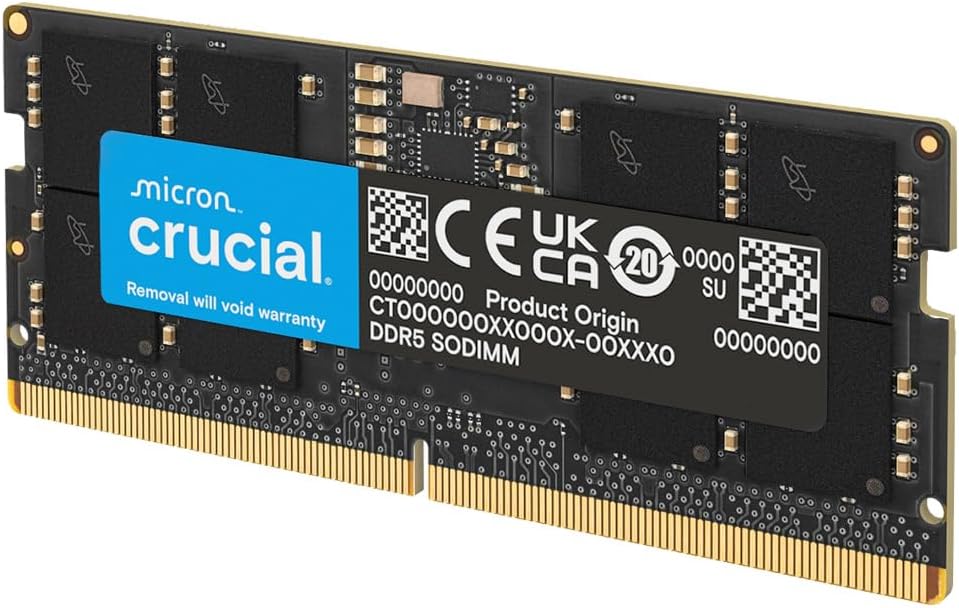
Sudden frame drops in competitive shooters or heavy open-world games often stem from memory bottlenecks rather than your graphics card. When system memory runs out of headroom during intense firefights or complex rendering scenes, 1% low frame rates crash and gameplay turns into a choppy mess. Upgrading your machine with the best 16gb ddr5 laptop ram provides the high bandwidth and swift data channels modern mobile processors require to keep frame times consistent. Quality DDR5 SODIMM modules operate at frequencies like 4800MHz and 5600MHz at a lean 1.1V, preventing unnecessary thermal throttling inside compact laptop chassis.
Modern laptop motherboards pairing Intel 12th/13th Gen Core or AMD Ryzen 6000/7000 processors thrive on dense memory bandwidth. Installing a dedicated laptop RAM upgrade delivers noticeable responsiveness, keeping asset streaming fluid and eliminating stutter during fast map transitions. You can also explore our guide on the best upgrades for gaming PC to see how memory enhancements stack up against other system components. Following manufacturer guidelines and basic anti-static precautions during installation guarantees your portable rig stays protected and ready for heavy gaming sessions.
Pros
- Significant performance boost for gaming and heavy workloads
- Easy installation with standard SODIMM form factor
- Low power consumption helps extend laptop battery life
- Compatible with latest Intel and AMD platforms
Cons
- Limited to laptop use; not suitable for desktop PCs
- Requires compatible motherboard and CPU to reach full 5600MHz speed
- Price may be higher than some DDR4 alternatives
The Crucial 16GB DDR5 RAM Laptop Memory Kit (2x8GB) is a straightforward upgrade for anyone looking to boost their laptop's performance. Designed for modern gaming laptops and high-performance workstations, this kit operates at speeds up to 5600MHz, though it can downclock to 5200MHz or 4800MHz for broader compatibility. It's an excellent choice for PC gamers, streamers, content creators, and college gamers who need faster load times and smoother multitasking without breaking the bank.
For competitive gamers and esports players, every millisecond counts. This DDR5 memory helps reduce lag and improve frame rates in fast-paced titles like FPS and MOBA games. Casual gamers will also appreciate snappier application launches and less stutter in open-world games. The kit supports Intel XMP 3.0 and AMD EXPO, making it easy to enable higher performance profiles on compatible systems.
Build quality is backed by Micron's decades of memory expertise. Each module is rigorously tested for reliability, ensuring stable operation during long gaming sessions or intense streaming workloads. The SODIMM form factor fits most modern laptops, and the low 1.1V voltage helps keep power consumption in check, which is a plus for battery life.
Setup is straightforward: just install the two sticks into your laptop's memory slots, and the system will automatically detect them. No additional software is required, though enabling XMP or EXPO in BIOS can unlock the full speed. Cable management isn't a concern here, as these are internal components, but the compact design leaves plenty of room for other upgrades.
One realistic limitation is that not all laptops support the full 5600MHz speed, especially older models. Users with 12th Gen Intel or AMD Ryzen 6000 processors should check their motherboard specs. Additionally, the price is higher than comparable DDR4 kits, but the performance uplift in memory-intensive tasks often justifies the cost.
Overall, this Crucial memory kit is a practical investment for gamers and creators who want to maximize their laptop's potential. Whether you're building a new gaming rig, upgrading a streaming setup, or simply speeding up daily tasks, this RAM delivers reliable performance and future-proof compatibility. It's a solid choice for U.S. PC gamers looking to stay competitive without upgrading their entire system.
Pros
- Excellent 5600MHz speed for smooth gaming and multitasking in laptops
- Trusted Crucial/Micron brand with high reliability and positive user feedback
- Easy installation with no software setup required
- Great compatibility with latest Intel and AMD laptop platforms
- Energy-efficient design improves battery life compared to DDR4
Cons
- CAS latency of 46 is not the tightest for extreme overclocking
- Limited to laptop SODIMM form factor - not for desktop builds
- Premium price compared to DDR4 memory, but justified by DDR5 performance gains
The Crucial 16GB DDR5 SODIMM (CT16G56C46S5) is a high-performance laptop memory upgrade designed for PC gamers, streamers, and content creators who demand faster load times and smoother multitasking. Operating at speeds up to 5600MHz, this DDR5 module delivers 1.75x the data rates of DDR4, making it a solid choice for modern gaming laptops equipped with 13th Gen Intel Core or AMD Ryzen 7000 series processors.
For gamers, this memory translates into tangible improvements in frame rates and responsiveness, especially in open-world titles and fast-paced shooters like Call of Duty or Fortnite. User reviews highlight how upgrading from 8GB to 16GB eliminated stuttering in Diablo IV and allowed for seamless multitasking with Discord and streaming software running in the background. The support for Intel XMP 3.0 and AMD EXPO also means enthusiasts can easily overclock for even higher speeds, though the CAS latency of 46 is balanced for stability rather than absolute low latency.
Build quality is a strong point here. Crucial, backed by Micron's 42 years of memory expertise, ensures each module undergoes rigorous testing at both component and module levels. The 262-pin SODIMM form factor is standard for most gaming laptops, and the 1.1V voltage makes it more energy-efficient than DDR4, which can help extend battery life during less demanding tasks. Installation is straightforward: just locate the memory slot, insert the module at a 45-degree angle, and press down until it clicks. No software or drivers are needed.
One realistic limitation is that this is a single 16GB stick, so if your laptop supports dual-channel memory, you may want to buy two sticks for optimal performance. Additionally, while the 5600MHz speed is great, some users report that when using two high-capacity sticks (like 64GB each), the speed may downclock to 5200MHz or 4800MHz depending on the system. This is typical for DDR5 and shouldn't impact real-world gaming performance significantly.
For streamers and content creators, the extra bandwidth helps with 4K video editing and running multiple applications like OBS, Photoshop, and Chrome tabs simultaneously. The memory's reliability is backed by overwhelmingly positive user feedback, with a 4.8-star rating from over 2,300 reviews. Many users have successfully used it in NAS systems and Alienware laptops without issues.
Overall, the Crucial 16GB DDR5 SODIMM is a practical upgrade for anyone with a compatible gaming laptop looking to boost performance. It's especially recommended for competitive gamers who need consistent frame rates, content creators who multitask heavily, and esports players who want to eliminate lag in tournaments. If you're building a new gaming laptop or upgrading an existing one, this memory offers a solid balance of speed, reliability, and ease of use.
For PC gamers, the Crucial 16GB DDR5 SODIMM provides a noticeable uplift in gaming performance compared to DDR4. The higher bandwidth (up to 5600MHz) allows for faster data transfers between the CPU and GPU, reducing stutter in open-world games and improving minimum frame rates. In user reviews, one gamer reported that upgrading from 8GB to 16GB eliminated memory-related crashes in Diablo IV. The module also supports Intel XMP 3.0 and AMD EXPO, enabling easy one-click overclocking for even snappier response in competitive titles like Valorant or Apex Legends. While the CAS latency of 46 isn't the lowest, the overall speed advantage of DDR5 outweighs this for most gaming scenarios.
This Crucial DDR5 SODIMM is designed for laptops with 262-pin DDR5 slots. It is officially compatible with 12th and 13th Gen Intel Core processors as well as AMD Ryzen 7000 series CPUs. User reviews confirm it works flawlessly with Alienware M18 R2, Dell Precision 3590, and various NAS systems like Ugreen DXP2800. The module supports both Intel XMP 3.0 and AMD EXPO on the same stick, making it versatile for different platforms. Note that when using two high-capacity sticks (e.g., 64GB each), the system may downclock the speed to 5200MHz or 4800MHz, which is normal for DDR5 memory controllers.

Pros
- Easy, tool-free installation that works immediately with automatic speed detection
- Rock-solid stability even under sustained gaming and multitasking loads, per user reviews
- Black PCB design blends into any laptop or mini PC build
- Competitive performance for the price, especially at 5600MHz CL40
Cons
- CAS latency of CL40 is slightly higher than some premium DDR5 kits
- First boot after installation may take 45-60 seconds for memory training
- Limited availability in some regions, making it harder to find at retail
The Kingston FURY Impact 32GB (2x16GB) DDR5 5600MHz SODIMM kit is a high-performance memory upgrade designed for gaming laptops, ultrabooks, and small form factor PCs. It brings the speed and efficiency of DDR5 to compact systems, offering a 50% bandwidth improvement over DDR4 for smoother gameplay, faster rendering, and more responsive multitasking.
This kit is ideal for PC gamers, streamers, content creators, and college gamers who want to get the most out of their portable rig without compromising on performance. The Plug N Play feature automatically overclocks the memory to its 5600MHz rated speed, so you don't need to dive into BIOS settings. Intel XMP 3.0 certification also gives advanced users the flexibility to fine-tune timings and voltage for maximum throughput.
Build quality is typical Kingston, with a compact black PCB that fits easily into standard SODIMM slots. The memory runs at just 1.1V, reducing heat output and power draw, which is especially beneficial for thermally constrained laptops and small PCs. On-die ECC helps maintain data integrity during heavy workloads, adding an extra layer of reliability for long gaming sessions or content creation marathons.
Installation is straightforward, but users should expect a longer first boot (around 45-60 seconds) as the system trains the new memory. Once configured, the kit performs reliably day-to-day. Some users have noted that on Intel-based systems with 64GB configurations, the memory may default to 5200MHz instead of 5600MHz due to chipset limitations, but this is a known platform quirk rather than a product flaw.
A realistic limitation is the CL40 latency, which is slightly higher than some enthusiast DDR5 kits. In practice, the speed advantage of 5600MHz still translates to excellent real-world performance in games and applications. Also, availability can be spotty in certain markets, so you may need to shop around.
All in all, the Kingston FURY Impact 32GB DDR5 SODIMM kit is a smart upgrade for anyone with a DDR5-capable laptop or mini PC. It delivers meaningful performance gains without complexity, making it a top choice for gamers, streamers, and productivity users who want faster, more efficient memory.
With 5600MHz speed and Plug N Play auto-overclocking, this memory kit can reduce load times in open-world games and minimize stutter in fast-paced titles like Call of Duty and Apex Legends. Combined with the bandwidth boost of DDR5, it helps keep frame rates consistent during intense moments, especially when streaming or running background apps. The low 1.1V power draw also keeps temperatures in check, preventing thermal throttling during extended gaming sessions.
This SODIMM kit works with laptops and mini PCs that support DDR5 memory, including recent Intel (12th Gen and newer) and AMD (Ryzen 6000 series and newer) platforms. It is XMP 3.0 certified for Intel-based systems, but many users have reported flawless operation on AMD systems as well. Always check your system's maximum supported memory speed and capacity before purchasing. Some Intel laptops may downclock from 5600MHz when using 64GB configurations due to chipset limitations.
Pros
- High 5600MHz speed improves in-game performance and system responsiveness.
- Automatic error correction enhances stability, especially during long gaming or streaming sessions.
- Low voltage (1.1V) helps with thermals and battery efficiency in laptops.
- Easy installation – no technical skills needed, just plug it in.
Cons
- Limited to DDR5-compatible devices; older laptops with DDR4 slots cannot use this module.
- Single 16GB stick may not be optimal for dual-channel performance; pairing with another identical module is recommended for best results.
- Price is higher than some comparable DDR5 options, though reliability and features justify the cost for many users.
The ADATA DDR5 5600 SO-DIMM 16GB memory module is a solid upgrade for gamers who want to squeeze more performance out of their laptop, mini PC, or all-in-one system. Designed for DDR5-compatible devices, this stick runs at 5600MHz, which is a significant step up from standard DDR4 speeds and even some entry-level DDR5 modules. For PC gamers who multitask – streaming on Twitch while playing competitive shooters, or running a Discord call alongside a demanding open-world game – the extra bandwidth and faster data transfer rates can reduce stuttering and improve overall system smoothness.
One of the standout features is the automatic error correction (ECC), which isn't common in consumer DDR5 but helps maintain data integrity during heavy workloads. This is especially useful for content creators editing video or rendering 3D assets on their gaming laptop, where a single bit error could cause a crash or corrupted file. The onboard Power Management IC (PMIC) ensures stable power delivery, which is critical when you're pushing the system in a high-FPS esports title or during a long streaming session.
Installation is straightforward – just locate the SO-DIMM slot inside your laptop (or mini PC), align the notch, and press down until it clicks. No software or drivers are needed; the system will automatically recognize the new RAM. For gamers who aren't hardware experts, this plug-and-play simplicity is a big plus. However, keep in mind that this is a single 16GB module. For dual-channel performance (which can boost gaming frame rates by 5-15% in many titles), you'll want to install two identical sticks. If your system has only one slot, or you're planning to add a second stick later, this is a fine start.
Build quality feels solid, with a compact form factor that fits snugly into the slot. The low 1.1V operating voltage means less heat generation, which is a blessing in thin gaming laptops where cooling is already a challenge. Users who have upgraded from older DDR4 laptops often report noticeably faster app loading times and smoother multitasking – for example, switching between a browser with multiple tabs and a game like Fortnite or Valorant without lag.
That said, this RAM is only compatible with DDR5-capable devices. If you're using a laptop from 2022 or later with a 12th/13th Gen Intel or Ryzen 6000/7000 series processor, you're good. But if you have an older DDR4 machine, this module won't work. Also, while the price is reasonable for a reputable brand like ADATA, budget-conscious gamers might find cheaper options from lesser-known brands. However, the combination of speed, error correction, and low power draw makes this a reliable choice for anyone looking to future-proof their gaming laptop or mini PC.
Overall, the ADATA DDR5 5600 SO-DIMM 16GB is a strong recommendation for PC gamers, streamers, and content creators who need a performance uplift without the complexity of a full system rebuild. It's particularly well-suited for competitive gamers who demand low latency and consistent frame rates, and for college gamers who rely on a single laptop for gaming, schoolwork, and entertainment. If you're building a compact gaming setup with a mini PC or upgrading a gaming laptop, this RAM delivers tangible benefits in responsiveness and stability.

Pros
- Significantly faster than DDR4 – games and apps load noticeably quicker.
- On-die ECC adds an extra layer of stability for critical tasks like streaming or rendering.
- Easy installation – just open your laptop's RAM slot and click it in; no software needed.
- Competitive price point for the performance offered, especially compared to premium brands.
- Lifetime warranty and US-based technical support provide peace of mind.
Cons
- Not compatible with DDR4 motherboards – only works with newer DDR5 laptops.
- Single-rank design may not deliver the same bandwidth as dual-rank kits in some multi-threaded workloads.
- A small number of user reviews mention occasional compatibility hiccups or early failure, though Timetec's warranty covers replacements.
The Timetec Premium 16GB DDR5 5600MHz SODIMM is a laptop memory upgrade designed for users who want to squeeze more performance out of their gaming, streaming, or creative laptop without spending a fortune. This single 16GB module runs at 5600MHz (PC5-44800) and uses the latest DDR5 technology to deliver nearly 1.5x the bandwidth of DDR4, making it a solid choice for faster game loading, smoother multitasking, and improved responsiveness in memory-hungry applications.
This RAM is best suited for laptop gamers, streamers, content creators, and even college students who need a reliable boost for both work and play. If you're using a recent DDR5 laptop and find your current 8GB or 16GB (single-channel) setup is bottlenecking your system in modern games or while running OBS and a game simultaneously, this upgrade can free up headroom. The on-die ECC feature helps catch and correct memory errors automatically, which is especially valuable for long streaming sessions or when running AI tools where stability is critical.
In terms of real-world performance, users report faster boot times, snappier app launches, and the ability to keep more browser tabs and apps open without slowdowns. For gamers, this translates to fewer stutters in open-world titles and smoother frame pacing in competitive shooters like Valorant or Call of Duty. The 5600MHz speed is a step up from standard 4800MHz, and while the CL46 latency isn't the tightest, the increased bandwidth compensates for most workloads. The single-rank design (1Rx8) also runs cooler and draws less power than dual-rank sticks, which can be beneficial in slim laptops with limited cooling.
Build quality feels solid. The module uses premium chip ICs and includes a built-in Power Management IC (PMIC) to regulate voltage more precisely, keeping it steady at 1.1V. This helps reduce electrical noise and improve battery efficiency – a nice perk if you game unplugged. Installation is as simple as popping the back panel of your laptop, inserting the stick at a 45-degree angle, and pressing it down. The module is lightweight (0.317 ounces) and compact, so it fits in almost any DDR5 laptop that supports SO-DIMMs.
One realistic limitation is that this kit is single-rank. While that's fine for most gamers, users who rely heavily on CPU-intensive tasks like video rendering or heavy multitasking might see better performance from a dual-rank kit. Also, a few users in the reviews mentioned early failures or compatibility hiccups, but Timetec's responsive customer service and lifetime warranty – including a no-questions-asked replacement program – make this less of a risk. It's worth noting that your laptop's BIOS may need a few minutes on first boot to train the memory; that's normal.
Overall, the Timetec 16GB DDR5 5600MHz SODIMM offers a compelling value for laptop users who want a genuine performance lift without overspending. It's a practical upgrade for gamers moving from 8GB or mixing mismatched sticks, for streamers who need to run encoding alongside games, and for anyone building a budget-friendly laptop setup that can handle modern titles and creative work. If your laptop is DDR5-ready and you're looking for an affordable, reliable speed bump, this module is a smart pick.

Pros
- Fast 4800MHz DDR5 speed delivers noticeable system responsiveness improvements
- Simple installation process with clear compatibility guidance
- Lifetime warranty and responsive customer support add long-term value
- Low 1.1V voltage helps maintain battery life in portable gaming setups
- Cost-effective alternative to OEM memory upgrades for gaming laptops
Cons
- Compatibility must be verified with your system's manual before purchase
- Single module limits dual-channel performance benefits unless paired with an identical stick
- Some users reported timing mismatches (e.g., CL46 vs CL40) - check product specifications carefully
The A-Tech 16GB DDR5 4800MHz SO-DIMM is a memory upgrade module designed specifically for laptops, mini PCs, and all-in-one systems that support DDR5 RAM. For PC gamers, streamers, and content creators using a gaming laptop, this single 16GB stick offers a straightforward way to increase system memory, helping reduce stutters in demanding games and improving multitasking when running Discord, OBS, or Chrome alongside your favorite titles.
Based on product specifications and user feedback, the 4800MHz speed (PC5-38400) provides a solid baseline for DDR5 performance. While not the fastest available, it matches the JEDEC standard and will automatically downclock if your system supports lower speeds. This makes it a safe choice for upgrading older DDR5 laptops or budget gaming notebooks. The low 1.1V voltage also helps keep thermals and battery drain in check during long gaming sessions or streaming marathons.
Build quality appears consistent with A-Tech’s reputation for reliable memory modules. The module is unbuffered, non-ECC, and uses the standard 262-pin SO-DIMM form factor. Installation is genuinely plug-and-play: just open your laptop’s memory compartment, insert the module at a 30-degree angle, and press down until it clicks. No software or drivers are needed, though it’s wise to verify compatibility via your system’s manual or A-Tech’s support team before ordering.
In real-world use, upgrading from 8GB to 16GB (or adding this to an existing 16GB for 32GB total) can significantly improve gaming responsiveness. Titles like Call of Duty: Warzone, Fortnite, or Cyberpunk 2077 benefit from extra RAM, reducing hitches and allowing smoother background tasks. For streamers, having enough memory to run OBS, a browser, and chat apps without choking the game is critical, and this module delivers that headroom.
One realistic limitation is that a single stick operates in single-channel mode, which can leave some performance on the table compared to dual-channel configurations. If you plan to use two identical sticks, buy them as a matched pair or ensure the second stick matches specs exactly. Also, a few user reviews mention timing discrepancies (e.g., CL46 vs CL40), so double-check the listed timings if your system is picky. Overall, A-Tech’s lifetime warranty and solid support help mitigate these concerns.
For PC gamers, esports players, or college gamers looking to breathe new life into a DDR5 laptop without spending a fortune, this A-Tech 16GB module is a practical choice. It’s especially suited for those who need a quick, reliable upgrade for smoother multitasking and better gaming performance. Just confirm your system’s memory specs first, and you’ll have a cost-effective path to a more capable gaming setup.

Pros
- Dual-channel configuration offers noticeable performance gains in gaming and multitasking
- 4800MHz speed ensures fast data transfer for smoother gameplay and quicker app launches
- Low power consumption (1.1V) helps maintain cooler laptop temperatures during intense use
- Samsung brand reliability and compatibility with many DDR5 laptop models
- Simple installation for a quick performance boost without complexity
Cons
- 16GB total capacity may feel limiting for heavy multitasking or future game requirements; 32GB kits are available for more demanding users
- OEM packaging lacks a heatsink, which could affect sustained performance under extreme loads in some laptops
- Price per GB is higher compared to some aftermarket DDR5 memory options
The Samsung 16GB (2x8GB) DDR5 4800MHz SODIMM memory kit is a solid upgrade for anyone using a DDR5-compatible laptop, mini PC, or all-in-one. This is laptop memory designed to boost system responsiveness, especially for PC gamers, streamers, and content creators who need faster multitasking and smoother performance in demanding applications.
When it comes to real-world gaming, this kit's dual-channel configuration and 4800MHz speed help reduce stuttering and improve frame rates in CPU-bound titles like competitive shooters, MOBAs, and large open-world games. The low 1.1V voltage also means less heat generation, which is a big plus for keeping your laptop cooler during extended sessions - whether you're grinding ranked matches or streaming on Twitch.
Build quality is typical of Samsung OEM memory: reliable and consistent. The modules are bare PCB without heatsinks, but that's standard for many laptop memory upgrades. Installation is straightforward - just open your laptop's memory compartment, insert the sticks, and you're good to go. No software setup needed, which makes it an easy drop-in upgrade for gamers who want better performance without hassle.
One realistic limitation is the 16GB total capacity. While it's enough for most current games and light streaming, heavy multitaskers or those running virtual machines may want 32GB. The price also leans a bit higher than some competing brands, but you're paying for Samsung's reputation and compatibility assurance.
Overall, this memory kit is a great pick for PC gamers, esports players, and streamers using a DDR5 laptop who want a fast, reliable performance boost. It's also suitable for college gamers and content creators who need efficient multitasking for school, work, and play. If your laptop supports DDR5 and you're looking for a straightforward upgrade, this Samsung kit delivers solid gains without complicated setup.

Pros
- Two-module 32GB matched kit (2x16GB) allows dual-slot memory configurations without mixing disparate brands.
- Versatile speed support allows automatic downclocking to 5200MHz or 4800MHz if the laptop processor requires it.
- Supports both Intel XMP 3.0 and AMD EXPO profiles directly on the module.
- Standard 1.1V operating voltage adheres to baseline DDR5 power specifications for mobile systems.
- Built using non-ECC 1Rx8 memory architecture from an established semiconductor manufacturer.
Cons
- Incompatible with DDR4 laptop motherboards and laptops that utilize soldered or non-removable memory.
- Requires two vacant SODIMM slots; laptops with only one accessible slot cannot use both modules.
- Actual operating speed is dictated by the laptop motherboard and processor capabilities, not solely by the module rating.
The Crucial CT2K16G56C46S5 is a 32GB laptop memory kit consisting of two 16GB DDR5 SODIMM modules. Operating on the 262-pin SODIMM standard, this kit is engineered for modern notebook systems that accept removable DDR5 memory. With a rated data transfer rate of 5600MHz (PC5-44800) at 1.1V, this memory kit is designed for users who need additional memory headroom for intensive multitasking, content creation, software development, or gaming. It features a non-ECC, single-rank (1Rx8) configuration per module and provides integrated support for both Intel XMP 3.0 and AMD EXPO profiles.
Before considering this memory kit, thorough compatibility verification is essential. DDR5 SODIMMs are physically and electrically incompatible with older DDR4 slots, and they will not fit desktop memory slots. Laptop owners must check their device service manual or manufacturer specifications to confirm whether their exact model uses removable SODIMM memory or soldered RAM. Many ultraportable notebooks solder memory directly to the system board, leaving no open slots. Additionally, buyers should verify that their laptop supports 16GB module densities and at least 32GB of total system memory across two physical slots.
A critical consideration for laptop memory is the distinction between rated module speed and actual operating speed. This Crucial kit is rated for 5600MHz, but it includes internal profiles that allow it to downclock to 5200MHz or 4800MHz. If your laptop processor or motherboard chipset only supports 4800MHz or 5200MHz, the modules will operate at that lower threshold rather than 5600MHz. Installing a 5600MHz module does not force an unsupported laptop to run beyond its engineered platform limits. Operating speed and memory profile access depend entirely on the BIOS and processor specifications of your specific notebook.
In terms of configuration, this package contains two identical 16GB modules. Installing both modules enables two memory channels on supported motherboards, provided both SODIMM slots are populated. If your laptop already has one module soldered and only offers a single expansion slot, this two-module kit will leave you with an unused module. When replacing an existing memory setup, review the laptop manufacturer instructions regarding safety precautions, power disconnection, and proper seating of SODIMM retaining clips.
Realistic limitations must also be acknowledged. Adding memory cannot overcome bottlenecks caused by an underpowered processor, limited thermal headroom, or slow secondary storage. Memory upgrades help specifically when existing physical RAM is saturated by open applications and background processes. Furthermore, accessing internal laptop slots may require specific tools and careful handling, which varies by manufacturer and chassis model.
For owners of compatible DDR5-enabled laptops from Intel Core or AMD Ryzen platforms that have two empty or upgradeable SODIMM slots, this Crucial 32GB kit offers a standardized, specification-compliant solution. Verify your laptop model documentation, confirm that your system supports DDR5 SODIMMs at 1.1V, and verify slot accessibility before purchasing.
Compatibility for the Crucial CT2K16G56C46S5 depends on your laptop exact hardware specifications. This kit uses the 262-pin DDR5 SODIMM form factor, which has a distinct notch position and electrical design that prevents it from fitting into DDR4 or desktop DIMM slots. It cannot be used in systems built for previous DDR generations.
Shoppers must confirm whether their laptop memory is user-upgradeable. Laptops with soldered LPDDR5 or soldered DDR5 cannot accept SODIMM modules unless a separate SODIMM expansion slot is explicitly provided. Consult your laptop technical documentation to confirm slot counts, maximum supported capacity per slot, and system board limits before purchasing.
While this Crucial DDR5 kit carries a maximum rated speed of 5600MHz, system operating speed is determined by the laptop processor and BIOS configuration. The product includes support to downclock automatically to 5200MHz or 4800MHz to align with platform limits, such as those found on select 12th or 13th Gen Intel Core systems and AMD Ryzen mobile platforms.
The modules also incorporate Intel XMP 3.0 and AMD EXPO profile support. However, access to customized memory profiles requires compatible BIOS support from the laptop maker. Standard operation uses regular JEDEC platform profiles at 1.1V, ensuring broad operational stability even when user overclocking settings are not present in the laptop BIOS.
This product is supplied as a matched 32GB kit containing two individual 16GB modules. Each module is built with a single-rank 1Rx8 organization and operates non-ECC unbuffered memory architecture at standard 1.1V power consumption.
Using both modules simultaneously requires a laptop with two open 262-pin SODIMM slots. If your notebook only features a single upgrade slot alongside soldered onboard RAM, a two-module kit is not ideal, and a single-module configuration should be considered instead. Check your system hardware manual to confirm whether your laptop supports a dual 16GB arrangement.
Frequently Asked Questions
Will installing the Best 16gb Ddr5 Laptop Ram void my laptop warranty in 2026?
No, upgrading your laptop RAM typically does not void the manufacturer warranty if you handle internal components properly. Major gaming laptop brands include user-accessible SODIMM slots beneath the bottom panel specifically for memory upgrades. Always disconnect the battery and observe proper anti-static precautions before handling the memory sticks.
Can I install DDR5 SODIMM memory into a DDR4 laptop slot?
No, DDR5 memory modules cannot fit or operate in DDR4 laptop motherboards. DDR5 SODIMM sticks use a distinct 262-pin layout with an offset notch position that physically blocks insertion into older 260-pin slots. Older hardware like a gaming laptop with GTX 1650 relies strictly on DDR4 architecture, meaning DDR5 requires a compatible motherboard.
Does running a single 16GB stick hurt gaming performance compared to a 2x8GB kit?
Yes, running two matched modules in a dual-channel memory kit delivers noticeably higher effective bandwidth than a single stick. While DDR5 features two 32-bit subchannels per module, installing two matched SODIMM sticks activates a quad-subchannel configuration that improves 1% low frame rates in CPU-heavy esports titles. A dual-channel setup prevents asset streaming stutters during competitive play.
What memory speed should I choose for modern gaming laptops?
5600MHz is the recommended standard for contemporary laptops running 13th Gen Intel or AMD Ryzen 7000 processors. Most mobile platforms support 5600MHz at standard 1.1V without manual tweaking. If your motherboard caps memory speed at 4800MHz or 5200MHz, modern 5600MHz modules automatically downclock to match system limits safely.
Does on-die ECC help prevent crashes during marathon gaming sessions?
Yes, integrated on-die ECC enhances system reliability by correcting single-bit errors within the memory cells. This built-in error correction prevents sudden desktop crashes and corrupted textures when laptop components heat up under heavy load. Paired with an onboard PMIC, it maintains stable power delivery and thermal safety across long play sessions.






Write Your Review
No reviews yet. Be the first to share your experience!