


Competitive matches and demanding open-world simulations quickly expose the limits of underpowered mobile hardware through sudden frame drops and frustrating thermal throttling. Demanding titles need raw multi-core muscle and high thermal ceilings to sustain peak clock speeds without choking mid-fight. Securing the Best Ryzen 9 Gaming Laptop 2026 With Unmatched Power eliminates these bottlenecks by pairing high-thread Zen architecture with high-TGP mobile graphics. Enthusiasts who analyze hardware specifications understand that sustained clock speeds, fast DDR5 memory bandwidth, and dense vapor chamber cooling dictate actual in-game responsiveness during marathon sessions.
Modern portable battle stations now rival desktop systems in both compute density and rendering speed, making on-the-go esports tournaments and heavy 3D rendering effortless. Pairing high-refresh QHD or FHD panels with capable silicon ensures fluid motion clarity and reduced input latency across fast-paced competitive shooters. Investing in machines with accessible SODIMM slots and dual M.2 bays also allows for simple performance-first hardware upgrades down the road. User feedback and technical teardowns confirm that robust cooling designs, like liquid metal thermal interface material and multi-fan exhausts, are essential for keeping Ryzen mobile chips running at their full potential without excessive acoustic noise.

Pros
- Exceptional CPU performance for both gaming and productivity.
- High-refresh QHD+ display provides sharp visuals and smooth motion.
- Robust cooling system keeps thermals in check during extended use.
- Fast DDR5 RAM and NVMe storage reduce load times and improve responsiveness.
- Comprehensive connectivity with Wi-Fi 6E, multiple USB ports, and USB-C.
Cons
- GPU (RTX 5060) may be slightly underpowered compared to higher-tier desktop GPUs for 1440p ultra settings.
- At 5.51 pounds, it's not the lightest laptop for frequent travel.
- Only 16GB RAM may require an upgrade for heavy multitasking or content creation.
The MSI Crosshair A16 HX is a gaming laptop that strikes a strong balance between raw performance and practical features, making it a solid choice for PC gamers, esports players, streamers, and even college gamers who need one machine to handle everything. Powered by the AMD Ryzen 9 8940HX and the new NVIDIA GeForce RTX 5060 with DLSS 4, this laptop is built to handle competitive titles, open-world adventures, and creative workloads without breaking a sweat.
In real-world use, the combination of a 16-inch QHD+ display with a 240Hz refresh rate provides incredibly smooth motion and sharp visual clarity. This is a major advantage for fast-paced FPS games like Valorant or Overwatch, where every frame matters. The RTX 5060 handles ray tracing with ease, and DLSS 4 keeps framerates high even in demanding titles. The Cooler Boost 5 cooling system, with dual fans and multi-directional airflow, helps maintain consistent performance during long gaming sessions or extended streaming on Twitch.
Build quality feels sturdy despite the relatively thin profile. The laptop weighs 5.51 pounds, which is reasonable for a 16-inch gaming machine, and the gray chassis looks professional enough for work-from-home or dorm room setups. The 24-zone RGB keyboard offers plenty of customization through MSI's software, and the illuminated WASD keys are a nice touch for gamers. The keyboard has decent key travel and tactile feedback, making it suitable for both gaming and typing.
Setup is straightforward: Windows 11 Home comes pre-installed, and the Copilot feature, along with MSI AI Engine, helps optimize performance based on your tasks. The 1TB NVMe SSD provides ample storage for a large game library, and the 16GB of DDR5 RAM handles multitasking well, though heavy content creators may want to consider upgrading later. Connectivity is excellent with Wi-Fi 6E, Bluetooth, multiple USB 3.0 ports, and USB-C, allowing easy connection to external peripherals, monitors, or streaming capture gear.
One realistic limitation is that the RTX 5060, while powerful for a laptop, won't match a high-end desktop GPU at native 1440p ultra settings in the most demanding games. However, with DLSS and clever settings adjustments, it still delivers a great experience. Also, the 16GB RAM may feel a bit tight if you run many applications simultaneously, but it's fine for most gamers. Battery life is typical for a gaming laptop, so expect to stay plugged in during heavy use.
Overall, the MSI Crosshair A16 HX is a well-rounded gaming laptop that excels in performance, display quality, and cooling. It's especially suited for competitive gamers who want high refresh rates, streamers who need reliable multitasking, and college gamers looking for a do-it-all machine. If you're in the market for a portable powerhouse that handles gaming, work, and content creation with confidence, this is a strong contender worth considering.

Pros
- Excellent gaming performance with top-tier CPU and GPU combination.
- Large 18-inch 144Hz display with fast response time and improved contrast.
- Robust cooling system that keeps temperatures in check under heavy load.
- Generous 2TB SSD and upgradeable RAM for long-term use.
Cons
- Heavy at 11.2 pounds, making it less portable than smaller gaming laptops.
- Display resolution is FHD+ (1920x1200) rather than QHD or 4K, which may not suit users wanting higher pixel density.
- Price point of $1699 may be steep for budget-conscious buyers, though it aligns with high-end specs.
The ASUS ROG Strix G18 (2025) is a high-performance gaming laptop built for demanding PC gamers, esports enthusiasts, streamers, and content creators. It combines an 18-inch 144Hz display with AMD's latest Ryzen 9 9955HX processor and NVIDIA's RTX 5060 GPU, offering desktop-grade power in a portable form factor. With 16GB of DDR5-5600 RAM and a massive 2TB PCIe Gen 4 SSD, it handles heavy multitasking, large game libraries, and creative projects without breaking a sweat. This laptop is ideal for anyone who needs top-tier performance for competitive gaming, live streaming, video editing, or 3D rendering while maintaining mobility.
In real-world gaming scenarios, the ROG Strix G18 delivers smooth framerates in the latest AAA titles and competitive esports games like Call of Duty, Valorant, and League of Legends. The 144Hz refresh rate and 3ms response time ensure sharp visuals and minimal motion blur, giving you an edge in fast-paced matches. The RTX 5060 with DLSS 4 and Max-Q technologies further boost performance while preserving battery life. The ROG Intelligent Cooling system, featuring tri-fan technology and Conductonaut liquid metal on the CPU, keeps temperatures under control even during extended sessions, so you can maintain peak performance without thermal throttling.
Build quality is solid with an aluminum chassis and a sleek Eclipse Gray finish. The 18-inch display uses an ACR film to improve contrast and reduce glare, making it usable in various lighting conditions. The keyboard includes per-key RGB customization, and the Aura Light Bar on the front adds a customizable ambient glow that syncs with other ROG peripherals. For professional environments, Stealth Mode disables all lighting. Port selection includes USB 3.0, HDMI 2.1, and USB-C, ensuring easy connection to monitors, capture cards, and other gaming gear. The laptop also supports Wi-Fi 6E for low-latency online play.
Setting up the ROG Strix G18 is straightforward with Windows 11 Home pre-installed. ASUS Armoury Crate software allows you to tweak performance profiles, fan curves, and RGB lighting. The laptop supports easy upgrades to RAM and storage via accessible panels. While the 11.2-pound weight makes it less portable than smaller gaming laptops, the large screen and powerful internals make it a fantastic desktop replacement for dorm rooms, home offices, or dedicated gaming setups. The included 3-month PC Game Pass adds immediate value for new buyers.
However, there are a few realistic limitations to consider. The FHD+ resolution (1920x1200) may not satisfy users who prefer QHD or 4K for creative work or immersive single-player titles. The weight also means it is best suited for semi-stationary use rather than daily commuting. Additionally, the $1699 price tag positions it as a premium investment. Nonetheless, for gamers and creators who prioritize raw performance and a large screen, the ASUS ROG Strix G18 is a compelling choice that delivers exceptional value for its target audience.

Pros
- Powerful CPU and GPU combination for high-fps gaming and multitasking
- Bright, fast 240Hz display with excellent contrast and anti-glare coating
- Effective cooling system reduces thermal throttle during heavy loads
- Great build quality with a premium Eclipse Gray finish
Cons
- Weighs 6.61 pounds, making it less portable than smaller gaming laptops
- Only 16GB of RAM may require an upgrade for heavy multitaskers or future-proofing
- Price point is high, targeting enthusiasts rather than budget buyers
The ASUS ROG Strix G18 is a high-performance gaming laptop designed for serious PC gamers, esports players, streamers, and content creators who demand desktop-level power in a portable form. With an AMD Ryzen 9 8940HX processor and the latest NVIDIA GeForce RTX 5070 GPU built on Blackwell architecture, this machine handles demanding games like Cyberpunk 2077, Call of Duty, and AAA titles at high settings with ease. The 18-inch ROG Nebula display is a standout feature: a 2.5K resolution panel with a blistering 240Hz refresh rate and a 3ms response time, making it ideal for competitive FPS and MOBA players who need every frame advantage. The inclusion of DLSS 4 and Max-Q technologies further boosts performance while managing power efficiency.
Build quality is solid with an Eclipse Gray aluminum chassis that feels premium and durable. The keyboard is comfortable for extended sessions, and the customizable RGB lightbar adds a touch of flair for RGB enthusiasts. The advanced ROG Intelligent Cooling system, featuring tri-fan technology and a full-width heatsink, effectively dissipates heat even during marathon gaming sessions. This means you can push the hardware without worrying about thermal throttling or excessive noise.
In real-world use, the laptop delivers exceptional responsiveness and low-latency performance. The 240Hz display ensures smooth motion clarity, while the RTX 5070 provides ample GPU power for both gaming and content creation tasks like video editing or 3D rendering. The 16GB of DDR5-5200MHz RAM is sufficient for most games and multitasking, though power users may consider upgrading to 32GB later. The 1TB PCIe Gen 4 SSD offers fast load times and plenty of space for your game library.
Comfort is another strong point. The keyboard has good travel and a comfortable layout, and the large touchpad is responsive. The screen size and 16:10 aspect ratio provide an immersive experience without being too heavy on a desk. However, at 6.61 pounds, it's not the most portable option for frequent travel.
Setup is straightforward. Windows 11 Home comes pre-installed, and the ROG Armoury Crate software allows for easy overclocking, fan control, and RGB customization. The laptop supports Wi-Fi 6E and Bluetooth 5.3 for reliable wireless connectivity. Connectivity options include USB-C, USB-A, HDMI 2.1, and an audio jack, making it compatible with most peripherals and external displays. The surround RGB lightbar can be synced with other ROG devices for a unified setup.
A realistic limitation is its weight and size. Filing into a standard backpack can be tight, and it may be cumbersome for daily commute. Also, the 16GB RAM, while adequate, might feel limiting for heavy multitaskers or those who run virtual machines. Price is premium but aligns with high-end gaming laptops offering similar specs.
Overall, the ASUS ROG Strix G18 is a powerful choice for gamers who want a large, high-refresh display, top-tier performance, and robust cooling. It's well-suited for competitive and casual gaming, streaming, and content creation. If you have the budget and don't prioritize portability, this laptop delivers excellent value for a desktop replacement.

Pros
- Powerful Ryzen 9 processor handles demanding games and multitasking with ease
- USB-C 4.0 with eGPU support allows future graphics upgrades for PC gamers
- Large 17.3-inch FHD display provides immersive visuals for gaming and content creation
- Fast 100W PD charging and long battery life suit mobile gamers and students
- Backlit keyboard and fingerprint reader add convenience and security
Cons
- Integrated Radeon 780M graphics may struggle with AAA titles at high settings
- 512GB SSD might fill quickly for users with large game libraries
- Plastic build may not feel as premium as some competitors
The NIMO 17.3 Gaming Laptop is a traditional laptop designed for PC gamers, content creators, and college students who need a balance of performance and portability. Powered by the AMD Ryzen 9 8945HS processor and integrated Radeon 780M graphics, this machine aims to deliver smooth gameplay and productivity without the bulk of a typical gaming laptop. It's best suited for casual gamers, esports players, and work-from-home users who value a large screen and modern connectivity.
In real-world use, the Ryzen 9 8945HS provides snappy responsiveness for FPS games like Valorant and Overwatch 2 at 1080p, while the Radeon 780M handles less demanding titles and creative tasks like photo editing or streaming on Twitch. The 17.3-inch FHD display offers clear visuals and plenty of screen real estate for multitasking, though the 60Hz refresh rate may not satisfy competitive gamers seeking higher frame rates. The 16GB of DDR5 RAM and 512GB SSD ensure quick load times and smooth app switching during long gaming sessions or Discord calls.
Build quality is practical if not premium, with a lightweight 3.84-pound chassis that's easy to carry between classes or LAN parties. The backlit keyboard is comfortable for typing in low light, and the fingerprint reader adds quick, secure login. The USB-C 4.0 port is a standout feature, supporting external GPU docks and fast data transfers, which is a major plus for gaming setup builders who want to upgrade graphics later. The 100W PD fast charging and 12.8-hour battery life are ideal for mobile use.
Setup is straightforward with Windows 11 pre-installed, and the laptop includes a webcam privacy switch for security. The integrated graphics mean no extra cooling fans, so the system runs quietly during light use, though it may warm up under load. The 512GB SSD may fill quickly if you install multiple AAA games, but it's enough for a focused library. The lack of a dedicated graphics card limits high-end gaming potential, but the eGPU support offers a future path.
For PC gamers on a budget, especially college gamers or those building their first gaming setup, the NIMO laptop delivers strong CPU performance and modern connectivity at a reasonable price. It's a versatile tool for gaming, streaming, and productivity, though hardcore gamers may want a dedicated GPU model. The combination of Ryzen 9 power, USB-C 4.0, and a large screen makes it a practical choice for versatile use.
Pros
- Powerful Ryzen 9 processor delivers strong gaming and multitasking performance at a competitive price point.
- Large 17.3-inch Full HD display provides an immersive gaming and productivity experience.
- Fast 1TB PCIe 4.0 SSD ensures quick boot times and ample storage for games and media.
- USB-C 4.0 port with eGPU support offers future upgrade potential for graphics-intensive workloads.
- Backlit keyboard and fingerprint reader add convenience and security for daily use.
Cons
- Integrated Radeon 780M graphics may not handle demanding AAA titles at high settings; best suited for esports and older games.
- Built-in speakers are notably weak, as highlighted by multiple user reviews, so a good headset or external speakers are recommended.
- The trackpad may have alignment issues according to some users, but this is a minor concern if you use an external mouse.
The NIMO 17.3 gaming laptop is a compelling option for PC gamers, streamers, and content creators who want strong performance without the hefty price tag of premium brands. Powered by the AMD Ryzen 9 8945HS processor and Radeon 780M integrated graphics, this laptop handles esports titles like Valorant, CS2, and League of Legends with ease, while also managing lighter AAA games at 1080p. It's a solid choice for college gamers and work-from-home users who need a versatile machine for both gaming and productivity.
Real-world performance is where this laptop shines. The Ryzen 9 processor, with its 8 cores and boost clock up to 5.2GHz, ensures snappy responsiveness in everyday tasks and demanding workloads. The 16GB of DDR5 RAM keeps multitasking smooth, whether you're running Discord in the background while gaming or editing video in DaVinci Resolve. The 1TB PCIe 4.0 SSD provides fast load times and plenty of space for your game library, though some users note the SSD's speed may not fully saturate the PCIe 4.0 bus. Still, for most gaming and streaming scenarios, it's more than adequate.
Build quality is decent for the price point, with a lightweight yet sturdy chassis that feels more premium than its cost suggests. The 17.3-inch Full HD display offers good visual clarity and ample screen real estate for multitasking, though it's a standard 60Hz panel, so competitive gamers may prefer an external monitor with a higher refresh rate. The backlit keyboard is a nice touch for late-night sessions, and the fingerprint reader adds a layer of security and convenience. However, the built-in speakers are a weak point, as multiple reviews mention poor audio quality. You'll definitely want a gaming headset or external speakers for an immersive experience.
Connectivity is a strong suit here. The USB-C 4.0 port supports fast data transfers, external displays, and even eGPU docks, giving you room to upgrade graphics performance down the line. The 100W USB-C GaN charger is compact and efficient, offering quick top-ups for the 75Wh battery. The laptop also includes a variety of USB-A ports, HDMI, and a headphone jack, making it easy to connect your peripherals and external monitors for a full gaming desk setup.
One realistic limitation is the integrated graphics. While the Radeon 780M is capable for many games, it won't run the latest AAA titles at high settings. If you're a competitive gamer focused on esports, this laptop is a great fit, but for heavy AAA gaming, you might want to consider an external GPU or a dedicated graphics laptop. Additionally, some users reported that the trackpad can be slightly misaligned, but this is a minor issue if you use a gaming mouse.
Overall, the NIMO 17.3 gaming laptop offers excellent value for budget-conscious gamers, streamers, and content creators. It's a practical choice for a dorm room gaming setup, a home office workstation, or a portable rig for LAN parties. If you prioritize performance and versatility over premium audio and a high-refresh display, this laptop is a smart buy that won't disappoint.
Pros
- Powerful Ryzen 9 processor and ample 32GB RAM excel at multitasking and productivity.
- Large 17.3-inch screen with Full HD resolution is great for gaming and work.
- USB-C 4.0 with PD charging and eGPU support adds versatile connectivity.
- Slim and lightweight design (3.84 lbs) makes it portable for travel or campus use.
Cons
- Integrated Radeon 780M graphics are not suited for demanding AAA gaming at high settings.
- Limited to 1080p resolution; no high-refresh-rate display option mentioned.
- Only 2 MP webcam; may not be ideal for streamers needing higher video quality.
The NIMO 17.3 gaming laptop is a versatile machine built for PC gamers, streamers, content creators, and college students who need a balance of performance and portability. Powered by an AMD Ryzen 9 8945HS processor that can boost up to 5.2 GHz, this laptop handles everyday multitasking, light gaming, and productivity tasks with ease. The 32GB of DDR5 RAM and 1TB PCIe SSD ensure smooth operation even when juggling multiple applications or loading large files.
For gaming, the integrated Radeon 780M graphics deliver solid frame rates in eSports titles like Fortnite, Valorant, and League of Legends at 1080p medium settings. While it won't run the latest AAA games at ultra settings, it's more than capable for casual gamers and competitive players focused on fast-paced shooters. The 17.3-inch Full HD display provides a large canvas for immersive gameplay and multitasking, though note it's a standard 60Hz panel rather than a high-refresh-rate screen.
Build quality feels practical with a slim 0.74-inch profile and a weight of just 3.84 pounds, making it easy to slip into a backpack for dorm or office use. The backlit keyboard is comfortable for typing and gaming in low light, while the fingerprint reader adds quick, secure access. The USB-C 4.0 port is a standout feature, supporting fast data transfers, external displays, and even external GPU docks (eGPUs) for those who want to boost graphics performance later.
Connectivity is well-covered with three USB 3.0 ports, one USB 2.0, Wi-Fi, and Bluetooth 5.2. The 100W PD fast charger gets you back up and running quickly, and the battery is rated for up to 12.8 hours of average use, though gaming will drain it faster. The webcam includes a privacy shutter, which is a nice touch for security during video calls or streaming.
One limitation is the integrated graphics, which means this laptop is best suited for light to moderate gaming rather than hardcore AAA titles. The 2 MP webcam is adequate for video calls but may not satisfy streamers looking for higher resolution. Additionally, there's no mention of a high-refresh-rate display, so competitive gamers might want an external monitor.
Overall, the NIMO 17.3 gaming laptop is a strong recommendation for college gamers, work-from-home users, and casual streamers who want a large screen, powerful CPU, and plenty of RAM without the heavy weight and high price of a dedicated gaming rig. It also works well as a desktop replacement when paired with an eGPU for more demanding tasks.

Pros
- Exceptional raw performance from Ryzen 9 and RTX 5070 Ti combination
- High-refresh-rate QHD+ display with excellent color reproduction
- Generous 32GB RAM and fast 1TB SSD out of the box
- Comprehensive port selection including dual USB4 and HDMI 2.1
Cons
- Unit is factory-opened for upgrade inspection, which may concern some buyers expecting a sealed new item
- Weight over 5.9 lbs and large 330W power brick make it less portable than ultrabooks
- Battery life under heavy gaming is typical for a high-performance laptop, likely requiring frequent charging
The MSI Vector 16 HX AI is a high-end gaming laptop aimed squarely at PC gamers who demand top-tier performance for competitive esports, AAA gaming, and content creation on the go. Powered by the AMD Ryzen 9 8940HX with 16 cores and a boost clock of 5.3 GHz, paired with the NVIDIA RTX 5070 Ti laptop GPU sporting 12GB of GDDR7 memory, this machine is built to handle the most demanding titles at high settings without breaking a sweat.
For competitive gamers, the 16-inch QHD+ (2560x1600) IPS display with a 240Hz refresh rate and 100% DCI-P3 coverage offers exceptionally smooth motion and vivid colors, making it ideal for fast-paced FPS games like Valorant or Overwatch, as well as immersive open-world RPGs. The RTX 5070 Ti's 992 AI TOPS also enable NVIDIA's latest DLSS and ray tracing features, delivering stunning visuals while maintaining high frame rates.
Build quality is typical of MSI's Vector series: a sturdy plastic and metal chassis with a large hinge and an expansive 24-zone RGB keyboard. The keyboard includes a dedicated Copilot key for AI assistance in Windows 11 Pro, which adds productivity value for streamers and content creators who juggle multiple tasks. The 32GB of DDR5 RAM and 1TB NVMe SSD ensure snappy load times and ample storage for a large game library, though the SSD is upgradeable if needed.
One important detail to note is that this listing is for a unit that has been opened by the seller to test, inspect, and install upgrades. While this means the configurations are verified and any defects are checked, buyers looking for a factory-sealed product should be aware. The laptop itself is fully functional and comes with Windows 11 Pro, which is a plus for business and professional use.
In terms of connectivity, the Vector 16 HX AI is well-equipped: dual USB4 Type-C ports (Thunderbolt 4 compatible) support fast data transfer and external GPU enclosures, HDMI 2.1 allows for high-resolution external monitors, and the 2.5GbE LAN port ensures stable low-latency online gaming. The inclusion of Wi-Fi 7 and Bluetooth 5.4 future-proofs wireless connections. The only potential drawbacks are its weight (nearly 6 lbs) and the large 330W power adapter, which reduce portability for on-the-go gaming.
Overall, the MSI Vector 16 HX AI is a compelling choice for serious gamers, streamers, and content creators who need a powerful desktop replacement. Its performance, display, and connectivity are top-notch, and the upgraded configuration offers peace of mind. Just be prepared for the open-box nature and consider your need for portability. For a dedicated gaming setup or a high-performance workstation that can double as a gaming rig, this laptop delivers outstanding value.
Pros
- Large 18-inch display with smooth 144Hz refresh rate ideal for competitive gaming.
- Strong CPU and GPU combo delivers reliable performance for gaming and multitasking.
- Effective cooling system keeps the laptop stable and quiet under load.
- Customizable RGB lighting adds style without being distracting in professional settings.
- Plenty of storage and memory for modern game libraries and creative projects.
Cons
- At 6.61 pounds, it's heavier than some 16-inch alternatives, making it less portable.
- The FHD+ resolution may not satisfy users who prefer higher pixel density for productivity.
- Some users may find the fan noise audible during intense gaming sessions.
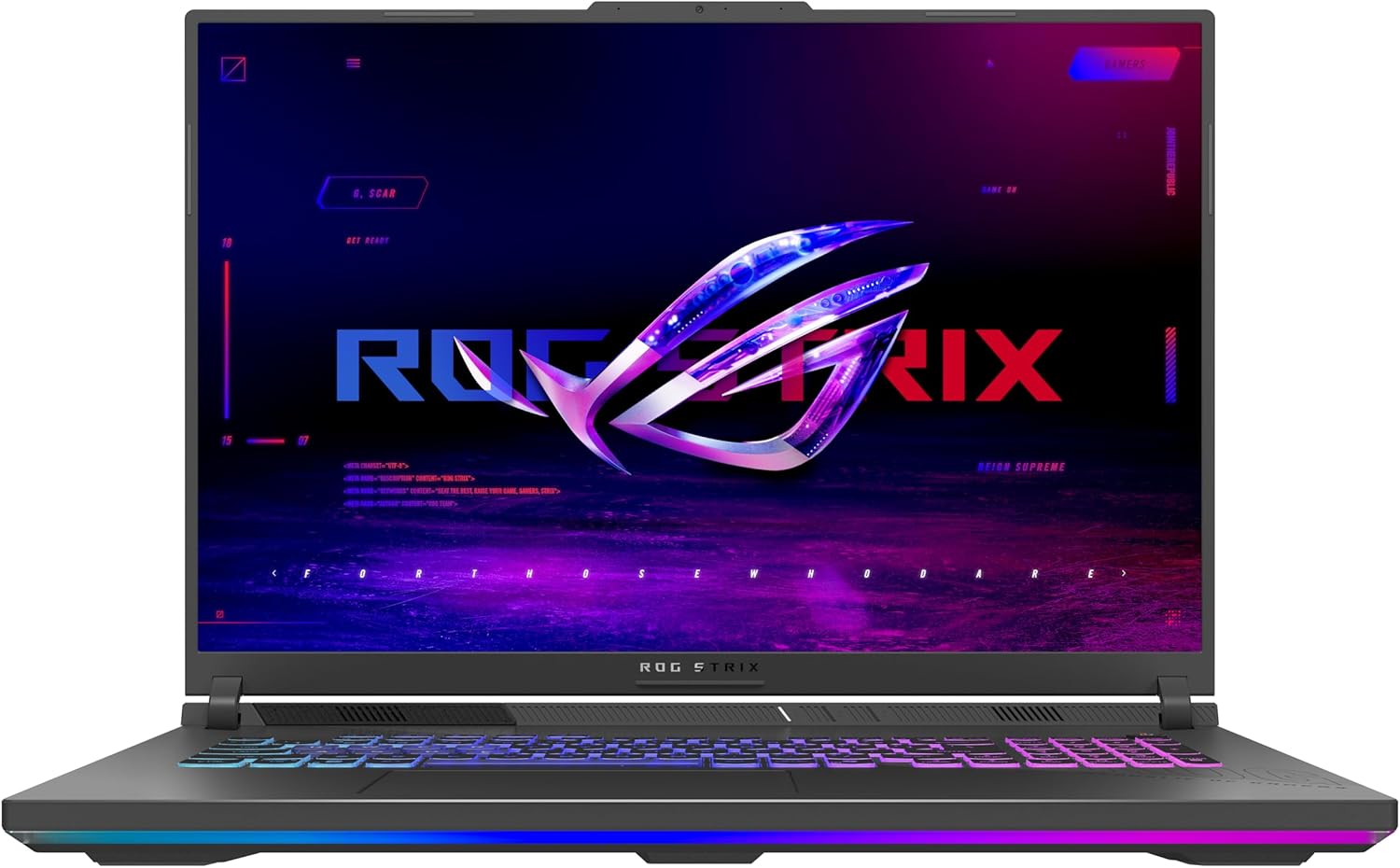
The ASUS ROG Strix G18 (2025) is a large-screen gaming laptop that aims to deliver a desktop-like experience for PC gamers, streamers, and content creators. It combines an 18-inch FHD+ 144Hz display with the latest AMD Ryzen 9 processor and NVIDIA RTX 5050 GPU, making it a strong contender for anyone who needs high performance in a portable form factor. Whether you are into competitive esports, casual open-world games, or creative work like video editing, this laptop is designed to handle it all.
Performance is the standout feature here. The Ryzen 9 8940HX mobile processor and RTX 5050 with Blackwell architecture and DLSS 4 work together to deliver smooth frame rates in most modern titles at high settings. The 144Hz display with a 3ms response time ensures that fast-paced action stays sharp and responsive, which is critical for FPS and MOBA players. The 16GB of DDR5-5200MHz RAM and 1TB PCIe Gen 4 SSD mean you can keep multiple applications open and load games quickly without hiccups.
Build quality is solid, with a black chassis that feels sturdy and premium. The keyboard is esports-ready with good key travel and responsive feedback, and the RGB light bar adds a customizable aesthetic that syncs with other ROG peripherals. For users who need a more professional look, the stealth mode turns off all lighting. The laptop also offers easy upgrade options for RAM and storage, which is a nice touch for those who want to future-proof their setup.
The ROG Intelligent Cooling system with tri-fan technology and a full-width heatsink does an excellent job of keeping temperatures in check during long gaming sessions. While the fans can get audible under heavy load, they keep the system from throttling, which is more important for sustained performance. The display also features an ACR film that improves contrast and reduces glare, making it easier to play in bright rooms.
Connectivity is well-covered with Wi-Fi 6E for low-latency online gaming and a good selection of ports, including two USB 3.0 ports. The Dolby Atmos audio provides immersive sound, though external speakers or a gaming headset will still enhance the experience. The laptop weighs 6.61 pounds, so it is not the most portable option, but it is manageable for moving between rooms or taking to a LAN party.
Overall, the ASUS ROG Strix G18 (2025) is a strong choice for PC gamers who prioritize a large, smooth display and reliable performance. It is particularly well-suited for competitive gamers who need high refresh rates, streamers who multitask between games and broadcasting, and content creators who work with demanding applications. While it is heavier than some competitors and the display resolution is not 4K, the combination of power, cooling, and build quality makes it a practical investment for a serious gaming setup.
The ASUS ROG Strix G18 (2025) is built for gaming, with an AMD Ryzen 9 8940HX processor and NVIDIA GeForce RTX 5050 GPU that handle modern titles at high settings. The 144Hz FHD+ display ensures smooth motion, and the 3ms response time reduces ghosting. DLSS 4 support boosts frame rates in supported games, making it a solid choice for competitive and casual gaming alike.
ROG Intelligent Cooling uses a tri-fan system, full-width heatsink, and full-surround vents to keep the laptop cool during intense sessions. The design prioritizes quiet operation while maintaining performance, though fans can become audible under heavy load. This setup helps prevent thermal throttling, ensuring consistent frame rates over time.
The 18-inch FHD+ display offers a 144Hz refresh rate and 3ms response time, ideal for fast-paced gaming. The ACR film enhances contrast and reduces glare, making it easier to see details in bright environments. While not 4K, the resolution balances performance and clarity well for gaming and everyday use.

Pros
- Exceptional CPU and GPU combination handles AAA titles and creative software with ease
- High-refresh-rate 144Hz IPS display with anti-glare is great for fast-paced esports and immersive single-player games
- Generous 32GB RAM ensures smooth multitasking and future-proofing for demanding applications
- Cooling system keeps thermals in check under load while remaining quieter than previous generations
- USB-C with Power Delivery and DisplayPort 1.4 offers versatile connectivity for external monitors and accessories
Cons
- Battery life may be limited under heavy gaming, requiring frequent plug-in for extended sessions
- Some user reviews report keyboard backlight is white-only rather than RGB as implied by 'backlit'
- Random lag spikes during basic tasks reported by a few users, possibly driver related
The HP OMEN Gaming Laptop is a high-performance portable rig designed for gamers, streamers, and content creators who refuse to compromise on power. At its heart lies the AMD Ryzen 9 8940HX processor, built on Zen 4 architecture, paired with NVIDIA's latest GeForce RTX 5060 laptop GPU featuring Blackwell architecture and DLSS 4. This combination delivers buttery-smooth frame rates at the laptop's 2K (1920x1200) resolution and handles ray-traced titles with impressive fidelity. The 144Hz IPS display with AMD FreeSync keeps visuals tear-free, making it a strong contender for competitive gamers in FPS or MOBA titles.
Beyond raw performance, the OMEN focuses on practical usability. The 32GB of DDR5 RAM and 1TB PCIe SSD ensure near-instant game loading and ample space for a sizable library. The backlit keyboard (though noted by some users as white-only rather than RGB) is responsive for typing and gaming. The cooling system, featuring high-efficiency fans and noise reduction, keeps the laptop from sounding like a jet engine during intense sessions, and OMEN AI adjusts power profiles to optimize for the task at hand.
Build quality is solid, with a sleek Shadow Black chassis that feels durable enough for regular transport between dorm room, home office, and LAN parties. Port selection includes USB-C (with Power Delivery and DisplayPort), USB-A, HDMI 2.1, and an RJ-45 Ethernet port, covering most peripherals and external displays. Wi-Fi 6E and Bluetooth 5.3 keep connectivity fast and stable for online play and streaming.
That said, no laptop is perfect. A few early reviews mention occasional random lag during light tasks, which could be a driver quirk. Battery life is typical for a gaming laptop – expect to stay plugged in for demanding work. Also, the keyboard backlight may not be the full RGB some gamers expect, so check the exact configuration. The lack of facial recognition (no IR camera) is a minor omission for Windows 11 Pro users who prefer biometric login.
For the target audience – college gamers needing a portable powerhouse, streamers wanting to run OBS and games simultaneously, or work-from-home professionals tackling both productivity and gaming – the HP OMEN hits a sweet spot. It's a practical investment for those who want desktop-tier performance without being tied to a desk. Just keep expectations realistic on battery and keyboard lighting.
The Ryzen 9 8940HX and RTX 5060 combo is a beast for 1440p gaming. In titles like Call of Duty and Cyberpunk 2077, you can expect high-to-ultra settings with DLSS 4 enabled. The 144Hz screen ensures smooth motion, and FreeSync eliminates tearing. Competitive players will appreciate the low-latency response, though some may want a higher refresh rate for esports. Overall, this laptop handles modern games without breaking a sweat.
The chassis is sturdy with minimal flex, and the Shadow Black finish looks professional. Weight is around 5.4 pounds – reasonable for a 16-inch gaming laptop. The hinge feels solid, and the cooling vents are well-placed. Port selection is generous, though the lack of an SD card slot might disappoint content creators. The keyboard offers decent travel, but the backlight is single-zone white on many units, not full RGB.
Frequently Asked Questions
Does a Ryzen 9 processor cause thermal throttling in thin gaming laptops?
No, modern Ryzen 9 gaming laptops prevent severe thermal throttling when built with multi-fan cooling and liquid metal compound. AMD designs its HX and HS series processors with aggressive power curves and thermal sensors that balance clock speeds on the fly. Models featuring vapor chambers and three-exhaust fan designs sustain boost clocks reliably during extended gaming sessions. Maintaining clear intake vents and utilizing balanced performance profiles helps keep core temperatures within manufacturer limits.
How much RAM is recommended for the Best Ryzen 9 Gaming Laptop in 2026?
A minimum of 16GB DDR5 memory is standard, but 32GB is optimal for high-end gaming and multitasking. Heavy titles paired with background voice chat, game recording, and web browsers consume more memory than ever before. Choosing a laptop with dual-channel expandable DDR5 RAM ensures smoother 1% low frame rates and eliminates micro-stuttering in dense open-world games.
Can the Best Ryzen 9 Gaming Laptop drive high-resolution external gaming monitors?
Yes, these laptops feature modern HDMI 2.1 and USB-C display outputs capable of driving high-refresh external panels. High-bandwidth ports support 1440p and 4K displays with variable refresh rates enabled to minimize screen tearing. If you compare mobile chips with desktop setups or evaluate top graphics cards for gaming, mobile RTX GPUs offer DLSS 4 and frame generation to keep high-resolution output fluid.
What display refresh rate should competitive players look for on a Ryzen 9 laptop?
Competitive players should look for at least a 144Hz refresh rate, while fast-paced esports enthusiasts benefit from 240Hz panels. Higher refresh panels significantly reduce motion blur and input latency during rapid camera movements in first-person shooters. Displays paired with sub-3ms response times and anti-glare coatings offer clear target acquisition without ghosting artifacts.
Is USB-C fast charging sufficient for gaming on a Ryzen 9 laptop?
No, 100W USB-C fast charging is intended for lightweight productivity and battery replenishment rather than full-load gaming. Demanding gaming sessions draw more power than standard 100W PD adapters can provide, requiring the dedicated high-wattage barrel charger to prevent battery drain while playing. USB-C charging remains a convenient travel feature for school, office tasks, and multimedia playback on the go.


Write Your Review
No reviews yet. Be the first to share your experience!