


Nothing kills the flow of a fast-paced match like a dead battery or a tangled cable. For competitive players, the transition from wired to wireless often means sacrificing some precision or dealing with annoying charging rituals. A Best Gaming Mouse With Charging Dock solves this by combining high-speed sensor performance with a dedicated storage and power station. This setup keeps your desk clean and ensures your device is always ready for the next session without the hassle of hunting for a USB port.
When analyzing the current market, you will notice a wide range of options from brands like KLIM, DAREU, and ATTACK SHARK. Each model offers different benefits, from ultra-lightweight builds to advanced RGB customization on the dock itself. We have carefully reviewed the product specifications, including sensor types, DPI ranges, and connection modes, to help you make an informed decision. Whether you prefer a magnetic charging base or a standard dock, finding the right balance between weight, ergonomics, and battery life is key to a smooth gaming experience.

Pros
- Versatile tri-mode connection lets you alternate between Bluetooth, 2.4GHz wireless, and wired USB-C
- Included magnetic RGB charging dock delivers 5 hours of runtime from a 10-minute quick charge
- Weighs just 59 grams without requiring an external honeycomb shell cutout
- PixArt PAW3311 optical sensor offers adjustable tracking up to 22,000 DPI and a 1000Hz polling rate
- Long-lasting HUANO switches rated for 20 million clicks provide crisp tactile feedback
Cons
- Configuration software availability and full feature support on macOS are not detailed in the product specifications
- Ergonomic contouring and side button layout are exclusively designed for right-handed use
- Total internal battery capacity in milliamp-hours is not specified in the listing
The ATTACK SHARK X11 is an ultra-lightweight optical gaming mouse designed primarily for PC and Mac users seeking fast handling and flexible setup options. Tipping the scales at approximately 59 grams, it is engineered for players and general desktop users who prefer minimal physical resistance during rapid pointer movements. Its ergonomic shell measures roughly 128 by 64 by 40.5 millimeters, with subtly concave primary buttons designed to align with finger contours, making it particularly oriented toward medium to large hands.
Connectivity is a major focal point for the X11, offering tri-mode operation that includes 2.4GHz wireless, Bluetooth, and a wired USB-C connection. Switching among these modes is handled via an integrated button on the underside of the mouse. The listing notes broad compatibility across PC and Mac platforms, while the included charging dock features a built-in USB 2.0 port that allows users to manage their wireless connection without consuming multiple computer ports.
Tracking is managed by a PixArt PAW3311 optical sensor, delivering six adjustable DPI stages that scale up to 22,000 DPI, accompanied by a 1000Hz reporting rate, 300 IPS tracking speed, and 35g acceleration. Physical inputs consist of five programmable buttons backed by HUANO micro switches rated for up to 20 million clicks, alongside a TTC scroll wheel encoder designed for defined stepping. Customization is managed through self-developed driver software, allowing users to reconfigure buttons, tailor DPI intervals, and adjust polling frequencies.
For power management, the mouse relies on an included magnetic RGB charging dock. According to manufacturer specifications, docking the mouse for just 10 minutes yields up to 5 hours of continuous operation, eliminating the need to search for loose charging cables. When wireless operation is not needed or the internal battery is depleted, the mouse can also function over a direct wired USB-C link.
While the feature list is expansive, potential buyers should recognize several practical limitations. The listing identifies compatibility with both PC and Mac, but it does not specify whether the proprietary configuration software is natively supported on macOS or restricted to Windows systems. Additionally, the ergonomic sculpting and side button placement cater to right-handed users, making it unsuitable for left-handed setups. Total battery capacity is also left unspecified, meaning overall runtime between full charges remains undocumented outside the quick-charge estimate.
For desk-bound gamers, students, and home-office workers who value a lightweight build, flexible multi-device connectivity, and the clutter-free convenience of a magnetic desktop dock, the ATTACK SHARK X11 provides a capable array of documented features. Those requiring verified macOS software programming or an ambidextrous shape will want to look elsewhere, but users wanting a responsive sensor and quick docking at an accessible price point will find strong utility here.
The ATTACK SHARK X11 features tri-mode connectivity, allowing users to select between a 2.4GHz wireless link, Bluetooth, and a direct wired USB-C connection. A dedicated button located on the bottom of the mouse allows for quick transitions between these modes, facilitating use across laptops, desktop rigs, or study setups.
The included magnetic charging dock incorporates a USB 2.0 pass-through port. This setup enables users to plug the wireless receiver directly into the dock, occupying only a single port on the host machine while keeping the wireless transmitter positioned close to the mouse pad for optimal signal proximity.
The product data lists compatibility with both PC and Mac computers. However, users should verify their system port availability, as a standard USB connection is required for the dock and wired mode unless appropriate adapters are used.
At the core of the ATTACK SHARK X11 is the PixArt PAW3311 optical gaming sensor. The manufacturer lists tracking capabilities of up to 22,000 DPI across six selectable stages, allowing users to adjust cursor sensitivity to match distinct screen resolutions or in-game roles.
The sensor is documented to support up to 300 IPS tracking speed, 35g acceleration, and a 1000Hz (1ms) polling rate. These specifications provide rapid communication between the mouse and computer, minimizing input delay during demanding gaming operations or high-precision desktop tasks.
Physical tracking is complemented by internal components including HUANO micro switches rated for 20 million clicks and a TTC scroll wheel encoder designed to deliver clear tactile feedback without unwanted double-clicking.
Power is maintained through an included magnetic desktop charging stand with integrated RGB lighting. The magnetic alignment guides the mouse into position, keeping the desktop tidy and reducing physical wear on the USB-C port.
According to the manufacturer specifications, the fast-charging dock provides up to 5 hours of usage from a short 10-minute charge. This allows users to quickly top off power during breaks without prolonged downtime.
When operating away from the dock or during extended sessions, the mouse can also connect and charge simultaneously using a standard USB-C cable, ensuring continuous functionality even when battery reserves are fully depleted.

Pros
- Includes a dedicated charging dock for seamless wireless power management
- Documented support across PC, PS4, and PS5 gaming systems
- Side flanks provide anti-slip grip suitable for palm, claw, and fingertip styles
- Customizable lighting effects and DPI indicator colors through dedicated software drivers
- Backed by a 5-year manufacturer coverage commitment
Cons
- Exact sensor model, maximum DPI value, and polling rate are omitted from the listing specifications
- Dedicated software customization is typically restricted to PC and unconfirmed on consoles
- Specific battery runtime hours and wireless receiver frequency details are not documented
The KLIM Blaze Pro is an ergonomic wireless gaming mouse designed for players looking to declutter their desk while maintaining quick responsiveness. Its white matte finish and underglow RGB rim give it a clean, modern aesthetic that blends seamlessly into both casual home workstations and dedicated gaming spaces. With stated compatibility covering personal computers along with PlayStation 4 and PlayStation 5 consoles, this mouse serves a broad audience of PC and console enthusiasts.
For connectivity, the Blaze Pro operates as a wireless mouse engineered to offer reaction times and tracking responsiveness comparable to wired alternatives. The product documentation confirms out-of-the-box support for PC and modern PlayStation platforms, making it versatile for cross-platform gamers. However, the listing details do not specify the exact wireless transmission standard or receiver format, so buyers should plan to use standard computer and console USB connectivity.
Handling and physical design center around versatility and grip control. The mouse measures approximately 4.92 inches long by 2.66 inches wide with a listed weight of roughly 0.31 pounds. Its side panels feature anti-slip flanks to help maintain control during rapid sweeps across a desk or pad. KLIM notes that the contour and button sizing accommodate palm, claw, and fingertip grip styles equally well. On the durability side, the primary switches are rated for more than 20 million clicks, paired with a wear-resistant exterior coating.
Power management is one of the standout aspects of the Blaze Pro setup. Rather than requiring users to swap out disposable alkaline batteries or untangle charging cables, this mouse comes paired with a dedicated charging dock. The internal battery charges simply by resting the mouse on the dock between gaming or work sessions. In addition to power delivery, the mouse features customizable RGB lighting, including a base rim and a logo that can change color according to active sensitivity stages when configured through dedicated software drivers.
Prospective buyers should take note of several informational gaps in the documented specifications. The product data notes an accurate sensor and adjustable DPI stages, but it does not specify the maximum DPI ceiling, hardware sensor model, or adjustable polling rate levels. Furthermore, expected battery runtime on a single charge is not stated, and driver-based lighting adjustments are generally accessible only on compatible PC environments rather than game consoles.
Overall, the KLIM Blaze Pro is a strong candidate for shoppers seeking an attractive, dock-charging wireless gaming mouse that eliminates the hassle of disposable batteries. Gamers with PC or PlayStation setups who value a comfortable shape, anti-slip handling, and a manufacturer-backed five-year coverage policy will find practical everyday utility here, provided extreme high-end sensor specifications are not their primary purchasing criterion.
The KLIM Blaze Pro provides wireless operation tailored for unrestricted movement during gameplay. The manufacturer lists the mouse as fully compatible with PC systems as well as Sony PS4 and PS5 consoles, offering flexibility for players who game across multiple platforms.
While wireless freedom and console functionality are confirmed, the provided product data does not specify whether connection relies on a dedicated USB wireless dongle or an integrated receiver in the dock. Shoppers should ensure their target system has an accessible USB port available to support the wireless hardware.
Power is handled via an integrated rechargeable battery designed to provide steady usability without the recurring expense or environmental waste of disposable dry-cell batteries. The manufacturer highlights long-lasting battery construction intended to endure repeated charge cycles with minimal degradation.
Recharging is managed through an included desktop charging dock. Users can keep their mouse topped up simply by setting the device onto the dock whenever it is not in use, ensuring it remains charged and ready for action. Specific battery life per full charge cycle is not documented in the manufacturer specifications.
Visual personalization is supported through dedicated software drivers that allow users to manage the vibrant RGB rim wrapping around the bottom edge of the mouse. The software enables adjustment of light patterns, color selections, and overall brightness levels to match individual desktop preferences.
In addition to decorative lighting, the dedicated drivers allow the KLIM logo light to correspond to specific DPI values. This provides a visual cue for current pointer sensitivity settings. Users should confirm operating system compatibility for the configuration software, as driver utility suites are typically designed for PC environments.
The KLIM Blaze Pro is supported by an extensive 5-year coverage commitment directly from the manufacturer, reflecting confidence in the build quality and switch durability. The primary buttons are tested to withstand over 20 million clicks under typical operating conditions.
Customer support is backed by native English-speaking representatives with stated response times within 24 hours, including on weekends. This extended coverage provides added peace of mind for buyers looking for long-term peripheral reliability.

Pros
- Convenient dual OLED screens let you check DPI, polling rate, and battery level directly on the hardware
- Included RGB charging dock simplifies desktop cable management while functioning as a display stand
- Versatile tri-mode connectivity allows easy switching between gaming rigs, laptops, and mobile setups
- On-board memory retains custom button macros and performance settings across different computers
- Lightweight 65-gram ergonomic form factor minimizes wrist strain during long sessions
Cons
- Specific battery capacity in milliamp-hours and estimated single-charge runtime are not stated in listing specifications
- Right-handed ergonomic design is unsuitable for left-handed users
- Operating system compatibility is not detailed beyond recommending the Chrome browser for configuration software
The EPOMAKER NEX Lite is an ultra-lightweight, right-handed wireless gaming mouse designed for gamers, students, and desk workers who value flexible connectivity and real-time hardware telemetry. Weighing approximately 65 grams (2.29 ounces), it features an ergonomic shell sculpted to support medium-to-large hand sizes. Its contours are particularly well-suited for users who prefer either a palm or claw grip style during long computing sessions.
Connectivity is a central strength, offering tri-mode support through 2.4GHz wireless, Bluetooth 5.0, and USB-C wired operation. This variety makes it practical to alternate between a primary gaming desktop and a secondary work laptop without constantly swapping cables. Configuration is handled through an online web application, with the manufacturer recommending Google Chrome for optimal compatibility. While basic pointing functionality works across standard USB and Bluetooth hosts, users on non-standard operating systems should verify browser-based tool support before purchasing.
Under the hood, tracking is powered by the PixArt PAW3311 optical sensor. It delivers specifications including a 12,000 maximum DPI, 300 IPS tracking speed, and 35G acceleration. The mouse comes pre-configured with six selectable DPI levels (400, 800, 1600, 3200, 5600, and 12000). A defining design element is the dual OLED screen system: both the mouse shell and the desktop dock feature compact displays that show active DPI, battery percentage, connection mode, and polling rate. This allows instant stat checks without interrupting your screen workflow.
Everyday charging and desk organization rely on the bundled charging dock. The dock provides a secure magnetic resting point that recharges the mouse between uses while keeping your workspace tidy. It includes touch-sensitive controls to cycle through various RGB lighting patterns or switch the illumination off completely. Five programmable buttons on the mouse support custom key assignments and macro functions, and all profile adjustments save straight to onboard memory for consistent behavior on any connected computer.
There are a few limitations to keep in mind. The product listing does not state the internal battery capacity or estimated hours of continuous runtime per charge, making routine docking recommended. Additionally, the dedicated right-handed contour excludes left-handed users, and individuals with smaller hands may find the medium-to-large shell slightly bulky for finger-tip gripping. For computer users seeking a capable multi-mode pointer with clear visual status displays and an included charging cradle, the EPOMAKER NEX Lite offers a well-equipped desktop setup.
The mouse supports tri-mode operation, accommodating 2.4GHz wireless, Bluetooth 5.0, and a USB-C wired connection. This makes it straightforward to configure for varied setups, from low-latency gaming via wireless or cable to quick Bluetooth pairing with travel laptops.
The included desktop charging dock acts as both a drop-in charging station and an active display. It features integrated RGB accent lighting that can be adjusted or turned off via a touch point, alongside an OLED screen showing key device metrics while the mouse is docked.
Tracking relies on an optical PAW3311 sensor featuring a maximum resolution of 12,000 DPI, tracking speeds up to 300 IPS, and 35G acceleration. Six preset sensitivity stages (400, 800, 1600, 3200, 5600, and 12000 DPI) allow quick adaptation to different screen sizes and gameplay styles.
Five programmable buttons can be customized with complex macros or productivity shortcuts using a web-based configuration utility. Because the mouse includes internal on-board memory, all programmed assignments and sensitivity steps stay saved when moving to a new computer.

Pros
- Dual OLED screens show real-time battery, DPI, and polling rate without opening software.
- Versatile tri-mode connection lets you toggle between 2.4GHz wireless, Bluetooth 5.0, and USB-C wired.
- Dedicated desktop charging dock provides tidy storage and convenient wireless recharging.
- Lightweight 65g right-handed ergonomic body reduces wrist fatigue during long sessions.
- Onboard memory stores custom button mappings and performance parameters directly on the mouse.
Cons
- Right-handed contouring is not suitable for left-handed users.
- Product listing does not state specific operating-system compatibility outside of recommending Chrome for online configuration.
- Product documentation lists an implausible height dimension (0.04 inches) which appears to be a retailer listing error.
The EPOMAKER NEX Lite is an ultra-lightweight, right-handed wireless gaming mouse designed for PC players and everyday desktop users seeking granular control and real-time status monitoring. Weighing in at a listed 65 grams (2.29 ounces), it pairs an ergonomic shell with integrated hardware status displays, making it an appealing option for users who want modern gaming specifications without having to rely on background software to monitor basic settings.
Regarding connection options, the NEX Lite provides tri-mode versatility with 2.4GHz wireless, Bluetooth 5.0, and wired USB-C connectivity. This multi-mode setup allows users to switch between high-speed wireless on a main gaming rig, Bluetooth pairing on a laptop, or standard wired play while charging. While the product documentation does not detail complete operating system compatibility across macOS or Linux, the manufacturer highlights an online configuration utility that operates inside a web browser, noting that Google Chrome is recommended for optimal compatibility.
Handling is engineered around a right-handed ergonomic profile suited for medium-to-large hands using either palm or claw grip styles. Optical tracking is driven by a PixArt PAW3311 sensor capable of up to 12,000 DPI, 300 IPS tracking speed, and 35G acceleration. The mouse includes six preset sensitivity levels ranging from 400 to 12,000 DPI, along with five programmable buttons that can store custom macros and productivity shortcuts directly onto the device onboard memory.
A notable feature of this model is the dual OLED screen configuration found on both the mouse shell and the included desktop dock. These compact displays show active DPI settings, battery percentage, connection status, and polling rates at a glance. The companion dock serves as a dedicated desktop charging station and storage base, complete with a touch-sensitive point to cycle through ambient RGB lighting profiles or switch off illumination entirely.
A few practical limitations should be kept in mind before purchasing. The dedicated right-handed contouring makes the mouse unsuitable for left-handed or ambidextrous grip styles. Additionally, the manufacturer does not document a specific battery capacity rating or runtime estimate in hours. The catalog specifications also state an erroneous height measurement of 0.04 inches, which does not reflect standard ergonomic mouse dimensions and is likely an entry error by the seller.
For right-handed gamers, students, and home-office workers who value physical status displays, lightweight handling, and a tidy desktop charging cradle, the EPOMAKER NEX Lite delivers a robust combination of features. As long as you have a compatible USB port or Bluetooth connection and do not mind using a web browser for button remapping, it offers strong practical utility for everyday desktop use.
The EPOMAKER NEX Lite features tri-mode connectivity, allowing users to select between low-latency 2.4GHz wireless, Bluetooth 5.0, and a standard wired USB-C connection. This flexibility supports switching between a primary desktop computer, a mobile laptop, or a wired desk setup when the battery needs replenishing.
While broad platform compatibility is implied by the standard USB-C and Bluetooth protocols, specific operating system versions are not formally enumerated in the product specifications. However, the manufacturer states that parameter adjustments and button programming are executed through web-based online software, with Google Chrome explicitly recommended for reliable configuration.
Tracking performance is powered by an optical PAW3311 sensor, which is specified to support speeds up to 300 IPS and acceleration up to 35G. These figures accommodate fast swipes and precise aiming adjustments during demanding gaming sessions or fine graphical work.
The mouse comes pre-configured with six distinct DPI levels: 400, 800, 1600, 3200, 5600, and 12000. Because the current DPI and polling rate are displayed continuously on the mouse and dock OLED screens, users can verify their active sensitivity profile instantly without opening an external control panel.
Power is maintained using the included desktop charging dock, which acts as a permanent desk perch and magnetic charging base. This dock keeps the mouse ready to use without requiring loose charging cords cluttering the desk surface.
The dock includes touch-controlled RGB lighting presets that can be adjusted or turned off completely based on personal preference. Both the mouse and dock feature OLED battery indicators showing remaining charge percentages, though exact runtime hours per full charge are not specified in the listed documentation.
Weighing only 65 grams (2.29 ounces), the NEX Lite is built to reduce physical strain during extended gaming sessions or full working days. Its body follows a dedicated right-handed contour engineered specifically for medium-to-large hand profiles.
The manufacturer highlights natural support for both palm and claw grip techniques. Due to the asymmetrical ergonomic sculpting, this mouse is intended exclusively for right-handed users and will not accommodate left-handed orientations.
Pros
- Integrated HyperPolling 8K Hz transceiver eliminates the need for a separate high-polling dongle
- Magnetic alignment holds the mouse firmly in place during charging sessions
- Visual charge status lighting makes it easy to monitor battery levels at a glance
- Tacky anti-slip base prevents sliding without leaving sticky desk residues
Cons
- Restricted hardware compatibility, documented to work only with the Basilisk V3 Pro, Cobra Pro, and Naga V2 Pro
- Does not include a mouse; it is strictly a charging dock and transceiver accessory
- Listing details do not state cable specifications or operating-system software requirements
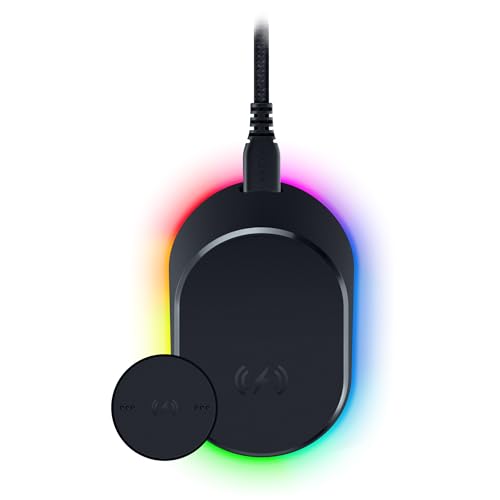
The Razer Mouse Dock Pro with Wireless Charging Puck is a dedicated desktop accessory rather than a standalone mouse. Built specifically for PC gamers who own or plan to purchase compatible Razer wireless pointers, this unit combines an inductive charging stand with a high-performance wireless receiver. For players looking to eliminate loose charging cables from their desks while maintaining rapid wireless communication, this accessory delivers a targeted dual-purpose solution.
A primary feature of the dock is its integrated HyperPolling 8K Hz transceiver. Instead of occupying multiple USB ports with a standard mouse dongle and a separate charging wire, this dock pairs directly with supported mice to handle wireless data transmission at up to an 8,000 Hz polling rate. The product specifications do not detail the exact computer connection cable or port type used to connect the dock itself to your PC, so buyers should confirm port availability on their system before purchasing.
In terms of physical design, the dock measures 5.39 by 4.37 by 4.09 inches and weighs 0.53 pounds in a clean black finish. It features an anti-slip base with a tacky underside designed to maintain steady placement on your desk without toppling over during placement or removal, and the manufacturer notes that it leaves no sticky residue behind. Visual customization comes via 8 Chroma RGB lighting zones, offering underglow illumination customizable across 16.8 million colors with dynamic effects for supported games.
Daily power replenishment is streamlined through magnetic inductive charging. The included wireless charging puck replaces the standard cover puck on the underside of a compatible mouse, allowing the mouse to snap securely onto the angled dock face. While docked, the integrated RGB lighting doubles as a battery gauge, transitioning from red for low charge to yellow for mid-level capacity, and green once the mouse battery reaches full charge.
A critical consideration is compatibility. The manufacturer explicitly limits compatibility to three specific models: the Basilisk V3 Pro, Cobra Pro, and Naga V2 Pro. It will not charge or pair with general wireless mice, older Razer models lacking the puck interface, or non-compatible peripherals. Additionally, managing the 8 Chroma lighting zones and application profiles typically requires companion software, though specific operating-system requirements are not detailed in the listing data.
For owners of the Basilisk V3 Pro, Cobra Pro, or Naga V2 Pro seeking an organized charging routine and high-polling wireless connectivity, the Razer Mouse Dock Pro offers clear utility. It replaces manual cable plugging with magnetic drop-and-charge convenience while simultaneously serving as an 8K Hz receiver. Shoppers using unsupported mice or those content with standard cable charging will find little reason to invest in this dedicated dock.
The Razer Mouse Dock Pro features an integrated HyperPolling 8K Hz transceiver. When paired with a supported Razer gaming mouse, the dock acts as the primary wireless receiver, supporting reporting rates up to 8,000 updates per second without requiring a standalone USB wireless adapter.
Hardware compatibility is strictly limited to three documented Razer gaming mice: the Basilisk V3 Pro, Cobra Pro, and Naga V2 Pro. The product details do not list support for other Razer mice, third-party brands, or standard office mice. Shoppers should verify that their specific mouse model is compatible before purchasing this dock.
Charging functionality relies on inductive magnetic transfer facilitated by the included wireless charging puck. The puck installs into the underside of a compatible mouse, allowing it to dock magnetically in a secure position for reliable power delivery.
The dock provides real-time battery status monitoring through dedicated RGB lighting. Both the dock underglow and paired mouse illuminate to reflect charge status, displaying red when battery power is low, yellow during medium charge, and green when the battery is completely full.

Pros
- Convenient RGB charging dock keeps the mouse charged while neatly storing the USB wireless receiver.
- Tri-mode connectivity makes it easy to switch between low-latency 2.4GHz, Bluetooth 5.2, and USB-C wired modes.
- Lightweight 62g chassis paired with bundled anti-slip grip tape provides customizable handling.
- Configurable PAW3311 optical sensor delivers six adjustable DPI presets up to 22,000 DPI.
- Broad stated compatibility spanning modern and legacy Windows versions along with Mac OS.
Cons
- Specific battery runtime hours between charges are not listed in the manufacturer specifications.
- Full driver software customization may be limited on Mac OS compared to Windows platforms.
- Physical exterior dimensions are omitted from the listing data, making exact hand-size fit difficult to verify beforehand.
The ATTACK SHARK X11 is an ultra-lightweight wireless optical gaming mouse designed for players, students, and office workers seeking responsive tracking alongside organized desktop charging. With a listed weight of 62 grams and an ergonomic shape engineered to support palm, claw, and fingertip grip styles, it aims to reduce hand fatigue during long computer sessions. The clean white finish and included RGB desktop charging base offer an attractive and tidy appearance suitable for both gaming battlestations and productivity desks.
In terms of connection and compatibility, the X11 offers tri-mode flexibility. Users can link to devices using low-latency 2.4GHz wireless, Bluetooth 5.2, or a standard USB-C wired connection. This multi-mode setup allows convenient switching between desktop computers, laptops, tablets, and Mac hardware. The manufacturer states compatibility with Windows XP, 7, 8, 10, and 11 as well as Mac OS, though users will need an accessible USB port or built-in Bluetooth hardware to pair their device.
Handling and control are driven by a PixArt PAW3311 optical sensor with a maximum sensitivity of 22,000 DPI across six adjustable levels, a 1,000Hz polling rate, 300 IPS tracking speed, and 35G acceleration. The mouse features five programmable buttons built with HUYU switches rated for a 20 million click lifespan, paired with a TTC encoder for defined wheel scrolling. Through downloadable driver software, users can fine-tune macros, button shortcuts, DPI steps, polling rates, and lift-off distance (LOD) to match their operational preferences.
Everyday power management is straightforward thanks to the included RGB backlit charging base. The mouse charges directly when seated on the dock, eliminating the need to search for loose charging cords. Additionally, the dock features a dedicated slot to hold the 2.4GHz USB receiver, which keeps the wireless dongle near the mouse for an organized workspace. ATTACK SHARK also includes pre-cut anti-slip grip tape with residue-free adhesive, allowing users to install textured, sweat-resistant grip panels on the primary buttons and side shells.
Prospective buyers should take note of a few unstated details. The product data does not list the battery capacity or provide an estimated battery runtime per charge, meaning overall wireless endurance between dock visits is unspecified. Furthermore, exact exterior dimensions are omitted from the listing, and advanced driver software features typically offer broader configuration support on Windows than on Mac OS.
Overall, the ATTACK SHARK X11 provides solid practical value for users who want an agile 62-gram mouse paired with versatile tri-mode connectivity and an effortless dock-charging routine. If you need a flexible pointer for study, work, or casual gaming across different computers, this model delivers a well-rounded set of documented features.
The ATTACK SHARK X11 provides tri-mode connectivity, giving users the freedom to select 2.4GHz wireless, Bluetooth 5.2, or wired USB-C operation. This variety makes it easy to alternate between desktop towers, portable laptops, and tablets without needing separate input devices for each machine.
Stated operating system compatibility includes Windows XP, 7, 8, 10, 11, and Mac OS. The desktop charging dock serves as an anchor for the 2.4GHz USB receiver, keeping the dongle close to your mouse pad, while Bluetooth 5.2 enables cable-free connection to Bluetooth-compatible laptops without occupying a physical USB slot.
At the core of the mouse is a PAW3311 optical sensor capable of reaching up to 22,000 DPI across six adjustable sensitivity stages. Listed tracking specifications include a 1,000Hz polling rate, 300 IPS tracking speed, and 35G acceleration to ensure consistent tracking across supported desktop surfaces.
Users can customize their controls using dedicated driver software, which allows adjustment of the five programmable buttons, macro bindings, and shortcut assignments. The software also supports tuning for polling rates and lift-off distance, while durable HUYU switches provide tactile clicks rated for up to 20 million cycles.
The X11 stands out by including an RGB backlit charging base directly in the box. Instead of plugging in a charging cable after every session, users can place the mouse onto the magnetic dock to recharge its internal battery during breaks or at the end of the day.
The base also integrates a storage compartment for the 2.4GHz USB wireless dongle, streamlining desktop setup and reducing wire clutter. While exact battery runtime hours are not documented in the manufacturer specifications, the convenient dock design makes regular top-ups effortless.
Pros
- Magnetic dock makes recharging quick and eliminates the hassle of plugging in loose cables.
- Allows uninterrupted play and work by supporting wired use while the battery charges.
- Configurable 400-12,000 DPI range and macro assignment via downloadable DAREU driver.
- Lightweight 85-gram construction provides effortless gliding for work and gaming.
Cons
- Customization software features and macro programming may not be fully supported on macOS.
- No Bluetooth support is documented, requiring a compatible USB port for the wireless receiver or cable.
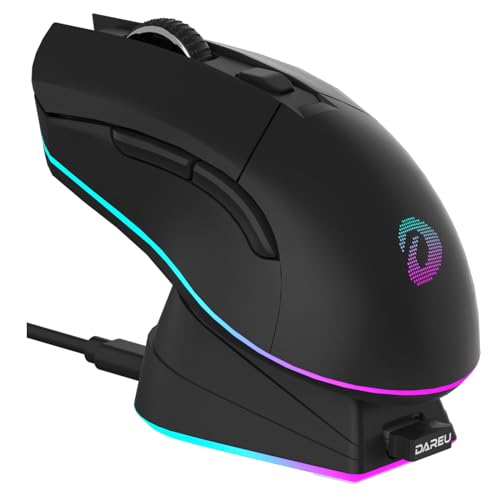
The DAREU EM901X Starry Black is a dual-mode wireless gaming mouse designed for gamers, remote professionals, and students looking for a reliable desktop pointer with effortless power management. Measuring 4.9 by 2.6 by 1.6 inches and weighing approximately 85 grams, this medium-sized mouse offers an agile footprint suitable for both fast-paced gaming sessions and long study or office shifts.
Connectivity centers on dual-mode flexibility, giving users the choice between 2.4G wireless mode and a standard wired connection. The wireless link is built around a documented 1 ms transmission speed and a 1,000 Hz polling rate to minimize input lag. The manufacturer notes compatibility with PC notebooks and Mac systems. Shoppers should note that Bluetooth is not listed, meaning your computer will need an available USB port to accommodate the connection.
For cursor precision and input control, the EM901X incorporates the AIM-WL sensor, which supports sensitivity adjustments from 400 to 12,000 DPI alongside a tracking speed of 300 IPS. The mouse features six programmable buttons that can be remapped through the downloadable DAREU driver software. The internal switches are rated for 50 million clicks, helping ensure consistent actuation and tactile feedback over prolonged daily use.
Power management is one of this model's primary strengths. It houses an internal 930mAh rechargeable lithium battery that provides up to 10 days of working time in 2.4G mode based on manufacturer lab estimates of four hours of daily use. When not in use, the mouse snaps into the included magnetic charging dock, which features adjustable RGB lighting. If power runs low during use, plugging the Type-C cable directly into the mouse allows you to charge and work simultaneously.
While the feature set is broad, buyers should consider a few practical limitations. The absence of Bluetooth means it cannot connect natively to tablets or thin laptops that lack USB ports without an adapter. Furthermore, while the mouse functions as a standard pointing device on Mac computers, advanced driver-based button remapping and macro software typically cater primarily to Windows environments, which Mac owners should keep in mind.
Overall, the DAREU EM901X is a well-rounded pick for desktop and laptop users who prioritize quick charging and responsive tracking. If you want an 85-gram wireless mouse with programmable controls and a dedicated magnetic dock that declutters your workspace, this model offers excellent practical utility.
The DAREU EM901X is equipped with a built-in 930mAh lithium rechargeable battery. According to manufacturer laboratory testing, a full charge can sustain up to 10 days of continuous operation in 2.4G wireless mode based on four hours of daily use.
Recharging is handled primarily through a dedicated magnetic desktop dock. The underside of the mouse aligns and attaches magnetically to the dock pins, making daily charging as simple as resting the mouse on its stand after a session. The charging stand also includes integrated RGB lighting that can be adjusted to match your desk ambiance.
For situations where the battery is depleted during active use, the mouse supports direct charging via a Type-C connection to your computer. This passthrough design ensures you can continue gaming, browsing, or working without waiting for the battery to recharge on the dock.
Tracking on the EM901X is powered by DAREU's AIM-WL sensor. The sensor supports a wide sensitivity range from 400 up to 12,000 DPI, allowing users to tailor cursor movement for wide-screen navigation or fine precision tasks. It also features a tracking speed rating of 300 IPS and a 1,000 Hz polling rate for responsive screen tracking.
Hardware customization is managed through six programmable buttons. Using the official DAREU driver software on compatible systems, users can remap button assignments, record complex macros, adjust DPI stages, and modify the onboard RGB lighting patterns and transition speeds.
The primary left and right buttons utilize mechanical switches rated for 50 million clicks. This switch rating is designed to maintain consistent click resistance and actuation feel over millions of cycles during everyday productivity or intense gaming.
Pros
- Flexible tri-mode connectivity makes switching between desktop computers, laptops, and mobile devices simple
- Magnetic charging dock with RGB accent lighting provides an effortless drop-to-charge routine
- Lightweight 62-gram design offers smooth gliding and reduced fatigue for gaming and office tasks
- PAW3311 optical sensor offers adjustable DPI up to 24,000 for varied display resolutions and sensitivity preferences
Cons
- Customization software is Windows-only and requires a wired USB-C connection to configure
- Manufacturer specifications do not disclose exact battery capacity or estimated hourly battery life
- Physical exterior dimensions are not listed in the product specifications
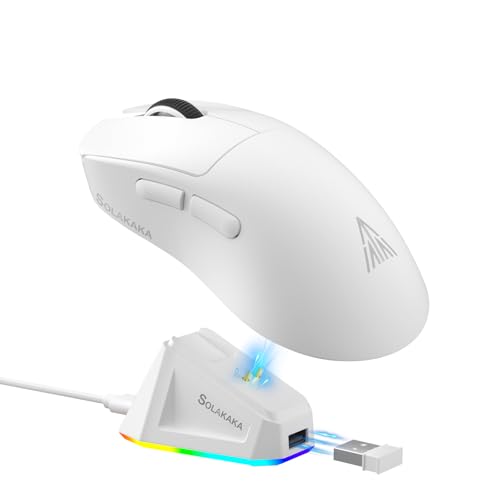
The SOLAKAKA SM822 is a lightweight wireless gaming mouse engineered for versatility across desktop productivity, study, browsing, and fast-paced PC gaming. Weighing in at 62 grams, it targets computer users who want an agile mouse that glides smoothly across a mouse pad without feeling cumbersome. Finished in white with a contoured top shell and tapered waist grips, this model suits both first-time mouse buyers and experienced users seeking a feature-rich pointing device equipped with modern optical tracking hardware.
Connectivity is a standout feature of the SM822, offering tri-mode flexibility that includes 2.4GHz wireless, Bluetooth 5.0, and a USB-C wired connection. The mouse documents broad compatibility across Windows, macOS, iOS, and Android, allowing you to use it on a desktop tower, a work laptop, or a tablet. The included magnetic charging base also acts as a convenient USB pass-through hub, letting you seat the 2.4GHz USB receiver directly into the base to keep the wireless signal close to your mouse.
Tracking is powered by a PixArt PAW3311 optical sensor capable of a 1000Hz polling rate, 300 IPS tracking speed, and 35G acceleration. The hardware supports six onboard DPI presets: 800, 1600, 2400, 3200, 6500, and 12,000. Through downloadable software, users can fine-tune sensitivity in 100 DPI increments up to a stated maximum of 24,000 DPI. Physical controls consist of five programmable buttons, including primary switches and side-mounted forward and backward keys suitable for swift web navigation or custom macro inputs.
Power management is handled through an integrated rechargeable battery paired with a magnetic charging dock. The dock features RGB backlighting and magnetic contact points that allow the mouse to seat naturally into place without wrestling with cables. Alternatively, you can plug a standard USB-C cable directly into the mouse to recharge while continuing to work in wired mode. While the manufacturer does not specify the exact battery capacity in milliamp-hours or runtime per charge, having a dedicated desktop dock encourages consistent drop-and-charge routines between uses.
Buyers should keep a few documented limitations in mind. While basic pointer movement and clicks work across Windows, Mac, Android, and iOS, the customization software is strictly limited to Windows systems. Additionally, the manufacturer notes that configuration software must be run while the mouse is plugged in via wired mode to adjust macros, polling rates, and DPI levels. Exterior physical dimensions are also not detailed in the listing specifications, meaning shoppers with very specific hand sizes must judge fit primarily by its 62-gram form factor.
Overall, the SOLAKAKA SM822 delivers a compelling package of versatile tri-mode wireless connections, a capable PAW3311 sensor, and the daily convenience of a magnetic RGB charging base. It is a practical match for users seeking an agile, multi-device mouse for everyday tasks or casual to mid-tier gaming. If you use a Windows PC and appreciate an organized, cable-free desk setup with simple drop-to-charge functionality, the SM822 offers balanced features and responsive control.
The SM822 offers three distinct connection methods to suit a variety of setups: low-latency 2.4GHz wireless via a dedicated USB dongle, Bluetooth 5.0 for cord-free pairing with mobile devices or laptops lacking full-sized ports, and a wired USB-C mode. The mouse supports Windows, Mac, iOS, and Android operating systems for everyday cursor navigation and clicking.
A thoughtful detail of the included magnetic dock is its integrated USB port. Plugging the included 2.4GHz receiver directly into the dock eliminates the need to reach behind a desktop computer while keeping the receiver within close proximity to the mouse for a stable wireless signal.
Under the hood, the SM822 features the PAW3311 optical sensor, supporting up to a 1000Hz polling rate, 300 IPS tracking speed, and 35G acceleration. Out of the box, you can toggle through six preset DPI sensitivity levels ranging from 800 to 12,000 DPI to match your screen resolution and personal pointer speed preference.
Advanced customization is available via driver software downloadable from the manufacturer website. The software allows fine-tuning sensitivity up to 24,000 DPI in steps of 100, adjusting the polling rate, remapping the five programmable buttons, and recording macros. Note that the software is only compatible with Windows computers and requires the mouse to be connected via USB-C wired mode to apply settings.
Eliminating the ongoing cost of disposable alkaline batteries, the SM822 features an internal rechargeable power supply. Recharging is streamlined by the included magnetic base, which features RGB accent lighting and guided pins that snap the mouse securely into place when not in use.
If you need to power up while working or gaming, the mouse can be connected directly to your computer using a USB-C cable. While the manufacturer does not publish exact battery runtimes or recharge durations, the desktop dock makes routine charging between computing sessions effortless.

Pros
- Magnetic dock makes recharging seamless and reduces the need to constantly plug and unplug charging cables.
- Lightweight 62-gram shell allows for fast, low-effort mouse sweeps during gaming or extended work sessions.
- Tri-mode functionality makes it easy to switch between desktop gaming rigs, office laptops, and mobile devices.
- PAW3311 sensor provides substantial tracking headroom with an adjustable polling rate up to 1000Hz.
Cons
- Customization software is exclusively compatible with Windows and requires a wired USB-C connection to run.
- The manufacturer does not state battery capacity or expected operating hours per charge in the listing specifications.
- Side button placement is oriented for right-handed use, which may not suit left-handed users seeking ambidextrous side controls.
The SOLAKAKA SM822 is a feature-packed gaming mouse engineered for players and general computer users who want lightweight agility combined with modern wireless convenience. Tipping the scales at an agile 62 grams, this mouse addresses the growing demand for low-mass peripherals that glide effortlessly during high-speed desktop use. Its contoured shape features a tapered waist on the sides to provide a firm grip point, paired with a curved top designed to sit comfortably underneath the palm. Whether you are replacing an older, heavier office mouse or outfitting a modern gaming setup, the SM822 offers a balanced blend of everyday practicality and gaming-focused hardware.
Connectivity is one of the standout features of this device, offering tri-mode pairing that supports 2.4GHz wireless, Bluetooth 5.0, and a standard USB-C wired link. According to the manufacturer, the mouse supports Windows, Mac, iOS, and Android platforms, allowing it to interface smoothly with laptops, desktop towers, and mobile workstations. Setup is versatile: you can plug the mouse directly into a computer using the USB-C cable for zero-latency wired use, pair via Bluetooth for on-the-go productivity without dongles, or connect via 2.4GHz wireless for responsive desk performance.
At the heart of the SM822 is the PAW3311 optical gaming sensor. Documented specifications include tracking speeds up to 300 IPS, 35G acceleration, and a 1000Hz polling rate to ensure quick desktop reporting. The mouse features six onboard DPI presets ranging from 800 up to 12,000, allowing users to adapt pointer speed without touching a control panel. For power users seeking deeper control, downloadable configuration software allows fine sensitivity adjustments in 100-DPI increments all the way up to 24,000 DPI. The mouse provides five programmable buttons, including forward and backward side switches that streamline web browsing and in-game keybinds.
Power management is anchored by an included magnetic charging dock featuring RGB backlighting. Rather than fumbling with loose cords at the end of the day, users can simply rest the mouse on the magnetic base to replenish its rechargeable battery. An added functional benefit is that the dock accepts the mouse's 2.4GHz USB receiver, effectively bringing the wireless antenna closer to the mouse pad while freeing up front-panel computer ports. This dual-purpose base keeps the desktop tidy while eliminating frequent USB plugging and unplugging.
While the hardware offers considerable versatility, prospective buyers should consider a few clear limitations. The companion software required for recording macros, remapping buttons, and adjusting the polling rate is only compatible with Windows systems. Mac, iOS, and Android users can utilize the mouse for standard navigation, but cannot access deep customization tools. Furthermore, running the driver software requires the mouse to be connected in wired USB-C mode. Additionally, the manufacturer does not specify the battery's milliamp-hour rating or estimated runtime between dock visits, making actual battery longevity dependent on individual usage habits and lighting modes.
For Windows gamers and home-office workers who value a lightweight build, versatile connection options, and the convenience of a dedicated magnetic charging dock, the SOLAKAKA SM822 presents a compelling package. It bridges the gap between competitive tracking specifications and daily desktop utility. Shoppers on non-Windows platforms or those who prefer heavy, oversized mice may want to look elsewhere, but for those seeking a fast, dock-rechargeable wireless mouse, it represents a well-equipped option.
The SOLAKAKA SM822 provides comprehensive tri-mode connectivity, giving users the freedom to adapt their connection to different computing setups. Users can pair via low-latency 2.4GHz wireless using the included USB dongle, connect through Bluetooth 5.0 for wire-free portability without taking up a USB port, or plug in directly using a USB-C cable for simultaneous charging and wired operation.
Documented operating-system compatibility spans Windows, Mac, iOS, and Android devices. This makes the mouse suitable for multi-device environments, such as switching between a desktop PC for gaming and an Apple or Android tablet for light productivity. Keep in mind that while standard pointer functionality is broad across these operating systems, full software configuration is restricted to Windows computers.
Precision tracking on the SM822 is driven by the PAW3311 optical sensor, a dedicated gaming sensor known for reliable tracking across gaming surfaces. The sensor offers a maximum tracking speed of 300 inches per second (IPS), up to 35G of acceleration, and a rapid 1000Hz polling rate, which updates pointer position every single millisecond.
For sensitivity management, the mouse includes six default hardware levels: 800, 1600, 2400, 3200, 6500, and 12,000 DPI. When paired with the Windows driver software, the sensitivity ceiling can be expanded up to 24,000 DPI with step adjustments of 100 DPI, allowing users to fine-tune cursor response to match their specific monitor resolution and personal preferences.
Recharging the SM822 is handled through a magnetic charging base equipped with ambient RGB backlighting. The magnetic alignment allows users to effortlessly drop the mouse onto the stand when stepping away from the desk, ensuring the device remains powered without wearing out physical charging ports.
In addition to charging, the dock acts as a wireless receiver hub. The mouse's USB receiver can be inserted directly into the base while the base is tethered to the computer via cable. This places the receiver within close proximity to the mouse pad to maintain a stable 2.4GHz connection. The product listing does not provide specific battery capacity or hours of continuous runtime, so frequent docking between sessions is recommended.
Configuration of the SOLAKAKA SM822 is handled through dedicated software available for download from the manufacturer's website at solakakadriver.com. Through the utility, users can remap the five programmable buttons, build custom macros, modify polling rates, and adjust custom DPI stages.
It is important to note two operational conditions for software usage: the utility is exclusively built for Windows operating systems, and the mouse must be connected via its USB-C cable in wired mode to configure settings. Users on macOS or mobile platforms can use the mouse in standard modes, but cannot customize button maps or advanced sensor parameters.

Pros
- Tri-mode flexibility allows rapid switching between 2.4GHz wireless, Bluetooth 5.2, and USB-C wired setups.
- Bundled RGB charging dock simplifies desktop cable management while providing a secure resting and charging station.
- Weighs only 62 grams, helping reduce hand fatigue during extended computing or gaming sessions.
- Includes pre-cut anti-slip grip tape in the box to customize tactile control.
- Driver software allows fine-tuning of sensitivity, button assignments, polling rate, and lift-off distance.
Cons
- The product listing does not state the exact battery capacity in milliamp-hours or provide estimated runtime per charge.
- Advanced driver software customization features are primarily geared toward Windows, leaving Mac software support unverified.
- Physical exterior dimensions are not provided in the specifications, making exact hand-fit comparison difficult prior to purchase.
The ATTACK SHARK X11 is an ultra-lightweight gaming mouse engineered for computer users seeking agile tracking, comfortable handling, and versatile connection options. Weighing in at approximately 62 grams, this mouse is configured to reduce hand fatigue across extended desk sessions. Its contoured shape is designed to accommodate palm, claw, and fingertip grip styles, making it suitable for desktop gamers, remote workers, and students who prefer a fast, low-drag mouse for everyday productivity or gaming.
Connectivity is a primary strength of the X11, featuring tri-mode support that includes 2.4GHz wireless, Bluetooth 5.2, and wired USB-C operation. This lets users alternate between desktop computers, laptops, tablets, and Mac workstations without hassle. According to manufacturer specifications, the mouse is compatible with Windows XP, 7, 8, 10, and 11, as well as Mac OS. Users will simply need an available USB port for wired connection or receiver docking, or native Bluetooth capability on their host machine.
Tracking performance relies on the PixArt PAW3311 optical sensor, which lists a sensitivity ceiling of up to 22,000 DPI across six adjustable levels, accompanied by a 300 IPS tracking speed, 35G acceleration, and a reporting rate of 1,000Hz. Physical inputs include five programmable buttons operated by HUYU mechanical switches rated for a 20-million-click lifespan. Scrolling is managed by a TTC encoder engineered for precise, distinct steps, while driver software allows users on supported operating systems to reconfigure macros, shortcuts, polling intervals, and lift-off distance.
Desk setup and power management are streamlined by an included RGB backlit charging dock. Instead of plugging cables directly into the mouse between uses, the unit can simply rest on the magnetic dock to replenish its internal rechargeable battery. Furthermore, the dock features a pass-through slot for the 2.4GHz USB receiver, which keeps the wireless signal close to the mouse pad while keeping desk space tidy. The package also includes pre-cut, sweat-resistant anti-slip grip tape that can be applied to the shell for extra traction.
While the feature set is broad, prospective buyers should keep realistic limitations in mind. The product specifications do not state the exact battery capacity or how many hours of continuous use to expect on a single charge. Additionally, while the mouse functions on Mac OS for standard navigation, driver software customization for programmable buttons and macros typically requires a Windows environment. Finally, exact shell dimensions are omitted from the listing, so users with particularly large or small hands will have to gauge fit based solely on the general shape and 62-gram weight profile.
For computer users wanting a capable lightweight pointer that avoids the clutter of loose charging cables, the ATTACK SHARK X11 presents a practical package. The inclusion of an RGB charging dock, tri-mode wireless switching, high-DPI optical tracking, and bundled grip tape provides strong utility for shoppers building a clean, responsive gaming or office workstation.
The ATTACK SHARK X11 supports three distinct connection methods: low-latency 2.4GHz wireless, Bluetooth 5.2, and direct USB-C wired mode. This tri-mode functionality makes it easy to toggle between different workstations, such as a desktop PC for gaming and a laptop or tablet for portable tasks.
The mouse documentation specifies broad system compatibility covering Windows XP, 7, 8, 10, and 11, along with Mac OS. Connecting via 2.4GHz wireless requires a standard USB port for the included receiver, while Bluetooth mode connects directly to devices with integrated Bluetooth support without occupying a physical port.
At the core of the mouse is the PixArt PAW3311 optical sensor, which provides six adjustable DPI presets reaching up to a maximum of 22,000 DPI. This wide sensitivity span allows users to adapt pointer movement to high-resolution monitors, quick gaming sweeps, or slow, meticulous desktop tasks.
Manufacturer specifications outline a tracking speed of 300 IPS, acceleration tolerance of up to 35G, and a maximum polling rate of 1,000Hz. Through the driver software, users can fine-tune tracking parameters including report rates and sensor lift-off distance (LOD) to match their personal preferences and mouse pad surface.
Built with a lightweight chassis weighing approximately 62 grams, the X11 is designed to support palm, claw, and fingertip grip styles without excessive weight. The primary buttons utilize HUYU switches with a stated durability of up to 20 million clicks, paired with a TTC encoder for structured scroll wheel feedback.
The package includes an RGB desktop charging dock that acts as both a charging stand and an elevated USB receiver base. ATTACK SHARK also supplies a set of pre-cut, sweat-resistant anti-slip grip tape engineered with residue-free adhesive, allowing users to enhance shell grip if desired.
Frequently Asked Questions
Do I need a USB receiver for these mice?
Most models in this list use a 2.4 GHz wireless connection, which requires a small USB receiver. This provides lower latency than Bluetooth for competitive gaming. The receiver often stores directly in the charging dock to keep your desk organized.
Is the charging dock compatible with all brands?
Generally, no. The charging docks are usually proprietary to the specific mouse model. For example, the Razer dock works only with compatible Razer mice. Always check the product description to ensure the dock matches your mouse.
How does the polling rate affect gameplay?
A higher polling rate, such as 1000 Hz, means the mouse reports its position more frequently. This results in smoother cursor movement and faster response times. Most mice here offer 1000 Hz, which is standard for high-end gaming performance.
Can I use these mice with Mac?
Yes, many of these mice support Bluetooth and 2.4 GHz connections compatible with Mac OS. However, advanced features like button remapping might require Windows-specific software. Check the compatibility list before purchasing if you are a Mac user.
What is the benefit of a magnetic dock?
Magnetic docks ensure the mouse aligns perfectly for charging without fumbling with ports. They provide a secure, stable connection that is quick to use. This design is particularly helpful for players who want to switch between devices rapidly.



Write Your Review
No reviews yet. Be the first to share your experience!