


Matching Performance Pointers with Apple Laptops
MacBook Pro users often face unique hardware hurdles because modern Apple laptops feature USB-C ports instead of traditional USB-A connections. Plugging in a standard wired peripheral or a 2.4 GHz wireless dongle frequently requires an external hub, while Bluetooth connections help preserve physical ports for charging and external monitors. Selecting the best gaming mouse for macbook pro setups involves balancing physical connectivity options against sensor precision and hand comfort. Whether you coordinate quick movements across a dedicated gaming desk setup or need a pointer for travel, connection reliability remains paramount.
Sensor sensitivity and button configurations also define the daily experience on macOS. Top models offer high DPI optical sensors, on-board memory for button mapping, and dual-mode scroll wheels that assist with rapid navigation. Because software customization tools can differ across operating systems, evaluating hardware specifications and native plug-and-play capabilities ensures a smooth workflow. Examining connection types, ergonomic contours, and switch durability allows you to identify the ideal pointing device without guessing.

Pros
- Exceptional sensor accuracy with HERO 25K for competitive edge
- Fully customizable weight and balance for personalized feel
- 11 programmable buttons with on-board memory for on-the-go profiles
- Durable mechanical switch tensioning for reliable clicks
- Great value for the feature set at this price point
Cons
- Wired design may not suit gamers who prefer wireless freedom
- Requires Logitech G Hub software for full RGB and macro customization
- Weight of 121g (plus optional weights up to 140g) may feel heavy for some FPS players
The Logitech G502 Hero is a well-known wired gaming mouse that has been a staple in the PC gaming community for years. With the latest HERO 25K sensor, it offers impressive tracking performance up to 25600 DPI without any smoothing, filtering, or acceleration. This makes it a solid choice for competitive gamers who need precise aim in FPS titles like Valorant or Call of Duty, as well as for streamers and content creators who want reliable cursor control for editing or multitasking.
What sets the G502 Hero apart is its versatility. You get 11 programmable buttons, including a dual-mode hyper-fast scroll wheel that can free-spin for rapid scrolling or click through with notches for precise steps. This is especially handy for MOBA and MMO players who need quick access to abilities, or for productivity users who want shortcuts for copy-paste and app switching. The adjustable weight system allows you to add or remove up to five 3.6g weights to tweak the balance and heft, letting you dial in the perfect feel for your grip style.
Build quality is robust with a textured rubber grip on the sides and a durable braided cable that resists tangling. The mechanical switch button tensioning system uses metal springs to deliver crisp, consistent clicks with minimal pre-travel, which is crucial for rapid-fire shooting in games like Apex Legends. The LIGHTSYNC RGB lighting is fully customizable via Logitech G Hub software, and you can sync it with other Logitech G peripherals or game events for an immersive setup.
Setting up the G502 Hero is straightforward: plug it in via USB, and it works out of the box with default settings. For advanced customization, the Logitech G Hub software is required, which some users find a bit bloated, but it offers deep control over DPI steps, button mapping, lighting effects, and surface tuning. The on-board memory stores up to three profiles, so you can bring your settings to LAN parties or tournaments without needing the software installed.
One limitation is that the mouse is wired, which may be a drawback for those who prefer the clutter-free feel of wireless mice. Also, at around 121g without weights, it is heavier than some lightweight competitors favored by fast-paced FPS players. However, many users appreciate the solid feel and the ability to adjust weight. The shape is ergonomic and comfortable for palm and claw grips, though those with very small hands might find it a bit large.
Overall, the Logitech G502 Hero is a fantastic wired gaming mouse that balances performance, customization, and comfort at a reasonable price. It's ideal for PC gamers who want a feature-rich mouse for a variety of genres, competitive gamers who value sensor accuracy, and streamers who need extra buttons for OBS controls. If you don't mind the wire and prefer a customizable, weight-adjustable mouse, this is one of the best options available.
The G502 Hero's HERO 25K sensor is one of the most accurate on the market, capable of detecting movements at the sub-micron level. In real-world gaming, this translates to smooth, responsive tracking with no jitter or acceleration, even at the highest DPI settings. The sensor's 400+ inches per second (IPS) tracking speed ensures you won't experience spin-out during fast flicks in games like Overwatch or Rainbow Six Siege.
The 11 programmable buttons are well-placed for quick access without accidental presses. The dual-mode scroll wheel is especially useful in games where you need to switch weapons or abilities rapidly, or for browsing inventory. The mechanical switch tensioning provides a tactile, audible click that gives you confidence in every input. For competitive play, the on-board memory allows you to store your DPI and button configurations so you can maintain consistency across different PCs.
While the weight is higher than some dedicated lightweight mice, many players find the G502 Hero's balance and adjustable weight system help with stability and control. The PTFE feet glide smoothly on most mouse pads, and the braided cable minimizes drag. Overall, this mouse delivers top-tier performance for a wide range of gaming styles.
The Logitech G Hub software provides comprehensive control over the G502 Hero. You can adjust DPI settings in increments of 50 (up to 25600), assign macros to any of the 11 buttons, and create custom lighting effects using the LIGHTSYNC engine. The software also supports game-specific profiles that automatically switch when you launch a title, and you can sync lighting across all your Logitech G devices.
One of the standout features is the surface tuning tool, which optimizes the sensor for different mouse pad textures. This is a nice bonus for gamers who use a variety of surfaces. The on-board memory can store up to three profiles, so you can use the mouse on other computers without losing your settings. However, note that the software is required for initial profile setup, and some users report it being resource-heavy. Still, once configured, the mouse works independently.
For RGB enthusiasts, the lighting can be set to static colors, breathing, cycling, or reactive effects that respond to in-game actions like kills or health status. Overall, the software offers deep customization that caters to both competitive players and those who want a personalized aesthetic.
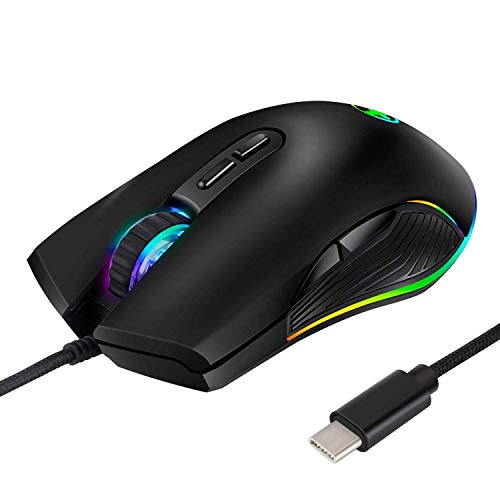
Pros
- USB-C connector offers wide compatibility with modern laptops, tablets, and smartphones.
- Adjustable DPI settings allow customization for different gaming styles or productivity tasks.
- Ergonomic build and soft surface help prevent hand strain during extended use.
- No software required; just plug in and start using immediately.
- Multiple RGB modes add visual appeal to any desktop setup.
Cons
- Limited to wired connectivity; no wireless or Bluetooth option for clutter-free setups.
- Side buttons are absent, which may disappoint MOBA or MMO players who rely on extra programmable controls.
- Build materials feel basic compared to premium gaming mice, though acceptable at this price.
The HXMJ RGB LED Gaming Mouse is a wired USB-C peripheral designed for gamers and users who want a straightforward, no-fuss pointing device with a touch of RGB flair. It’s built around a standard optical sensor with four DPI presets (800, 1600, 2400, and 3200), making it suitable for everything from casual web browsing to fast-paced FPS games. The USB-C connector is its standout feature, offering compatibility with newer Apple MacBooks, Chromebooks, and any laptop or tablet that supports USB-C, all without needing a dongle.
This mouse is best suited for casual gamers, college students, or work-from-home users who need a reliable, budget-friendly option that works with modern devices. Esports players or competitive gamers seeking ultra-precise tracking or customizable side buttons may want to look at higher-tier options, but for everyday gaming and productivity, the HXMJ covers the basics well. The ergonomic design helps reduce fatigue during long sessions, and the four RGB modes (including a side flow effect) let you match your setup’s color scheme with a simple button press.
In terms of real-world performance, the wired connection means zero input lag, so your clicks and movements register instantly. The DPI switch is easy to reach on the top of the mouse, letting you adapt to different tasks on the fly. The sensor provides accurate tracking on most surfaces, though it won’t match high-end gaming sensors used in premium mice. For most daily gaming, streaming overlays, or Discord chats, it delivers enough responsiveness to keep you in the action.
Build quality is adequate for the price. The plastic shell feels lightweight but sturdy enough for regular use. The braided cable is a nice touch since it resists tangling and adds durability. There are no side buttons or software customization, so you won’t be able to remap keys or save profiles, but the plug-and-play simplicity means you can use it on any computer without installing drivers. Cleaning is easy; a quick wipe with a damp cloth keeps the surface looking fresh.
A realistic limitation is the lack of wireless freedom. If you prefer a clean desk with no cables, this mouse won’t fit that vision. Also, the absence of side buttons may disappoint gamers who rely on extra inputs for abilities or macros. However, these trade-offs are typical at this price point.
For budget-conscious gamers, students, or anyone who needs a functional USB-C mouse with a bit of RGB style, the HXMJ is a practical buy. It offers good compatibility, solid ergonomics, and sufficient DPI range for most non-competitive gaming and everyday tasks. If your priorities are affordability, simplicity, and a cable that works with modern laptops, this mouse deserves a spot on your desk.

Pros
- Highly accurate 26K DPI sensor with zero smoothing for responsive aiming
- Versatile HyperScroll wheel with three modes adapts to different tasks
- Comfortable ergonomic design with thumb rest for extended use
Cons
- Wired USB connection may limit desk cable management for some setups
- Software required for full customization, which may be a minor setup step
- Larger hand size may prefer a more extended shape for palm grip
The Razer Basilisk V3 is a wired ergonomic gaming mouse designed for PC gamers who demand precision, customization, and comfort. It features a 26K DPI optical sensor, 11 programmable buttons, and a unique HyperScroll tilt wheel that can switch between tactile and free-spin modes. This mouse caters to competitive gamers, casual players, streamers, and content creators looking for reliable performance and vibrant RGB lighting.
In real-world gaming scenarios, the Focus+ 26K DPI sensor delivers crisp tracking with zero smoothing, making it ideal for fast-paced FPS games and precise MOBA clicks. The optical switches actuate at 0.2ms, reducing input lag and preventing accidental clicks during intense matches. The HyperScroll wheel is a standout feature: use tactile mode for weapon cycling or free-spin mode for rapid document scrolling, with Smart-Reel automatically switching based on scroll speed.
Build quality is solid with a durable USB cable and a comfortable ergonomic shape that includes a thumb rest. The 11 programmable buttons are well-placed for quick access to macros, push-to-talk, or pings. The 11 RGB lighting zones are customizable via Razer Synapse, allowing syncing with over 150 games for dynamic lighting effects that enhance any gaming setup.
Setup is straightforward: plug into a USB port, install Razer Synapse for full customization, and adjust DPI, lighting, and button assignments. The mouse is lightweight at 3.56 ounces, reducing fatigue during long sessions. However, the wired connection may require cable management to keep the desk tidy.
One limitation is the need for Razer Synapse software to unlock all features, which might be a minor inconvenience for some users. Additionally, while the ergonomic design suits most hand sizes, gamers with larger hands might prefer a more extended shape for palm grip. Despite this, the Basilisk V3 offers excellent value for its price.
Overall, the Razer Basilisk V3 is a practical choice for PC gamers, streamers, and esports players who want a customizable, comfortable mouse with top-tier sensor accuracy and versatile scroll wheel options. It performs well across various genres and integrates seamlessly into RGB-heavy setups, making it a reliable addition to any gaming desk.

Pros
- Excellent wireless performance with low latency and no noticeable lag.
- Comfortable ergonomic shape for extended use, with a solid build quality that feels durable.
- High DPI range and easy on-the-fly adjustment suitable for various game genres.
- Great value with lots of features – programmable buttons, RGB, and long battery life.
- Simple software for remapping buttons and customizing lighting without bloatware.
Cons
- The mouse is relatively lightweight (8.8 oz) – some users used to heavier mice may need time to adjust.
- The included USB-C cable uses a snap-in design that may not work with standard cables, limiting replacement options.
- Software is basic but functional; advanced users might want more detailed customization.
The Redragon M810 Pro is a wireless gaming mouse built to deliver solid performance without the premium price tag. It's aimed at PC gamers who want low-latency wireless freedom, customizable controls, and RGB flair for their desk setup. Whether you're into competitive FPS shooters, casual MOBA sessions, or just need a reliable mouse for work and play, this model packs a surprising amount of features for its cost.
At the heart of the M810 Pro is a Pixart 3325 optical sensor that supports up to 10,000 DPI with five adjustable levels (500/1000/2000/3000/10000). Combined with a 1ms polling rate over the 2.4Ghz wireless connection, the mouse feels snappy and responsive. According to user feedback, the tracking is accurate and there's no perceptible lag – important for fast-paced gaming where every millisecond counts. The 8 programmable buttons, including a dedicated rapid fire key and two side macros, give you plenty of room for customizing hotkeys for games like Fortnite, Apex Legends, or even productivity tasks in Photoshop or Excel.
Build quality is reassuring for a budget-friendly mouse. The right-hand ergonomic shape with a skin-friendly matte finish fits well for medium to large hands, and the grooved scroll wheel adds a nice tactile feel. Many users report it's comfortable for long hours of gaming or browsing, with minimal hand fatigue. The mouse also features full RGB backlighting that you can control via the Redragon Pro driver – choose from breathing, wave, or fixed colors to match your setup. The software also lets you remap all buttons and set macro sequences, though it's straightforward rather than feature-packed.
One standout feature is battery life. In eco mode, the M810 Pro can last up to 45 hours on a single charge, and it automatically goes to sleep after 8 minutes of inactivity. Recharging is easy via the included USB-C cable, though note that the cable has a snap-in locking mechanism – it's not a standard USB-C plug, so you'll want to keep the included cable handy. The mouse also works wired while charging, so you can switch between modes as needed. The 2.4Ghz dongle stores neatly underneath the mouse for travel.
On the downside, the lightweight design (8.8 ounces) might not suit everyone – those used to heavier mice like the Logitech G502 might find it too light for their taste. The software, while sufficient for most, could be more intuitive for advanced users. Also, the proprietary charging cable is a minor inconvenience if you misplace it. However, these are small trade-offs given the price point.
Overall, the Redragon M810 Pro is a smart buy for PC gamers on a budget who want reliable wireless performance, customizable features, and decent ergonomics. It's especially well-suited for competitive and casual gamers, streamers who need quick button access, and anyone building a gaming setup without overspending. If you value performance and comfort without the high cost, this mouse deserves a spot on your desk.
The M810 Pro's Pixart 3325 sensor delivers accurate tracking up to 10,000 DPI with a 1ms report rate, making it suitable for both twitch shooters and strategy games. The 2.4Ghz wireless connection is stable and feels like wired – no dropped inputs or interference during normal use. The rapid fire key (next to left click) is a nice bonus for games that require fast repeated clicks like MMOs or battle royales. Eight programmable buttons let you assign critical actions directly without reaching for the keyboard.
Designed with a right-hand, contoured shape, the M810 Pro offers a comfortable grip for palm, claw, or fingertip styles. The matte finish resists fingerprints and provides a secure hold even during sweaty sessions. Weighing 8.8 ounces, it's on the lighter side, which many gamers prefer for quick flicks. The side buttons are well-placed and easy to reach without accidental presses. Most users report minimal fatigue even after hours of use, making it a solid choice for both gaming and everyday computing.

Pros
- Exceptional battery life – up to 285 hours on HyperSpeed and 535 hours on Bluetooth reduces charging anxiety.
- High-precision 18K DPI sensor with zero spinouts ensures reliable tracking in fast-paced FPS and MOBA games.
- Comfortable ergonomic design with textured rubber side grips for secure hold during intense matches.
- 9 programmable buttons plus Hypershift provide immense customization potential for macros and secondary commands.
- Durable mechanical switches rated for 60 million clicks offer long-lasting performance.
Cons
- Uses a single AA battery (included) rather than a built-in rechargeable cell, which may be less convenient for some users.
- Weighs about 3.88 ounces (110g), which might feel slightly heavy for gamers who prefer ultralight mice.
- No onboard memory for saving profiles without Razer Synapse software, requiring software setup on each new PC.
The Razer Basilisk V3 X HyperSpeed is a wireless gaming mouse designed to meet the demands of PC gamers who value both performance and endurance. Built on the beloved Basilisk shape, it offers an ergonomic form that suits various grip styles and hand sizes, making it a comfortable companion for marathon gaming sessions, whether you’re grinding ranked matches in Valorant or exploring open-world titles.
Performance-wise, this mouse is driven by Razer’s 5G Advanced 18K optical sensor, which provides up to 18,000 DPI and 99.4% tracking accuracy. In practice, users report smooth, jitter-free cursor movement and no spinouts during fast flicks, which is critical for competitive esports players and casual gamers alike. The HyperSpeed wireless connection delivers low-latency performance comparable to wired mice, while Bluetooth mode extends battery life up to 535 hours for everyday use or travel.
The nine programmable controls include two side buttons, a multi-function trigger (great for Hypershift), and a scroll wheel with left/right tilt. Using Razer Synapse, you can assign complex macros, secondary commands, or media controls to any button, tailoring the mouse to your workflow or gaming style. The Razer Mechanical Switches Gen-2 feature gold-plated contacts rated for 60 million clicks, ensuring consistent tactile feedback over years of use.
Build quality is solid, with a classic black matte finish that resists fingerprints and textured rubber side grips for a confident hold. The mouse weighs around 110 grams, which is on the heavier side for competitive FPS gamers but offers stability for slower, precise movements. Setup is straightforward: plug in the USB dongle, insert the included AA battery, and you’re ready to go. Razer Synapse provides deep customization for DPI stages, lighting effects, and button mapping, though it requires installation and internet connectivity for full features.
One limitation is the reliance on a single AA battery instead of a rechargeable internal battery. While battery life is excellent, you’ll need to keep spare alkaline or rechargeable cells on hand. Additionally, there’s no onboard memory for saving profiles, so your settings remain tied to Synapse. This may be a minor inconvenience if you frequently switch between multiple PCs.
Overall, the Razer Basilisk V3 X HyperSpeed is a well-rounded wireless mouse that excels in comfort, customization, and longevity. It’s a strong recommendation for PC gamers who want a reliable, feature-rich mouse without breaking the bank. Whether you’re a streamer needing extra buttons for OBS shortcuts, an esports player requiring precise tracking, or a casual gamer seeking a comfortable daily driver, this mouse delivers practical performance that fits into any gaming setup.
Frequently Asked Questions
Can a USB-A wired gaming mouse connect directly to a MacBook Pro?
No, standard USB-A wired mice require a USB-C adapter or multiport dock because modern MacBook Pro models only offer Thunderbolt USB-C ports. Direct USB-C options like the HXMJ RGB LED Gaming Mice,Wired USB C Port plug in without extra adapters. Alternatively, wireless models that support native Bluetooth eliminate cable connections entirely.
What is the main difference between Bluetooth and 2.4 GHz wireless for Mac gaming?
Connection speed and port usage represent the key distinctions. A 2.4 GHz wireless connection uses a dedicated USB receiver to deliver low 1ms latency, making it favorable for competitive play seen on portable gaming laptop configurations. Bluetooth pairs directly to the internal Mac hardware without occupying a physical port, though it generally offers slightly higher latency than a dedicated 2.4 GHz dongle.
How does DPI sensitivity affect gaming and productivity on a MacBook Pro?
DPI settings control how far your cursor travels on screen relative to physical movement. High DPI levels, such as the 25,600 DPI on the Logitech G502 Hero High Performance Wired or 26,000 DPI on the Razer Basilisk V3 Customizable Ergonomic, allow broad multi-monitor navigation with minimal hand motion. Lower settings provide more deliberate control for fine-grain targeting in games or graphic design work.
Will programmable mouse buttons and RGB lighting work on macOS?
Basic pointer navigation and standard click functions work natively on macOS without software. Advanced features like custom macros, lighting synchronization, or specific DPI profiles may require manufacturer software or on-board memory storage. Mice featuring internal memory let you save profiles on a compatible system before transferring the settings to your MacBook Pro.
Does the polling rate impact cursor performance on macOS?
Yes, the polling rate determines how frequently the mouse reports position data to your computer. A 1000Hz polling rate, as featured on the Redragon M810 Pro Wireless Gaming Mouse, updates every single millisecond for fluid cursor response. Standard office mice often run at lower polling frequencies, which can feel less responsive during fast motion.
What battery life can wireless gaming mice provide during routine use?
Battery longevity varies significantly based on connection method and power configuration. The Razer Basilisk V3 X HyperSpeed Customizable lists up to 285 hours of operation over HyperSpeed wireless and extends up to 535 hours on Bluetooth. Rechargeable models with integrated batteries typically run for dozens of continuous hours before needing a USB charging cable.


Write Your Review
No reviews yet. Be the first to share your experience!