


Struggling to keep your crosshair steady during rapid flicks often comes down to more than just hand speed. It is about how the device translates your subtle wrist movements into on-screen action without lag or drag. Many players overlook how cable tension, sensor polling rates, and weight distribution affect their consistency in fast-paced shooters. Choosing the right Best Wired Gaming Mouse For Fps means matching the hardware to your specific grip style and sensitivity settings. You want a tool that feels like an extension of your hand, not a source of friction during critical moments. This guide breaks down the key specifications that matter most for competitive FPS play, helping you avoid common pitfalls like excessive drag or imprecise tracking.
Based on the supplied product specifications, we have analyzed a range of options from budget-friendly entry models to high-end performance units. Each mouse listed here features distinct advantages, such as ultra-lightweight designs for agile movements or robust build quality for long gaming sessions. We look closely at sensor types, DPI ranges, and software support to ensure you get the precision you need. Whether you prefer a claw grip or a palm grip, the shape and button layout play a crucial role in your comfort and reaction time. Understanding click mechanics can also help you maximize the potential of these devices. By focusing on these practical details, you can make a confident decision that enhances your gameplay without unnecessary expense or complexity.

Pros
- Exceptional sensor accuracy with HERO 25K for competitive edge
- Fully customizable weight and balance for personalized feel
- 11 programmable buttons with on-board memory for on-the-go profiles
- Durable mechanical switch tensioning for reliable clicks
- Great value for the feature set at this price point
Cons
- Wired design may not suit gamers who prefer wireless freedom
- Requires Logitech G Hub software for full RGB and macro customization
- Weight of 121g (plus optional weights up to 140g) may feel heavy for some FPS players
The Logitech G502 Hero is a well-known wired gaming mouse that has been a staple in the PC gaming community for years. With the latest HERO 25K sensor, it offers impressive tracking performance up to 25600 DPI without any smoothing, filtering, or acceleration. This makes it a solid choice for competitive gamers who need precise aim in FPS titles like Valorant or Call of Duty, as well as for streamers and content creators who want reliable cursor control for editing or multitasking.
What sets the G502 Hero apart is its versatility. You get 11 programmable buttons, including a dual-mode hyper-fast scroll wheel that can free-spin for rapid scrolling or click through with notches for precise steps. This is especially handy for MOBA and MMO players who need quick access to abilities, or for productivity users who want shortcuts for copy-paste and app switching. The adjustable weight system allows you to add or remove up to five 3.6g weights to tweak the balance and heft, letting you dial in the perfect feel for your grip style.
Build quality is robust with a textured rubber grip on the sides and a durable braided cable that resists tangling. The mechanical switch button tensioning system uses metal springs to deliver crisp, consistent clicks with minimal pre-travel, which is crucial for rapid-fire shooting in games like Apex Legends. The LIGHTSYNC RGB lighting is fully customizable via Logitech G Hub software, and you can sync it with other Logitech G peripherals or game events for an immersive setup.
Setting up the G502 Hero is straightforward: plug it in via USB, and it works out of the box with default settings. For advanced customization, the Logitech G Hub software is required, which some users find a bit bloated, but it offers deep control over DPI steps, button mapping, lighting effects, and surface tuning. The on-board memory stores up to three profiles, so you can bring your settings to LAN parties or tournaments without needing the software installed.
One limitation is that the mouse is wired, which may be a drawback for those who prefer the clutter-free feel of wireless mice. Also, at around 121g without weights, it is heavier than some lightweight competitors favored by fast-paced FPS players. However, many users appreciate the solid feel and the ability to adjust weight. The shape is ergonomic and comfortable for palm and claw grips, though those with very small hands might find it a bit large.
Overall, the Logitech G502 Hero is a fantastic wired gaming mouse that balances performance, customization, and comfort at a reasonable price. It's ideal for PC gamers who want a feature-rich mouse for a variety of genres, competitive gamers who value sensor accuracy, and streamers who need extra buttons for OBS controls. If you don't mind the wire and prefer a customizable, weight-adjustable mouse, this is one of the best options available.
The G502 Hero's HERO 25K sensor is one of the most accurate on the market, capable of detecting movements at the sub-micron level. In real-world gaming, this translates to smooth, responsive tracking with no jitter or acceleration, even at the highest DPI settings. The sensor's 400+ inches per second (IPS) tracking speed ensures you won't experience spin-out during fast flicks in games like Overwatch or Rainbow Six Siege.
The 11 programmable buttons are well-placed for quick access without accidental presses. The dual-mode scroll wheel is especially useful in games where you need to switch weapons or abilities rapidly, or for browsing inventory. The mechanical switch tensioning provides a tactile, audible click that gives you confidence in every input. For competitive play, the on-board memory allows you to store your DPI and button configurations so you can maintain consistency across different PCs.
While the weight is higher than some dedicated lightweight mice, many players find the G502 Hero's balance and adjustable weight system help with stability and control. The PTFE feet glide smoothly on most mouse pads, and the braided cable minimizes drag. Overall, this mouse delivers top-tier performance for a wide range of gaming styles.
The Logitech G Hub software provides comprehensive control over the G502 Hero. You can adjust DPI settings in increments of 50 (up to 25600), assign macros to any of the 11 buttons, and create custom lighting effects using the LIGHTSYNC engine. The software also supports game-specific profiles that automatically switch when you launch a title, and you can sync lighting across all your Logitech G devices.
One of the standout features is the surface tuning tool, which optimizes the sensor for different mouse pad textures. This is a nice bonus for gamers who use a variety of surfaces. The on-board memory can store up to three profiles, so you can use the mouse on other computers without losing your settings. However, note that the software is required for initial profile setup, and some users report it being resource-heavy. Still, once configured, the mouse works independently.
For RGB enthusiasts, the lighting can be set to static colors, breathing, cycling, or reactive effects that respond to in-game actions like kills or health status. Overall, the software offers deep customization that caters to both competitive players and those who want a personalized aesthetic.
Pros
- Ultra-light 73-gram symmetric design offers quick, low-fatigue movement for claw and fingertip grips
- Custom PixArt optical sensor supports up to 18,000 DPI with single-step sensitivity adjustments
- Quickstrike spring-loaded button mechanism minimizes gap between buttons and switches for rapid response
- Flexible drag-reducing paracord cable provides an unrestricted glide without wireless battery maintenance
- Broad hardware compatibility with documented support for PC, Mac, and major gaming consoles
Cons
- Compact symmetric dimensions (115.8 x 64.2 x 37.8 mm) may feel small for users with large hands or palm grips
- Corsair iCUE software configuration options are primarily focused on computer environments rather than consoles
- Permanently attached wired cable does not provide the cordless freedom sought by mobile travel setups
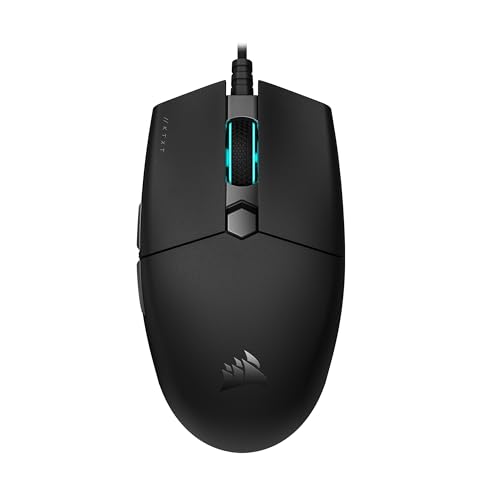
The Corsair KATAR PRO XT is an ultra-light wired gaming mouse engineered for desktop and console users who demand swift, low-resistance cursor movements. At a documented weight of just 73 grams (approximately 0.16 pounds), this mouse is oriented toward fast-paced first-person shooters (FPS) and multiplayer online battle arenas (MOBA). Its compact, symmetric shell makes it a sensible option for players who rely on claw or fingertip grip styles to execute quick, reactive maneuvers.
Connection is handled entirely through an integrated paracord cable designed to reduce surface drag, eliminating friction on mouse pads and desks. The product listing specifies compatibility across a wide range of hardware, including Windows PC, Mac, PlayStation 5, PlayStation 4, and Xbox. While standard pointing and clicking function via a basic USB connection across these systems, full software-driven adjustments require a compatible desktop operating system.
Handling and physical control are centered around a balanced, compact footprint measuring 115.8 millimeters in length, 64.2 millimeters in width, and 37.8 millimeters in height. A standout physical feature is the implementation of Corsair Quickstrike buttons on the primary left and right clicks. This spring-loaded design creates zero gap between the exterior buttons and their underlying switches, which helps minimize mechanical pre-travel. Tracking relies on a custom PixArt optical sensor delivering up to 18,000 DPI, which can be dialed in via single-step DPI increments.
Because the KATAR PRO XT is a tethered USB mouse, power is supplied continuously through the cable, completely bypassing battery degradation, charging docks, or wireless interference concerns. Initial setup involves plugging the cable into an available USB port for immediate pointer recognition. Users looking to customize button layouts or fine-tune tracking profiles can install Corsair iCUE software on supported computers to manage their preferences.
Prospective buyers should take note of a few practical constraints. The compact 115.8 mm length and low profile are intentionally built for agility, which means users with larger hands or those who favor a full, relaxed palm grip may find the support insufficient. Furthermore, while the paracord cable is designed to flex easily, it remains a wired mouse that will not offer the cord-free packing convenience desired by frequent travelers or mobile laptop users.
For gamers seeking a high-performance wired pointer that pairs an ultra-light 73-gram body with a highly customizable 18,000 DPI sensor, the Corsair KATAR PRO XT delivers strong capability. It is an especially practical choice for claw and fingertip grip players who want fast, responsive clicks without spending a fortune on heavy, battery-dependent alternatives.
The KATAR PRO XT houses a custom PixArt optical sensor capable of reaching a maximum resolution of 18,000 DPI. Rather than relying solely on coarse sensitivity presets, the sensor allows for fine adjustments in individual 1 DPI increments, giving users granular control over their aim and navigation speed.
Combined with the mouse's light 73-gram construction and low-drag paracord cable, the optical sensor facilitates fluid, uninterrupted tracking across standard mouse surfaces for fast, low-friction targeting.
The mouse features a compact, symmetric shape measuring 115.8 x 64.2 x 37.8 millimeters. Its neutral curves are specifically tailored for claw and fingertip grip styles, allowing the fingers to guide the mouse swiftly across the desk.
Users who prefer a full palm rest or individuals with larger hands may find the compact profile too low for full hand support. Checking your preferred grip style against these dimensions ensures an appropriate fit.
A key physical design feature is the Corsair Quickstrike button assembly. By utilizing internal springs to keep the primary click surfaces flush against the mechanical switches, the mouse eliminates dead travel, promoting quick click response during intense gameplay.
Compatibility with Corsair iCUE software enables users to remap commands, adjust DPI steps, and personalize supported settings on compatible PC and Mac systems, tailoring the mouse to individual applications.

Pros
- Exceptional value for the price - delivers reliable gaming-grade performance under $30.
- Smooth and accurate sensor with adjustable DPI up to 8,000, suitable for most playstyles.
- Vibrant and customizable RGB lighting that syncs with other Logitech gear for a unified setup.
- Lightweight design (85g) ensures easy flick movements without feeling too heavy.
- Reliable build quality with mechanical switches rated for millions of clicks.
Cons
- Cable is slightly stiff and may benefit from a mouse bungee for smoother movement.
- Side buttons could be larger for easier access during intense gameplay.
- Shape may feel small for users with larger hands preferring palm grip.
The Logitech G203 Lightsync RGB is a wired gaming mouse designed to deliver solid performance without a premium price tag. It's perfect for PC gamers, esports players, and casual users who want reliable tracking and customizable aesthetics without breaking the bank. Based on user feedback and product specifications, this mouse combines a classic six-button layout with an 8,000 DPI optical sensor that provides precise cursor control even during fast-paced FPS or MOBA sessions.
In terms of real-world performance, the G203's sensor offers zero smoothing and filtering, which means movements translate directly to on-screen action. The adjustable DPI range from 200 to 8,000 lets you tailor sensitivity to your preferred playstyle. The 1000 Hz polling rate (1 ms response) ensures low latency, a key advantage for competitive gaming. While the mouse is lightweight at around 85 grams, users note that the rubber cable can be a bit stiff, so a mouse bungee may help keep it out of the way during intense matches.
Build quality is solid for the price point. The mechanical primary switches use metal springs, delivering crisp and tactile clicks that hold up well over time. The overall chassis is sturdy with no creaking, and the rubber scroll wheel provides a nice grip with quiet, defined steps. The side buttons offer a softer click, which some may prefer, but they are placed conveniently for thumb access. The mouse is compatible with both PC and Mac, and the included Logitech G HUB software allows for extensive customization of DPI settings, button assignments, and RGB lighting.
RGB lighting is a standout feature here. The LIGHTSYNC RGB can be customized with millions of colors and effects, including color wave, breathing, and screen-reactive modes. It syncs with other Logitech gear, making it a great choice for RGB enthusiasts building a coordinated gaming setup. The on-board memory means you can save your lighting and DPI profiles directly to the mouse, so they persist even when using the mouse on another computer without G HUB installed.
Comfort is generally good for medium to small hands, especially with a claw or fingertip grip. Larger hands may find the shape slightly too small for full palm support. During long gaming sessions, the light weight and low-profile design help reduce fatigue. However, if you have very large hands, you might want to consider a bigger model. The mouse works well on most surfaces, including without a mouse pad, though a quality pad will enhance glide.
Overall, the Logitech G203 is an excellent choice for gamers on a budget, streamers who want a secondary wired mouse, and anyone building a first gaming PC. It offers reliable performance, solid build, and customizable RGB that punches above its price class. While the cable stiffness and side button size are minor drawbacks, the value proposition is hard to beat. If you're looking for an affordable wired mouse that doesn't compromise on core gaming essentials, this is a top recommendation.
The G203's 8,000 DPI optical sensor with zero filtering provides accurate, responsive tracking suitable for most gaming genres. The adjustable DPI can be cycled between up to five presets, allowing quick sensitivity changes during gameplay. The 1000 Hz polling rate ensures minimal input lag, which is critical for competitive titles like CS:GO or Valorant. While not the lightest mouse on the market, the 85g weight strikes a good balance between stability and swift movements. Users report reliable performance in both FPS and MOBA games, with no noticeable jitter or acceleration issues.
LIGHTSYNC RGB offers vibrant, customizable lighting across a single zone around the mouse body. Using Logitech G HUB software, you can choose from millions of colors, preset effects, or create your own patterns. The lighting can also react to in-game actions or sync with other compatible Logitech devices for a unified look. On-board memory stores your lighting and DPI profiles, so the settings remain even when using the mouse on a different computer. The lighting is bright but not distracting, and the color transitions are smooth.
The mouse is built with a durable plastic shell that feels solid in hand. Mechanical primary switches with metal springs provide crisp tactile feedback and are rated for long life. The rubber scroll wheel is textured and quiet with consistent notches. The six-button layout is straightforward, and the side buttons are positioned for easy thumb access. The cable is 6.89 ft long, ample for most setups. While the shape is ergonomic for claw and fingertip grips, users with large hands may find it less comfortable for palm grip after extended use. The weight of 85g is light enough for quick movements but still provides some control.

Pros
- Exceptional value for the price; performs like higher-end mice.
- Long battery life eliminates need for frequent charging or battery swaps.
- Reliable LIGHTSPEED wireless with minimal latency.
- Lightweight and comfortable for extended gaming sessions.
Cons
- Uses AA battery instead of rechargeable internal battery.
- Scroll wheel feels basic and may lack durability.
- Side buttons may be accidentally pressed for some hand sizes (especially for claw grip).
The Logitech G305 Lightspeed is a wireless gaming mouse designed to deliver high performance without the hassle of cords. It features the HERO optical sensor, capable of up to 12,000 DPI with zero acceleration or smoothing, making it a solid choice for competitive gamers who need pinpoint accuracy. The LIGHTSPEED wireless technology ensures a 1ms report rate, so it feels as responsive as a wired mouse, even during fast-paced FPS or MOBA games.
At just 99 grams, the G305 is lightweight enough for quick flicks and long gaming sessions without causing fatigue. Its symmetrical design suits a variety of grip styles, including claw and fingertip, and the six programmable buttons can be customized via Logitech G HUB for macros, DPI adjustments, or media controls. The built-in storage for the nano receiver makes it easy to take on the go with a gaming laptop.
One of the standout features is the battery life: up to 250 hours on a single AA battery. In Endurance mode (via G HUB), it can last up to nine months, so you don't have to worry about charging mid-game. The mouse uses a standard AA battery, which is both a pro and a con – it's convenient to swap in a fresh battery, but some users prefer a rechargeable internal pack.
Setup is straightforward: plug the included USB receiver into your PC or Mac, and the mouse is ready to use. The Logitech G HUB software offers additional customization, but the mouse also has onboard memory to save your settings. On the downside, the scroll wheel is fairly basic and might not feel as premium as on higher-priced models, and the side buttons can be accidently pressed if you use a claw grip – though this is common with many mice.
Overall, the Logitech G305 is an excellent wireless gaming mouse at an entry-level price. It's ideal for PC gamers who want top-tier performance without spending a fortune, whether you're grinding ranked matches, streaming on Twitch, or just enjoying casual games. Its lightweight design, long battery life, and reliable sensor make it a smart addition to any gaming setup, especially for those who value affordability and practicality.

Pros
- Highly accurate 26K DPI sensor with zero smoothing for responsive aiming
- Versatile HyperScroll wheel with three modes adapts to different tasks
- Comfortable ergonomic design with thumb rest for extended use
Cons
- Wired USB connection may limit desk cable management for some setups
- Software required for full customization, which may be a minor setup step
- Larger hand size may prefer a more extended shape for palm grip
The Razer Basilisk V3 is a wired ergonomic gaming mouse designed for PC gamers who demand precision, customization, and comfort. It features a 26K DPI optical sensor, 11 programmable buttons, and a unique HyperScroll tilt wheel that can switch between tactile and free-spin modes. This mouse caters to competitive gamers, casual players, streamers, and content creators looking for reliable performance and vibrant RGB lighting.
In real-world gaming scenarios, the Focus+ 26K DPI sensor delivers crisp tracking with zero smoothing, making it ideal for fast-paced FPS games and precise MOBA clicks. The optical switches actuate at 0.2ms, reducing input lag and preventing accidental clicks during intense matches. The HyperScroll wheel is a standout feature: use tactile mode for weapon cycling or free-spin mode for rapid document scrolling, with Smart-Reel automatically switching based on scroll speed.
Build quality is solid with a durable USB cable and a comfortable ergonomic shape that includes a thumb rest. The 11 programmable buttons are well-placed for quick access to macros, push-to-talk, or pings. The 11 RGB lighting zones are customizable via Razer Synapse, allowing syncing with over 150 games for dynamic lighting effects that enhance any gaming setup.
Setup is straightforward: plug into a USB port, install Razer Synapse for full customization, and adjust DPI, lighting, and button assignments. The mouse is lightweight at 3.56 ounces, reducing fatigue during long sessions. However, the wired connection may require cable management to keep the desk tidy.
One limitation is the need for Razer Synapse software to unlock all features, which might be a minor inconvenience for some users. Additionally, while the ergonomic design suits most hand sizes, gamers with larger hands might prefer a more extended shape for palm grip. Despite this, the Basilisk V3 offers excellent value for its price.
Overall, the Razer Basilisk V3 is a practical choice for PC gamers, streamers, and esports players who want a customizable, comfortable mouse with top-tier sensor accuracy and versatile scroll wheel options. It performs well across various genres and integrates seamlessly into RGB-heavy setups, making it a reliable addition to any gaming desk.
Pros
- Ergonomic shape comfortable for palm and claw grips, reducing fatigue over long sessions
- Responsive 6400 DPI sensor handles a wide range of gaming styles from FPS to MOBA
- Durable build with mechanical switches and solid construction for daily use
- Affordable price point makes it accessible for budget-conscious gamers and setup builders
Cons
- Wired connection may limit desk cable management compared to wireless alternatives
- Lacks adjustable weight system or RGB lighting that some enthusiasts prefer
- Software required for full customization, which may be a minor inconvenience for some users
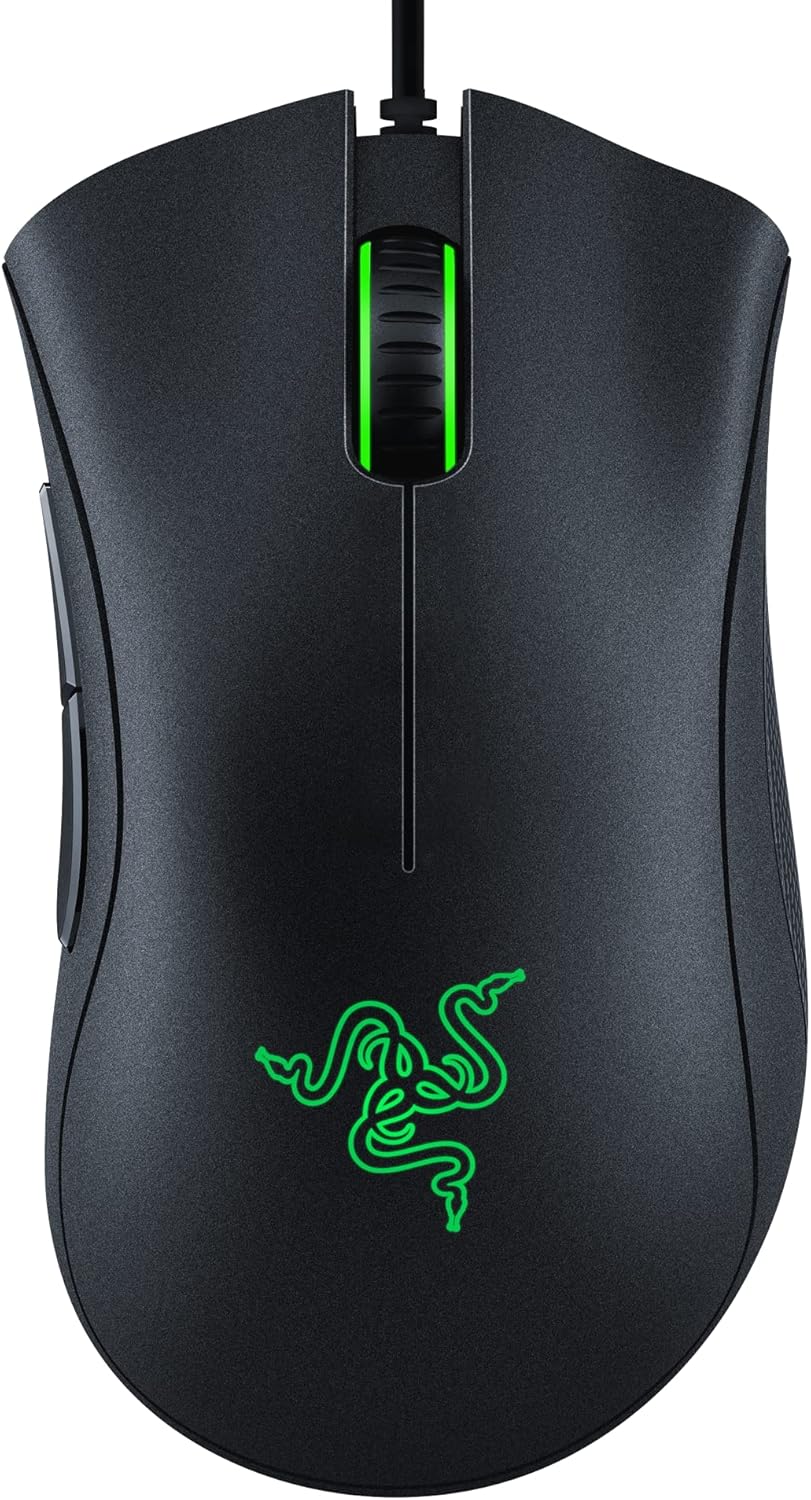
The Razer DeathAdder Essential is a wired gaming mouse that carries forward the iconic ergonomic shape that has made the DeathAdder series a favorite among PC gamers for years. Designed for comfort and precision, this mouse is a solid choice for competitive gamers, casual players, esports athletes, and even streamers or content creators who need a reliable peripheral for long hours at their desk. Its classic black finish and simple design make it a versatile addition to any gaming setup, whether you are building a budget-friendly rig or upgrading a dorm room battlestation.
Performance-wise, the DeathAdder Essential features a 6400 DPI optical sensor that allows for on-the-fly sensitivity adjustments through dedicated DPI buttons. This means you can quickly switch between precise aiming in FPS games and faster cursor movement in MOBAs or desktop work. The sensor tracks accurately across various mouse pads, and the ridged, rubberized scroll wheel adds extra control during intense moments. While it does not offer the highest DPI range of some premium mice, the 6400 DPI is more than enough for the vast majority of gamers and provides a responsive, low-latency experience.
Build quality is a strong point here. The mouse uses durable mechanical switches rated for up to 10 million clicks, which should hold up well over years of use. The rubber side grips help maintain a firm hold even during sweaty gaming sessions, and the overall construction feels solid without being overly heavy. The 5 programmable buttons can be customized via Razer Synapse software, allowing you to assign macros or remap controls for specific games or productivity tasks. This makes the mouse adaptable for both gaming and work-from-home scenarios.
In terms of setup and maintenance, the DeathAdder Essential is straightforward. It is a wired mouse with a USB connection, so there is no need to worry about batteries or wireless interference. Simply plug it in, and it is ready to go. If you want to customize the buttons or DPI settings, you will need to install Razer Synapse, which is free and easy to use. The software also allows for profile storage, so you can switch between gaming and desktop setups quickly. Cleaning the mouse is simple thanks to its smooth surfaces and accessible crevices.
One realistic limitation is the wired design. While many gamers prefer wired for zero latency, it can add to cable clutter on your desk if you are not using cable management solutions. Additionally, there is no RGB lighting or adjustable weight system, which may disappoint enthusiasts who enjoy customization and aesthetics. However, for the price point, these omissions are understandable and keep the mouse affordable and focused on core performance.
Overall, the Razer DeathAdder Essential is a practical recommendation for PC gamers who want a proven, comfortable, and responsive mouse without spending a lot. It works well for competitive gaming, casual play, streaming, and even everyday productivity. If you prioritize ergonomics and reliable tracking over flashy features, this mouse is a smart choice for your gaming setup or home office.

Pros
- Ultra-light 58-gram weight makes physical navigation and swift flicks effortless
- Optical switches prevent electrical debounce delays and double-clicking issues with a 90-million click lifespan
- Flexible Speedflex cable minimizes cord drag compared to standard stiff wired cables
- Full PTFE skates across the base ensure low-friction gliding on various desk pads and mouse mats
- Sensors can be fine-tuned in precise 50 DPI increments using the Razer Synapse application
Cons
- Permanent wired cable design offers no wireless connection or Bluetooth functionality
- Full lighting effects and fine DPI tuning require downloading the Razer Synapse software on a compatible Windows PC
- The listing does not specify exact maximum DPI limits, tracking speed (IPS), or button count configurations
The Razer Cobra is a wired lightweight gaming mouse crafted for desktop PC gamers, students, and general computer users seeking an agile, responsive pointer. Weighing in at just 58 grams (approximately 0.1275 pounds), this mouse is tailored for users who want to reduce wrist fatigue during long gaming sessions or everyday computing tasks. Its compact physical footprint makes it a solid option for those replacing a bulky standard office mouse with something significantly faster on the desk.
Connection is handled through a built-in Speedflex cable, which connects directly to your computer. The cable is designed to stay flexible and reduce drag on desk surfaces, providing fluid swipes without the resistance typical of heavier braided or stiff rubber cords. The product documentation highlights optimization with Windows mouse settings, such as turning off pointer precision, and pairs with the Razer Synapse application for deeper customization. Shoppers should verify that their computer setup has an open USB port before connecting.
For physical handling, the Cobra measures 4.71 inches long, 2.46 inches wide, and 1.5 inches tall. The manufacturer indicates that this profile fits most grip styles, whether you favor palm, claw, or fingertip handling. Underneath the buttons, Gen-3 optical mouse switches provide actuation in 0.2 milliseconds without debounce delay, alongside an extensive 90-million click lifespan that prevents double-clicking faults. Pure 100 percent PTFE feet positioned at the front, rear, and around the sensor ring help the mouse glide smoothly across mouse mats and flat desk surfaces.
Setup is straightforward thanks to its wired bus power, meaning you never need to replace batteries, monitor charge levels, or wait for recharging cycles. To unlock its full functionality, users can install the Razer Synapse software on Windows to configure the Razer Chroma gradient underglow with 16.8 million colors and dynamic in-game lighting reactions. The software also allows players to fine-tune sensor sensitivity in distinct 50 DPI increments to match their personal targeting preference.
Prospective buyers should keep a few documented limitations in mind. Because this is strictly a wired mouse, it lacks Bluetooth and wireless USB receiver modes, making it less convenient for mobile laptop workers who dislike cable clutter. Additionally, while the listing confirms 50 DPI adjustment increments, it does not document the maximum DPI ceiling, total programmable button count, or macOS software compatibility, meaning non-Windows users or macro-heavy gamers should verify specific software support before purchase.
For desktop gamers and everyday PC users who want a lightweight, zero-latency wired mouse with durable optical switches and smooth PTFE gliding, the Razer Cobra represents a dependable, low-maintenance choice. If you prefer tether-free mobility or need a wireless travel mouse, another model will be more appropriate, but for stationary desk setups requiring consistent tracking adjustments, this mouse fits the bill.
The Razer Cobra features customizable sensor sensitivity that can be adjusted in precise 50 DPI increments, allowing users to fine-tune cursor movement for desktop productivity or competitive gaming.
Through the Razer Synapse application on Windows, users can access these sensitivity settings and configure the dynamic Razer Chroma gradient underglow lighting, which supports up to 16.8 million colors and interacts directly with compatible Chroma-integrated games.
With a measured weight of 58 grams and dimensions of 4.71 by 2.46 by 1.5 inches, the mouse offers a lightweight, nimble profile intended to suit most grip styles during extended computer sessions.
Physical movement is aided by a flexible Speedflex cable that minimizes cord resistance, while 100 percent PTFE skates positioned along the base ensure clean, low-friction gliding across desk mats and mouse pads. Durability is anchored by Gen-3 optical switches rated for up to 90 million clicks with a 0.2 ms response time.

Pros
- High DPI range up to 12,400 for fast and accurate tracking.
- 12 side buttons and 18 programmable buttons ideal for MMO and MOBA games.
- Comfortable ergonomic shape with weight tuning for personalized feel.
- Affordable price point for a feature-rich gaming mouse.
- Vibrant RGB lighting with multiple modes and profile color coding.
Cons
- Software is only compatible with Windows, limiting customization for Mac users.
- Some users may find the mouse too large for smaller hands.
- The side buttons can be accidentally pressed if not positioned correctly.
The Redragon M908 Impact is a wired optical gaming mouse designed specifically for MMO and MOBA gamers who need quick access to a large number of commands. With 12 side buttons and a total of 18 programmable buttons, this mouse aims to streamline gameplay for titles like World of Warcraft, League of Legends, and Dota 2. It also appeals to streamers and content creators who want customizable controls for their software.
Performance-wise, the M908 features the Pixart PAW3327 optical sensor, capable of up to 12,400 DPI with five adjustable levels. The 1000 Hz polling rate ensures low-latency input, which is crucial for competitive gaming. Whether you're executing complex rotations in an MMO or landing precise shots in an FPS, the sensor provides reliable tracking.
Build quality is solid for its price range. The mouse has a comfortable ergonomic shape that supports palm or claw grips, and the included weight tuning set (eight 2.4g weights) lets you adjust the heft to your liking. The braided fiber cable is durable and the TEFLON feet glide smoothly on most surfaces. The RGB lighting is vibrant and customizable via the software, adding to your setup's aesthetics.
Setting up the M908 is straightforward. The software allows you to remap buttons, adjust DPI, and configure lighting profiles. However, it's important to note that the software only works on Windows, so Mac users will lose customization features. The mouse works as a standard mouse on Mac, but you won't be able to program the side buttons or adjust lighting without Windows.
Some users might find the side buttons a bit too close together, leading to accidental presses, and the mouse may feel large for gamers with smaller hands. Despite these drawbacks, the M908 offers excellent value for the price. If you're a PC gamer who plays MMOs or MOBAs regularly, or if you need extra buttons for streaming and productivity tasks, the Redragon M908 Impact is a strong contender that won't break the bank.
The Redragon M908 Impact excels in gaming scenarios that demand quick access to multiple commands. The 12 side buttons are arranged in a grid pattern, similar to an MMO mouse, allowing you to bind abilities, items, or macros without moving your hand. The Pixart PAW3327 sensor provides accurate tracking up to 12,400 DPI, and the five adjustable DPI levels let you switch sensitivity on the fly for different in-game situations.
The 1000 Hz polling rate translates to a 1 ms response time, reducing input lag. This is noticeable in fast-paced games where every millisecond matters. The button switches have a satisfying click and are rated for durability, though they are not mechanical switches. Overall, the M908 delivers responsive and reliable performance for competitive and casual gaming alike.

Pros
- Sturdy anodized aluminum frame provides solid structural durability
- Native 26,000 DPI sensor and 650 IPS tracking capture fast desktop movements
- Axon technology supports an 8,000Hz polling rate for rapid input reporting
- Optical primary switches offer fast responsiveness without mechanical switch wear
Cons
- Wired configuration restricts movement flexibility compared to cordless mice
- Product listing does not detail cable length, connector type, or specific operating-system software requirements
- Heavier aluminum construction and structured shape may not suit users seeking an ultralight travel mouse
The Corsair M65 RGB Ultra is a dedicated wired FPS PC gaming mouse crafted for users who prioritize structural sturdiness and responsive input on a desktop setup. Built around an anodized aluminum frame, this mouse maintains the familiar silhouette of the M65 series while introducing modern optical tracking and processing enhancements. It appeals directly to gamers, power users, and PC hobbyists who prefer a structured, weighted feel over the ultralight plastic designs common in general office mice.
In terms of connectivity, this model relies on a tethered wired connection, categorizing it firmly as a personal computer desktop peripheral. A wired setup provides constant power and a direct link to the computer, removing any concerns about dead batteries, wireless interference, or Bluetooth pairing steps. The provided product data does not list the specific USB connector format or cable material, so shoppers should ensure their PC has an available USB port or compatible adapter before connecting.
Handling is anchored by the mouse frame and its adjustable weight functionality, with a documented baseline weight of approximately 0.21 pounds. The integration of optical switches on the primary left and right buttons gives users hyper-fast click responses while reducing mechanical switch degradation. In addition, Corsair incorporates sensor fusion technology that combines an internal six-axis gyro and an accelerometer. This combination is designed to enforce an ultra-low lift-off distance, helping keep cursor movement steady when picking up and repositioning the mouse during fast-paced movement.
Tracking capabilities come from the Corsair Marksman optical sensor, which lists a native 26,000 DPI and up to 650 inches per second (IPS) tracking speed. Paired with Corsair Axon hyper-processing technology, the mouse can report inputs at up to an 8,000Hz polling rate. This specification describes how frequently the mouse communicates coordinate and click data to your PC. While these high figures indicate capable sensor hardware, practical tracking and perceived responsiveness depend heavily on system configuration, display refresh rate, and personal sensitivity preferences.
When evaluating limitations, the primary trade-off is the wired form factor, which introduces a cable across the desk and limits ease of packing for travel. Furthermore, the product data leaves out certain practical details, including the exact button layout, tilt-wheel functions, cable construction, and required configuration software. Users should keep in mind that customizing specialized features like gyro controls or detailed DPI stages typically requires vendor-specific desktop software.
Overall, the Corsair M65 RGB Ultra represents a capable wired gaming option for desktop PC users who value an aluminum chassis, tunable weight, and high-frequency sensor reporting. If you need a stable, tethered gaming mouse tailored for FPS gaming sessions and appreciate solid build materials, this model aligns well with those priorities. Those needing wireless portability or silent office buttons may want to look at lighter, multi-mode alternatives.
The Corsair M65 RGB Ultra is equipped with the Corsair Marksman optical sensor, boasting a native sensitivity ceiling of 26,000 DPI alongside a tracking speed rating of 650 inches per second (IPS). These specifications allow the mouse to register both subtle micro-adjustments and sweeping desktop gestures without losing tracking synchronization.
Movement processing is handled by Corsair Axon technology, which delivers up to an 8,000Hz native polling rate to transmit movement and click registrations to the computer rapidly. Additionally, an onboard six-axis gyroscope and accelerometer facilitate sensor fusion control, enabling an ultra-low lift-off distance that minimizes unwanted cursor drift when lifting the mouse off the tracking surface.
Durability is central to the design of the M65 RGB Ultra, highlighted by its anodized aluminum frame. This rigid metallic core provides lasting durability and a stable base during heavy use, setting it apart from all-plastic competitors.
The mouse also features an adjustable weight system, allowing users to modify the overall mass from its documented baseline of roughly 0.21 pounds. Combined with resilient optical switches on the main clicks, the physical build provides a dependable and customizable tactile experience for desktop users.

Pros
- High DPI range up to 12,800 allows flexible sensitivity for different game genres and screen resolutions.
- 8 programmable buttons with software support enhance efficiency in both gaming and productivity tasks.
- 12 RGB lighting modes offer personalization without overwhelming brightness, according to user feedback.
- Comfortable ergonomic shape fits medium hands well, reducing strain during extended use.
- Affordable price point makes it a great entry-level or backup gaming mouse for budget-conscious gamers.
Cons
- Some users reported durability issues, including left-click failure within the first few days of use.
- The software requires manual download from the user manual, and the driver may be blocked by browsers, requiring whitelisting.
- RGB lighting is described as simple; while customizable via software, it may lack the advanced effects found on pricier gaming mice.
The Acer Wired Gaming Mouse is a solid entry-level option for PC gamers, esports players, streamers, and content creators who need a reliable, responsive peripheral without overspending. With a maximum DPI of 12,800, an optical sensor, and eight programmable buttons, this mouse aims to bridge the gap between casual use and competitive play. Based on product specifications and user feedback, it offers a practical blend of performance and customization for various gaming genres, including FPS, MOBA, and open-world titles, as well as everyday productivity tasks.
Performance-wise, the 1000Hz polling rate and 20G acceleration deliver low-latency tracking that feels snappy in fast-paced games. The adjustable DPI settings (default presets at 1200, 2400, 3200, and 6400) let you switch between sniper precision and rapid flicks on the fly, while the top-end 12,800 DPI caters to high-resolution monitors. The eight programmable buttons, configured via the included software, allow for macro assignments or key binds that can streamline your in-game actions or work shortcuts. However, users have noted that the driver download process requires following the printed manual's link, and some browsers may block it, so be prepared to whitelist the site.
Build quality is a mixed bag. The ABS plastic shell feels decent for the price, and the braided cable adds a touch of durability and reduces drag during movement. The ergonomic shape, sized for medium hands (4.7 inches long), receives praise from users who find it comfortable for palm or claw grips during extended sessions. That said, some owners have reported issues such as left-click failure within the first day or the inability to left-click while holding the right button, which could be dealbreakers for competitive gamers. It's wise to check your unit early and contact support if problems arise.
The 12 RGB lighting modes add personalization to your desk setup, with effects like breathing, ripple, and neon stream that sync with your rig. Users appreciate that the lighting isn't too bright, but some wish for an option to disable the LED button fully without manually cycling through modes. The software does allow customization of colors and effects, though it's straightforward rather than premium. Cleaning is easy with a dry cloth, and the cable management is simple thanks to the 3-foot braided cord.
On the practical side, this mouse works out of the box as a plug-and-play device on Windows, Linux, and macOS, making it convenient for gaming PCs, laptops, or even work setups. Its weight (6.7 ounces) strikes a balance that feels substantial without being a drag, according to reviews. For college gamers or work-from-home users, this versatility means you can use it for both gaming and office tasks without skipping a beat.
Realistically, the Acer Gaming Mouse is best suited for budget-conscious PC gamers, casual players, and streamers who want a functional RGB mouse with programmable buttons. If you're a hardcore esports competitor demanding flawless durability and zero-latency performance, you might want to invest in a higher-tier mouse from brands known for long-term reliability. However, for its price, it offers a commendable set of features, good ergonomics, and decent performance for gamers seeking a reliable wired mouse for their setup. Keep an eye on the return policy and test it thoroughly upon arrival.
Frequently Asked Questions
What DPI setting is best for FPS games?
There is no single correct DPI, as it depends on your mousepad size and personal preference. Most competitive players use settings between 400 and 800 DPI for better micro-adjustments. This range allows for precise aiming with smaller physical movements, which can reduce fatigue during long sessions.
Does a lighter mouse improve aiming accuracy?
A lighter mouse can make rapid flicks feel faster and easier to execute. However, some players prefer a heavier weight for stability and control. The ideal weight is subjective, so choose a model that feels comfortable for your specific grip style and play habits.
Is a wired mouse better than wireless for FPS?
Wired mice offer consistent connectivity without battery anxiety, which some players prefer for reliability. Modern wireless technology has closed the latency gap significantly, but wired remains a solid choice for those who want zero interference. It ensures a direct connection that is not subject to potential signal dropouts or charging cycles.
Do I need software to use these mice?
Most gaming mice work out of the box with basic functionality. However, manufacturer software is often required to customize DPI settings, assign macros, or adjust RGB lighting. Comparing software options can help you understand the level of customization each brand offers for your specific needs.
How important is the polling rate for gaming?
Higher polling rates, like 1000Hz or more, update your mouse position more frequently to the computer. This results in smoother cursor movement and reduced perceived lag. While 1000Hz is standard for gaming, higher rates may benefit those with high-refresh-rate monitors and fast reflexes.


Write Your Review
No reviews yet. Be the first to share your experience!