


Fast-paced motion clarity often makes the difference between tracking an opponent cleanly and dealing with distracting blur during critical gameplay moments. Competitive players and desktop enthusiasts frequently look for panels that combine crisp pixel density with fluid frame rates, making the search for the best gaming monitor 240hz 1440p an important setup decision. Upgrading from entry-level 144Hz monitors under $200 to a native 240Hz refresh rate helps reduce motion smearing, while the 2560×1440 Quad HD resolution maintains sharp visuals without demanding the excessive graphics power of 4K. Our breakdown examines published manufacturer specifications, panel response claims, and verified user feedback to help you compare these high-speed displays objectively.
Selecting the right screen for your setup also requires balancing physical desk dimensions with port connectivity. While standard 27-inch Fast IPS displays offer wide viewing angles and snappy pixel response for competitive titles, 34-inch ultrawide curved monitors provide expansive screen space for immersive gaming and productivity. Verifying input support like DisplayPort 1.4 and HDMI bandwidth is equally essential, as hitting 240Hz depends on your hardware output. We outline color coverage, contrast, and ergonomic flexibility so you can pick the ideal screen for your battlestation.
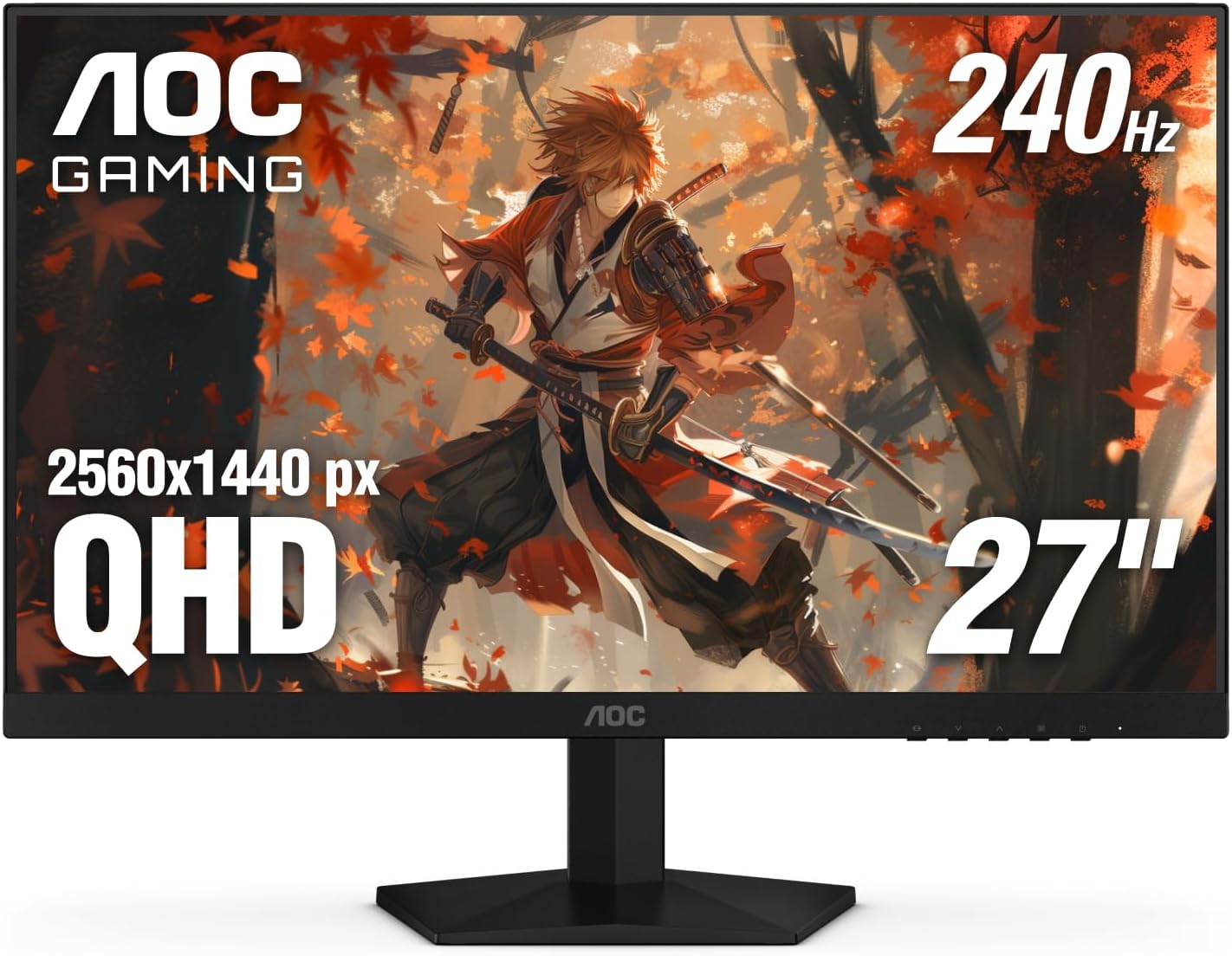
Pros
- Incredible 240Hz refresh rate and 0.3ms response for competitive edge
- Sharp QHD resolution with vibrant IPS colors and wide viewing angles
- G-Sync compatible and Adaptive-Sync for smooth, tear-free visuals
- Frameless design and VESA support great for multi-monitor and clean setups
- Easy-to-use OSD with practical gaming presets and Shadow Control
Cons
- Stand only offers tilt adjustment - no height, swivel, or pivot options
- HDMI 2.0 ports limit refresh rate to 144Hz over HDMI; use DisplayPort for full 240Hz
- Glossy screen surface may cause reflections in brightly lit rooms
The AOC Gaming Q27G41ZE is a 27-inch QHD IPS monitor built for gamers who prioritize speed and clarity. With a native 240Hz refresh rate that can be overclocked to 260Hz and a 0.3ms MPRT response time, it targets competitive esports players, serious PC gamers, and streamers who need every frame to count. The QHD resolution (2560x1440) strikes a balance between sharpness and performance, making it a solid choice for both high-fidelity single-player games and fast multiplayer titles.
When it comes to real-world performance, this monitor delivers. The combination of high refresh rate and ultra-low response time minimizes motion blur and ghosting, which is crucial in fast-paced shooters like Valorant or Apex Legends. Adaptive-Sync technology (G-Sync compatible) keeps gameplay smooth and tear-free, working seamlessly with both NVIDIA and AMD GPUs. The IPS panel offers vibrant colors and solid viewing angles, so you won't lose image quality when leaning back or sharing your screen on stream.
Build quality is practical for a gaming setup. The three-sided frameless design reduces bezel distraction and makes multi-monitor arrays look clean. The stand only allows tilt adjustment (-3 to +21 degrees), which might be limiting for some users, but the 100x100mm VESA mount lets you swap in an arm or height-adjustable stand. The textured black and red finish gives it a sporty gaming look without being too over-the-top.
Setting up the monitor is straightforward: connect via DisplayPort 1.4 to unlock the full 240Hz refresh rate, since HDMI 2.0 caps at 144Hz. The on-screen display (OSD) is intuitive, with joystick navigation and quick shortcuts for gaming presets like FPS, RTS, and racing. Shadow Control brightens dark areas without washing out the whole image - a handy feature for spotting enemies in shadows. The monitor also includes a headphone jack for easy audio routing.
That said, there are some realistic limitations. The lack of height adjustment on the stock stand means you'll likely want an aftermarket monitor arm for ergonomic positioning, especially during long sessions. The glossy screen surface can also produce reflections if you have bright lights behind you. While the connectivity covers the basics (2x HDMI 2.0, 1x DisplayPort 1.4, audio out), it lacks USB ports or USB-C, which some users may miss for peripherals.
Overall, the AOC Gaming Q27G41ZE is a fantastic value for gamers who want high-refresh QHD performance without paying a premium. It's best suited for competitive gamers who use DisplayPort and either already have a monitor arm or don't mind the basic tilt stand. Streamers and content creators will appreciate the color accuracy and smooth motion for gameplay footage. If you're building a gaming PC on a budget or upgrading from 1080p, this monitor delivers where it matters most: speed, clarity, and responsiveness.

Pros
- High 260Hz refresh rate and 1ms response time deliver exceptional motion clarity for competitive gaming
- Excellent color coverage (98% DCI-P3, 130% sRGB) makes games and content look vivid and accurate
- Multiple connectivity options with DP 1.4 and HDMI 2.0 support high refresh rates on various devices
- Includes DP cable and has VESA mount support for easy setup and desk organization
Cons
- Only 320 nits brightness may not be ideal for very bright rooms or HDR content
- HDMI 2.0 ports limited to 144Hz, requiring DisplayPort for full 260Hz performance
- Built-in speakers are not mentioned, so external audio may be necessary for full immersion
The SANSUI 27-inch gaming monitor is a solid choice for PC gamers, competitive esports players, and gaming setup builders who want a high-refresh-rate display without breaking the bank. This WQHD 2560x1440 monitor runs at 260Hz (via DisplayPort 1.4) with a 1ms MPRT response time, making it well-suited for fast-paced FPS, MOBA, and racing games where every millisecond counts. The Fast IPS panel ensures wide viewing angles and vibrant colors, so whether you're in the heat of a clutch round or exploring an open-world title, the visuals stay clear and immersive.
For competitive gamers, the 260Hz refresh rate and FreeSync Premium support work together to minimize screen tearing and stuttering, providing a buttery-smooth experience. The built-in crosshair overlay and game assistant modes (Racing, RTS, FPS) are practical extras that can give you an edge in titles like Valorant, Apex Legends, or Call of Duty. The 1ms response time also helps reduce ghosting, keeping fast-moving objects sharp during intense firefights.
Color performance is a highlight here, with DCI-P3 98% and sRGB 130% coverage, which means games, movies, and creative work look punchy and accurate. While the 320-nit brightness and HDR10 support are decent for a monitor at this price point, they won't replace a dedicated HDR display for content creation. Still, for most gamers and streamers, the color reproduction is more than adequate for enjoying vibrant game worlds and editing streams.
Build quality feels sturdy, with a minimalist black design that fits into any gaming or work-from-home setup. The monitor offers tilt adjustment (-5 to 20 degrees) and VESA 100x100mm compatibility, so you can easily mount it on an arm or stand to save desk space. Connectivity is generous: two DisplayPort 1.4 ports can handle the full 260Hz, while two HDMI 2.0 ports cap at 144Hz. This makes it easy to hook up a gaming PC and a console or secondary device. The included DP cable is a nice touch, but make sure to use a cable that supports 2560x1440 at 260Hz to avoid issues.
Setup is straightforward out of the box, with the stand attaching easily and the OSD menu being simple to navigate for adjusting brightness, game modes, and crosshair settings. The low blue light and anti-flicker features help reduce eye fatigue during long sessions, which is a plus for college gamers or anyone who spends hours grinding ranked matches. However, note that the monitor lacks built-in speakers, so you'll need a headset or external speakers for audio.
Overall, the SANSUI 27-inch 1440p 260Hz monitor is a strong option for competitive gamers, esports players, and gaming setup builders who prioritize high refresh rates and good color accuracy at an accessible price. It's also practical for streamers who want a smooth secondary display for chat or alerts. If you're building a performance-focused gaming PC and need a monitor that keeps up with fast action without sacrificing image quality, this model deserves a spot on your desk.

Pros
- 240Hz refresh and 0.5ms response perfect for competitive gaming where every millisecond counts.
- WQHD IPS panel balances high resolution with fast performance, great for both gaming and productivity.
- Sturdy ergonomic stand with full adjustability reduces neck strain during long gaming sessions.
- FreeSync Premium ensures smooth gameplay without tearing, even during variable frame rates.
- DisplayHDR 400 certification improves brightness and color depth for HDR content.
Cons
- Built-in 2W speakers are weak; plan to use a gaming headset or external speakers for decent audio.
- HDMI ports limited to 144Hz; need DisplayPort to achieve full 240Hz refresh rate.
- No USB hub or built-in cable management channels, so additional accessories may be needed for a clean desk setup.
The Acer Nitro XV272U W2bmiiprx is a 27-inch WQHD IPS gaming monitor built for gamers who refuse to compromise on speed or clarity. With a native 2560x1440 resolution and a blistering 240Hz refresh rate over DisplayPort, it's squarely aimed at competitive esports players, streamers, and high-end PC gamers who demand buttery-smooth motion and crisp visuals. Whether you're fragging in Valorant, racing in Forza, or exploring open-world RPGs, this monitor keeps up with zero perceptible ghosting thanks to its 0.5ms (GtG) response time.
Best suited for U.S. gamers who prioritize responsiveness, the XV272U pairs perfectly with a powerful gaming PC or console that supports FreeSync Premium. The IPS panel not only delivers wide 178-degree viewing angles but also covers 99% of the sRGB spectrum and meets DisplayHDR 400 standards, meaning vibrant colors and decent contrast out of the box. Streamers and content creators will appreciate the color accuracy for photo editing or video work, while RGB enthusiasts can integrate it into a clean, adjustable desk setup with VESA mounting.
Performance-wise, the monitor excels in fast-paced titles. The 240Hz refresh on DisplayPort 1.4 ensures minimal input lag, and FreeSync Premium dynamically synchronizes the refresh rate to your GPU's output, eliminating screen tearing during intense firefights. The response time is rated up to 0.5ms, which translates to near-instant pixel transitions for competitive play. Casual gamers and MOBA players will also enjoy the smooth 144Hz over HDMI, though serious competitors will want to stick with DisplayPort for the full 240Hz advantage.
Build quality is solid for its price range. The stand offers tilt, swivel, height (4.7 inches), and pivot rotation, making it easy to find your preferred viewing angle or switch to portrait mode for coding or documents. The frame is sturdy and doesn't wobble, and the monitor is VESA 100x100 compatible for arm mounting. The black matte finish minimizes glare, and the on-screen controls are intuitive. However, the built-in 2W speakers are underwhelming, so most gamers will rely on a dedicated gaming headset or external speakers for immersive audio.
Setting up the XV272U is straightforward: attach the stand, plug in the included DisplayPort or HDMI cable, and enable FreeSync in your GPU driver. Cable management is basic since there are no channels, but a monitor arm can help route cables neatly. Maintenance is minimal just dust the screen periodically. One realistic limitation is the lack of USB ports, so you'll need to use your PC's front I/O or a hub for peripherals. Also, the 144Hz cap on HDMI means console gamers or those without DisplayPort won't reach the maximum refresh rate.
Overall, the Acer Nitro XV272U W2bmiiprx is an excellent choice for PC gamers, competitive esports players, streamers, and even casual users who want a high-refresh WQHD monitor without breaking the bank. Its combination of 240Hz speed, crisp resolution, ergonomic adjustability, and FreeSync Premium makes it a strong contender for any gaming or mixed-use desk setup. If you can live without USB ports and plan to use a good headset, this monitor delivers top-tier performance for its price.
The Acer Nitro XV272U is built for high-performance gaming. Its 240Hz refresh rate (via DisplayPort) and 0.5ms response time eliminate motion blur and provide ultra-low input lag, giving competitive gamers a decisive edge in fast-paced shooters, battle royales, and fighting games. AMD FreeSync Premium ensures tear-free gameplay even when frame rates fluctuate, making every session smoother. The WQHD resolution offers a sharp image that enhances detail in open-world environments and strategy games without sacrificing the high frame rates needed for esports.
The monitor features a sturdy black chassis with a professional aesthetic. The stand provides full ergonomic adjustment: tilt (-5 to 15 degrees), swivel (360 degrees), height adjustment (up to 4.7 inches), and pivot (+/-90 degrees) for flexible viewing. The base is stable and doesn't take up excessive desk space. The bezels are slim on three sides, making it suitable for multi-monitor setups. The VESA mount compatibility (100x100mm) allows users to attach a monitor arm for even better cable management and desk organization.
Connectivity includes 1x DisplayPort 1.4 and 2x HDMI 2.0 ports, plus a 3.5mm audio out. The DisplayPort supports full 240Hz at WQHD, while HDMI is limited to 144Hz. Both cables are included. There are no USB ports built in, so users may need a separate hub for peripherals. The audio out lets you connect external speakers or a headset directly, though most gamers prefer USB headsets. The port layout is recessed on the back, making cable management tidy when using the included stand.
The 27-inch IPS panel offers a WQHD resolution of 2560x1440 with wide viewing angles (178 degrees). It covers 99% of the sRGB color space and is DisplayHDR 400 certified, providing bright highlights and decent contrast for HDR content. Colors appear vibrant and accurate straight from the factory, which is beneficial for both gaming and media consumption. The 0.233mm pixel pitch ensures sharp text, making it a solid choice for productivity tasks like coding or editing documents.

Pros
- 240Hz refresh rate and 1ms response deliver exceptionally smooth gameplay with minimal motion blur.
- UWQHD resolution combined with 1500R curvature provides an immersive, wraparound viewing experience.
- Strong connectivity with HDMI 2.1 and DP 1.4 supports high refresh rates on both PC and modern consoles.
- AI features like crosshair and visual enhance offer practical in-game advantages without extra software.
- Competitive price point for a 34-inch 240Hz ultrawide monitor with HDR400 and wide color gamut.
Cons
- No built-in speakers, so you will need separate headphones or external speakers for audio.
- Ergonomic adjustment is limited to tilt only; no height, swivel, or pivot adjustments available.
- VA panel may exhibit slight black smearing in very fast dark transitions compared to IPS panels, though the 1ms MPRT helps mitigate this.
The SANSUI 34-inch 240Hz ultrawide curved gaming monitor is a feature-packed display aimed at PC gamers who want a competitive edge without spending a fortune. With a 3440x1440 UWQHD resolution, 240Hz refresh rate, and 1ms MPRT response time, this monitor is designed to deliver fluid, tear-free gameplay across fast-paced titles like Call of Duty, Valorant, and Apex Legends. It also caters to casual gamers and content creators who appreciate the extra screen real estate for multitasking or immersive open-world exploration.
Performance is where this monitor shines. The 240Hz refresh rate, combined with FreeSync support and VRR compatibility over HDMI 2.1, ensures buttery-smooth motion with minimal input lag. The Fast VA panel offers deep blacks and strong contrast, which enhances visibility in dark game scenes. The 1500R curvature wraps around your peripheral vision, helping you stay focused during long sessions. AI enhancements like AI Crosshair and AIPQ Visual Enhance automatically tweak color and sharpness to improve target acquisition and overall image clarity, a handy perk for competitive players.
Build quality is solid for the price. The monitor comes with a durable metal stand that provides a stable footprint on most desks. It offers tilt adjustment from -5 to 15 degrees, which is functional but limited - you cannot adjust height or swivel. VESA 75x75mm compatibility gives you the option to use a third-party arm if you prefer more flexibility. The bezels are slim, making it a good fit for multi-monitor setups. Connectivity is generous with two HDMI 2.1 ports and two DisplayPort 1.4 ports, plus a headphone jack. The included DisplayPort cable gets you started right away.
Setup is straightforward. The monitor supports PIP/PBP, allowing you to view two inputs at once - useful if you want to keep an eye on Twitch chat or a guide while gaming. The OSD menu is easy to navigate with the included joystick, and the AI features can be toggled on or off as needed. There are no built-in speakers, so you will need a headset or external speakers for audio. The monitor also lacks USB ports, so cable management for peripherals will require a separate hub or routed cables.
Realistic limitations include the lack of height adjustment and no integrated speakers. Some users may notice minor VA panel ghosting in extremely fast transitions, but the 1ms MPRT rating helps keep it minimal. Also, being a new model with no customer reviews yet, there is some uncertainty about long-term reliability. However, SANSUI offers a 30-day money-back guarantee and lifetime technical support, which provides peace of mind.
Overall, the SANSUI 34-inch 240Hz ultrawide monitor is a strong choice for PC gamers who want high-refresh ultrawide performance without paying a premium. It works well for competitive esports, immersive single-player games, and even productivity tasks thanks to the extra horizontal space. If you are building a gaming setup on a budget and value smooth, responsive visuals with a touch of AI convenience, this monitor is worth serious consideration.
The SANSUI 34-inch monitor targets serious gaming performance with its 240Hz refresh rate and 1ms MPRT response. In fast-paced games like Overwatch 2 and Fortnite, motion stays crisp and blur-free, giving you a clear advantage when tracking enemies. The UWQHD resolution keeps details sharp without demanding as much GPU power as 4K, so you can push high frame rates on mid-range to high-end graphics cards. FreeSync and VRR support over HDMI 2.1 reduce screen tearing and stuttering, making the experience smoother across both PC and consoles. AI Crosshair highlights your reticle for better accuracy, while AIPQ enhances color and contrast automatically - though purists may prefer to disable these features for a natural look.
Frequently Asked Questions
Do you need a DisplayPort cable to reach 240Hz at 1440p?
Yes, most 1440p 240Hz monitors require a DisplayPort 1.4 connection to achieve their maximum refresh rate. Models like the AOC Gaming Q27G41ZE and MONITOR Acer Nitro 27″ WQHD 2560 x 1440 PC limit their HDMI 2.0 ports to 144Hz. Only displays with HDMI 2.1, such as the SANSUI 34 Inch 240Hz Ultrawide Curved, support 240Hz over HDMI.
Is upgrading to a 240Hz 1440p monitor noticeable from 60Hz or 144Hz?
Yes, moving to a 240Hz panel provides noticeably smoother motion tracking and reduced input lag during fast gameplay. Users transitioning from older 1440p 60Hz gaming displays will see immediate clarity improvements, while players moving up from 144Hz gain tighter responsiveness in competitive shooters. Taking full advantage of this speed requires a graphics card capable of sustaining high frame rates.
What are the main differences between IPS and VA panels in this lineup?
The primary differences center on viewing angles and native contrast. Fast IPS options like the SANSUI Gaming Monitor 27″ 1440p 260hz/240hz WQHD maintain color consistency across 178-degree viewing angles, while the SANSUI 34-inch Fast VA panel utilizes a 1500R curve and 450-nit brightness for enhanced immersion. IPS panels generally prioritize competitive speed, whereas VA ultrawides favor deeper contrast.
Can modern consoles take full advantage of a 240Hz refresh rate?
No, current gaming consoles like the PlayStation 5 and Xbox Series X top out at a 120Hz refresh rate. While monitors like the SANSUI 34-inch support variable refresh rate over HDMI 2.1 for consoles, the 240Hz speed is purely accessible on PC. Console gamers seeking value may find a dedicated console monitor under $300 more cost-effective.
What ergonomic features should you prioritize when buying a monitor?
Stand ergonomics depend on your physical desk arrangement and posture needs. The MONITOR Acer Nitro 27″ WQHD 2560 x 1440 PC offers flexible adjustment with 4.7 inches of height travel, tilt, swivel, and pivot. Other models only provide tilt adjustments, though each monitor supports standard VESA mounting patterns for aftermarket arms.


Write Your Review
No reviews yet. Be the first to share your experience!