


Cable clutter and cramped desks are the enemies of a clean gaming setup. You want a machine that pulls its weight in Fortnite or Valorant without taking over your whole room. That’s where the are all in one computers good for gaming question comes in. These space-saving rigs pack everything into the monitor, but can they deliver the smooth framerates and low input lag you need? We looked at 8 options from STGSivir, HP, Lenovo to see which ones might fit your battlestation without breaking the bank. If you are curious about what gaming computers are used for, this guide sheds light on how AIOs compare to traditional towers. From AMD Ryzen processors to Intel N100 chips, each model has its own strengths and limits for casual play and competitive matches.
Low FPS and thermal throttling are real worries when you push integrated graphics, but some of these all-in-ones surprise with decent performance at 1080p. The key is matching your expectations to the hardware inside. For gamers on a tight budget or those who need a streaming-capable machine for light titles, an AIO can be a smart buy. But let’s be honest: if you crave max settings in Cyberpunk 2077, a dedicated gaming video card is still king. Here is our breakdown of 8 all-in-ones for November 2026.

Pros
- Sleek, space-saving design that looks great on any desktop
- Good everyday performance for web browsing, office work, and light gaming
- Built-in webcam and microphones with privacy features ideal for video calls and streaming
Cons
- Integrated Radeon graphics limit gaming to less demanding titles at lower settings
- 8GB RAM may feel limiting for heavy multitasking or modern games; not upgradeable easily
- 256GB SSD fills quickly with large game installations; external storage recommended
The HP 24 inch All-in-One Desktop PC (model 24-cr0002) is designed for users who want a clean, space-saving setup without sacrificing performance. It’s not a dedicated gaming rig, but with its AMD Ryzen 5 7520U processor and integrated AMD Radeon Graphics, it can handle casual gaming, streaming media, and everyday productivity tasks. This makes it a practical choice for college gamers, work-from-home users, or anyone building a streamlined desktop for light gaming and content consumption.
For casual gamers who play esports titles like League of Legends, Valorant, or CS:GO at lower settings, this all-in-one delivers a smooth enough experience. The 24-inch FHD display with micro-edges and high screen-to-body ratio provides good visual clarity for gaming and movie watching. The 256GB SSD ensures fast boot times and quick loading in most applications, though serious gamers may find the storage limited once a few modern titles are installed. The 8GB of RAM is adequate for daily use but could become a bottleneck when multitasking with many browser tabs or running heavier games.
Build quality is typical HP – a sturdy plastic chassis with a clean white finish that blends well in most setups. The integrated pop-up privacy webcam and dual array microphones with noise reduction are a nice touch for streaming or video calls. The all-in-one form factor means no separate tower, which saves desk space and simplifies cable management – a win for gaming setup builders who value a tidy desktop. The display is fixed to the stand but can be tilted slightly for better viewing angles.
Setting up the HP All-in-One is straightforward: plug in the power, connect peripherals via USB or Bluetooth, and you’re on Windows 11 in minutes. Windows 11 brings gaming improvements like Auto HDR (if the display supports it) and DirectStorage, though the integrated graphics limit the impact of these features. For light productivity, content creation (e.g., photo editing, streaming 1080p video), and occasional gaming, it’s a solid companion. However, it’s not designed for high-refresh-rate gaming or AAA titles at high settings.
A realistic limitation is the lack of expandability; RAM and storage are not easily upgraded in all-in-one designs, so what you buy is what you get for the long term. Users needing more power for demanding games or creative software should consider a traditional desktop or a dedicated gaming laptop. This HP is best for those who prioritize simplicity, desk aesthetics, and reliable everyday performance over cutting-edge gaming capabilities.
Overall, the HP 24 inch All-in-One is a reliable, space-efficient solution for casual gamers, students, and home office workers who want a neat, all-in-one package. If your gaming needs are light and you value a clean desktop setup with decent performance for daily tasks, this PC is a practical choice. For serious esports or AAA gaming, you’ll want a dedicated gaming rig with a stronger GPU.
Pros
- Space-saving all-in-one design perfect for small desks or dorm rooms
- Sufficient RAM for everyday multitasking and light productivity
- Good display quality with 99% sRGB for basic photo editing or streaming
- Included wireless peripherals simplify initial setup
Cons
- Integrated graphics limit gaming to older or less demanding titles
- Storage configuration (128GB PCIe + 500GB external) may require management for larger game libraries
- Not upgradeable for dedicated GPU, reducing long-term gaming potential
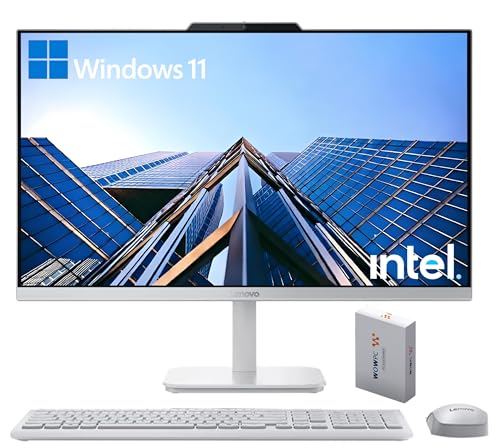
The Lenovo 24" All-in-One Desktop is a practical space-saving solution for users who want a full desktop experience without the tower. While it's not built for high-end gaming, its 23.8" FHD IPS display and modest Intel N100 processor make it a solid choice for casual gamers, college students, and anyone needing a reliable home office machine.
This all-in-one is best suited for light gaming sessions, such as indie titles, classic strategy games, or older AAA games at low settings. The 16GB of DDR4 RAM helps keep things snappy when you have multiple browser tabs, streaming apps, or office software open. The included wireless keyboard and mouse reduce cable mess, which is a nice bonus for keeping your desk tidy.
Performance-wise, the Intel N100 with integrated graphics won't handle modern competitive shooters or esports titles at high frame rates. However, for everyday productivity, streaming video, or Discord calls, it runs smoothly. The 23.8" display offers 99% sRGB coverage, so colors look accurate for photo editing or watching content. The anti-glare coating reduces reflections during long study or work sessions.
On the connectivity front, you get Wi-Fi 6 and Bluetooth 5.2 for fast wireless connections, plus a decent port selection: two USB 2.0, two USB 3.2 Gen 2, HDMI-out, Ethernet, and a headphone/mic combo jack. This setup is adequate for most peripherals, though you won't be plugging in an external GPU or upgrading the graphics.
One realistic limitation is the hybrid storage: 128GB PCIe SSD for the OS and key apps, plus a 500GB external drive for extra files. That means you'll need to manage your installs carefully, especially if you have a decent game library. Also, the all-in-one form factor means internal upgrades are limited to RAM and storage, so think about your long-term needs.
Overall, the Lenovo 24" All-in-One is a good value for casual gamers and home office users who prioritize desk simplicity and everyday reliability. It's not a gaming powerhouse, but for light play, streaming, and work, it gets the job done without taking up much space.

Pros
- Excellent multitasking performance with Ryzen 7 and 32GB RAM.
- Fast 1TB SSD for quick boot and game loads.
- Slim, clean design with minimal desk footprint.
- Built-in privacy camera and noise-canceling microphones for streaming and calls.
- Great value for a complete desktop solution.
Cons
- Integrated graphics limit performance in modern AAA games; not suitable for high-end gaming.
- No discrete GPU upgrade path; GPU performance is fixed.
- White finish may show wear over time; limited color options.
The HP 27-inch All-in-One Desktop PC (model 27-cr0012) is a sleek, space-saving computer designed for a wide range of users. While not a traditional gaming PC, it brings enough power to handle casual gaming, streaming, content creation, and everyday productivity tasks. It is best suited for casual gamers, streamers who don't need maximum graphics fidelity, content creators editing light projects, work-from-home professionals, and college gamers looking for a tidy desktop solution. The all-in-one form factor eliminates the need for a separate tower, making it a clean addition to any gaming setup.
Performance wise, the AMD Ryzen 7 7730U processor paired with 32GB of RAM provides smooth multitasking across multiple applications. You can run Discord, a web browser with several tabs, and a game like League of Legends or Fortnite simultaneously without noticeable slowdown. The 1TB SSD ensures quick load times for both games and creative software like Adobe Lightroom. For input responsiveness, the integrated AMD Radeon graphics are capable of delivering playable frame rates at 1080p for less demanding titles, though you will want to lower settings for newer games. This system is not meant for competitive esports at high refresh rates, but it handles casual play well.
Build quality is solid with HP's trademark all-in-one design. The ultra-slim micro-edge display offers a 90% screen-to-body ratio, giving you a modern look and an immersive FHD (1920x1080) picture. The tiltable pop-up privacy camera is a nice touch for streamers who want to maintain privacy between broadcasts. The dual array microphones with advanced noise reduction help keep your voice clear on Discord or during Twitch streams. For connectivity, you get USB ports, HDMI, and a headphone jack, but the exact layout is standard for an all-in-one. The white finish and slim footprint make it easy to place on a desk without dominating the space.
Setting up the HP All-in-One is straightforward: plug it in, connect peripherals, and Windows 11 Home guides you through the initial setup. There is almost no cable management required since the monitor and PC are one unit. Maintenance involves occasional dusting and updating drivers through Windows Update or HP Support Assistant. A realistic limitation is the integrated graphics - they cannot be upgraded, so gaming performance is fixed. For AAA gaming at higher settings, a desktop with a discrete GPU would be a better choice. Additionally, the white chassis may show scuffs more than darker models.
Overall, the HP 27-inch All-in-One Desktop PC offers a compelling package for users who value a clutter-free desk and solid performance for casual gaming and everyday tasks. It works well as a secondary streaming PC, a main computer for college students, or a work-from-home station that can also handle light gaming. If you are a serious competitive gamer or need ultra-high graphics settings, look elsewhere. But for those who prioritize simplicity and versatility, this all-in-one is a smart buy.
The HP All-in-One relies on integrated AMD Radeon graphics, which limits its gaming capabilities to less demanding titles. Based on the specifications, you can expect playable frame rates in games like Minecraft, League of Legends, Fortnite (at low settings), and older AAA titles. The 32GB RAM helps with multitasking, allowing you to keep game launchers and chat apps open. The 1TB SSD reduces load times significantly. However, for modern AAA games such as Cyberpunk 2077 or Call of Duty, the integrated GPU will struggle even at 720p low settings. The FHD 60Hz display is adequate for casual gaming but lacks high refresh rate support for competitive play. This system is not marketed as a gaming PC, but it can handle a session of Rocket League or Overwatch 2 on low settings.
Streamers will appreciate the built-in pop-up camera and dual array microphones with noise reduction. The Ryzen 7 processor can handle software encoding for 1080p streams on Twitch or YouTube, provided you are not also running a demanding game. The 32GB RAM ensures that streaming software like OBS can run alongside other applications without stuttering. The all-in-one design reduces desk clutter, leaving more room for a microphone arm or secondary monitor. One limitation is the integrated graphics - game streaming directly from this PC will require lowering game settings to maintain stream quality. It works best as a streaming PC for lighter titles or as a secondary streaming encoder while using a separate gaming rig.

Pros
- Smooth 100Hz IPS display with vibrant colors and anti-glare coating.
- Fast DDR5 RAM and PCIe SSD for responsive multitasking.
- Compact all-in-one design saves desk space and reduces cable clutter.
- Versatile connectivity with HDMI-in/out and Wi-Fi 6.
- Pre-installed Windows 11 Pro for enhanced productivity and security.
Cons
- Integrated graphics limit performance for demanding AAA gaming titles.
- Limited upgradeability compared to traditional desktop PCs.
- No dedicated GPU for esports or competitive gaming at high settings.
The Lenovo 24" ThinkCentre All-in-One Desktop PC is a versatile computing solution that blends productivity with casual gaming capabilities. Powered by a 6-core AMD Ryzen 5 220 processor and 16GB of DDR5 RAM, this system handles everyday tasks, streaming, and light gaming with ease. Its 512GB PCIe SSD ensures quick load times, while the 100Hz FHD IPS display delivers smooth visuals for both work and play.
This all-in-one is best suited for casual gamers, streamers, content creators, and work-from-home professionals who value a clean, space-saving desk setup. The 24-inch anti-glare display with 99% sRGB coverage provides accurate colors and wide viewing angles, making it great for video editing, photo work, or watching media. The 100Hz refresh rate reduces motion blur, offering a noticeable improvement over standard 60Hz monitors for everyday use and less demanding games.
Performance-wise, the Ryzen 5 processor with 6 cores and 12 threads handles multitasking smoothly, whether you're running multiple browser tabs, streaming on Twitch, or hopping into a Discord call. The 16GB of DDR5 RAM keeps things responsive, and the 512GB SSD provides ample space for your favorite games and files. However, the integrated graphics mean this system isn't built for high-end gaming at max settings. It's more at home with indie titles, older games, or esports titles at lower settings.
Build quality is solid, with a sleek, borderless design that looks modern on any desk. The included wired keyboard and mouse are functional for immediate use, though many users may prefer to upgrade to a dedicated gaming keyboard and mouse for better ergonomics and responsiveness. Connectivity is a strong point, with four USB ports, HDMI-in and HDMI-out, Gigabit Ethernet, and Wi-Fi 6 for fast, reliable internet connections. The HDMI-out allows you to connect an external monitor for a dual-screen setup, which is handy for streamers or multitaskers.
Setup is straightforward: just plug in the power, connect to Wi-Fi or Ethernet, and you're ready to go. The all-in-one design minimizes cable clutter, making it ideal for dorm rooms, home offices, or any space where desk organization matters. Maintenance is simple, with easy access to the RAM and SSD for future upgrades, though the integrated nature of the system limits major component swaps.
One realistic limitation is the lack of a dedicated GPU, which means this PC won't handle modern AAA games at high settings or competitive esports titles at high frame rates. It's also not designed for heavy video rendering or 3D modeling. For casual gamers, streamers, and productivity users who want a reliable, space-efficient desktop, the Lenovo ThinkCentre offers a balanced package. If you're a competitive gamer or need high-end graphics performance, you'd be better off with a traditional desktop or a gaming laptop with a dedicated graphics card.

Pros
- Integrated design saves desk space and reduces cable clutter – ideal for small gaming desks or dorm rooms.
- Decent performance for light gaming (e.g., Minecraft, League of Legends) and streaming at 1080p.
- RGB keyboard and mouse add visual flair without extra cost – good for budget RGB setups.
- Easy setup – just plug in and power on; no tower assembly required.
Cons
- Graphics performance is limited to integrated GPU – not suitable for demanding modern AAA games at high settings.
- Wi-Fi 5 and USB 2.0 ports are dated; faster connectivity (Wi-Fi 6, USB 3.0) would improve file transfers and streaming stability.
- Non-upgradeable components (RAM and storage are likely soldered) – limits future expansion for heavier workloads.
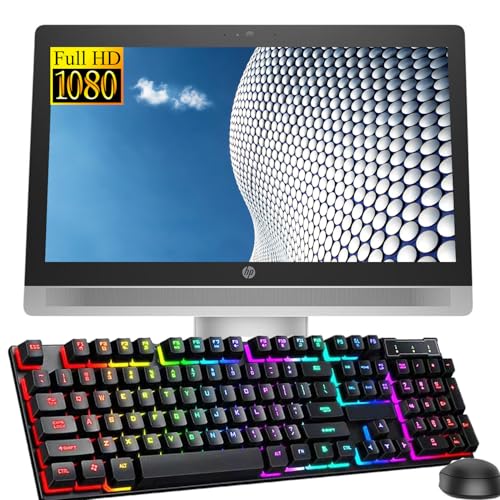
The STGSivir All-in-One Desktop Computer is a compact all-in-one PC that blends everyday computing with a subtle gaming aesthetic. It features a 24-inch Full HD display (1920x1080), an Intel Core i7 processor, 16GB of RAM, a 512GB SSD, and includes an RGB keyboard and mouse. While not a high-end gaming rig, this All-in-One is designed for users who want a clean, space-saving desktop for casual gaming, streaming, content creation, and day-to-day productivity.
This All-in-One PC is best suited for budget-conscious PC gamers, casual gamers who play less demanding titles, streamers looking for a secondary streaming PC, college gamers with limited desk space, and work-from-home users who need a reliable system for video calls and office tasks. The integrated graphics (Intel UHD Graphics 630 or similar, depending on the specific Core i7 generation) can handle esports titles like League of Legends, Valorant, or CS:GO at lower settings, as well as older AAA games. For more intensive gaming, this machine is not a good fit, but it works fine for light workloads and streaming at 1080p.
Performance-wise, the Core i7 and 16GB RAM provide snappy multitasking. You can have a game open, a Chrome browser with many tabs, and a Discord call running simultaneously without major slowdowns. The 512GB SSD ensures fast boot times and quick game loading. However, the lack of a dedicated graphics card is the main limitation for gaming – don't expect to run Cyberpunk 2077 or modern AAA titles at high settings. Video editing and photo editing with basic software (like Adobe Premiere Elements or Photoshop) are doable but may feel sluggish with complex projects.
Build quality is what you'd expect from a budget All-in-One: a silver plastic chassis with a decent stand. The display is bright enough for indoor use, with decent viewing angles, but it's not a gaming monitor with high refresh rates (likely 60Hz). The included RGB keyboard and mouse are basic peripherals – they work fine for casual use and add some color to your desk, but serious gamers will want to upgrade to a mechanical keyboard and a high-DPI mouse for better responsiveness. The built-in webcam is adequate for video calls and streaming, but its quality is average.
Setup is straightforward: unbox, plug in the power cord, connect the keyboard and mouse (USB or wireless dongle), and turn it on. Windows 11 Home comes pre-installed, so you can start using it immediately. Cable management is minimal since there's only the power cord and maybe a network cable if you use wired Ethernet. The system runs quietly under normal load, but it can get warm under sustained heavy use – the integrated cooling fan is audible but not too loud.
Realistic limitations include the lack of expandability – you can't upgrade the GPU, RAM, or SSD easily (some All-in-Ones allow RAM upgrades, but this model likely solders them). Also, the connectivity ports are limited to USB 2.0 and one HDMI/VGA – no USB-C or Thunderbolt for modern peripherals. If you need more ports, you'll need a hub. Overall, the STGSivir All-in-One Desktop Computer is a practical choice for budget-minded users who need a functional, aesthetically pleasing desktop for casual gaming and everyday computing. It's a good entry-level option for a dorm room gaming setup or a secondary streaming PC.
The gaming performance of the STGSivir All-in-One is limited by its integrated Intel graphics. It can handle esports titles such as League of Legends, Dota 2, CS:GO, and Valorant at low to medium settings and 1080p resolution, typically achieving 30-60 fps depending on the game and scene complexity. Older AAA titles like GTA V (minimum settings) or Minecraft (with Optifine) are playable. However, demanding modern games (Cyberpunk 2077, Call of Duty Warzone, Red Dead Redemption 2) will struggle and may require very low settings or reduced resolution to become playable. Casual and indie games run smoothly. This machine is not designed for competitive FPS gaming at high refresh rates, but it suffices for light gaming and as a secondary streaming PC.
The STGSivir All-in-One provides a basic set of connectivity options: multiple USB 2.0 ports, one HDMI output (for an external monitor), one VGA port (legacy display support), an RJ-45 Ethernet port, a headphone/mic combo jack, and built-in Wi-Fi 5 plus Bluetooth 5.0. The lack of USB 3.0 or USB-C ports is a drawback for faster file transfers and modern peripherals. You can connect an external monitor via HDMI or VGA, which is useful for dual-monitor setups. Wi-Fi 5 is reliable for streaming and gaming at typical internet speeds, but for best latency, a wired Ethernet connection is recommended. Bluetooth 5.0 supports wireless mice, keyboards, headsets, and game controllers.
This All-in-One comes with an RGB keyboard and mouse that feature per-key lighting (likely basic patterns) to match a gaming setup. The keyboard is a membrane-style with a full numeric keypad, and the mouse is a standard optical model with adjustable DPI (probably up to 2400 or 3200). While they are not high-end peripherals, they add a splash of color to your desk and can be customized via default lighting modes. The silver chassis of the PC itself is understated, so the RGB peripherals become the focal point. For users building a budget RGB gaming setup, these included accessories are a nice bonus, but enthusiasts will likely upgrade to mechanical keyboards and high-performance mice for better feel and accuracy.
Pros
- Space-saving all-in-one design with integrated display and computer
- Solid performance for casual gaming and everyday tasks with Core i5 and SSD
- Full HD display offers good visual clarity for gaming and streaming
- Comes with Windows 11 Pro and essential peripherals out of the box
- Affordable renewed price point for budget-conscious buyers
Cons
- Integrated graphics limit performance for demanding modern games
- 8GB RAM may require an upgrade for heavier multitasking or streaming
- Limited upgradeability compared to traditional desktop PCs
The HP ProOne 600 G2 is a renewed all-in-one desktop that brings together a 21.5-inch Full HD display and a capable Core i5-6500 processor in a single, space-saving unit. This design is ideal for PC gamers, streamers, and work-from-home users who want a clean, clutter-free desk setup without sacrificing performance for everyday tasks and casual gaming.
Under the hood, the 6th generation Intel Core i5-6500 runs at a base 3.2GHz and can turbo up to 3.6GHz, providing enough power for smooth multitasking, streaming on Twitch or YouTube, and running less demanding games like indie titles, older AAA games, or esports favorites such as League of Legends and CS:GO at playable settings. The 8GB of RAM and 256GB SSD ensure quick boot times and responsive app loading, though heavy multitaskers or those running modern games may want to consider a RAM upgrade.
The 21.5-inch Full HD (1920x1080) LCD screen offers a 16:9 aspect ratio that delivers clear visuals for gaming, streaming, and content creation. While it won't compete with high-refresh-rate gaming monitors, it provides a comfortable viewing experience for casual gaming sessions, video calls, and productivity work. The integrated graphics handle basic gaming needs but are not suited for graphically intensive titles at high settings.
Build quality is typical for a business-class all-in-one, with a sturdy frame that feels reliable for daily use. The included keyboard and mouse are basic but functional, getting you started right out of the box. Setup is straightforward: plug in the power, connect to Wi-Fi, and you're ready to go. The all-in-one design also simplifies cable management, making it a great choice for dorm rooms, small apartments, or any desk where space is at a premium.
One realistic limitation is the lack of upgradeability compared to a traditional tower PC. The RAM and storage may be accessible, but the graphics are integrated and not user-replaceable. This means the system is best for casual gamers and streamers who don't need cutting-edge GPU performance. Additionally, as a renewed unit, cosmetic wear is possible, though performance should be reliable based on the product description.
Overall, the HP ProOne 600 G2 is a practical choice for budget-conscious PC gamers, college students, and home office users who value a compact, all-in-one solution. It handles everyday computing, casual gaming, and streaming with ease, and its affordable price makes it an attractive entry point into the PC gaming world. If you're looking for a simple, space-efficient setup that won't break the bank, this renewed all-in-one is worth considering.

Pros
- Space-saving all-in-one form factor with minimal wiring needed
- Generous 16GB DDR5 RAM for smooth everyday multitasking
- Built-in webcam with privacy shutter and good audio for calls or streaming
- Windows 11 Pro gives extra security and productivity tools for professionals
- Affordable entry point for casual gaming and home office use
Cons
- 128GB storage is very limited for installing multiple modern games; external drive or cloud storage is necessary
- Integrated Intel UHD graphics cannot handle modern AAA games or esports titles at acceptable frame rates
- 21.5" FHD screen is decent but small for immersive gaming or multi-window productivity
The HP 2025 All-in-One Desktop is a compact, space-saving PC designed for everyday computing tasks. It's not built for hardcore gaming, but it can serve casual gamers, college students, and work-from-home users who need a reliable machine for browsing, streaming, and light creative work without taking up much desk space.
This all-in-one uses the latest 13th Gen Intel N100 processor (4 cores, 3.4GHz) paired with 16GB of DDR5 RAM and a 128GB SSD. For everyday productivity - email, Office, web browsing, video calls, and even light photo editing - it feels responsive. The DDR5 RAM helps keep multiple tabs and apps open without slowdown. The SSD boots Windows 11 Pro quickly, and apps launch fast.
When it comes to gaming, this is strictly for casual or older titles. The integrated Intel UHD Graphics can run 2D indie games, retro emulators, or older 3D games like Minecraft (at lower settings) or League of Legends (on low). Don't expect to play modern AAA releases, competitive esports at high settings, or stream graphically intensive games. For that, you'll need a dedicated gaming PC.
The 21.5-inch FHD display has an anti-glare coating, making it comfortable for long work sessions. Colors are decent for an office monitor, but not vivid enough for content creation where color accuracy matters. The built-in dual stereo speakers are okay for system sounds and YouTube, but you'll want headphones or external speakers for better audio. The HD webcam with privacy shutter is handy for Zoom calls or Discord chats, and the integrated microphones work fine for casual use.
Connectivity is modern with WiFi 6, Bluetooth 5.3, USB Type-C (data only), a couple of USB-A ports, and HDMI-out for a second display. The all-in-one design keeps your desk tidy - just plug in power and mouse/keyboard, and you're set. However, the 128GB storage fills up quickly if you install games or large files; plan on using an external drive or cloud storage. The system is silent under normal loads and runs cool.
In short, this HP All-in-One is a practical choice for users who want a neat desk setup for work and casual gaming. It's not for competitive esports or demanding games. College gamers in a dorm, remote workers who play light titles, or families wanting a shared PC will appreciate the ease of use and low price. Just be realistic about its limitations - it's an everyday computer that can do a little gaming, not a gaming PC.

Pros
- Compact all-in-one design saves desk space and reduces cable clutter
- Solid performance for everyday tasks, casual gaming, and streaming
- Fast SSD storage improves load times and system responsiveness
- Good connectivity options including USB 3.1 and DisplayPort
- Affordable renewed price point for budget-conscious buyers
Cons
- Integrated graphics limit gaming performance for demanding titles
- 8GB RAM may be insufficient for heavy multitasking or modern AAA games
- Renewed unit may show signs of wear or have limited warranty
The HP ProOne 600 G4 All-in-One Desktop PC is a renewed business-class system that offers a practical solution for gamers and streamers who need a compact, space-saving setup. With its 21.5-inch Full HD display integrated into the chassis, this all-in-one eliminates the need for a separate monitor, making it ideal for dorm rooms, small desks, or home offices where space is at a premium. Powered by an Intel Core i5-8500T processor, 8GB of DDR4 RAM, and a 256GB SSD, it handles everyday tasks, casual gaming, and streaming without breaking a sweat.
This system is best suited for casual gamers, streamers, content creators, and work-from-home users who prioritize desk organization and ease of setup. While it won't run the latest AAA titles at high settings due to its integrated graphics, it handles indie games, older titles, and esports games like League of Legends or Counter-Strike 2 at lower settings. The 256GB SSD ensures fast boot times and quick game loading, which is a plus for productivity and gaming alike.
Build quality is typical of HP's business lineup, with a sturdy chassis and a clean, professional aesthetic. The 21.5-inch FHD display offers crisp visuals for work and media consumption, though it lacks the high refresh rates gamers crave. Connectivity is solid with four USB 3.1 ports, one USB 2.0, DisplayPort, Gigabit Ethernet, and a 3-in-1 card reader, allowing you to hook up gaming peripherals, external drives, and additional monitors easily.
Setup is straightforward: just plug in the included keyboard, mouse, and power adapter, and you're ready to go. Windows 11 Pro comes pre-installed, providing a modern and secure OS environment. The all-in-one design means minimal cable management, which is a huge plus for those who hate tangled wires. However, upgrading components is limited compared to a traditional desktop tower, so consider your future needs carefully.
A realistic limitation is the 8GB of RAM, which might feel restrictive for heavy multitasking or running multiple streaming apps simultaneously. The integrated Intel UHD Graphics 630 is fine for light gaming but won't satisfy competitive gamers or those who play graphically intensive titles. Additionally, as a renewed unit, cosmetic wear is possible, and the warranty may vary by seller.
Overall, the HP ProOne 600 G4 is a solid choice for budget-conscious users who want a clean, all-in-one setup for casual gaming, streaming, and daily work. It's particularly appealing for college gamers or those setting up a home office where space and simplicity matter more than raw gaming horsepower. If you need a reliable secondary system or a primary PC for light gaming and productivity, this renewed desktop offers excellent value.
Frequently Asked Questions
Can all-in-one computers run modern games?
Yes, many all-in-ones can run modern games, but mostly at lower settings and resolutions. Models with AMD Radeon Graphics or Intel UHD can handle esports titles like League of Legends or CS:GO at 1080p with decent framerates. For AAA games, expect to dial down settings to medium or low. The HP 27 inch with Ryzen 7 7730U and 32GB RAM offers better multitasking for streaming while gaming, but the integrated GPU remains the bottleneck for high-FPS experiences.
Is 8GB RAM enough for gaming on an all-in-one?
8GB RAM is the bare minimum for gaming in 2026. It can run older titles and light esports games, but you will face stutters in newer releases. For smoother Call of Duty: Warzone or Apex Legends, 16GB or more is recommended. The HP 24 inch with 8GB RAM might struggle with background apps open, so consider models with 16GB or 32GB if you plan to play while running Discord or OBS.
Can I upgrade the GPU in an all-in-one computer?
Generally no. Most all-in-ones use integrated graphics soldered to the motherboard or a non-upgradeable mobile GPU. That means you cannot swap in a better graphics card later. If future upgradability matters, a traditional desktop is better. However, some business AIOs like the HP ProOne 600 G4 are renewed models that give you decent specs at a low price, but still no GPU upgrade path.
How does the Lenovo ThinkCentre 24 with Ryzen 5 perform in games?
The Lenovo ThinkCentre 24 with AMD Ryzen 5 220 and 16GB DDR5 RAM offers solid everyday performance. Its 100Hz IPS display provides smoother motion than standard 60Hz screens, which helps in fast-paced games. But the integrated graphics limit it to light titles. Expect playable framerates in Rocket League or Minecraft at 1080p medium settings, but not for demanding shooters.
Are refurbished all-in-ones worth it for gaming?
Refurbished models like the HP ProOne 600 G2 or G4 can be great value if you are on a tight budget. They often come with Windows 11 Pro and decent business-grade components. However, they typically have older CPUs and limited RAM. For casual gaming (emulators, older titles), they work fine. But don’t expect to play recent releases smoothly. Always check the warranty before buying.
What about the STGSivir All-in-One with Intel Core i7?
The STGSivir 24-inch with Intel Core i7 up to 3.9GHz, 16GB RAM, and 512GB SSD is a budget-friendly option. It includes RGB keyboard and mouse, which is a nice touch. For gaming, the integrated graphics are similar to other AIOs in this price range. It can handle Fortnite at low settings and older games, but it is better suited for productivity and light streaming.
Should I choose an all-in-one or a gaming laptop for the same price?
It depends on your priorities. A gaming laptop often has a discrete GPU (like an RTX 3050) that significantly outperforms integrated graphics in AIOs. Laptops are portable but can be noisy and have smaller screens. All-in-ones offer a larger display and less clutter, but trade away performance. If gaming is your main use, a gaming PC under $800 or a dedicated laptop will give you better FPS.


Write Your Review
No reviews yet. Be the first to share your experience!