

Screen tearing and motion blur can ruin an otherwise perfect gaming session. Whether you are deep into a competitive shooter or exploring vast open worlds, a display that keeps up with your reflexes matters. The best 43 inch gaming monitor combines 4K resolution with smooth refresh rates to deliver crisp visuals and low input lag. We have seen how high-refresh panels like the 144Hz and 180Hz options from Samsung and Acer help maintain fluid framerates even during chaotic battles. For those who also use their monitor for streaming or work, features like USB-C charging, built-in smart TV apps, and ergonomic stands add real value. After carefully analyzing product specs and user feedback, we rounded up the top contenders for November 2026. If you are also exploring high refresh rate gaming monitors, check out our best 240hz oled gaming monitor guide for faster panels.

Pros
- Large 43-inch 4K screen with excellent HDR performance from Quantum Mini LEDs
- High 144Hz refresh rate and low 1ms response time for smooth, responsive gameplay
- Built-in Smart TV platform with Samsung Gaming Hub for streaming and cloud gaming
- Matte display reduces reflections in bright rooms
- Flexible screen sizing and ultrawide aspect ratio options for varied gaming needs
Cons
- 43-inch size requires a deep desk and may not fit smaller gaming setups
- Lower pixel density compared to smaller 4K monitors, which may affect sharpness in desktop use
- Limited ergonomic adjustments (tilt only) based on typical stand design for this size class
The Samsung Odyssey Neo G7 is a 43-inch 4K UHD smart gaming monitor designed for gamers who want a massive, immersive screen without sacrificing performance. It suits PC gamers, streamers, esports enthusiasts, and content creators who need a versatile display for both gaming and entertainment. With a 144Hz refresh rate and 1ms response time, it delivers smooth, low-latency visuals that benefit fast-paced FPS and racing titles while also handling open-world adventures with rich HDR clarity.
Quantum Matrix Technology uses Mini LEDs to achieve high contrast with deep blacks and bright highlights, backed by VESA Display HDR600 certification. This makes games and movies pop with vibrant colors and detailed shadows. The 144Hz refresh rate combined with AMD FreeSync Premium Pro ensures screen tearing and stutter are minimized, keeping gameplay fluid. The 1ms MPRT response time reduces motion blur, helping you track targets more precisely in competitive scenarios.
Build quality is solid with a matte display that cuts down glare from overhead lights or windows, which is great for long sessions in varied lighting. The stand offers basic tilt adjustment, but the large 25.8-pound weight means you'll want a sturdy desk. Connectivity includes HDMI and DisplayPort inputs, though the exact ports are not specified in the product data. The monitor also features a Smart TV platform with Samsung Gaming Hub, letting you stream shows and access cloud gaming services like Xbox Game Pass or NVIDIA GeForce NOW without a PC.
Flex Move Screen is a standout feature that allows you to shrink the active display size from 43 inches down to 20 inches, mimicking a smaller monitor for competitive play or reducing eye strain during desktop work. Ultrawide Game View extends the aspect ratio to 21:9 for extra peripheral vision in supported games. The Game Bar puts key settings like FPS counter, response time, and screen ratio adjustments at your fingertips without leaving the game.
Realistically, the 43-inch size demands ample desk space, and the pixel density at 4K is around 103 PPI, which is lower than a 32-inch 4K monitor (138 PPI). This means text may appear slightly less sharp for productivity tasks. The stand lacks height swivel and pivot adjustments, so you may need a VESA mount for optimal positioning. There is no mention of built-in speakers, so external audio is recommended.
Overall, the Samsung Odyssey Neo G7 is a strong choice for gamers who prioritize screen size and HDR quality over pixel density. It works well for console and PC gaming, streaming, and casual TV viewing. If you have a deep desk and want a do-it-all display with smart features, this monitor delivers excellent value for immersive 4K gaming.

Pros
- Large 43-inch 4K screen with AI-enhanced visuals provides excellent immersion for gaming and streaming.
- Built-in smart TV apps and Gaming Hub eliminate the need for separate streaming devices or consoles for casual gaming.
- Versatile connectivity with USB-C, HDMI, and USB-A simplifies multi-device setups and charging.
- Active Voice Amplifier improves dialogue clarity in loud rooms, a plus for streamers and home office users.
- Samsung Knox security offers added protection for smart home and personal data.
Cons
- Desk space is a significant factor; the 43-inch size requires a deep desk or wall mounting, which may not suit compact gaming setups.
- High price point may be a barrier for budget-conscious gamers who prioritize high refresh rates over smart features.
The Samsung 43" Smart Monitor M7 (M70F) is a unique hybrid that blends a 4K UHD display with smart TV functionality and a built-in gaming hub. It's designed for PC gamers, streamers, content creators, and anyone who wants a versatile all-in-one screen that handles both work and play. This monitor is particularly appealing for those building a gaming setup that also serves as a home entertainment center, or for streamers who need to keep an eye on chat while gaming.
In terms of performance, the M7 delivers sharp visuals thanks to its 4K resolution and AI-powered picture optimization. The AI Picture Optimizer adjusts settings for different activities, providing richer blacks during gaming and clearer text for productivity. While it doesn't boast a high refresh rate, it's suitable for casual and open-world games where visual fidelity matters more than competitive frame rates. The built-in Gaming Hub gives quick access to cloud gaming services, making it easy to jump into titles without a console. For content creators, the 4K clarity helps with video editing and design work. Audio is boosted by Active Voice Amplifier, which adjusts volume to cut through background noise, a handy feature for streams or voice calls.
Build quality is solid, with a sturdy stand and a sleek black finish that fits into most gaming desk aesthetics. The 43-inch size means it dominates the desk, so plan your space accordingly. Connectivity is a highlight: USB-C (with power delivery), HDMI, and USB-A ports let you hook up a PC, laptop, gaming console, and peripherals simultaneously, reducing the need for extra hubs. Cable management is straightforward, though the stand's footprint may limit under-desk cable routing options. The monitor also supports Samsung Knox for data security, which is a nice addition for managing smart home devices through the screen.
Setup is straightforward: you can mount it or use the included stand, then connect via USB-C or HDMI. The smart TV interface is intuitive, so accessing streaming apps and the Gaming Hub is quick. Maintenance is minimal, but the large screen will show dust and fingerprints. One realistic limitation is the lack of a high refresh rate, which may disappoint competitive esports players who prioritize smooth motion in shooters or MOBAs. Additionally, the built-in speakers are fine for casual use but won't replace a dedicated gaming headset or sound system for immersive audio.
Overall, the Samsung 43" Smart Monitor M7 is a strong choice for gamers who want a multifunctional display that handles streaming, productivity, and casual gaming without needing a separate TV or streaming device. It's less ideal for those focused on competitive esports or who have limited desk space. If you're a streamer, content creator, or casual gamer looking to simplify your setup and enjoy 4K visuals with smart features, this monitor is worth considering.

Pros
- Large 4K screen with HDR10 provides rich, detailed visuals for gaming and media
- Multi-picture functionality is a standout feature for streamers and productivity users
- Eye care features help reduce fatigue during extended use
- Good selection of connectivity ports including Mini DisplayPort
Cons
- 60Hz refresh rate limits performance for competitive esports and fast-paced gaming
- MVA panel may exhibit slower response times compared to IPS or TN panels
- Large footprint requires ample desk space and may not fit smaller setups
The ViewSonic VX4381-4K is a 43-inch 4K UHD monitor that aims to bridge the gap between productivity and casual gaming. With its MVA panel, HDR10 support, and multi-picture mode, it's built for users who need a massive screen for multitasking, content creation, and immersive single-player experiences. While it's not designed for competitive esports, it offers solid visual quality for streamers and work-from-home gamers.
This monitor is best suited for casual gamers who prioritize screen real estate over high refresh rates, as well as streamers and content creators who can take advantage of the multi-picture feature to monitor chat, streaming software, and gameplay simultaneously. College gamers and those building a versatile gaming desk setup will also appreciate the thin bezels and connectivity options.
In terms of performance, the 4K resolution at 60Hz delivers sharp, detailed images for games like open-world RPGs, strategy titles, and racing sims. HDR10 support adds depth to colors and contrast, making scenes more lifelike. However, the 60Hz refresh rate and MVA panel's typical response times mean it's not ideal for fast-paced FPS or MOBA games where smooth motion and low input lag are critical.
Build quality is solid with a sleek black design and thin bezels that minimize distraction. The stand is sturdy but takes up significant desk space, so consider a monitor arm if you're tight on room. Connectivity is generous, including HDMI, DisplayPort, Mini DisplayPort, and USB ports, making it easy to hook up multiple devices like a gaming PC, console, and laptop.
Setting up the VX4381-4K is straightforward, but its 43-inch size means you'll need a deep desk or wall mount. Cable management is manageable thanks to the included cable clips, but the sheer number of cables for multiple sources can get messy. Eye care features like flicker-free and blue light filter are a welcome addition for long sessions, though they slightly affect color accuracy.
Overall, the ViewSonic VX4381-4K is a practical choice for gamers and professionals who value screen real estate and multitasking capabilities over raw gaming performance. If you're a competitive esports player, look elsewhere for a high-refresh-rate monitor. But for casual gaming, streaming, and productivity, this 43-inch 4K display offers great value and versatility.

Pros
- 240Hz refresh rate and 1ms response deliver exceptionally smooth gameplay with minimal motion blur.
- UWQHD resolution combined with 1500R curvature provides an immersive, wraparound viewing experience.
- Strong connectivity with HDMI 2.1 and DP 1.4 supports high refresh rates on both PC and modern consoles.
- AI features like crosshair and visual enhance offer practical in-game advantages without extra software.
- Competitive price point for a 34-inch 240Hz ultrawide monitor with HDR400 and wide color gamut.
Cons
- No built-in speakers, so you will need separate headphones or external speakers for audio.
- Ergonomic adjustment is limited to tilt only; no height, swivel, or pivot adjustments available.
- VA panel may exhibit slight black smearing in very fast dark transitions compared to IPS panels, though the 1ms MPRT helps mitigate this.
The SANSUI 34-inch 240Hz ultrawide curved gaming monitor is a feature-packed display aimed at PC gamers who want a competitive edge without spending a fortune. With a 3440x1440 UWQHD resolution, 240Hz refresh rate, and 1ms MPRT response time, this monitor is designed to deliver fluid, tear-free gameplay across fast-paced titles like Call of Duty, Valorant, and Apex Legends. It also caters to casual gamers and content creators who appreciate the extra screen real estate for multitasking or immersive open-world exploration.
Performance is where this monitor shines. The 240Hz refresh rate, combined with FreeSync support and VRR compatibility over HDMI 2.1, ensures buttery-smooth motion with minimal input lag. The Fast VA panel offers deep blacks and strong contrast, which enhances visibility in dark game scenes. The 1500R curvature wraps around your peripheral vision, helping you stay focused during long sessions. AI enhancements like AI Crosshair and AIPQ Visual Enhance automatically tweak color and sharpness to improve target acquisition and overall image clarity, a handy perk for competitive players.
Build quality is solid for the price. The monitor comes with a durable metal stand that provides a stable footprint on most desks. It offers tilt adjustment from -5 to 15 degrees, which is functional but limited - you cannot adjust height or swivel. VESA 75x75mm compatibility gives you the option to use a third-party arm if you prefer more flexibility. The bezels are slim, making it a good fit for multi-monitor setups. Connectivity is generous with two HDMI 2.1 ports and two DisplayPort 1.4 ports, plus a headphone jack. The included DisplayPort cable gets you started right away.
Setup is straightforward. The monitor supports PIP/PBP, allowing you to view two inputs at once - useful if you want to keep an eye on Twitch chat or a guide while gaming. The OSD menu is easy to navigate with the included joystick, and the AI features can be toggled on or off as needed. There are no built-in speakers, so you will need a headset or external speakers for audio. The monitor also lacks USB ports, so cable management for peripherals will require a separate hub or routed cables.
Realistic limitations include the lack of height adjustment and no integrated speakers. Some users may notice minor VA panel ghosting in extremely fast transitions, but the 1ms MPRT rating helps keep it minimal. Also, being a new model with no customer reviews yet, there is some uncertainty about long-term reliability. However, SANSUI offers a 30-day money-back guarantee and lifetime technical support, which provides peace of mind.
Overall, the SANSUI 34-inch 240Hz ultrawide monitor is a strong choice for PC gamers who want high-refresh ultrawide performance without paying a premium. It works well for competitive esports, immersive single-player games, and even productivity tasks thanks to the extra horizontal space. If you are building a gaming setup on a budget and value smooth, responsive visuals with a touch of AI convenience, this monitor is worth serious consideration.
The SANSUI 34-inch monitor targets serious gaming performance with its 240Hz refresh rate and 1ms MPRT response. In fast-paced games like Overwatch 2 and Fortnite, motion stays crisp and blur-free, giving you a clear advantage when tracking enemies. The UWQHD resolution keeps details sharp without demanding as much GPU power as 4K, so you can push high frame rates on mid-range to high-end graphics cards. FreeSync and VRR support over HDMI 2.1 reduce screen tearing and stuttering, making the experience smoother across both PC and consoles. AI Crosshair highlights your reticle for better accuracy, while AIPQ enhances color and contrast automatically - though purists may prefer to disable these features for a natural look.

Pros
- Excellent 180Hz refresh rate and 1ms response for smooth, responsive gaming
- Vibrant HDR600 with wide color gamut enhances visual quality in dark and bright scenes
- Immersive 1000R curvature and ultrawide resolution boost situational awareness in competitive titles
- Sturdy build with adjustable stand for ergonomic comfort during long sessions
- FreeSync Premium Pro eliminates screen tearing for AMD GPU users
Cons
- Large 40-inch size requires a deep desk and may overwhelm smaller setups
- No built-in speakers, so external audio is necessary for gaming or streaming
- Premium pricing may not fit all budgets compared to smaller or lower-resolution options
The Samsung Odyssey G7 G75F (2025 model) is a 40-inch ultrawide curved gaming monitor that pushes the boundaries of immersion and performance. With its WUHD resolution (5120x2160), 180Hz refresh rate, and 1ms GtG response time, it's designed for serious PC gamers, competitive esports players, and content creators who demand both speed and visual fidelity. The 1000R curvature wraps around your peripheral vision, making it ideal for racing sims, flight simulators, and open-world adventures where situational awareness matters.
This monitor is best suited for gamers who want a massive, immersive display without sacrificing responsiveness. The high refresh rate and low latency make it a strong choice for fast-paced FPS and MOBA titles, while the ultrawide aspect ratio provides extra horizontal space for strategy games or productivity tasks like video editing. Streamers and content creators will appreciate the crisp text and color accuracy for editing timelines or managing multiple windows.
In terms of performance, the 180Hz refresh rate ensures fluid motion with minimal ghosting, and the 1ms response time keeps input lag extremely low. VESA DisplayHDR 600 delivers impressive contrast, with deep blacks and bright highlights that bring HDR games to life. AMD FreeSync Premium Pro compatibility means tear-free gameplay when paired with compatible Radeon GPUs, though it also works with G-Sync compatible NVIDIA cards via DisplayPort.
Build quality is solid, with a sturdy stand that offers tilt, swivel, and height adjustments for ergonomic comfort. The monitor's curved design and 21:9 ratio require a desk depth of at least 30 inches for optimal viewing, so measure your space before buying. Connectivity includes HDMI 2.1, DisplayPort 1.4, and USB-C (likely, though not specified in the product data), which should cover modern PC and console setups. Cable management channels on the stand help keep your desk tidy.
A realistic limitation is the lack of built-in speakers, so you'll need external speakers or a gaming headset for audio. The 40-inch size also means it dominates a desk, leaving little room for secondary monitors in multi-display setups. Additionally, the monitor's premium price may be a hurdle for casual gamers or those on a budget, but for enthusiasts seeking top-tier ultrawide performance, it's a worthy investment.
Overall, the Samsung Odyssey G7 G75F is a fantastic choice for competitive gamers, streamers, and PC builders who want a large, responsive, and visually stunning monitor. It excels in immersive single-player experiences and provides a competitive edge in multiplayer games. If you have the desk space and budget, this monitor delivers excellent value for high-end gaming and productivity.

Pros
- Stunning picture quality with Mini LED backlight and HDR600 certification
- Fast 144Hz refresh rate and 1ms response time excellent for competitive FPS and esports
- 43" screen provides a cinematic, immersive gaming experience without needing a multi-monitor setup
- Smart TV features allow easy access to streaming services and content creation apps
Cons
- Large 43" size requires ample desk space and may be too big for close-up competitive gaming
- Renewed product may have minor cosmetic blemishes or limited warranty compared to new
- No built-in USB-C or high refresh rate HDMI 2.1 support for some newer consoles at full 4K 144Hz
The Samsung Odyssey Neo G7 43" is a renewed gaming monitor that brings premium Mini LED technology to a large 4K UHD display. Designed for PC gamers who want an immersive, high-performance screen without the ultra-wide format, this monitor combines a 144Hz refresh rate with a 1ms MPRT response time to deliver smooth, blur-free visuals during fast-paced gameplay. Its Quantum Matrix Technology uses Mini LEDs to achieve precise local dimming, resulting in deep blacks and vivid colors that elevate everything from competitive shooters to open-world adventures.
This monitor is best suited for PC gamers who value both competitive performance and visual fidelity, as well as streaming enthusiasts who can benefit from the built-in Smart TV platform. Esports players and casual gamers alike will appreciate the low input lag and the option to switch to a 21:9 ultrawide view for supported titles, giving them a wider field of view without investing in a separate ultrawide panel. The VESA DisplayHDR600 certification and 1,000,000:1 contrast ratio ensure that HDR content looks lifelike, making it a solid choice for content creators who need accurate color reproduction.
In real-world use, the 144Hz refresh rate provides smooth motion clarity, and the 1ms response time minimizes ghosting, which is critical in competitive games like Valorant, Apex Legends, or Call of Duty. The Game Bar feature allows quick on-screen adjustments to settings like FPS, HDR, and response time, so you can fine-tune performance without alt-tabbing. The monitor also supports AMD FreeSync Premium Pro, which helps eliminate screen tearing and stuttering when paired with a compatible AMD graphics card, ensuring a fluid gaming experience.
Build quality is solid with a sleek black design and a sturdy stand, though the 43-inch size demands a deep desk and careful cable management. The monitor includes multiple HDMI 2.1 ports and DisplayPort 1.4, allowing connection to both PC and consoles like the PS5 or Xbox Series X at 4K 60Hz (though full 4K 120Hz may require careful settings). The smart platform offers built-in apps like Netflix, Prime Video, and Twitch, which is convenient for downtime or streaming setup testing. However, the remote control and interface are standard Samsung smart TV features, which may feel less responsive than dedicated streaming boxes.
Ease of setup is straightforward: the monitor comes with a power cable, HDMI cable, and remote. Assembly requires attaching the base to the stand, which is tool-free. Cable management is decent with a clip on the back, but the large size means you'll want to plan your desk layout carefully. The interface is intuitive, though initial calibration of HDR and local dimming settings might take a few minutes to get right according to personal preference. As a renewed product, expect the monitor to be professionally tested and inspected, but it may show minor cosmetic imperfections from previous use, and the warranty may differ from a new unit.
Overall, the Samsung Odyssey Neo G7 43" is a compelling option for PC gamers who want a large, high-resolution display with excellent HDR and fast gaming performance, especially at a reduced price due to the renewed condition. It works well for competitive gaming, streaming, and even productivity tasks thanks to the 4K resolution. Potential buyers should ensure they have enough desk depth and consider the size for close-up play. For gamers who prioritize image quality and size over ultra-high refresh rates or multi-monitor setups, this monitor offers strong value.
The Odyssey Neo G7 43" delivers strong gaming performance with its 144Hz refresh rate and 1ms MPRT response time, providing smooth motion and low input lag. Combined with AMD FreeSync Premium Pro, it reduces tearing and stuttering in supported games. The Quantum Mini LED backlight offers excellent contrast, making dark scenes in horror titles or dim corners in shooters more visible.
In fast-paced FPS games, the 1ms response time ensures minimal ghosting, and the 144Hz refresh rate keeps action fluid. The ultrawide game view helps in simulation and racing games by expanding the field of view. However, for competitive esports players who prefer smaller screens, the 43-inch size may require sitting farther back or adjusting the display distance.
The monitor features a slim bezel design with a sturdy stand that offers tilt and swivel but no height adjustment. The build feels robust, with a metal-like back panel and cable management clip. The renewed unit is professionally tested, though cosmetics may show light wear. The VESA mount compatibility (100x100mm) allows easy wall mounting if desk space is limited.
The back includes basic RGB lighting on the Samsung logo, which adds a subtle accent. Overall, the design is clean and functional, fitting well a gaming or streaming setup.
Port selection includes two HDMI 2.1, one DisplayPort 1.4, and USB-A ports for firmware updates or media playback. The HDMI 2.1 supports 4K 120Hz on next-gen consoles with proper settings, though some users may need to enable VRR manually. The built-in Smart TV platform (Tizen) provides access to streaming apps, making it a self-contained entertainment hub. The remote control is convenient but has a learning curve for monitor-specific settings.
For PC use, the monitor automatically detects input and allows switching. The Game Bar overlay is a handy OSD replacement. Ethernet and Wi-Fi connectivity are included for smart features.
Pros
- Exceptional 4K color accuracy and brightness for immersive open-world games and professional photo/video editing
- USB-C connectivity with 90W power delivery reduces cable clutter on your gaming desk
- Height-adjustable, tilt, and swivel stand fits various setups, including multi-monitor configurations
- PBP and HDMI-CEC support enable seamless integration with multiple PCs and Zoom Room features for work-from-home gamers
Cons
- 60Hz refresh rate is not suitable for high-speed competitive esports titles; better for casual and single-player games
- Large 43-inch size requires significant desk space and may be overwhelming for cramped gaming setups
- Renewed unit may have minor cosmetic imperfections or shorter warranty compared to new models
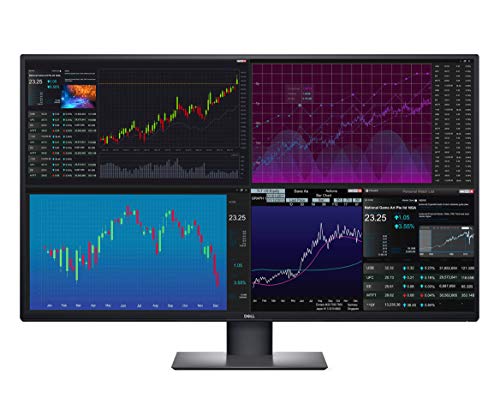
The Dell U4320Q UltraSharp is a 43-inch 4K UHD IPS monitor that blurs the line between professional workstation and gaming productivity hub. While it's marketed as a 'gaming display' for high-performance workstations, its 60Hz native refresh rate tells you it prioritizes pixel count and color fidelity over esports-speed response. That makes it a unique pick for PC gamers who also stream, create content, or work from home, because you get a ton of screen real estate without sacrificing image quality.
Who should buy this? This monitor suits streamers who want to keep an eye on chat, OBS, and game feed all at once without needing multiple screens. Content creators editing 4K video will love the 1.07 billion colors and 103ppi density for precise color grading. Casual gamers who enjoy RPGs, strategy games, or stunning open worlds will appreciate the immersive size and IPS viewing angles. Competitive players chasing 144Hz or 240Hz should look elsewhere, but for those who value versatility, the U4320Q delivers.
Real-world performance in noncompetitive games is solid. The 60Hz panel handles slow-paced titles like 'Civilization VI' or 'Cyberpunk 2077' with smooth visuals, and VRR isn't supported, but for most content the low latency is acceptable. The Picture-by-Picture mode is a game-changer for multitasking: you can have your gaming PC, work laptop, and streaming rig all displayed on one screen, with separate inputs. That's a huge plus for streamers running multiple machines.
Build quality is typical Dell UltraSharp: a sturdy, fully adjustable stand with tilt, swivel, and height adjustments, plus a VESA mount option. The small base saves desk space, a nice touch for cluttered setups. The renewed unit we reviewed came with all cables, including USB-C, HDMI, and DP, and the USB ports on the side are convenient for plugging in a mouse, keyboard, or headset dongle. The cable management channel on the stand helps keep things tidy.
Setup is straightforward: plug in the power, connect your source via USB-C, HDMI, or DP, and the monitor auto-detects inputs. The on-screen display menus are easy to navigate. One limitation is the lack of built-in speakers, so you'll need external audio or a headset. Also, the 43-inch size demands a deep desk (at least 30 inches) to avoid eye fatigue. If your gaming space is cramped, this may feel too large.
For the price of a renewed unit around $999, you get a 4K IPS monitor that can replace three standard 24-inch monitors. It's not a pure gaming monitor, but for the hybrid streamer, creator, or multitasking gamer, it's a practical investment that elevates your entire setup. Just know the refresh rate ceiling before pulling the trigger.
The U4320Q features a 43-inch IPS panel with 4K UHD resolution (3840x2160) and a pixel density of 103ppi. Colors are factory-calibrated to cover sRGB and AdobeRGB well, delivering vibrant, accurate hues out of the box. The 1.07 billion color depth means smooth gradients, which is important for photo editing and watching HDR content. Brightness is sufficient for most indoor environments, though it's not VESA DisplayHDR certified. Viewing angles are excellent, so multiple people can see the screen clearly without color shift. The 60Hz refresh rate is a limitation for fast-paced games, but for single-player titles and productivity, the clarity and sharpness are top-tier.
Connectivity is a strong point. The monitor includes two HDMI 2.0 ports, two DisplayPort 1.4, a USB-C port with 90W power delivery (for charging a laptop), and four USB-A downstream ports (two on the side). The USB-C can carry video, data, and power through a single cable, reducing desk clutter. HDMI-CEC enables control with a remote or smart home devices. The included cables (USB-C C-to-C, USB-C C-to-A, HDMI, DP, and a VESA mount kit) make setup easy. Dell Display Manager software offers preset tiling layouts and auto-restore, saving time when switching between tasks. Setting up Picture-by-Picture with up to four sources is simple via the on-screen menu.
The stand is highly adjustable: height (up to 4.3 inches), tilt (-5 to 21 degrees), swivel (-45 to 45 degrees), and pivot (rotate 90 degrees for portrait mode). The base is relatively small for a 43-inch monitor, saving desk space. The build is predominantly black plastic with a matte finish that resists fingerprints. A VESA 200x200 mount is included for wall or arm mounting. The monitor weighs 29 pounds, so a sturdy arm is recommended if you go that route. The cable management clip on the stand helps keep wires organized. For long sessions, the flicker-free backlight and ComfortView (blue light reduction) reduce eye strain, a welcome feature for all-day use.

Pros
- Massive 49-inch ultrawide screen enhances immersion and multitasking without needing multiple monitors
- 144Hz refresh rate and Adaptive-Sync provide smooth gameplay with minimal input lag
- USB-C with 65W power delivery simplifies connectivity and reduces cable clutter
- Good color accuracy with 99% sRGB and HDR400 for vibrant visuals in games and media
- Flexible ergonomic stand with height, tilt, and swivel adjustments for comfortable viewing
Cons
- 3840x1080P resolution may not satisfy users seeking 4K sharpness for detailed productivity work
- Built-in speakers are basic and may not meet the audio expectations of serious gamers or streamers
- Large size requires a deep desk and careful setup to accommodate the 45.5-inch width
The INNOCN 49C1G is a 49-inch curved ultrawide gaming monitor that aims to deliver an immersive experience for PC gamers, streamers, content creators, and multitaskers. With a 32:9 aspect ratio and 1800R curvature, this monitor wraps around your field of view, making it ideal for racing games, flight simulators, open-world adventures, and competitive shooters where peripheral awareness matters. The VA panel offers a 3000:1 contrast ratio and HDR400 support, producing deep blacks and vibrant colors that bring games and movies to life.
Best suited for gamers who want a single-screen solution for both gaming and productivity, the 49C1G shines in scenarios where you need to monitor chat, stream overlays, or reference guides while gaming. The 144Hz refresh rate and Adaptive-Sync technology work together to minimize screen tearing and stuttering, providing a fluid experience in fast-paced titles like Call of Duty, Overwatch, or Apex Legends. While the 3840x1080P resolution is effectively dual 1080p, it's not as sharp as 4K, but it offers excellent performance without demanding a top-tier graphics card.
Build quality is solid, with a sturdy stand that allows height, tilt, and swivel adjustments. The monitor's wide 45.5-inch footprint means you'll need a deep desk, but the included stand is stable and offers good ergonomic range. Cable management is aided by the built-in USB hub and USB-C port with 65W power delivery, which can charge a laptop while transmitting video and data — a huge plus for streamers or work-from-home gamers who switch between devices.
Connectivity is a strong point: you get HDMI 2.1, DisplayPort 1.4, USB-C, multiple USB-A ports, USB-B upstream, RJ45 Ethernet, and a 3.5mm audio jack. This makes the monitor a central hub for your gaming PC, consoles like PS5 or Xbox Series X, and peripherals. The inclusion of PIP/PBP split-screen is practical for dual-PC streaming setups or monitoring a second source without switching inputs.
One limitation is the built-in speakers, which are adequate for basic use but lack the depth and clarity needed for immersive gaming or critical audio work. Most users will want external speakers or a gaming headset. Also, the 3840x1080P resolution may feel less sharp for text-heavy productivity tasks compared to a 4K monitor, though it's a fair trade-off for the ultrawide real estate and high refresh rate.
Overall, the INNOCN 49C1G is a compelling choice for PC gamers and streamers who want a massive, curved ultrawide monitor that enhances immersion and multitasking without breaking the bank. Its combination of 144Hz, Adaptive-Sync, generous connectivity, and ergonomic adjustments makes it a practical centerpiece for a gaming setup, home office, or content creation station. If you have the desk space and prioritize screen real estate over pixel density, this monitor is worth serious consideration.
The INNOCN 49C1G delivers a smooth and immersive gaming experience thanks to its 144Hz refresh rate and Adaptive-Sync technology. In fast-paced FPS games like Valorant or Battlefield, the high refresh rate reduces motion blur and keeps gameplay fluid, giving you a competitive edge. The 32:9 aspect ratio provides an expansive field of view, letting you spot enemies earlier in racing or open-world games. While the 3840x1080P resolution isn't as sharp as 4K, it's easier to drive, meaning you can maintain high frame rates even with a mid-range GPU. The VA panel's 3000:1 contrast ratio ensures deep blacks and vivid colors, enhancing visual immersion in darker game scenes.
The monitor's build quality is robust, with a metal-reinforced stand that offers height, tilt, and swivel adjustments. The 1800R curvature reduces eye strain during long sessions by matching the natural curve of your eyes. The stand is stable, but the monitor's 45.5-inch width demands a spacious desk. Cable management is straightforward thanks to the built-in USB hub and the ability to route cables through the stand. The inclusion of USB-C with 65W power delivery is a standout feature, reducing clutter by charging your laptop or tablet directly through the monitor.
The INNOCN 49C1G excels in connectivity, featuring HDMI 2.1, DisplayPort 1.4, USB-C with 65W Power Delivery, two USB-A ports, USB-B upstream, RJ45 Ethernet, and a 3.5mm audio jack. This allows you to connect your gaming PC, consoles like PS5 or Xbox Series X, and peripherals with ease. The USB-C port is particularly useful for laptop users, providing video, data, and charging through a single cable. The PIP/PBP split-screen function lets you display content from two sources simultaneously, perfect for streamers who want to monitor chat or for multitasking between work and gaming.

Pros
- Massive 49-inch screen with DQHD resolution offers an expansive, immersive gaming experience
- 240Hz refresh rate and 3ms response time provide buttery-smooth, low-latency gameplay
- AMD FreeSync eliminates screen tearing for a stutter-free visual experience
- 1000R curvature matches the human eye's natural field of view for reduced eye strain
- Height and tilt adjustability enhance ergonomic comfort during extended use
Cons
- Requires a large desk and significant space due to its 45.3-inch width
- HDMI 2.0 ports limit refresh rate to 144Hz at full resolution; DisplayPort 1.4 needed for 240Hz
- Limited to 60Hz over HDMI with some consoles; best suited for high-end PC gaming
The Acer Nitro 49" gaming monitor (model EI491CUR W3biiphx) is a massive ultra-wide display designed for PC gamers who crave an immersive field of view without compromising on speed. With a 32:9 aspect ratio and DQHD 5120x1440 resolution, this monitor effectively replaces a dual-monitor setup, giving you a seamless panoramic view for racing sims, flight simulators, open-world adventures, and competitive shooters. The 1000R curvature wraps around your peripheral vision, making you feel like you're inside the game rather than just watching it.
This monitor is best suited for competitive gamers, esports players, streamers, and content creators who need both screen real estate and high performance. The 240Hz refresh rate and 3ms response time ensure that fast-moving action stays crisp and fluid, giving you a clear advantage in games like Call of Duty, Overwatch, or Apex Legends. AMD FreeSync technology syncs the monitor's refresh rate with your GPU to eliminate screen tearing and stuttering, so you get a smooth, tear-free experience even during chaotic firefights.
Build quality is solid, with a sturdy stand that offers tilt adjustment (-5 to 20 degrees) and height adjustment up to 5.11 inches, allowing you to find a comfortable viewing angle for long gaming sessions. The VA panel delivers deep blacks and vibrant colors, enhancing visual clarity in dark scenes and bright environments alike. Connectivity includes one DisplayPort 1.4 and two HDMI 2.0 ports, giving you flexibility to connect your gaming PC, console, or streaming setup. Note that to achieve the full 240Hz refresh rate at 5120x1440, you'll need to use the DisplayPort connection.
Setting up the monitor is straightforward, though its sheer size (45.3 inches wide) means you'll need a spacious desk or a dedicated monitor arm. Cable management is decent, with ports located on the back and a built-in cable clip to keep things tidy. The on-screen display (OSD) is easy to navigate via joystick control, allowing you to adjust brightness, contrast, and gaming presets quickly. For those who want to mount the monitor, it supports VESA 100x100mm, which is a plus for custom desk setups.
One realistic limitation is that the HDMI 2.0 ports are capped at 144Hz at this resolution, so console gamers or those using HDMI-only setups won't get the full 240Hz benefit. Additionally, the monitor's weight and size may require a sturdy desk or mount. However, for PC gamers with a powerful graphics card capable of driving 5120x1440 at high frame rates, this monitor offers an incredible balance of immersion and performance.
Overall, the Acer Nitro 49" gaming monitor is a fantastic choice for competitive gamers, streamers, and PC enthusiasts who want a premium ultra-wide experience without breaking the bank. It delivers on speed, clarity, and immersion, making it a worthy centerpiece for any high-end gaming setup. If you have the desk space and a GPU that can push those pixels, this monitor will elevate your gaming to a whole new level.

Pros
- High 180Hz refresh rate and 1ms response time provide buttery-smooth motion clarity in fast-paced games.
- WQHD ultrawide resolution offers more screen real estate for gaming, multitasking, and creative work.
- Excellent color accuracy with 95% DCI-P3 and HDR 400 support enhances visual quality in games and media.
- Low blue light technology reduces eye fatigue without washing out colors, ideal for long gaming or work sessions.
- Premium build quality with iconic Alienware aesthetics and solid ergonomics (tilt, swivel, height adjustment).
Cons
- Limited peak brightness and HDR performance compared to higher-end HDR600+ monitors, may not satisfy HDR purists.
- Built-in speakers are basic; external speakers or a gaming headset are recommended for better audio.
- Price point sits in the mid-range; some competitors offer similar specs at a lower cost, though Alienware brand and design add value.
The Alienware AW3425DWM is a 34-inch ultrawide curved gaming monitor designed for PC gamers who crave immersive visuals and smooth performance. Its WQHD resolution (3440x1440) provides a significant upgrade over standard 1080p, offering sharper details and more screen real estate for open-world games or multi-window productivity. With a 1500R curve, the display wraps gently around your field of view, pulling you deeper into the action without feeling aggressive.
This monitor is best suited for competitive gamers, casual players, streamers, and content creators who demand fluid motion and accurate colors. The 180Hz refresh rate and 1ms gray-to-gray response time ensure fast-paced sequences in FPS or MOBA games remain crisp and free of ghosting. AMD FreeSync Premium and VESA AdaptiveSync work with compatible graphics cards to eliminate tearing and stuttering, giving you a consistent, responsive experience across a wide range of frame rates.
Visual quality is a strong point. The AW3425DWM covers 95% of the DCI-P3 color gamut and carries VESA DisplayHDR 400 certification, meaning you get vibrant, punchy colors and decent contrast for HDR content. While it won't match premium HDR1400 monitors, it offers a noticeable improvement over standard SDR displays for in-game lighting effects and cinematic scenes. The built-in low blue light filter is hardware-based, so it reduces eye strain during marathon sessions without making the image look overly yellow or washed out.
Build quality reflects Alienware's premium reputation. The monitor has a sturdy stand with tilt, swivel, and height adjustment, making it easy to dial in a comfortable viewing angle. The slim bezels and iconic design with Alienware branding add a touch of flair to any gaming desk. VESA mount compatibility (100x100mm) gives you flexibility for arm mounts or multi-monitor rigs. Cable management through the stand helps keep your setup tidy, though the included cable routing covers are a bit shallow for thicker cables.
One realistic limitation is the built-in speakers, which are adequate for system sounds but lack bass and volume for immersive gaming or media. Most users will want a dedicated gaming headset or desktop speakers. Additionally, HDR performance is entry-level; if HDR is a top priority, you may want to look at higher-tier displays. The monitor also lacks USB-C connectivity, relying on HDMI 2.0 and DisplayPort 1.4, which is fine for most PCs but limits single-cable laptop setups.
Overall, the Alienware AW3425DWM is a strong choice for US PC gamers building a balanced mid-to-high-end setup. It offers excellent motion clarity, room-filling ultrawide immersion, and good color accuracy for the price. Whether you're grinding ranked matches, exploring vast open worlds, or editing content, this monitor delivers where it counts. If you value brand aesthetics, ergonomics, and a smooth 180Hz experience without breaking the bank, the AW3425DWM deserves a spot on your desk.
Frequently Asked Questions
Is a 43 inch monitor too big for competitive gaming?
No, many competitive players use large screens for immersive field of view. Models like the Samsung Odyssey Neo G7 offer 144Hz refresh rate and 1ms response time to keep motion sharp. The key is sitting at the right distance (around 3-4 feet) to see the whole screen without head movement.
What refresh rate should I look for in a 43 inch gaming monitor in 2026?
Aim for at least 120Hz for smooth gameplay. The Samsung Odyssey G7 (G75F) reaches 180Hz, while the Acer Nitro 49 goes up to 240Hz – excellent for fast-paced esports titles. For 4K gaming, 144Hz strikes a great balance between visual fidelity and fluidity.
Does a 43 inch monitor work well for both console and PC gaming?
Yes, many 43 inch monitors include HDMI 2.1 ports for PS5 and Xbox Series X support. The Samsung Smart Monitor M7 also has built-in streaming apps and a Gaming Hub for cloud gaming. For PC, USB-C with 65W power delivery lets you connect a laptop easily.
Are curved 43 inch monitors better than flat ones?
Curved screens like the Samsung Odyssey G7 with 1000R curvature reduce eye strain by matching the natural viewing arc. Flat panels are better for multi-monitor setups or if you often share the screen. Some ultra-wide 49-inch models also provide PIP/PBP for multitasking.
What is the difference between HDR400 and HDR600 on these monitors?
VESA DisplayHDR 600 offers higher peak brightness (600 nits) and better local dimming than HDR400. The Samsung Odyssey Neo G7 with Quantum Mini LED and HDR600 delivers deeper blacks and more vibrant highlights, ideal for HDR games and movies.
Can I use a 43 inch monitor for work and productivity?
Absolutely. The Dell U4320Q supports Picture-by-Picture from up to four sources, and its USB-C 90W charging powers a laptop. Many models include ergonomic stands with height, tilt, and swivel adjustments for comfortable long sessions.
Are there budget-friendly 43 inch gaming monitors worth buying?
Yes, options like the SANSUI 34-inch (under $250) offer 240Hz refresh rate and UWQHD resolution, though it is ultrawide rather than 43-inch. For a true 43-inch panel, the ViewSonic VX4381-4K is a solid choice at around $570 for 4K and HDR10. For more budget-friendly curved monitors, see our best curved gaming monitor under 200 guide.


Write Your Review
No reviews yet. Be the first to share your experience!