


Managing desk clutter and maintaining quick access to peripherals often dictates how comfortable a gaming station feels. Cluttered surfaces, loose cables, and awkward peripheral positions create physical friction that distracts from everyday play. Investing in the best gaming accessories helps streamline your tabletop by securing essential devices, routing cords cleanly, and improving control. Whether you need a responsive wired mouse or a clamp-on cup holder to protect electronics, the right additions balance utility and style. If you are also fine-tuning your workstation layout, exploring practical setup picks offers useful perspective on peripheral organization.
Purpose-built gear addresses distinct physical needs, from input precision to ambient lighting and equipment storage. Peripherals like the Logitech G502 Hero deliver sub-micron tracking and customizable weights, while dedicated units like the Razer Tartarus V2 provide 32 programmable keys. Meanwhile, rotatable headphone stands, USB light bars, and controller mounts keep tools accessible without crowding your mouse pad. Selecting the right setup additions depends on your desk space, port availability, and specific play habits.

Pros
- Exceptional sensor accuracy with HERO 25K for competitive edge
- Fully customizable weight and balance for personalized feel
- 11 programmable buttons with on-board memory for on-the-go profiles
- Durable mechanical switch tensioning for reliable clicks
- Great value for the feature set at this price point
Cons
- Wired design may not suit gamers who prefer wireless freedom
- Requires Logitech G Hub software for full RGB and macro customization
- Weight of 121g (plus optional weights up to 140g) may feel heavy for some FPS players
The Logitech G502 Hero is a well-known wired gaming mouse that has been a staple in the PC gaming community for years. With the latest HERO 25K sensor, it offers impressive tracking performance up to 25600 DPI without any smoothing, filtering, or acceleration. This makes it a solid choice for competitive gamers who need precise aim in FPS titles like Valorant or Call of Duty, as well as for streamers and content creators who want reliable cursor control for editing or multitasking.
What sets the G502 Hero apart is its versatility. You get 11 programmable buttons, including a dual-mode hyper-fast scroll wheel that can free-spin for rapid scrolling or click through with notches for precise steps. This is especially handy for MOBA and MMO players who need quick access to abilities, or for productivity users who want shortcuts for copy-paste and app switching. The adjustable weight system allows you to add or remove up to five 3.6g weights to tweak the balance and heft, letting you dial in the perfect feel for your grip style.
Build quality is robust with a textured rubber grip on the sides and a durable braided cable that resists tangling. The mechanical switch button tensioning system uses metal springs to deliver crisp, consistent clicks with minimal pre-travel, which is crucial for rapid-fire shooting in games like Apex Legends. The LIGHTSYNC RGB lighting is fully customizable via Logitech G Hub software, and you can sync it with other Logitech G peripherals or game events for an immersive setup.
Setting up the G502 Hero is straightforward: plug it in via USB, and it works out of the box with default settings. For advanced customization, the Logitech G Hub software is required, which some users find a bit bloated, but it offers deep control over DPI steps, button mapping, lighting effects, and surface tuning. The on-board memory stores up to three profiles, so you can bring your settings to LAN parties or tournaments without needing the software installed.
One limitation is that the mouse is wired, which may be a drawback for those who prefer the clutter-free feel of wireless mice. Also, at around 121g without weights, it is heavier than some lightweight competitors favored by fast-paced FPS players. However, many users appreciate the solid feel and the ability to adjust weight. The shape is ergonomic and comfortable for palm and claw grips, though those with very small hands might find it a bit large.
Overall, the Logitech G502 Hero is a fantastic wired gaming mouse that balances performance, customization, and comfort at a reasonable price. It's ideal for PC gamers who want a feature-rich mouse for a variety of genres, competitive gamers who value sensor accuracy, and streamers who need extra buttons for OBS controls. If you don't mind the wire and prefer a customizable, weight-adjustable mouse, this is one of the best options available.
The G502 Hero's HERO 25K sensor is one of the most accurate on the market, capable of detecting movements at the sub-micron level. In real-world gaming, this translates to smooth, responsive tracking with no jitter or acceleration, even at the highest DPI settings. The sensor's 400+ inches per second (IPS) tracking speed ensures you won't experience spin-out during fast flicks in games like Overwatch or Rainbow Six Siege.
The 11 programmable buttons are well-placed for quick access without accidental presses. The dual-mode scroll wheel is especially useful in games where you need to switch weapons or abilities rapidly, or for browsing inventory. The mechanical switch tensioning provides a tactile, audible click that gives you confidence in every input. For competitive play, the on-board memory allows you to store your DPI and button configurations so you can maintain consistency across different PCs.
While the weight is higher than some dedicated lightweight mice, many players find the G502 Hero's balance and adjustable weight system help with stability and control. The PTFE feet glide smoothly on most mouse pads, and the braided cable minimizes drag. Overall, this mouse delivers top-tier performance for a wide range of gaming styles.
The Logitech G Hub software provides comprehensive control over the G502 Hero. You can adjust DPI settings in increments of 50 (up to 25600), assign macros to any of the 11 buttons, and create custom lighting effects using the LIGHTSYNC engine. The software also supports game-specific profiles that automatically switch when you launch a title, and you can sync lighting across all your Logitech G devices.
One of the standout features is the surface tuning tool, which optimizes the sensor for different mouse pad textures. This is a nice bonus for gamers who use a variety of surfaces. The on-board memory can store up to three profiles, so you can use the mouse on other computers without losing your settings. However, note that the software is required for initial profile setup, and some users report it being resource-heavy. Still, once configured, the mouse works independently.
For RGB enthusiasts, the lighting can be set to static colors, breathing, cycling, or reactive effects that respond to in-game actions like kills or health status. Overall, the software offers deep customization that caters to both competitive players and those who want a personalized aesthetic.
Pros
- Fun, gaming-themed design that complements any gaming setup.
- Sturdy build quality for reliable phone holding.
- Compact footprint saves desk space.
- Works with a wide range of devices up to 19 cm tall.
- Affordable price point for a practical desk accessory.
Cons
- Limited to holding devices up to 19 cm, so larger tablets may not fit.
- No adjustable viewing angle, which may not suit all preferences.
- Design may be too niche for users seeking a minimalist look.
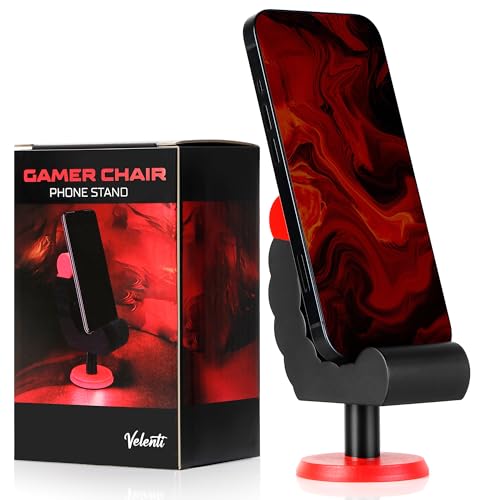
The VELENTI Gamer Chair Phone Stand is a clever desk accessory designed for PC gamers, streamers, and gaming setup builders who want to keep their smartphone or Kindle within easy reach. Shaped like a miniature gaming chair, this phone holder adds a touch of personality to your desktop while serving a practical purpose. It's a simple yet effective way to keep an eye on notifications, messages, or streaming alerts without having to pick up your phone.
This phone stand is best suited for casual and competitive gamers, esports players, and content creators who spend long hours at their desk. It's also a great fit for college gamers or work-from-home users who want to stay connected without interrupting their workflow. The holder accommodates devices up to 19 cm tall, which covers most modern smartphones and even some e-readers like the Kindle.
In terms of real-world performance, the VELENTI stand excels at keeping your phone visible and accessible. It's not about low-latency or high refresh rates, but rather about desk convenience and reducing distractions. During long gaming sessions, you can quickly glance at incoming calls or messages without breaking focus. The sturdy construction ensures your device stays put, even if you bump the desk during an intense match.
Build quality is solid for a product in this price range. The stand is made from durable materials that feel robust enough to withstand daily use. Its compact size means it won't take up much space on your desk, which is a plus for gamers with limited real estate. The gaming chair design is fun and eye-catching, making it a conversation starter in any gaming room or streaming setup.
Setup is as simple as placing the stand on your desk and dropping your phone into the slot. There's no software to install, no cables to manage, and no maintenance required. Just wipe it clean occasionally to keep it looking fresh. One realistic limitation is that the stand doesn't offer adjustable viewing angles, so you're stuck with whatever angle the design provides. Also, larger tablets or phones with bulky cases may not fit securely.
Overall, the VELENTI Gamer Chair Phone Stand is a practical and affordable accessory for anyone looking to organize their gaming desk. It's not a must-have for performance, but it adds a nice touch of convenience and personality. If you're a PC gamer, streamer, or setup enthusiast who wants to keep your phone handy without clutter, this stand is a solid choice. It also makes a fun gift for fellow gamers who appreciate unique desk accessories.

Pros
- Affordable way to add ambient RGB lighting to any gaming desk or TV setup
- Music sync works well for game audio and playlists, enhancing immersion without extra hub
- Both app and remote control make it easy to switch modes or dim lights mid-game
- USB power and included line switch simplify installation and daily use
Cons
- Music sensor may pick up ambient noise, causing occasional flickering in quiet scenes
- Light bar size is relatively short (12.8 inches), so it works best as accent lighting rather than full backlight for large monitors
- App requires smartphone and setup may feel basic for users wanting advanced automation like screen mirroring
The Ledagic LED Light Bar is a compact, USB-powered RGB+W light strip designed to add ambient backlighting to your gaming monitor, TV, or desk area. It’s targeted at PC gamers, streamers, casual players, and RGB setup enthusiasts who want an easy way to improve their gaming atmosphere without breaking the bank.
For real-world use, the built-in music sync feature is the standout. It picks up audio from your games, movies, or playlists and changes colors in real time. While it’s not as precise as high-end sound-reactive systems, it’s plenty fun for casual sessions and creates a lively vibe in a dorm room or streaming setup. The 64+ modes include strobe, gradient, chasing, and more, and you can switch between colorful IC+RGB effects and clean white light for reading or work. Brightness is adjustable from 1% to full, so you can tone it down for late-night gaming without eye strain.
Build quality is decent for the price. The plastic housing feels light but sturdy, and the 60-inch USB cable gives enough reach to route neatly behind a monitor or TV. Powering it via a TV or PC USB port means it turns on and off with your device – a nice convenience. The included remote works reliably from about 10 feet, and the LotusLamp X app offers color picking, timer settings, and mode selection. There’s also a small button on the USB plug for quick on/off control, which is handy if you misplace the remote.
Setup is practically plug-and-play: stick the light bar where you want it (it has adhesive backing), plug into any USB port, and start experimenting with modes. No software install or hub required. Cleaning is simple – just wipe the bar with a dry cloth. The main limitation is the size: at 12.8 inches, it works best as a localized accent light rather than a full backlight for a 27-inch or larger monitor. For smaller displays or as a desk lamp alternative, it’s a solid fit.
Overall, the Ledagic LED Light Bar offers good value if you’re after a cheap, easy way to add reactive lighting to your PC gaming setup. It’s especially suited for college gamers, streamers on a budget, or anyone wanting to dip their toes into RGB without complex wiring. While it won’t replace high-end addressable strips, it delivers reliable performance for the price and fits neatly into most gaming desks or TV entertainment centers.

Pros
- No-drill clamp installation is quick, tool-free, and desk-friendly.
- Spill-proof lines and rubber pad at the bottom keep your desk dry.
- Metal build is more durable than plastic alternatives, offering long-term reliability.
- Compatible with a wide range of cup sizes and shapes, including those with handles.
Cons
- May not fit very wide or oversized cups beyond 40 oz diameter.
- Clamp might not work on desks with thick edges over 2 inches.
- Only available in black; limited color options for those wanting customization.
If you're a PC gamer, streamer, or someone who spends long hours at a desk, keeping your workspace clean and clutter-free is essential. The OOKUU Large Desk Cup Holder Clamp is a simple yet smart accessory that helps you do just that. It's a sturdy metal clamp-on holder designed to securely cradle your drink, pen holder, or other small items right under your desk, freeing up valuable surface area for your keyboard, mouse, or gaming peripherals.
This cup holder is built for a wide range of users: competitive gamers who want to avoid spills during intense matches, casual gamers looking for a tidy setup, streamers who need easy access to drinks without leaving their chair, college gamers in dorm rooms, and work-from-home professionals who want a clean desk. The large 3.95-inch diameter fits most standard water bottles, tumblers, and even cups with handles, making it versatile for your daily hydration needs.
Performance-wise, the OOKUU holder focuses on spill prevention and stability. The bottom features spill-proof lines and a non-slip pad to keep your drink in place and catch any condensation or small drips. The clamp itself is reinforced with an anti-slip pad and a five-position adjustable bracket, allowing you to mount it at various angles. This means you can position two holders side by side without running into space issues, which is great for holding both a drink and a snack or a pen holder.
Build quality is a strong point here. The main body is made from high-quality metal, which is far more durable and tear-resistant than typical plastic cup holders. The clamp uses a metal construction with a hand-tightened knob that secures firmly without tools. Protective pads on the clamp prevent scratches on your desk edge, ensuring your gaming desk stays pristine. This robust build can handle the weight of larger 40 oz tumblers without wobbling or bending.
Setting up the OOKUU cup holder is straightforward. You don't need to drill any holes or use adhesive. Just position the clamp on your desk edge, tighten the knob by hand, and you're good to go. It's easy to remove or reposition if you rearrange your setup. Maintenance is minimal - just wipe it clean with a damp cloth if any spills occur. The U-shaped slot is especially handy for cups with handles, adding extra convenience for coffee mug users.
There are a couple of realistic limitations. The clamp may not work on desks with edges thicker than about 2 inches, so measure before buying. Also, while the diameter covers most cups, very wide bottles or mugs over 40 oz may not fit. The color is only black, which is neutral and matches most gaming setups, but those wanting RGB or other colors won't find options. For the price, this is a practical, well-built desk accessory that enhances your gaming or work area by keeping your drink secure and your desk tidy.
The OOKUU Large Desk Cup Holder Clamp is built to last. It uses a thick metal construction for both the cup holder and the clamp mechanism, which gives it a solid feel compared to flimsy plastic alternatives. The clamp features a non-slip pad on the contact points to ensure a firm grip on your desk edge without sliding or marking the surface. The protective padding also prevents scratches, so your desk stays looking new. The cup holder itself includes spill-proof ribs and a rubberized bottom pad to keep drinks stable and catch any condensation. All moving parts, like the adjustable bracket, are made from metal, ensuring long-term durability even under regular use. The hand-tightened knob is large enough to apply good torque without tools, making installation and adjustment easy. Overall, the build quality matches the needs of a daily-use gaming or office accessory.
Integrating the OOKUU cup holder into your desk setup is simple. The clamp-on design requires no drilling, adhesive, or permanent modifications. It attaches to any desk edge up to about 2 inches thick, making it compatible with most standard desks, including gaming desks, office desks, and dorm room tables. The five adjustable installation directions let you angle the holder to fit your reach and space, even allowing two holders to be mounted side by side without conflict. This is especially useful for gamers who want a drink and a snack within easy reach. The large 3.95-inch diameter accommodates a wide variety of bottle sizes - from standard 18 oz water bottles to larger 40 oz tumblers - as well as cups with handles thanks to the U-shaped slot. It can also serve as a pen holder or small accessory organizer, adding to its versatility. Whether you have a minimalist desk or a full RGB setup, this holder blends in with its black finish and stays out of the way while keeping essential items accessible.

Pros
- Unique collectible that actually serves a practical purpose
- Sturdy build with a weighted base for reliable device support
- Officially licensed by Activision with authentic Monkeybomb design
- Compatible with most smartphones, small tablets, and standard controllers
- Compact footprint - fits easily on crowded desks or shelves
Cons
- Limited to one specific character design - may not fit all gaming room themes
- May not accommodate large tablets or non-standard controller shapes
- Figure is non-adjustable - device placement depends on the fixed arm position
The Exquisite Gaming Call of Duty Monkeybomb stand is a clever crossover between a collectible figure and a practical desk accessory. Designed as a mini replica of the iconic exploding monkey from the game, this 8.5-inch PVC figure serves as a holder for your phone, controller, or small tablet. It's a niche product that blends fandom with everyday organization, making it a solid pick for PC gamers who want their gaming setup to reflect their favorite titles.
This stand is best suited for Call of Duty enthusiasts, casual gamers, and collectors who value themed decor. If you have a gaming desk that already features other game-inspired peripherals or RGB accents, the Monkeybomb adds a playful focal point. It's also a great conversation starter for streamers or content creators who want a recognizable prop on camera. That said, it's not a high-performance accessory - its job is to hold your gear safely, not to enhance gaming responsiveness or input speed.
When it comes to real-world performance, the stand delivers exactly what it promises. The heavy-duty PVC construction feels solid, and the wide base keeps devices from tipping over during aggressive gameplay or accidental bumps. Your phone or controller sits securely in the figure's grip, and you can easily retrieve it without any wobble. While it won't affect your gaming latency or refresh rate, it does help clear desk clutter, which can improve your overall setup's comfort and cable management.
Build quality is decent for the price point. The PVC material is durable and should hold up well over time, though it's not as premium as resin or metal collectibles. The paint job is clean, and the licensed design matches the in-game monkey bomb accurately. One practical limitation is the fixed arm position - you'll need to center your device carefully, and larger tablets or unusually shaped controllers might not fit. Also, because it's a single figure, you can't adjust the angle or height of the holder.
Setup couldn't be simpler: just unpack it, place it on your desk, and drop your device into the holder. No software, cables, or assembly required. Cleaning is easy too - a quick wipe with a microfiber cloth keeps it dust-free. The main maintenance concern is avoiding direct sunlight, which could fade the paint over time.
In summary, the Monkeybomb stand is a fun, functional accessory that's best for themed gaming setups. It won't revolutionize your gaming performance, but it will organize your essentials while showing off your love for Call of Duty. If you're a collector or a casual gamer who enjoys unique desk items, it's worth the modest investment. For competitive gamers or those with minimal desk space, a simple adjustable stand might be more practical. But for the right person, this figure adds genuine character to any PC gaming corner.

Frequently Asked Questions About Gaming Setup Gear
Do adjustable mouse weights make a noticeable difference in control?
Yes, adjustable weights allow you to tailor physical resistance to your grip style. The Logitech G502 Hero includes five 3.6-gram weights that fit directly into the base. Distributing these weights changes how the mouse pivots during swift motions. Players who favor lower sensitivity often appreciate lighter setups, while higher sensitivity users prefer added mass for controlled stops.
How much desk space is required for multi-device stands?
Multi-device stands occupy a small footprint while clearing valuable surface area. The KDD headphone stand features a weighted base with rubber pads to hold a headset and two controllers. Its rotating arm swings out of the way, letting you position it along corners without blocking mouse sweeps. This design keeps cables off your primary workspace and minimizes accidental drops.
Can USB ambient light bars operate without computer software?
Yes, many USB ambient light bars operate without computer software. The Ledagic light bar utilizes an onboard switch, remote, or app to manage lighting modes and music synchronization. Power is drawn directly from any standard 5V USB port on a monitor or console. This standalone setup provides dynamic illumination without consuming background PC resources.
Are dedicated gaming keypads practical for traditional PC setups?
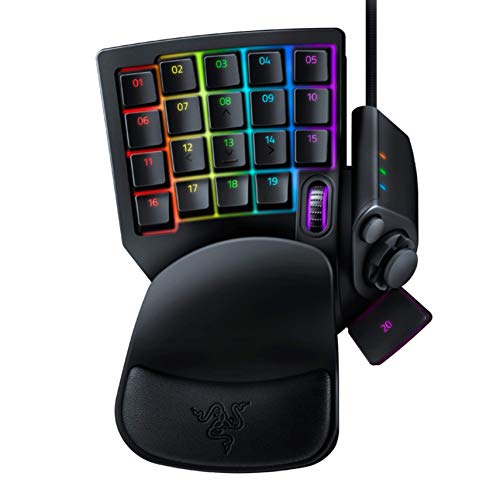
Dedicated keypads offer an ergonomic alternative for players seeking condensed key clusters. The Razer Tartarus V2 supplies 32 programmable mecha-membrane keys and an 8-way directional thumbpad. This compact layout sits neatly beside your keyboard, leaving broader clearance for mouse movements. Pairing specialized keypads with ergonomic setup options helps maintain comfortable posture during long gaming sessions.
What should you look for in the Best Gaming Accessories of 2026 for desk organization?
The best gaming accessories for organization prioritize sturdy clamps and spill protection. Metal clamp accessories like the OOKUU cup holder attach firmly without drilling holes, supporting containers up to 40 ounces. Checking table thickness and clamp clearance ensures your chosen organizer integrates cleanly without wobbling or scuffing your desk finish.


Write Your Review
No reviews yet. Be the first to share your experience!