


Slow load times and choppy framerates can ruin the fun fast, especially when your teen is trying to keep up in competitive matches. A best gaming computer for teenager needs to balance performance with durability, and that’s exactly what we’re looking at here. We’ve analyzed the specs, user feedback, and hardware configurations of eight different systems, from budget-friendly towers to high-end laptops, to help you find the right fit for your setup. Whether it’s for Fortnite, Valorant, or school projects, these machines are built to handle it all. For more context on what makes a gaming PC tick, check out our guide on what gaming computers are used for and how they differ from standard desktops. The key is matching the hardware to the games they play most, and we’ve got options from $500 to over $2,000 to suit any budget.
From Intel Core i7 processors to NVIDIA GeForce RTX 4050 graphics, these picks cover a wide range of power levels. We also considered factors like upgradability, cooling efficiency, and RGB lighting to make sure the system looks as good as it performs. If you’re curious about how these compare to dedicated gaming rigs, our post on best gaming PCs under $800 offers some solid alternatives for tighter budgets. Let’s dive into the specifics of each model so you can make an informed choice.

Pros
- Excellent 1080p gaming performance for the price
- Generous 1TB NVMe SSD for fast storage and quick load times
- Effective cooling system with seven ARGB fans keeps components cool under load
- 16GB RAM is ample for gaming and multitasking without bottlenecks
- Ready to use out of the box with no assembly required
Cons
- RTX 3050 6GB may struggle with demanding titles at 1440p or with ray tracing enabled
- No user reviews available yet, so long-term reliability is unverified
- Potential limited upgrade path due to proprietary case or motherboard (typical of budget prebuilts)
The ZYNEEX Gaming Desktop PC is a prebuilt gaming tower designed for U.S. PC gamers who want a straightforward, no-fuss entry into 1080p gaming. It combines an AMD R5 5500 processor with an NVIDIA GeForce RTX 3050 6GB graphics card, 16GB of DDR4 RAM, and a 1TB NVMe SSD. This setup targets budget-conscious gamers, casual players, streamers, and even college gamers who need a reliable machine for both gaming and everyday tasks.
When it comes to real-world performance, this PC handles esports titles like Valorant, Fortnite, and League of Legends at high settings with smooth frame rates. The RTX 3050 6GB is capable for 1080p gaming but will show its limits in graphically demanding AAA games or if you try to push 1440p resolutions. The 16GB RAM and fast NVMe SSD help with quick load times and smooth multitasking, so you can keep Discord, Spotify, or a browser open while gaming without noticeable lag.
The cooling system is a standout feature. Seven ARGB case fans plus a quad-copper-pipe air cooler work together to keep the CPU and GPU temperatures in check during long gaming sessions. The included RGB controller lets you customize the lighting to match your desk setup or gaming room aesthetic, which will appeal to RGB enthusiasts and gaming setup builders.
Build quality is typical for a budget prebuilt. The case uses a tempered glass side panel to show off the internals, and cable management appears clean from the photos. As a plug-and-play system, you can take it out of the box, connect your peripherals, and start gaming immediately. The one-year warranty from ZYNEEX adds a layer of protection, though it's always wise to check return policies and customer support responsiveness.
One realistic limitation is that the RTX 3050 is not a powerhouse for ray tracing or high-refresh-rate 1440p gaming. Also, since there are no user reviews yet, early adopters take a small risk on build quality consistency. Upgrade potential may be limited depending on proprietary motherboard or PSU choices, so this is best suited as a complete system rather than a base for future upgrades.
Overall, the ZYNEEX Gaming Desktop PC is a practical option for U.S. PC gamers who want a balanced, ready-to-run setup without spending over a thousand dollars. It works well for casual to competitive 1080p gaming, streaming on Twitch or YouTube, and handling everyday productivity for work-from-home or school use. If you're looking for a prebuilt that offers strong cooling and a fast SSD at this price point, this machine is worth considering.
The ZYNEEX Gaming Desktop PC is built for smooth 1080p gaming across a wide range of titles. The AMD R5 5500 processor with 6 cores and 12 threads pairs well with the GeForce RTX 3050 6GB graphics card. In esports games like Counter-Strike 2, Overwatch 2, and Apex Legends, you can expect high frame rates at medium to high settings. For more demanding single-player games like Cyberpunk 2077 or Red Dead Redemption 2, lowering settings to medium will still deliver playable performance.
The 16GB of DDR4 RAM at 3200MHz ensures that game assets load quickly and multitasking remains fluid. The 1TB NVMe SSD drastically reduces loading times, so you spend less time waiting and more time playing. While the RTX 3050 supports NVIDIA's DLSS and ray tracing, these features will have a noticeable performance impact, so it's best to use them sparingly or only in less demanding scenes.
This PC is a solid choice for competitive gamers who prioritize consistent frame rates in popular shooters and MOBAs. Casual gamers will appreciate the out-of-box convenience, and streamers can rely on the CPU's multithreading for basic streaming setups without a separate capture card.
The ZYNEEX prebuilt features a mid-tower case with a tempered glass side panel to showcase the internal components. The cooling solution is one of its strongest assets: seven ARGB case fans (three front intake, three top exhaust, one rear exhaust) combined with a Tianjifeng J8 quad-copper-pipe air cooler for the CPU. This setup provides excellent airflow, keeping the system quiet and cool even under sustained gaming loads.
Users can customize the RGB fan lighting using the included controller, allowing for various colors and effects to match their gaming desk or room aesthetic. The case has a clean interior with decent cable management, though it's not fully modular. The power supply is not specified but is likely a standard 80+ unit sufficient for these components.
For maintenance, the front panel can be removed to clean dust filters, and the glass panel is easy to wipe down. Overall, the thermal design ensures that performance doesn't throttle during long sessions, which is critical for both gaming and streaming usage.
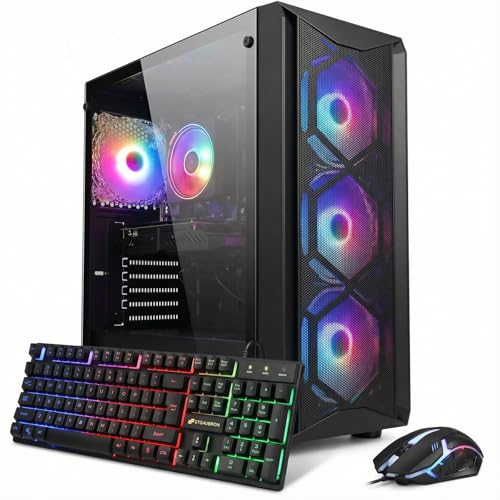
Pros
- Good balance of CPU and GPU for 1080p gaming at medium to high settings
- Ample 1TB SSD for games and files, plus 16GB RAM for smooth multitasking
- Included RGB peripherals and Windows 11 Home save on initial setup costs
- WiFi 6 and Bluetooth 5.2 provide modern wireless connectivity
- Compact tower design (16.4x14.8x8.2 inches) fits well on most desks
Cons
- Intel Core i7 8th Gen is a few generations old, limiting future upgrade potential
- RTX 3050 6GB may struggle with ray tracing or max settings in newer AAA titles
- No reviews yet, so long-term reliability is unverified
The STGAubron Gaming PC Desktop is a pre-built tower designed for gamers who want a plug-and-play experience without the hassle of building their own system. It pairs an Intel Core i7 8th Gen processor (up to 4.1GHz, 6 cores, 12 threads) with a GeForce RTX 3050 6GB GPU, 16GB of DDR4 RAM, and a 1TB SSD. This configuration is well-suited for 1080p gaming at medium to high settings in popular titles like Fortnite, Valorant, Apex Legends, Call of Duty Warzone, and GTA V, often hitting 60+ FPS according to the product description.
This PC is ideal for casual gamers, competitive players on a budget, streamers just starting out, content creators doing light editing, college gamers, and work-from-home users who need a reliable all-in-one desktop. The included RGB keyboard and mouse add to the value, letting you dive into gaming immediately. The four RGB fans not only look great but also help maintain good airflow for extended sessions.
In terms of real-world performance, the RTX 3050 6GB is capable for esports titles and older AAA games, but don't expect to run modern ray-traced games at high settings. The 1TB NVMe SSD ensures fast boot and load times, while 16GB RAM handles multitasking between games, Discord, and streaming software without issue. WiFi 6 and Bluetooth 5.2 provide low-latency wireless connections, ideal for online gaming.
Build quality is typical for a pre-built in this price range: a black steel case with side panel, decent cable management, and easy access to internals for future upgrades. The included peripherals are functional but basic - many users may prefer to upgrade to a mechanical keyboard and higher-DPI mouse over time. Setup is straightforward: plug in power, monitor, and peripherals, then Windows 11 Home walks you through the rest.
A realistic limitation is the older 8th-gen CPU, which means the motherboard socket (LGA 1151) limits CPU upgrades to the same generation. The RTX 3050 6GB is entry-level for ray tracing. For heavy content creation or ultra settings in the latest games, you may want a more powerful GPU. Additionally, with zero reviews at the time of writing, it's wise to buy from a retailer with a good return policy.
Overall, the STGAubron Gaming PC offers solid value for budget-conscious gamers and streamers who need a complete, ready-to-use system. It handles modern esports and casual gaming well, provides modern connectivity, and includes helpful extras. If you're looking for a hassle-free gaming desktop under $750, this is a strong contender.
The STGAubron Gaming PC comes with a matching RGB gaming mouse and keyboard, allowing you to start gaming right away. The keyboard features basic membrane switches with adjustable RGB backlighting, while the mouse offers a standard optical sensor with DPI settings and RGB lighting. While not high-end, these peripherals are functional for everyday gaming and can be upgraded later. Also included are a power cord, SATA cables, and a user manual. Free lifetime tech support and a 1-year parts/labor warranty add peace of mind.

Pros
- Outstanding gaming performance with top-tier CPU and GPU combination
- Quiet and efficient cooling system keeps thermals in check
- Easy setup with minimal bloatware and included peripherals
- Great value for a prebuilt with high-end components
- Stylish RGB case with tempered glass for a clean desktop look
Cons
- RAM speed at 5200MHz is modest compared to higher-end DDR5 options
- Bundled keyboard and mouse are functional but may not satisfy competitive gamers
- Some users report inconsistent warranty support experiences
The iBUYPOWER Y40 PRO is a prebuilt gaming desktop designed for enthusiasts who want high-end performance without the hassle of building their own rig. It's tailored for PC gamers, competitive esports players, streamers, content creators, and anyone who demands smooth 4K gaming, fast multitasking, and reliable productivity. Packed with an AMD Ryzen 9 7900X and NVIDIA GeForce RTX 5070Ti, this system handles demanding titles like Cyberpunk 2077 and Call of Duty at max settings with ease.
In real-world use, the combination of 32GB DDR5 RAM and a 2TB NVMe SSD ensures quick load times and seamless switching between games, streaming software, and editing tools. The RTX 5070Ti's 16GB VRAM provides excellent visual clarity at high resolutions, while the 240mm liquid cooler keeps the CPU running cool even during extended gaming marathons. Many users report smooth frame rates in modern games with ray tracing enabled, making this a solid choice for immersive experiences.
Build quality is a highlight here. The HYTE Y40 PRO case features a tempered glass side panel and RGB fans that create an attractive display. The included iBUYPOWER AW4 liquid cooler and fan setup maintain good airflow without excessive noise. The bundled keyboard and mouse are decent for starting out, though competitive players might prefer upgrading to mechanical peripherals. The system also comes with Windows 11 Home pre-installed and minimal bloatware, so you can start gaming right away.
Setting up the Y40 PRO is straightforward. After unboxing, you simply connect power, display, and peripherals, then follow the Windows setup. Some users have noted a minor issue with Windows activation, but this is easily resolved by entering the product key from the system. The motherboard offers four RAM slots for future upgrades, and the case provides ample room for additional storage or cooling modifications.
One realistic limitation is the RAM speed of 5200MHz, which is decent but not the fastest available. Additionally, while the warranty is standard, a few user reviews mention challenges with customer support for defective parts. However, the majority of feedback highlights excellent performance and reliability. The price point is competitive for a prebuilt with these specs, offering strong value for those who prefer a ready-to-use system.
Overall, the iBUYPOWER Y40 PRO is a well-rounded gaming PC that delivers on performance and aesthetics. It's best suited for gamers and creators who want a powerful, reliable machine without the complexity of building their own. If you're looking for a high-end prebuilt that can handle 4K gaming, streaming, and content creation, this is a solid investment.
The iBUYPOWER Y40 PRO is built for high-performance gaming, thanks to the AMD Ryzen 9 7900X and NVIDIA RTX 5070Ti. This combo easily runs modern titles at 4K with ray tracing enabled, delivering smooth frame rates in demanding games like Cyberpunk 2077, Call of Duty: Modern Warfare III, and Fortnite. The 32GB of DDR5 RAM ensures fast multitasking, so you can stream, browse, and game without stutters. The 2TB NVMe SSD dramatically reduces load times, getting you into matches quickly. For competitive gamers, the system handles high refresh rate monitors at 1440p with ease, providing low-latency gameplay.
The Y40 PRO features the HYTE Y40 PRO case with a tempered glass side panel and three RGB fans for a clean, customizable look. Cooling is handled by the iBUYPOWER AW4 240mm liquid CPU cooler, which keeps the Ryzen 9 7900X at optimal temperatures even under heavy load. The case design promotes good airflow, with mesh panels and ample venting. During extended gaming sessions, the system remains quiet, with fans ramping up only when necessary. The included RGB lighting can be controlled via the motherboard software, allowing you to match your setup's aesthetic.

Pros
- Strong price-to-performance ratio for entry-level to mid-range gaming
- Ample RAM and SSD storage for smooth multitasking and quick game loads
- Includes WiFi 6 and Bluetooth 5.0 for modern wireless connectivity
- Comes with RGB peripherals and four RGB fans for an immersive setup aesthetic
Cons
- Processor is a 4th-gen Intel Core i7, which may bottleneck newer AAA titles compared to modern CPUs
- Graphics card (RX 580) is an older architecture, limiting ray tracing and high-refresh gaming at 1440p
- Only 512GB SSD may require additional storage for larger game libraries
The STGAubron Gaming PC Desktop is a pre-built tower designed for gamers who want a solid entry-level to mid-range gaming experience without the hassle of building their own system. It combines an Intel Core i7 processor (4th-gen, up to 3.9GHz) with an AMD Radeon RX 580 8GB graphics card, 16GB of RAM, and a 512GB SSD. This configuration is well-suited for casual and competitive gamers, streaming enthusiasts, and even those who need a capable machine for photo/video editing, schoolwork, or day trading.
When it comes to real-world gaming, the RX 580 can handle popular titles like Fortnite, Call of Duty Warzone, Valorant, Apex Legends, and GTA V at 60+ FPS on medium to high settings. The 16GB of RAM ensures smooth multitasking, letting you run Discord, OBS, or browser tabs in the background while gaming. The 512GB SSD provides quick boot times and fast level loads, though heavy gamers may want to add a secondary drive later.
Build quality is typical for a budget-friendly pre-built: a standard tower with a tempered glass side panel (likely) and four RGB fans for decent airflow. The included RGB gaming mouse and keyboard are functional starters, but most users will eventually upgrade to more premium peripherals. The system also features WiFi 6 and Bluetooth 5.0, which means lag-free wireless connections and fast downloads if your router supports it.
Setup is straightforward: unbox, plug in the power and peripherals, connect to your monitor via HDMI or DisplayPort, and boot into Windows 11 Home. The case has minimal cable management pre-installed, and the RGB fans and case lighting can be controlled via a remote or button on the case. For cleaning, the easily removable side panel makes dusting the interior simple.
A realistic limitation is that the CPU is an older 4th-gen Core i7, which might hold back performance in CPU-heavy games or multitasking scenarios compared to newer budget processors like an i3-12100F. The RX 580 also lacks modern features like ray tracing and efficient encoding, so if you're aiming for high-refresh 1440p gaming or intensive streaming, you may want to look at higher-end options. The 512GB SSD fills up quickly, so an external or secondary drive is worth considering.
Overall, this STGAubron gaming PC offers good value for its price point, especially for gamers on a tight budget who want a turnkey system that can handle esports and mainstream titles. It's also a nice fit for college students or home office users who want a versatile desktop that can game and work. Just be aware of the older components and plan for potential upgrades down the line.

Pros
- Integrated power strip with USB charging eliminates cable clutter and keeps devices charged.
- RGB LED strip with app control adds immersive lighting without extra accessories.
- Sturdy Z-frame construction with adjustable feet ensures wobble-free gaming.
- Reversible and expandable design offers flexibility for different room layouts.
- Monitor stand, cup holder, and headphone hook enhance desk organization.
Cons
- 40-inch size may feel cramped for users with multiple large monitors or a full tower PC.
- Carbon fiber texture is a printed finish on MDF, not real carbon fiber, so it may show wear over time.
- Assembly requires about 60 minutes and some users may find the instructions unclear.
The Korfile 40 Inch L-Shaped Gaming Desk is a practical solution for PC gamers, streamers, and content creators who need a compact yet functional corner desk. Designed to fit small spaces like dorm rooms, apartments, or cozy gaming nooks, this desk combines a carbon fiber textured work surface with built-in power outlets and RGB LED lighting to enhance both productivity and gaming atmosphere.
For competitive and casual gamers alike, the desk's integrated power strip with 3 AC outlets and 2 USB ports is a standout feature. It allows you to plug in your gaming PC, monitor, and peripherals without hunting for wall sockets, keeping your setup clean and organized. The RGB LED light strip, controllable via a smartphone app, lets you match the lighting to your mood or game, adding an immersive touch without extra accessories.
Build quality is solid for the price point. The MDF surface with carbon fiber texture is smooth and scratch-resistant, though it's a printed finish rather than real carbon fiber. The double Z-shaped steel legs provide sturdy support up to 220 lbs, and adjustable leg pads help stabilize the desk on uneven floors. The reversible L-shape design is a nice touch, allowing you to configure it for left or right corners, and you can even combine two desks into a U-shaped workstation for a more expansive setup.
Storage and organization are well thought out. The long monitor stand can hold two 24-inch monitors or a single large display, improving ergonomics by raising screens to eye level. A cup holder and headphone hook keep drinks and headsets off the main work area, reducing clutter. The 3-tier storage shelves on the corner section provide space for games, controllers, or a small printer, making it practical for both gaming and home office use.
Setup is straightforward with step-by-step instructions and labeled parts, though expect to spend about an hour assembling it. Some users may find the instructions a bit sparse, but the process is manageable for most DIY enthusiasts. The 40-inch depth is adequate for a single monitor and keyboard, but if you run a triple-monitor setup or a large tower case, you might feel cramped. Cable management is basic, so you may want to add zip ties or a cable tray for a cleaner look.
Overall, the Korfile 40 Inch L-Shaped Gaming Desk is a great value for budget-conscious gamers, streamers, and college students who need a compact, feature-rich desk. It delivers essential power and lighting features, decent build quality, and smart storage options in a space-saving design. While it's not built for massive multi-monitor rigs, it's an excellent choice for small gaming setups where every inch counts.

Pros
- Solid 1080p gaming performance with RTX 3050 6GB for popular esports and AAA titles
- Fast storage and ample RAM for smooth multitasking and quick game loading
- Includes WiFi 6, Bluetooth 5.2, and RGB fans for a complete, modern gaming experience
- Pre-installed Windows 11 and included peripherals make it ready to use immediately
- Lifetime tech support and one-year warranty offer good after-sales support
Cons
- 512GB SSD may fill up quickly with modern games; extra storage or an upgrade may be needed
- RTX 3050 6GB is an entry-level GPU, so high-refresh 1440p gaming or ray tracing will be limited
- No reviews yet, making long-term reliability and customer satisfaction unclear
The STGAubron Gaming PC Desktop is a pre-built tower designed to deliver solid 1080p gaming performance without the hassle of building your own. It’s aimed at PC gamers who want a ready-to-play system for esports titles like Valorant, Fortnite, and Apex Legends, as well as casual gamers diving into AAA games like Call of Duty Warzone or Elden Ring at playable settings. Streamers and content creators will also appreciate the balance of CPU cores and GPU power for light editing and streaming tasks.
Powered by a 13th Gen Intel Core i5-13400F (10 cores, 16 threads) and an NVIDIA GeForce RTX 3050 6GB, this system can handle most popular games at 60+ FPS on medium to high settings at 1080p. The 16GB of DDR4 RAM ensures smooth multitasking, while the 512GB SSD keeps load times short. For competitive players, the low-latency response of the RTX 3050 combined with WiFi 6 connectivity helps maintain stable online matches.
Build quality is typical of affordable prebuilt PCs: a standard black case with a tempered glass side panel (likely) and four RGB fans for decent airflow. The included RGB keyboard and mouse add value for first-time buyers. Cable management inside appears tidy enough for a prebuilt, and the system is quiet under normal gaming loads. The use of standard components means upgrading RAM or storage later is straightforward.
Setup is incredibly simple: unbox, plug into power and monitor, connect the included peripherals, and you’re on Windows 11 Home ready to go. The pre-installed OS reduces setup time, and the bundled WiFi 6 adapter means you can skip running Ethernet cables. For college gamers or those in dorm rooms, the compact dimensions (16.4 x 14.8 x 8.2 inches) fit easily on most desks.
One realistic limitation is the 512GB SSD. With modern games taking up 50-100GB each, you’ll need to manage storage carefully or add a secondary drive. The RTX 3050 6GB is fine for 1080p gaming but won’t push high refresh rates at 1440p or enable heavy ray tracing. Also, with zero user reviews at launch, potential buyers should consider this an entry-level buy with good on-paper specs.
Overall, the STGAubron Gaming PC is a practical choice for budget-focused PC gamers, esports players, and streamers who want a reliable prebuilt with modern features like WiFi 6 and RGB lighting. It works well as a first gaming rig for newcomers or a secondary system for a dorm room or home office. If you’re okay with upgrading storage down the line, this system offers strong value for under $800.
The STGAubron Gaming PC includes WiFi 6 and Bluetooth 5.2 for fast, reliable wireless connections. This is great for online gaming without Ethernet, and for connecting wireless headsets, controllers, or peripherals. For wired use, there's an RJ-45 Ethernet port. The RTX 3050 6GB provides three video outputs: one HDMI, one DisplayPort, and one DVI, allowing multi-monitor setups. USB ports (likely USB 3.0 and USB 2.0) are available on the front and back panels for peripherals and external drives. Overall, connectivity is modern and sufficient for most gamers and streamers.

Pros
- Excellent gaming performance for 1440p and 4K with RTX 5070 and DLSS 4.
- Quiet operation even under load thanks to improved airflow and 1000W Platinum PSU.
- Compact footprint fits easily on most desks without sacrificing internal space.
- Customizable RGB lighting with AlienFX software offers millions of color options.
- Good selection of ports, including USB 4 and Power Share USB ports.
Cons
- Premium price point may not suit budget-conscious buyers.
- Some users report occasional boot issues that require a full discharge to resolve.
- Limited to one HDMI port, which may be a concern for dual-monitor setups without using DisplayPort.
The Alienware Aurora ACT1250 is a prebuilt gaming desktop that targets the sweet spot for PC gamers who want high performance without the hassle of building their own rig. It combines Intel's latest Core Ultra 7 265F processor with NVIDIA's RTX 5070 graphics card, 32GB of DDR5 RAM, and a 1TB NVMe SSD. This setup is well suited for competitive gamers who need low latency, casual gamers who want smooth visuals in open-world titles, and streamers or content creators who rely on reliable multitasking. The included 1000W Platinum-rated power supply and optimized cooling system aim to keep things quiet and stable during long sessions.
In real-world gaming, the RTX 5070 with DLSS 4 and frame generation can push high frame rates in demanding titles like Cyberpunk 2077, with some users reporting jumps from 120fps to over 500fps using frame gen. While that kind of performance is impressive, it's worth noting that frame generation can introduce slight input delay, which may be noticeable in fast-paced shooters. For most games, the system delivers smooth 1440p and 4K gameplay with ray tracing enabled. The Intel Core Ultra 7 265F handles background tasks like Discord, streaming, or recording without causing stutter, making it a solid choice for multitaskers.
Build quality is typical of Alienware: a sturdy chassis with a matte black finish, a clear side panel to show off the internal components, and customizable AlienFX RGB lighting that includes stadium lighting and front intake lighting. The Legend 3 design is about 40% smaller by volume than previous models, which helps it fit on a desk without dominating the space. Cable management is internal and designed to reduce airflow obstruction, contributing to quieter operation. Users report that the system is noticeably quieter than the Aurora R15, with average noise levels dropping by 20% according to internal testing.
Setup is straightforward out of the box, with most users reporting that the PC boots up quickly and is ready to game within 20 minutes. The Alienware Command Center software allows you to control RGB lighting, fan speeds, and performance modes (quiet, balanced, performance). Some users find the software a bit buggy but functional. One common complaint is that the system may occasionally refuse to start and requires a full discharge to reset, which is a known quirk. Also, the included mouse and keyboard are basic and best replaced with your own peripherals.
Connectivity is solid, with USB 4, USB-C with Power Share, and 2.5 Gigabit Ethernet. However, there is only one HDMI port on the GPU, so if you plan to run dual monitors, you'll need to use DisplayPort or an adapter. The desktop also has a global headset jack, line in/out, and SPDIF digital output for audio setups. The 1TB SSD is user-replaceable, and the system supports up to 8TB of total SSD storage, though the base model only comes with 1TB.
Overall, the Alienware Aurora ACT1250 is a strong option for PC gamers who want a reliable, high-performance prebuilt with good cooling and a compact footprint. It's best suited for those who prioritize performance and convenience over building their own PC. The premium price is justified by the quality of components and the quiet operation, but budget-conscious buyers may want to compare with other prebuilts or consider building their own. If you're looking for a gaming desktop that can handle modern AAA titles, streaming, and content creation without much fuss, this Aurora is worth a look.

Pros
- Strong gaming performance for its price with i7 and RTX 4050
- 165Hz display with thin bezels provides immersive, fluid visuals
- Fast 1TB Gen 4 SSD and 16GB DDR5 RAM for quick boot and game loads
- Good connectivity including Thunderbolt 4, HDMI 2.1, and Wi-Fi 6
- Effective cooling system with customizable fan curves
Cons
- Battery life around 5 hours may require frequent charging during extended use
- Weighs 4.66 lbs, making it less portable than some ultrabooks
- Only 6GB VRAM on RTX 4050 may limit future AAA titles at high settings
The Acer Nitro V 15 (ANV15-52-76NK) is a dedicated gaming laptop that hits a sweet spot for PC gamers, competitive esports players, streamers, and content creators who need reliable performance without breaking the bank. Powered by an Intel Core i7-13620H processor and an NVIDIA GeForce RTX 4050 GPU, this machine is built to handle modern games, multitasking, and creative workloads like video editing or live streaming.
For gamers, the real highlight is the 15.6-inch Full HD IPS display with a 165Hz refresh rate. This means you get buttery-smooth motion in fast-paced shooters like Valorant or Call of Duty, with minimal ghosting and precise tracking. The 1920x1080 resolution keeps frame rates high, and the thin bezels offer an immersive 82.64% screen-to-body ratio. The RTX 4050 supports DLSS 3.5 and ray tracing, so even demanding titles like Cyberpunk 2077 can look stunning with AI-enhanced visuals.
Performance is backed by 16GB of DDR5 RAM (upgradeable to 32GB) and a 1TB PCIe Gen 4 SSD. Load times are snappy, and you can keep multiple apps open without lag. The laptop also includes Wi-Fi 6 and Killer Ethernet E2600 for low-latency online play, plus a Thunderbolt 4 port that supports fast charging, data transfer, and video output. The dual-fan cooling system with adjustable fan speeds helps keep the CPU and GPU cool during extended sessions, though the laptop does get warm under heavy load.
Build quality is solid with a black plastic chassis that feels durable, though it's not ultra-premium. The backlit keyboard includes a numeric keypad, making it practical for both gaming and productivity tasks. The 4.66-pound weight is manageable for moving between rooms but not ideal for daily commuting. The 5-hour battery life is typical for a gaming laptop, so expect to stay plugged in for gaming sessions.
Setting up the software is straightforward with Windows 11 pre-installed and Acer's NitroSense utility for monitoring performance and customizing fan curves. The AI-powered PurifiedView and PurifiedVoice features improve webcam and microphone quality for Discord calls or streaming, though the built-in webcam is only 720p. One limitation is the RTX 4050's 6GB VRAM, which may struggle with ultra textures in future AAA titles, but for 1080p gaming and most current releases, it's plenty capable.
Overall, the Acer Nitro V 15 is a practical recommendation for college gamers, work-from-home gamers, and anyone building a versatile setup that can handle both gaming and daily tasks. It offers strong value at its price point, and the 165Hz display combined with RTX 4050 makes it a reliable choice for competitive and casual gamers alike.
The combination of the Intel Core i7-13620H (10 cores, up to 4.9 GHz) and NVIDIA GeForce RTX 4050 (6GB GDDR6, 194 AI TOPS) delivers excellent 1080p gaming performance. In competitive titles like Fortnite and Apex Legends, you can expect well over 100 FPS at high settings, while more demanding games like Elden Ring or Assassin's Creed Mirage run smoothly with DLSS enabled. The 165Hz display ensures every frame looks fluid, giving you a clear edge in fast-paced shooters.
The 15.6-inch Full HD IPS panel offers vibrant colors and decent contrast with a 165Hz refresh rate. The 16:9 aspect ratio and thin bezels create an immersive gaming experience. Response times are good enough to minimize ghosting, and the 300-nit brightness works well indoors. For a gaming laptop at this price, the display is a strong selling point.
Port selection is generous: one Thunderbolt 4 (USB-C with 65W charging, DisplayPort), one USB 3.2 Gen 2 Type-C, two USB 3.2 Gen 1 Type-A, HDMI 2.1, Gigabit Ethernet, and a headphone jack. This setup supports dual external monitors, fast peripherals, and reliable wired networking. Wi-Fi 6 and Bluetooth 5.2 round out wireless connectivity.
Frequently Asked Questions
What is the best gaming computer for a teenager in 2026?
The best gaming computer for teenager depends on budget and game preferences. For under $1,000, systems like the STGAubron with an Intel Core i7 and RTX 3050 offer solid 1080p performance for Fortnite and Call of Duty. For higher budgets, the iBUYPOWER Y40 PRO with Ryzen 9 7900X and RTX 5070 Ti handles 1440p gaming and streaming smoothly.
Can a gaming laptop be a good choice for a teenager?
Yes, especially for teens who need portability for school or LAN parties. The Acer Nitro V 15 with Intel Core i7-13620H and RTX 4050 delivers strong 1080p performance in a compact form. It also includes Wi-Fi 6 and a 165Hz display for smoother gameplay.
What graphics card is best for a teenager’s gaming PC?
For most teens, an NVIDIA GeForce RTX 3050 (6GB) or AMD Radeon RX 580 (8GB) provides excellent 1080p performance for popular titles like Valorant, Minecraft, and Rocket League. The RTX 3050 also supports DLSS 3.5 for better visuals in supported games.
How much RAM does a teenager need for gaming?
16GB of RAM is the sweet spot for most teen gamers. It allows for smooth multitasking while gaming, like running Discord in the background or streaming. Some higher-end systems like the iBUYPOWER Y40 PRO offer 32GB DDR5 for future-proofing.
Is a gaming desk necessary for a teenager’s setup?
Not strictly necessary, but a dedicated gaming desk like the Korfile 40 Inch L-Shaped Desk with power outlets and LED lights can improve organization and comfort. It provides space for dual monitors, a cup holder, and a headphone stand, which helps reduce clutter.
What should I look for in a prebuilt gaming PC for a teen?
Focus on a balanced CPU and GPU combination, at least 16GB RAM, and a solid-state drive (SSD) for fast load times. Also check for Wi-Fi 6 and Bluetooth support, as well as good cooling to prevent thermal throttling during long sessions.
Are refurbished gaming PCs worth it for teens?
Refurbished models can be a great value if they come with a warranty. For example, some Dell gaming PCs offer solid performance at lower prices. Check our guide on Dell computers for gaming to see if they fit your needs.


Write Your Review
No reviews yet. Be the first to share your experience!