


Cramped tabletop space and poor console ventilation can quickly spoil competitive online matches. When a console lacks proper airflow, fan noise climbs fast and internal heat builds up, while loose controller wires and low monitor heights wreck your seated posture. Researching the best gaming desk for xbox consoles helps solve these physical bottlenecks by prioritizing dedicated console shelves, elevated display racks, and integrated power strips. A well-designed battlestation gives your machine room to breathe while keeping headsets and gamepads organized. Pairing your display with an integrated gaming desk with LED lights also creates an immersive ambient glow that cuts down on late-night eye fatigue.
Based on our detailed analysis of metal frame designs, scratch-resistant carbon fiber surfaces, and user feedback, structural stability remains critical during high-stakes multiplayer action. Nobody wants a shaky table that wobbles every time a stick snaps or a headset drops onto the deck. Modern desks with built-in AC outlets and USB charging hubs streamline your power management so dead gamepad batteries never disrupt an active session. Selecting a desk with a built-in monitor riser and smart cable paths keeps your field of view level, helping you maintain sharp reaction times during marathon Xbox sessions.

Pros
- LED lighting under the monitor shelf adds immersive ambiance without taking up desk space.
- Power outlet and USB ports are conveniently placed for charging controllers, headset, or phone.
- Carbon fiber surface is easy to clean and resistant to spills and scratches.
- Reversible storage shelf adapts to left- or right-handed setups.
- Monitor shelf improves ergonomics and provides extra storage for small items.
Cons
- Desk dimensions (48 x 18.9 x 34.2 inches) may be too narrow for dual monitor setups or large tower cases.
- LED lights are only under the monitor shelf, not full desk perimeter, limiting RGB customization options.
- No cable management tray or grommets included, so you may need to buy additional cable ties or clips.
The AODK 48-inch gaming desk is a versatile addition to any PC gaming or home office setup. It combines a carbon fiber textured tabletop, built-in LED lighting, and a power strip with outlets and USB ports. Designed for gamers, streamers, content creators, and remote workers, this desk aims to keep your gear organized and your environment comfortable.
For real-world gaming and streaming, the desk's monitor shelf is a standout feature. It raises your screen to a natural viewing angle, which can reduce neck and back fatigue during long sessions. The LED strip under the shelf offers 10 static colors and 10 dynamic modes, letting you match the lighting to your mood or RGB setup. While the lights aren't as extensive as some full-perimeter options, they still add a nice glow without taking up extra desk space.
Build quality is decent for the price. The carbon fiber surface feels smooth and is resistant to scratches and spills, making it easy to clean after a late-night gaming session. The metal frame provides solid stability, though the desk's 18.9-inch depth may feel tight if you're using a large monitor or a full-size keyboard with a deep mouse pad. The reversible storage shelf is a practical touch, allowing you to install it on the left or right side and adjust the height for a printer, CPU, or file basket.
Setup is straightforward with the included tools and instructions. Most users can assemble it in under an hour. However, cable management is a bit limited there are no built-in grommets or trays, so you'll want to invest in some cable ties or clips to keep cords tidy. The power strip is a welcome addition, but it's located at the front of the desk, which might be inconvenient for some routing preferences.
One limitation is the desk's width and depth. At 48 inches wide and 18.9 inches deep, it's best suited for a single monitor setup or a small laptop and external monitor. Gamers with dual monitors or a large tower may find it cramped. Also, the LED lights are only under the monitor shelf, not along the entire desk edge, so RGB enthusiasts might want extra strips for full customization.
Overall, the AODK 48-inch gaming desk is a practical choice for college gamers, casual players, or anyone building a compact gaming station. It offers good ergonomics, useful storage, and a touch of RGB flair at an affordable price. If you're a competitive esports player with a multi-monitor rig, you might need a larger desk, but for most PC gamers and streamers, this desk provides solid value and a clean, organized workspace.
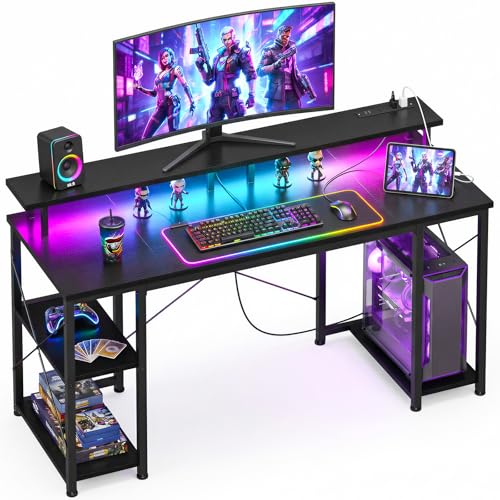
Pros
- Sturdy metal frame with X cross bar provides excellent stability for a gaming desk in this price range.
- LED lights add immersive ambiance and can be customized to match any gaming setup or mood.
- Monitor stand raises screens to eye level, improving ergonomics and reducing neck strain during long sessions.
- Integrated USB ports and power outlets are convenient for charging controllers, phones, and other peripherals.
- Compact size fits well in small spaces while still offering storage shelves and a CPU stand.
Cons
- Desk depth of 19.6 inches may be too shallow for large monitors or deep keyboard-mouse setups.
- Particleboard construction may not be as durable as solid wood, though it's reinforced with a metal frame.
- No built-in cable management tray, so you may need to add your own cable ties or clips for a clean look.
The ODK 48 inch gaming desk is a versatile addition to any PC gamer or streamer's setup, combining a compact footprint with essential features like LED lighting and power outlets. Designed for small spaces such as dorm rooms, apartments, or home offices, this desk prioritizes organization and immersion without breaking the bank.
Best suited for casual gamers, competitive esports players, streamers, and even content creators who need a tidy workspace, the desk's monitor stand supports dual monitors or a laptop, raising them to an ergonomic eye level. This reduces neck fatigue during long gaming marathons or work-from-home sessions. The built-in USB ports and power outlets let you charge your phone, headset, or controller without reaching for a distant outlet.
In terms of performance, the desk's stability is a highlight thanks to the metal frame and X cross bar – it stays firm even when you're reacting quickly in FPS or MOBA games. The 48-inch width gives enough room for a full-sized keyboard, mouse, and a large mousepad, though the 19.6-inch depth may feel tight if you use a deep monitor arm or a full-size keyboard with a wrist rest. For most setups, it works well.
Build quality is solid for the price: thick particleboard with a smooth black finish resists scratches, and the metal legs feel robust. The reversible PC shelf can hold your tower on either side, and the included headphone hook keeps your headset accessible. Assembly takes about 30 minutes with clear instructions – all tools are provided.
One realistic limitation is the lack of an integrated cable management channel, so you'll need to manage cables yourself to keep the setup looking clean. Also, the particleboard edges may not hold up to heavy moisture or impacts, but for typical use it's fine. The LED lights are a nice touch, adding customizable color to match your gaming ambiance via a simple controller.
Overall, the ODK 48 inch gaming desk is a practical buy for PC gamers, streamers, and remote workers who want a compact, feature-packed desk without a high price tag. It offers good stability, useful storage, and immersive lighting, all in a size that fits tighter spaces. If you need more depth or premium materials, consider larger options, but for most setups, this desk delivers excellent value.
The ODK gaming desk combines a thick particleboard tabletop with a metal frame and an X cross bar for added rigidity. The black finish is smooth and resistant to minor scratches, though it's not as premium as solid wood. The legs are sturdy and have adjustable floor glides to level the desk on uneven surfaces. The reversible CPU shelf and headphone hook are made of metal, adding to the overall durability. While particleboard can chip if handled roughly, the frame's reinforcement makes this desk stable for everyday gaming and work use.
The built-in LED strip runs along the back edge of the desk, providing ambient lighting that can be cycled through multiple colors and brightness levels via a remote control. The lights create a strong gaming atmosphere, perfect for RGB enthusiasts looking to enhance their setup. While the LEDs are not individually addressable, they offer enough versatility to match most gaming peripherals or room themes. The USB ports and power outlet are conveniently located on the front edge, making it easy to plug in devices without disrupting the lighting.
Assembly is straightforward with all necessary tools included. The instructions are clear, and most users can complete the process in about 30 minutes. The desk comes in several pieces: the tabletop, legs, cross bar, monitor stand, shelves, and hardware. It's advisable to have a second person for lifting the tabletop onto the frame to avoid scratching the surface. Once assembled, the desk feels solid and ready for use. No software or app setup is required for the LEDs – just plug in and use the remote.
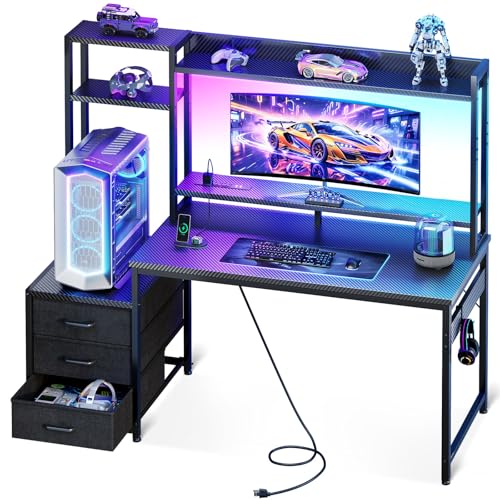
Pros
- Spacious 48-inch worktop with hutch and drawers offers excellent storage for a compact desk.
- Integrated LED lights and USB ports add convenience and style without extra accessories.
- Monitor stand promotes ergonomic posture for extended gaming or work sessions.
- Carbon fiber surface is durable and easy to wipe down, resisting wear from daily use.
- Great value for budget-conscious gamers and students looking for a complete desk solution.
Cons
- Fabric drawers are better suited for lightweight items like cables and small peripherals, not heavy gear.
- LED lights require a USB power source and may not be as customizable as premium RGB systems.
- Assembly can be time-consuming; the desk lacks built-in cable management channels, so zip ties or clips may be needed.
The Casaottima 48-inch gaming desk is a versatile all-in-one workstation designed for PC gamers, streamers, students, and anyone working from home. It combines a spacious carbon fiber desktop with a hutch, three fabric drawers, built-in USB ports, and LED lighting, making it a practical choice for those who want a tidy and immersive setup without a large footprint.
For gamers and content creators, the desk's 47.24 x 18.9-inch surface comfortably holds a dual-monitor configuration, a gaming keyboard, and a mouse, while the included monitor stand elevates your primary display to eye level. This ergonomic boost helps reduce neck fatigue during long gaming sessions or Twitch streams. The LED lights add a subtle glow to the room, enhancing the gaming atmosphere, and the USB ports let you charge your headset or phone without reaching behind your PC.
Build quality is solid for the price point. The carbon fiber finish is scratch-resistant and easy to clean, and the hutch and drawers provide ample storage for controllers, cables, notebooks, or desk accessories. The drawers are fabric-lined, so they're best for light items like mouse bungees or USB drives rather than heavy peripherals. The desk itself weighs 44.5 pounds, giving it a sturdy feel once assembled, though it's light enough to move if needed.
Setting up the desk requires some time with the included instructions. The hutch can be reversed to favor left- or right-handed users, which is a nice touch. However, there are no built-in cable management channels, so you'll want to use adhesive clips or zip ties to keep wires tidy. The LED lights plug into a USB port (not included) and offer basic color-changing modes rather than software control, which may disappoint RGB enthusiasts seeking advanced customization.
One realistic limitation is the fabric drawers: they can collect dust over time and aren't ideal for heavy gaming gear like backup hard drives or large tool kits. Also, the 18.9-inch depth is narrower than some full-size desks, so if you prefer a deep surface for a large mousepad or keyboard tray, you might feel slightly cramped. But for most standard gaming setups, it works well.
Overall, the Casaottima 48-inch gaming desk is a strong value pick for budget-conscious gamers, college students, or anyone setting up a compact gaming or streaming station. It offers a good mix of storage, ergonomics, and RGB flair at an affordable price. If you prioritize organization and aesthetics without sacrificing desk space, this is a solid choice for your gaming room or home office.

Pros
- Integrated power and USB ports simplify cable management and device charging at your desk.
- Customizable RGB lighting enhances the gaming vibe without needing separate LED strips.
- Monitor stand promotes better posture by raising the screen to comfortable viewing height.
- Removable storage bag and headphone hooks keep accessories tidy and easy to access.
- Quick and straightforward assembly saves setup time compared to bulkier desks.
Cons
- Particle board construction may not be as durable as solid wood or metal desks over years of heavy use.
- At 40 inches wide, this desk offers limited surface area for dual monitor setups or large peripherals.
- With zero user reviews yet, long-term reliability and quality feedback are unavailable.
The Lufeiya Black Gaming Desk is a practical and space-efficient solution for PC gamers, streamers, and content creators who want a compact workstation with integrated modern features. It combines a built-in power strip with two AC outlets and two USB charging ports, plus RGB LED lighting and a monitor stand, all in a 40-inch footprint. This desk is designed to reduce cable clutter and enhance the aesthetic of any gaming setup, making it a strong contender for dorm rooms, small home offices, or budget-conscious gaming stations.
For target users like competitive and casual gamers, esports players, and streamers, the desk's practical layout helps maintain a tidy desktop. The monitor stand elevates your screen to a more ergonomic height, which can reduce neck strain during extended sessions of FPS, MOBA, or open-world games. The built-in RGB lighting offers 7 colors and multiple dynamic modes, allowing you to match your mood or setup theme without adding separate LED strips. While not high-performance gear in the traditional sense, the desk contributes to a responsive and comfortable gaming environment by keeping your devices organized and at reach.
Build quality centers on thick particle board with a scratch-resistant and waterproof coating. It should hold up well against everyday spills and abrasion, though it may lack the long-term durability of solid wood or all-metal frames. The monitor stand is sturdy enough to support dual monitors or a laptop, and the included storage bag and two headphone hooks add extra convenience. Cable management is simplified by the built-in power strip, which lets you plug in your PC, monitor, and accessories without fishing for outlets behind the desk.
Setup is straightforward thanks to a detailed manual and all necessary tools provided. Most users can assemble the desk in under an hour. The compact size (19.7 x 39.4 x 33.4 inches) fits easily into smaller spaces, but it does limit surface area for larger peripherals or a full-size keyboard and mousepad combo. The particle board material means you should avoid excessive weight or heavy monitor arms without additional reinforcement.
Realistic limitations include the lack of user reviews to confirm long-term stability and the desk's modest dimensions. The integrated power strip is not surge-protected, so you may want to use an external surge protector for sensitive electronics. Additionally, the RGB lighting cannot be synced with major PC ecosystems; it is controlled manually via a button on the strip. Despite these trade-offs, the Lufeiya gaming desk offers excellent value for those seeking a functional and visually appealing setup on a budget. It is especially suitable for college gamers, work-from-home gamers, and RGB enthusiasts who want a clean, organized desktop with minimal cable mess.
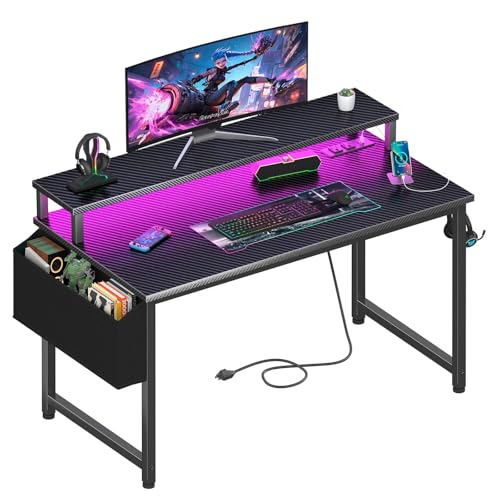
Pros
- Built-in power and USB charging simplifies cable management and eliminates the need for separate extension cords.
- Customizable RGB lighting adds immersive ambiance for gaming or streaming without extra accessories.
- Durable carbon fiber surface is easy to clean and resists scratches from mouse movements and accidental spills.
- Monitor stand promotes ergonomic viewing angle, beneficial for long gaming sessions and productivity.
- Removable storage accessories provide convenient organization for small gaming peripherals.
Cons
- At 40 inches wide, the desk may feel cramped for users with multiple monitors or larger peripherals.
- Power strip placement might be fixed; some users may prefer a detachable or repositionable unit.
- No reviews yet, so long-term durability and real-world user experiences are not confirmed.
The Lufeiya Gaming Desk is a compact 40-inch workstation designed specifically for PC gamers, streamers, and remote workers who value both functionality and style. It packs a built-in power strip with two AC outlets and two USB ports, plus customizable RGB LED lighting, all in a footprint that fits easily in dorms, apartments, or smaller gaming rooms.
For performance, the desk's raised monitor stand is a standout feature: it lifts your screen to eye level, which can reduce neck fatigue during marathon gaming sessions or long workdays. The built-in power strip keeps your tower, monitor, phone, and peripherals powered without crawling under the desk - a real time-saver when you're switching between games or streaming.
The carbon fiber surface is a practical choice; it's scratch-resistant and waterproof, so spills from late-night energy drinks or frantic mouse movements won't leave permanent marks. The included storage bag and headphone hooks are removable, letting you customize your cable management and accessory storage to your exact needs.
Assembly is straightforward thanks to the included manual and tools - no extra drills required. Most users can put it together in under an hour. Just keep in mind that the 40-inch width is best for single-monitor setups; if you run two large screens, you might feel a bit squeezed. Also, the power strip is fixed to the desk, so you can't move it to the side if that creates cable tension.
Overall, the Lufeiya desk offers excellent value for budget-minded gamers and workspace organizers who want a neat, immersive setup. While long-term durability remains to be seen, the initial build quality and thoughtful features make it a strong contender for anyone needing a compact gaming desk with power and RGB built in.
The Lufeiya desk includes a built-in RGB LED strip that offers 7 adjustable colors, 4 dynamic modes, and 16 static lighting types. You can cycle through solid colors, breathing effects, or a fast rainbow sweep to match your mood or sync with other RGB peripherals. The strip is pre-installed along the back edge, creating a subtle glow that enhances the atmosphere without being distracting. Since there's no software required, you control the lights via a simple button on the strip - perfect for quick changes during a gaming session or streaming stream.
Setting up this desk is a breeze - the package includes all necessary tools and a clear manual, so you can assemble it in about 30-45 minutes. The power strip is integrated into the desk frame, with outlets and USB ports accessible from the front of the desktop. This design helps keep cables tidy, especially when combined with the included storage bag (which can hold small accessories) and the two headphone hooks. The carbon fiber surface also hides fingerprints and smudges, so your desk looks clean even after hours of use. If you need to move the desk, the lightweight 20.4-pound build makes it easy to reposition.

Pros
- Integrated power and USB charging hub saves outlet space and keeps cables tidy
- LED lighting adds immersive ambiance and can reduce eye strain in dark rooms
- Large monitor stand improves viewing angle and provides extra storage underneath
- Ample shelving for PC tower, books, and accessories reduces desktop clutter
- Easy to assemble with clear instructions and labeled parts, according to product details
Cons
- MDF surface may show wear over time with heavy use or spills without protective coasters
- Fixed height (30 inches) may not suit all users; an adjustable desk might be better for tall or short gamers
- Limited cable management channels - you may need to add clips or raceways for a completely clean look
The ODK 48 Inch L-Shaped Gaming Desk is a corner-friendly workstation built for PC gamers, streamers, and anyone who spends long hours at their setup. It combines a roomy desktop, integrated power outlets, and customizable LED lighting - all at a price that won't break the bank. This desk is designed to hold multiple monitors, a PC case, and all your peripherals, making it a practical choice for competitive gamers, content creators, and college gamers alike.
One of the standout features is the built-in USB charging ports and power outlets. You can plug in your gaming mouse, keyboard, headset, or phone directly on the desk without crawling under for outlets. The LED strip offers 10 static colors, 6 brightness levels, and 10 dynamic modes - perfect for RGB enthusiasts who want to match their setup's vibe. The memory function remembers your last setting, so you don't have to redo it every time.
Build quality is solid for the price. The desk uses a premium metal frame and MDF board with a carbon fiber surface that resists scratches and water. Adjustable foot pads keep it stable on uneven floors, which is important for competitive gaming where any wobble can be distracting. The L-shape fits corners nicely, freeing up space in your room while giving you a large 48x19.7 inch main surface plus a monitor riser for better ergonomics.
Storage is a strong point. There's an under-desk bookshelf and a side storage bag for small items like controllers or cables. The monitor stand also offers room underneath for a keyboard or notes. This setup helps keep your gaming area organized - essential for streamers who need quick access to gear. However, cable management is basic; you may want to add some adhesive clips or a cable tray for a truly clean look.
Assembly is straightforward with step-by-step instructions and labeled parts. According to user feedback, most people can put it together in under an hour. One realistic limitation is the fixed 30-inch height - it works for average-height users but may not be ideal if you're very tall or short. Also, while the MDF is durable, it's not real wood, so using coasters for drinks is recommended to avoid rings.
Overall, the ODK 48 Inch L-Shaped Gaming Desk offers excellent value for PC gamers and streamers who want a practical, RGB-lit workstation with built-in power. It's great for dorm rooms, home offices, or gaming dens where you need maximum surface area in a corner layout. If you're okay with the fixed height and don't need premium wood, this desk checks all the right boxes for performance, convenience, and aesthetics.

Pros
- Integrated power strip with USB charging eliminates cable clutter and keeps devices charged.
- RGB LED strip with app control adds immersive lighting without extra accessories.
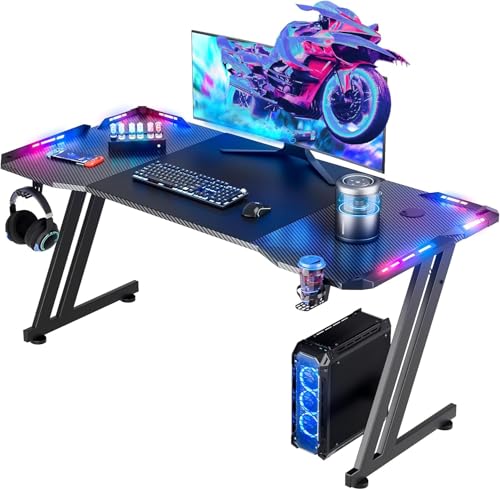
- Sturdy Z-frame construction with adjustable feet ensures wobble-free gaming.
- Reversible and expandable design offers flexibility for different room layouts.
- Monitor stand, cup holder, and headphone hook enhance desk organization.
Cons
- 40-inch size may feel cramped for users with multiple large monitors or a full tower PC.
- Carbon fiber texture is a printed finish on MDF, not real carbon fiber, so it may show wear over time.
- Assembly requires about 60 minutes and some users may find the instructions unclear.
The Korfile 40 Inch L-Shaped Gaming Desk is a practical solution for PC gamers, streamers, and content creators who need a compact yet functional corner desk. Designed to fit small spaces like dorm rooms, apartments, or cozy gaming nooks, this desk combines a carbon fiber textured work surface with built-in power outlets and RGB LED lighting to enhance both productivity and gaming atmosphere.
For competitive and casual gamers alike, the desk's integrated power strip with 3 AC outlets and 2 USB ports is a standout feature. It allows you to plug in your gaming PC, monitor, and peripherals without hunting for wall sockets, keeping your setup clean and organized. The RGB LED light strip, controllable via a smartphone app, lets you match the lighting to your mood or game, adding an immersive touch without extra accessories.
Build quality is solid for the price point. The MDF surface with carbon fiber texture is smooth and scratch-resistant, though it's a printed finish rather than real carbon fiber. The double Z-shaped steel legs provide sturdy support up to 220 lbs, and adjustable leg pads help stabilize the desk on uneven floors. The reversible L-shape design is a nice touch, allowing you to configure it for left or right corners, and you can even combine two desks into a U-shaped workstation for a more expansive setup.
Storage and organization are well thought out. The long monitor stand can hold two 24-inch monitors or a single large display, improving ergonomics by raising screens to eye level. A cup holder and headphone hook keep drinks and headsets off the main work area, reducing clutter. The 3-tier storage shelves on the corner section provide space for games, controllers, or a small printer, making it practical for both gaming and home office use.
Setup is straightforward with step-by-step instructions and labeled parts, though expect to spend about an hour assembling it. Some users may find the instructions a bit sparse, but the process is manageable for most DIY enthusiasts. The 40-inch depth is adequate for a single monitor and keyboard, but if you run a triple-monitor setup or a large tower case, you might feel cramped. Cable management is basic, so you may want to add zip ties or a cable tray for a cleaner look.
Overall, the Korfile 40 Inch L-Shaped Gaming Desk is a great value for budget-conscious gamers, streamers, and college students who need a compact, feature-rich desk. It delivers essential power and lighting features, decent build quality, and smart storage options in a space-saving design. While it's not built for massive multi-monitor rigs, it's an excellent choice for small gaming setups where every inch counts.
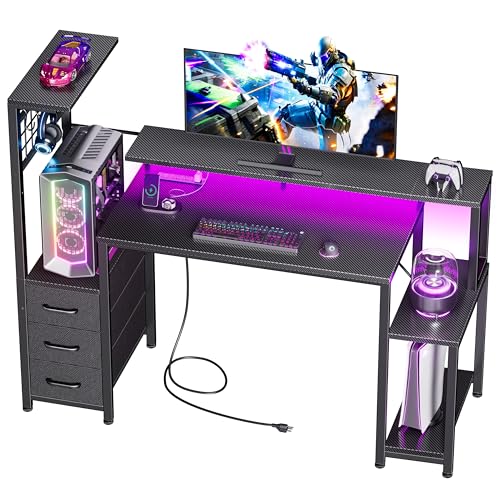
Pros
- RGB lighting with app control offers vibrant customization for immersive gaming vibes.
- Integrated power outlets and USB ports eliminate cable clutter and keep devices charged.
- Ample storage with fabric drawers and hooks helps maintain a clean and organized desk.
- Solid build quality with 220 lb capacity and anti-slip feet for stable use.
- Easy to assemble with clear instructions and all necessary hardware included.
Cons
- Desktop depth of 18.9 inches may be too shallow for large monitors or dual-screen setups.
- Fabric drawers are not as rigid as wooden alternatives and may sag over time with heavy items.
- LED lighting requires app download and may lack advanced effects found in premium RGB ecosystems.
The Korfile 48 Inch Gaming Desk is a versatile workstation designed for PC gamers, setup enthusiasts, and streamers looking to level up their gaming space. It blends a carbon fiber textured desktop with integrated RGB lighting, a built-in charging station, and multiple storage options to keep your gear organized and your battlestation looking sharp.
For real-world use, this desk works well for competitive or casual gamers who need a sturdy surface for their keyboard, mouse, and monitor. The 220-pound weight capacity means it can handle a full PC tower, monitor arm, and peripherals without wobble. The anti-slip feet provide extra stability on carpet or hardwood floors, which is essential during intense gaming sessions.
Storage is a standout feature. Three fabric drawers and four side hooks give you plenty of room for controllers, headsets, cables, and other accessories. The reversible shelf can hold a gaming PC tower or console, helping you free up desktop space. This keeps your setup clutter-free and lets you focus on the game.
RGB lighting adds atmosphere with 10 static colors and 10 dynamic modes, all controllable via a smartphone app. It's not as advanced as top-tier lighting systems, but it offers good variety for creating a personalized gaming vibe. The built-in power station with 3 AC outlets and 2 USB ports is a practical addition for charging your phone, headset, or streaming gear right at your desk.
Setup is straightforward thanks to labeled parts and included tools. Most users can assemble it in under an hour with the step-by-step instructions. One limitation to note is the desktop depth of 18.9 inches, which may feel shallow if you use a large monitor or dual-screen setup. The fabric drawers are convenient but not built for heavy loads.
Overall, the Korfile 48 Inch Gaming Desk is a strong value for budget-conscious gamers, college students, or anyone setting up a compact home office. It provides solid build quality, useful storage, and nice RGB lighting at an affordable price. If you need a functional, organized desk that doesn't compromise on style or practicality, this is a smart choice.

Pros
- Officially licensed by Xbox for authentic branding
- Two lighting modes add a bit of visual variety
- USB or battery power offers placement flexibility
- Compact size works on crowded desks or shelves
Cons
- No RGB customization or color options beyond white/black
- Batteries not included, so you'll need to buy AAA batteries for cordless use
- Light output is more decorative than functional for reading or detailed work
The Paladone Xbox Icons Light is a simple, officially licensed desk accessory designed for Xbox fans who want to add a subtle gaming touch to their workspace or game room. Measuring just 4 inches tall and 12 inches wide, this compact light is meant to sit on a desk, shelf, or nightstand without taking up much space. It's not a high-end RGB strip or a powerful desk lamp - it's a decorative piece that shows off your love for the Xbox brand.
This light is best suited for casual gamers, Xbox enthusiasts, and anyone building a themed gaming setup or man cave. If you're a competitive esports player or a streamer looking for advanced lighting effects, you might find this too basic. But for a college dorm room, a home office, or a kid's playroom, it's a fun and affordable way to add a bit of personality.
In terms of performance, the Xbox Icons Light offers two lighting modes: standard (steady on) and phasing (slowly pulses between brightness levels). The light is cool white in color, so it won't clash with most setups. It's powered via USB (cable included) or by three AAA batteries (not included), so you can place it almost anywhere without worrying about outlet proximity. The build quality is decent for the price - the plastic feels sturdy enough for desk use, though it's not meant to be dropped or handled roughly.
Setup is straightforward: plug in the USB cable or insert batteries, then use the small button on the side to switch between modes. There's no software, no app, and no complicated controls. That simplicity is a plus if you just want to unbox it and start using it right away. However, there's no way to adjust brightness or color, so what you see is what you get.
One realistic limitation is that the light is more decorative than functional. It won't illuminate your keyboard for late-night gaming sessions or provide enough light for reading. It's really just a glowing icon that says "I'm an Xbox fan." Also, the lack of RGB customization might disappoint gamers who love syncing colors across their setup. But for the price, it's a fair trade-off.
Overall, the Paladone Xbox Icons Light is a solid choice for Xbox fans who want a low-cost, low-effort way to personalize their gaming space. It's not a performance accessory, but it doesn't pretend to be. If you're looking for a simple, licensed desk decor piece that works out of the box and fits in almost anywhere, this light is worth considering. Just don't expect it to replace your main desk lamp.

Pros
- Power outlets and USB ports integrated directly into the desk save desk space and reduce cable clutter.
- Reversible L-shape adapts to different room layouts, perfect for small apartments or dorm rooms.
- LED lighting adds immersive atmosphere for late-night gaming sessions without straining your eyes.
- Ample storage with shelves, CPU stand, and storage bag keeps your gaming area organized.
- Price point is very competitive for a desk with power and RGB features.
- Assembly is relatively straightforward with clear instructions and labeled parts.
Cons
- Desk surface depth (18.9 inches) may be tight for large monitors or multiple screens.
- LED strip brightness and color accuracy may not satisfy hardcore RGB enthusiasts looking for premium effects.
- Build materials are likely particle board or MDF, which may wear over time with heavy use.
- Some users may find the included storage bag and hook less durable than expected.
The AODK L Shaped Gaming Desk is exactly the kind of practical, space-efficient workstation that many PC gamers and streamers need. At 53 inches wide with a reversible L-shape, this desk is designed to fit snugly into a corner, making it a great option for dorm rooms, small apartments, or any gaming setup where floor space is at a premium. The built-in 3-outlet power strip and 2 USB charging ports mean you can plug in your gaming PC, monitor, phone, and peripherals without crawling under the desk to find a wall socket.
Who is this desk best suited for? First, PC gamers who want a dedicated gaming corner without taking up too much room. Also, streamers who need quick access to power for a streaming PC, capture card, or extra monitors. College gamers and work-from-home users will appreciate the reversible layout and the two-tier upper shelf, which can hold a monitor or display your collectibles. The integrated LED strip offers a range of colors and dynamic modes, allowing you to customize the look of your gaming setup without extra RGB strips or expensive lighting gear.
In terms of real-world performance, the desk delivers on convenience. The power outlets are right there on the desktop, so you can easily charge your gaming headset, controller, or phone while you play. The LED lighting is controlled by a simple switch and includes memory function, so you don’t have to reset your favorite color every time you power it on. The desk also includes a CPU stand to keep your tower off the floor, a headphone hook for your gaming headset, and a storage bag for cables and small accessories. All these features help maintain a tidy, efficient gaming space.
Build quality is typical for a desk in this price range. The frame is made of engineered wood (likely particle board) with a durable black finish. While it won’t have the solid feel of a premium hardwood desk, it’s plenty sturdy for a gaming monitor, keyboard, mouse, and other peripherals. Assembly is required, but the instructions are clear, and all parts are labeled. Most users should be able to put it together in under an hour. However, the desktop depth of just 18.9 inches means you might not have room for a large monitor arm or a full-size mechanical keyboard with a deep wrist rest.
One realistic limitation is the LED strip itself. While it offers multiple colors and modes, the brightness and color saturation may not match what you’d get from a dedicated RGB lighting kit. It’s fine for ambient lighting, but if you’re a hardcore RGB enthusiast looking for vibrant, customizable effects, you might want to add your own lights. Also, the storage bag and hook feel a bit flimsy compared to the rest of the desk, but they get the job done for holding small items.
Overall, the AODK L Shaped Gaming Desk is a solid choice for gamers who want a functional, space-saving desk with built-in power and RGB lighting on a budget. It works well for casual and competitive gamers alike, as well as for streamers and content creators who need a clean, organized setup. If you’re building your first gaming PC or upgrading a cramped desk, this is a practical pick that won’t break the bank.
Console Gaming Desk Setup Questions Answered
Does an Xbox Series X require special desk ventilation?
Yes, vertical consoles need at least four to six inches of clear space above and behind their exhaust ports to prevent thermal throttling. Placing your console inside an enclosed cabinet or directly on plush carpet chokes airflow and drives up fan acoustics. Desks featuring dedicated open-air CPU stands or reversible lower shelves allow cool intake air to circulate freely. This airflow clearance protects internal hardware longevity during extended gaming sessions.
What desk width works best for a console and monitor setup?
A desk measuring 40 to 48 inches wide provides ample space for a single 27-inch to 32-inch gaming monitor alongside an Xbox and charging accessories. Gamers planning dual-screen layouts or streaming gear often step up to a spacious 63-inch gaming desk for extra elbow room. Compact 40-inch desks work wonders in smaller bedrooms, provided they feature raised monitor shelves to preserve usable surface area.
Can built-in desk power strips handle an Xbox and accessories?
Yes, integrated desk power strips with standard three-prong AC outlets easily handle the electrical draw of a modern Xbox console and monitor. Most built-in units feature 120V AC plugs rated well above typical console power requirements, alongside convenient 5V USB ports for controller charging. Using built-in desk plugs eliminates tangled floor cords and keeps your play space tidy. Always check manufacturer load limits before plugging in high-draw space heaters or secondary power strips.
Are monitor risers better than flat desktops for console play?
Yes, monitor shelves lift your display closer to natural eye level, significantly reducing neck and upper back strain. Sitting hunched over during intense matches can cause muscle fatigue and slow your visual tracking. Elevating the screen also frees up critical desktop space underneath for controller charging docks, games, or external hard drives. Alternately, players wanting posture variety can explore an ergonomic standing desk converter for gaming to alternate between sitting and standing.
Does a carbon fiber textured surface benefit controller gamers?
Yes, textured carbon fiber finishes provide superior scratch resistance and water protection compared to basic laminate boards. Controller grips, metal charging stands, and drink cans slide across the desk without scuffing the top surface. The textured finish also provides light grip for rubberized gamepad docks and mousepads. Wiping down dust or spills requires only a quick pass with a damp cloth.
How much weight capacity is necessary for a console desk?
A weight limit of at least 150 to 220 pounds is recommended to safely hold a monitor, console, audio gear, and resting arm pressure. Desks reinforced with powder-coated steel frames and X-shaped crossbars stay rock solid during fast-paced play. Sturdy leg levelers also compensate for uneven flooring to stop distracting desk wobble before it starts.



Write Your Review
No reviews yet. Be the first to share your experience!