


Managing thermal exhaust, cable bulk, and heavy monitor weight requires a solid setup foundation before powering on a high-performance desktop PC. Many players struggle with cramped surfaces where tower cases block airflow or crowd out multiple displays. Investing in the best gaming desk l shape setup resolves these spatial bottlenecks by dividing hardware across dedicated surfaces. This split layout accommodates your gaming desktop computer tower on one wing while preserving open space for dual screens, an extended mousepad, and accessible ports.
Modern gaming rigs require reliable power distribution and structural support, especially when running an expansive desktop for streaming and gaming alongside external audio interfaces. Evaluating your workspace helps prevent cable snarls and ensures your PC tower gets adequate intake ventilation. Factoring in how much a gaming desk costs against built-in AC outlets and reinforced steel frames ensures stability without overspending. A clean corner setup keeps your desktop hardware protected and your essential ports within reach.
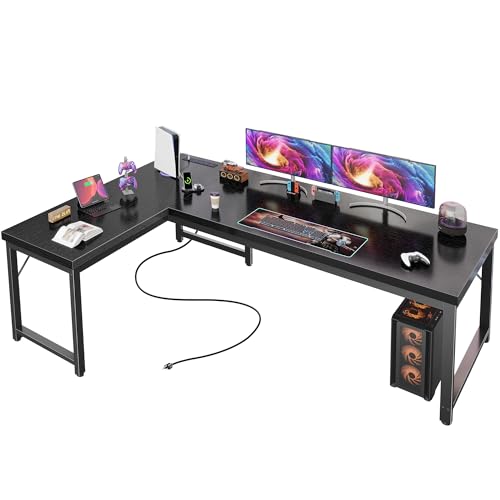
Pros
- Integrated power and USB-C reduce cable clutter and improve organization
- Sturdy metal frame and adjustable feet ensure stability on uneven floors
- Spacious L-shape accommodates multiple monitors, notebooks, and accessories
- Thick, waterproof surface is easy to clean and resists daily wear
- Simple assembly process with clear instructions and all hardware included
Cons
- No built-in cable management tray, may require separate cable sleeves or clips
- Black finish can show dust and fingerprints, needing regular wiping
- Some users may find the 20-inch depth slightly shallow for large monitor arms
The Huuger 63 Inch L Shaped Desk is a versatile workstation designed for PC gamers, streamers, content creators, and work-from-home professionals who need a reliable and organized setup. Its reversible L-shape fits neatly into corners or can be flipped for an open layout, making it suitable for dorm rooms, home offices, and gaming dens alike. With a thick 0.95 inch desktop and reinforced steel frame, this desk offers a stable surface for heavy gear like multiple monitors, gaming PCs, and streaming equipment.
Built-in power management is a standout feature. Four AC outlets and a USB-C port let you charge your gaming laptop, smartphone, or peripherals without reaching under the desk. This simplifies cable management and keeps your workspace tidy, which is especially useful during long gaming sessions or live streams. The 20-inch depth provides enough room for a keyboard, mouse, and a small notebook, though some may want more depth for extra-large monitor arms.
Build quality is solid for the price point. The high-density particleboard desktop is scratch-resistant and waterproof, holding up well against spills and daily use. The metal frame uses thick legs and crossbars to eliminate wobble, and adjustable feet keep the desk level on uneven floors. Weight capacity is rated at 220 pounds, plenty for most gaming setups including a dual-monitor rig, tower, and accessories.
Assembly is straightforward. The instructions are clear, parts are numbered, and all tools are included, so you can put it together in about an hour. The compact packaging also makes it easier to move into tight spaces. However, there is no built-in cable management tray, so you will want to add cable sleeves or clips to keep cords organized. Some users note that the black finish shows fingerprints and dust, but it wipes clean easily.
Overall, the Huuger L Shaped Desk is a practical choice for gamers and professionals who value space, stability, and convenience. It works well for competitive and casual gaming, streaming on Twitch or YouTube, and even daily work-from-home tasks. If you need a durable, power-integrated desk that won't break the bank, this is worth considering.
Setting up your gaming station on the Huuger L Shaped Desk is straightforward. The reversible design lets you place your main monitor and PC on one side, with the secondary side holding a laptop, console, or streaming gear. Use the built-in outlets to power your monitor, PC, and peripherals while the USB-C port handles fast charging for your phone or tablet. Since the desk lacks a cable management tray, consider using adhesive cable clips or a under-desk mesh tray to keep cords out of sight. The spacious surface can comfortably hold a 27-inch monitor plus a second vertical display, leaving room for a full-size keyboard and mouse. For RGB enthusiasts, the black background makes LED strips pop, and the sturdy frame ensures no shaking during intense gameplay.

Pros
- Ample storage with shelves, CPU stand, hook, and bag for accessories.
- Built-in power outlets and USB ports simplify cable management.
- Customizable RGB lighting enhances gaming atmosphere.
- Sturdy X-frame construction supports heavy monitors.
- Reversible layout adapts to any corner setup.
Cons
- Limited user reviews make long-term durability uncertain.
- Desktop depth (18.9 inches) may be shallow for some deep monitors.
- LED strip is not addressable per-key like premium gaming desks.
The ODK 53 Inch L Shaped Gaming Desk is a versatile corner workstation designed for PC gamers, streamers, content creators, and anyone building a compact gaming setup at home, in a dorm, or in a home office. It combines storage, power, and RGB lighting into one affordable package, making it a strong candidate for those who need an organized desk without spending a fortune.
For gaming performance, the desk delivers stability thanks to the X-shaped steel frame and adjustable foot pads. You can confidently place dual monitors, a gaming PC, and peripherals without worrying about wobble. The built-in 3 AC outlets and 2 USB ports keep your tower, displays, and phone charged right at your fingertips, reducing the need for external power strips and tangled cables. The RGB LED strip adds a customizable ambiance with 10 colors, 8 brightness levels, and 10 dynamic modes, perfect for late-night gaming or streaming sessions.
Build quality is practical for the price point. The reversible L-shape lets you mount the longer section on the left or right, adapting to your room layout. The desktop surface is spacious at 53 inches wide, though the depth of 18.9 inches is a bit shallow for very deep monitors or those with aggressive curves. The included storage shelves, CPU stand, accessory hook, and tool bag help keep your headphones, controllers, and cables organized, making it easier to maintain a clean gaming area.
Assembly is straightforward with pre-labeled parts and included tools, so you can have the desk ready in under an hour. The cable management channels behind the desktop help route wires from your PC and monitors, keeping the workspace tidy. However, the LED strip is a simple stick-on design rather than addressable per-key lighting, so you won't get effects that sync with game audio or screen content out of the box.
Realistically, this desk is best for gamers who prioritize storage and convenience over ultra-premium aesthetics. The shallow depth means it may not suit triple-monitor arrays or large curved ultrawides, but it handles a standard dual monitor setup well. With no user reviews yet, long-term durability is unproven, but ODK offers 24-hour customer support for missing or broken parts. If you need an affordable L-shaped desk with built-in power, modular storage, and RGB lighting, the ODK 53 Inch is a solid choice for getting your gaming setup organized.

Pros
- Generous storage with five shelves and three drawers for organizing gaming gear, documents, and peripherals.
- Integrated power station with switch saves desk space and simplifies cable management for multiple devices.
- Vibrant RGB lighting with music sync adds immersive atmosphere and is controllable via smartphone app.
- Sturdy construction supports heavy monitors and equipment without wobbling during use.
- Versatile reversible design fits various room layouts and can be used as a corner desk or standalone L-shape.
Cons
- Assembly is time-consuming and may require two people due to the desk's size and weight (76 pounds).
- Fabric drawers, while lightweight, may not hold heavy items and could sag over time if overloaded.
- RGB lighting strip is pre-installed and not easily replaceable if it malfunctions; reliance on app may be less intuitive for some users.
The SEDETA L Shaped Gaming Desk is a versatile corner workstation designed for PC gamers, streamers, and home office users who need efficient organization and a touch of flair. This desk combines a roomy L-shaped surface with integrated power outlets and customizable RGB LED lights, making it a practical centerpiece for a gaming setup or a productivity hub.
Targeted at gamers who juggle multiple monitors, a desktop PC, and peripherals, this desk offers plenty of space for two monitors and a notebook. The included CPU stand keeps your tower off the floor, improving airflow and reducing dust buildup. Streamers will appreciate the 5-tier storage shelves for holding capture cards, microphones, and lighting gear, while the 3 fabric drawers are ideal for neatly stashing controllers, cables, and documents.
Performance here is about reliability and convenience. The built-in power station with 4 outlets and 2 USB ports eliminates the need for a separate power strip, and the on/off switch adds safety. The RGB LED strip, controllable via a smartphone app, offers over 60,000 colors and music sync that pulses with your gameplay or stream audio. This feature helps create an immersive atmosphere without cluttering the desk with extra peripherals.
Build quality is solid for the price. The melamine surface resists scratches and spills, while the steel frame supports up to 76 pounds. However, the fabric drawers are better suited for lightweight items like papers or small accessories rather than heavy gear. The desk's 55-inch width and 29.5-inch height provide ample legroom and a comfortable typing height for long sessions.
Setup requires some patience. Assembly is straightforward with clear instructions, but the desk's 76-pound weight and reversible design may necessitate a helper. Cable management is somewhat addressed by the power outlet placement, but additional cable clips or trays could further tidy the look. The LED strip is pre-attached, so future replacement would require careful removal.
Overall, the SEDETA L Shaped Gaming Desk is a strong choice for gamers and streamers seeking a functional, space-saving corner desk with built-in power and customizable RGB lighting. It balances storage, style, and practicality, making it a worthwhile investment for upgrading your gaming room or home office without breaking the bank.
The desk features a pre-installed RGB LED strip along the lower edge of the desktop. This strip offers over 60,000 colors and 29 dynamic modes, including static, breathing, flash, and music-sync patterns. Control is via a mobile app (compatible with iOS and Android) that allows you to adjust brightness, speed, and color without getting up. The music sync function uses a built-in microphone to capture ambient sound, so the lights pulse with game audio, stream alerts, or your favorite playlist. For those who prefer simple controls, there’s also a physical remote included. The customization potential is excellent for creating a personalized gaming atmosphere that matches your setup’s RGB theme.
One of the desk’s standout features is its extensive storage. The 5-tier open shelving area is perfect for a printer, PC tower, books, or display collectibles. Each shelf is adjustable in height, allowing you to accommodate taller items like a full-size tower or a large monitor riser. The 3 fabric drawers slide smoothly and are ideal for smaller accessories: think controllers, cables, pens, or notepads. The drawer sizes fit legal/letter/A4 documents, making them viable for office use as well. The reversible U-shaped design lets you place the shelves on either side, adapting to your room layout. This organization system helps reduce desktop clutter, giving you more space for dual monitors or a large mousepad.
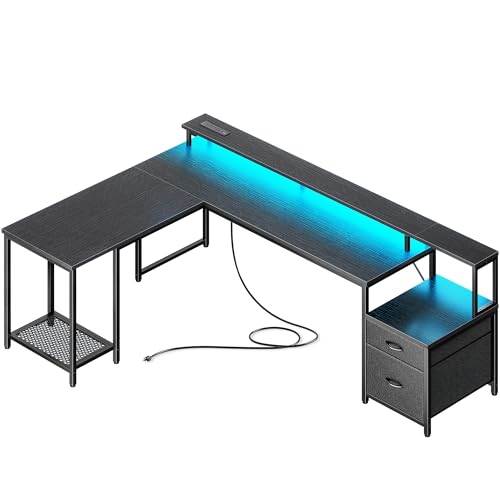

Pros
- LED lighting built into the hutch adds instant RGB flair without extra cables or strips
- Display shelves are great for showing off figurines, trophies, or streaming gear
- CPU platform keeps your tower off the floor for better airflow and visibility
- Reversible orientation offers flexibility for corner placement or room rearrangement
- Side storage bag helps declutter the main surface for a cleaner look
Cons
- No built-in cable management channels or grommets may require additional zip ties or sleeves
- Some users may find the 51-inch size too small for large multi-monitor setups
- LED strip is only on the top hutch, not integrated into the desktop edge, limiting ambient desk lighting
The AODK L Shaped Gaming Desk is a 51-inch corner desk designed to maximize space while adding visual flair to any gaming setup. It features a reversible hutch with built-in LED lighting, two display shelves for collectibles, a desktop CPU platform, and a side-mounted fabric storage bag. This desk targets PC gamers, streamers, content creators, and RGB enthusiasts who want an organized, immersive workstation without sacrificing floor space.
Best suited for competitive gamers, casual players, esports hopefuls, and college students in dorms, the reversible design lets you configure the main top and hutch on the left or right. The wide open legroom allows you to stretch and reposition freely during long sessions, making it a practical choice for work-from-home gamers and those who spend hours grinding or streaming on Twitch or YouTube.
Gaming performance here is about desktop ergonomics and atmosphere. The LED strip on the hutch offers multiple colors and dynamic modes that wash both shelves and the desktop in light, creating an immersive glow for late-night wins. The CPU platform lets you keep your tower on the desk, highlighting your build, improving airflow, and protecting it from dust and kicks. However, the desk lacks built-in cable management holes, so you will need to use zip ties or a cable tray to keep wires organized.
Build quality is typical for a budget-friendly gaming desk. The frame is metal and the surfaces are engineered wood. The shelves hold collectibles, controllers, and small consoles but may not support very heavy items. The fabric storage bag is handy for headsets and cables but may show wear over time. Assembly is required; instructions are clear, and most users can set it up in under an hour. Cleaning is simple with a damp cloth.
A realistic limitation is the 51-inch total width, which may feel cramped for dual 27-inch monitors or a large streaming setup. The LED strip is only on the hutch, not the desk edges, so ambient lighting is limited to the top area. Additionally, the desk does not offer height adjustment, so pairing it with an ergonomic chair is important for long-term comfort.
Overall, this desk is a strong value for gamers with limited space who want an RGB-lit corner desk with display options. It suits single monitor gaming rigs, casual streaming stations, and dorm room setups. For a cleaner look, consider adding aftermarket cable management. If you need more surface area or integrated cable routing, you may want to explore larger or higher-end options. For the price, the AODK L shaped desk delivers a well-rounded package for most PC gamers and setup builders.
Setting up the AODK L Shaped Gaming Desk requires basic assembly. The reversible design means you can install the hutch and main top on your preferred side, making it flexible for corner use or against a wall. The included hardware is straightforward, but a screwdriver (not included) is needed.
Cable management is not pre-built into this desk. There are no grommets or channels, so we recommend using adhesive cable clips, a cable sleeve, or a under-desk cable management tray to keep wires from monitor, PC, and peripherals tidy. This is especially helpful if you are using the CPU platform on the desktop, as cables will connect to the tower from multiple directions.
The side fabric bag attaches easily and provides a spot for your headset, controllers, or cables, reducing desktop clutter. For LED control, the strip on the hutch has a remote (likely included) or a button interface, allowing quick adjustment of colors and effects. Overall, the desk is easy to assemble and reorganize if you decide to flip the layout later.


Pros
- Power outlets and USB ports integrated directly into the desk save desk space and reduce cable clutter.
- Reversible L-shape adapts to different room layouts, perfect for small apartments or dorm rooms.
- LED lighting adds immersive atmosphere for late-night gaming sessions without straining your eyes.
- Ample storage with shelves, CPU stand, and storage bag keeps your gaming area organized.
- Price point is very competitive for a desk with power and RGB features.
- Assembly is relatively straightforward with clear instructions and labeled parts.
Cons
- Desk surface depth (18.9 inches) may be tight for large monitors or multiple screens.
- LED strip brightness and color accuracy may not satisfy hardcore RGB enthusiasts looking for premium effects.
- Build materials are likely particle board or MDF, which may wear over time with heavy use.
- Some users may find the included storage bag and hook less durable than expected.
The AODK L Shaped Gaming Desk is exactly the kind of practical, space-efficient workstation that many PC gamers and streamers need. At 53 inches wide with a reversible L-shape, this desk is designed to fit snugly into a corner, making it a great option for dorm rooms, small apartments, or any gaming setup where floor space is at a premium. The built-in 3-outlet power strip and 2 USB charging ports mean you can plug in your gaming PC, monitor, phone, and peripherals without crawling under the desk to find a wall socket.
Who is this desk best suited for? First, PC gamers who want a dedicated gaming corner without taking up too much room. Also, streamers who need quick access to power for a streaming PC, capture card, or extra monitors. College gamers and work-from-home users will appreciate the reversible layout and the two-tier upper shelf, which can hold a monitor or display your collectibles. The integrated LED strip offers a range of colors and dynamic modes, allowing you to customize the look of your gaming setup without extra RGB strips or expensive lighting gear.
In terms of real-world performance, the desk delivers on convenience. The power outlets are right there on the desktop, so you can easily charge your gaming headset, controller, or phone while you play. The LED lighting is controlled by a simple switch and includes memory function, so you don’t have to reset your favorite color every time you power it on. The desk also includes a CPU stand to keep your tower off the floor, a headphone hook for your gaming headset, and a storage bag for cables and small accessories. All these features help maintain a tidy, efficient gaming space.
Build quality is typical for a desk in this price range. The frame is made of engineered wood (likely particle board) with a durable black finish. While it won’t have the solid feel of a premium hardwood desk, it’s plenty sturdy for a gaming monitor, keyboard, mouse, and other peripherals. Assembly is required, but the instructions are clear, and all parts are labeled. Most users should be able to put it together in under an hour. However, the desktop depth of just 18.9 inches means you might not have room for a large monitor arm or a full-size mechanical keyboard with a deep wrist rest.
One realistic limitation is the LED strip itself. While it offers multiple colors and modes, the brightness and color saturation may not match what you’d get from a dedicated RGB lighting kit. It’s fine for ambient lighting, but if you’re a hardcore RGB enthusiast looking for vibrant, customizable effects, you might want to add your own lights. Also, the storage bag and hook feel a bit flimsy compared to the rest of the desk, but they get the job done for holding small items.
Overall, the AODK L Shaped Gaming Desk is a solid choice for gamers who want a functional, space-saving desk with built-in power and RGB lighting on a budget. It works well for casual and competitive gamers alike, as well as for streamers and content creators who need a clean, organized setup. If you’re building your first gaming PC or upgrading a cramped desk, this is a practical pick that won’t break the bank.

Pros
- Integrated power outlets and USB ports reduce cable clutter and improve desk organization for gaming peripherals.
- Thick, sturdy desktop and metal frame provide solid support for heavy gaming monitors and equipment without sagging.
- Reversible layout allows flexible placement in corners or as a standalone station, ideal for evolving gaming setups.
- Easy assembly process with included tools and numbered parts saves time and frustration for gamers building their battle station.
Cons
- No built-in cable management channels or grommets, so you may need additional clips or sleeves to keep wires tidy.
- With zero user reviews at launch, long-term durability and finish quality are unverified despite promising specs.
- The 20-inch depth may feel shallow for dual monitor arms or large gaming peripherals; measure your gear beforehand.
The Huuger 63 Inch L Shaped Desk is designed for gamers, streamers, and remote workers who crave more workspace and convenient power access without crawling under the desk. This corner desk combines a thick, 0.95-inch desktop with a reinforced steel frame, offering a stable foundation for your gaming monitors, PC tower, and peripherals. With four AC outlets, one USB port, and one USB-C port built right into the desktop, you can charge your gaming headset, phone, laptop, or stream deck without reaching for a separate power strip.
This desk shines for PC gamers who need room for a multi-monitor setup or for streamers juggling a gaming rig, capture card, and lighting gear. The reversible L-shape means you can tuck it into a corner to save space or flip it for an open layout — perfect for a dual workstation if you pair two desks together. The thick, high-density surface resists scratches and spills, so accidental coffee drips during a late-night gaming session won't ruin your workspace. With a 220 lb weight capacity, it comfortably holds a gaming PC, dual monitors, and a heavy gaming chair without wobbling, thanks to the crossbars and adjustable feet.
In real-world use, the included power outlets and USB ports are a huge convenience for keeping your gaming mouse, keyboard, and stream deck charged while eliminating messy cables. The large legroom and angled shape give your elbows proper support during long competitive matches or creative projects. Assembly is straightforward with numbered parts and clear instructions — most users can put it together in under an hour. The rustic brown finish adds a warm, professional look that fits both gaming dens and home offices.
Build quality feels solid for the price point. The metal frame and thickened legs provide a stable platform, and the desktop’s waterproof coating means easy cleaning after snacks or spills. However, there are no built-in cable management grommets or trays, so you might need to invest in adhesive cable clips or a wire management basket to keep your gaming setup looking clean. The 20-inch depth is slightly shallower than some dedicated gaming desks, so measure your monitor arms and large mouse pad to ensure a comfortable fit.
Overall, this L-shaped desk is a practical choice for college gamers setting up their dorm, streamers building a multi-purpose station, or work-from-home gamers who need a versatile corner desk. It delivers a sturdy surface with integrated power, easy assembly, and a reversible design that adapts to your room layout. While the lack of cable management features and unverified long-term durability are minor drawbacks, the value and functionality make it a strong contender for any gaming setup builder.

Pros
- Versatile reversible L-shape adapts to various room corners.
- Built-in LED lighting with music sync enhances gaming atmosphere.
- Convenient power outlet and USB ports reduce cable clutter.
- Ample storage space for gaming accessories and documents.
Cons
- Limited user reviews make long-term durability unclear.
- LED app control may require smartphone and stable connection.
- Corner design requires adequate floor space to maximize usability.
If you're looking for a gaming desk that offers both style and functionality, the Aheaplus L Shaped Gaming Desk is certainly worth considering. This 59-inch corner desk features built-in RGB lighting, a power strip, and plenty of storage options. It's designed to serve as a command center for PC gamers, streamers, and content creators who need an organized and immersive workspace.
The desk is reversible, so you can set it up with the hutch on the left or right. That flexibility is great for fitting into different room layouts. The integrated LED lights can be controlled via a smartphone app, and they sync with music to create dynamic lighting effects. This is a nice touch for streamers who want to add some visual flair to their broadcasts. The built-in power outlets and USB ports mean you can charge your phone, headset, and other devices without reaching for a separate power strip.
Storage is a strong point here. The desk comes with four open shelves, a storage bag, and a couple of hooks. You'll have plenty of room for games, books, and small decor items. The main desktop is 45 inches long, which is enough for a dual monitor setup or a large laptop plus peripherals. Based on the product description, assembly is straightforward with labeled parts and tools included. The overall build uses engineered wood and a metal frame, which is common at this price point.
However, there are some things to keep in mind. Since the product has no reviews yet, it's hard to gauge long-term durability. The LED app might have compatibility issues with some devices. And the L-shape, while space-saving, needs a corner spot to work well. If you're placing it against a wall, the hutch might limit monitor placement.
For budget-conscious gamers or streamers who want an organized and good-looking desk, the Aheaplus L Shaped Gaming Desk offers a solid feature set. It combines RGB lighting, power management, and storage in one package. If you're building a gaming setup on a budget and want a desk that stands out without breaking the bank, this is a practical option to consider.
Frequently Asked Questions
What desktop computer form factor works best on an L-shaped workstation?
Mid-tower and compact desktop computer cases fit best because they balance component cooling with a manageable footprint. Massive full-tower chassis can crowd smaller corner wings, so checking case dimensions before placement is essential. Compact towers leave ample desk space for screens while maintaining open airflow.
How do built-in power outlets support a high-performance desktop PC setup?
Built-in AC outlets and USB ports provide direct power for secondary monitors, audio gear, and wireless peripheral chargers. They reduce cable clutter across your floor and keep cord runs organized. While your primary PC power supply should plug into a wall surge protector, onboard ports easily handle all auxiliary gear.
Can an L-shaped setup comfortably accommodate dual monitors and a PC tower?
Yes, separating hardware across two intersecting surfaces provides plenty of room for dual displays without crowding your computer tower. When configuring a multi-screen rig or a dedicated gaming desktop for League of Legends, placing monitors along the wider wing keeps sightlines natural. The secondary wing safely supports your PC chassis.
Why is case airflow clearance important when setting up a desktop PC in a corner?
Placing a desktop PC tower against adjoining walls can trap hot exhaust and starve intake fans, increasing system temperatures. Leaving several inches of breathing room around case vents allows fans to circulate fresh air over your processor and graphics card. Proper ventilation prevents thermal throttling during demanding gaming sessions.
Is the best gaming desk l shape layout suitable for both gaming and office work in 2026?
A split corner workstation excels at separating productivity from gaming by providing distinct zones for your desktop computer and work gear. You can dedicate one side to your primary gaming PC while keeping office laptops and paperwork on the adjacent wing. This layout creates an organized environment that easily adapts to everyday tasks.






Write Your Review
No reviews yet. Be the first to share your experience!