


Key Hardware Factors for Modern Gaming Rigs
Mismatched hardware can turn an exciting PC purchase into a frustrating headache plagued by sluggish frame rates and system bottlenecks. When a processor can’t keep up with a graphics card, or a small storage drive runs out of room after installing two modern games, your entire rig suffers. Evaluating the best gaming desktop components requires looking closely at how the central processor, system memory, graphics card, and thermal management work together. Premium prebuilt towers from brands like Skytech Gaming offer advanced liquid cooling and multi-terabyte solid-state drives, while refurbished models from Dell provide budget-friendly options for entry-level play.
Balancing your hardware needs starts with understanding what you’ll run every day. High-resolution gaming demands substantial graphics memory and modern system architecture, whereas lighter esports titles operate smoothly on modest quad-core configurations. If you’re also planning a broadcast setup, checking a dedicated desktop for streaming and gaming can clarify how background software impacts processor headroom. Inspecting case airflow, power supply wattage, and available port selections ensures your setup supports your monitors without unexpected compromises.

Pros
- Budget-friendly all-in-one gaming bundle with monitor and peripherals included.
- Fast Intel Core i7 processor and 16GB RAM handle multitasking and moderate gaming well.
- 512GB SSD ensures quick load times and a responsive system feel.
- RGB front panel adds customizable lighting to your desk setup without extra cost.
- Renewed unit offers good value with warranty coverage and professional testing.
Cons
- GT 1030 is a budget GPU that struggles with modern AAA titles at higher settings.
- 24-inch monitor likely has standard 60Hz refresh rate, not ideal for competitive esports.
- Limited upgrade potential due to proprietary Dell form factor and power supply.
The Dell Gaming OptiPlex Desktop RGB Computer PC is a renewed desktop bundle aimed at PC gamers who want an affordable way to get into gaming without building a custom rig from scratch. It comes equipped with an Intel Core i7 processor, GeForce GT 1030 graphics with 2GB GDDR5 VRAM, 16GB of DDR4 RAM, and a 512GB SSD. The package also includes a 24-inch HDMI monitor, a keyboard, mouse, and headset, making it a true plug-and-play solution for casual gaming, streaming, or everyday computing.
This system is best suited for casual gamers, college students, work-from-home professionals, or anyone looking for a budget-friendly entry into PC gaming. The Core i7 processor and 16GB of RAM provide snappy performance for multitasking, web browsing, and light productivity tasks. The GT 1030, while not a powerhouse, can handle popular esports titles like CS:GO and DOTA 2 at medium settings with decent frame rates, and it can run older or less demanding games smoothly. It is not designed for high-refresh-rate competitive play or AAA gaming at ultra settings.
In terms of real-world performance, the system boots quickly thanks to the 512GB SSD, and everyday tasks feel responsive. The included monitor is a standard 1080p display, which is fine for casual gaming and general use, but its refresh rate is likely 60Hz, so competitive gamers may want to upgrade to a higher-refresh-rate monitor later. The keyboard, mouse, and headset are basic but functional for getting started. The RGB lighting on the front panel is a nice touch for gamers who enjoy a bit of flair on their desk, and the included remote makes it easy to switch between colors and effects.
Build quality is typical of renewed Dell business-class hardware, meaning the OptiPlex chassis is sturdy and reliable, but it lacks the flashy design of many modern gaming towers. The form factor may limit future upgrades, especially for the power supply and GPU size. However, for the price, the bundle delivers solid value. Setup is straightforward: plug in the monitor, connect the peripherals, and you are ready to go. The renewed status means the unit has been inspected and tested, with a 90-day warranty for added confidence.
For cable management, the compact desktop design helps keep things tidy, though the included peripherals have standard cables that may add some clutter. The system runs relatively cool and quiet during normal use, though more demanding games may cause the fan to spin up. Overall, this is a practical, no-fuss gaming PC bundle for those who prioritize affordability and convenience over cutting-edge performance.
If you are a competitive gamer needing high frame rates and low latency, this setup may not meet your expectations. But for casual players, students, or anyone seeking an affordable entry into PC gaming with everything included, the Dell OptiPlex Desktop Bundle is a solid choice. It offers a balanced mix of performance, storage, and convenience, letting you jump into gaming without the hassle of assembling components or hunting for deals.


Pros
- Affordable entry point into PC gaming
- 16GB RAM handles multitasking and daily use well
- SSD ensures quick system responsiveness
- Includes RGB peripherals and WiFi
- Renewed by Dell may offer reliability and warranty
Cons
- GT 1030 is limited for modern AAA gaming; best for esports and older titles
- Only 256GB SSD may fill up quickly; consider adding more storage
- Renewed product condition may vary; check seller ratings
This Dell Gaming Tower Desktop PC (Renewed) is a budget-friendly entry-level desktop aimed at casual gamers, college students, and anyone looking to dip their toes into PC gaming without a huge investment. It pairs a 7th-gen Intel Core i5-7500 processor with 16GB of DDR4 RAM and a 256GB SSD, plus a dedicated GeForce GT 1030 graphics card. The package also includes an RGB keyboard and mouse, making it a ready-to-play setup for light gaming, schoolwork, or home office use.
In terms of real-world performance, this PC handles esports titles like Fortnite, League of Legends, and CS:GO at moderate settings quite well thanks to the GT 1030. The i5-7500 and 16GB RAM keep multitasking snappy, and the SSD delivers quick boot times and responsive storage. However, the GT 1030 is not meant for modern AAA games at high settings; if you're after the latest blockbusters, you'll need a more powerful GPU. For casual gamers and those who play older or indie titles, it's perfectly capable.
Build quality is typical of Dell’s tower designs, and being a renewed unit, it has been tested and refurbished to work like new. The included RGB keyboard and mouse are basic but functional, giving your desk a bit of customizable lighting out of the box. WiFi is built-in, so you can connect without Ethernet, and Windows 11 Pro comes pre-installed, providing a modern and familiar OS environment.
Setup is straightforward: plug in the power, connect peripherals, and you’re ready to go. The small 256GB SSD is a limitation; you may quickly run out of space for games and files. Adding a secondary hard drive or external storage is advisable. Also, as a renewed product, cosmetic wear or minor marks are possible, though performance should be reliable if purchased from a reputable seller.
Overall, this Dell gaming tower is a solid pick for budget-focused buyers who want a functional gaming PC for esports, everyday computing, and a taste of PC gaming. For more demanding gamers, consider saving for a system with a better GPU. But as an affordable gateway to PC gaming, it hits the mark.
Pros
- Top-tier CPU and GPU combo for high-refresh-rate 1440p and entry-level 4K gaming.
- Generous 32GB DDR5 RAM handles streaming, editing, and heavy multitasking with ease.
- Excellent cooling with 360mm AIO and well-ventilated case keeps components running cool.
- Clean, no-bloatware Windows 11 installation and US assembly ensure quality and convenience.
- Includes a free keyboard and mouse, so you can start gaming right away.
Cons
- The 12GB RTX 5070 may be limiting for 4K ultra settings in future titles; better suited for 1440p.
- Limited storage with only 1TB SSD may require upgrades for users with large game libraries.
- Brand of the graphics card may vary, which could affect warranty or aesthetics slightly.
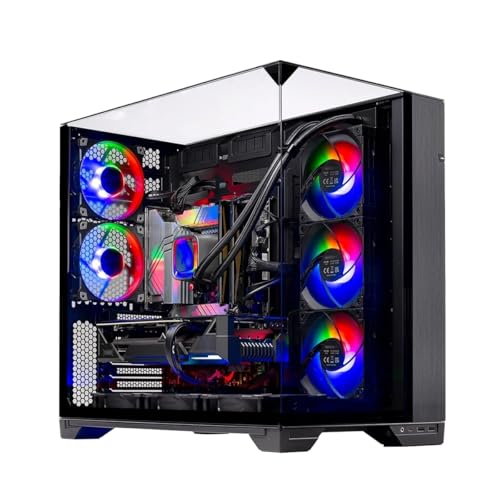
The Skytech Gaming O11 Vision is a prebuilt gaming desktop that combines the latest hardware from AMD and NVIDIA in a showcase-ready chassis. Powered by the AMD Ryzen 7 7700X (4.5GHz base, 5.4GHz boost) and the new NVIDIA RTX 5070 with 12GB GDDR7 memory, this PC is built to handle today's most demanding games at 1440p with high refresh rates. It comes with 32GB of DDR5-5600MHz RAM and a 1TB Gen4 NVMe SSD, ensuring fast load times and smooth multitasking whether you're gaming, streaming, or editing.
This system is ideal for a wide range of users: competitive gamers will appreciate the low-latency performance in esports titles like Valorant, CS2, and Apex Legends; casual and open-world gamers can enjoy ultra settings in games like Cyberpunk 2077, Elden Ring, or Black Myth Wukong at 60+ FPS. Streamers and content creators benefit from the 8-core CPU and 32GB of RAM for smooth OBS recording and editing in applications like Premiere Pro or DaVinci Resolve. RGB enthusiasts and setup builders will love the Lian Li O11 Vision case, which offers excellent cable management and a panoramic tempered glass view perfect for showing off ARGB fans and the 360mm AIO cooler.
In terms of real-world gaming performance, the Ryzen 7 7700X and RTX 5070 deliver excellent responsiveness and frame rates. You can expect over 100 FPS in most competitive shooters at 1440p and smooth 60+ FPS in graphically intense single-player titles. The 360mm AIO cooler keeps CPU temperatures in check even during extended sessions, preventing thermal throttling. The system includes Wi-Fi, multiple USB ports (2.0, 3.0, 3.2 Gen1), and HD audio, making it easy to connect peripherals and a headset.
Build quality is solid: the Lian Li O11 Vision case features a metal frame with tempered glass panels, good cable management channels, and ample space for future upgrades. The AIO cooler uses ARGB fans, and the included keyboard and mouse are basic but functional for starting out. The system comes with Windows 11 Home and no bloatware, so you can unbox and install your games without hassle. Skytech offers a 1-year warranty on parts and labor plus free technical support for peace of mind.
Some realistic limitations: The 12GB VRAM on the RTX 5070 is sufficient for 1440p but may struggle at high resolutions in future titles or with heavy ray tracing. The 1TB SSD fills up quickly if you install many AAA games; expansion via additional NVMe or SATA SSDs is easy but an added cost. The graphics card brand may vary (e.g., ASUS, MSI, Gigabyte), which slightly affects the look but not the performance.
Overall, the Skytech Gaming O11 Vision is a strong recommendation for U.S. gamers looking for a high-performance prebuilt that's ready to go for 1440p gaming and streaming. It's a practical choice for college gamers, work-from-home multitaskers, and anyone who wants a powerful, visually impressive desktop without the hassle of building it themselves. If you prefer a system that balances cutting-edge specs with excellent cooling and aesthetics, this PC delivers on all fronts.
The combination of the Ryzen 7 7700X and RTX 5070 is a potent pairing for 1440p gaming. In titles like Call of Duty: Modern Warfare III, Fortnite, and Apex Legends, you can expect frame rates well above 100 FPS at high settings. More demanding games like Cyberpunk 2077 or Black Myth Wukong run smoothly at 60+ FPS with a mix of high and ultra settings. The 32GB of DDR5 RAM ensures zero stuttering during intense battles or open-world exploration. The 1TB Gen4 NVMe SSD drastically reduces load times, letting you jump into matches quickly.
The 360mm AIO liquid cooler, paired with three ARGB fans in the Lian Li O11 Vision case, provides exceptional thermal management. The case itself has a dual-chamber design that separates the PSU and drives from the main components, improving airflow. Even during extended gaming sessions, CPU temperatures stay well within safe limits, and the GPU runs cool thanks to the ventilated bottom intake. The ARGB fans are controllable via the motherboard software, allowing you to sync lighting with the rest of your setup.
Skytech includes a free gaming keyboard and mouse with the PC, which is a nice bonus for first-time builders or those upgrading. The keyboard is a standard membrane design with RGB lighting, and the mouse has a decent optical sensor with adjustable DPI (though specific DPI range is not provided). They are perfectly usable for everyday gaming and office work, though enthusiasts may want to upgrade later. Also included are power cables, Wi-Fi antennas, and documentation for quick setup.

Pros
- Top-tier CPU and GPU combo handles any modern game at high settings with ease.
- Fast 2TB Gen4 NVMe SSD provides huge storage and rapid load times.
- High-speed 32GB DDR5 6000MHz RAM enhances multitasking and gaming performance.
- Effective 360mm AIO liquid cooling keeps temperatures in check for consistent performance.
- No bloatware and straightforward setup make it ideal for gamers who want a plug-and-play experience.
Cons
- Premium price point may be out of budget for some PC gamers.
- Included keyboard and mouse are basic and may not satisfy serious esports players.
- Large case dimensions (18.7 x 11.8 x 17.4 inches) require ample desk space.
The Skytech Gaming King 95 is a high-end pre-built gaming desktop designed for PC gamers who demand uncompromised performance. Powered by the AMD Ryzen 7 9800X3D processor with a 5.2 GHz turbo boost and the NVIDIA RTX 5070 Ti with 16GB GDDR7, this system is built to handle the most demanding games at 1440p ultra settings with fluid frame rates. Whether you're a competitive esports player, a casual gamer exploring open-world titles, or a streamer running multiple applications, this PC delivers the responsiveness and reliability you need.
In real-world gaming scenarios, the Ryzen 7 9800X3D's 3D V-Cache technology significantly reduces latency, making it ideal for fast-paced titles like Valorant, Call of Duty, and Apex Legends. The RTX 5070 Ti ensures visual clarity with ray tracing and high refresh rates, while the 32GB of DDR5 6000MHz RGB memory keeps everything smooth during intense battles or while streaming on Twitch. The 2TB Gen4 NVMe SSD means games load in seconds, and you'll have plenty of space for your library.
Build quality is impressive with the King 95 case featuring tempered glass panels and ARGB fans that not only look stunning but also promote excellent airflow. The 360mm AIO liquid cooler is more than capable of taming the Ryzen 7 CPU, even during long gaming sessions or CPU-intensive tasks like video editing. The 850W Gold rated PSU provides stable power, ensuring no hiccups when pushing the system to its limits. Cable management inside the case is well-executed out of the box, reducing clutter and improving airflow.
Setup couldn't be easier - just connect your monitor, peripherals, and power, then boot straight into Windows 11 with zero bloatware. Skytech includes a free gaming keyboard and mouse, though serious gamers may want to upgrade these for better precision and comfort. The system also offers multiple USB ports (2.0, 3.0, and 3.2 Gen1), HDMI, and DisplayPort outputs for flexible connectivity.
One limitation to consider is the premium price, which reflects the high-end components but might be steep for budget-conscious buyers. Additionally, while the included keyboard and mouse work fine for general use, competitive players will likely want to invest in dedicated peripherals. The case size is also substantial, so make sure your desk can accommodate a tower that's nearly 19 inches tall and 18 inches deep.
Overall, the Skytech Gaming King 95 is an excellent choice for PC gamers who want a top-tier experience without the hassle of building their own system. It's well-suited for streamers who need reliable multitasking power, esports athletes who demand low-latency performance, and content creators who require fast rendering and editing capabilities. If you have the budget and want a powerful, ready-to-go gaming PC, this is a strong contender.
Based on product specifications, the Skytech Gaming King 95 is built for high-performance gaming at 1440p resolution with ultra settings. The Ryzen 7 9800X3D CPU, combined with the RTX 5070 Ti 16GB graphics card, can handle demanding titles like Cyberpunk 2077, Elden Ring, and Black Myth: Wukong with smooth frame rates above 60 FPS. The 32GB DDR5 RAM ensures minimal stutter during gameplay, while the Gen4 NVMe SSD eliminates load times almost entirely.
For competitive gaming, the low-latency CPU and GPU combination provides responsive input and high refresh rate support, making it ideal for esports titles such as Overwatch 2, Counter-Strike 2, and Rainbow Six Siege. The 360mm AIO cooler keeps temperatures low even during extended sessions, preventing thermal throttling that could impact performance. Overall, this PC is well-equipped to deliver an immersive and responsive gaming experience across a wide range of genres.
The Skytech Gaming King 95 features the King 95 case, which combines tempered glass panels with a sturdy steel frame for a premium look and feel. The case supports excellent airflow with a mesh front panel and multiple fan mounts, including the pre-installed 360mm ARGB AIO liquid cooler. The power supply is an 850W Gold rated unit, ensuring reliable and efficient power delivery to all components.
Inside, cable management is neatly organized, with cables routed behind the motherboard tray for a clean appearance. The system is assembled in the USA, and Skytech offers a 1-year warranty on parts and labor plus free technical support. The inclusion of ARGB fans and AIO allows for easy customization of lighting effects, making it a great choice for RGB setup enthusiasts.
Frequently Asked Questions
What are the most critical hardware parts to prioritize in a prebuilt PC?
The graphics card and the central processor are the two most essential components in any gaming setup. Your graphics card dictates visual fidelity, rendering speeds, and supported monitor resolutions, while the CPU handles game logic, physics, and background apps. Investing in sufficient DDR4 or DDR5 RAM and a fast NVMe solid-state drive ensures quick system boots and minimal stuttering during active play.
How much system memory is recommended for gaming desktops in 2026?
Most contemporary gaming desktop configurations benefit from at least 16GB of system RAM, while 32GB is ideal for demanding titles. Systems configured with 16GB of memory handle everyday gaming, web browsing, and communication apps smoothly. Stepping up to 32GB of high-speed DDR5 memory provides greater headroom for modern simulation titles and prevents background programs from slowing down your sessions.
Why is liquid cooling included on high-end gaming desktops?
Liquid cooling keeps high-draw multi-core processors within safe operating temperatures during prolonged gaming sessions. Prebuilt towers equipped with 360mm all-in-one liquid coolers circulate coolant across an internal radiator, preventing thermal throttling when a processor runs at high boost clocks. For powerful hardware like a high-end AMD Ryzen processor, liquid cooling provides steady performance during demanding workloads.
What is the benefit of a solid-state drive over a traditional hard drive?
A solid-state drive offers significantly faster file access speeds, rapid operating system boot times, and drastically reduced game load sequences. Modern Gen4 NVMe solid-state drives transfer data directly over high-speed PCIe lanes without moving parts. This architecture allows massive game files and system assets to load smoothly compared to older mechanical hard drives.
How do you verify display compatibility when purchasing a gaming desktop?
You should inspect the specific video output ports listed on the graphics card, such as HDMI and DisplayPort connections. Premium GPUs usually provide multiple DisplayPort outputs alongside HDMI ports to accommodate high-refresh monitors. If you’re configuring a specialized simulator setup like a gaming desktop for iRacing, matching the card’s available video outputs to your monitor cables prevents connection issues.







Write Your Review
No reviews yet. Be the first to share your experience!