


Stuttering frames and sluggish loading screens can quickly ruin casual game nights, especially when you want to avoid spending a fortune on a custom build. Securing the best gaming desktop under $400 is completely feasible when you focus on practical specs over flashy marketing. Entry-level battlestations combining quad-core processors with dedicated graphics like the Radeon RX 550 comfortably handle esports titles such as CS:GO, Valorant, and GTA V at smooth framerates. Pairing that silicon with a responsive 512GB SSD keeps boot times short, so you jump straight into the action without waiting on slow hard drives.
Effective thermal management and quiet acoustics also matter for smaller gaming spaces or shared bedrooms. A well-ventilated chassis maintains steady airflow to prevent throttling during long matches, much like a dedicated air-cooled gaming PC. Upgradability provides extra peace of mind, making it simple to plan the best upgrades for gaming PC memory and storage down the road. Specification analysis and user feedback show that refurbished systems with 16GB RAM and pre-installed Windows 11 Pro offer a reliable, wallet-friendly path to competitive PC gaming.
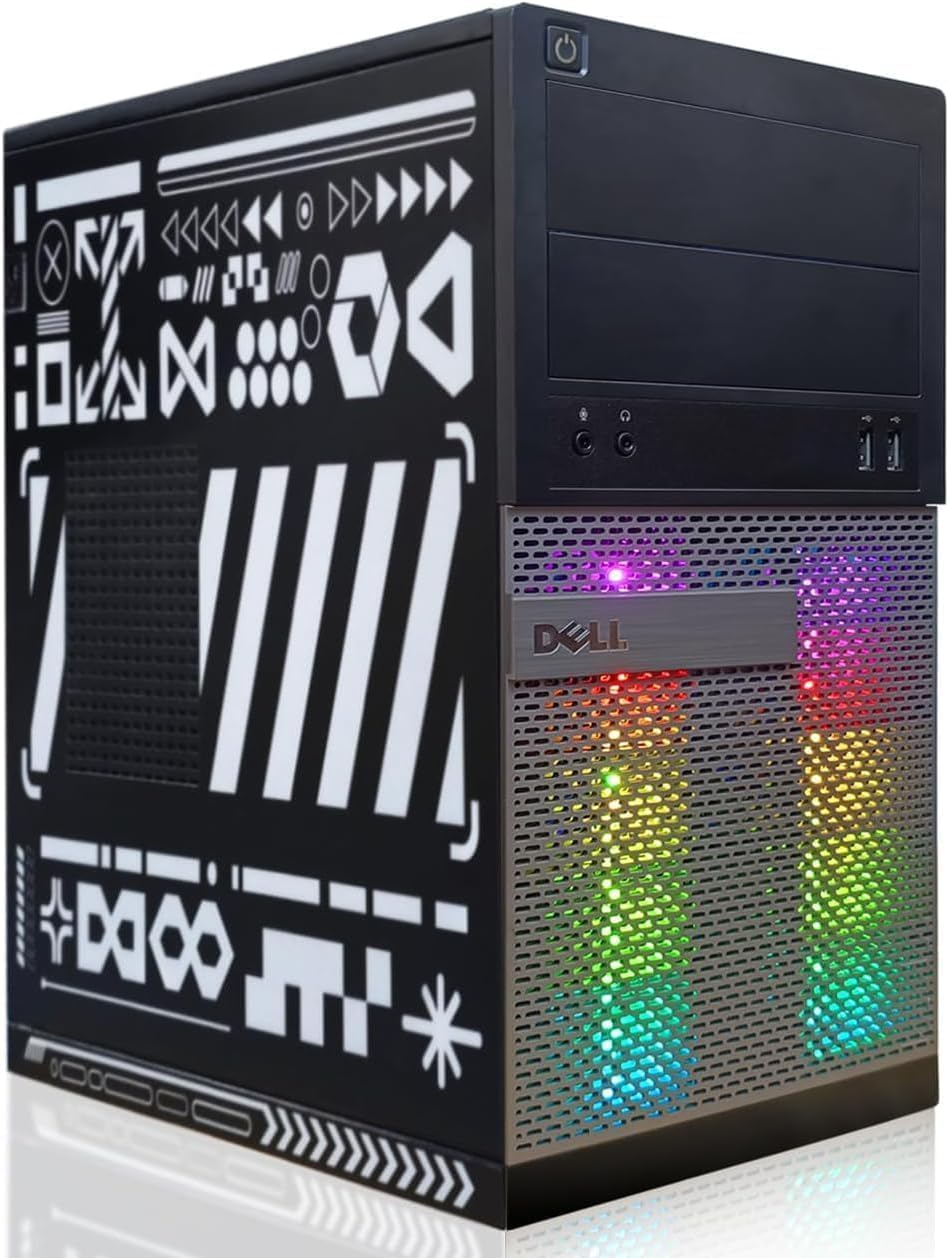
Pros
- Solid entry-level gaming performance for popular esports titles at medium settings.
- Generous 16GB of RAM and a fast 512GB SSD for smooth multitasking and quick boot times.
- Comes with RGB keyboard and mouse, plus a front-panel RGB light strip for a colorful setup.
- WiFi and Bluetooth are built in, making cable-free connections easy.
- Renewed by Amazon, so you get a tested, cleaned, and reliable machine at a budget-friendly price.
Cons
- The Radeon RX 550 is limited to medium settings in newer AAA games, so don't expect high-end performance.
- With only 4 processor cores, the Core i7 is a bit older, so heavy multitasking may show its age.
- The included keyboard and mouse are basic, so you may want to upgrade them for a better feel.
This Dell OptiPlex desktop is a renewed gaming PC that brings a solid mix of performance and value for budget-conscious gamers. It's built around an Intel Core i7 processor, 16GB of RAM, and a 512GB SSD, paired with an AMD Radeon RX 550 graphics card. This combination is ideal for entry-level gaming, esports titles, and light content creation.
For PC gamers and streamers, the Radeon RX 550 handles popular games like CS:GO, DOTA 2, and GTA V at decent frame rates on medium settings. The 16GB of RAM keeps your browser tabs, streaming software, and games running smoothly without stutter. The 512GB SSD gives you quick boot times and fast loading for apps and files, which is a big plus for a responsive desktop experience.
Build quality is typical of a renewed Dell OptiPlex: it's a sturdy, business-class tower that's been professionally cleaned and tested. The front panel includes an RGB light strip you can control with a remote, adding a bit of color to your setup. The included RGB keyboard and mouse are basic but functional, so you can start gaming right away without extra purchases.
Setup is straightforward with Windows 11 Pro pre-installed. You get built-in WiFi and Bluetooth, so you don't need to run extra cables. The desktop footprint is compact enough for most desks, though it's not a small form factor. Cable management is minimal since it's a standard tower, but you can still keep things tidy.
A realistic limitation is the Radeon RX 550's performance ceiling. It won't handle modern AAA games at high settings, so it's best for esports and older titles. The Core i7 is also a few generations old, so heavy multitasking may show its limits. The included keyboard and mouse are fine for starting out, but you'll likely want to upgrade them for a better feel.
Overall, this renewed Dell OptiPlex is a practical choice for budget gamers, esports players, and content creators who want a reliable, ready-to-use desktop with a touch of RGB. It's a solid value for the price, especially if you're building your first gaming setup or need a work-from-home PC that can handle some light gaming.
Frequently Asked Questions
Can the Best Gaming Desktop Under 400 run modern esports titles smoothly?
Yes, prebuilt desktops in this price range handle popular esports titles at 720p or 1080p using medium settings. Dedicated GPUs like the Radeon RX 550 4G produce steady framerates in titles such as CS:GO, DOTA 2, and Rocket League without stuttering. While demanding AAA titles require lower graphical fidelity, competitive multiplayer games remain responsive and fluid throughout 2026.
Is 16GB of RAM sufficient for budget gaming in 2026?
Yes, 16GB of system memory is the sweet spot for modern entry-level gaming and multitasking. It lets you run games while keeping Discord, voice chat, and web browsers open without background hitching. Having ample memory prevents aggressive paging to storage drives, which protects your minimum framerates in chaotic team fights.
Can you upgrade the graphics card on a renewed desktop?
Yes, though upgrades depend on case dimensions and power supply limits. Many compact business-class towers require low-profile expansion cards that draw power solely through the PCIe slot. Reviewing options among the best graphics cards for gaming can help identify energy-efficient cards compatible with OEM power envelopes.
What monitor pairs best with a budget gaming PC?
A 1080p display with a 75Hz or 100Hz refresh rate matches this hardware category perfectly. Connecting via DisplayPort or HDMI ensures tear-free visuals without overwhelming your graphics processor. Pairing your rig with a budget 27-inch gaming monitor creates an expansive gaming station without exceeding sensible spending limits.
Does Windows 11 Pro run well on refurbished quad-core hardware?
Yes, Windows 11 Pro runs smoothly when installed on a fast solid-state drive. Modern SSDs eliminate system sluggishness, allowing instant boot sequences and rapid application loading. The operating system also brings built-in driver security and full compatibility with modern gaming peripherals right out of the box.




Write Your Review
No reviews yet. Be the first to share your experience!