

Stuttering frames and sudden thermal drops can ruin an intense match before you even land a shot. Nobody wants to spend hard-earned cash on a rig that chokes during firefights or takes ages to boot. Striking the sweet spot between tight hardware budgets and dependable 60 FPS output requires checking dedicated VRAM, quad-core clock speeds, and solid-state storage. Choosing the Best Gaming Desktop Under $600 For Smooth Play 2026 gives you reliable entry-level power without forcing you into overpriced setups.
Careful analysis of system specifications reveals that pairing 16GB of system memory with dedicated GPUs like the Radeon RX 580 or GeForce GTX 1050 Ti helps eliminate micro-stutters in popular esports titles. Fast solid-state boot drives reduce loading downtime, while balanced multi-fan airflow cases prevent components from thermal throttling. If you plan to expand your hardware over time, investing in practical upgrades for your gaming PC keeps performance steady without breaking the bank. These value-oriented desktop towers prove that smooth frame rates and responsive controls remain well within reach.

Pros
- Complete package with monitor and RGB peripherals saves time and money for new gamers.
- 16GB DDR4 RAM is generous for this price point, ensuring smooth multitasking.
- SSD + HDD combo gives both speed and capacity for games and files.
- Windows 11 Pro provides the latest OS features and security updates.
- Affordable entry point for casual gaming, schoolwork, or home office use.
Cons
- GeForce GT 1030 is limited to older or less demanding titles – not suitable for modern AAA games at high settings.
- Intel Core i5-6500 is a 6th-gen processor, which may show its age in CPU-intensive tasks.
- Renewed electronics may have cosmetic wear or limited warranty compared to new units.
The Dell Gaming Tower Desktop PC (renewed) is a complete budget gaming setup built around a 6th-gen Intel Core i5-6500 and a GeForce GT 1030 graphics card. It comes with 16GB of DDR4 RAM, a 256GB SSD plus a 500GB HDD, a 22-inch monitor, and an RGB keyboard and mouse – all running Windows 11 Pro. This package targets casual gamers, college students, work-from-home professionals, or anyone looking for an affordable entry into PC gaming without the hassle of building from scratch.
In terms of performance, the i5-6500 and GT 1030 combination handles older titles like CS:GO, League of Legends, Minecraft, and indie games smoothly at 1080p with medium settings. For more demanding games like Fortnite or Apex Legends, you'll likely need to dial down settings to low for playable frame rates. The 16GB RAM is a strong point – it lets you keep Discord, Spotify, and a few browser tabs open while gaming without stuttering. The dual storage setup means Windows and frequently used programs can live on the SSD for quick boot times, while the HDD stores your game library and files.
Build quality is typical of Dell's Optiplex-style towers – a compact, utilitarian case with decent airflow for the components. The included 22-inch monitor is a standard 1080p display suitable for everyday use and casual gaming; it's not high-refresh-rate but gets the job done. The RGB keyboard and mouse are basic but functional, adding a touch of gaming flair to your desk. For setup, everything is plug-and-play: connect the monitor, peripherals, and power, then boot into Windows 11 Pro. Since it's a renewed unit, you may notice some cosmetic scuffs or minor wear, but the internal components are tested and working.
One realistic limitation is the graphics card – the GT 1030 is entry-level and won't satisfy competitive gamers or those wanting high-fidelity visuals in modern titles. The processor is also a few generations old, so CPU-heavy tasks like video editing or streaming may feel sluggish. Additionally, as a renewed product, warranty support may vary by seller, and you might not get the same long-term reliability as a new PC. However, for its price point, this system offers a solid foundation for light gaming, schoolwork, and everyday computing.
Overall, this Dell gaming tower is best suited for budget-conscious buyers who want a complete, ready-to-use gaming PC without assembling components. It works well for casual gaming sessions, homework, streaming media, and office tasks. If you're a competitive esports player or need high frame rates in AAA games, you'll want to look for something with a more powerful GPU. But for a first gaming PC or a secondary family computer, this renewed bundle provides good value and convenience.
Pros
- Affordable entry-level prebuilt with a solid CPU and enough RAM for casual gaming
- Comes with RGB fans and a full set of peripherals, saving you extra purchase costs
- Connectivity includes USB 3.0, display outputs (HDMI, DP, DVI), and serial port for versatile use
- Quiet and cool operation thanks to the included 4 RGB fans
Cons
- GTX 1050 Ti is an older GPU that may struggle with newer AAA titles at high settings
- Storage is limited to 512GB, which may fill up quickly with modern game installations
- Only 0 reviews at launch, so real-world long-term reliability is unconfirmed
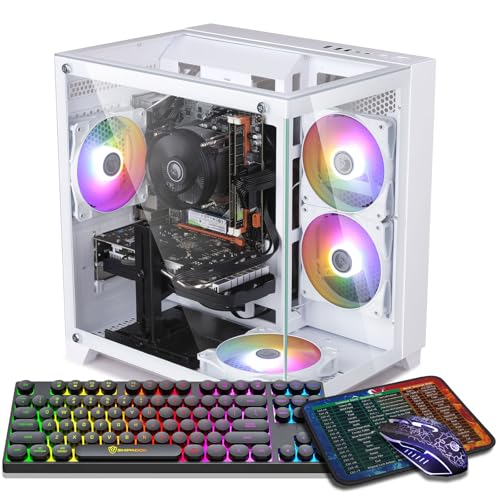
The ZER-LON Gaming PC Desktop is a prebuilt tower designed for budget-conscious gamers who want a ready-to-use system right out of the box. It combines an Intel Core i7 processor (up to 3.9GHz) with a GTX 1050 Ti 4GB graphics card, 16GB of RAM, and a 512GB SSD. This configuration is aimed at casual gamers, streamers, college students, and anyone looking to dive into PC gaming without building their own rig.
In terms of gaming performance, this PC handles popular esports titles like Fortnite, Valorant, CSGO, and Rocket League at 60+ FPS on medium to high settings, according to the product description. It can also run older AAA games like GTA V and Overwatch smoothly. However, the GTX 1050 Ti is an entry-level GPU from a few generations ago, so newer demanding games like Cyberpunk 2077 or Elden Ring will likely require lowering settings or resolution. For competitive games and casual play, it offers solid value.
Build quality includes a standard tower case with four pre-installed RGB fans that provide decent airflow and a colorful aesthetic. The PC also comes with a gaming keyboard, mouse, mouse pad, and a graphics card support bracket, which is a nice bonus for a complete setup. Connectivity-wise, you get 2x USB 3.0, 6x USB 2.0, HDMI, DisplayPort, DVI, and built-in WiFi 5.0, making it easy to connect monitors, peripherals, and network.
Setup is straightforward since it is prebuilt; just plug in the power, connect a monitor and keyboard, and you are ready to go. The SSD ensures quick boot times and game loading. The included WiFi means you may not need an Ethernet cable, but a wired connection could be more reliable for online gaming. One limitation is the 512GB SSD; with modern games often exceeding 50GB, you may need to add external storage or a secondary drive later.
Overall, this ZER-LON gaming PC is a practical choice for gamers on a tight budget who want a clear upgrade path later. It is best suited for playing less demanding games, doing schoolwork, streaming light content, or working from home. If you plan to play the latest triple-A titles at high settings, you may want to consider a more powerful GPU. But for its price point and included accessories, it offers a well-rounded entry into PC gaming.
Based on the product specifications, this PC can achieve 60+ FPS in games like Fortnite, Call of Duty Warzone, Valorant, Apex Legends, and Minecraft at 1080p resolution. The GTX 1050 Ti 4GB is capable for esports titles and older AAA games, but newer titles like Hogwarts Legacy may require lower settings. The 16GB RAM ensures smooth multitasking while gaming, and the 512GB SSD reduces load times significantly. For competitive gamers, the system offers low latency for fast-paced games, but the GPU is not designed for high-refresh-rate gaming above 60Hz.
The ZER-LON gaming PC provides a wide range of ports: 2x USB 3.0, 6x USB 2.0, 1x RJ-45 Ethernet, 1x Serial port, plus a 3-in-1 display output (HDMI, DisplayPort, DVI). Built-in WiFi 5.0 allows wireless networking without an adapter. This connectivity makes it easy to connect multiple peripherals like a mouse, keyboard, headset, and external drives. The inclusion of a serial port may be useful for industrial or legacy devices, but most gamers will primarily use USB and HDMI.

Pros
- Affordable entry-level gaming PC with solid 1080p performance for esports and older titles
- Includes WiFi 6 and Bluetooth 5.0 for fast wireless connectivity
- Generous 16GB RAM and 512GB SSD for smooth multitasking and quick boot times
- RGB lighting on fans and included peripherals adds a clean gaming aesthetic
- 1-year parts & labor warranty plus free lifetime tech support offers peace of mind
Cons
- Radeon RX 550 4GB is entry-level; not suitable for high-demand AAA games at max settings
- Only 2 RGB fans may require aftermarket cooling for heavy workloads or hot environments
- Case design with red accents may not fit all RGB or minimalist desk setups
The STGAubron Prebuilt Gaming PC Desktop is a budget-oriented tower aimed at PC gamers who want a ready-to-run system without the hassle of building from scratch. It combines an Intel Core i5 processor (up to 3.6GHz), 16GB of DDR4 RAM, a 512GB SSD, and an AMD Radeon RX 550 4G graphics card. This setup is designed to handle popular competitive games like Fortnite, Valorant, CSGO, and League of Legends at smooth 60+ FPS, as well as lighter creative tasks like photo and video editing.
This PC is best suited for casual gamers, college students, streamers getting started, and anyone who wants a reliable desktop for work and play. The included WiFi 6 and Bluetooth 5.0 make it easy to connect to modern networks and peripherals without extra dongles. The dual RGB fans not only look good but also provide enough airflow for moderate gaming sessions. However, the RX 550 is an entry-level GPU, so expect to dial down settings for newer AAA titles like Elden Ring or Hogwarts Legacy to maintain playable frame rates.
Build quality is decent for a prebuilt at this price point. The case has a black finish with red accents, which may not match all setups but is fairly standard. The included RGB keyboard and mouse are basic but functional, giving you everything to start gaming right away. The 512GB SSD offers fast load times, but you might need to add more storage later if you have a large game library. The 16GB of RAM is a nice touch, as many budget prebuilts only offer 8GB.
Setup is straightforward: plug in, connect to WiFi, and you're gaming. Windows 11 Home preinstalled means no extra OS purchases. The 1-year warranty and free lifetime tech support add value, especially for first-time PC buyers. One limitation is the cooling – only two RGB fans may not be enough for intense CPU/GPU loads over long periods. Adding an extra exhaust fan or upgrading the CPU cooler could help if you plan to push the system hard.
For the price, this STGAubron desktop delivers practical performance for esports and light productivity. If you're a competitive gamer focused on high FPS in shooters or a streamer using OBS, this rig can handle 1080p streaming and gaming simultaneously. Just don't expect to max out Cyberpunk 2077. It's a solid choice for budget-conscious gamers who want a prebuilt with modern connectivity and decent specs right out of the box.

Pros
- Strong price-to-performance ratio for entry-level to mid-range gaming
- Ample RAM and SSD storage for smooth multitasking and quick game loads
- Includes WiFi 6 and Bluetooth 5.0 for modern wireless connectivity
- Comes with RGB peripherals and four RGB fans for an immersive setup aesthetic
Cons
- Processor is a 4th-gen Intel Core i7, which may bottleneck newer AAA titles compared to modern CPUs
- Graphics card (RX 580) is an older architecture, limiting ray tracing and high-refresh gaming at 1440p
- Only 512GB SSD may require additional storage for larger game libraries
The STGAubron Gaming PC Desktop is a pre-built tower designed for gamers who want a solid entry-level to mid-range gaming experience without the hassle of building their own system. It combines an Intel Core i7 processor (4th-gen, up to 3.9GHz) with an AMD Radeon RX 580 8GB graphics card, 16GB of RAM, and a 512GB SSD. This configuration is well-suited for casual and competitive gamers, streaming enthusiasts, and even those who need a capable machine for photo/video editing, schoolwork, or day trading.
When it comes to real-world gaming, the RX 580 can handle popular titles like Fortnite, Call of Duty Warzone, Valorant, Apex Legends, and GTA V at 60+ FPS on medium to high settings. The 16GB of RAM ensures smooth multitasking, letting you run Discord, OBS, or browser tabs in the background while gaming. The 512GB SSD provides quick boot times and fast level loads, though heavy gamers may want to add a secondary drive later.
Build quality is typical for a budget-friendly pre-built: a standard tower with a tempered glass side panel (likely) and four RGB fans for decent airflow. The included RGB gaming mouse and keyboard are functional starters, but most users will eventually upgrade to more premium peripherals. The system also features WiFi 6 and Bluetooth 5.0, which means lag-free wireless connections and fast downloads if your router supports it.
Setup is straightforward: unbox, plug in the power and peripherals, connect to your monitor via HDMI or DisplayPort, and boot into Windows 11 Home. The case has minimal cable management pre-installed, and the RGB fans and case lighting can be controlled via a remote or button on the case. For cleaning, the easily removable side panel makes dusting the interior simple.
A realistic limitation is that the CPU is an older 4th-gen Core i7, which might hold back performance in CPU-heavy games or multitasking scenarios compared to newer budget processors like an i3-12100F. The RX 580 also lacks modern features like ray tracing and efficient encoding, so if you're aiming for high-refresh 1440p gaming or intensive streaming, you may want to look at higher-end options. The 512GB SSD fills up quickly, so an external or secondary drive is worth considering.
Overall, this STGAubron gaming PC offers good value for its price point, especially for gamers on a tight budget who want a turnkey system that can handle esports and mainstream titles. It's also a nice fit for college students or home office users who want a versatile desktop that can game and work. Just be aware of the older components and plan for potential upgrades down the line.

Pros
- Affordable price point for a complete gaming desktop with Windows 11 Home pre-installed
- Decent 1080p performance for popular esports and casual games at medium settings
- Generous 16GB RAM and 512GB SSD for fast load times and smooth multitasking
- Includes WiFi, Bluetooth, and a full set of peripherals for immediate use
- Three RGB fans add visual flair and help with cooling
Cons
- Older Xeon E5 processor and RX 550 GPU may struggle with newer AAA titles at high settings
- Limited upgrade path due to older platform and proprietary components
- Only 0 reviews at launch, so long-term reliability is unverified
The STGAubron Gaming PC Desktop is a pre-built tower aimed at budget-conscious gamers and streamers who want a hassle-free entry into PC gaming. It combines an Intel Xeon E5 processor, AMD Radeon RX 550 4GB graphics, 16GB of RAM, and a 512GB SSD, all housed in a black tower with three RGB fans. This system is designed to run popular titles like Fortnite, Valorant, Apex Legends, and Minecraft at 60+ FPS on medium settings, making it a practical choice for casual gamers and those new to PC gaming.
For competitive gamers and esports players, the RX 550 can handle games like CSGO, Overwatch, and Rocket League smoothly, though you may need to lower settings for more demanding shooters. Streamers and content creators will appreciate the 16GB RAM for basic multitasking, but the older Xeon processor may limit heavy encoding or editing tasks. The included RGB keyboard and mouse are a nice bonus for getting started, though serious gamers may want to upgrade them later.
Build quality is typical for a budget pre-built: the case is functional with decent airflow from the three RGB fans, and cable management is adequate. The tower weighs 21.4 pounds, so it's not too heavy to move around a dorm room or desk setup. Connectivity includes WiFi, Bluetooth 5.0, HDMI, DisplayPort, and DVI, giving you flexibility for monitors and peripherals. The 512GB SSD provides fast boot times and enough space for a few games, but you may need additional storage for a larger library.
Setup is straightforward: plug in the power, connect your monitor and peripherals, and you're ready to go with Windows 11 Home pre-installed. The RGB fans can be controlled via the case's built-in controller, adding a touch of customization to your gaming room. Maintenance is simple, with easy access to the interior for cleaning dust filters or upgrading RAM and storage in the future.
One realistic limitation is the older Xeon E5 platform, which may not support the latest CPUs or high-speed RAM, limiting future upgrades. The RX 550 is also entry-level, so don't expect high frame rates in AAA titles like Cyberpunk 2077 or Elden Ring at high settings. Additionally, with zero reviews at launch, it's wise to check user feedback over time for reliability insights.
Overall, the STGAubron Gaming PC is a solid budget option for casual gamers, college students, or anyone building their first gaming setup without the complexity of building a PC. It's best suited for esports, indie games, and light streaming, and offers good value for the price. If you're a competitive gamer needing higher frame rates or a content creator requiring more power, consider investing in a system with a newer GPU and CPU. But for an affordable, ready-to-play desktop, this is a practical choice.
Frequently Asked Questions
Can a budget gaming desktop achieve 60 FPS in modern games?
Yes, an entry-level system configured as the Best Gaming Desktop Under $600 For Smooth Play 2026 can easily sustain 60 FPS in mainstream esports titles like Valorant and Fortnite at 1080p. Demanding games may require lowering visual settings to medium to maintain fluid motion clarity. A dedicated GPU with at least 4GB of VRAM ensures textures render smoothly without severe hitching.
How much RAM is necessary for smooth gaming on a budget desktop?
A minimum of 16GB RAM is recommended to avoid stuttering and system bottlenecks. Modern operating systems use several gigabytes on their own, leaving little room for game assets on older 8GB machines. With 16GB, you can easily run voice chat and web browsers alongside your games without running out of memory.
Is an air-cooled PC adequate for managing thermals in budget cases?
Yes, multi-fan air cooling setups are more than sufficient to keep budget processors and entry-level graphics cards within safe operating temperatures. Cases equipped with multiple RGB fans generate steady airflow to prevent thermal throttling during long gaming sessions. Checking reliable air-cooled gaming PC options shows that smart airflow design easily protects entry-level hardware.
Can you upgrade the graphics card later in these desktop towers?
Yes, most budget desktop towers allow future graphics card upgrades if your power supply wattage and case clearance allow it. Researching the best graphics cards for gaming helps identify which GPUs fit your power envelope. Always verify your case dimensions and motherboard PCIe slots before upgrading.
Is an SSD required instead of a traditional hard drive in 2026?
Yes, an SSD is essential for fast boot times and responsive asset loading in 2026. While secondary mechanical hard drives offer cheap bulk storage, loading modern games from a solid-state drive eliminates annoying in-game stuttering. Most prebuilt systems in this price tier feature a 512GB SSD to deliver quick performance right out of the box.




Write Your Review
No reviews yet. Be the first to share your experience!