


Balancing Entry-Level Gaming Power and Value
Buying an entry-tier mobile rig often forces compromise between GPU performance, memory headroom, and display quality. Many affordable machines list a dedicated graphics card but cut corners on installed system RAM or screen refresh rates. Evaluating configurations helps identify the best gaming laptop rtx 3050 for your regular gaming and daily tasks without overspending. Standard models in this price tier typically feature an Intel Core i5 processor or an AMD Ryzen CPU alongside high-speed SSD storage. Checking whether a unit provides sufficient memory out of the box prevents unexpected slowdowns during intense gameplay.
Display responsiveness remains another critical factor when comparing portable gaming options. A screen with a 144Hz refresh rate provides noticeably smoother motion in fast games compared to a basic 60Hz panel. If you need strict budget control, reviewing budget gaming laptop options under 700 dollars helps locate capable hardware. You can also explore steps to optimize your laptop for esports to maintain steady frame rates. Balancing these component details ensures your machine handles coursework and entertainment effectively.

Pros
- Affordable entry-level gaming laptop with good CPU performance for the price.
- Portable and lightweight enough for college students or work-from-home gamers.
- Backlit keyboard and IPS display add value for the budget segment.
- Solid build quality with a clean, professional silver design.
Cons
- Only 8GB RAM may limit multitasking in demanding games and applications; upgrade recommended.
- Display likely 60Hz refresh rate, not ideal for competitive FPS gamers seeking higher smoothness.
- Limited storage expansion options? The 512GB SSD is decent but may fill up quickly; check for upgradeability.
The HP Victus 15 is a budget gaming laptop that brings together a capable NVIDIA GeForce RTX 3050 and a 12th Gen Intel Core i5-12500H processor. This combination makes it a solid choice for PC gamers looking for an affordable entry point into portable gaming. It's also well-suited for casual gamers, esports players, and college students who need a laptop for both schoolwork and light gaming.
In terms of real-world performance, the RTX 3050 can handle most modern games at 1080p with medium to high settings, especially when using DLSS. The i5-12500H is a strong performer for multitasking, so you can stream, browse, or run productivity apps without major slowdowns. However, the 8GB of RAM is a bottleneck for more demanding titles and heavy multitasking. Many users may want to upgrade to 16GB for smoother performance in games like Call of Duty or Cyberpunk 2077. The display is a Full HD IPS panel with good viewing angles, but the refresh rate is likely 60Hz, which is fine for casual play but not ideal for competitive FPS gamers who prefer 120Hz or higher.
Build quality is solid for the price range. The laptop feels sturdy with a clean silver finish, and the backlit keyboard is a nice touch for late-night gaming sessions. The enhanced thermal design helps keep temperatures in check during extended play, though it can get warm under load. Portability is a plus: at just over 5 pounds and a slim profile, it fits easily into a backpack for dorm or office use. The 512GB SSD provides fast boot times and enough storage for a few games, but you may need to manage space or invest in an external drive.
Setting up the HP Victus 15 is straightforward. It comes with Windows 11 pre-installed, and the HP software suite includes basic controls for performance and power management. The laptop has a decent selection of ports including USB-A, USB-C, HDMI, and a headphone jack, making it easy to connect peripherals like a gaming mouse or headset. Cable management is simple given the laptop form factor, but the included charger is a bit bulky.
One realistic limitation is the 8GB RAM, which is on the low side for modern gaming. Additionally, the display's 60Hz refresh rate may disappoint competitive gamers. The storage is also limited to 512GB, so you'll need to be selective about which games you install. Upgrading the RAM and SSD is possible on some models, but check the specific configuration before buying.
Overall, the HP Victus 15 is a practical choice for budget-conscious gamers who need a portable machine for light gaming and everyday tasks. It's a solid entry-level gaming laptop for students, casual players, and those who want to dip their toes into PC gaming without breaking the bank. If you're willing to upgrade the RAM later, this laptop offers good value for the price.

Pros
- Excellent value for 144Hz gaming at this price point, delivering smooth visuals in popular esports titles.
- Upgradeable RAM (up to 64GB) and storage (up to 2TB) allows future-proofing as your library grows.
- Reliable build and thermal design keep the system stable during extended gaming sessions without excessive fan noise.
- Wi-Fi 6 and USB 3.0 ports offer modern connectivity for peripherals and high-speed internet.
- Windows 11 Pro adds business-grade features like BitLocker and Remote Desktop for versatile use.
Cons
- Battery life drops significantly under gaming load, typical for budget gaming laptops; expect around 2-3 hours of intense use.
- Some units may ship with the RTX 3050 4GB variant instead of the advertised 6GB, so verify your specific configuration.
- The 144Hz panel is decent but not the brightest; outdoor or brightly lit rooms may cause glare.
The HP Victus 15.6" gaming laptop is an entry-level to mid-range option designed for PC gamers who want solid 1080p performance without breaking the bank. It's best suited for casual and competitive gamers, college students, streamers just starting out, and anyone building a budget gaming setup that needs portability. With an Intel Core i5-12450H processor and an NVIDIA GeForce RTX 3050 graphics card, this machine handles most modern titles at medium to high settings.
In real-world gaming, the 144Hz display offers a significant advantage in fast-paced shooters like Call of Duty or Overwatch, providing smoother motion and reduced input lag. The 16GB of DDR4 RAM ensures that you can keep Discord, Spotify, or OBS running in the background without stuttering. The 512GB PCIe SSD loads games quickly, though you may want to upgrade storage if you plan to install multiple AAA titles. According to user feedback, the laptop performs reliably for games such as Fortnite and Apex Legends at 60-90 FPS on high settings.
Build quality is typical for the HP Victus line: a sturdy plastic chassis with a blue finish that looks sleek on a desk. The backlit keyboard is comfortable for typing, though not mechanical, and the trackpad is adequate. The laptop weighs 5.1 pounds, making it easy to take to a dorm room or LAN party. Cooling is handled by dual fans that keep temperatures in check during long sessions, but the fans do become audible under load. Battery life is a limitation: you'll get around 5-6 hours for light use, but expect only 2-3 hours while gaming, which is common among budget gaming laptops.
Setup is straightforward out of the box, but if you want more RAM or storage, the bottom panel is easy to remove for upgrades. Some users noted that the advertised 6GB VRAM may actually be 4GB on their unit, so double-check your specific model before buying. This is a realistic caveat but doesn't diminish the laptop's overall value. The included Wi-Fi 6 and USB 3.0 ports give you fast networking and peripheral connectivity, and the micro-edge display minimizes bezels for a more immersive look.
Limitations include the aforementioned battery life and a display that isn't very bright (around 250 nits), which can be a problem in well-lit rooms. Additionally, the RTX 3050 is best for 1080p gaming; don't expect to run demanding titles at 1440p. For content creators, the laptop can handle light video editing in DaVinci Resolve, but heavier workloads may require a more powerful GPU. Overall, the HP Victus is a practical recommendation for budget-conscious PC gamers who need a portable, capable machine for school, work, and play.

Pros
- 144Hz display enhances gameplay fluidity in FPS, MOBA, and racing games
- Strong CPU and GPU combo for the price point, handling esports and moderate AAA gaming well
- Backlit keyboard is a welcome feature for dark environments
- Solid build quality with a clean, understated blue design
Cons
- 8GB of RAM is limiting for heavy multitasking or memory-intensive games; an upgrade is recommended
- Battery life may be shorter during gaming sessions, typical for budget gaming laptops
- The 512GB SSD can fill up quickly with modern game installations
The HP Victus 15.6" gaming laptop is a solid entry-level machine aimed at PC gamers who want decent performance without breaking the bank. It's a perfect fit for college gamers, casual players, and esports enthusiasts who need a portable rig for dorms, LAN parties, or home gaming setups.
Under the hood, the Intel Core i5-13420H processor and NVIDIA GeForce RTX 3050 graphics with 6GB VRAM provide enough muscle for smooth gameplay in popular titles like Fortnite, Valorant, and Apex Legends. The 144Hz display is a standout feature for this price range, offering fluid motion and reduced screen tearing during fast-paced action. However, the 8GB of DDR4 RAM can be a bottleneck for more demanding games or when running multiple apps, so many users may want to upgrade to 16GB for a better experience.
The 512GB SSD ensures quick boot times and fast load speeds, though you'll need to manage your storage carefully if you install several large games. The anti-glare screen is great for reducing reflections in brightly lit rooms, and the backlit keyboard adds convenience for late-night sessions. The laptop's 'Performance Blue' finish looks sleek and understated, fitting well into most desk setups.
Build quality is decent for a budget machine, with a sturdy plastic chassis that feels durable enough for daily use. The cooling system handles moderate loads well, but expect fans to spin up under heavy gaming. The 10-hour battery life estimate is more realistic for light use like browsing or streaming, not gaming. Connectivity is solid with multiple USB ports, Wi-Fi 6, and HDMI output for an external monitor.
One realistic limitation is the RAM, which HP has configured as single-channel 8GB in some units, hindering performance in CPU-bound scenarios. Upgrading to a second stick of RAM can noticeably improve frame rates. The 512GB storage may also fill up quickly, so an external drive or cloud storage is a smart addition. The laptop is relatively lightweight at 5.04 pounds, making it easy to carry in a backpack.
Overall, the HP Victus is a strong value for budget-conscious PC gamers and students. If you're building a gaming setup on a tight budget or need a portable companion for esports and casual gaming, this laptop delivers where it counts. Just plan for a RAM upgrade and keep your storage habits in check.
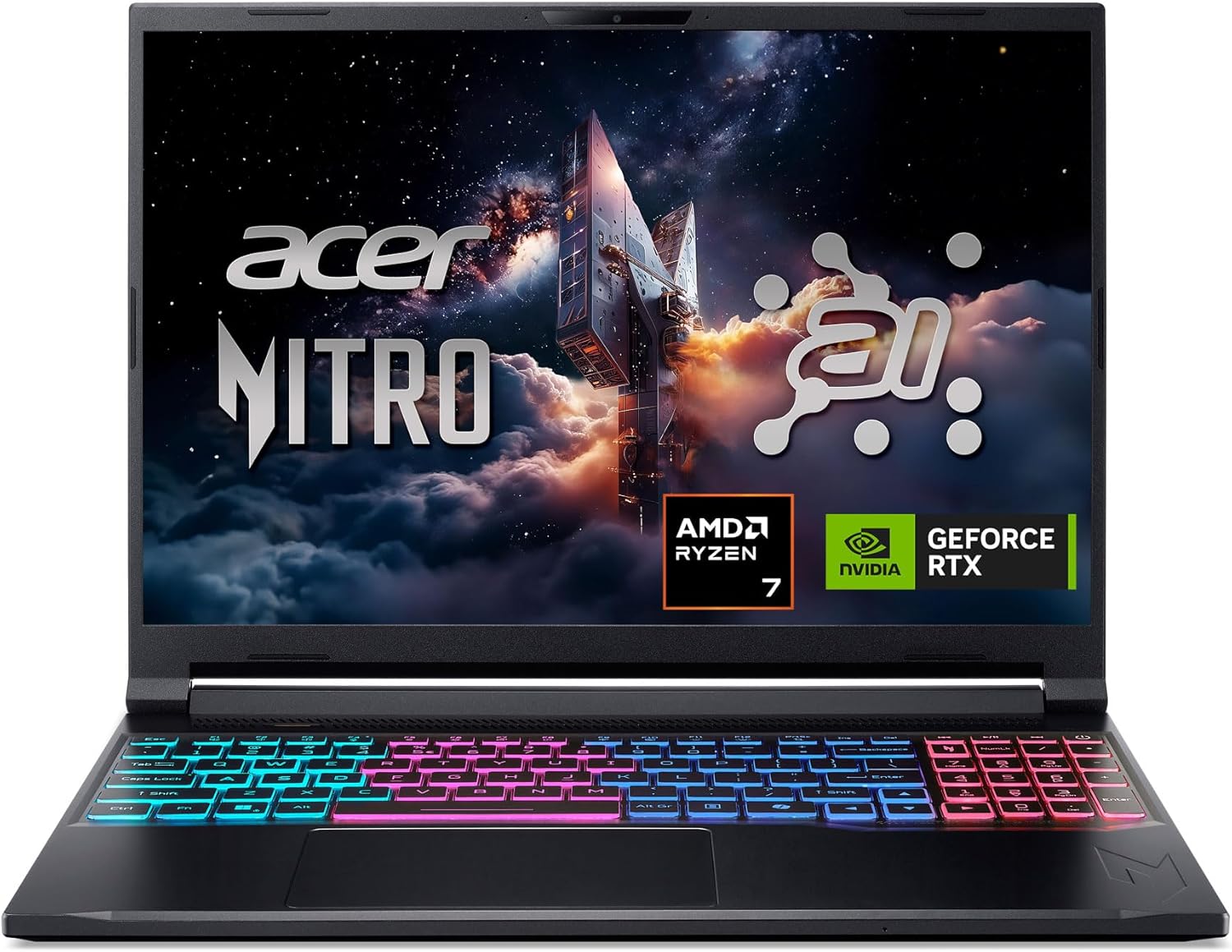
Pros
- Powerful AI-optimized CPU and GPU combination for demanding games and creative apps
- Excellent 32GB DDR5 RAM and fast 1TB Gen 4 SSD out of the box reduce need for upgrades
- High 180Hz refresh rate with good color accuracy enhances visual clarity and responsiveness
- Compact and relatively lightweight chassis (4.63 lbs) makes it portable for gamers on the go
- Robust cooling solution with quad air intakes and dual fans keeps thermals under control during intense sessions
Cons
- Maximum RAM is 32GB with no expansion slots available after purchase, limiting future upgrade potential
- Battery life may be typical for a gaming laptop and could require frequent charging during extended unplugged use
- Integrated webcam quality not specified; users may want an external camera for streaming
The Acer Nitro V 16S AI is a mid-range gaming laptop built around the latest AMD Ryzen 7 260 processor and NVIDIA GeForce RTX 5060 GPU. It's designed for PC gamers who want a balance of performance and portability, as well as content creators and streamers who can leverage the AI capabilities for tasks like upscaling, background effects, and faster encoding. With a 16-inch 180Hz display and 32GB of DDR5 RAM, this laptop aims to deliver smooth gameplay and efficient multitasking right out of the box.
When it comes to real-world gaming performance, the RTX 5060 with DLSS 4 and full ray tracing support gives you high frame rates in modern titles at 1080p or 1200p resolution. The 180Hz refresh rate makes fast action in FPS and racing games feel buttery smooth, while the 100% sRGB coverage ensures vibrant colors for open-world adventures. The AMD Ryzen 7 260's AI TOPS also help with background tasks, voice commands, and optimizing settings in supported software, giving an edge in competitive scenarios.
Build quality is typical for the Nitro line: a black plastic chassis with a clean, understated look. At 4.63 pounds, it's slim enough to slip into a backpack for college or LAN parties. The dual-fan quad-intake cooling keeps temperatures reasonable under load, though you'll still hear the fans ramp up during extended gaming sessions. The keyboard includes a backlit numeric keypad, and the touchpad is responsive for everyday use. Port selection is solid with USB4, two USB 3.2 Gen 2, HDMI 2.1, and Ethernet, making external monitor or dock setups easy.
Setting up the laptop is straightforward: it runs Windows 11 Home, and the pre-installed NitroSense software gives you control over fan speeds, power profiles, and system monitoring. The Acer PurifiedView and PurifiedVoice 2.0 features handle webcam background blur and noise reduction during Discord calls or streams. There are two M.2 SSD slots (one free) for storage expansion, but note that the RAM is soldered and maxes out at 32GB, so choose your capacity wisely at purchase.
One realistic limitation is that while the laptop includes a USB4 port, you'll need an external GPU dock if you ever want more graphics power - but for most users the RTX 5060 is plenty. Battery life is average for a gaming laptop; expect around four to five hours of light use. Also, the 1080p webcam isn't specified, but many laptops in this range offer only basic 720p or 1080p sensors, so external webcams are still recommended for professional streaming.
Overall, the Acer Nitro V 16S AI is a well-rounded portable gaming machine that hits a sweet spot for price-conscious PC gamers, esports players, and content creators. If you value high-refresh-rate gaming, AI-assisted performance, and decent portability without breaking the bank, this laptop is worth considering. It also comes with a three-month PC Game Pass trial to get you started with hundreds of games on day one.
The RTX 5060 laptop GPU with 572 AI TOPS and DLSS 4 Multi Frame Generation provides a significant boost in supported games. You can expect high settings at 1080p with smooth frame rates in titles like Call of Duty, Fortnite, and Cyberpunk 2077. The 180Hz display minimizes motion blur and screen tearing, while the AMD Ryzen 7 260 processor handles CPU-intensive simulations and background tasks without stutter. Gamers who play competitive esports titles will appreciate the low-latency response and Killer Ethernet for stable online play.
Despite being a slim 0.79-inch profile, the Nitro V 16S AI packs a dual-fan, quad-intake, quad-exhaust cooling system. This design pushes heat out efficiently, keeping the CPU and GPU within safe operating temperatures during long gaming sessions. The chassis is made of durable plastic with a matte finish that resists fingerprints. The hinge feels sturdy, and the weight of 4.63 pounds makes it manageable for daily carry. The backlit keyboard has a numeric keypad and decent key travel, suitable for both gaming and typing.
Frequently Asked Questions
Can an RTX 3050 laptop run modern AAA games?
Yes, an RTX 3050 laptop runs modern AAA games, though demanding titles require medium or low graphical settings at 1080p. Using NVIDIA DLSS technology helps boost frame rates significantly in compatible games. This GPU is especially well suited for casual gaming and esports titles.
Is 8GB of RAM sufficient for a gaming laptop in 2026?
8GB of RAM works for entry-level gaming, but 16GB is the preferred baseline for smooth multitasking in 2026. Complex games and open browser tabs can quickly max out 8GB, causing frame drops. Checking whether the laptop has accessible memory slots allows you to upgrade later if needed.
How does the RTX 3050 compare to higher tier graphics cards for Best Gaming Laptop Rtx 3050 options?
The RTX 3050 offers budget-friendly 1080p capability, while higher tier GPUs provide larger video memory and better graphical fidelity. If your budget allows for an upgrade, reviewing gaming laptops under 1000 euros reveals machines with stronger GPUs. However, the RTX 3050 remains an accessible pick for standard gaming needs.
Is an RTX 3050 laptop good for competitive titles like Overwatch?
Yes, an RTX 3050 easily powers competitive titles with high frame rates at 1080p resolution. Pair it with a 144Hz screen to get smooth motion in fast shooters. You can check our dedicated recommendations for laptops for Overwatch to see how hardware matches competitive gaming requirements.
What display resolution is best for an RTX 3050 gaming laptop?
A 1080p Full HD resolution is ideal for an RTX 3050 GPU. Stepping up to 1440p or 4K strains the entry-level graphics chip and lowers frame rates considerably. A 1080p IPS panel with a 144Hz refresh rate provides crisp visuals and excellent motion clarity.


Write Your Review
No reviews yet. Be the first to share your experience!