


Balancing Thermal Management and Portable Gaming Power
Pushing high frame rates through demanding titles generates tremendous heat, often forcing slim chassis designs into severe thermal throttling. Hardware throttling cuts clock speeds on both the processor and graphics chip, dragging performance down during intense gameplay. Identifying the best gaming laptop that doesnt overheat requires checking ventilation layouts, thermal pipe counts, and exhaust designs rather than simply buying the fastest parts. Machines like the ASUS TUF Gaming F16 Gaming Laptop manage heat by pairing an Intel Core 5 210H and an RTX 4050 with five heat pipes and four exhaust vents. Buyers aiming to optimize a gaming setup know that consistent heat dissipation matters just as much as raw speed.
Adequate airflow also protects system longevity during extended gaming sessions. Configurations like the Acer Nitro V 16S AI Gaming Laptop rely on dual fans with quad intakes and quad exhausts to keep air moving across the AMD Ryzen 7 260 processor and RTX 5060 GPU. A properly cooled chassis maintains steady clock frequencies across both the CPU and GPU, allowing high refresh panels to display smooth motion. Comparing cooling setups helps you secure stable performance without unnecessary thermal bottlenecks.

Pros
- Military-grade build quality gives confidence for on-the-go gaming and work.
- RTX 4050 hits a sweet spot for 1080p high-refresh gaming without breaking the bank.
- 144Hz display with Adaptive-Sync provides a smooth, tear-free experience in fast-paced shooters.
- Excellent cooling solution keeps thermals in check even under sustained loads.
- 16:10 aspect ratio offers extra vertical screen space for productivity and gaming.
Cons
- 512GB SSD may fill up quickly with modern game installs; external storage recommended.
- Battery life is typical for gaming laptops - expect around 4-5 hours on light use.
- Design is understated; those wanting RGB flair may need to add external accessories.
The ASUS TUF Gaming F16 (model FX607VU-SS53) is a 16-inch gaming laptop that brings together a capable mid-range hardware package with the ruggedness expected from the TUF series. Powered by an Intel Core 5 210H processor and an NVIDIA GeForce RTX 4050 laptop GPU (with a Max TGP of 115W and Advanced Optimus), this machine is designed to handle modern titles at 1080p with high refresh rates. It's a solid pick for PC gamers, competitive esports players, and even streamers who need a reliable secondary rig for on-the-go broadcasting.
The 16-inch FHD+ display (1920x1200, 16:10 aspect ratio) runs at 144Hz and covers 100% sRGB, offering vibrant colors and smooth motion. Adaptive-Sync technology reduces screen tearing and stuttering, which is a big plus for fast-paced games like Call of Duty or Overwatch. The extra vertical space from the 16:10 ratio also helps with productivity tasks like editing spreadsheets or coding, making this laptop versatile for work-from-home gamers and college students.
Build quality is a standout feature here. The TUF F16 is MIL-STD-810H certified, meaning it has passed tests for drops, vibration, humidity, and extreme temperatures. The chassis feels solid, with minimal flex, and the Mecha Gray finish resists fingerprints. This durability makes it a great companion for gamers who frequently travel to LAN parties or need a machine that can survive a dorm room backpack.
Cooling performance is handled by ASUS's Arc Flow Fans, four exhaust vents, five dedicated heat pipes, and an anti-dust filter. Based on user feedback, this setup keeps the CPU and GPU temperatures in check even during extended gaming sessions, while the fans remain reasonably quiet. The anti-dust filter is a practical touch that reduces the need for frequent internal cleaning.
Connectivity is well-covered with Wi-Fi 6, two USB 3.0 ports, and other essential I/O. The 16GB of DDR5 RAM and 512GB PCIe Gen4 SSD provide snappy boot times and quick level loads, though power users may want to upgrade the storage later since games are only getting larger. The backlit keyboard is comfortable for both gaming and typing, with decent key travel.
Realistically, the 512GB SSD is the main limitation for those with large game libraries, and battery life hovers around 4-5 hours for light use, which is standard for this class. However, for its price point, the ASUS TUF Gaming F16 offers a well-rounded package that balances performance, durability, and display quality. It's a strong recommendation for U.S. gamers who need a portable workhorse for competitive gaming, streaming on Twitch, or handling daily productivity tasks in a gaming setup.
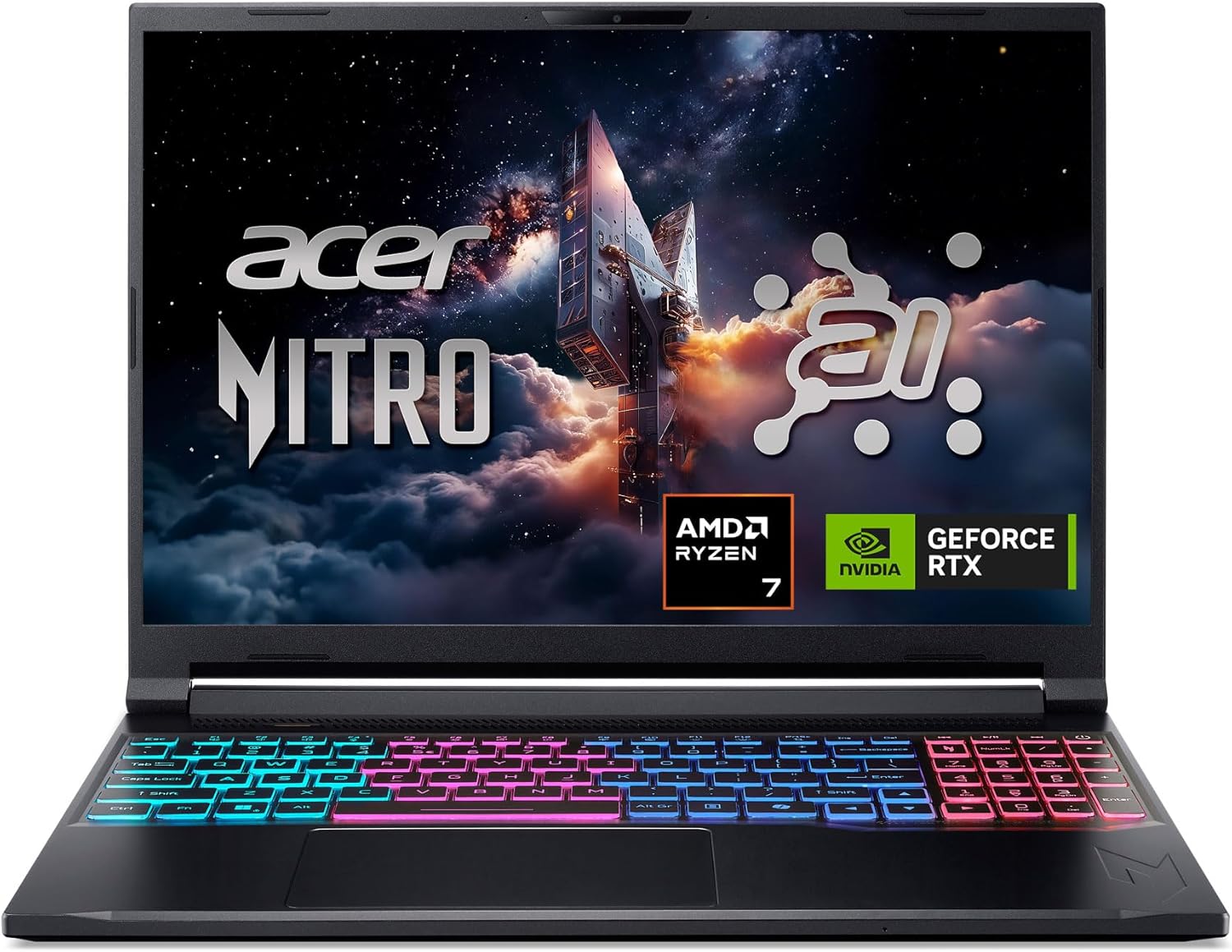
Pros
- Powerful AI-optimized CPU and GPU combination for demanding games and creative apps
- Excellent 32GB DDR5 RAM and fast 1TB Gen 4 SSD out of the box reduce need for upgrades
- High 180Hz refresh rate with good color accuracy enhances visual clarity and responsiveness
- Compact and relatively lightweight chassis (4.63 lbs) makes it portable for gamers on the go
- Robust cooling solution with quad air intakes and dual fans keeps thermals under control during intense sessions
Cons
- Maximum RAM is 32GB with no expansion slots available after purchase, limiting future upgrade potential
- Battery life may be typical for a gaming laptop and could require frequent charging during extended unplugged use
- Integrated webcam quality not specified; users may want an external camera for streaming
The Acer Nitro V 16S AI is a mid-range gaming laptop built around the latest AMD Ryzen 7 260 processor and NVIDIA GeForce RTX 5060 GPU. It's designed for PC gamers who want a balance of performance and portability, as well as content creators and streamers who can leverage the AI capabilities for tasks like upscaling, background effects, and faster encoding. With a 16-inch 180Hz display and 32GB of DDR5 RAM, this laptop aims to deliver smooth gameplay and efficient multitasking right out of the box.
When it comes to real-world gaming performance, the RTX 5060 with DLSS 4 and full ray tracing support gives you high frame rates in modern titles at 1080p or 1200p resolution. The 180Hz refresh rate makes fast action in FPS and racing games feel buttery smooth, while the 100% sRGB coverage ensures vibrant colors for open-world adventures. The AMD Ryzen 7 260's AI TOPS also help with background tasks, voice commands, and optimizing settings in supported software, giving an edge in competitive scenarios.
Build quality is typical for the Nitro line: a black plastic chassis with a clean, understated look. At 4.63 pounds, it's slim enough to slip into a backpack for college or LAN parties. The dual-fan quad-intake cooling keeps temperatures reasonable under load, though you'll still hear the fans ramp up during extended gaming sessions. The keyboard includes a backlit numeric keypad, and the touchpad is responsive for everyday use. Port selection is solid with USB4, two USB 3.2 Gen 2, HDMI 2.1, and Ethernet, making external monitor or dock setups easy.
Setting up the laptop is straightforward: it runs Windows 11 Home, and the pre-installed NitroSense software gives you control over fan speeds, power profiles, and system monitoring. The Acer PurifiedView and PurifiedVoice 2.0 features handle webcam background blur and noise reduction during Discord calls or streams. There are two M.2 SSD slots (one free) for storage expansion, but note that the RAM is soldered and maxes out at 32GB, so choose your capacity wisely at purchase.
One realistic limitation is that while the laptop includes a USB4 port, you'll need an external GPU dock if you ever want more graphics power - but for most users the RTX 5060 is plenty. Battery life is average for a gaming laptop; expect around four to five hours of light use. Also, the 1080p webcam isn't specified, but many laptops in this range offer only basic 720p or 1080p sensors, so external webcams are still recommended for professional streaming.
Overall, the Acer Nitro V 16S AI is a well-rounded portable gaming machine that hits a sweet spot for price-conscious PC gamers, esports players, and content creators. If you value high-refresh-rate gaming, AI-assisted performance, and decent portability without breaking the bank, this laptop is worth considering. It also comes with a three-month PC Game Pass trial to get you started with hundreds of games on day one.
The RTX 5060 laptop GPU with 572 AI TOPS and DLSS 4 Multi Frame Generation provides a significant boost in supported games. You can expect high settings at 1080p with smooth frame rates in titles like Call of Duty, Fortnite, and Cyberpunk 2077. The 180Hz display minimizes motion blur and screen tearing, while the AMD Ryzen 7 260 processor handles CPU-intensive simulations and background tasks without stutter. Gamers who play competitive esports titles will appreciate the low-latency response and Killer Ethernet for stable online play.
Despite being a slim 0.79-inch profile, the Nitro V 16S AI packs a dual-fan, quad-intake, quad-exhaust cooling system. This design pushes heat out efficiently, keeping the CPU and GPU within safe operating temperatures during long gaming sessions. The chassis is made of durable plastic with a matte finish that resists fingerprints. The hinge feels sturdy, and the weight of 4.63 pounds makes it manageable for daily carry. The backlit keyboard has a numeric keypad and decent key travel, suitable for both gaming and typing.
Frequently Asked Questions
What cooling features prevent a gaming laptop from overheating?
Dedicated heat pipes, high-airflow fans, and multi-directional exhaust vents prevent excessive thermal buildup. For example, the ASUS TUF Gaming F16 incorporates Arc Flow fans, four exhaust vents, and five heat pipes to sustain airflow. The Acer Nitro V 16S utilizes a quad-intake and quad-exhaust dual-fan architecture. Without sufficient exhaust channels, internal components quickly trap heat and throttle clock speeds.
Does high GPU wattage cause laptops to run hotter?
Yes, higher GPU wattage increases thermal output inside a compact chassis. When a graphics processor operates up to a 115W maximum TGP, the cooling system must expel significantly more heat under load. When evaluating models in the sub-thousand euro gaming laptop range, checking thermal dissipation specs sets realistic expectations for chassis temperatures.
How does thermal throttling affect gaming frame rates?
Thermal throttling lowers processor clock speeds to protect internal silicon from reaching dangerous temperatures. When throttling occurs, frame rates drop abruptly, causing stuttering and input lag during demanding scenes. Choosing hardware with ample thermal headroom ensures stable frame pacing across long gaming sessions.
Can fan control software help keep a gaming laptop cool?
Yes, proprietary software lets users adjust fan curves and thermal priorities manually. The Acer Nitro V 16S includes NitroSense software to adjust fan speeds for heavy workloads. Setting fans to aggressive presets before launching graphics-intensive games helps remove heat before components reach throttling thresholds.
Does screen refresh rate impact internal temperatures?
Screen refresh rates do not warm up the display panel, but pushing higher frame rates increases graphical load. Driving a 144Hz or 180Hz screen at uncapped frame rates makes the GPU generate more heat than gaming at 60Hz. Capping in-game frame rates can reduce thermal strain without hurting visual smoothness.







Write Your Review
No reviews yet. Be the first to share your experience!