


Desk Space and Grip Stability Considerations
Desk space and palm contact heavily influence how quickly you can react during high-stakes gaming sessions. When your hand arches over a mouse chassis, finger placement determines whether your aim stays consistent through long matches. Selecting the best gaming mice for claw grip requires balancing overall weight, side friction, and button reach so your wrist avoids unnecessary strain. Looking at physical shell profiles helps you align your preferred grip with the right hardware for everyday play.
Mouse body dimensions, optical sensor tracking, and surface texture dictate how securely your fingertips hold position during rapid micro-adjustments. A lightweight shell, like the 50g chassis on the Gwolves Skoll Mini SK-S, provides nimble handling compared to heavier frames. You can also customize your current peripheral using high-friction grip tape or learn how to configure and use a gaming mouse to refine on-the-fly DPI steps and macro shortcuts. Balancing these physical dimensions against your desk setup ensures your peripheral complements your playstyle without unnecessary hand fatigue.

Pros
- Ergonomic claw-grip design with a secure, rubberized non-slip coating
- Adjustable polling rate settings from 125Hz to 1000Hz for responsive input
- Eight programmable buttons with deep macro and script support
- Broad plug-and-play compatibility across multiple desktop platforms
Cons
- Heavier overall profile than modern ultra-lightweight esports mice
- Macro software interface can present a slight learning curve for beginners
- Base 3200 DPI ceiling may feel limiting for gamers using ultra-high sensitivity setups
The Bloody V7 is a wired ergonomic claw-grip gaming mouse engineered to deliver reliable precision, comfortable handling, and extensive button mapping. Geared toward PC gamers, competitive FPS players, college students, and home office setups, this mouse balances in-game agility with everyday desktop usability. Its sculpted chassis and tactile grip cater specifically to claw-grip and palm-grip players who need dependable hand stability during fast-paced firefights or long MOBA matches.
Responsiveness on the desktop and in-game relies on an optical sensor capable of reaching 3200 DPI, backed by configurable report rates between 125Hz and 1000Hz. This adjustability allows gamers to match polling speed with their monitor refresh rate and hardware preferences, helping minimize input latency during critical flick shots. Whether tracking opponents in tactical shooters or navigating large unit maps in strategy games, the sensor maintains steady pointer motion across standard cloth mouse pads and hard desk surfaces alike.
Build quality is highlighted by a rigid exterior shell finished in a soft-touch, rubberized black coating that resists hand sweat and maintains traction through intense matches. The eight programmable buttons provide crisp, tactile actuation, helping prevent accidental clicks while keeping essential secondary abilities, reload commands, or weapon toggles within quick reach. Integrated forward and back thumb switches also make web browsing and everyday multitasking effortless between matchmaking queues.
Setting up the peripheral is straightforward, requiring only an available USB port for core plug-and-play functionality across Windows, Linux, and Mac systems. Gamers looking to unlock advanced macro automation, profile switching, and custom key bindings can access full software customization through the dedicated Bloody utility. Routine maintenance is simple, needing just an occasional wipe down with a microfiber cloth to keep the rubberized coating clean and the optical sensor free of dust.
While the Bloody V7 provides solid ergonomics and versatile customization, players who prefer ultra-lightweight competitive mice under 60 grams or extreme DPI levels beyond 10,000 may find this traditional build a bit hefty. Additionally, mastering the macro scripting suite requires some patience initially. For budget-conscious PC gamers, streamers, and setup builders seeking an ergonomic, durable claw-grip mouse with programmable macro capability, this model serves as a practical and dependable addition to any battle station.
In fast-paced competitive environments, input latency and click consistency play a vital role in every match. The option to switch between 125, 250, 500, and 1000Hz report rates allows the Bloody V7 to communicate rapidly with your PC, aligning smoothly with high refresh rate gaming monitors to reduce delay.
Optical tracking up to 3200 DPI delivers steady crosshair control across FPS titles, battle royales, and action RPGs without erratic cursor skipping. The eight responsive buttons click cleanly under rapid tapping, giving competitive players the reliability needed for fast macro triggers and split-second gameplay inputs.

Pros
- Exceptional value for the price - feels more premium than its budget tag suggests.
- Solid build quality with comfortable ergonomics for medium to large hands.
- Easy-to-use software for remapping buttons and adjusting DPI settings.
- Responsive optical sensor with no noticeable lag or tracking issues.
- Vibrant RGB lighting with multiple modes and on-the-fly controls.
Cons
- Click sound is louder than some silent mice, which may bother others in quiet spaces.
- Software must be downloaded from the manufacturer's website, not included on a disk or plug-and-play.
- Wired design limits mobility compared to wireless options, though the cable is flexible.
The Redragon M612 Predator is a wired optical gaming mouse that delivers a surprising amount of performance and customization for its budget-friendly price point. Aimed at PC gamers, competitive esports players, streamers, and even casual users who want reliable hardware, this mouse packs features typically found in more expensive models.
Under the hood, the M612 uses an advanced optical sensor with a maximum DPI of 8000, adjustable in five levels via a dedicated button or through Redragon's software. This allows you to tailor sensitivity for different games - from fast flicks in FPS titles to precise cursor control in MOBAs or productivity apps. User reviews consistently highlight the accurate tracking and lack of input lag, making it a dependable choice for responsive gameplay.
Build quality is where the M612 really shines for its price. The plastic shell feels solid, and the frosted coating resists fingerprints while providing a comfortable grip. The left side features a rubberized texture for extra control, and the overall ergonomic shape suits palm and claw grips equally well. The 11 programmable buttons include two side macros and a rapid fire button, all of which can be reassigned through the software. Clicks have a satisfying mechanical feel, though some users note they are louder than silent alternatives.
Setting up the mouse is straightforward: plug it into a USB port, and it works immediately. To unlock full customization, you'll need to download Redragon's software from their website - a minor step that many gamers will appreciate for the ability to remap buttons, adjust DPI in finer increments, and create macros. The RGB lighting offers five preset modes and can be controlled via the software, adding a nice visual touch to your desk without being overbearing.
One realistic limitation is the lack of wireless connectivity, but the wired design ensures zero latency and no need to charge batteries. The braided cable is durable and flexible enough for most setups. The loud click may be a concern for streamers using open microphones or those sharing a room, but it's a minor trade-off for the overall value.
Overall, the Redragon M612 Predator is an outstanding budget gaming mouse that punches well above its weight. It's ideal for competitive and casual gamers alike, offering dependable performance, extensive customization, and comfort for long sessions. If you're building a gaming PC or upgrading your peripheral setup without breaking the bank, this mouse is a smart choice.
The M612 Predator is built for responsive gaming. Its 8000 DPI optical sensor handles fast movements with ease, and the adjustable reporting rate ensures clicks register instantly. The five DPI levels can be switched on the fly, letting you adapt to different in-game scenarios without diving into menus. User feedback confirms no noticeable lag or tracking issues, making it suitable for competitive play in FPS, MOBA, and battle royale titles.
Despite its low price, the M612 feels well-constructed. The plastic body is rigid, and the frosted coating resists smudges. The rubberized thumb grip adds stability during intense sessions. The braided USB cable is durable and flexible, reducing drag on your desk. Mechanical switches under the main buttons provide a crisp, tactile response. Overall, the build quality exceeds expectations for a mouse in this price range.
Designed for medium to large hands, the M612's claw-grip shape supports natural hand positioning. The frosted surface and rubber side grip prevent slipping, even during long gaming marathons. At 4.4 ounces, it's light enough for quick flicks but still has a solid feel. Users with small hands may find it less comfortable, but for most gamers, the ergonomics reduce fatigue effectively.
Pros
- Ergonomic shape comfortable for palm and claw grips, reducing fatigue over long sessions
- Responsive 6400 DPI sensor handles a wide range of gaming styles from FPS to MOBA
- Durable build with mechanical switches and solid construction for daily use
- Affordable price point makes it accessible for budget-conscious gamers and setup builders
Cons
- Wired connection may limit desk cable management compared to wireless alternatives
- Lacks adjustable weight system or RGB lighting that some enthusiasts prefer
- Software required for full customization, which may be a minor inconvenience for some users
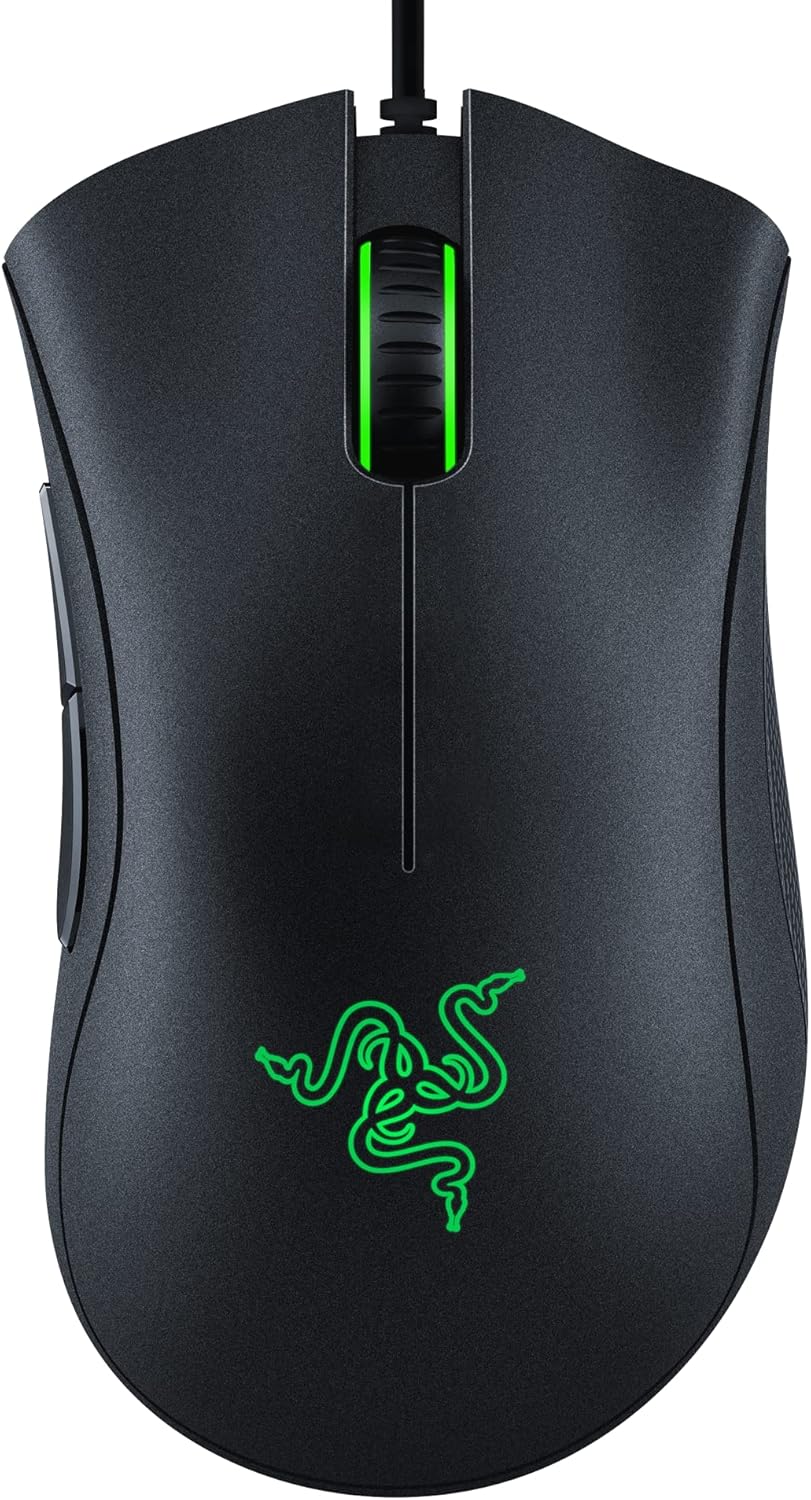
The Razer DeathAdder Essential is a wired gaming mouse that carries forward the iconic ergonomic shape that has made the DeathAdder series a favorite among PC gamers for years. Designed for comfort and precision, this mouse is a solid choice for competitive gamers, casual players, esports athletes, and even streamers or content creators who need a reliable peripheral for long hours at their desk. Its classic black finish and simple design make it a versatile addition to any gaming setup, whether you are building a budget-friendly rig or upgrading a dorm room battlestation.
Performance-wise, the DeathAdder Essential features a 6400 DPI optical sensor that allows for on-the-fly sensitivity adjustments through dedicated DPI buttons. This means you can quickly switch between precise aiming in FPS games and faster cursor movement in MOBAs or desktop work. The sensor tracks accurately across various mouse pads, and the ridged, rubberized scroll wheel adds extra control during intense moments. While it does not offer the highest DPI range of some premium mice, the 6400 DPI is more than enough for the vast majority of gamers and provides a responsive, low-latency experience.
Build quality is a strong point here. The mouse uses durable mechanical switches rated for up to 10 million clicks, which should hold up well over years of use. The rubber side grips help maintain a firm hold even during sweaty gaming sessions, and the overall construction feels solid without being overly heavy. The 5 programmable buttons can be customized via Razer Synapse software, allowing you to assign macros or remap controls for specific games or productivity tasks. This makes the mouse adaptable for both gaming and work-from-home scenarios.
In terms of setup and maintenance, the DeathAdder Essential is straightforward. It is a wired mouse with a USB connection, so there is no need to worry about batteries or wireless interference. Simply plug it in, and it is ready to go. If you want to customize the buttons or DPI settings, you will need to install Razer Synapse, which is free and easy to use. The software also allows for profile storage, so you can switch between gaming and desktop setups quickly. Cleaning the mouse is simple thanks to its smooth surfaces and accessible crevices.
One realistic limitation is the wired design. While many gamers prefer wired for zero latency, it can add to cable clutter on your desk if you are not using cable management solutions. Additionally, there is no RGB lighting or adjustable weight system, which may disappoint enthusiasts who enjoy customization and aesthetics. However, for the price point, these omissions are understandable and keep the mouse affordable and focused on core performance.
Overall, the Razer DeathAdder Essential is a practical recommendation for PC gamers who want a proven, comfortable, and responsive mouse without spending a lot. It works well for competitive gaming, casual play, streaming, and even everyday productivity. If you prioritize ergonomics and reliable tracking over flashy features, this mouse is a smart choice for your gaming setup or home office.

Pros
- Excellent wireless performance with low latency and no noticeable lag.
- Comfortable ergonomic shape for extended use, with a solid build quality that feels durable.
- High DPI range and easy on-the-fly adjustment suitable for various game genres.
- Great value with lots of features – programmable buttons, RGB, and long battery life.
- Simple software for remapping buttons and customizing lighting without bloatware.
Cons
- The mouse is relatively lightweight (8.8 oz) – some users used to heavier mice may need time to adjust.
- The included USB-C cable uses a snap-in design that may not work with standard cables, limiting replacement options.
- Software is basic but functional; advanced users might want more detailed customization.
The Redragon M810 Pro is a wireless gaming mouse built to deliver solid performance without the premium price tag. It's aimed at PC gamers who want low-latency wireless freedom, customizable controls, and RGB flair for their desk setup. Whether you're into competitive FPS shooters, casual MOBA sessions, or just need a reliable mouse for work and play, this model packs a surprising amount of features for its cost.
At the heart of the M810 Pro is a Pixart 3325 optical sensor that supports up to 10,000 DPI with five adjustable levels (500/1000/2000/3000/10000). Combined with a 1ms polling rate over the 2.4Ghz wireless connection, the mouse feels snappy and responsive. According to user feedback, the tracking is accurate and there's no perceptible lag – important for fast-paced gaming where every millisecond counts. The 8 programmable buttons, including a dedicated rapid fire key and two side macros, give you plenty of room for customizing hotkeys for games like Fortnite, Apex Legends, or even productivity tasks in Photoshop or Excel.
Build quality is reassuring for a budget-friendly mouse. The right-hand ergonomic shape with a skin-friendly matte finish fits well for medium to large hands, and the grooved scroll wheel adds a nice tactile feel. Many users report it's comfortable for long hours of gaming or browsing, with minimal hand fatigue. The mouse also features full RGB backlighting that you can control via the Redragon Pro driver – choose from breathing, wave, or fixed colors to match your setup. The software also lets you remap all buttons and set macro sequences, though it's straightforward rather than feature-packed.
One standout feature is battery life. In eco mode, the M810 Pro can last up to 45 hours on a single charge, and it automatically goes to sleep after 8 minutes of inactivity. Recharging is easy via the included USB-C cable, though note that the cable has a snap-in locking mechanism – it's not a standard USB-C plug, so you'll want to keep the included cable handy. The mouse also works wired while charging, so you can switch between modes as needed. The 2.4Ghz dongle stores neatly underneath the mouse for travel.
On the downside, the lightweight design (8.8 ounces) might not suit everyone – those used to heavier mice like the Logitech G502 might find it too light for their taste. The software, while sufficient for most, could be more intuitive for advanced users. Also, the proprietary charging cable is a minor inconvenience if you misplace it. However, these are small trade-offs given the price point.
Overall, the Redragon M810 Pro is a smart buy for PC gamers on a budget who want reliable wireless performance, customizable features, and decent ergonomics. It's especially well-suited for competitive and casual gamers, streamers who need quick button access, and anyone building a gaming setup without overspending. If you value performance and comfort without the high cost, this mouse deserves a spot on your desk.
The M810 Pro's Pixart 3325 sensor delivers accurate tracking up to 10,000 DPI with a 1ms report rate, making it suitable for both twitch shooters and strategy games. The 2.4Ghz wireless connection is stable and feels like wired – no dropped inputs or interference during normal use. The rapid fire key (next to left click) is a nice bonus for games that require fast repeated clicks like MMOs or battle royales. Eight programmable buttons let you assign critical actions directly without reaching for the keyboard.
Designed with a right-hand, contoured shape, the M810 Pro offers a comfortable grip for palm, claw, or fingertip styles. The matte finish resists fingerprints and provides a secure hold even during sweaty sessions. Weighing 8.8 ounces, it's on the lighter side, which many gamers prefer for quick flicks. The side buttons are well-placed and easy to reach without accidental presses. Most users report minimal fatigue even after hours of use, making it a solid choice for both gaming and everyday computing.

Pros
- Precise pre-cut shapes tailored for Logitech G Pro X Superlight Gen 1 and Gen 2 mice
- Ultra-thin 0.5mm profile minimizes alterations to mouse grip dimensions
- Sweat-absorbing material provides reliable anti-slip texture for warm hands
- Residue-free 3M adhesive removes cleanly without damaging mouse surfaces
Cons
- Designed strictly as an accessory and does not include a computer mouse
- Limited compatibility that does not fit other mouse models or shapes
- Requires careful manual alignment during installation to avoid misplacement
The Pulsar Gaming Gears Supergrip is a specialized computer mouse accessory engineered specifically for Logitech G Pro X Superlight Gen 1 and Gen 2 mice. Rather than being a standalone peripheral, this product is an aftermarket grip tape kit created for PC gamers and desktop users who want to enhance the tactile handling of their existing mouse. It directly addresses common grip issues during fast-paced gaming sessions or prolonged desktop work where hand moisture can cause fingers to slip against smooth plastic shells.
Because this product is a physical surface modification, it does not contain electronic components, optical sensors, DPI switches, or wireless receivers. Compatibility is strictly determined by the physical shell design of the Logitech G Pro Superlight series. Users should verify their exact mouse model before purchasing, as these pre-cut pieces match the distinct contours of the Gen 1 and Gen 2 Superlight chassis and will not properly fit other computer mice.
In terms of dimensions, the Supergrip measures just 0.5mm (0.02 inches) thick. This ultra-thin build helps preserve the original ergonomic profile and grip width of the mouse, allowing users to maintain their established palm, claw, or fingertip grip without introducing bulky edges. The material incorporates sweat absorption and an anti-slip texture intended to maintain traction even when hands become warm during extended computing tasks.
Installation is managed via a pre-laminated 3M adhesive backing. The manufacturer specifies that this adhesive is robust enough to stay firmly anchored during aggressive swiping and lifting, yet delicate enough to peel away cleanly. This residue-free characteristic protects the underlying mouse casing from adhesive buildup or finish damage whenever grips need to be removed or replaced.
Prospective buyers should keep realistic limitations in mind. This package contains only the adhesive grip tape sheets and does not include a computer mouse, replacement skates, or connection accessories. Proper alignment relies entirely on the user during installation, as crooked placement along primary buttons or side panels can interfere with click action or comfort.
For owners of the Logitech G Pro X Superlight Gen 1 or Gen 2 seeking improved surface traction and sweat resistance without altering their mouse profile, the Pulsar Supergrip offers a practical, model-specific upgrade. Users who need a complete replacement mouse or own a different mouse shape should look toward full peripherals or model-compatible alternatives.
The Pulsar Supergrip is pre-cut specifically for the Logitech G Pro X Superlight Gen 1 and Gen 2 body contours. It includes dedicated sections designed to cover the high-contact areas of the mouse shell, notably the main left and right buttons and side grip zones.
With a documented thickness of 0.5mm (0.02 inches), the tape adds minimal volume to the chassis. This allows users to retain their preferred grip style, whether palm, claw, or fingertip, without noticeably altering the ergonomic feel of the mouse in hand.
This accessory kit features pre-laminated, sweat-absorbing grip tape supported by high-grade 3M adhesive. The package measures approximately 6.69 x 4.45 x 0.12 inches and weighs around 0.044 pounds.
The included 3M adhesive is designed to prevent residue upon removal, ensuring that the original mouse shell remains undamaged when grips are replaced or taken off.

Pros
- Ultra-thin 0.5mm profile adds traction without significantly changing the mouse grip width or feel
- Sweat-absorbing surface helps maintain solid control during prolonged computer use
- Universal 12-piece pre-cut format saves time by eliminating the need for manual trimming
- Versatile application allows use across mice, keycaps, and other gaming peripherals
Cons
- Does not include an actual computer mouse; this is strictly an aftermarket grip tape accessory
- Universal pre-cut shapes may not provide full edge-to-edge coverage on uniquely contoured mouse shells
- Listing does not state the adhesive type, residue details upon removal, or expected wear lifespan
The Pulsar Gaming Gears SUPERGRIP Pre-Cut 1 is an aftermarket mouse accessory designed to upgrade handling rather than a standalone computer mouse. Featuring a 12-piece universal pre-cut layout, this grip tape set is made for PC gamers, office workers, and students who want to improve traction on their current mouse or keyboard without replacing their entire setup. Because it is an accessory, buyers need to provide their own computer mouse or peripheral.
As a physical surface accessory, the SUPERGRIP requires no cables, wireless dongles, or device pairing. It does not interface with operating systems or USB ports, meaning compatibility is purely mechanical. The universal shapes are intended for application on flat or curved surfaces across virtually any wired, wireless, or Bluetooth mouse, regardless of brand, operating system, or computer type.
The manufacturer highlights an ultra-thin 0.5mm (0.02-inch) thickness, which is engineered to provide tactile friction without noticeably altering the grip width or balance of your mouse. The tape is pre-laminated and features sweat-absorbing properties intended to maintain non-slip traction during extended computer sessions or intense gaming matches. Because the set provides 12 pre-cut pieces, users can customize placement on main click buttons, side grips, or peripheral contact points based on personal preference.
Applying the tape is a straightforward manual process that avoids the hassle of measuring or custom cutting from sheet stock. Users simply peel each pre-cut piece and place it onto clean, dry contact areas of their mouse buttons or side panels. No special software, batteries, or technical configuration steps are involved, making it a quick physical modification for standard office mice, ergonomic mice, or dedicated gaming mice.
While the universal pre-cut format saves installation effort, the shapes may not offer edge-to-edge coverage on mice with complex curves or proprietary button shapes compared to model-specific skins. Additionally, the manufacturer does not specify the adhesive compound, expected lifespan under heavy friction, residue characteristics upon removal, or recommended surface-cleaning methods prior to application.
For users struggling with a slippery mouse finish or sweaty palms during long hours of work or play, the Pulsar SUPERGRIP offers an affordable, low-profile grip solution. It represents a practical upgrade for standard mice rather than a replacement device, making it best suited for shoppers looking to optimize hand stability on hardware they already own.
The Pulsar Gaming Gears SUPERGRIP pack includes 12 universal pre-cut black grip tape pieces. Each piece features a pre-laminated design measuring approximately 0.5mm (0.02 inches) in thickness.
This ultra-thin construction focuses on sweat absorption and surface traction for gaming mice, office peripherals, and keyboards without requiring manual cutting tools.

Pros
- Featherlight 50-gram build allows swift target acquisition with minimal wrist strain
- Proven PixArt 3389 optical sensor ensures reliable, jitter-free cursor tracking
- Detachable cable improves portability and prevents cord wear during transport
- Smooth PTFE skates offer consistent glide right out of the box
- Ergonomic curvature provides great tactile support for claw and fingertip grips
Cons
- Small dimensions may feel cramped for players with large hands who prefer a full palm grip
- Open honeycomb housing requires periodic cleaning with compressed air to prevent dust buildup
The G-Wolves Skoll Mini SK-S is a dedicated ultralight wired gaming mouse engineered for agility, precision, and hand comfort. Built around a skeletal honeycomb frame, it caters specifically to competitive PC gamers, esports competitors, and streamers who require rapid target acquisition in titles like Counter-Strike 2, Valorant, and Apex Legends. Gamers building a streamlined desktop setup will appreciate how its small footprint frees up valuable mouse pad real estate for wide, sweeping arm movements.
At the heart of the mouse sits the PixArt PMW3389 optical sensor, a tournament-proven component offering resolution up to 16,000 DPI. Based on product specifications, this sensor delivers true 1-to-1 tracking without hardware acceleration or jitter, making micro-adjustments crisp and predictable. Underneath the chassis, pure PTFE skates ensure that the mouse moves smoothly across both cloth and hybrid mouse pads, reducing initial friction when reacting to enemy movement.
Weighing in at approximately 50 grams, the Skoll Mini SK-S significantly reduces physical strain during extended gaming sessions and Discord marathons. The ergonomic contours guide the thumb and fingers into a natural position, which benefits players who favor claw or fingertip grips. The perforated shell not only shaves off unnecessary weight but also promotes airflow, helping keep your palm cooler and drier during high-pressure clutch situations.
Practicality extends to the connectivity and desk arrangement. The mouse features a detachable lightweight cable designed to mimic a wireless feel by reducing desk drag and snagging. This modular cable design makes packing the mouse into a backpack effortless for college gamers or LAN party attendees, while also offering simple replacement down the line without needing to dismantle the mouse housing.
Users should consider a few physical tradeoffs before picking up this model. Because of its compact dimensions, players with larger hands or those who rely on a flat palm grip might find the mouse too small for prolonged comfort. Additionally, the open honeycomb structure leaves the internal circuit board exposed to ambient dust and debris, requiring occasional maintenance with compressed air to keep the interior clean.
For competitive gamers, college students, and esports enthusiasts seeking an ultra-responsive pointing device without extra bulk, the G-Wolves Skoll Mini SK-S presents a compelling option. Its combination of a proven 3389 sensor, low 50-gram mass, and smooth glide properties makes it a strong contender for any performance-focused gaming desk.
The physical profile of the G-Wolves Skoll Mini SK-S favors fast-paced esports genres where split-second reaction times matter most. First-person shooters and fast battle royales benefit directly from the reduced inertia of a 50-gram chassis, allowing quick stopping power on precision shots.
Due to its miniature dimensions, this mouse works best with claw and fingertip grip styles. Players with small to medium hand sizes can achieve a confident, locked-in grip that maximizes control during frantic skirmishes and vertical tracking sequences.
Frequently Asked Questions
What design features matter most when selecting the Best Gaming Mice For Claw Grip?
A pronounced rear hump and tapered grip width matter most for maintaining hand stability. A claw grip relies on contact between your palm base and the mouse chassis while fingertips rest on the primary switches. If you need a larger profile for wider hands, reviewing a best large PC mouse can help you evaluate alternative dimensions.
Does mouse weight affect claw grip aiming performance?
Yes, lighter mice generally allow quicker fingertip adjustments during fast-paced play. An ultralight model like the Gwolves Skoll Mini SK-S weighs 50g, reducing the effort needed for rapid directional flicks. Heavier models offer more physical resistance, which some gamers prefer for deliberate cursor tracking.
Can grip tape improve control on a gaming mouse?
Yes, dedicated grip tape adds friction and absorbs palm moisture to prevent slippage. Accessories like the Pulsar Gaming Gears Supergrip use an ultra-thin 0.5mm material with residue-free adhesive to enhance contact points without altering chassis shape. Pairing textured tape with a proper mousepad for sweaty hands keeps your aim steady during intense gaming marathons.
Are wireless mice responsive enough for claw grip play in 2026?
Yes, modern 2.4GHz wireless connections deliver responsiveness comparable to standard wired setups. Models like the Redragon M810 Pro utilize a 2.4GHz receiver supporting a 1000Hz polling rate and a 1ms report interval. This matches typical wired USB performance while eliminating cable drag across your desk pad.
How many programmable buttons are needed for claw grip gaming?
Most gamers only require five to eight programmable buttons for common tactical keybinds. Standard configurations offer primary clicks, a scroll wheel, and dual thumb buttons, seen on the Razer DeathAdder Essential. Titles requiring frequent macro execution benefit from expanded layouts, such as the 11 programmable buttons on the Redragon M612 Predator.



Write Your Review
No reviews yet. Be the first to share your experience!