


Mismatched motherboard chipsets and weak power delivery phases frequently sabotage new desktop assemblies before the first post screen even lights up. Skimping on VRM thermal armor or getting stuck on an obsolete socket creates frustrating bottlenecks that choke fast multi-threaded computing and modern GPU bandwidth. Securing a well-balanced best gaming mobo cpu combo eliminates that guesswork by pairing capable silicon with the right power stages and board layout right out of the box. Detailed platform specs and motherboard topologies reveal how pairing a high-boost chip like the AMD Ryzen 5 7600X processor with an ATX board creates dependable gaming headroom.
Modern titles demand fast DDR5 memory support alongside high-speed NVMe storage lanes to prevent frame drops in demanding scenes. Selecting an integrated bundle guarantees that your AM5 CPU socket, memory controllers, and expansion slots play nicely together without physical clearance issues or power delivery throttling. Solid boards deliver reliable power stages, integrated Wi-Fi networking, and ample PCIe lanes for modern graphics cards. That makes a pre-matched hardware setup the most practical foundation for building a dependable rig that lasts through multiple hardware cycles.

Pros
- Excellent price-to-performance for a CPU + motherboard bundle
- Ryzen 5 7600X delivers strong gaming performance with high boost clocks
- ASUS B650E motherboard includes PCIe 5.0 support for future GPU and storage upgrades
- Integrated Wi-Fi 6E and Bluetooth 5.3 reduce cable clutter
- BIOS Flashback feature allows CPU-free BIOS updates
Cons
- No included CPU cooler – you'll need to buy one separately
- Initial boot times can be slow on AM5 platforms, per some user reports
- Some users may need to update BIOS for full Ryzen 9000 series support

Pros
- Excellent price-to-performance ratio for a CPU and motherboard bundle
- Strong single-core and multi-core performance for gaming and streaming
- Modern connectivity: Wi-Fi 6, Bluetooth 5.3, USB-C, and multiple M.2 slots
- Overclocking unlocked on the CPU with robust VRM on the motherboard
- Compact ATX form factor fits most mid-tower cases
Cons
- CPU cooler not included, so budget for a separate cooler (even a good air cooler is fine)
- Only DDR5 support; users with DDR4 RAM will need to upgrade memory
- 7 reviews only, so long-term reliability feedback is limited
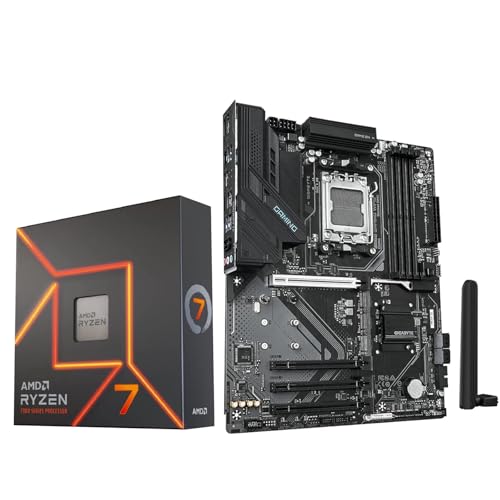
This Micro Center bundle combines the AMD Ryzen 7 9700X processor with a GIGABYTE B850 Gaming WiFi6 motherboard, offering a complete foundation for a high-performance gaming PC. The Ryzen 7 9700X is an 8-core, 16-thread CPU with a 5.5 GHz max boost and a 65W default TDP, making it power-efficient yet capable of delivering 100+ FPS in today's most demanding games. The GIGABYTE B850 board brings the latest platform features: AM5 socket, DDR5 memory support up to 256GB, PCIe 5.0 for graphics and storage, three M.2 slots (one PCIe 5.0), integrated Wi-Fi 6, Bluetooth 5.3, and a solid VRM design.
This bundle is best suited for PC gamers, competitive and casual players, esports enthusiasts, streamers, content creators, and anyone building a modern AM5 gaming rig. The CPU's strong single-core performance helps in fast-paced titles like Call of Duty, Valorant, or Apex Legends, while the eight cores handle streaming and multitasking effortlessly. For gamers who also edit videos or run productivity apps, the DDR5 support and PCIe 5.0 bandwidth future-proof the build.
In terms of real-world performance, the Ryzen 7 9700X provides excellent responsiveness and low-latency gameplay. The motherboard's X3D Turbo Mode gives an extra performance boost in compatible games, and the DDR5 OC support up to 8200MT/s allows memory overclockers to push further. Connectivity is robust: you get Wi-Fi 6 for stable wireless connections, fast USB-C ports, and HDMI/DisplayPort outputs for integrated graphics – useful for troubleshooting or secondary displays. The board also features a user-friendly BIOS with multi-theme customization, AIO fan control, and Q-Flash Auto Scan for easy updates.
Build quality on the GIGABYTE B850 is solid with a reinforced PCIe slot (EZ-Latch Plus for easy release), ample M.2 heatsinks, and a VRM Thermal Armor to keep temperatures in check during extended sessions. The motherboard is ATX-sized, so it fits standard mid-tower cases, and the layout leaves room for cable management. Note that the CPU does not include a cooler, so you'll need to purchase one – a budget tower air cooler or an AIO will work well given the 65W TDP.
Setup is straightforward: mount the CPU in the AM5 socket, add RAM, install a cooler, and you're ready. The motherboard's clear labeling and included accessories make assembly easy even for first-time builders. One limitation is that there are only 4 SATA ports, but with three M.2 slots, storage expansion is ample. Also, the board uses an older Realtek audio codec (not specified but typical at this price), which is fine for most but not audiophile-grade.
Overall, this Micro Center bundle offers excellent value for gamers and builders wanting a balanced, high-performance foundation. It's a smart choice for those building a new AM5 system, especially if you're focused on gaming and streaming. The combination of the Ryzen 7 9700X and GIGABYTE B850 provides a reliable, upgradeable platform that will last for years.
The Ryzen 7 9700X delivers strong gaming performance thanks to its high boost clock and efficient Zen 5 architecture. Combined with the GIGABYTE B850 motherboard, you get PCIe 5.0 for the fastest GPUs and storage, plus X3D Turbo Mode for an extra edge in CPU-bound titles. Expect smooth 100+ FPS in competitive shooters and high frame rates in open-world games, especially when paired with a fast DDR5 kit and a modern graphics card.
The GIGABYTE B850 Gaming WiFi6 motherboard is built with a 6+2+2 phase VRM, solid capacitors, and a PCIe EZ-Latch Plus slot for easy GPU removal. It supports AMD Ryzen 7000, 8000, and 9000 series CPUs, so you can drop in a future upgrade later. The board has three M.2 slots (one PCIe 5.0) and four SATA ports, giving plenty of storage options. Wi-Fi 6 and Bluetooth 5.3 are integrated, so no need for extra cards. The ATX form factor fits most mid-tower cases.
This motherboard offers a versatile I/O: multiple USB 3.2 Gen 1 Type-A and Type-C ports, HDMI and DisplayPort outputs for integrated graphics, Wi-Fi 6 and Bluetooth 5.3, and a Gigabit Ethernet LAN. The rear panel also has audio jacks for typical gaming headsets. Inside, you get one PCIe 5.0 x16 slot (strong and reinforced), one PCIe 4.0 x4 slot, and three M.2 slots – one PCIe 5.0 and two PCIe 4.0. This combination supports high-speed NVMe drives for game loading and project files.
Pros
- High-performance 8-core processor great for gaming and multitasking.
- DDR5 and PCIe 5.0 support for future-proofing.
- WiFi 6 and Bluetooth 5.3 for wireless convenience.
- Overclocking headroom with unlocked CPU and robust VRM.
- Bundle simplifies shopping and ensures compatibility.
Cons
- No CPU cooler included: requires separate purchase.
- Only 0 reviews at launch: early adopter risk.
- GIGABYTE B850 is a mid-range board: lacks PCIe 5.0 for GPU slot (only M.2).
The Micro Center bundle combining the AMD Ryzen 7 7700X CPU and GIGABYTE B850 Gaming WiFi6 motherboard provides a straightforward path to building a powerful AM5 gaming PC. The Ryzen 7 7700X is an 8-core, 16-thread processor with a max boost of 5.4 GHz, designed to deliver smooth 100+ FPS performance in popular games. Paired with the GIGABYTE B850 Gaming ATX board, this kit supports DDR5 memory (overclockable up to 8200 MT/s) and includes a PCIe 5.0 M.2 slot for blazing-fast storage.
This setup is ideal for PC gamers, competitive esports players, and streamers who want a responsive foundation for high-refresh-rate gaming. The combination of a fast CPU and a modern chipset ensures low-latency performance in titles like Call of Duty, Valorant, and Fortnite. Content creators will also appreciate the multi-core muscle for video encoding and multitasking during streams.
Build quality is solid: the GIGABYTE B850 board features a digital 6+2+2 phase VRM with thermal armor, keeping the CPU cool under load. The board includes three M.2 slots (one PCIe 5.0, two PCIe 4.0) and four SATA ports for ample storage. Connectivity is robust with WiFi 6, Bluetooth 5.3, USB 3.2 Gen 1 Type-C, and HDMI/DisplayPort outputs for integrated graphics (though a discrete GPU is recommended for gaming).
Setup is streamlined thanks to the bundle: the CPU and motherboard come together, eliminating compatibility guesswork. GIGABYTE's EZ-Latch feature simplifies GPU and M.2 installation, and the included Q-Flash BIOS update tool makes firmware upgrades easy. However, note that no CPU cooler is included in the box, so you will need to purchase a separate cooler (air or liquid) to keep the 105W TDP processor running cool.
A realistic limitation is the lack of user reviews at launch, which means early adopters may encounter firmware quirks. Additionally, the B850 chipset is positioned below X870, so it lacks advanced PCIe 5.0 lanes for graphics cards (the GPU slot is PCIe 4.0). For most gamers, PCIe 4.0 is more than sufficient, but enthusiasts aiming for future GPU bandwidth may prefer a higher-end board.
Overall, this bundle offers excellent value for gamers and builders who want a high-performing AM5 platform without hunting for separate deals. The Ryzen 7 7700X provides top-tier gaming performance, and the GIGABYTE B850 motherboard provides the essential modern features. If you are building a new gaming PC or upgrading to DDR5, this well-matched combo is a practical choice.
Frequently Asked Questions
Do AM5 gaming motherboards support older DDR4 RAM?
No, AMD Socket AM5 motherboards exclusively support DDR5 RAM modules. The physical pin layout and memory controller architecture differ completely from DDR4, preventing older sticks from seating or functioning. Modern chipsets like the B650E and B850 rely on high-speed DDR5 memory to feed bandwidth to multi-core processors. You will need to factor in a dedicated DDR5 kit when choosing your best gaming mobo cpu combo.
What power supply wattage is recommended for these AM5 motherboard and CPU bundles?
A quality 750W to 850W power supply is ideal for most desktop systems built around these processor combos. While a 65W or 105W TDP rating CPU draws modest wattage under load, modern discrete graphics cards can produce sudden transient power spikes. Choosing an 80 Plus Gold modular power supply provides ample headroom and clean voltage regulation for demanding gaming sessions. This buffer also keeps your power delivery running cool and prevents sudden system shutdowns during intensive 1440p gaming.
Does a PCIe 5.0 M.2 slot provide noticeable gaming advantages in 2026?
No immediate frame rate increase occurs with PCIe 5.0 storage, but it offers massive sequential data transfer speeds for heavy file transfers and future DirectStorage assets. A PCIe 5.0 x4 M.2 slot doubles the theoretical bandwidth of PCIe 4.0 drives, preventing system bottlenecks as next-gen game engines evolve. High-performance gaming motherboards feature dedicated heatsinks over these top slots to prevent thermal throttling on ultra-fast solid state drives.
Are 8-core processors significantly better than 6-core options for a best gaming mobo cpu combo setup?
Eight-core chips provide better multitasking headroom for background streaming, voice chat, and game recording while playing hardware-intensive titles. While a 6-core chip handles raw gaming frame rates effortlessly, 8-core CPUs like the Ryzen 7 9700X and 7700X offer extra threads that smooth out 1% low frame rates in CPU-heavy simulations. Builders upgrading from an older AMD Ryzen 9 5900X processor often find that 8 modern AM5 cores provide faster single-thread speeds alongside lower operational temperatures.
Do these bundled motherboards require a liquid AIO cooler or can an air cooler suffice?
Dual-tower air coolers and 240mm or 360mm AIO liquid coolers both work effectively on 65W to 105W AM5 processors. A standard dual-tower heatsink handles standard gaming loads with minimal fan noise while avoiding clearance conflicts with your GPU. Liquid cooling radiators fit nicely in mid-tower cases and help exhaust hot air directly outside the chassis, which keeps internal motherboard VRM temperatures lower during sustained workloads.




Write Your Review
No reviews yet. Be the first to share your experience!