


Ergonomic Shell Profiles and Palm Support for Larger Hands
Standard pointing devices frequently cause hand fatigue when larger hands are forced into cramped claw grips on compact frames. Resting your entire palm flat against a mouse requires a taller arch, extended length, and sculpted finger rests so fingers do not drag on desk surfaces. Finding the best gaming mouse for big hands palm grip means evaluating shell dimensions, sensor tracking, and ergonomic contours that support full palm contact. Whether you are pairing a mouse with a custom gaming desk setup or working across multiple monitors, a properly proportioned mouse keeps your hand in a natural, relaxed posture.
Modern options include tri-mode wireless mice with customizable RGB illumination, wired options with high DPI sensors, and textured grip skins. Models like the Corsair IRONCLAW Wireless SE offer asymmetric right-handed curves for palm players, while the Redragon Large Wireless Gaming Mouse delivers wide finger supports and multi-device pairing. Assessing connection types, button programmability, and shell shape ensures you choose a comfortable fit for everyday play.

Pros
- Spacious contoured shape with integrated finger rests tailored specifically for larger hands
- On-the-fly DPI switching across five preset speeds up to 4800 DPI without needing software
- Primary switches rated for up to 50 million keystrokes for dependable hardware durability
- Convenient internal storage slot prevents misplacing the USB Nano Receiver
Cons
- Side forward and backward buttons do not function under macOS
- Requires an open USB-A port and does not feature Bluetooth connectivity
- Listing does not state the specific battery size or whether batteries are included
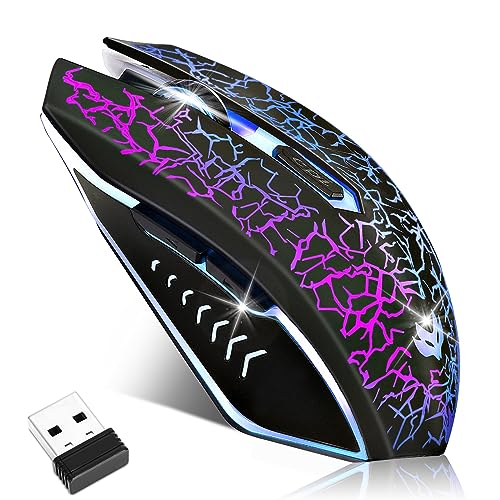
The E-YOOSO X-31 is a full-sized 2.4GHz wireless optical mouse engineered specifically for computer users who find standard office mice too cramped or fatiguing. Built with an expanded footprint measuring roughly 4.96 by 3.85 inches, it features dedicated rest ledges on both sides to give the thumb, ring finger, and pinky stable support. This contoured profile makes it a viable match for adults with larger hands who need a steady, full-contact palm or relaxed claw grip during daily office work, study sessions, or general web browsing.
Connection is handled by a standard 2.4GHz USB Nano Receiver that delivers an operational wireless range up to 33 feet. Setup is completely driverless and plug-and-play across major desktop platforms, including Windows 11, 10, 8, 7, Vista, XP, Linux, ChromeOS, and macOS. However, users connecting to Apple computers should note that the side forward and backward navigation buttons do not function under macOS. Devices that lack traditional USB-A ports, such as newer ultrabooks or tablets, will also require a compatible USB adapter to connect the receiver, as Bluetooth is not supported on this model.
In terms of tracking and physical controls, the mouse incorporates six buttons, highlighted by primary left and right switches rated for over 50 million clicks. An onboard DPI button allows users to cycle through five distinct sensitivity presets: 800, 1200 (the factory default), 1600, 2000, and 4800 DPI. For users seeking faster cursor update intervals, the polling rate can be switched between 125Hz and 250Hz simply by pressing and holding the right click and middle scroll wheel buttons simultaneously for three seconds. This hardware-level adjustability lets users tune their cursor response across multiple screen resolutions without installing configuration software.
Everyday power management is governed by an automated power-saving feature. If the mouse detects no movement or input for eight minutes, it shifts into a dormant standby state to reduce unnecessary battery drain, waking instantly once any button is clicked. When taking the mouse between home and the office, the USB dongle docks directly into a molded cavity on the underside of the casing. Note that while the listing outlines power-saving behavior, it does not confirm the required battery type or quantity, so buyers should check the unit upon arrival to supply the proper cells.
Realistic limitations mostly center on connection versatility and platform specifics. Aside from the side-button restrictions on macOS, the mouse lacks multi-device pairing or Bluetooth support, locking you to devices with accessible USB ports. Its larger build and 0.37-pound weight provide stability on a desk, but those same attributes make it less compact for carrying inside tight laptop sleeves compared to ultra-slim travel mice.
For desktop users seeking an affordable replacement mouse that comfortably accommodates a bigger hand size, the E-YOOSO X-31 delivers practical ergonomic shaping and responsive wireless tracking. Provided your computer has an available USB-A port and you do not depend on thumb buttons within macOS, its combination of side finger rests, five DPI stages, and durable switch ratings make it a solid choice for daily desktop productivity.
The E-YOOSO X-31 connects through a 2.4GHz wireless signal using an included USB Nano Receiver, providing wireless operation at distances up to 33 feet. It does not include Bluetooth, meaning an open USB port is necessary to establish a connection on any desktop, laptop, or Surface device.
Operating system support is broad, with plug-and-play functionality documented for Windows 11, 10, 8, 7, Vista, XP, Linux, ChromeOS, and macOS. Buyers using Apple Mac hardware should be mindful that the side thumb buttons do not operate on macOS, though primary clicking, scrolling, and DPI adjustments remain fully functional.
Designed specifically to overcome the cramping associated with compact mice, the X-31 features a wide, contoured body measuring 4.96 inches long and 3.85 inches wide. Its custom exterior is built with an anti-slip and anti-sweat finish to help maintain a secure hold over long working hours.
A standout design element is the dual-sided finger rest system, which provides designated resting surfaces for the thumb on the left side and the outer fingers on the right. This layout promotes a natural hand posture and is particularly suited for individuals with larger hands who favor a supportive palm grip.
Tracking sensitivity can be adjusted directly from the mouse across five fixed stages: 800, 1200, 1600, 2000, and 4800 DPI. The 1200 DPI setting serves as the default option, while the higher presets allow faster cursor traversal across wide or high-resolution monitors.
The mouse also supports two hardware polling rates: a default 125Hz rate and a faster 250Hz rate. Users can toggle between these two report rates by holding down the right button and the scroll wheel click together for three seconds, offering simple customization without third-party software.


Pros
- Excellent value for price with features normally found in higher-end mice.
- Comfortable ergonomic shape suitable for palm, claw, or fingertip grips.
- Responsive sensor with consistent tracking across various surfaces.
- Full software control for button mapping, DPI settings, and RGB effects.
- Long-lasting build quality with braided cable and reinforced USB port.
Cons
- Software download process can be confusing; requires navigating Redragon's website to find the correct driver.
- Slightly heavier than some modern ultralight gaming mice, which may affect fast flick shots for competitive FPS players.
- Occasional unregistered clicks reported by some users, though this seems to be rare.
The Redragon M602 Griffin is a wired gaming mouse that has been a staple in the budget gaming peripherals market since its launch in 2015. It combines a comfortable ergonomic shape, a high-precision optical sensor with up to 7200 DPI, and nine programmable buttons, all wrapped in a durable design with customizable RGB lighting. Priced affordably, it aims to deliver features that rival more expensive mice without compromising on core performance.
This mouse is well-suited for a wide range of users: casual and competitive PC gamers, esports enthusiasts, streamers, content creators, college gamers, and even work-from-home professionals. Its versatility makes it a reliable choice for anyone who needs a responsive and comfortable pointing device for both gaming and daily tasks. The M602 fits naturally into a gaming setup, adding a splash of RGB without requiring a big investment.
In terms of gaming performance, the optical sensor provides smooth and consistent tracking across various surfaces. The adjustable DPI can be changed on the fly using a dedicated button, allowing quick adaptation between different game genres or desktop work. While the mouse lacks a high polling rate specification, user feedback indicates that responsiveness is adequate for most gaming scenarios, including fast-paced shooters and MOBAs. The mechanical switches are rated for 500,000 clicks and provide a satisfying tactile feedback, though some users have noted that the left and right buttons feel slightly different in pressure.
Build quality is a strong point for the M602. The matte plastic body feels solid and resists fingerprints. The braided cable is a premium touch at this price point, reducing tangles and adding durability. The ergonomic shape is contoured for right-handed use, with a pronounced thumb rest and finger grooves that promote a natural grip. This design helps reduce fatigue during extended gaming sessions, making it a comfortable choice for marathon play.
Setup is straightforward: plugging the mouse into a USB port immediately enables basic functionality. For full customization of buttons, DPI steps, and RGB lighting, users need to download the Redragon software from the company's website. The software offers a range of options, though the download process can be a bit confusing due to multiple product variants. Once installed, it allows fine-tuning of lighting effects, macro recording, and button remapping. The RGB lighting offers seven modes and effects, which can be adjusted without software by using a dedicated button under the scroll wheel.
As for limitations, the main drawbacks are the slightly higher weight compared to ultralight mice and the occasional software navigation hassle. Some users have reported infrequent missed clicks, but this appears to be an outlier rather than a widespread issue. Overall, the Redragon M602 is an excellent budget gaming mouse for those who prioritize comfort, durability, and customization without a high price tag. It is a reliable performer for everyday gaming and work, and its long track record of positive reviews speaks to its value.

Pros
- Exceptional battery life ratings reaching up to 532 hours on Bluetooth and 285 hours on 2.4GHz wireless
- High-accuracy 26,000 DPI Corsair Marksman sensor with surface calibration capability
- Generous 10-button programmable layout suited for gaming binds and everyday productivity shortcuts
- Contoured asymmetric shell tailored to reduce wrist strain for right-handed palm grip users
Cons
- Asymmetric right-handed mold is entirely unsuitable for left-handed users
- Larger profile is not ideal for users with smaller hands or those who prefer fingertip grip styles
- Product specifications do not list whether a wireless receiver or charging cable is included in the package
The Corsair IRONCLAW Wireless SE is a wireless gaming mouse designed primarily for right-handed users who have larger hands and favor a palm grip style. Built with an asymmetric shell, it aims to provide full palm support and stable control without forcing the wrist into an unnatural position during extended computer sessions. While it carries a gaming designation, the combination of multiple inputs and dual wireless modes also makes it a functional candidate for desktop productivity and general everyday navigation.
In terms of connectivity, this model supports dual-mode wireless operation using either a 2.4GHz wireless link or Bluetooth. This flexibility lets users choose between responsive 2.4GHz connectivity for gaming sessions or Bluetooth for broad compatibility across laptops and general desktop setups. The product documentation does not specify whether a dedicated USB wireless receiver is bundled in the box, nor does it detail operating-system requirements, so shoppers should verify computer port availability and system compatibility for Corsair iCUE software before purchasing.
Physical control and tracking are centered around an expansive 10-button layout and the Corsair Marksman optical sensor. The sensor provides sensitivity settings up to 26,000 DPI along with surface calibration support, allowing the mouse to adapt tracking behavior to various desk surfaces and mouse mats. Through Corsair iCUE software, all 10 buttons can be mapped to custom macros, system shortcuts, or specialized gaming keybinds. A set of 3-stage indicator lights on the mouse body allows users to monitor their active DPI setting and profile cues at a glance.
Power performance is one of the standout specifications for this mouse. Corsair rates the battery life at up to 285 hours when connected over 2.4GHz wireless and up to an impressive 532 hours when operating via Bluetooth. The mouse also features multi-zone RGB illumination on the scroll wheel, rear logo, and front grill. However, the listing does not state whether the mouse uses a rechargeable battery or replaceable cells, nor does it specify whether a charging cable is included, making it wise to review the packaging documentation upon setup.
Potential buyers should consider a few clear physical and practical limitations. The pronounced asymmetric shape is exclusively tailored for right-handed users, ruling it out completely for left-handed setups. Additionally, the generous body dimensions, listed at 5.12 inches long and 3.15 inches wide, are intended for larger hands and may feel cumbersome for individuals with smaller hands or those who prefer a fingertip or claw grip. Setting up custom lighting profiles, DPI steps, and macro assignments also relies heavily on Corsair iCUE software.
Overall, the Corsair IRONCLAW Wireless SE is a compelling choice for right-handed PC gamers and power users who need a sizable, comfortable palm-grip mouse with extensive programmable buttons. Its massive battery ratings across both 2.4GHz and Bluetooth connections provide excellent freedom from frequent charging or battery swaps, provided the asymmetric ergonomic shape aligns with your physical grip preference.
The Corsair IRONCLAW Wireless SE features an asymmetric ergonomic design engineered specifically for right-handed users. The contouring provides dedicated palm support, allowing your hand to rest naturally across the top shell rather than hovering in a claw or fingertip stance. This design aims to provide comfortable control during long hours of gaming or desk work.
With listed dimensions of 5.12 inches in length and 3.15 inches in width, this mouse is firmly positioned in the larger-size category. Users with medium to large hands who prefer a full palm contact grip will find the dimensions familiar and supportive. Conversely, shoppers with smaller hands or those who favor quick fingertip adjustments may find the body slightly wide or long for rapid repositioning.
Cordless flexibility is a key aspect of the IRONCLAW Wireless SE, which provides both standard 2.4GHz wireless and Bluetooth connection methods. The 2.4GHz mode is geared toward low-latency response during gaming, while the Bluetooth setting allows quick pairing with compatible laptops, tablets, and desktop computers without occupying a dedicated USB port.
The manufacturer-listed battery figures are exceptionally high, quoting up to 285 hours of continuous use over 2.4GHz wireless and up to 532 hours when using Bluetooth. Actual runtime will naturally vary depending on active RGB lighting settings, polling rates, and daily usage patterns. Buyers should check the packaging to confirm whether power is supplied via an internal rechargeable battery or standard cells.
Configuration of the IRONCLAW Wireless SE is managed through Corsair iCUE software. The utility provides deep control over the 10 programmable buttons, enabling users to rebind standard mouse inputs, assign complex multi-key macros, or configure productivity shortcuts for creative and office workflows.
The software also governs the mouse's dynamic RGB lighting, which shines through the scroll wheel, Corsair logo, and front grill. Users can tune sensitivity up to the 26,000 DPI sensor limit, run surface calibration to match their mouse pad, and rely on the onboard 3-stage LED indicators to verify their active DPI tier and profile settings in real time.

Pros
- Ultra-thin 0.5mm profile adds surface traction without significantly altering the mouse grip size or feel
- Reliable American 3M adhesive backing provides secure adhesion and removes cleanly without residue
- Pre-cut layout matches compatible Logitech G PRO X Superlight mouse contours for simple installation
- Textured polymer material assists with palm moisture absorption during intense computer use
Cons
- Grip tape accessory set only; the computer mouse is not included
- Explicitly not compatible with the Logitech G Pro X Superlight 2 DEX model
- Precision-cut dimensions mean it will not fit other mouse shapes, brands, or non-listed models
The TALONGAMES Mouse Anti-Slip Grip Tape is a precision-cut computer mouse accessory created specifically for Logitech G PRO X Superlight, Superlight 2, and G PRO X2 SUPERSTRIKE wireless mice. Rather than being a standalone mouse, this product serves as a specialized exterior skin set designed for users who already own one of these popular lightweight pointers. It is tailored for desk workers, students, and gamers who experience slipping or hand sweat during long sessions and want a firmer, more controlled grip on their device.
Crafted from a specialized polymer material measuring just 0.5mm in thickness, the tape adds meaningful surface traction without changing the underlying ergonomics or dimensions of the mouse. A diamond texture pattern across the surface works to raise the friction coefficient, preventing fingers from sliding during swift desktop maneuvers. Additionally, the polymer material features sweat-absorption properties, particularly across the palm and main click zones, helping keep hands dry and comfortable over extended hours of use.
Because the pieces are pre-cut and molded according to the factory proportions of compatible Logitech models, fitting the pieces is straightforward. The design includes sections for the primary click buttons, side panels, and palm area, allowing users to apply the full set or choose specific placements that fit their preferred grip style. At an overall weight of roughly 0.02 pounds, the tape adds negligible weight, maintaining the ultra-lightweight handling characteristics that define the Superlight series.
Installation is designed to be user-friendly thanks to a self-adhesive layout utilizing genuine American 3M adhesive. This backing material is chosen to keep the skins firmly anchored during active computer use while ensuring that removal is clean and leaves no sticky residue behind on the mouse shell. Users can peel off individual pieces when replacing them or returning the mouse to its original finish.
While this accessory provides valuable grip enhancements, potential buyers should recognize its specific limitations. The package contains solely the adhesive tape set and does not include a mouse, replacement sensor skates, or internal hardware. Furthermore, the manufacturer explicitly notes that this kit is not compatible with the Logitech G Pro X Superlight 2 DEX due to distinct shell differences, nor will it align properly with mice from other brands or non-compatible Logitech lines.
For owners of compatible Logitech G PRO X Superlight models looking to address palm moisture or enhance surface handling, this TALONGAMES grip kit offers a practical, model-specific modification. It delivers dependable adhesion, noticeable surface texture, and a slim design that protects the mouse surface without adding unwanted bulk.
This TALONGAMES grip tape set is calibrated specifically to match the shell dimensions of the Logitech G Pro X Superlight, Logitech G Pro X Superlight 2, and Logitech G PRO X2 SUPERSTRIKE wireless gaming mice. The pre-cut sections align with the primary buttons, side grips, and palm area of these specific shells.
The listing explicitly notes that this set is not compatible with the Logitech G Pro X Superlight 2 DEX model due to its differing ergonomic shape. Buyers should verify their exact mouse model before purchasing, as this accessory will not properly fit other mouse chassis or non-supported Logitech models.
The package includes one complete set of pre-cut anti-slip grip sticker tape pieces made from 0.5mm high-grade polymer with a diamond texture finish. The tape features American 3M adhesive backing designed for secure attachment and residue-free removal.
Please note that the computer mouse itself is not included with this purchase. The set contains only the adhesive mouse skin components intended for user installation on a compatible mouse.
Frequently Asked Questions
Why is mouse arch height crucial for a palm grip style?
A taller arch supports your palm fully so fingers rest flat without cramping. Mice built for larger hands, like the Corsair IRONCLAW Wireless SE, feature elevated asymmetric contours that fill the hand cavity. This raised shell prevents fingers from hanging off the click switches and stops painful dragging across mousepads.
What connection options do large wireless gaming mice provide?
Tri-mode configurations typically support 2.4 GHz wireless, Bluetooth, and wired USB connections. Devices like the Redragon Large Wireless Gaming Mouse let you use low-latency 2.4 GHz for gaming, switch to Bluetooth across tablets or laptops, and plug in a USB-C cable for uninterrupted play while charging.
How does anti-slip grip tape benefit players with big hands?
Textured polymer tape enhances grip friction and absorbs palm sweat during rapid mouse swipes. Accessories such as TALONGAMES Mouse Anti Slip Grip Tape apply directly onto mouse shells with thin 0.5 mm adhesives, keeping large palms firmly positioned without distorting the underlying shape of the mouse.
Does a higher DPI setting indicate better gaming performance?
No, DPI indicates optical sensor sensitivity rather than overall sensor quality. High DPI options let you move cursors quickly across wide displays, but most players use moderate levels between 800 and 3,200 DPI. Polling rates up to 1000 Hz are equally critical for responsive tracking.
Are extra programmable buttons helpful for gaming and productivity?
Yes, programmable buttons let you trigger macros and system commands without reaching across your keyboard. When playing on a gaming computer for World of Warcraft, having up to 10 customizable buttons provides fast access to spells and hotkeys via configuration software.
How do wireless mice preserve battery life during daily use?
Automated sleep modes put the mouse into standby after several minutes of inactivity. For instance, the E-YOOSO Large Wireless Mouse enters sleep mode after eight idle minutes, waking with a single click. Rechargeable and Bluetooth-enabled designs can run for hundreds of hours between charges.



Write Your Review
No reviews yet. Be the first to share your experience!