


Mastering Complex Rotations and Desk Control
Juggling extensive action bars and intricate spell rotations quickly exposes the physical limits of a standard two-button desktop peripheral. When you must trigger instant cooldowns without taking your fingers off movement keys, a dedicated thumb grid transforms how quickly you react during raids or dungeon encounters. Exploring the current options for the best gaming mouse mmo allows players to offload complex keyboard combinations directly onto responsive side switches. Whether paired with a dedicated setup like the best gaming computer for World of Warcraft or a flexible laptop station, these specialized pointing devices prioritize dedicated macro storage, customizable grip geometry, and precise tracking.
Selecting the ideal peripheral requires balancing practical hardware tradeoffs rather than chasing raw technical specifications. Sensor sensitivity reaches impressive heights across modern models, yet day-to-day usability relies far more on comfortable right-handed contours, switch durability, and dependable wireless stability. Battery longevity varies substantially between low-latency 2.4 GHz gaming connections and power-efficient Bluetooth links, while wired alternatives eliminate recharge cycles entirely. Reviewing manufacturer specifications, thumb-button placement, and reported software compatibility ensures your chosen device delivers reliable command execution throughout marathon progression sessions.
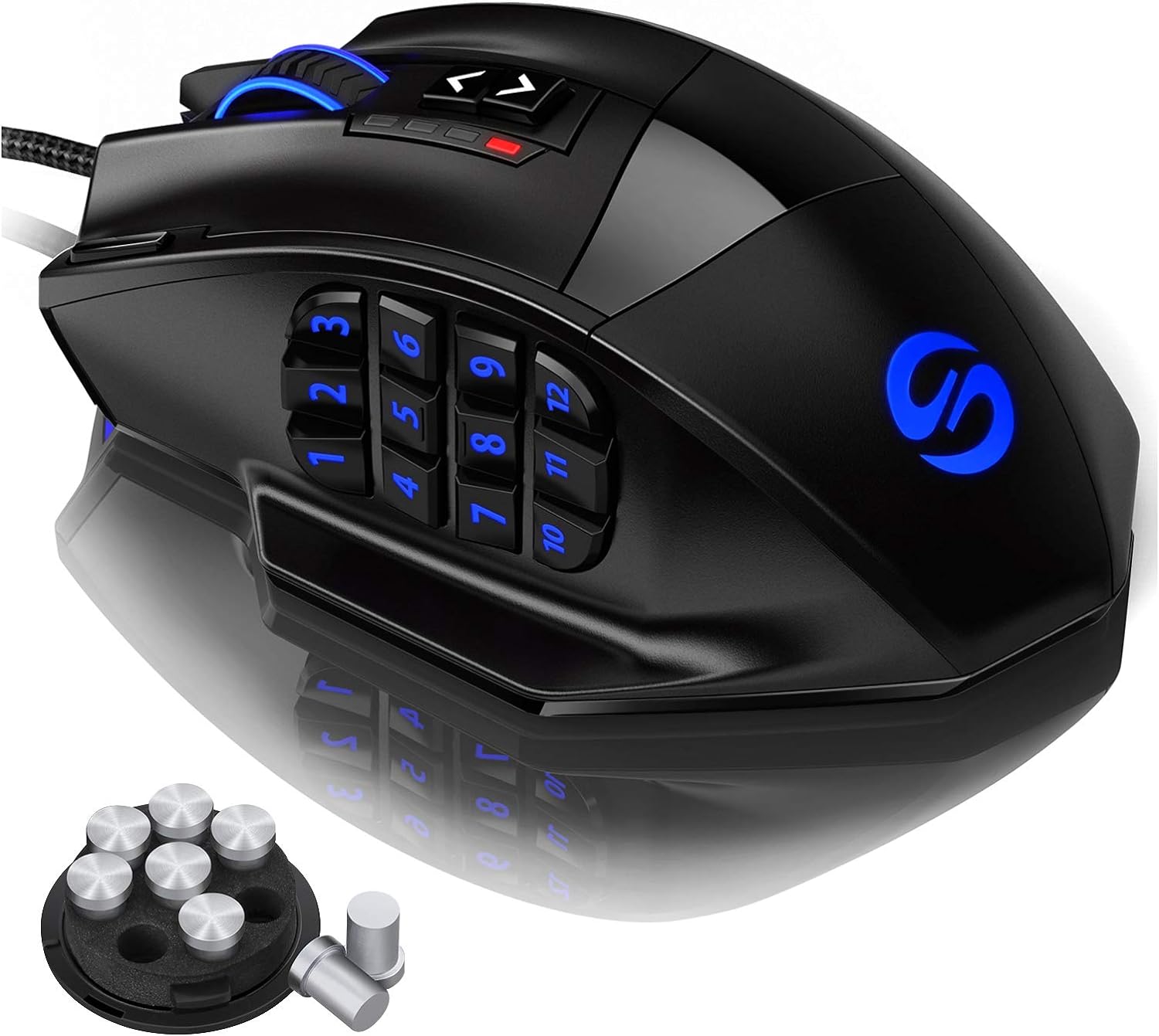
Pros
- Excellent value for a feature-rich MMO mouse with 18 programmable buttons
- High DPI range and precise Avago laser sensor suitable for various game genres
- Comfortable ergonomic shape with textured grip and adjustable weight for personalized feel
- RGB lighting with profile-specific colors helps identify settings at a glance
- Durable build with braided cable and Teflon feet for smooth gliding
Cons
- Software only available for Windows; profiles persist on Mac/Linux but cannot be adjusted
- Right-handed design only, not suitable for left-handed users
- 12 side buttons may feel crowded for users with smaller hands or those preferring fewer buttons
The UtechSmart Venus Gaming Mouse is a wired MMO gaming mouse designed for PC gamers who need quick access to many commands. With its 12 programmable side buttons, adjustable 16400 DPI laser sensor, and customizable RGB lighting, it caters to MMO, MOBA, and FPS players, as well as streamers, content creators, and competitive gamers who want to streamline their keybinds. Its ergonomic right-handed shape and frosted surface provide a comfortable grip for long sessions, making it a practical choice for college gamers, esports players, and anyone building a gaming setup on a budget.
In real-world use, the Venus mouse offers responsive tracking thanks to the Avago laser sensor and Omron micro switches. The 1000 Hz polling rate ensures low-latency input, which is crucial for fast-paced games like Fortnite, PUBG, and World of Warcraft. The 12 side buttons are angled differently to help your thumb find the right key quickly, reducing reaction time in complex MMO rotations. The adjustable weight system (up to 8 weights) lets you fine-tune the mouse's balance for better control. The braided 6ft cable with gold-plated USB connector ensures stable data transfer and minimal drag, while the included Velcro tie helps with cable management on your desk.
Build quality is solid for the price point. The mouse has a durable plastic shell with a matte finish that resists sweat. The Teflon feet pads provide smooth gliding on most mouse pads. The RGB lighting is vibrant and can be customized with 16 million colors across five profiles, which you can assign to different games. The software (Windows-only) allows you to program macros, adjust DPI, and set lighting effects. Once configured, the profiles are stored on the mouse, so they work on Mac and Linux as well.
Setup is straightforward: plug the mouse into a USB port, download the driver from the official website or Google Drive link, and start customizing. The learning curve is minimal if you've used programmable mice before, but the sheer number of buttons might take some getting used to. The mouse is right-handed only, which is a limitation for left-handed gamers. Also, the software is only available on Windows, so Mac and Linux users must pre-configure profiles on a Windows PC.
Overall, the UtechSmart Venus Gaming Mouse is a fantastic option for MMO and MOBA players who want a high-button-count mouse without breaking the bank. It offers strong performance, comfortable ergonomics, and plenty of customization. While it may not suit left-handed users or those who prefer a minimalist button layout, its value for dedicated gamers is undeniable. Whether you're raiding in WoW, building in Fortnite, or streaming on Twitch, this mouse can handle the workload.
The Venus mouse uses an Avago laser sensor capable of up to 16400 DPI, 12000 FPS, and 1000 Hz polling rate. This translates to precise tracking with minimal latency, suitable for both twitchy FPS games and methodical MMO gameplay. The Omron switches provide crisp, reliable clicks with a satisfying feel. The 12 side buttons are responsive and can be mapped to any keyboard key or macro, giving you an edge in games where every second counts. The adjustable DPI button on top lets you switch sensitivity on the fly, which is handy for different in-game situations.
The UtechSmart Venus features a sturdy plastic construction with a frosted coating that improves grip and resists fingerprints. The braided 6ft cable is flexible yet durable, with a gold-plated USB connector for corrosion resistance. Two extra Teflon feet pads are included for replacement, ensuring long-term smooth gliding. The mouse also comes with a weight tuning cartridge containing 8 weights (2.4g each) that can be added or removed to adjust the overall heft. The Omron switches are rated for high durability, so you can expect consistent performance over time.
Designed for right-handed users, the Venus mouse has a contoured shape that supports the palm and provides a rest for the thumb. The frosted surface prevents slippage even during intense gaming sessions. The 12 side buttons are arranged in angled rows, making them easy to locate by touch without looking. The mouse is relatively lightweight without weights (around 100g) but can be tuned up to about 120g. The included Teflon feet ensure smooth movement across most surfaces. Long-term comfort is good, though users with very large or small hands may want to test the fit.
The Venus mouse offers extensive RGB lighting with 16 million colors. The lighting zones include the scroll wheel, the UtechSmart logo, the side buttons, and a front LED strip. You can choose from multiple effects like breathing, static, and color cycling, and adjust brightness and speed via the software. There are five onboard profiles, each with its own LED color for easy identification. The software also allows you to remap all 18 programmable buttons, create macros, and adjust DPI settings. Once saved, profiles are stored on the mouse, so your customizations travel with you even on computers without the software.

Pros
- High DPI range up to 12,400 for fast and accurate tracking.
- 12 side buttons and 18 programmable buttons ideal for MMO and MOBA games.
- Comfortable ergonomic shape with weight tuning for personalized feel.
- Affordable price point for a feature-rich gaming mouse.
- Vibrant RGB lighting with multiple modes and profile color coding.
Cons
- Software is only compatible with Windows, limiting customization for Mac users.
- Some users may find the mouse too large for smaller hands.
- The side buttons can be accidentally pressed if not positioned correctly.
The Redragon M908 Impact is a wired optical gaming mouse designed specifically for MMO and MOBA gamers who need quick access to a large number of commands. With 12 side buttons and a total of 18 programmable buttons, this mouse aims to streamline gameplay for titles like World of Warcraft, League of Legends, and Dota 2. It also appeals to streamers and content creators who want customizable controls for their software.
Performance-wise, the M908 features the Pixart PAW3327 optical sensor, capable of up to 12,400 DPI with five adjustable levels. The 1000 Hz polling rate ensures low-latency input, which is crucial for competitive gaming. Whether you're executing complex rotations in an MMO or landing precise shots in an FPS, the sensor provides reliable tracking.
Build quality is solid for its price range. The mouse has a comfortable ergonomic shape that supports palm or claw grips, and the included weight tuning set (eight 2.4g weights) lets you adjust the heft to your liking. The braided fiber cable is durable and the TEFLON feet glide smoothly on most surfaces. The RGB lighting is vibrant and customizable via the software, adding to your setup's aesthetics.
Setting up the M908 is straightforward. The software allows you to remap buttons, adjust DPI, and configure lighting profiles. However, it's important to note that the software only works on Windows, so Mac users will lose customization features. The mouse works as a standard mouse on Mac, but you won't be able to program the side buttons or adjust lighting without Windows.
Some users might find the side buttons a bit too close together, leading to accidental presses, and the mouse may feel large for gamers with smaller hands. Despite these drawbacks, the M908 offers excellent value for the price. If you're a PC gamer who plays MMOs or MOBAs regularly, or if you need extra buttons for streaming and productivity tasks, the Redragon M908 Impact is a strong contender that won't break the bank.
The Redragon M908 Impact excels in gaming scenarios that demand quick access to multiple commands. The 12 side buttons are arranged in a grid pattern, similar to an MMO mouse, allowing you to bind abilities, items, or macros without moving your hand. The Pixart PAW3327 sensor provides accurate tracking up to 12,400 DPI, and the five adjustable DPI levels let you switch sensitivity on the fly for different in-game situations.
The 1000 Hz polling rate translates to a 1 ms response time, reducing input lag. This is noticeable in fast-paced games where every millisecond matters. The button switches have a satisfying click and are rated for durability, though they are not mechanical switches. Overall, the M908 delivers responsive and reliable performance for competitive and casual gaming alike.

Pros
- Excellent value for a wireless MMO mouse with 16 programmable buttons and long battery life.
- Comfortable ergonomic shape with textured coating that provides a secure, sweat-resistant grip.
- High-quality optical sensor with a wide DPI range and adjustable polling rate for precise tracking.
- Easy-to-use software for button mapping, DPI adjustment, and RGB customization without bloatware.
- Sturdy build quality with durable micro switches rated for 20 million clicks and no double-click issues reported by many users.
Cons
- Software compatibility issues with macOS; macro customization does not work on MacBooks according to the product note.
- Side buttons can feel stiff initially and may require a short break-in period for comfortable use.
- USB-C cable is somewhat thick and stiff, which can cause drag if used in wired mode for extended periods.
The UtechSmart Venus Pro RGB Wireless MMO Gaming Mouse is a feature-packed peripheral designed specifically for players who need quick access to a large number of commands. With 16 programmable buttons, a high-precision optical sensor, and reliable wireless connectivity, this mouse aims to deliver a competitive edge without the premium price tag of established brands.
This mouse is best suited for MMO and MOBA gamers who rely on complex keybinds for abilities, spells, or macros. It also works well for streamers who want to assign hotkeys for scene switching or chat commands, and for content creators who need extra shortcuts for editing software. Casual gamers and those building a budget gaming setup will appreciate the balance of features and affordability.
In terms of real-world performance, the Venus Pro offers responsive tracking with its PixArt PMW3335 sensor. The 2.4 GHz wireless connection is stable and low-latency, making it suitable for both fast-paced MMO encounters and casual FPS games. The 16,000 DPI range and adjustable polling rate allow users to fine-tune sensitivity to their preference. Battery life is a standout feature: many users report getting days of use on a single charge, with the auto-sleep mode preserving power when idle.
Build quality is solid for the price. The mouse features a textured coating that improves grip and resists sweat, though some users note it may show wear over time. The micro switches are rated for 20 million clicks and generally hold up well, with few reports of double-clicking. The ergonomic shape includes a thumb rest and contoured grip that helps reduce wrist fatigue during long sessions, though the side buttons are placed close together and may feel stiff until broken in.
Setting up the Venus Pro is straightforward: plug in the wireless receiver or connect via USB-C, and the mouse works out of the box. For full customization, you need to download the UtechSmart software, which is lightweight and intuitive. It allows you to remap buttons, adjust DPI stages, and control RGB lighting. One limitation is that the software does not support macro customization on macOS, which may disappoint Mac users. Additionally, the included USB-C cable is notably stiff, which can cause drag if you prefer wired mode.
Overall, the UtechSmart Venus Pro is a strong recommendation for MMO gamers on a budget who want wireless freedom and extensive button options. It's also a good choice for streamers and productivity users who need extra shortcuts. While not perfect—the software limitations on Mac and stiff cable are drawbacks—the mouse delivers reliable performance, long battery life, and comfortable ergonomics at a price that undercuts many competitors. For PC gamers looking to upgrade their setup without overspending, this is a solid bet.

Pros
- Exceptional battery life ratings reaching up to 532 hours on Bluetooth and 285 hours on 2.4GHz wireless
- High-accuracy 26,000 DPI Corsair Marksman sensor with surface calibration capability
- Generous 10-button programmable layout suited for gaming binds and everyday productivity shortcuts
- Contoured asymmetric shell tailored to reduce wrist strain for right-handed palm grip users
Cons
- Asymmetric right-handed mold is entirely unsuitable for left-handed users
- Larger profile is not ideal for users with smaller hands or those who prefer fingertip grip styles
- Product specifications do not list whether a wireless receiver or charging cable is included in the package
The Corsair IRONCLAW Wireless SE is a wireless gaming mouse designed primarily for right-handed users who have larger hands and favor a palm grip style. Built with an asymmetric shell, it aims to provide full palm support and stable control without forcing the wrist into an unnatural position during extended computer sessions. While it carries a gaming designation, the combination of multiple inputs and dual wireless modes also makes it a functional candidate for desktop productivity and general everyday navigation.
In terms of connectivity, this model supports dual-mode wireless operation using either a 2.4GHz wireless link or Bluetooth. This flexibility lets users choose between responsive 2.4GHz connectivity for gaming sessions or Bluetooth for broad compatibility across laptops and general desktop setups. The product documentation does not specify whether a dedicated USB wireless receiver is bundled in the box, nor does it detail operating-system requirements, so shoppers should verify computer port availability and system compatibility for Corsair iCUE software before purchasing.
Physical control and tracking are centered around an expansive 10-button layout and the Corsair Marksman optical sensor. The sensor provides sensitivity settings up to 26,000 DPI along with surface calibration support, allowing the mouse to adapt tracking behavior to various desk surfaces and mouse mats. Through Corsair iCUE software, all 10 buttons can be mapped to custom macros, system shortcuts, or specialized gaming keybinds. A set of 3-stage indicator lights on the mouse body allows users to monitor their active DPI setting and profile cues at a glance.
Power performance is one of the standout specifications for this mouse. Corsair rates the battery life at up to 285 hours when connected over 2.4GHz wireless and up to an impressive 532 hours when operating via Bluetooth. The mouse also features multi-zone RGB illumination on the scroll wheel, rear logo, and front grill. However, the listing does not state whether the mouse uses a rechargeable battery or replaceable cells, nor does it specify whether a charging cable is included, making it wise to review the packaging documentation upon setup.
Potential buyers should consider a few clear physical and practical limitations. The pronounced asymmetric shape is exclusively tailored for right-handed users, ruling it out completely for left-handed setups. Additionally, the generous body dimensions, listed at 5.12 inches long and 3.15 inches wide, are intended for larger hands and may feel cumbersome for individuals with smaller hands or those who prefer a fingertip or claw grip. Setting up custom lighting profiles, DPI steps, and macro assignments also relies heavily on Corsair iCUE software.
Overall, the Corsair IRONCLAW Wireless SE is a compelling choice for right-handed PC gamers and power users who need a sizable, comfortable palm-grip mouse with extensive programmable buttons. Its massive battery ratings across both 2.4GHz and Bluetooth connections provide excellent freedom from frequent charging or battery swaps, provided the asymmetric ergonomic shape aligns with your physical grip preference.
The Corsair IRONCLAW Wireless SE features an asymmetric ergonomic design engineered specifically for right-handed users. The contouring provides dedicated palm support, allowing your hand to rest naturally across the top shell rather than hovering in a claw or fingertip stance. This design aims to provide comfortable control during long hours of gaming or desk work.
With listed dimensions of 5.12 inches in length and 3.15 inches in width, this mouse is firmly positioned in the larger-size category. Users with medium to large hands who prefer a full palm contact grip will find the dimensions familiar and supportive. Conversely, shoppers with smaller hands or those who favor quick fingertip adjustments may find the body slightly wide or long for rapid repositioning.
Cordless flexibility is a key aspect of the IRONCLAW Wireless SE, which provides both standard 2.4GHz wireless and Bluetooth connection methods. The 2.4GHz mode is geared toward low-latency response during gaming, while the Bluetooth setting allows quick pairing with compatible laptops, tablets, and desktop computers without occupying a dedicated USB port.
The manufacturer-listed battery figures are exceptionally high, quoting up to 285 hours of continuous use over 2.4GHz wireless and up to 532 hours when using Bluetooth. Actual runtime will naturally vary depending on active RGB lighting settings, polling rates, and daily usage patterns. Buyers should check the packaging to confirm whether power is supplied via an internal rechargeable battery or standard cells.
Configuration of the IRONCLAW Wireless SE is managed through Corsair iCUE software. The utility provides deep control over the 10 programmable buttons, enabling users to rebind standard mouse inputs, assign complex multi-key macros, or configure productivity shortcuts for creative and office workflows.
The software also governs the mouse's dynamic RGB lighting, which shines through the scroll wheel, Corsair logo, and front grill. Users can tune sensitivity up to the 26,000 DPI sensor limit, run surface calibration to match their mouse pad, and rely on the onboard 3-stage LED indicators to verify their active DPI tier and profile settings in real time.

Pros
- Excellent value for money with a feature set rivaling premium MMO mice at a fraction of the price
- Responsive wireless performance with 1000Hz polling rate and no noticeable lag during gameplay
- 12 tactile side buttons that are easy to locate without accidental presses, ideal for MMO and MOBA gamers
- Impressive battery life, especially with RGB turned off, lasting days or even weeks in eco mode
- On-board memory stores profiles so the mouse works identically on any PC without running software
Cons
- Software lacks auto-profile switching and requires manual profile loading, which may frustrate users who play multiple games
- Glossy finish can feel slippery during long sessions, though it can be mitigated with grip tape or textured accessories
- Hardware limitation prevents simultaneous pressing of two mouse buttons (e.g., modifier + side key), limiting some advanced macros
The Redragon M913 Impact Elite is a wireless MMO gaming mouse designed for PC gamers who demand extensive button customization without paying Razer or Logitech prices. With 16 programmable buttons, including 12 side buttons, it targets MMO, MOBA, and battle royale players who need quick access to abilities, macros, or keybinds. Streamers and content creators will also appreciate the flexibility for hotkeys during editing or broadcasting.
Performance-wise, the M913 uses a Pixart 3335 optical sensor with up to 16,000 DPI and 1000Hz polling rate, providing smooth, accurate tracking in both wired and wireless modes. User reviews frequently note that the mouse feels responsive with no perceptible lag, making it suitable for competitive gaming. The 45-hour battery life (or 80 hours in eco mode) means you can game for days without reaching for the charger, and the USB-C cable charges it fully in about four hours.
Build quality is solid for the price. The matte black plastic body is lightweight at 4.7 ounces, and the HUANO switches are rated for durability. The 12 side buttons are tactile and spaced well enough to avoid accidental presses, though some users with large hands wish they were positioned slightly forward. The glossy thumb and pinky rest areas can get slippery over time, but this is a common issue that can be solved with textured tape. On the plus side, the mouse has a convenient bottom LED toggle to quickly turn off RGB when you want longer battery life.
Setup is straightforward: plug in the 2.4GHz receiver or connect via the included USB-C cable, and the mouse works immediately. The full customization software is available for Windows (compatible with older and current versions) and allows remapping all buttons, creating macros, and adjusting RGB lighting effects. However, the software lacks auto-profile detection, so you must manually load a profile for each game. Some users have created third-party utilities to automate this, as noted in reviews. The on-board memory does retain your settings, so you can configure the mouse once and use it on any PC.
A realistic limitation is the hardware constraint that prevents two mouse buttons from being pressed simultaneously. If you intended to use a side button as a modifier (like Control or Shift), it won't register with another button. This may disappoint gamers who rely on complex macros. Additionally, the glossy finish and slightly narrow side buttons may take time to adjust to, especially if you have larger hands. Despite these quirks, the M913 remains a top contender for budget-conscious MMO gamers.
Overall, the Redragon M913 Impact Elite delivers an impressive array of features for under $40. It's an excellent choice for MMO and MOBA players, casual and competitive gamers, and streamers who need programmable buttons without the hefty price tag. If you can look past the software drawbacks and glossy finish, this mouse offers outstanding value, great battery life, and reliable wireless performance for any gaming setup.
The Redragon software for the M913 lets you remap all 16 buttons, create macros, adjust DPI settings, and control 16.8 million color RGB lighting. Profiles are saved to the mouse's on-board memory, so you can use your custom layout on any computer without installing the software again. However, the software does not support auto-profile switching based on the active game; you must manually select a profile from the button on the bottom of the mouse or open the software to load a different configuration. This is a minor inconvenience for gamers who play multiple titles, but some users have developed third-party tools to automate the process. The software works with wired and wireless connections, and it is compatible with Windows 7 through 10 (and likely 11). Mac and Linux users can still use the mouse with its default settings, but customization is limited to Windows.
The M913 is designed for right-handed users and features a comfortable shape that accommodates medium to large hands. It includes a pronounced thumb rest and a pinky rest, which help reduce fatigue during long MMO sessions. The 12 side buttons are positioned in a grid pattern that is easy to reach with your thumb, though the glossy finish on the button surface and the rest areas may cause slipperiness if your hands get sweaty. Many users recommend applying grip tape for a more secure hold. The mouse is relatively lightweight at 4.7 ounces, which helps with fast movements, and the braided USB-C cable is flexible enough for wired use. Overall, the ergonomics are well-suited for claw or palm grips, and the button layout becomes natural with a short adjustment period.

Pros
- Extensive button customization with 19 programmable buttons for MMO and productivity workflows
- Excellent battery life - up to 250 hours on 2.4 GHz and 400 hours on Bluetooth
- Flawless tracking on various surfaces, including glass, with the Focus Pro 30K sensor
- Durable Gen-2 mechanical switches with gold-plated contacts for long-term reliability
Cons
- Razer Synapse software required for full customization, which some users find non-intuitive
- Side buttons can be difficult to locate by touch without looking
- Lacks onboard memory; profiles save to cloud, requiring software setup on new devices
The Razer Naga V2 HyperSpeed is a wireless MMO gaming mouse designed for PC gamers who demand extensive button mapping for complex skill rotations, macros, and productivity shortcuts. With 19 programmable buttons, including a 12-button side grid, it's built for MMO, MOBA, and even battle royale players who need quick access to abilities without breaking their keyboard stride.
Performance-wise, this mouse delivers low-latency responsiveness through Razer HyperSpeed Wireless (2.4 GHz), which is 25% faster than standard wireless, or you can switch to Bluetooth for extended battery life. The Focus Pro 30K optical sensor ensures accurate tracking on most surfaces, including glass, which is a nice touch for gamers with unique desk setups. The Gen-2 mechanical switches provide a satisfying, tactile click and are rated for up to 60 million clicks, reducing the chance of double-clicking issues over time.
Build quality is solid but light at 3.35 ounces (with battery), making it easy to glide across a mouse pad. However, the side buttons can be tricky to differentiate by touch, especially during fast-paced gameplay, and there's no palm rest for larger hands. The mouse uses a single AA battery, which is easy to replace, and the HyperScroll wheel offers two modes: free-spin for rapid scrolling and tactile for precise feedback.
Software setup via Razer Synapse is required to remap buttons and adjust DPI settings, and it stores profiles in the cloud rather than onboard memory. Some users may find the software clunky, but it offers extensive customization once you get used to it. The mouse works well with both PC and Mac, though Mac users will need third-party software like Karabiner for full button remapping.
In terms of limitations, the Naga V2 HyperSpeed only supports two paired devices (one via 2.4 GHz dongle and one via Bluetooth), which may be restrictive for multi-platform gamers. Additionally, the RGB lighting is dimmer compared to other gaming mice, and there's no wave effect option. However, for a wireless MMO mouse under $65, it offers excellent value for its features.
Overall, this mouse is a strong recommendation for MMO enthusiasts, competitive gamers, and content creators who want to streamline their workflows with macros. It's also a practical choice for productivity users who need extra buttons for copy/paste, volume control, or Excel shortcuts. Just be prepared for a slight learning curve with the side buttons and Razer Synapse software.
Frequently Asked Questions
How many side buttons do you need on an MMO gaming mouse?
Most dedicated MMO mice provide 12 mechanical or membrane side buttons, offering direct thumb access to full skill bars. For players managing complex macros in titles like World of Warcraft or Final Fantasy XIV, having 10 to 12 side buttons substantially reduces left-hand keyboard strain. If you play mixed genres or prefer simpler hotkey bindings, a mouse with fewer auxiliary buttons like the Corsair IRONCLAW Wireless SE may offer a more relaxed grip without accidental clicks.
What is the difference between 2.4 GHz wireless and Bluetooth for gaming mice?
A 2.4 GHz wireless connection uses a dedicated USB receiver to deliver a 1000 Hz polling rate and near-zero transmission latency suitable for competitive gameplay. Bluetooth mode conserves significant power, extending battery life up to several hundred hours on models like the Razer Naga V2 HyperSpeed, but operates at a lower polling rate that may introduce minor cursor delay. Connecting through 2.4 GHz requires an open USB port, which is an important consideration when organizing your setup while planning how to build a gaming desk with tidy cable management.
Does a higher DPI setting make a gaming mouse objectively better?
No, maximum DPI reflects optical sensor sensitivity rather than overall tracking accuracy or build reliability. While sensors reaching 16,000 to 30,000 DPI show impressive tracking capabilities, most players keep their active sensitivity between 800 and 2,400 DPI for controlled cursor movement across standard displays. Polling rate, stable wireless connectivity, and ergonomic thumb rest contours matter far more for consistent rotation timing than extreme DPI figures.
Can you use macro customization software for these mice on a Mac?
Macro configuration support varies by manufacturer, with several budget-friendly MMO mice offering full programming drivers exclusively on Windows systems. For example, product documentation for both the UtechSmart Venus Pro and Redragon M908 indicates that deep button mapping and macro recording functions are restricted to Windows operating systems, while normal pointing and clicking function on macOS. If you plan to game on an Apple device, verify software compatibility before purchasing.
Are adjustable weight tuning systems worth considering?
Adjustable internal weights allow you to tailor the center of gravity and physical inertia of your pointer to match your grip style. Models such as the wired UtechSmart Venus and Redragon M908 include sets of removable 2.4-gram weights housed in the base. Adding weights provides a grounded, stable feel during methodical rotations, whereas removing them helps minimize wrist effort during quick swipes.
How does battery life differ between rechargeable and battery-operated wireless mice?
Internal lithium-ion rechargeable mice typically provide between 45 and 70 hours of continuous gameplay per charge over high-speed wireless connections, requiring periodic USB-C recharging. In contrast, wireless peripherals utilizing replaceable AA batteries, such as the Razer Naga V2 HyperSpeed, can run for 250 to 400 hours before replacement. If you prefer uninterrupted wireless gaming without cable attachments during raids, models with extended battery reserves or dual-mode functionality offer clear operational advantages.






Write Your Review
No reviews yet. Be the first to share your experience!