


Desk clutter quickly ruins focus during intense multiplayer sessions or long work hours. Tangled headset cables, loose gamepads, and cramped mouse surfaces make even high-end hardware feel disorganized and frustrating to navigate. Investing in the Best Gaming Pc Desk Accessories 2026 helps create a clean, purposeful layout where every peripheral has a dedicated spot. Adding smart additions like a freestanding pegboard organizer keeps your favorite gamepads off the desktop while matching your ambient lighting. Pairing that organization with a responsive, smooth surface tailored for a precision gaming mouse gives you the control and comfort needed for daily sessions.
Power access and desk space play massive roles in keeping your battle station operational. Modern gaming peripherals demand reliable charging ports for wireless controllers, phones, and lighting strips without messy extension cords trailing across the floor. An integrated workstation with built-in power outlets and dedicated monitor shelves provides functional cable management and extra storage for bulky peripherals. Compact mouse mats featuring non-slip rubber bases and printed reference dates also offer utility for hybrid setups that handle both competitive play and daily productivity. Balancing desk organization with physical layout constraints turns a chaotic workspace into an efficient, distraction-free environment.

Pros
- Smooth microfiber cloth surface offers consistent glide for casual gaming and daily navigation
- Non-slip natural rubber base stays anchored to wood, glass, and laminate desks
- Convenient 2026 calendar layout helps track schedules without adding desk clutter
- Waterproof surface finish makes accidental drink spills easy to wipe clean
- Compact size is well suited for tight workspaces and college dorm desks
Cons
- Compact 10.3" x 8.3" dimensions limit wide arm sweeps for low-DPI competitive FPS players
- Year-specific calendar printing limits long-term relevance past 2026
The HaoSiTeck 2026 Calendar Mouse Pad is a hybrid desk accessory designed to balance everyday PC gaming needs with daily desktop productivity. Rather than acting strictly as a plain gaming mat or a traditional paper desk planner, this pad blends both functions into a single surface. It is well suited for work-from-home gamers, college students, and casual PC enthusiasts who manage work deadlines, class schedules, and gaming sessions from the same workstation.
In terms of tracking performance, the mouse pad features a smooth microfiber cloth surface that pairs well with both optical and laser mouse sensors. While it is not designed to replace high-speed tournament pads for competitive esports, the tight weave provides low surface friction and reliable sensor response. Casual gamers who play strategy titles, role-playing games, or casual action games can expect consistent cursor control and predictable glide for everyday aiming and clicking.
Build quality focuses on everyday durability and comfort. The pad measures 3mm in thickness, giving your wrist a moderate cushion against hard desk edges during longer PC sessions. Underneath, a high-density natural rubber backing grips firmly to wood, laminate, and glass desktop finishes to stop the pad from sliding around during quick swipes. The water-resistant finish also adds peace of mind, allowing small spills to be wiped clean with a damp cloth before liquid absorbs into the fabric.
From a setup standpoint, the compact 10.3 by 8.3 inch footprint makes it easy to integrate into crowded setups. If you use a compact 60 percent or tenkeyless mechanical keyboard, this pad leaves ample room on smaller computer desks and dorm workstations. Having the calendar directly under your mouse hand also removes the need for bulky desktop calendars or paper notepads, helping you maintain a cleaner setup with less clutter around your cables.
There are practical limitations to keep in mind before choosing this pad. Competitive first-person shooter players who rely on low DPI settings and sweeping arm movements will likely find the compact dimensions restrictive compared to extended desk pads. Additionally, the printed 2026 calendar naturally gives the pad a finite shelf life. For hybrid professionals, student gamers, and casual PC users who want an organized, clutter-free desk surface for daily use, it offers a functional and budget-friendly upgrade.
Integrating this mouse pad into a dual-purpose gaming and work setup is straightforward. Its modest footprint makes it an easy pairing alongside compact tenkeyless or 65 percent mechanical keyboards, leaving open real estate for desktop microphones, audio interfaces, or monitor riser stands. Because the calendar layout is directly embedded into the surface, it frees up physical space that would otherwise be taken up by standing desk calendars or paper planners.
Cable management around the pad remains clean thanks to its thin 3mm profile, allowing wired mouse bungees and USB cables to route across the desk without catching on thick stitched borders. For students in dorm rooms or remote workers operating with limited desk area, it delivers reliable tracking space while keeping key dates visible at a single glance.

Pros
- Space-saving footprint ideal for small gaming desks and mobile laptop setups
- Durable stitched edge construction prevents fraying and surface separation
- Waterproof coating makes quick cleanup simple after accidental spills
- Reliable non-slip rubber backing prevents movement during intense gameplay
Cons
- Compact dimensions are too restricted for low-DPI competitive FPS arm aiming
- Calendar theme may not suit minimalist or purely dark RGB aesthetic setups
The Aoryalps 2026 Calendar Mouse Pad is a dual-purpose desk accessory engineered for casual PC gamers, students, and remote workers who want functional desktop utility in a compact footprint. Designed specifically for smaller setups, this mat combines a standard tracking surface with a full-year reference layout. It serves players who juggle everyday productivity with evening gaming sessions, offering an organized platform that fits neatly alongside compact mechanical keyboards or gaming laptops.
Surface responsiveness remains critical for any PC gamer, and this mat uses a tightly woven micro-texture fabric designed to deliver consistent mouse glide. Optical and laser mouse sensors track reliably across the surface, ensuring that cursor movements remain accurate during casual MOBA sessions, strategy titles, or everyday desktop navigation. While not built for low-sensitivity arm tracking, players using medium to high DPI settings will find sufficient real estate for quick cursor corrections and inventory management.
Durability is reinforced by stitched outer border edges that prevent the top fabric layer from fraying or separating from the base over extended daily use. Underneath, a textured non-slip rubber backing anchors the pad securely to wooden, glass, or laminate desk surfaces, minimizing unwanted slippage during fast mouse flicks. In addition, the surface features a spill-resistant treatment that prevents liquids from immediately soaking in, protecting your gear against accidental drink spills during intense matches.
Routine maintenance and setup require zero effort. Spills and dust can be quickly wiped away with a damp cloth or microfiber towel, keeping the gold-themed calendar legible and clean. Because of its lightweight construction, the mat easily rolls up into a laptop bag or backpack, making it an excellent companion for college gamers working in tight dorm rooms, library study halls, or mobile LAN setups.
Despite its utility, the compact 240mm by 200mm dimensions present clear trade-offs for competitive esports titles. Gamers who play tactical shooters like Valorant or Counter-Strike at low DPI settings may find the boundaries too restrictive for wide arm swipes. Furthermore, the aesthetic features a prominent date layout, which might clash with unified RGB battlestation themes that prioritize clean, unprinted desk pads.
For gamers and desktop builders managing tight space constraints, this mouse pad offers a budget-conscious, highly practical solution. It bridges the gap between daily schedule organization and smooth mouse control, making it an appealing pick for home office setups, college dorm desks, and compact laptop gaming rigs.
With dimensions measuring 240mm by 200mm, this mouse mat is tailored specifically for tight desktop configurations where every square inch matters. Users operating on compact dorm desks, small corner workstations, or portable laptop trays will appreciate how easily it slots into place without overlapping with keyboard trays or monitor stands.
The flexible rubber structure allows the mat to lay flat quickly right out of the package. It rolls up tightly without creasing, allowing mobile PC gamers and hybrid workers to slide it into a gear bag alongside a portable mouse and mechanical keypad for on-the-go productivity and casual gaming.
Pros
- No drilling or adhesive required – simply place on desk and rearrange as needed
- RGB lighting adds immersive glow without software – one-button control with mode memory
- Compact vertical storage frees up desk surface for mouse, keyboard, and monitor
- Headset and controller hooks fit standard gaming gear comfortably
- Storage box and hooks keep small items like cables, pens, and phone organized
Cons
- Base footprint may be slightly small for very heavy headsets or multiple controllers – stability depends on weight distribution
- RGB lighting is powered via USB (likely cable included) – adds one more cable to manage if not routed neatly
- Limited to vertical storage – no ability to mount larger items like full-size keyboards or monitor arms
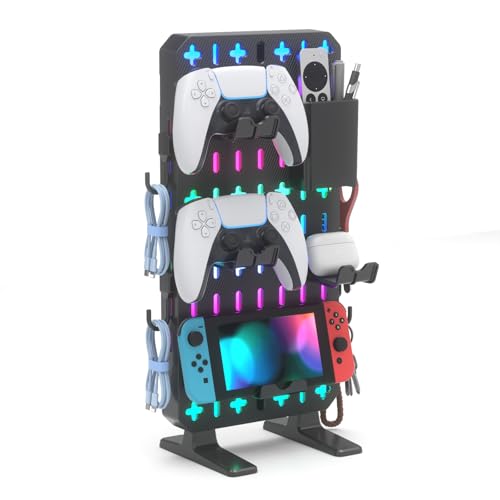
The KDD 6 in 1 RGB Gaming Desk Accessories is a practical solution for gamers and streamers who need to reclaim desk space without permanent modifications. This freestanding pegboard organizer combines a phone stand, three controller and headset hangers, a storage box, and five hooks into one compact unit. It’s designed for small desks, dorm rooms, and minimalist gaming setups where every inch matters.
Best suited for PC gamers, competitive players, casual gamers, and content creators who want to keep their gear within easy reach. The built-in RGB lighting features nine modes – including breathing, flashing, and static colors – controlled by a single button with memory function. While it won’t rival high-end addressable RGB ecosystems, it adds a pleasant glow that matches many gaming peripherals.
Performance here is about organization and convenience rather than raw responsiveness. The thick back panel provides good stability, and the protective base pads keep your desk scratch-free. The modular design lets you reposition the storage box, hooks, and hangers to suit your workflow. Fitting most PlayStation, Xbox, Switch, and Steam controllers plus standard gaming headsets, it ensures your most-used accessories are always within arm’s reach.
Build quality feels solid for the price – the plastic construction is typical for this category, but the freestanding base and sturdy back prevent tipping under normal use. Setup is truly no-drill: just unpack, place on your desk, and arrange the accessories. Cable management is indirect – you can weave cables through hooks or tuck them in the storage box, but there are no dedicated cable channels.
One limitation is that the compact base may not be ideal for very heavy headsets or multiple large controllers simultaneously, as the center of gravity can shift. Also, the RGB power requires a USB port, adding a cable. However, for most users, this organizer effectively clears desk clutter without the permanence of wall-mounted alternatives.
If you're a college gamer, streamer, or anyone with a tight desk setup, the KDD 6 in 1 RGB Gaming Desk Accessories offers an affordable way to tidy up while adding a touch of RGB flair. It's a practical buy for those who prioritize vertical storage and flexibility over maximum capacity.

Pros
- Reversible L-shape adapts to room layout and can become a two-person desk.
- Integrated power strip and USB ports reduce cable clutter and keep devices charged.
- RGB LED strip with app control offers vibrant lighting to enhance any gaming or streaming setup.
- Multiple storage options (shelf, pegboard, bag) help organize gear and accessories.
- Sturdy build with FSC-certified wood supports heavy monitors and PC equipment.
Cons
- Assembly may take time due to multiple components and cable management.
- The desk weight of 77 pounds makes it less portable after setup.
- Key tray and monitor shelf may not suit all ergonomic preferences.
The SEDETA L Shaped Gaming Desk is a comprehensive workstation designed to meet the needs of PC gamers, streamers, content creators, and home office users. This reversible desk features a large 96-inch surface, a built-in power outlet with 4 AC outlets and 2 USB ports, an RGB LED strip with app control, a monitor shelf, a keyboard tray, a pegboard, and multiple storage shelves. It's tailored for those who want a clean, organized gaming setup that can handle dual monitors, a PC tower, and accessories without clutter.
In real-world gaming scenarios, this desk offers ample space for a dual-monitor configuration, making it ideal for competitive gamers who need to track multiple displays during intense FPS or MOBA sessions. The integrated power hub simplifies charging your gaming mouse, keyboard, headset, or phone, while the on-off switch adds safety and convenience. The RGB LED strip, with over 60,000 colors and music sync feature, can create an immersive atmosphere that reacts to in-game action or your streaming background, enhancing both gameplay and broadcast quality.
Build quality is solid with an FSC-certified wood frame that supports heavy monitors and PCs without wobbling. The reversible design allows you to position the L-shape to fit your room, and it can even be converted into a long two-person desk for co-op gaming or collaborative work. The included monitor shelf elevates screens to eye level, reducing neck strain during long gaming sessions, while the keyboard tray offers ergonomic typing. The pegboard is a practical addition for hanging headphones, controllers, or mic arms, keeping your workspace tidy.
Setup requires patience due to the many parts, but the instructions are clear. Cable management is facilitated by the power strip location and under-desk storage bag, helping to keep wires out of sight. The desk's weight (77 pounds) means it's sturdy once assembled but not easy to move. Some users may find the keyboard tray too shallow or the monitor shelf limiting for larger monitors, but overall the customization options are generous.
Realistic limitations include potential assembly time and the need for careful planning to route cables effectively. The desk may also require additional cable ties for a truly clean look. However, for PC gamers, streamers, and esports players who prioritize organization and ambiance, this desk delivers exceptional value. It works well in dorm rooms, home offices, or dedicated gaming dens, offering a blend of functionality and style that supports both productivity and play.
Overall, the SEDETA L Shaped Gaming Desk is a practical choice for gamers and creators who want a feature-rich workstation without breaking the bank. Its reversible layout, integrated power, and RGB lighting make it a strong contender for anyone building a gaming PC setup or upgrading their streaming area.
Frequently Asked Questions
How do desktop organizers help improve a gaming setup?
Desktop organizers free up valuable surface space by shifting accessories into vertical storage. A freestanding pegboard keeps controllers, gaming headsets, and connecting cables within arm’s reach without requiring wall drilling. This layout prevents desk clutter and protects your sensitive hardware from accidental spills or drops during intense sessions.
What features should you look for in a gaming desk with built-in power?
Integrated power strips should include standard AC outlets and dedicated USB charging ports with a master safety switch. Having power directly on your desk allows you to run LED lighting and charge gamepads without messy floor wiring. Desks that also support dual monitors and reversible layouts give you the flexibility needed to configure a dedicated desktop for streaming and gaming cleanly.
Are compact calendar mouse mats suitable for competitive PC gaming?
Small calendar mouse mats work well for casual gaming, general productivity, and high-DPI mouse settings where arm sweep is minimal. However, competitive players who rely on low DPI sensitivity often require wider desk mats for broad tracking sweeps. The non-slip rubber base and waterproof fabric keep these compact pads stable and easy to clean in hybrid office setups.
Can freestanding pegboard organizers hold multiple gaming controllers?
Yes, modular desktop pegboards include specialized brackets designed to store multiple gamepads securely. Hangers on these units generally fit standard PlayStation, Xbox, and Nintendo Switch controllers alongside full-sized gaming headsets. The removable hooks and storage bins let you adjust the configuration based on your peripheral collection.
Why is a non-slip rubber base important on gaming mouse pads?
A high-density natural rubber base prevents the mat from sliding during rapid mouse flicks. Consistent friction between the pad and the desk keeps tracking reliable and avoids unexpected shifts in competitive games. Waterproof surface coatings and stitched borders also guard against edge fraying and moisture damage over time.





Write Your Review
No reviews yet. Be the first to share your experience!