


Managing component heat inside a desktop PC often comes down to radiator clearance, case airflow, and socket compatibility. High thermal output from desktop processors can lead to loud fan noise or throttling if cooling hardware cannot pull heat away efficiently. Selecting the best gaming pc water cooling system requires balancing chassis dimensions with pump flow rates, whether you prefer an all-in-one loop or a modular kit. Evaluating motherboard headers and mounting brackets prevents fitment delays before you upgrade your gaming PC.
Liquid cooling options include prefilled closed-loop setups and DIY kits featuring separate reservoirs and tubing. All-in-one designs like the ARCTIC Liquid Freezer III Pro 360 A-RGB emphasize leak prevention, socket brackets, and streamlined cable management. In contrast, modular setups like the DIY 240mm Water Cooling Kit from Bewinner require manual tube routing and pump voltage checks. Verifying physical case clearance alongside connector standards ensures reliable operation during demanding gaming sessions.
Pros
- Affordable entry point into custom water cooling for PC builders
- G1/4 fittings are industry standard, making expandability straightforward
- Good pump flow rate (600L/H) supports a basic CPU-only loop
- Compact 250ml reservoir saves space in mid-tower and full-tower cases
- Aluminum radiator provides decent heat dissipation for moderate overclocks
Cons
- Aluminum components may cause galvanic corrosion if mixed with copper or brass parts in the loop
- No included coolant, tubing, or detailed instructions – requires additional purchases
- Pump requires a 12V input with at least 2A current; using a non-standard adapter could cause damage
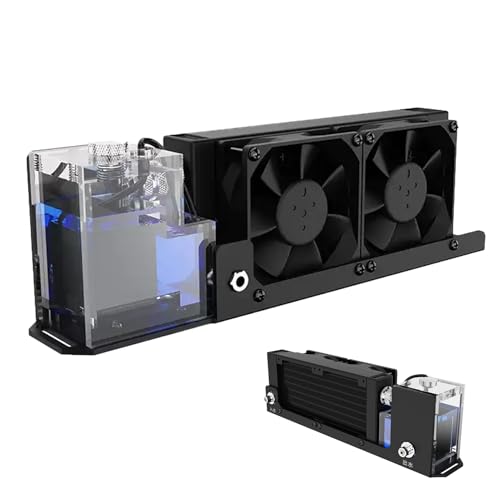
If you're a PC gamer or builder looking to dip your toes into custom water cooling without breaking the bank, the Zunate Water Cooling System is worth a closer look. This kit includes an aluminum radiator, two 2000RPM fans, a 600L/H pump, and a 250ml reservoir – all connected via G1/4 threaded fittings. It's designed for CPU cooling, making it a solid choice for overclockers and enthusiasts who want better thermal performance than a standard air cooler can provide. Whether you're building a showpiece gaming rig or upgrading your existing setup, this system offers a foundation for a custom loop at a budget-friendly price.
Performance is where this kit shines for its price point. The 160mm aluminum radiator paired with dual fans provides fast heat dissipation, which can help keep your CPU temperatures in check during long gaming sessions or rendering tasks. The pump's 600L/H flow rate is respectable for a single-component loop, ensuring coolant moves efficiently through the block and radiator. However, keep in mind that this is not a complete all-in-one solution – you'll need to source your own CPU water block, tubing, fittings, and coolant to finish the loop. For experienced builders, this flexibility is a plus; for novices, it may add complexity.
Build quality is decent given the price. The aluminum radiator and reservoir feel sturdy, and the G1/4 threads are precise, making it easy to attach standard fittings. The included fans spin at a fixed 2000RPM, delivering good airflow but without PWM control – so they'll run at full speed all the time unless you add a fan controller or resistor. The pump itself is rated for 100-240V (US plug included) but requires a 12V input at 2A from your power supply; using an incorrect adapter could damage it. Also, note that aluminum components can react with copper or brass parts in your loop, so plan your build accordingly to avoid corrosion.
Installation is straightforward if you're comfortable with custom water cooling. The pump has bottom mounting slots that let you screw it into a case floor or bracket. The reservoir sits on top of the pump, and you'll connect tubing between the pump, radiator, and CPU block (not included). Cable management is minimal since the fans and pump each have power cables. Make sure your case has enough clearance for the 160mm radiator – it's not huge, but it's wider than typical 120mm units. The lack of included instructions means you'll want to watch a few YouTube guides before starting.
As for limitations, the biggest is compatibility: this kit is aluminum, so you should stick with aluminum radiators, blocks, and fittings to avoid galvanic corrosion. Also, the fixed fan speed might produce more noise than PWM fans at low load. The pump's power requirement (12V, 2A) means you'll likely need a dedicated SATA or Molex to 12V adapter – check your PSU cables. Finally, the 250ml reservoir is on the smaller side, which may require more frequent topping off in a larger loop.
Overall, the Zunate Water Cooling System is a practical starting point for PC gamers and builders who want a custom loop on a budget. It's best suited for those who already have some experience with liquid cooling and are willing to source additional parts. For competitive gamers focused on core performance, a high-end air cooler or a reliable AIO may be simpler. But if you're into the aesthetics and performance gains of a custom loop, this kit gives you the essentials at a fair price – just plan your build carefully to avoid compatibility pitfalls.

Pros
- Efficient cooling performance for mid-range to high-end CPUs, keeping temperatures low during long gaming sessions.
- Quiet and smooth fan operation with PWM and ARGB control, suitable for both gaming and streaming setups.
- Customizable ARGB lighting adds a stylish touch to any gaming PC build, compatible with major motherboard software.
- Broad socket compatibility includes AMD AM5/AM4 and Intel LGA1700/1200, making it a versatile upgrade for many gamers.
- Easy installation with clear instructions and all necessary hardware except the LGA1700 bracket (sold separately).
Cons
- LGA1700 bracket is not included in the box and must be purchased separately if building an Intel 12th/13th/14th gen system.
- Pump noise can be noticeable at higher RPMs, though it's acceptable for most users under load.
- Radiator thickness may be tight in some compact cases; double-check clearance before purchasing.
If you're building a gaming PC and want reliable liquid cooling without breaking the bank, the Cooler Master MasterLiquid ML240L RGB V2 is a solid option. This 240mm all-in-one (AIO) CPU cooler combines a 3rd Generation dual chamber pump with two SickleFlow 120mm ARGB fans, aiming to keep your processor cool while adding a splash of customizable lighting. It's designed for PC gamers, esports players, content creators, and anyone who wants a tidy, efficient cooling solution for their gaming setup.
In terms of real-world performance, this cooler handles heat from mid-range to high-end CPUs well during gaming, streaming, and multitasking. The dual chamber pump improves coolant flow and reduces the risk of air bubbles, which helps maintain consistent thermal performance. The SickleFlow fans push decent airflow through the 240mm radiator, and their PWM control lets you balance noise and cooling. While you won't get the extreme cooling of a 360mm radiator, the ML240L is more than capable for most gaming builds, including overclocked CPUs up to around 200W TDP.
Build quality is a highlight here. The radiator uses reinforced aluminum fins, and the pump features industrial-grade EPDM seals that are more resistant to leaks over time. The fans have a refreshed design with quieter operation and improved RGB diffusion. The pump head itself has a cool ARGB logo ring that can be synced with your motherboard via 3-pin ARGB headers. Cable management is straightforward, with sleeved tubes and a flexible pump mount that fits most sockets.
Installation is fairly simple, especially for AMD systems. The pre-applied thermal paste and included backplate make the process quick. Note that Intel LGA1700 users will need to order a separate bracket (available on Amazon under part 603005870-GP), which is a minor inconvenience. The 240mm radiator fits in most mid-tower and full-tower cases, but you should measure your case's clearance for radiator thickness and fan height.
One limitation is that the pump can produce a slight whine at higher speeds, though it's not disruptive during gameplay. The fans are quiet at lower RPMs but can become audible under load. For users who prioritize near-silent operation, you might want to swap the fans later. Also, the ARGB lighting requires a 3-pin header on your motherboard; if you lack one, you'll need a separate controller.
Overall, the Cooler Master MasterLiquid ML240L RGB V2 offers a great balance of performance, aesthetics, and value for most gaming PC builders. It's especially suitable for those who want a reliable AIO cooler with RGB flair, and it works well for competitive gaming, streaming, or daily use. Just remember to grab the LGA1700 kit if you're on Intel's latest platform. For the price, it's a smart choice that won't let you down during long sessions.
The MasterLiquid ML240L RGB V2 uses a 3rd Generation dual chamber pump that separates the coolant into two chambers, reducing turbulence and improving heat transfer efficiency. This design helps maintain consistent cooling even under sustained loads. The 240mm radiator with a fin density optimized for static pressure fans pairs well with the SickleFlow 120mm fans, which push air through the radiator at up to 62 CFM. In practice, this cooler can handle CPUs like the Ryzen 7 7700X or Intel Core i5-13600K without thermal throttling in most gaming scenarios. The PWM control allows you to set fan curves for quiet operation at idle and higher speeds when gaming. While it won't match a premium 360mm AIO for extreme overclocking, it's ample for mainstream gaming and streaming builds.
Cooler Master has improved the durability of this AIO with industrial-grade EPDM (ethylene propylene diene monomer) seals on the pump and radiator connections, which better resist aging and leakage. The 240mm radiator is made of aluminum with a black painted finish, and the tubes are braided nylon for a clean look. The SickleFlow fans have a refreshed design with a semi-transparent frame that diffuses the ARGB LEDs evenly. The pump head features a rotating cap with the Cooler Master logo, and the ARGB ring can be controlled via motherboard software like ASUS Aura Sync, Gigabyte RGB Fusion, MSI Mystic Light, or ASRock Polychrome. The 4-pin PWM fan headers and 3-pin ARGB cables are standard, making cable management simple. Just be aware that the pump's ARGB cable is fixed, so you'll need to route it carefully.
This cooler supports Intel LGA1200, LGA115x, LGA1366, LGA2011, and LGA2066 sockets, as well as AMD AM5, AM4, AM3+, FM2+, and more. The AM5/AM4 mounting uses the existing motherboard backplate, which simplifies installation. For Intel LGA1700 (Alder Lake, Raptor Lake), you must purchase the separate bracket (part 603005870-GP). The package includes a tube of thermal paste already applied to the copper cold plate, so you can mount it straight out of the box. The mounting hardware is straightforward, with clear instructions. The 240mm radiator is 277mm long and 27mm thick (plus fan thickness), so it fits in most mid-tower cases like the Cooler Master MasterBox, Corsair 4000D, or NZXT H5. Check your case's radiator support before buying. The pump height is low, so it won't interfere with tall RAM modules. Overall, installation is beginner-friendly, with the only minor hurdle being the separate LGA1700 bracket.
Pros
- Comprehensive all-in-one DIY kit for custom water cooling, ideal for PC builders.
- Copper blocks provide efficient heat dissipation for CPU and GPU.
- Quiet pump and fans help maintain a low-noise gaming environment.
- Transparent reservoir allows you to monitor coolant flow and levels easily.
- Included accessories simplify installation for both new and experienced builders.
Cons
- Assembly requires some technical knowledge and patience, not for beginners.
- Limited to 240mm radiator size, which may not fit all cases or high-end overclocking needs.
- Some users may find the included tubing and fittings less durable than premium alternatives.
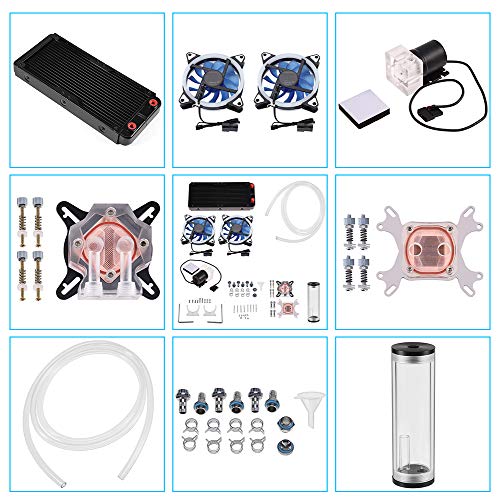
This Bewinner DIY 240mm Water Cooling Kit is a complete liquid cooling solution designed for PC gamers, streamers, esports players, and gaming setup builders who want to take their system cooling to the next level. It's a custom loop kit that includes a 240mm radiator, CPU and GPU water blocks, a pump reservoir combo, LED fans, and all necessary fittings and tubing. This kit is best suited for enthusiasts who enjoy building and customizing their own water cooling systems for better thermal performance and a cleaner aesthetic.
In real-world gaming and streaming scenarios, this kit can significantly improve cooling efficiency compared to standard air coolers or all-in-one liquid coolers. The copper base on both the CPU and GPU blocks ensures excellent heat transfer, which helps maintain lower temperatures during long gaming sessions or while streaming. The 9W pump with a 600 L/h flow rate provides reliable water circulation, and the 240mm radiator with dual LED fans offers good heat dissipation with relatively low noise. While it's not the most powerful pump on the market, it's more than adequate for most mid-range to high-end gaming builds.
Build quality is a mixed bag. The copper blocks feel solid and well-machined, and the acrylic reservoir is clear and durable. However, the included tubing and fittings are basic and may not be as robust as those from premium brands. The LED fans are functional but their lighting is not addressable, so you won't get advanced RGB customization. For builders focused on aesthetics, this might be a limitation. That said, the kit includes all-a comprehensive set of accessories, including hose clamps, plugs, and brackets, making the installation process straightforward for those with some experience.
Ease of setup is moderate. This is not a plug-and-play solution; it requires planning and some technical skill to assemble and install the loop. You'll need to mount the radiator, attach the water blocks, connect the tubing, and fill the reservoir. The instructions are basic, so beginners may find it challenging. However, for PC building enthusiasts, this kit offers a rewarding DIY experience. Maintenance involves periodically checking coolant levels and cleaning the system to prevent algae or blockages, which is typical for custom loops.
One realistic limitation is the radiator size. A 240mm radiator is suitable for many cases, but it may not provide enough cooling capacity for heavily overclocked CPUs or GPUs in very demanding setups. Additionally, the pump and reservoir combo is a bit bulky, which could complicate placement in smaller cases. The lack of RGB software control might also disappoint gamers who want to sync lighting with their other components.
Overall, this Bewinner DIY 240mm Water Cooling Kit is a solid choice for PC gamers, streamers, and esports players who want to dive into custom water cooling without breaking the bank. It's ideal for gaming setup builders who enjoy hands-on projects and want improved thermal performance and a unique look for their rig. If you're comfortable with basic PC building and want a cost-effective entry into custom loops, this kit delivers good value. For those seeking plug-and-play convenience or high-end performance, consider a premium all-in-one cooler or a more advanced custom loop kit.

Pros
- Excellent cooling performance for high-end gaming CPUs, with a thick 38mm radiator and high-static-pressure P12 Pro fans.
- Integrated VRM fan helps keep motherboard voltage regulators cool during sustained loads, boosting system reliability.
- Offset mounting improves heat transfer on both Intel and AMD platforms, reducing CPU temperatures in real-world gaming scenarios.
- Cable management is a standout feature - only one visible cable for all fans, making builds cleaner and easier to manage.
- Contact frame design ensures even pressure distribution, potentially extending CPU lifespan and reducing risk of bending.
Cons
- Thicker 38mm radiator may not fit in all cases, especially those with limited clearance for top or front mounting.
- PWM cables integrated into tubing could complicate replacement or custom loop upgrades if needed in the future.
- A-RGB lighting is limited to pump and fans; some users may prefer more extensive RGB coverage on the radiator itself.
The ARCTIC Liquid Freezer III Pro 360 A-RGB is a purpose-built all-in-one CPU cooler that targets serious PC gamers, streamers, and custom PC builders. This 360mm AIO combines a thick 38mm radiator, ARCTIC's P12 Pro fans, and a unique integrated VRM fan to deliver reliable thermal performance even under the sustained loads of competitive gaming or live streaming. The included contact frame for Intel LGA1851 and LGA1700 ensures even pressure distribution, which not only improves heat transfer but also helps protect your CPU from long-term stress.
For gaming PCs, this cooler excels at taming high-TDP processors during extended sessions. The native offset mounting for both Intel and AMD platforms positions the cold plate directly over the CPU's hotspot, making it an effective choice for overclocked gaming rigs. The P12 Pro fans offer a strong balance of airflow and silence; they move plenty of air at higher speeds when needed but stay remarkably quiet at lower RPMs, so you won't hear them during casual gameplay or desktop work. The integrated VRM fan is a thoughtful addition for streamers and content creators who push their systems hard, as it actively cools the voltage regulators around the CPU socket.
Build quality is solid across the board. The radiator feels sturdy with its reinforced frame, and the sleeved tubing is both flexible and durable. One of the cooler's biggest practical advantages is the integrated cable management: the PWM cables for all three fans are routed inside the tubing sleeve, so you only have to manage a single, clean cable to the motherboard. This simplicity makes installation and cable routing much easier compared to traditional AIOs with multiple fan cables, especially in compact gaming cases where airflow organization is critical. The pump is PWM-controlled as well, allowing system software to fine-tune performance versus noise.
Setting up the Liquid Freezer III Pro 360 A-RGB is straightforward, thanks to included mounting hardware for Intel LGA1851/1700 and AMD AM5/AM4. The contact frame design removes guesswork from mounting pressure. However, the 38mm radiator thickness means you should double-check case compatibility: many mid-towers can accommodate a 360mm radiator, but clearance for the added thickness depends on your case layout and whether you top-mount or front-mount it. Also, because the fan cables are permanently embedded in the tubing, replacing a fan requires more effort than usual.
A realistic limitation is that this AIO is best suited for users who value a clean, functional build over extensive RGB customization. While the pump and fans feature A-RGB lighting that can sync with most motherboards, the radiator itself doesn't have integrated LEDs. Some gamers who prefer a fully illuminated setup might look for more flashy options. Additionally, the fan cable integration means you cannot easily swap fans for other brands without cutting into the tubing sleeve, which is a minor inconvenience for modders.
Overall, the ARCTIC Liquid Freezer III Pro 360 A-RGB is a smart choice for PC gamers, streamers, and content creators who prioritize cooling performance, reliability, and build simplicity. Its integrated cable management and VRM fan set it apart from many competitors in the same price range. If your case has the clearance for a 38mm radiator, this cooler delivers robust thermal performance and a clean aesthetic that will complement any gaming setup, from competitive esports rigs to quiet home-office gaming machines.
Frequently Asked Questions
What is the difference between an AIO cooler and a DIY water cooling kit?
An all-in-one cooler is a factory-sealed loop requiring no fluid refills, while a DIY kit includes separate blocks, reservoirs, and tubing assembled manually. Units like the CoolerMaster MasterLiquid ML240L RGB V2 arrive ready to mount with durable EPDM seals. Modular DIY kits require custom tubing connections and fluid management, providing flexibility alongside added installation complexity.
Will a 360mm liquid cooler fit inside standard PC cases?
A 360mm cooler requires a case with three contiguous 120mm fan mounts and sufficient internal clearance. The ARCTIC Liquid Freezer III Pro 360 A-RGB features a 38mm thick radiator that demands extra clearance above motherboard heatsinks. Checking your chassis dimensions beforehand prevents clearance issues when you setup a gaming PC.
What power input does a standalone water cooling pump require?
Standalone water cooling pumps typically require a stable 12V direct current power supply with at least 2A current delivery. The Water Cooling System, Aluminum with 2 Fans notes that voltage over 12V can cause motor or fan burnouts. Always verify power adapter ratings to prevent hardware damage from non-standard voltages.
How do contact frames and offset mounts assist cooling?
Contact frames distribute mounting pressure evenly across CPU heat spreaders to prevent socket bending, while offset mounts position the cold plate over core hotspots. The ARCTIC Liquid Freezer III Pro includes dedicated contact frames for Intel LGA1700 and LGA1851 sockets alongside native offset mounting for AMD AM4 and AM5 processors. This alignment maximizes direct heat transfer into circulating liquid.
Is a liquid cooling loop necessary for new PC gamers?
Liquid cooling is not strictly mandatory, but it provides quiet heat dissipation under sustained loads. Beginners learning how to get into PC gaming often favor factory-sealed AIO units over complex custom setups. A sealed 240mm radiator provides reliable thermal control without the need for manual coolant refills.








Write Your Review
No reviews yet. Be the first to share your experience!