


Desk clutter can quickly turn an otherwise clean battlestation into a frustrating tangle of loose cables and displaced gear. Proper surface organization gives your mouse ample room to glide freely while keeping your most important daily peripherals within arm’s reach. Adding the best gaming setup accessories allows you to reclaim valuable desktop real estate through space-saving compact layouts, dedicated controller docks, and customizable lighting. When you balance functional hardware mounts with supportive ergonomic desk seating, your overall physical comfort and setup workflow improve noticeably.
Power delivery and cable routing also dictate how smoothly your gaming area functions during extended sessions. Many modern peripherals feature tri-mode wireless links, Bluetooth switching, and built-in USB hubs that prevent loose cords from tangling across your mouse mat. Physical build quality matters just as much, since weighted bases and non-slip rubber feet keep expensive headsets and gamepads upright. Pairing durable materials like double-shot keycaps with practical audio and keyboard gear establishes a clean, cohesive space built for reliable daily play.

Pros
- Excellent build quality with premium weight and finish.
- Satisfying, creamy thocky sound out of the box.
- Versatile connectivity options and long battery life.
- Hot-swappable PCB for easy switch upgrades.
- Vibrant RGB with multiple effects and knob control.
Cons
- Side-printed keycaps may take time to adjust to for some users.
- Plastic chassis, not premium metal.
- Software customization may require driver download.
The AULA F75 Pro is a 75% wireless mechanical keyboard that blends compact design with high-end features aimed at PC gamers, competitive players, streamers, and setup enthusiasts. Its 81-key layout saves desk space while retaining arrow keys, and the included multifunction knob adds convenient control over volume and RGB settings. With tri-mode connectivity including Bluetooth 5.0, 2.4GHz wireless, and USB-C, this keyboard works with PCs, consoles, tablets, and phones, making it a versatile choice for multi-device users.
Typing feel is where the F75 Pro truly shines. It comes with pre-lubed LEOBOG Reaper switches that produce a creamy, thocky sound often associated with higher-end custom boards. The gasket mount structure and five layers of internal foam reduce hollow noise and create a soft, consistent keystroke that’s satisfying for both gaming and daily typing. For those who want to experiment, the hot-swappable PCB supports 3-pin and 5-pin switches, so you can easily swap in different switches without any soldering.
Battery life is another strong point. The built-in 4000mAh battery provides days of use even with RGB enabled, and charging via USB-C is fast. Wireless performance is rock-solid with negligible latency, making it suitable for competitive gaming where every millisecond counts. The side-printed PBT keycaps are durable and resist shine, while their translucent legends let the RGB backlight glow through attractively. The keyboard also includes a WIN lock key to prevent accidental presses during intense matches.
Build quality feels solid despite the plastic chassis. The keyboard has a satisfying weight that keeps it planted on the desk, and the included braided USB-C cable adds reliability. Setup is straightforward: plug in or pair via Bluetooth, and the keyboard is ready. Software customization via the AULA driver allows macro programming, lighting effects, and key remapping, though it’s not required for basic use. The multifunction knob is a highlight, letting you adjust brightness or volume and cycle through lighting presets with a simple press and twist.
Some limitations exist. The side-printed legends may take a short adjustment period for touch typists used to top-printed keys. The plastic construction, while sturdy, lacks the premium feel of metal cases found in pricier boards. And while the software is functional, it’s not as polished as some competitors’ offerings. However, considering the price, these trade-offs are minor.
Overall, the AULA F75 Pro offers an impressive typing experience, strong wireless performance, and extensive customization in a compact layout. It’s an excellent choice for PC gamers who want a thocky, responsive board without breaking the bank, and it works well for streamers, content creators, and anyone building a clean RGB setup. If you’re looking for a feature-packed mechanical keyboard that delivers on sound and feel, the F75 Pro is a smart buy.
In gaming scenarios, the AULA F75 Pro delivers fast, consistent input thanks to its pre-lubed Reaper switches and stable gasket mount. The 2.4GHz wireless connection offers near-zero latency, ideal for FPS, MOBA, and fast-paced titles. The 75% layout keeps essential keys within easy reach, and the dedicated macro programming through software can give competitive players an edge. The multifunction knob allows quick volume adjustments without leaving the game, and the anti-ghosting and N-key rollover ensure every press registers accurately during intense moments.
The keyboard’s plastic chassis feels sturdy and heavier than expected, thanks to internal foam and a steel plate. The PBT keycaps are thick and resistant to wear, with side printing that won’t fade over time. The USB-C port is recessed for cable stability, and the bottom has rubber feet and kickstands for typing angle adjustment. Overall, the F75 Pro is built to withstand daily use and moderate travel, though it lacks the premium weight of metal-framed boards.
The F75 Pro features bright, smooth RGB backlighting with 16.8 million colors and 16 preset effects, plus 10 music-sync modes via software. The side-printed keycaps allow the light to shine through the legends while keeping the top surface clean-looking. The multifunction knob makes it easy to cycle effects, adjust brightness, and toggle between gaming and office modes. Customization through the AULA driver includes per-key lighting remapping and macro recording, giving users control over their setup’s look and functionality.
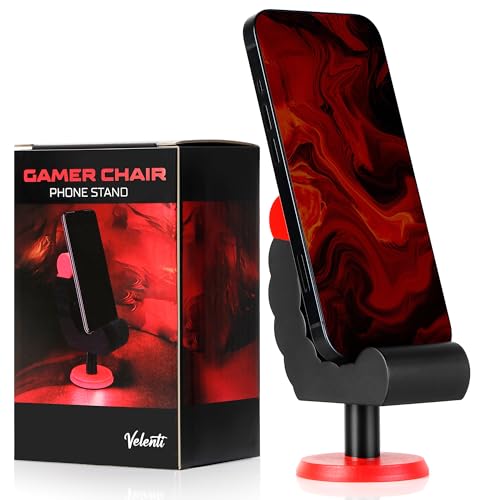
Pros
- Fun, gaming-themed design that complements any gaming setup.
- Sturdy build quality for reliable phone holding.
- Compact footprint saves desk space.
- Works with a wide range of devices up to 19 cm tall.
- Affordable price point for a practical desk accessory.
Cons
- Limited to holding devices up to 19 cm, so larger tablets may not fit.
- No adjustable viewing angle, which may not suit all preferences.
- Design may be too niche for users seeking a minimalist look.
The VELENTI Gamer Chair Phone Stand is a clever desk accessory designed for PC gamers, streamers, and gaming setup builders who want to keep their smartphone or Kindle within easy reach. Shaped like a miniature gaming chair, this phone holder adds a touch of personality to your desktop while serving a practical purpose. It's a simple yet effective way to keep an eye on notifications, messages, or streaming alerts without having to pick up your phone.
This phone stand is best suited for casual and competitive gamers, esports players, and content creators who spend long hours at their desk. It's also a great fit for college gamers or work-from-home users who want to stay connected without interrupting their workflow. The holder accommodates devices up to 19 cm tall, which covers most modern smartphones and even some e-readers like the Kindle.
In terms of real-world performance, the VELENTI stand excels at keeping your phone visible and accessible. It's not about low-latency or high refresh rates, but rather about desk convenience and reducing distractions. During long gaming sessions, you can quickly glance at incoming calls or messages without breaking focus. The sturdy construction ensures your device stays put, even if you bump the desk during an intense match.
Build quality is solid for a product in this price range. The stand is made from durable materials that feel robust enough to withstand daily use. Its compact size means it won't take up much space on your desk, which is a plus for gamers with limited real estate. The gaming chair design is fun and eye-catching, making it a conversation starter in any gaming room or streaming setup.
Setup is as simple as placing the stand on your desk and dropping your phone into the slot. There's no software to install, no cables to manage, and no maintenance required. Just wipe it clean occasionally to keep it looking fresh. One realistic limitation is that the stand doesn't offer adjustable viewing angles, so you're stuck with whatever angle the design provides. Also, larger tablets or phones with bulky cases may not fit securely.
Overall, the VELENTI Gamer Chair Phone Stand is a practical and affordable accessory for anyone looking to organize their gaming desk. It's not a must-have for performance, but it adds a nice touch of convenience and personality. If you're a PC gamer, streamer, or setup enthusiast who wants to keep your phone handy without clutter, this stand is a solid choice. It also makes a fun gift for fellow gamers who appreciate unique desk accessories.

Pros
- Affordable way to add ambient RGB lighting to any gaming desk or TV setup
- Music sync works well for game audio and playlists, enhancing immersion without extra hub
- Both app and remote control make it easy to switch modes or dim lights mid-game
- USB power and included line switch simplify installation and daily use
Cons
- Music sensor may pick up ambient noise, causing occasional flickering in quiet scenes
- Light bar size is relatively short (12.8 inches), so it works best as accent lighting rather than full backlight for large monitors
- App requires smartphone and setup may feel basic for users wanting advanced automation like screen mirroring
The Ledagic LED Light Bar is a compact, USB-powered RGB+W light strip designed to add ambient backlighting to your gaming monitor, TV, or desk area. It’s targeted at PC gamers, streamers, casual players, and RGB setup enthusiasts who want an easy way to improve their gaming atmosphere without breaking the bank.
For real-world use, the built-in music sync feature is the standout. It picks up audio from your games, movies, or playlists and changes colors in real time. While it’s not as precise as high-end sound-reactive systems, it’s plenty fun for casual sessions and creates a lively vibe in a dorm room or streaming setup. The 64+ modes include strobe, gradient, chasing, and more, and you can switch between colorful IC+RGB effects and clean white light for reading or work. Brightness is adjustable from 1% to full, so you can tone it down for late-night gaming without eye strain.
Build quality is decent for the price. The plastic housing feels light but sturdy, and the 60-inch USB cable gives enough reach to route neatly behind a monitor or TV. Powering it via a TV or PC USB port means it turns on and off with your device – a nice convenience. The included remote works reliably from about 10 feet, and the LotusLamp X app offers color picking, timer settings, and mode selection. There’s also a small button on the USB plug for quick on/off control, which is handy if you misplace the remote.
Setup is practically plug-and-play: stick the light bar where you want it (it has adhesive backing), plug into any USB port, and start experimenting with modes. No software install or hub required. Cleaning is simple – just wipe the bar with a dry cloth. The main limitation is the size: at 12.8 inches, it works best as a localized accent light rather than a full backlight for a 27-inch or larger monitor. For smaller displays or as a desk lamp alternative, it’s a solid fit.
Overall, the Ledagic LED Light Bar offers good value if you’re after a cheap, easy way to add reactive lighting to your PC gaming setup. It’s especially suited for college gamers, streamers on a budget, or anyone wanting to dip their toes into RGB without complex wiring. While it won’t replace high-end addressable strips, it delivers reliable performance for the price and fits neatly into most gaming desks or TV entertainment centers.


Pros
- Exceptional value for a complete gaming bundle at this price point
- Responsive keyboard with satisfying key feel and customizable RGB modes
- Lightweight ambidextrous mouse with smooth glide and adjustable DPI
- Comfortable headset with decent sound quality and flexible microphone
- Wide platform compatibility including PC, consoles, and handhelds
Cons
- Membrane keyboard lacks the tactile feedback of mechanical switches
- Headset microphone clarity is average and may not suit serious streamers
- Mouse has no side buttons, limiting customization for some games
The Orzly Hornet RX-250 is a budget-friendly 4-in-1 gaming bundle that gives you everything you need to start gaming without spending a fortune. It includes a full-size membrane keyboard, an ambidextrous mouse, a stereo headset, and a cloth mouse pad. This set is designed for casual gamers, console players, and anyone building their first gaming setup who wants a quick, all-in-one solution.
The keyboard is the centerpiece, offering a 104-key layout with 19-key rollover and anti-ghosting. While it uses membrane switches rather than mechanical ones, the keys feel smooth and responsive for both typing and gaming. The RGB backlighting has multiple modes, letting you customize the look to match your setup. It's also spill-resistant, which adds peace of mind during late-night sessions.
The mouse is lightweight at 90 grams and works well for both left- and right-handed users. You can cycle through four DPI settings (1200, 1600, 2400, 3200) with a dedicated button, making it easy to adjust sensitivity for different games. The auto-rotating RGB lighting adds a nice visual touch. However, there are no side buttons, so you won't get extra programmable inputs.
The headset delivers surprisingly good stereo sound with decent bass and clear highs. The aluminum frame and suspended headband keep it comfortable for long gaming sessions, and the cushioned ear cups provide good noise isolation. The microphone folds up when not in use and reduces background noise, though audio quality is average for voice chat. In-line volume controls are convenient for quick adjustments.
Setup is truly plug-and-play: just connect the USB cables and you're ready to go. The keyboard and mouse work on PC, PS4, Xbox, Steam Deck, and other devices without any drivers. Build quality is acceptable for the price, though some users report key fading or headset durability issues over time. The mouse pad is a generous size with a non-slip rubber base, helping with smooth mouse movement.
Overall, the Orzly Hornet RX-250 is a solid choice for budget-conscious gamers, console players, or anyone who needs a complete setup in one box. It's not meant for competitive esports due to the membrane keyboard and average mic, but for casual gaming, school, or work-from-home use, it delivers great value. If you're looking for an affordable way to upgrade your gaming desk, this bundle is worth considering.
For casual and entry-level gaming, the Orzly Hornet RX-250 performs admirably. The keyboard's anti-ghosting and 19-key rollover ensure that rapid key presses register correctly in games like Fortnite, Call of Duty, or League of Legends. The membrane switches are quiet and smooth, though they lack the tactile click of mechanical boards. The mouse's adjustable DPI allows you to switch between fast flick shots and precise aiming, and the 1000 Hz polling rate (typical for budget mice) keeps input lag low. The headset's stereo sound provides good directional audio for footsteps and gunfire, though the bass is more thumping than nuanced. Overall, this bundle handles most mainstream games well, but competitive players may want dedicated peripherals.
Comfort is a strong point for this bundle, especially considering the price. The keyboard has foldable feet for adjustable typing angle and a standard layout that reduces wrist strain. The mouse is ambidextrous and lightweight, making it easy to grip for hours without fatigue. The headset's suspended headband and soft ear cups distribute weight evenly, and the aluminum frame keeps it sturdy yet light. The ear cups are large enough to fit most ears, though users with larger ears may find them snug. The microphone is positioned close to the mouth, which some may find intrusive, but it stays out of the way when flipped up. For long gaming sessions or work-from-home use, the bundle offers decent ergonomics.


Frequently Asked Questions
What makes a 75% mechanical keyboard useful for a gaming setup?
A 75% keyboard layout preserves dedicated arrow keys and function rows while eliminating the numeric keypad to save desk space. This compact form factor gives your mouse hand extra clearance for broad sweeps during fast gameplay. Models like the AULA F75 Pro also feature hot-swappable switch sockets, letting you swap 3-pin or 5-pin switches without soldering.
Can headset stands safely hold multiple game controllers at once?
Yes, several dedicated stands feature modular hooks specifically built to hold gamepads alongside your primary gaming headset. The KDD RGB Headset Stand includes a rotatable headphone hanger and detachable hooks that can cradle two controllers with a headset or up to four controllers total. Its weighted base and non-slip rubber pads keep the entire assembly stable on flat surfaces.
How do programmable macro pads assist streamers and PC gamers?
Macro pads allow you to trigger multi-action sequences, OBS scene changes, or complex shortcut macros with a single physical press. Keypads like the VSD M18 offer 15 customizable LCD keys alongside physical buttons, letting you assign custom icons or GIF animations to specific commands. This dedicated hardware streamlines streaming controls and productivity shortcuts without crowding your primary keyboard.
Do desktop RGB light bars require a separate power adapter?
No, many ambient light bars run directly on standard USB power from your computer, monitor, or console port. The Ledagic light bar uses a 60-inch USB cord for direct placement behind displays without needing a standalone wall brick. You can control brightness levels, chasing patterns, and audio-reactive lighting using an included remote control or companion smartphone app.
What factors should you evaluate before buying the Best Gaming Setup Accessories of 2026?
Focus on connection flexibility, desk footprint, and port compatibility across your peripheral collection. Selecting multi-port accessories with wireless charging or USB passthrough keeps cords neat, while pairing your layout with heavy-duty gaming chairs ensures sustained physical comfort. Always check specific manufacturer specs, such as port charging limitations or switch compatibility, before finalizing your setup.





Write Your Review
No reviews yet. Be the first to share your experience!