


Balancing component budgets against modern system memory demands often leaves desktop buyers second-guessing their hardware choices. Many players struggle to determine whether a complete prebuilt setup or a targeted graphics card upgrade offers the cleanest path to steady gaming. Reviewing the best geforce rtx 3060 12 gb pcs and compatible graphics hardware provides a reliable starting point for anyone who needs generous 12GB VRAM without paying flagship prices. If you are deciding whether to assemble your own rig or buy preassembled, a step-by-step gaming PC building guide can clarify how each component fits into your overall budget.
Chassis size, airflow, and power connections also play a major role in keeping your setup running reliably. Prebuilt options like the STGAubron tower arrive with a Ryzen 5 CPU, 16GB of DDR4 memory, and Windows 11 Home installed. Standalone cards from msi and GIGABYTE provide straightforward upgrade paths for existing desktop towers that already have suitable power supplies. Checking your physical case clearance before buying ensures you select the right configuration for your desk space.


Pros
- Generous 12GB VRAM for modern games and creative tasks.
- Quiet and effective cooling with zero-frozr fan stop.
- Supports HDMI 2.1 for 4K 120Hz displays and VRR.
- Solid 1080p and capable 1440p gaming performance.
- Compact size fits smaller cases easily.
Cons
- Not ideal for 4K gaming at high settings in demanding titles.
- Limited ray tracing performance compared to higher-tier RTX cards.
- Single 8-pin power connector may limit overclocking headroom.
The MSI Gaming GeForce RTX 3060 12GB is a solid mid-range graphics card aimed at PC gamers who want smooth 1080p and 1440p gaming without breaking the bank. It features NVIDIA's Ampere architecture, 12GB of GDDR6 VRAM, and a boost clock of 1807 MHz. This card is well-suited for competitive esports titles like Valorant, CS:GO, and Overwatch 2, where high frame rates and low latency matter most. It also handles AAA games at high settings with ease, making it a versatile choice for both casual and dedicated gamers.
For streamers and content creators, the 12GB VRAM provides extra headroom for multitasking, running OBS, and editing 1080p video. The card supports NVIDIA Broadcast features like noise removal and background blur, which can improve stream quality without extra hardware. While it's not a powerhouse for 4K gaming, it can handle lighter titles and older games at 4K, and it's great for 1440p gaming where you want a balance of visual fidelity and performance.
Build quality is solid with MSI's dual Torx 3.0 fan design, which uses alternating fan blades to increase airflow and reduce noise. The zero-frozr technology stops the fans entirely under low load, making the card silent during desktop use or light gaming. The metal backplate adds rigidity and helps with heat dissipation. At just 9.3 inches long, this card fits into most mid-tower cases easily, even those with limited space.
Connectivity is modern with three DisplayPort 1.4 outputs and one HDMI 2.1 port. HDMI 2.1 is a nice addition for connecting to 4K TVs at 120Hz or using variable refresh rate (VRR) monitors. The card uses a single 8-pin PCIe power connector, which keeps cable management simple. It draws around 170W under load, so a 550W-650W power supply is recommended for most builds.
Software-wise, MSI's Afterburner and the NVIDIA GeForce Experience app give you control over overclocking, fan curves, and game optimization. The card also supports NVIDIA Reflex for lower latency in competitive games and DLSS 2.0 for improved performance in supported titles. Realistically, this card is best for gamers building a new mid-range PC or upgrading from an older GTX 1060 or RX 580.
Overall, the MSI RTX 3060 12GB is a practical choice for anyone looking to play modern games at high settings, stream without hiccups, or start content creation. It's not a high-end halo product, but it delivers reliable performance where it counts. For 1080p and entry-level 1440p gaming, it's a smart buy that balances cost, features, and longevity.

Pros
- Strong 1080p and 1440p gaming performance with RTX 3060 12GB.
- Large 1TB SSD for plenty of game storage.
- WiFi 6 and Bluetooth 5.2 for modern wireless connectivity.
- RGB fans and included peripherals enhance desk aesthetics.
Cons
- Only 16GB RAM may require an upgrade for heavy multitasking or content creation.
- Case design may feel basic compared to premium PC builds.
- Limited upgrade room due to compact tower dimensions.
The STGAubron Gaming PC Desktop is a pre-built system designed for gamers who want a hassle-free entry into PC gaming without the need to assemble components themselves. Powered by an AMD Ryzen 5 5500 processor and an NVIDIA GeForce RTX 3060 with 12GB of GDDR6 memory, this machine is built to handle popular titles like Fortnite, Call of Duty Warzone, GTA V, and Elden Ring at smooth frame rates. It's an ideal choice for casual gamers, competitive players, streamers, and even college gamers who need a reliable desktop for both gaming and everyday tasks.
In real-world gaming scenarios, the RTX 3060 delivers excellent 1080p performance and can even tackle 1440p gaming in many titles. The Ryzen 5 5500's boost clock of 4.2GHz ensures responsive gameplay with minimal input lag, which is crucial for fast-paced esports titles like Valorant and Overwatch. The 16GB of DDR4 RAM is sufficient for most modern games, though power users may want to consider an upgrade for heavy multitasking or content creation. The 1TB SSD provides ample space for a large game library and quick load times, reducing waiting and keeping you in the action.
Build quality is practical for a pre-built system. The tower features a compact design with four RGB fans that not only add a customizable lighting element but also maintain good airflow to keep components cool during long gaming sessions. Connectivity is a strong point, with WiFi 6 and Bluetooth 5.2 built in, allowing for lag-free online play and easy connection to wireless peripherals. The included RGB gaming mouse and keyboard are decent for getting started, though enthusiasts may eventually want to upgrade to more specialized gear.
Setup is straightforward: unbox, plug in, and you're ready to game on Windows 11 Home. The system comes with a 1-year parts and labor warranty and free lifetime tech support, which adds reassurance for buyers who may not be comfortable troubleshooting hardware issues. Cable management inside the case is tidy for a pre-built, and the compact size means it won't dominate your desk space.
One realistic limitation is the RAM configuration. While 16GB is standard for gaming, users who plan to stream, edit video, or run multiple applications simultaneously may find it limiting. Additionally, the case's compact nature could make future upgrades a bit more challenging compared to a full-tower build. The included peripherals are functional but basic, so serious gamers may want to invest in a higher-quality mouse and keyboard over time.
Overall, the STGAubron Gaming PC is a solid choice for gamers who want a ready-to-run system with strong 1080p performance, modern wireless connectivity, and a touch of RGB style. It's well-suited for casual and competitive gaming, streaming, and everyday use, making it a versatile option for a variety of users. If you're looking for a pre-built that balances performance and convenience without breaking the bank, this desktop deserves a spot on your shortlist.
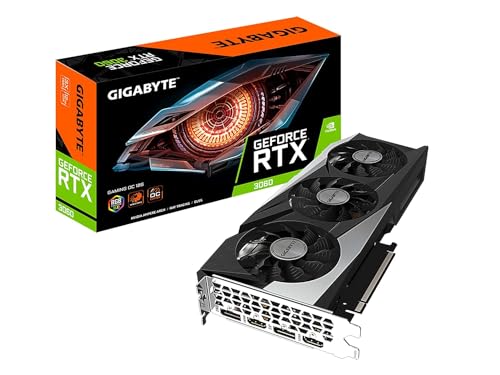
Pros
- Generous 12GB VRAM handles modern games and multitasking without choking
- Effective triple-fan cooling system runs quiet under load in a well-ventilated case
- Ray tracing and DLSS support future-proofs for newer titles
- Solid build quality with a metal backplate and dual BIOS switch for custom tuning
Cons
- Requires a 500W or higher PSU and dual 8-pin power connectors, which may necessitate a power supply upgrade for older builds
- Physical size (11.1 x 4.6 inches) may not fit smaller or compact PC cases without careful measurement
- Stock overclock out of the box is modest; enthusiasts may want to tweak settings for extra performance
The GIGABYTE GeForce RTX 3060 Gaming OC 12G (REV2.0) is a mid-range graphics card built around NVIDIA's Ampere architecture. Designed for PC gamers who want a balance of performance and value, this card brings 12GB of GDDR6 VRAM, second-gen RT Cores, and third-gen Tensor Cores to the table. It’s a solid choice for competitive gamers, casual players, streamers, and content creators who need reliable 1080p or entry-level 1440p performance without breaking the bank.
In real-world use, the RTX 3060 handles popular esports titles like Valorant, CS:GO, and Fortnite at high frame rates with ease. It also delivers playable ray-traced effects in games like Cyberpunk 2077 when combined with DLSS. The triple WINDFORCE cooling system, featuring alternate-spinning fans and composite heat pipes, keeps temperatures well under control during long gaming sessions. Many users will appreciate the card’s low noise levels under load, especially when gaming with a headset or streaming on Twitch.
Build quality is commendable for this price tier. The metal backplate adds rigidity and helps dissipate heat, while the dual BIOS switch gives enthusiasts the option to run a silent or performance profile. The card measures 11.1 x 4.6 x 1.6 inches, so it fits most standard ATX cases, but those with compact or mini-ITX builds should double-check clearance. Setup is straightforward: install the card, connect the dual 8-pin PCIe power cables, and use GIGABYTE’s AORUS Engine software to monitor clock speeds, fan curves, and RGB lighting.
One limitation is the power requirement. A quality 500W or higher PSU is recommended, and older systems may need a power supply upgrade. Additionally, the factory overclock is modest, so users looking for maximum performance should consider manual tuning. The 12GB VRAM is a standout feature at this price point, helping with modded games, texture-heavy settings, or productivity tasks like video editing.
Overall, the GIGABYTE RTX 3060 Gaming OC 12G is a well-rounded graphics card for PC gamers building a new rig or upgrading from an older generation. It suits competitive players who prioritize smooth gameplay, streamers who need reliable encoding (thanks to NVENC), and casual gamers who want to enjoy ray tracing without going over budget. If you have the case space and power supply headroom, this card offers strong performance and long-term value for a versatile gaming setup.
Frequently Asked Questions
Why is 12GB of VRAM helpful in a gaming PC?
The 12GB GDDR6 memory buffer gives the RTX 3060 ample room for higher-resolution textures and multitasking. Games and editing software that exceed 8GB of memory can experience sudden stutters. Having 12GB ensures your desktop handles demanding visual assets smoothly at 1080p and 1440p resolutions.
What network features come with the STGAubron desktop?
The STGAubron gaming desktop includes built-in Wi-Fi 6, Bluetooth 5.2, and an RJ-45 Ethernet port. If you plan on gaming over wireless, checking whether Wi-Fi 6 is good for gaming can help verify your connection reliability. These built-in options let you connect online and pair wireless accessories right away.
How can you maintain steady cooling in these systems?
Regular dust removal and proper ventilation are essential for maintaining stable temperatures. Learning how to clean your PC helps prevent dust buildup on cooling fans and heatsinks. Case setups with four dedicated fans, such as the STGAubron desktop, keep air moving across the internal components.
Can an RTX 3060 PC support multiple monitors?
Yes, these RTX 3060 configurations include multiple display outputs like DisplayPort and HDMI. Cards from msi and GIGABYTE support resolutions up to 7680 by 4320 across compatible screens. This port selection lets you easily run a dual-monitor setup for gaming and productivity.
What accessories are included with the STGAubron prebuilt system?
The STGAubron desktop package includes a matching RGB gaming keyboard and mouse alongside genuine Windows 11 Home. It also provides a one-year parts and labor warranty with free lifetime technical support. Having these accessories included simplifies setup so you only need to connect a monitor.








Write Your Review
No reviews yet. Be the first to share your experience!