


Balancing component specifications against a budget often creates confusion when shopping for a desktop gaming setup. Many shoppers struggle to determine whether a dedicated graphics card upgrade or a prebuilt tower offers the best path forward. Evaluating the best geforce rtx 3060 pcs involves looking closely at dedicated video memory, system cooling, power delivery, and chassis dimensions. Systems and components in this category feature NVIDIA Ampere architecture, offering 8GB to 12GB of GDDR6 memory with ray tracing and DLSS support. Understanding these core specifications ensures your machine handles visual workloads without unexpected hardware bottlenecks.
Prebuilt configurations pairing an eight-core processor with ample memory reduce setup hassle, while standalone graphics cards let players refresh an existing rig. If you are deciding between a complete desktop or assembling your own tower, our step-by-step gaming PC building guide clarifies component installation and wiring steps. Verifying DisplayPort and HDMI outputs also ensures your multi-monitor display connects cleanly. Paying close attention to manufacturer specifications allows you to choose a balanced system matching your space and daily workload needs.


Pros
- Generous 12GB VRAM for modern games and creative tasks.
- Quiet and effective cooling with zero-frozr fan stop.
- Supports HDMI 2.1 for 4K 120Hz displays and VRR.
- Solid 1080p and capable 1440p gaming performance.
- Compact size fits smaller cases easily.
Cons
- Not ideal for 4K gaming at high settings in demanding titles.
- Limited ray tracing performance compared to higher-tier RTX cards.
- Single 8-pin power connector may limit overclocking headroom.
The MSI Gaming GeForce RTX 3060 12GB is a solid mid-range graphics card aimed at PC gamers who want smooth 1080p and 1440p gaming without breaking the bank. It features NVIDIA's Ampere architecture, 12GB of GDDR6 VRAM, and a boost clock of 1807 MHz. This card is well-suited for competitive esports titles like Valorant, CS:GO, and Overwatch 2, where high frame rates and low latency matter most. It also handles AAA games at high settings with ease, making it a versatile choice for both casual and dedicated gamers.
For streamers and content creators, the 12GB VRAM provides extra headroom for multitasking, running OBS, and editing 1080p video. The card supports NVIDIA Broadcast features like noise removal and background blur, which can improve stream quality without extra hardware. While it's not a powerhouse for 4K gaming, it can handle lighter titles and older games at 4K, and it's great for 1440p gaming where you want a balance of visual fidelity and performance.
Build quality is solid with MSI's dual Torx 3.0 fan design, which uses alternating fan blades to increase airflow and reduce noise. The zero-frozr technology stops the fans entirely under low load, making the card silent during desktop use or light gaming. The metal backplate adds rigidity and helps with heat dissipation. At just 9.3 inches long, this card fits into most mid-tower cases easily, even those with limited space.
Connectivity is modern with three DisplayPort 1.4 outputs and one HDMI 2.1 port. HDMI 2.1 is a nice addition for connecting to 4K TVs at 120Hz or using variable refresh rate (VRR) monitors. The card uses a single 8-pin PCIe power connector, which keeps cable management simple. It draws around 170W under load, so a 550W-650W power supply is recommended for most builds.
Software-wise, MSI's Afterburner and the NVIDIA GeForce Experience app give you control over overclocking, fan curves, and game optimization. The card also supports NVIDIA Reflex for lower latency in competitive games and DLSS 2.0 for improved performance in supported titles. Realistically, this card is best for gamers building a new mid-range PC or upgrading from an older GTX 1060 or RX 580.
Overall, the MSI RTX 3060 12GB is a practical choice for anyone looking to play modern games at high settings, stream without hiccups, or start content creation. It's not a high-end halo product, but it delivers reliable performance where it counts. For 1080p and entry-level 1440p gaming, it's a smart buy that balances cost, features, and longevity.

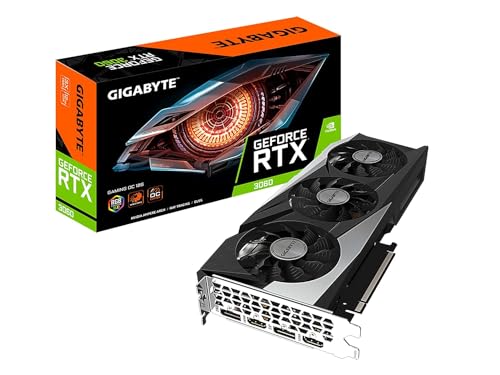
Pros
- Generous 12GB VRAM handles modern games and multitasking without choking
- Effective triple-fan cooling system runs quiet under load in a well-ventilated case
- Ray tracing and DLSS support future-proofs for newer titles
- Solid build quality with a metal backplate and dual BIOS switch for custom tuning
Cons
- Requires a 500W or higher PSU and dual 8-pin power connectors, which may necessitate a power supply upgrade for older builds
- Physical size (11.1 x 4.6 inches) may not fit smaller or compact PC cases without careful measurement
- Stock overclock out of the box is modest; enthusiasts may want to tweak settings for extra performance
The GIGABYTE GeForce RTX 3060 Gaming OC 12G (REV2.0) is a mid-range graphics card built around NVIDIA's Ampere architecture. Designed for PC gamers who want a balance of performance and value, this card brings 12GB of GDDR6 VRAM, second-gen RT Cores, and third-gen Tensor Cores to the table. It’s a solid choice for competitive gamers, casual players, streamers, and content creators who need reliable 1080p or entry-level 1440p performance without breaking the bank.
In real-world use, the RTX 3060 handles popular esports titles like Valorant, CS:GO, and Fortnite at high frame rates with ease. It also delivers playable ray-traced effects in games like Cyberpunk 2077 when combined with DLSS. The triple WINDFORCE cooling system, featuring alternate-spinning fans and composite heat pipes, keeps temperatures well under control during long gaming sessions. Many users will appreciate the card’s low noise levels under load, especially when gaming with a headset or streaming on Twitch.
Build quality is commendable for this price tier. The metal backplate adds rigidity and helps dissipate heat, while the dual BIOS switch gives enthusiasts the option to run a silent or performance profile. The card measures 11.1 x 4.6 x 1.6 inches, so it fits most standard ATX cases, but those with compact or mini-ITX builds should double-check clearance. Setup is straightforward: install the card, connect the dual 8-pin PCIe power cables, and use GIGABYTE’s AORUS Engine software to monitor clock speeds, fan curves, and RGB lighting.
One limitation is the power requirement. A quality 500W or higher PSU is recommended, and older systems may need a power supply upgrade. Additionally, the factory overclock is modest, so users looking for maximum performance should consider manual tuning. The 12GB VRAM is a standout feature at this price point, helping with modded games, texture-heavy settings, or productivity tasks like video editing.
Overall, the GIGABYTE RTX 3060 Gaming OC 12G is a well-rounded graphics card for PC gamers building a new rig or upgrading from an older generation. It suits competitive players who prioritize smooth gameplay, streamers who need reliable encoding (thanks to NVENC), and casual gamers who want to enjoy ray tracing without going over budget. If you have the case space and power supply headroom, this card offers strong performance and long-term value for a versatile gaming setup.

Frequently Asked Questions
What video memory configurations do RTX 3060 desktop hardware options feature?
Dedicated RTX 3060 graphics cards feature 12GB of GDDR6 memory on a 192-bit bus, while RTX 3060 Ti prebuilt options provide 8GB of GDDR6 memory. Standalone cards from MSI and GIGABYTE include 12GB of VRAM for large asset files. The Olialia prebuilt system pairs an 8GB RTX 3060 Ti with an AMD Ryzen 7 5700X CPU.
What power supply wattage is standard for these desktop configurations?
The Olialia prebuilt desktop includes an ATX 600W 80 PLUS Bronze certified power supply. For standalone graphics cards, manufacturers recommend checking your total system power draw, with 550W to 650W units commonly used in mid-tier setups. Always verify available PCIe power connectors in your chassis before upgrading your graphics hardware.
How does Wi-Fi 6 connectivity support desktop online gaming?
Integrated Wi-Fi 6 hardware provides high wireless bandwidth and lower latency on compatible networks. The Olialia prebuilt tower includes an Intel Wi-Fi 6 AX200 module and Gigabit Ethernet. Reviewing whether Wi-Fi 6 is good for gaming clarifies latency expectations. Reliable connectivity helps prevent dropped connections during online multiplayer sessions.
What memory and storage capacities are included in prebuilt models?
The Olialia prebuilt desktop comes configured with 32GB of DDR4 RAM and a 1TB PCIe NVMe SSD. A 32GB memory capacity handles multitasking, streaming, and background applications smoothly. The 1TB solid-state drive provides fast boot times and space for modern game installations. Standalone graphics cards do not include RAM or storage.
How can you maintain optimal cooling for desktop components?
Maintaining proper airflow requires keeping chassis intakes and heatsink fins clear of dust. Dual-fan and triple-fan designs from MSI and GIGABYTE rely on steady case ventilation. Following practical guidance on how to clean your PC helps maintain steady operating temperatures and preserves quiet acoustic performance over extended use.








Write Your Review
No reviews yet. Be the first to share your experience!