


Balancing processor strength, case thermals, and graphics hardware often creates confusion when shopping for a dedicated gaming rig. Many players struggle to determine whether a turnkey prebuilt system or a custom card swap delivers the right balance of memory bandwidth and chassis airflow. Evaluating the best geforce rtx 4060 ti pcs requires checking key hardware components such as DDR5 RAM, dedicated NVMe SSD storage, and robust cooling configurations. Whether you plan on buying an assembled tower or prefer learning how to build a gaming PC step-by-step, matching your system hardware to your favorite titles prevents performance bottlenecks.
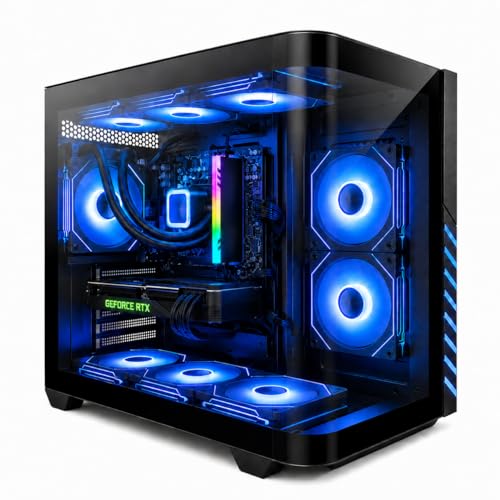
Modern desktop setups rely heavily on balanced component architecture to handle 1080p and 1440p gaming workloads alongside daily multitasking. Prebuilt configurations like liquid-cooled towers pair multi-core processors with dedicated RTX 4060 Ti graphics, while compact dual-fan cards offer small form factor compatibility for tighter computer desks. Assessing thermal features such as axial-tech cooling fans, multi-fan radiator setups, and efficient power distribution helps you maintain stable operating temperatures during extended play sessions. Reviewing listed hardware specifications ensures you select a dependable prebuilt gaming desktop or component configuration that fits your desk layout and budget.

Pros
- Excellent 1080p and solid 1440p gaming performance with DLSS 3 support.
- Quiet operation thanks to 0dB technology and efficient axial-tech fans.
- Compact 2.5-slot design fits most mid-tower and some smaller cases.
- Durable dual ball bearing fans for longer lifespan.
Cons
- 8GB VRAM may limit future high-resolution texture-heavy titles.
- Premium pricing compared to some competing models with similar performance.
- Requires a PCIe 4.0 motherboard for full bandwidth potential.
The ASUS Dual GeForce RTX 4060 Ti OC Edition is a graphics card built for PC gamers who want strong 1080p and capable 1440p performance without breaking the bank. It's part of NVIDIA's RTX 40 series, featuring the Ada Lovelace architecture and support for DLSS 3, which can dramatically boost frame rates in compatible games. This card is ideal for competitive gamers, casual players, streamers, and content creators who need reliable graphics horsepower for gaming, streaming, or light creative work.
In real-world use, the RTX 4060 Ti OC Edition delivers smooth gameplay in popular titles like Call of Duty, Fortnite, and Cyberpunk 2077 at high settings. DLSS 3 really shines here, offering up to 4x performance gains in supported games by generating additional frames. Ray tracing performance is also solid, thanks to the 3rd generation RT Cores. The card's boost clock reaches 2595 MHz in OC Mode, ensuring responsive input and low latency during intense gaming sessions.
Build quality is typical ASUS - sturdy and well-engineered. The axial-tech fan design uses a smaller hub and longer blades to push more air downward, while the barrier ring increases static pressure for better cooling. The dual ball bearing fans are rated to last twice as long as sleeve bearing designs, which adds peace of mind for long-term use. The 2.5-slot design is practical for most mid-tower cases and even some smaller form factor builds, without compromising cooling efficiency.
Setup is straightforward: install the card into a PCIe 4.0 slot, connect the power, and install the latest drivers from NVIDIA. ASUS's GPU Tweak III software lets you monitor performance, adjust fan curves, and toggle between OC and silent modes. The card also features 0dB technology, which stops the fans entirely under light loads - great for quiet desktop work or browsing.
One limitation to consider is the 8GB VRAM. While fine for 1080p and most 1440p gaming today, future games with heavy texture packs or high-resolution mods may push that limit. Also, the price point is a bit premium compared to some AMD alternatives, but the DLSS 3 and ray tracing features can justify the cost for many gamers.
Overall, the ASUS Dual GeForce RTX 4060 Ti OC Edition is a well-rounded graphics card for PC gamers, streamers, and content creators who want efficient performance, quiet cooling, and modern features like DLSS 3. It's a solid choice for building a new gaming PC or upgrading an older system, especially if you prioritize 1080p or 1440p gaming with ray tracing.
The ASUS Dual RTX 4060 Ti OC Edition excels at 1080p and 1440p gaming with high frame rates in esports titles and smooth 60+ FPS in demanding AAA games with DLSS 3 enabled. The OC boost clock of 2595 MHz ensures responsive gameplay with minimal input lag. Ray tracing performance is solid for the price range, making it a good fit for gamers who want visual fidelity without sacrificing too much performance.
ASUS uses a reinforced backplate and high-quality components for durability. The axial-tech fans with dual ball bearings are built to last, and the 2.5-slot design strikes a good balance between cooling and case compatibility. The card feels solid and well-made, suitable for long-term use in a gaming PC.
The axial-tech fan design with a barrier ring increases downward air pressure, directing airflow directly onto the heatsink for efficient cooling. The 0dB technology stops fans under light loads, keeping the system silent during desktop use or light gaming. Dual ball bearings ensure long fan life and consistent performance.




Frequently Asked Questions
What display resolution do best geforce rtx 4060 ti pcs typically target?
Systems equipped with RTX 4060 Ti hardware are primarily engineered for smooth 1080p and 1440p gaming. The listed specifications highlight features such as DLSS 3 frame generation, third-generation RT cores, and dedicated GDDR6 memory to assist with demanding visual workloads. While higher resolutions like 4K are technically possible on select lightweight titles, the card configuration excels when paired with high refresh rate 1080p or 1440p monitors.
Is liquid cooling necessary for an RTX 4060 Ti prebuilt desktop?
Liquid cooling is not strictly mandatory, but it helps maintain stable operating temperatures during prolonged gaming and streaming sessions. Desktop builds featuring all-in-one liquid CPU coolers and multiple case fans efficiently exhaust heat away from both the processor and graphics card. Air cooling remains a viable alternative, though liquid setups often provide quieter operation and steady thermal headroom under heavy loads.
How much RAM and storage should you look for in a gaming desktop?
A baseline of 16GB DDR5 RAM and a 1TB NVMe solid state drive provides an ideal starting point for contemporary gaming and multitasking. Fast NVMe storage ensures rapid operating system boot times and reduces in-game asset loading delays. Having at least 16GB of system memory allows you to run modern AAA titles comfortably while keeping background voice chat and streaming applications active.
Does integrated Wi-Fi 6 benefit an RTX 4060 Ti gaming setup?
Integrated Wi-Fi 6 provides increased bandwidth, reduced latency, and improved connection stability compared to older wireless protocols. If you cannot run a dedicated Ethernet cable to your desk, understanding whether Wi-Fi 6 is good for gaming helps ensure your online multiplayer matches remain responsive. This standard allows desktops to maintain reliable network throughput even in busy household environments.
How can you maintain optimal airflow in a multi-fan gaming PC?
Maintaining clear intake vents and periodically removing interior dust buildup ensures consistent airflow across your components. Reviewing a practical guide on how to clean your PC will help you safely preserve fan bearings, radiator fins, and power supply filters. Routine maintenance prevents thermal throttling and keeps axial-tech fan blades spinning quietly.
Can 2.5-slot graphics cards fit inside small form factor chassis?
A 2.5-slot graphics card design is built to balance cooling efficiency with broad chassis compatibility, including many small form factor cases. However, you should always verify your case clearance dimensions and expansion slot brackets before purchasing hardware. Checking the stated physical length and bracket clearance prevents physical interference with front case fans or power supply cables.



Write Your Review
No reviews yet. Be the first to share your experience!