


Ear fatigue and muddy audio can ruin both a meticulous timeline scrub and a high-stakes multiplayer match. Heavy headband pressure and bloated bass quickly cause headaches during long desk sessions. Selecting the best headphones for video editing and gaming means balancing neutral acoustic reproduction with all-day memory foam comfort and reliable voice pickup. Pairing accurate audio gear with a capable laptop for 1440p gaming and creative editing ensures you catch subtle audio flaws before exporting your project. Our analysis of driver specifications, acoustic enclosures, and user feedback highlights models that excel in desktop environments.
Versatility is essential because video editors need accurate frequency response to balance dialogue, while gamers rely on wide soundstage cues to pinpoint action. Headsets equipped with large 50mm audio drivers deliver detailed highs and controlled low frequencies without distorting complex waveforms. Breathable protein leather or fabric ear cushions help vent heat during marathon rendering tasks. Whether you prefer the zero-latency assurance of a 3.5mm analog connection or low-latency 2.4GHz wireless, identifying the right balance of passive noise isolation and microphone clarity keeps your workflow seamless.
Pros
- Excellent positional audio for competitive gaming thanks to DTS Headphone:X 2.0
- Clear, crisp microphone with convenient flip-to-mute function
- Comfortable leatherette padding for long sessions
- Affordable price point for the feature set
- Works across multiple platforms via 3.5mm or USB
Cons
- On-ear design may cause discomfort for some users during very long sessions
- Leatherette ear pads can get warm over time
- Wired only – no wireless option for those who prefer cable-free setups
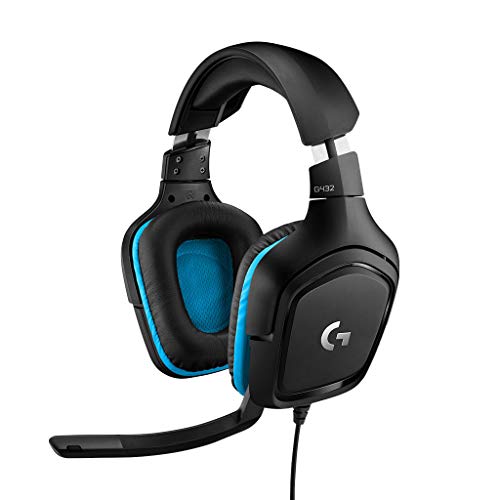
The Logitech G432 is a wired gaming headset that brings solid audio performance to PC gamers, esports players, and streamers without demanding a premium price. It features 50mm drivers and DTS Headphone:X 2.0 surround sound, which creates a convincing 3D soundscape for pinpointing enemy footsteps or environmental cues in competitive titles like Valorant or Call of Duty. The flip-to-mute mic is a practical touch for quick muting during intense moments or streaming on Twitch.
This headset is best suited for budget-conscious gamers who want reliable positional audio and a decent mic for team communication. Casual gamers will appreciate the immersive sound for open-world games, while streamers and content creators can use the USB DAC for easy connection to a PC. The on-ear design with leatherette padding offers decent comfort for sessions up to a few hours, though some users may prefer over-ear pads for extended wear.
Build quality is typical Logitech G – sturdy plastic construction that feels durable enough for daily use. The headband is padded and adjustable, and the ear cups swivel slightly for a better fit. The 3.5mm cable is braided and includes an inline volume wheel, which is handy for quick adjustments. Setup is plug-and-play on PC via USB, and the headset also works with consoles and mobile devices using the analog connection.
One realistic limitation is the on-ear fit: it presses against the ears rather than enclosing them, which can cause discomfort after several hours for some users. The leatherette material also traps heat, so you might notice sweating in warmer rooms. Additionally, there’s no wireless option, so you’re tethered to your device – fine for a desktop setup but less ideal if you like to move around.
Overall, the Logitech G432 is a strong choice for PC gamers and streamers on a budget who prioritize audio clarity and mic quality. It’s also a good entry-level headset for college gamers or those building their first gaming setup. If you can live with the on-ear design and wired connection, you get impressive surround sound and a reliable mic for under $50.
The Logitech G432 uses 50mm drivers that deliver clear highs, mids, and punchy bass. DTS Headphone:X 2.0 provides virtual 7.1 surround sound, which enhances spatial awareness in games. Footsteps, gunshots, and environmental sounds are well-defined, giving competitive gamers an edge. For music and movies, the sound is balanced but leans slightly toward a gaming-focused tuning.
The flip-to-mute mic on the G432 captures voice clearly without excessive background noise. It’s a 6mm cardioid mic that works well for team chat, Discord calls, and streaming. The mute function is physical and reliable – just flip the mic up to mute. Volume control is integrated into the cable for quick adjustments.
The headset features leatherette ear pads and a padded headband. The on-ear design is lightweight (1.2 lbs) but may press on ears during long sessions. Build quality is durable with a plastic frame and braided cable. The ear cups swivel slightly for a customized fit. Overall, it’s comfortable for moderate gaming sessions but may require breaks for extended wear.


Pros
- Exceptional value with 7.1 surround sound and RGB lighting at a budget price point
- Comfortable fit for extended gaming thanks to soft ear pads and adjustable headband
- Broad platform support including all major consoles and PC with simple plug-and-play setup
- Microphone delivers clear voice capture with effective passive noise reduction
- Lightweight construction minimizes fatigue during long sessions
Cons
- Plastic build feels less premium compared to higher-end headsets
- RGB lighting requires a USB power source and cannot function on battery alone
- Passive noise cancellation may not block loud ambient sounds as well as active alternatives
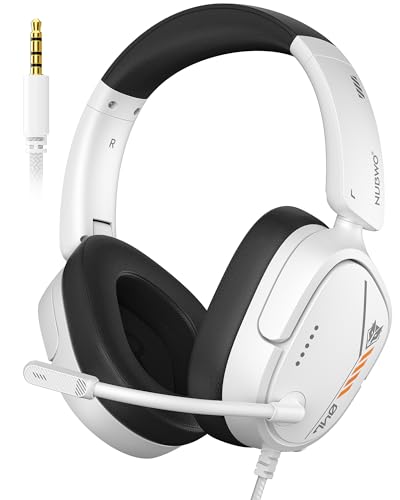
The Ozeino Gaming Headset is a wired over-ear headset designed for budget-minded PC gamers, console players, and streamers who want solid audio performance without breaking the bank. With 7.1 surround sound, a noise-cancelling microphone, and customizable RGB lighting, it aims to deliver an immersive gaming experience at an entry-level price point.
In terms of performance, the 50mm drivers provide crisp highs and punchy bass, with the virtual 7.1 surround sound offering accurate directional cues in competitive titles like Call of Duty or Apex Legends. The microphone picks up voice commands clearly while minimizing background hiss, making it suitable for Discord calls and in-game chat. While not studio-grade, it gets the job done for casual streaming or team coordination.
Build quality is where the cost savings are most apparent: the headset uses plastic throughout, but it feels reasonably sturdy for daily use. The breathable protein leather ear pads and adjustable headband provide good comfort for sessions lasting several hours, and the lightweight 10.6-ounce design reduces strain. The in-line controls for volume and mute are conveniently placed.
Setup is straightforward for most devices: simply plug the 3.5mm jack into your controller or PC, and use the included splitter cable for separate audio and mic on older computers. The USB connector only powers the RGB lights, so the headset works without lighting if needed. Cable management is basic but adequate, with a 1.55m extension cord for added reach.
One limitation is that the noise cancellation is passive and won't eliminate loud room noise. The plastic construction may not withstand rough handling as well as metal-framed headsets. Additionally, the RGB lights require a USB port, which may be an issue on consoles with limited ports. However, these trade-offs are expected at this price.
Overall, the Ozeino Gaming Headset is an excellent choice for casual gamers, console players, or those on a tight budget who need a functional headset with decent audio and a mic. It's also a practical option for college gamers or as a backup headset. For competitive esports or professional streaming, you might want to invest in a more premium model, but for most everyday gaming scenarios, this delivers reliable performance at a fantastic value.


Frequently Asked Questions
Can gaming headsets provide accurate enough sound for video editing?
Yes, gaming headsets with balanced frequency response and neutral tuning work well for timeline audio monitoring. Models featuring large 50mm dynamic drivers like the Logitech G432 provide clean separation across mid and high frequencies. While specialized studio monitors offer the flattest profiles, a well-tuned gaming headset allows you to spot background hisses and level dialogue before rendering your cut.
Is a wired connection better than wireless for editing and gaming?
Yes, a 3.5mm wired connection eliminates audio latency and prevents compression artifacts while working in editing software. Wired designs like the JBL Quantum 400 ensure perfect sync between timeline scrub heads and audio waveforms. If you prefer cord-free movement, modern tri-mode headsets with dedicated 2.4GHz wireless transmitters deliver low latency under 20 milliseconds, pairing smoothly alongside a responsive accurate PC gaming mouse.
What makes closed-back headphones preferable for video production and gaming?
Closed-back earcups provide superior passive noise isolation and prevent headphone audio bleed into open microphones. Headsets with thick memory foam cushions seal around your ears to block ambient room noise and PC fan hum. This acoustic seal helps you focus on faint audio artifacts in video clips while keeping in-game positional cues clear.
Do you need 7.1 surround sound enabled while editing video timelines?
No, you should keep virtual 7.1 surround sound disabled during video editing to ensure accurate stereo panning and level balancing. Surround processing alters spatial cues, which can cause you to misjudge dialogue volume relative to background tracks. Save virtual surround modes like DTS Headphone:X for immersive gaming where 3D positional awareness provides a competitive advantage.
What should you look for in the Best Headphones For Video Editing And Gaming of 2026 for long sessions?
Lightweight headband construction and breathable ear cushion padding are the most critical factors for preventing fatigue during marathon sessions. Soft memory foam covered in breathable fabric reduces clamping pressure on your skull and temples. Headsets with flexible omnidirectional microphones ensure you stay comfortable whether polishing edits or coordinating team matches in 2026.





Write Your Review
No reviews yet. Be the first to share your experience!