


Muffled voice pickup and harsh background keyboard clatter ruin critical team strategy calls and remote work meetings. Finding proper vocal clarity requires hardware designed with targeted noise isolation, balanced clamping pressure, and clean acoustic drivers. Securing the best headsets with mic means evaluating cardioid boom designs, lightweight frames, and responsive inline volume dials. Whether you coordinate tactical raids alongside a fast PC gaming mouse or manage high-priority client conferences, clear voice transmission prevents you from repeating yourself. Thoughtful weight distribution around the headband also eliminates uncomfortable skull hotspots during marathon desk sessions.
Long hours at a desk demand breathable memory foam cushions and gentle clamping force so your ears do not ache by midday. Based on our detailed review of driver architectures, microphone sensitivity ratings, and daily user feedback, wired connections consistently provide zero audio latency without battery anxiety. Multi-platform flexibility across consoles, laptops, and desktop rigs ensures quick plug-and-play simplicity for every daily task. Pairing your audio setup with a reliable PC mouse for work streamlines your entire workstation for focused communication. Great audio communication truly starts with a microphone that captures your natural tone while rejecting ambient room chatter.

Pros
- Affordable price point that doesn't compromise on core audio and mic quality
- Wide compatibility across gaming consoles, PC, and mobile devices
- Comfortable padding and lightweight frame for long sessions
- Easy plug-and-play setup with no additional software required
Cons
- RGB lighting is not customizable and may feel basic to setup enthusiasts
- Build materials may not feel as premium as higher-end headsets
- Microphone noise isolation is decent but not studio-grade
The IMYB Gaming Headset is a wired stereo headset designed for gamers who need a reliable, budget-friendly audio solution across multiple platforms. It connects via a standard 3.5mm jack, making it compatible with PC, PS4, PS5, Xbox One, Series X/S, Nintendo Switch, and mobile devices. This headset is best suited for casual PC gamers, console players, streamers on a budget, college gamers, and anyone building a gaming setup without spending a fortune.
Performance-wise, the 50mm neodymium drivers provide clear stereo sound with a noticeable bass presence, which helps with in-game audio cues like footsteps and explosions. While it doesn't offer virtual surround sound, the audio clarity is solid for competitive play in FPS and MOBA titles. The noise-isolating microphone does a good job filtering out background noise during team chat or streaming, though it won't match the quality of dedicated USB mics.
Comfort is a strong point here. The over-ear design uses soft, skin-friendly ear cushions and a padded headband, and at just 0.77 pounds, the headset remains comfortable during long gaming sessions. The flexible headband adjusts easily, and the lightweight build reduces pressure on the head and ears.
Build quality is practical for the price. The frame uses plastic, which keeps weight down, and the braided cable is 6.5 feet long, anti-tangle, and includes inline volume control and a mute button. The RGB lighting adds a visual pop but is not customizable - it simply cycles through colors. Setup is plug-and-play with no software or drivers needed, and the headset works immediately with most devices.
A realistic limitation is the lack of advanced features like virtual surround sound, EQ tuning, or premium materials. The microphone is good for basic communication but won't satisfy serious streamers or content creators. Also, the RGB lighting may feel basic for enthusiasts who prefer software-controlled effects.
Overall, if you're a PC gamer or console player looking for a functional, comfortable headset with decent audio and mic quality at an entry-level price, the IMYB Gaming Headset is a smart choice. It's especially practical for casual gaming, Discord calls, or as a backup headset. For those who need higher fidelity or more customization, investing in a pricier model may be worthwhile.



Pros
- Excellent value for money with 7.1 surround sound and quality drivers.
- Lightweight and comfortable for extended use.
- Clear microphone with good noise rejection.
- Broad platform support.
Cons
- 7.1 surround sound only works on Windows 10 64-bit.
- Only 3.5mm connection; no USB or wireless option.
- Leatherette ear cushions may cause warmth during very long sessions.
The Razer BlackShark V2 X is a budget-friendly gaming headset that brings a surprising amount of features to the table. It's part of Razer's popular BlackShark line, designed for PC gamers but with cross-platform compatibility that extends to consoles like PS4, PS5, Switch, and even Xbox (with a stereo adapter). Priced affordably, it targets gamers who want reliable audio performance without breaking the bank.
Audio quality is a standout feature here, thanks to Razer's TriForce 50mm drivers. These drivers split the audio into three parts for separate tuning of highs, mids, and lows, resulting in clearer sound with punchy lows. The 7.1 surround sound (available on Windows 10 64-bit) enhances positional awareness, which can give you an edge in competitive shooters or battle royale games. While not as immersive as high-end virtual surround, it's a solid addition for the price.
Comfort is well-addressed with the headset's lightweight 240g design and memory foam ear cushions covered in breathable leatherette. The headband has thicker padding, and the closed-back earcups provide passive noise cancellation. However, during long marathon sessions, the leatherette can trap some heat, though the overall comfort remains good. The mic is bendable and uses a cardioid pattern to pick up your voice while reducing background noise, making it suitable for Discord chats and in-game communication.
Setup is straightforward: plug the 3.5mm jack into your device, and you're ready to go. No software is required for basic use, though enabling 7.1 surround does require Razer's Synapse software on PC. The cable is standard and not braided, but it's durable enough for daily use. Cross-platform support means you can easily switch from PC to console without needing extra adapters for most devices, though Xbox users will need a stereo adapter sold separately.
One limitation is that the 7.1 surround sound is exclusive to Windows 10 64-bit, so Mac and console users won't get that feature. Additionally, the headset only uses a 3.5mm connection, so there's no USB or wireless option. This means it relies on your device's audio jack, which could be a downside if you prefer digital connections or need inline controls. For the price, these are acceptable compromises.
Overall, the Razer BlackShark V2 X is a strong recommendation for budget-conscious PC gamers, casual cross-platform players, or anyone needing a reliable backup headset. It delivers clear audio, comfort for long play sessions, and a decent microphone at an entry-level price. If you're building a gaming setup on a budget or need a solid all-around headset for multiple devices, this is a smart pick.

Pros
- Affordable price point for an entry-level gaming headset with 7.1 surround sound support.
- Plug-and-play USB connection works seamlessly on PC, PS4, and PS5 without additional software.
- Noise-cancelling microphone performs well for in-game chat and Discord calls, reducing ambient noise.
- Memory foam ear cushions and lightweight design offer good comfort for extended gaming sessions.
- Long 2.2-meter cable provides flexibility for desk setups and couch console gaming.
Cons
- Not compatible with console game controllers (only PS4/PS5 USB port) – no Xbox support.
- Lacks dedicated software for EQ customization or surround sound tuning – relies on system defaults.
- Build materials feel mostly plastic, which may not hold up as well as more expensive headsets over time.
The EKSA E1000 is a USB gaming headset designed for PC gamers and console players who want a budget-friendly way to step into virtual surround sound. It plugs directly into a USB port on your computer, PS4, or PS5, and instantly delivers 7.1-channel audio without any drivers or software installation. This makes it a practical choice for anyone who values simplicity and low cost over advanced customization.
This headset is best suited for casual PC gamers, college students, work-from-home gamers, and those just starting to build their gaming setup. It's also a fine option for streamers or content creators who need a reliable backup mic, thanks to the noise-cancelling microphone that helps keep background chatter out of your broadcasts or Discord calls. However, competitive esports players may want to look for a headset with more precise sound imaging and a lighter weight.
In terms of audio performance, the 50mm neodymium drivers provide clear mids and decent bass, while the 7.1 surround sound creates a more immersive experience in games like shooters or RPGs. The microphone uses omnidirectional noise reduction to pick up your voice clearly and filter out ambient noise, though it may not match dedicated condenser mics in quality. For everyday gaming and voice chat, it gets the job done well.
Comfort is a strong point: the memory foam earmuffs are soft and breathable, and the adjustable headband distributes weight evenly, reducing pressure during long sessions. The 2.2-meter cable is generous for desktop setups and even gives you some room to lounge while gaming on a console nearby. The RGB lighting on the ear cups adds a subtle glow that enhances your desk aesthetic without being distracting.
A realistic limitation is that the EKSA E1000 is not compatible with console game controllers, only with USB ports on the console itself. That means no plugging into a PS5 controller for voice chat – you'll need to use the console's USB port. Also, there is no software EQ or surround sound tuning, so you're limited to the default sound profile. The all-plastic build feels a bit lightweight, but for the price, that's expected.
Overall, the EKSA E1000 is a great entry-level gaming headset for PC gamers on a tight budget, console players who can use USB audio, and anyone who needs a spare headset for their gaming desk or dorm room. It delivers solid comfort, an easy setup, and adequate audio for most casual and competitive gaming scenarios. Backed by a 2-year warranty, it's a low-risk purchase for those seeking value without breaking the bank.

Pros
- Excellent audio clarity and directional sound for competitive gaming
- Very comfortable for extended sessions thanks to lightweight build and memory foam cushions
- Clear microphone with good background noise rejection
- Simple plug-and-play setup with convenient on-cable controls
Cons
- Wired connection may be less convenient for some users compared to wireless options
- Non-detachable cable could be a durability concern over time
- Some users may find the noise isolation too effective for awareness of surroundings
The Razer BlackShark V2 X is a wired gaming headset designed for console and PC gamers who want solid performance without breaking the bank. It features 50mm TriForce drivers, a cardioid microphone, and a lightweight build that prioritizes comfort. This headset is officially licensed for Xbox but works with PS5, PC, and Switch via a standard 3.5mm audio jack, making it a versatile option for multi-platform gamers.
This headset is best suited for competitive and casual gamers, esports players, and content creators who need clear audio and reliable communication. The 50mm drivers deliver well-balanced sound with good detail, helping you hear footsteps, gunfire, and environmental cues in games like Rainbow Six Siege or Call of Duty. The cardioid mic does a solid job of picking up your voice while rejecting background noise, which is a plus for team chat or streaming on Twitch.
Comfort is a standout feature. At just 240 grams with memory foam ear cushions and a padded headband, the headset feels light even during marathon gaming sessions. The closed-back design provides passive noise cancellation, helping you stay immersed. The on-cable volume knob and mute button are easy to reach and operate without taking your hands off the controller.
Build quality is decent for the price point. The materials feel sturdy enough for regular use, though the non-detachable cable is a potential weak point. The ear cushions are covered in leatherette and offer a good seal for sound isolation. Setup is straightforward: plug into any device with a 3.5mm port and you're ready to go. Windows Sonic surround sound is supported on Xbox and PC for enhanced spatial awareness.
One realistic limitation is the wired connection. While it ensures zero latency and no battery anxiety, it can feel restrictive compared to wireless options. The cable is long enough for most setups, but it's permanently attached, so if it gets damaged, the whole headset is affected. Also, the passive noise cancellation is effective, which may not suit gamers who prefer to stay aware of their surroundings.
Overall, the Razer BlackShark V2 X offers strong value for gamers who want a comfortable, reliable headset with good audio and mic quality. It works well across multiple platforms and is a practical choice for anyone building a gaming setup on a budget. For the price, it's hard to beat if you prioritize comfort and clear communication.
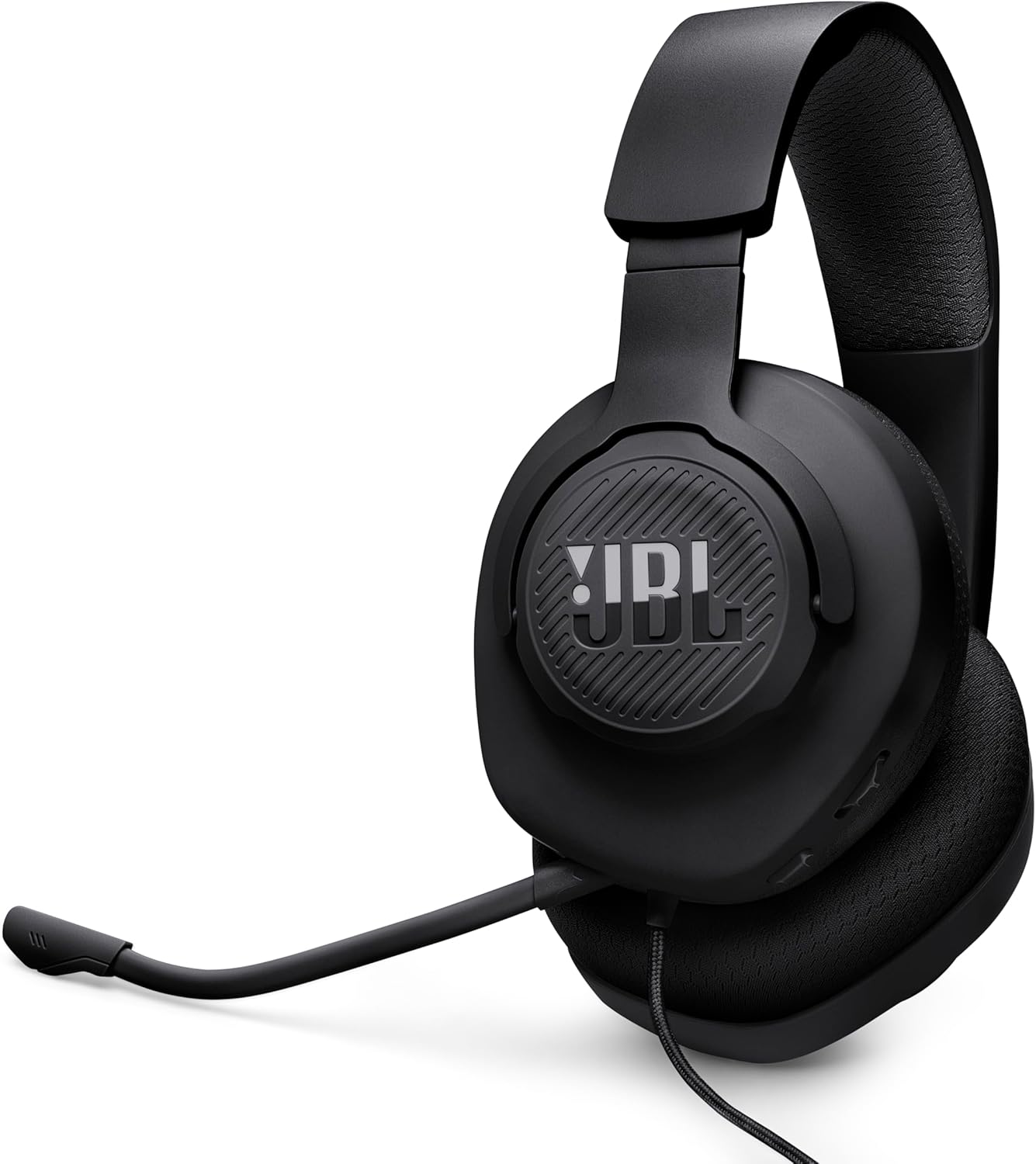
Pros
- Excellent audio clarity with JBL's signature sound profile for competitive gaming and entertainment.
- Comfortable breathable ear cushions and lightweight build reduce pressure during long sessions.
- Detachable boom mic provides clear voice pickup and can be removed for non-gaming use.
- Broad compatibility across consoles, PC, and mobile devices with simple plug-and-play via 3.5mm jack.
- Budget-friendly price without sacrificing essential gaming headset features like spatial sound support.
Cons
- Wired design and short cable (per user feedback) may be less convenient for desktop setups that require extra reach.
- No noise cancellation on the ear cups, so ambient sound can bleed in during loud environments.
- Some users reported units with no audio out of the box, suggesting potential quality control variability.
The JBL Quantum 100M2 is a wired over-ear gaming headset that focuses on delivering JBL's well-regarded QuantumSOUND Signature audio at an accessible price point. Designed for gamers, streamers, and even work-from-home professionals, this headset aims to provide clear, immersive sound and comfortable wear for extended use. With a detachable boom mic and compatibility across nearly every platform, it's a versatile option for anyone who needs a reliable all-rounder.
Based on product specifications and user feedback, the Quantum 100M2 excels in audio quality for its class. The 40mm dynamic drivers deliver crisp highs and punchy lows, making it easy to pinpoint enemy footsteps in FPS games or enjoy the cinematic boom of explosions in open-world titles. The support for Windows Sonic Spatial Sound is a nice bonus for PC and Xbox gamers, adding an extra layer of immersion without requiring expensive software or hardware.
Comfort is clearly a priority here. The ear cushions are covered in breathable fabric and filled with memory foam, which helps reduce heat buildup and pressure during marathon gaming sessions. The lightweight headband further contributes to a fatigue-free experience, and several user reviews confirm that the headset works well for glasses wearers over long play sessions. This makes it a solid choice for college gamers or anyone who spends hours at their desk.
The detachable voice-focus microphone is another highlight. It picks up speech clearly while minimizing background noise, making it suitable for multiplayer gaming, Discord calls, and even light streaming. The fact that you can remove the mic entirely when listening to music or streaming video is a thoughtful touch, turning the headset into a simple pair of headphones for everyday use.
Build quality feels decent for the price, with a durable plastic frame and a fabric-covered cable. However, the cable is on the shorter side, which might require an extension for desktop PC users who don't hook into the controller. Setup is straightforward: just plug the 3.5mm jack into your device, and you're ready to go. No drivers or software needed, though some users had to update their Xbox controller firmware before the mic worked properly.
While the JBL Quantum 100M2 doesn't offer active noise cancellation or wireless freedom, it nails the fundamentals for gamers on a budget. If you're a console or PC gamer who prioritizes clear audio, a comfortable fit, and a microphone that gets the job done, this headset is a practical buy. It also works well as a secondary headset for travel or for younger gamers just getting into multiplayer titles. For the price, it's a strong contender in the entry-level gaming headset market.
The JBL Quantum 100M2 is built with a lightweight frame that reduces strain during long sessions. The ear cushions use breathable fabric over memory foam, which conforms to your ears while preventing excessive sweating. Several users noted that the headset is comfortable for 4-5 hour gaming sessions, even for those who wear glasses. The headband is padded and flexible enough to fit a range of head sizes.
The build quality feels sturdy for a budget wired headset. Materials are primarily plastic but reinforced in key stress points. The detachable mic snaps in securely and the 3.5mm jack is gold-plated for reliable contact. Overall, this is a well-designed headset that prioritizes comfort and everyday practicality without feeling fragile.
The JBL Quantum 100M2 is compatible with all devices that have a standard 3.5mm audio jack, including PC, PlayStation 5 and 4, Xbox Series X|S and One, Nintendo Switch (in handheld mode), Mac, mobile phones, and VR headsets. It also supports Windows Sonic Spatial Sound on Windows 10 PCs and Xbox consoles for enhanced positional audio. Setup is plug-and-play; no additional drivers or software are required. Just note that for some Xbox controllers, a firmware update may be needed to enable the microphone.
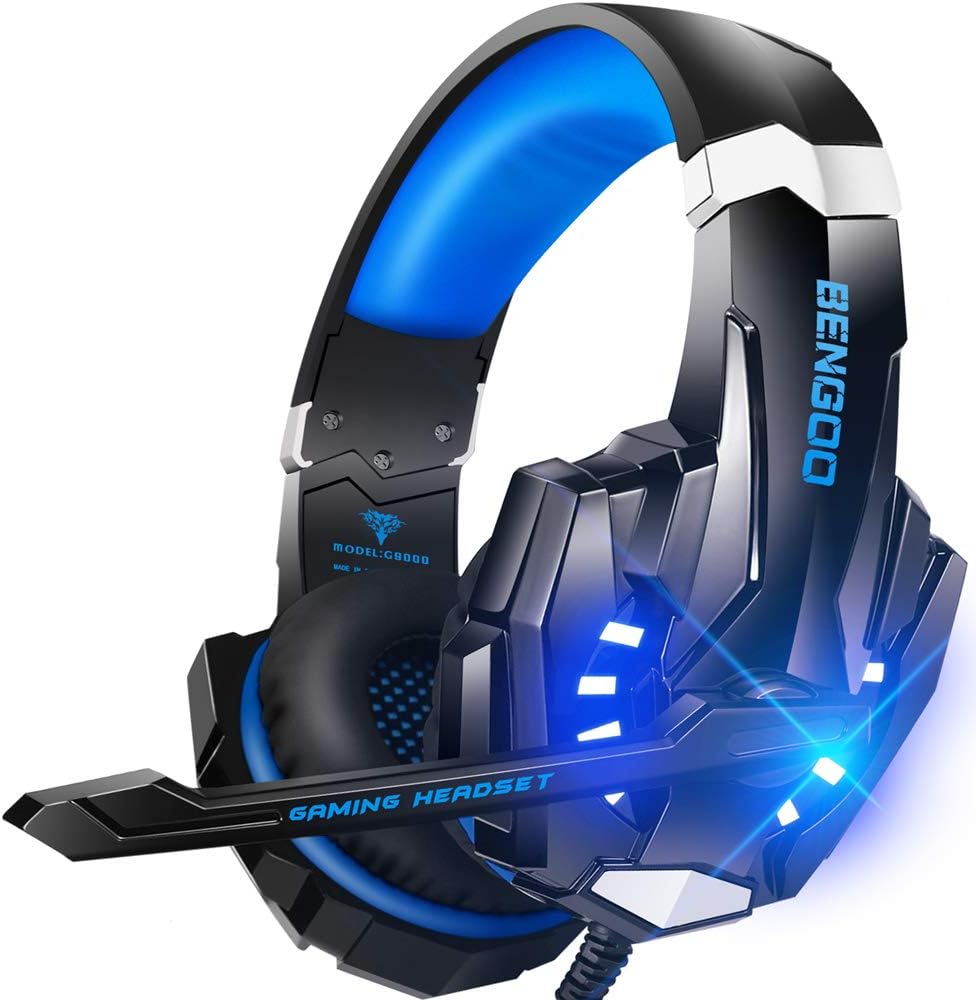
Pros
- Excellent value for money with solid audio and mic quality at a budget price
- Comfortable memory foam ear cups suitable for extended gaming marathons
- Works across nearly all modern gaming platforms including PC, PlayStation, and Xbox
Cons
- Microphone durability concerns noted in some user reviews after several months of use
- LED lights only function when connected via USB, limiting their use with consoles when plugged into the controller
- Headset feels slightly heavier than some competitors, which may cause minor discomfort over very long sessions
The BENGOO G9000 is a wired stereo gaming headset designed to deliver a budget-friendly yet feature-rich experience for a wide range of gamers. It combines noise-cancelling microphone technology, simulated 7.1 surround sound, and flashy LED lighting into a package that costs under $20. Based on product specifications and user feedback, this headset is best suited for PC gamers, console players on PS4, PS5, Xbox One, and Nintendo Switch, as well as casual streamers and gamers who prioritize affordability without sacrificing core audio features.
In terms of real-world performance, the 40mm neodymium drivers provide clear audio with decent bass and spatial awareness. The simulated 7.1 surround sound helps with directional cues in competitive titles like Call of Duty or Overwatch, though it's not a true hardware surround system. The omni-directional microphone does a good job filtering out background noise, making voice chat on Discord or in-game clear and reliable. Many users report that the overall sound quality surpasses expectations for the price, offering solid clarity for both gaming and voice calls.
Build quality is a mix of practicality and compromise. The headset uses a stiff but durable plastic frame with a metal-reinforced headband, and the faux leather ear pads are filled with memory foam that remains comfortable for a few hours of use. The braided USB cable is a nice touch, reducing tangles and adding longevity. However, some users note the microphone can become less responsive after several months, and the lighting only works via USB - which means console players who plug into their controller won't get the glow. The headset's weight, while not excessive, is slightly higher than some alternatives, but the padding helps offset this.
Ease of setup is about as simple as it gets: plug the 3.5mm jack into your device, and if you want LED lighting, connect the USB power cable. The inline remote offers a rotary volume wheel and a one-key mute button, which is convenient during gameplay. There's no proprietary software needed, making it truly plug-and-play. For maintenance, the ear pads can be wiped clean with a damp cloth, and the cable's braiding helps prevent wear.
The main limitations revolve around long-term durability and the LED dependency. A handful of reviews mention the mic failing after six months, and the lack of USB-C or a detachable cable might be a dealbreaker for some. That said, the headset's compatibility with nearly every platform and its comfortable fit make it a versatile backup or primary headset for budget-conscious gamers. It's a practical choice for college gamers, work-from-home gamers on a budget, or anyone building a secondary gaming setup on a shoestring.
For PC gamers, esports players on a tight budget, or casual gamers who want a reliable headset that covers the basics without breaking the bank, the BENGOO G9000 is a strong recommendation. It delivers on the core promises of decent audio, a functional mic, and comfort, while the LED lighting adds a touch of gaming flair to any desk. Users seeking premium build quality or a wireless option should look elsewhere, but for the price, this headset offers remarkable value.
Frequently Asked Questions
Why is a cardioid boom microphone better than an omnidirectional mic for calls?
Yes, cardioid boom microphones deliver significantly better voice clarity by focusing pickup directly on your mouth. This directional pattern naturally rejects room echoes, background PC fan hum, and noisy mechanical keyboard clicks. In contrast, omnidirectional mics capture sound from every direction equally, which often lets unwanted background noise slip into voice chats.
Do 3.5mm analog headsets work across PC, PlayStation, and Xbox without special adapters?
Yes, standard 3.5mm audio jacks provide universal plug-and-play support across modern PlayStation 5, Xbox Series X/S, Nintendo Switch, and PC setups. Older legacy Xbox One controllers may require a separate stereo headset adapter. For computers with split pink and green ports, an inexpensive audio and mic splitter cable might be needed.
How do 50mm dynamic drivers improve in-game spatial awareness?
Larger 50mm drivers move more air to produce richer bass impact, clearer mid-range vocal cues, and distinct treble details. This expanded dynamic range helps you accurately separate directional footsteps and explosive sound effects in competitive games. When paired with high-performance hardware like a laptop for 1440p gaming, 50mm drivers create an immersive 3D soundscape.
Can glasses wearers comfortably use over-ear gaming headsets for long sessions?
Yes, over-ear models with plush memory foam cushions and gentle clamping force accommodate glasses frames without pressing painfully against your temples. Breathable fabric or soft leatherette earmuffs flex around the frame arms to maintain an effective acoustic seal. Keeping comfortable during heated matches also pairs well with a cool mousepad for sweaty hands.
What is the difference between passive noise cancellation and active noise cancellation?
Passive noise cancellation relies on physical barriers, like closed-back earcups and dense memory foam cushions, to block incoming ambient sound naturally. Active noise cancellation uses internal microphones and inverse sound waves to neutralize low-frequency background rumbles electronically. Most budget-friendly communication headsets use passive isolation to maintain clear audio without draining battery power or adding bulk.
Why does a lightweight headset under 250 grams matter for daily use?
Lighter headsets dramatically reduce pressure across the top of your skull, preventing tension headaches during extended work shifts or gaming marathons. Models weighing around 140g to 240g distribute weight evenly along the headband so you barely feel them on your head. This ergonomic balance keeps your neck relaxed and prevents ear fatigue throughout 2026.






Write Your Review
No reviews yet. Be the first to share your experience!