


Balancing components against a strict budget often presents difficult tradeoffs between dedicated graphics, system responsiveness, and upgradeability. Many entry-level shoppers worry about sluggish multitasking or inadequate storage right out of the box. Identifying the best intel i3 gaming pcs under $1000 requires examining how quad-core processors pair with discrete graphics cards for 1080p entertainment. While some buyers weigh a prebuilt desktop against a step-by-step gaming PC building guide, packaged systems offer ready-to-use convenience with included operating systems and peripherals.
Chassis size and peripheral layout also determine how a tower fits your space, especially when choosing a gaming desk with restricted surface area. Prebuilt desktops in this tier typically combine space-saving chassis designs, solid-state system drives, and baseline power supplies suited to their graphics chips. Reviewing verified specifications like video memory, system RAM, and port selections ensures you pick a rig that handles your current game library smoothly.
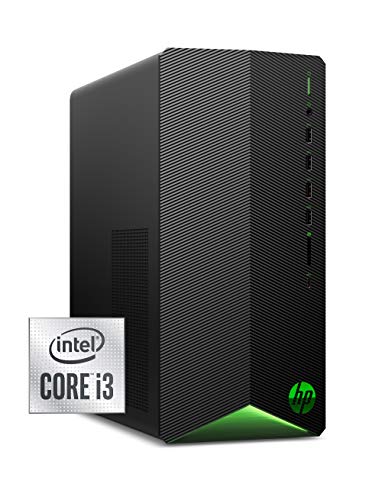
Pros
- Smooth 1080p gaming performance thanks to the GTX 1650 SUPER and 10th-gen Intel Core i3
- Compact and lightweight tower makes it easy to place in tight desk spaces or move between rooms
- Upgrade path available with customizable LED lighting and easy-access interior for future RAM or storage additions
Cons
- Only 8GB of RAM may require an upgrade for newer AAA titles or heavy multitasking
- 256GB SSD fills up quickly with modern game installs; you'll likely need additional external or internal storage
- Wired mouse and keyboard are basic- functional for starting out, but gamers will want to upgrade for better feel and performance
The HP Pavilion Gaming Desktop (TG01-1022) is a pre-built tower designed to get you into PC gaming without the hassle of assembling components yourself. It combines a 10th-generation Intel Core i3-10100 processor with an NVIDIA GeForce GTX 1650 SUPER graphics card, 8GB of DDR4 RAM, and a speedy 256GB NVMe SSD. This system is aimed at casual gamers, college students, work-from-home users, and anyone who wants a compact, affordable desktop that can handle modern esports titles and everyday productivity tasks.
For gaming, the GTX 1650 SUPER delivers smooth frame rates at 1080p in competitive games like Overwatch, Rocket League, and CS:GO. You can also enjoy single-player experiences like Fortnite or Apex Legends at medium to high settings. The NVMe SSD ensures quick game launch times and fast file transfers, so you spend less time waiting and more time playing. While the 8GB of RAM is adequate for most titles, heavier AAA games or multitasking with streams may push it to its limit, so an upgrade to 16GB is worth considering down the road.
Build quality is solid for its price range, with a compact Shadow Black tower that measures roughly 13 x 12 x 6 inches and weighs just over 13 pounds. That makes it easy to fit on a cramped desk or even a dorm room shelf. The case includes customizable LED lighting managed through OMEN Command Center, allowing you to personalize the look of your setup. The keyboard and mouse included are basic wired peripherals- they work out of the box but lack the precision and comfort of dedicated gaming gear. Most users will want to upgrade those for a better gaming experience.
Connectivity is decent, with Wi-Fi 5, Bluetooth 4.2, and a variety of ports including SuperSpeed USB Type-A and Type-C, plus a headphone/microphone combo jack. The 5.1 surround sound support is a plus for immersive audio in games or movies. The desktop also supports dual display setups, which is great for streamers or multitaskers who want extra screen real estate. Setting up the system is straightforward- it comes with Windows 11 pre-installed and requires little more than plugging in power and peripherals.
One realistic limitation is the storage: 256GB fills up fast, especially with modern games taking up 50GB or more each. You can add an external USB drive or upgrade the internal storage later, but it’s something to keep in mind if you plan to install several large games. The 8GB RAM also might need a bump for heavier use. Overall, this HP Pavilion offers good value for entry-level PC gaming and general computing. It’s a practical, ready-to-use desktop for casual gamers, students, or home office users who want reliable performance without breaking the bank.

Pros
- Affordable entry point for new PC gamers or budget builds
- Decent GPU (RTX 3050) handles modern esports and lighter titles at good settings
- 1TB SSD and 16GB RAM provide ample storage and multitasking capability
- US-based assembly and lifetime support add value and reassurance
Cons
- Intel Core i3-10105F may bottleneck the RTX 3050 in CPU-intensive games or heavy multitasking
- No reviews yet, so long-term reliability is unproven based on user feedback
- Included keyboard and mouse are basic; serious gamers may want to upgrade separately
The AVGPC Max Gaming PC is a prebuilt desktop tower designed for PC gamers who want a straightforward, affordable system without the hassle of building their own. It comes equipped with a 10th-gen Intel Core i3-10105F processor, an NVIDIA GeForce RTX 3050 with 6GB of VRAM, 16GB of DDR4 RAM, and a 1TB M.2 NVMe SSD. This configuration targets casual gamers, esports enthusiasts, college students, and anyone looking to dive into PC gaming on a budget. The system runs Windows 11 Home and includes a wired gaming keyboard and mouse, so you can plug in and play right away.
In real-world use, this PC will handle popular competitive titles like Valorant, Fortnite, Overwatch 2, and Rocket League at smooth 1080p frame rates with medium to high settings. The RTX 3050 provides enough graphical muscle for lighter AAA games such as Minecraft with shaders or older titles, but demanding modern releases like Cyberpunk 2077 will likely require lowering settings significantly. The 16GB of RAM and NVMe SSD ensure quick loading times and responsive multitasking for streaming or Discord calls during gameplay.
Build quality focuses on practicality. The front mesh panel promotes good airflow, helping to keep the CPU and GPU cool during long gaming sessions. The case offers USB 2.0, 3.0, and 3.2 Gen1 ports on the front, along with HDMI and DisplayPort outputs from the GPU for dual monitors. The system is assembled and supported in the USA by experienced gamers, with lifetime customer support included. This is a nice perk for first-time buyers who value peace of mind.
Setup is as simple as unboxing, connecting the power cable, monitor, and peripherals, and turning it on. Windows 11 is pre-installed, so you can log in, update drivers, and start gaming. The included keyboard and mouse are functional but basic; you might want to upgrade to a mechanical keyboard or a more precise gaming mouse for serious play. Cable management inside the case appears tidy, though the system isn't designed for extensive future upgrades without a new motherboard or power supply.
A realistic limitation is the Intel Core i3-10105F processor. While sufficient for many games, it can become a bottleneck in CPU-heavy scenarios like streaming while gaming or in simulation titles. The platform also lacks an upgrade path to newer CPUs without replacing the motherboard. Additionally, with no user reviews yet, long-term reliability is unverified. However, the lifetime support from AVGPC helps mitigate that risk.
Overall, the AVGPC Max Gaming PC is a practical, budget-friendly choice for those entering PC gaming or seeking a secondary system for work and light play. It delivers reliable performance for esports and casual gaming, offers decent storage and memory, and comes with the convenience of prebuilt support. If you're a college gamer, a work-from-home enthusiast who also enjoys gaming, or a parent buying for a young gamer, this system offers solid value. Just keep expectations realistic for AAA titles and consider a future GPU or CPU upgrade down the line.
The AVGPC Max Gaming PC is built around the Intel Core i3-10105F and RTX 3050 6GB, a combination that targets 1080p gaming at medium settings. Esports titles such as Valorant, CS2, and League of Legends will run smoothly with high frame rates. More demanding games like Call of Duty: Warzone or Fortnite with ray tracing will require tweaking settings, but the RTX 3050's DLSS support helps maintain playable performance. The 16GB of DDR4 RAM ensures enough headroom for gaming plus background apps, and the 1TB NVMe SSD reduces load times significantly compared to older HDDs. This PC is not meant for 4K or high-refresh-rate AAA gaming, but for its price point, it delivers respectable performance for casual and competitive gamers.

Pros
- Excellent value for a budget gaming PC with solid 1080p performance
- Generous storage with 1TB NVMe SSD and 16GB RAM for quick load times and smooth multitasking
- RGB fans and mesh front panel enhance both cooling and aesthetics
- Comes with Windows 11 Pro and lifetime technical support from an American assembler
Cons
- CPU is based on older generation (Intel Core i7-4790) which may limit future upgrade paths and performance in newer titles
- Graphics card is an older model (RX 580) and may struggle with demanding games at higher settings or resolutions
- Limited connectivity with only one HDMI and one DisplayPort guaranteed; additional ports may vary
The Blackout Computers Gaming Desktop PC is a budget-friendly prebuilt system aimed at gamers who want a ready-to-run machine without breaking the bank. It combines an Intel Core i7-4790 processor (3.6GHz base, up to 4.0GHz boost) with an AMD Radeon RX 580 8GB graphics card, 16GB of RAM, and a 1TB NVMe SSD. This configuration is well-suited for 1080p gaming at medium settings, handling popular titles like Call of Duty Warzone, Fortnite, Valorant, and Minecraft with smooth frame rates around 60 FPS or higher, according to the product description.
This desktop is best suited for budget-conscious PC gamers, casual gamers, and esports players who prioritize affordability and immediate use over cutting-edge performance. It also works well for college gamers or those setting up a dedicated gaming station for the first time. The included RGB fans and mesh front panel give it a modern look that will fit into most gaming setups without requiring extra customization.
In terms of real-world performance, the combination of the RX 580 and the older i7 delivers respectable 1080p gameplay. Loading times are snappy thanks to the NVMe SSD, and the 16GB of RAM ensures you can run Discord, Spotify, or a web browser alongside your game without major slowdowns. The system is VR Ready, so it can handle entry-level virtual reality experiences. However, the CPU and GPU are aging, so demanding newer games may need to run at lower settings or resolutions to maintain playable frame rates.
Build quality is typical for a budget mid-tower: a matte black steel case with a mesh front for airflow. The four RGB fans are pre-installed and provide decent cooling for the components. Cable management inside may not be as tidy as in higher-end builds, but for the price, it's acceptable. The system comes with Windows 11 Pro pre-installed, saving you the hassle of an OS setup. Setup is straightforward: plug in power, monitor, keyboard, and mouse, and you're ready to go.
One limitation is that the CPU is from the Haswell generation (2014), which means the motherboard likely uses DDR3 RAM and lacks modern features like M.2 NVMe slots (though the SSD is likely connected via SATA or a PCIe adapter). Upgradability is restricted: you won't be able to drop in a newer CPU without replacing the motherboard and RAM. The RX 580 is also an older GPU, so while it still performs well for 1080p, it may become a bottleneck in future titles. Additionally, video outputs are limited to one HDMI and one DisplayPort guaranteed, which could be restrictive for multi-monitor setups.
Overall, the Blackout Computers gaming desktop offers strong value for its price point. If you're a casual or esports gamer on a tight budget and want a PC that works right out of the box for 1080p gaming, this is a solid choice. It's not ideal for those who want to run the latest AAA titles at ultra settings or need extensive upgrade flexibility, but for the target audience, it delivers where it counts: performance per dollar. With a one-year warranty and lifetime technical support, it's a low-risk entry into PC gaming.
Frequently Asked Questions
Can an Intel Core i3 processor handle modern gaming?
Yes, an Intel Core i3 processor can handle casual and light gaming when paired with a discrete graphics card. Systems featuring the Core i3-10100 or i3-10105F utilize four processing cores to run everyday titles alongside dedicated GPUs like the GTX 1650 SUPER or RTX 3050. Heavy multitasking or streaming may still benefit from processors with higher core counts.
How much RAM and storage should you look for in this budget tier?
Aim for at least 8 GB to 16 GB of DDR4 RAM and an NVMe solid-state drive. Configurations like the AVGPC Max offer 16 GB of memory and a 1 TB NVMe SSD, providing ample room for multitasking and game storage. Baseline models with 8 GB of RAM and 256 GB of storage boot quickly but require selective installations.
Do these entry-level prebuilt gaming PCs support wireless networking?
Yes, the listed models include integrated wireless adapters for quick network access. You will find Wi-Fi 5 support alongside Bluetooth across systems like the HP Pavilion and Blackout Computers towers. While evaluating whether you need reliable Wi-Fi connectivity for gaming is helpful, these included adapters provide internet access immediately.
Are peripherals included with these desktop systems?
Yes, all three featured prebuilt desktop computers include a bundled keyboard and mouse combo. The HP Pavilion and AVGPC Max setups come with wired USB peripherals so you can start using the PC right away. These starter accessories work well for initial setup, though you can easily upgrade them later.
How important is case airflow and cooling maintenance for these budget desktops?
Steady case airflow is essential for keeping dedicated graphics cards and processors within safe operating temperatures. Chassis with front mesh panels and dedicated fans help promote consistent ventilation. Practicing routine maintenance by cleaning your PC regularly prevents internal dust buildup and protects component reliability.





Write Your Review
No reviews yet. Be the first to share your experience!