


You’ve saved up $1,500 for a gaming PC, but the choices can feel overwhelming. Do you go prebuilt or piece together your own? Maybe you already have a desk that’s too cramped or a case that runs hot. The best parts for a gaming pc under 1500 aren’t just about raw specs. They’re about balance: a GPU that pushes high frame rates at 1440p, a CPU that won’t bottleneck, and a setup that keeps everything cool and quiet during long sessions. We’ve looked at product specs and user feedback to find components and complete systems that solve common gamer problems like thermal throttling, slow load times, and cable clutter. Whether you’re building from scratch or upgrading an existing rig, these picks should help you get the most for your money. For more ideas on optimizing your build, check out our guide to the best gaming PC build for streaming.
Building or buying a sub-$1,500 gaming PC in 2026 means you can target solid 1080p high-refresh or entry-level 1440p performance. The best parts for a gaming pc under 1500 include options like the CyberPowerPC Gamer Xtreme with its RTX 4060 and DDR5 RAM, or the Montech XR-W case if you want to build your own. A sturdy desk like the Bestier Gaming Desk with built-in power outlets can also make a big difference. We’ve considered compatibility, upgrade paths, and overall value to bring you a focused list. If you’re also looking at laptops, see our Best MSI Gaming Laptop Under 2000 picks for portable power.

Pros
- Powerful 13th-gen Intel i5 and RTX 4060 combo for smooth 1080p gaming
- Fast DDR5 RAM and Gen4 SSD for snappy system responsiveness
- Tempered glass side panel and RGB lighting enhance desk aesthetics
- Includes keyboard and mouse for immediate setup
- Free lifetime tech support adds value for new PC gamers
Cons
- Only WiFi 5 and Bluetooth 4.2, not the latest wireless standards
- 2.5GHz base clock may feel modest for CPU-intensive tasks without turbo boost
- No review data yet, making long-term reliability uncertain
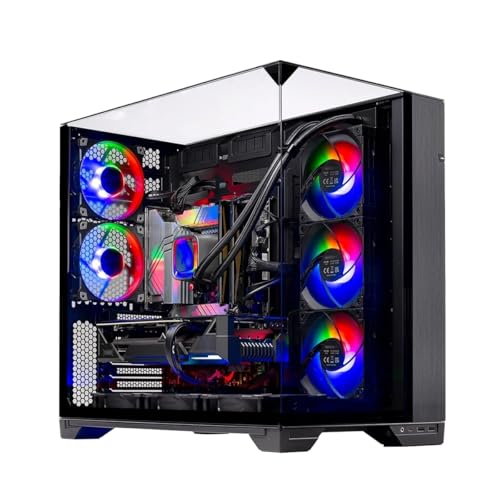
The CyberPowerPC Gamer Xtreme VR Gaming PC (model GXiVR8060A24) is a prebuilt gaming desktop aimed at PC gamers, streamers, esports players, and gaming setup builders who want solid 1080p performance without the hassle of building their own rig. It combines an Intel Core i5-13400F processor with an NVIDIA GeForce RTX 4060 graphics card, 16GB of DDR5 RAM, and a 1TB PCIe Gen4 NVMe SSD. This configuration is well-suited for competitive gaming titles like Valorant, Fortnite, and Apex Legends, as well as casual open-world games and streaming on Twitch or YouTube.
In terms of real-world performance, the i5-13400F's 6 performance cores and 4 efficiency cores handle gaming and multitasking smoothly, while the RTX 4060 with 8GB of VRAM delivers reliable frame rates at 1080p with high settings. The 16GB of DDR5 memory ensures quick system responsiveness, and the Gen4 SSD reduces load times significantly, making game launches and level transitions feel snappy. For streamers, this setup can handle encoding and gaming simultaneously without major stutters, provided you use NVENC on the RTX 4060.
Build quality is practical for a prebuilt in this price range. The tempered glass side panel lets you show off the custom RGB lighting, which adds a nice touch to any gaming desk setup. The case is compact enough for dorm rooms or smaller desks, and the included keyboard and mouse mean you can start gaming right away. Connectivity includes three USB 3.1 ports, six USB 2.0 ports, Gigabit LAN, WiFi 5, and Bluetooth 4.2, which covers most peripherals but lacks the latest wireless standards. Cable management inside the case is decent, though not as clean as a custom build.
Ease of setup is a strong point. The PC comes with Windows 11 Home pre-installed, so you just plug it in, connect to WiFi, and start downloading games. The 1TB SSD provides ample space for several AAA titles, and you can always add more storage later via the available SATA slots. The system runs relatively quiet under load, and the included cooling fans manage temperatures well for the components inside.
Realistic limitations include the absence of a more modern WiFi 6 or Bluetooth 5.x, which might matter if you have a high-end wireless router or use Bluetooth peripherals that benefit from lower latency. The base clock of 2.5GHz on the i5-13400F is modest, but the processor can turbo boost to higher frequencies when needed. Additionally, there are no user reviews yet, so long-term reliability is based on CyberPowerPC's reputation rather than verified feedback.
Overall, this gaming PC is a practical choice for PC gamers, streamers, and esports players who want a ready-to-use system for 1080p gaming and content creation. It's also a solid option for college gamers or work-from-home users who need a versatile desktop. If you prefer a prebuilt with good performance and RGB flair, the CyberPowerPC Gamer Xtreme is worth considering.

Pros
- Exceptional value with pre-installed ARGB fans and dual tempered glass at this price point.
- Versatile cooling support: up to 9 fans and 360mm radiator top mount.
- Unique wood-grain I/O adds a premium, natural feel to the front panel.
- Ample space for large GPUs and high-end components without being overly bulky.
Cons
- I/O panel may lack a USB-C port, which could be a downside for modern high-speed peripherals.
- The wood-grain design might not appeal to all RGB-centric or futuristic setups.
- Cable management space, while decent, may require careful routing for very thick cables.
The MONTECH XR-W is an ATX mid-tower PC gaming case that stands out with its dual tempered glass panels and a distinctive wood-grain I/O interface. It's designed for PC gamers, gaming setup builders, streamers, and anyone who wants a clean, modern case that showcases their components while offering solid cooling performance.
Performance-wise, the XR-W doesn't disappoint. It supports 360mm radiators at the top and can fit even the largest GPUs like the RTX 4090. The three pre-installed 120mm ARGB PWM fans include two reverse-blade fans on the side for optimal intake airflow and one regular fan at the rear for exhaust. This setup delivers excellent airflow out of the box, and you can add up to six more fans for extreme cooling. The mesh filters on top, bottom, and side panels keep dust at bay while maintaining high air throughput.
Build quality is solid for a case in this price range. The steel frame feels sturdy, and the dual tempered glass panels are thick and secure. The wood-grain I/O panel is a nice touch, blending natural texture with the typical ports (likely USB-A and audio jacks). However, it's worth noting that a USB-C port is not mentioned, which some users might miss. Cable management is decent with plenty of tie-down points and a generous gap behind the motherboard tray.
Setting up the XR-W is straightforward. The pre-installed fans simplify the building process, and the glass panels are attached with thumb screws for easy removal. Cleaning the filters is simple since they slide out. One limitation is that the wood-grain panel is non-removable, so you cannot swap it for a standard mesh if you prefer a different look. Also, the reverse-blade fans might confuse some builders, but they are clearly labeled.
In summary, the MONTECH XR-W is a great choice for PC gamers and setup builders who value aesthetics and airflow. It offers excellent compatibility with high-end components, pre-installed fans with ARGB, and a unique wood-grain design. While it may lack USB-C and the styling won't suit everyone, the overall value and performance make it a strong contender for a mid-tower build.
The XR-W is built with airflow in mind. The three pre-installed ARGB fans (two reverse-blade side intakes and one rear exhaust) provide a balanced positive pressure setup. You can mount up to nine fans total: three top, three side, two bottom, and one rear. The top supports 360mm radiators, and the front (behind the left glass panel) also supports 360mm radiators if you choose to use that area. The mesh filters are easy to remove for cleaning, ensuring long-term cooling efficiency remains high.

Pros
- Integrated power and USB ports reduce cable clutter and keep devices charged during long gaming sessions.
- Versatile LED lighting adds ambiance without requiring separate RGB strips or software.
- Reversible shelves and adjustable shelf height offer flexibility for various setups and room layouts.
- Solid steel construction feels sturdy and supports monitors, PCs, and peripherals with confidence.
Cons
- 44-inch width may feel cramped for multi-monitor or large tower setups, better suited for compact gaming stations.
- LED lights are controlled via button on the strip, not app or remote, limiting convenience for some users.
- Assembly requires some time and effort, though instructions are clear according to user feedback.
The Bestier Gaming Desk with Power Outlets is a well-thought-out solution for PC gamers, streamers, and setup enthusiasts who want a clean, organized gaming station without sacrificing style or functionality. This 44-inch desk combines built-in power management, customizable RGB lighting, and versatile shelving in a compact footprint that fits nicely in bedrooms, dorm rooms, or small home offices.
Designed with the modern gamer in mind, this desk targets a wide audience: from competitive esports players who need quick access to charging ports for peripherals, to casual gamers who appreciate a tidy setup. The integrated 4 AC outlets and 2 USB ports (5V 2.2A) mean you can plug in your monitor, PC, and headset directly on the desk, cutting down on tangled extension cords. The power strip is rated at 1500W, so it handles multiple devices without worry.
For those who love RGB, the built-in LED light strip offers 7 color selections and 22 dynamic modes - all controlled via buttons on the strip itself. While it lacks app or remote control, the variety of effects adds a personalized glow to your gaming space without needing separate accessories. The desk surface features a 3D carbon fiber finish that looks sleek and resists scratches, while the CARB P2 certified board ensures eco-friendly material standards.
Storage is handled by four reversible shelves that can be mounted on either side of the desk, plus a side storage bag and a headset hook. The second shelf is height-adjustable, allowing you to fit a PC tower or PlayStation 5 underneath. The steel frame with X-crossbar provides impressive stability - no wobble during intense gaming sessions. The overall weight capacity feels solid for monitors up to 24-27 inches and standard gaming rigs.
Setup is straightforward with included tools and clear instructions, though expect about 45 minutes to an hour of assembly. The cable management bag helps keep cables out of sight, though you may need additional clips for a fully hidden look. One realistic limitation is the 44-inch width: if you run dual monitors or a full-tower case, space gets tight. The LED control button placement on the strip can be slightly awkward to reach under the desk after setup.
Overall, the Bestier Gaming Desk is a practical choice for PC gamers who value organization, RGB ambiance, and reliable power access in a compact form. It works well for solo gaming stations, streaming setups with a single monitor, or as a dedicated desk for work-from-home gamers. For the price, it delivers solid build quality and convenience that many users will appreciate.

Pros
- Convenient built-in power outlets reduce cable clutter and keep devices charged.
- Versatile storage with reversible shelves and adjustable height for different setups.
- Attractive LED lighting with multiple modes enhances the gaming vibe.
- Sturdy steel construction ensures long-term durability and stability.
- Affordable price for a feature-rich gaming desk with power and RGB.
Cons
- LED lights are controlled by buttons on the strip, not via software or remote.
- Some users may find the desk depth (19 inches) shallow for large monitors or deep peripherals.
- Assembly may require time and effort due to multiple components.
The Bestier 61 Inch Gaming Desk is a well-rounded gaming table designed for PC gamers, streamers, and setup enthusiasts who value both aesthetics and functionality. It features built-in power outlets, customizable LED lighting, and reversible shelving, making it a practical centerpiece for any gaming room or home office.
For performance, the desk includes 4 AC outlets and 2 USB ports, allowing you to power your gaming PC, monitor, and accessories directly from the desk. The LED strip offers 7 colors and 22 dynamic modes, letting you match the lighting to your mood or setup. The reversible 4-tier shelves provide flexible storage for consoles, games, or collectibles, while the height-adjustable second shelf can fit a PC tower or PS5.
Build quality is solid with a durable steel frame and X-crossbar that keep the desk stable even under heavy loads. The grey 3D carbon fiber finish looks modern and resists scratches, and the CARB P2 Class board meets California air quality standards. The side storage bag and headset hook help keep cables and accessories organized.
Setup is straightforward but may take some time due to the many parts. The LED lights are controlled by buttons on the strip itself, which is less convenient than a remote or app but still easy to use. Cable management is aided by the storage bag and the ability to route cords through the shelves.
One limitation is the desk's depth of 19 inches, which might feel shallow for users with large monitors or deep keyboards. Also, the LED control method might not suit those who prefer software-based RGB customization. Assembly requires patience, but the instructions are clear.
Overall, the Bestier 61 Inch Gaming Desk is a great choice for PC gamers and streamers who want a feature-packed desk without breaking the bank. It offers excellent value with power outlets, RGB lighting, and versatile storage, making it suitable for gaming, streaming, and productivity setups.

Pros
- Built-in power and USB outlets simplify cable management and charging
- LED lighting with multiple modes enhances gaming ambiance without extra strips
- Reversible shelves offer flexible storage for gaming gear or decor
- Strong steel frame supports heavy monitors and multiple devices
Cons
- Desk dimensions may be too large for smaller rooms or tight corners
- LED lights are not software-controllable and require button operation
- Side storage bag may feel less premium compared to full drawer solutions
The Bestier Gaming Desk with Power Outlets is a 61-inch workstation designed for PC gamers, streamers, and content creators who want both style and function. This desk features a built-in power strip with four AC outlets and two USB charging ports, so you can plug in your gaming PC, monitor, and peripherals without hunting for a wall socket. The included LED lights offer 7 color options and 22 dynamic modes, letting you match the mood of your favorite games or streaming setup.
For gaming setup builders and RGB enthusiasts, the white 3D carbon fiber finish provides a clean, modern look that pairs well with colorful peripherals. The reversible shelves can be mounted on either side, giving you flexibility to store your console, games, or collectibles. The height-adjustable second shelf is ideal for fitting a PC tower or PS5, and the side storage bag keeps cables and small accessories out of sight.
Performance-wise, the desk's steel frame and X-crossbar deliver solid stability, even during intense esports matches or long streaming sessions. The 61-inch surface provides ample space for a dual-monitor setup, a gaming keyboard, and a mouse pad, making it practical for competitive gaming or content creation. The built-in power outlets are rated for 1500W, so you can safely power a high-end gaming PC and multiple accessories.
In terms of comfort and ergonomics, the desk's height is fixed, so you may want to pair it with an adjustable chair for proper posture. The LED lights are controlled via buttons on the strip, which is simple but lacks software customization. Many users may appreciate the straightforward setup, as the desk comes with clear instructions and all necessary hardware.
Realistic limitations include the desk's size, which may be too large for cramped dorm rooms or small apartments. The side storage bag is functional but not as sturdy as a drawer. Additionally, the LED lights are not compatible with smart home systems, so you'll need to manually change modes. However, for most PC gamers and streamers, these are minor trade-offs for the overall convenience and style.
Overall, the Bestier Gaming Desk is a solid choice for gamers who want a feature-rich workstation that keeps their gear organized and powered. It's especially well-suited for those building a dedicated gaming room or home office setup, and the combination of power outlets, LED lighting, and storage makes it a practical investment for long-term use.
Frequently Asked Questions
Can I build a gaming PC under $1,500 that handles 1440p gaming?
Yes, a $1,500 budget in 2026 can easily handle 1440p gaming at high settings. The best parts for a gaming pc under 1500 typically include an RTX 4060 or RX 7700 XT paired with a Ryzen 5 7600 or Intel i5-13400F. These combos deliver smooth frame rates in most AAA titles and competitive shooters.
Is the CyberPowerPC Gamer Xtreme VR a good prebuilt for under $1,200?
Yes, the CyberPowerPC Gamer Xtreme VR (GXiVR8060A24) with its i5-13400F and RTX 4060 is a solid prebuilt for the price. It includes 16GB DDR5 and a 1TB PCIe Gen4 NVMe SSD, which are strong specs for best parts for a gaming pc under 1500 builds. Just note it uses WiFi 5 and Bluetooth 4.2, so you may want a wired connection for online play.
What size desk is best for a gaming PC setup under $150?
A desk around 44 to 61 inches wide works well for most setups. The Bestier Gaming Desk comes in those sizes with built-in power outlets and LED lighting. A larger desk gives you more room for a dual-monitor setup, while a 44-inch version fits tighter spaces. Both include reversible shelves and a headset hook.
Does the Montech XR-W case support 360mm radiators and large GPUs?
Yes, the Montech XR-W supports a 360mm radiator at the top and fits 40-series GPUs like the RTX 4090. It comes with three pre-installed ARGB fans (two reverse-blade) and has a dual tempered glass design. The wood-grain I/O adds a unique look while keeping ports accessible.
Should I buy a prebuilt or build my own PC with a $1,500 budget?
It depends on your comfort level. A prebuilt like the CyberPowerPC Gamer Xtreme saves time and comes with a 1-year warranty and lifetime tech support. Building your own lets you choose every part, like the Montech XR-W case and a custom RTX 4060 combo, but requires assembly. Both paths can deliver great 1080p and 1440p performance for best parts for a gaming pc under 1500.
What are the key features of the Bestier gaming desk with power outlets?
The Bestier Gaming Desk includes 4 AC outlets and 2 USB charging ports with a 1500W rating. It also has LED lights with 7 colors and 22 dynamic modes, reversible shelves, a storage bag, a headset hook, and a height-adjustable shelf. The 3D carbon fiber finish and CARB P2 board make it durable and stylish.
Can I fit a PS5 or large PC tower on the Bestier desk’s shelf?
Yes, the second shelf is height-adjustable and removable, so you can fit a PS5 or a large PC tower. The desk’s steel frame and X-crossbar provide stability for heavy equipment. Just check the dimensions of your console or case to ensure it fits comfortably.








Write Your Review
No reviews yet. Be the first to share your experience!