


Desk clutter, port shortages, and wrist strain can quickly disrupt long gaming or work sessions. Even powerful rigs suffer when peripherals lack proper support or when desktop maintenance gets ignored. Investing in the best pc accessories transforms how your station functions by improving physical comfort, expanding peripheral connectivity, and maintaining clean hardware. Practical tools like memory foam wrist supports and multi-port USB adapters solve physical friction and cord crowding before they ruin workflow efficiency. Pair these with a quality ergonomic setup to ensure long-term comfort while sitting at your computer.
Modern workstations balance productivity with gaming needs, requiring utilities that handle both high-speed data and quick macro inputs. Dedicated control pads and expansive desk pads provide quick access to vital controls while protecting desktop surfaces from scuffs. Keeping screens and keyboards free of debris preserves expensive equipment without requiring aggressive chemicals or complex tools. Exploring dedicated hardware upgrades alongside an informative setup gear guide helps identify simple additions that provide measurable utility every single day.

Pros
- Includes dedicated, matching wrist cushions for both mouse and keyboard setups
- High-density memory foam distributes wrist pressure evenly along desk edges
- Anti-skid silicone underside prevents slipping during rapid mouse movements
- Silky Lycra fabric cover offers a smooth, non-irritating surface against the skin
Cons
- This is an ergonomic accessory set only and does not include an electronic computer mouse or keyboard
- The 0.83-inch height may sit too high when paired with ultra-slim or low-profile computer mice
- Requires at least 3.15 inches of clear desk depth in front of your mouse and keyboard
The Vaydeer Wrist Rest set is an ergonomic desk accessory kit containing two separate cushions: a 17.32-inch support for computer keyboards and a 5.94-inch support for your computer mouse. Designed for office workers, students, writers, and gamers who spend long hours navigating with a mouse or typing at a desk, this set serves as an external comfort upgrade rather than an electronic input device. It is intended for anyone looking to raise their palms and wrists level with their peripherals, reducing direct friction against hard desktop edges.
Because this product is a physical wrist support accessory, it requires no cables, Bluetooth connections, USB receivers, or software drivers. In terms of hardware compatibility, the standalone mouse pad rest works alongside any wired, wireless, trackball, or ergonomic mouse regardless of operating system or computer brand. The keyboard cushion spans 17.32 inches wide, making it compatible with full-sized mechanical or membrane keyboards, compact tenkeyless boards, and standalone laptop setups.
Both pieces are constructed with dense memory foam interior padding wrapped in a breathable, diamond-patterned Lycra fabric cover. The mouse support measures 5.94 by 3.15 inches with an approximate thickness of 0.83 inches, giving your hand a dedicated resting point whether you use a claw, palm, or fingertip mouse grip. The manufacturer features a subtle concave contour across the middle, designed to support the wrist joint naturally without impeding mouse gliding. On the bottom, a textured silicone rubber base grips flat wood, laminate, or glass desks to resist unwanted shifting during active navigation.
Setup is entirely manual and takes only seconds by aligning each pad directly in front of your mouse and keyboard. The independent mouse rest allows flexible positioning, accommodating left-handed or right-handed mouse users and letting you set your preferred distance from your mouse pad. Daily maintenance is straightforward since the Lycra exterior can be wiped down gently with a damp cloth if dust or oils accumulate from regular computer sessions.
When planning your workspace, keep in mind that this accessory set requires clear desk depth of at least 3.15 inches in front of your peripherals. At roughly 0.83 inches in height, it pairs best with standard-profile or mechanical peripherals; users of slim travel mice or ultra-low-profile touchpads might find the cushion slightly elevated compared to their mouse sensor height. Furthermore, while the manufacturer markets the padding to reduce wrist stress and fatigue, an ergonomic rest does not provide medical treatment or guarantee freedom from repetitive strain.
For American computer users wanting to enhance desk comfort while working, studying, or browsing, the Vaydeer Wrist Rest combo offers a dependable physical foundation for your mouse and keyboard setup. It provides effective cushioning and non-slip stability at an accessible entry point. If your current mouse setup leaves your wrist resting uncomfortably against a hard desk surface, this two-piece memory foam accessory is a sensible addition to verify before buying a completely new mouse.
The Vaydeer wrist rest set provides specific sizing to complement desktop peripherals. The keyboard pad measures 17.32 inches long, 3.15 inches wide, and 0.83 inches thick, matching the width of standard full-size computer keyboards. The mouse support measures 5.94 inches long, 3.15 inches wide, and 0.83 inches thick, offering ample width for typical wrist movements without occupying excessive mouse mat area.
Both rests feature a subtle ergonomic concave contour down the center to cradle the wrist joints. Because the mouse cushion is entirely separate from the keyboard cushion, it adapts equally well to ambidextrous, left-handed, or right-handed mouse setups. Buyers should measure their desk space to confirm they have roughly 3.15 inches of depth available directly in front of their keyboard and mouse.
This accessory package includes two individual items: one large keyboard wrist cushion and one compact mouse wrist cushion, weighing a combined total of approximately 0.71 pounds. Both pads feature a classic black finish with an embossed diamond geometric pattern on the surface.
The build consists of responsive memory foam encased in silky smooth Lycra fabric that minimizes skin irritation during repetitive wrist contact. The underside is lined with a non-slip silicone rubber base that stays securely anchored to smooth desk materials such as glass, treated wood, and metal without leaving adhesive residue.

Pros
- Affordable price point for adding extra USB ports
- Compact size fits easily into a laptop bag or desk drawer
- Reliable data transfer speeds up to 5Gbps for everyday use
- LED indicator clearly shows when the hub is powered and working
Cons
- USB-C port is for power input only, not data transfer or charging other devices
- 2ft cable may be too short for some desktop setups, requiring the hub to sit close to the computer
- Plastic housing may not feel as premium as metal alternatives, but it keeps weight low
The Acer USB Hub 4 Ports is a straightforward USB 3.0 splitter that brings four additional ports to any laptop, PC, or gaming console. For PC gamers and streamers who constantly juggle a mouse, keyboard, headset, flash drive, or external hard drive, this hub offers a simple solution to keep everything connected without constantly swapping cables. At just $9.99, it's an easy add-on for anyone building a gaming setup or upgrading their desk organization.
Performance-wise, the hub supports USB 3.0 speeds up to 5Gbps, which is plenty fast for transferring game files, streaming clips, or moving photos. The built-in GL3510 chip helps manage heat and data integrity, so you can rely on it during long gaming sessions or while streaming on Twitch. Just keep in mind that if you're connecting power-hungry devices like a 2.5-inch external hard drive, you'll need to use the USB-C power port (labeled IN 5V) to keep the hub stable. That port is for power input only, not for data or charging other gadgets.
The design is compact and portable, measuring just over 4 inches long and weighing about 0.1 pounds. The 2ft cable is short, which is fine for laptop users or if your PC tower is close by, but it might not reach across a large desk. The LED light is a nice touch, letting you know at a glance if the hub is active. Build quality is basic plastic, but it feels sturdy enough for everyday use and won't add clutter to your gaming space.
Setup couldn't be easier: it's plug-and-play with no drivers required on Windows, macOS, ChromeOS, or Linux. That means you can plug it into your gaming rig, laptop, or even a PS4 or Xbox to expand your USB options instantly. For college gamers or anyone with a tight desk setup, this hub helps manage cables by consolidating multiple connections into one spot.
One realistic limitation is the short cable length, which might require the hub to sit right next to your computer. Also, the USB-C port is strictly for powering the hub, so don't expect it to charge your phone or transfer data. These are minor trade-offs for such an affordable accessory.
Overall, the Acer USB 3.0 Hub is a solid choice for PC gamers, streamers, and anyone who needs extra USB ports without breaking the bank. It's especially handy for laptop gamers who want to quickly connect peripherals at a LAN party or in a dorm room. If you're looking for a no-fuss way to expand your connectivity, this hub delivers reliable performance at a great price.

Pros
- Useful printed shortcuts for Office and Windows users who want to work faster.
- Large surface area accommodates both keyboard and mouse comfortably.
- Waterproof and easy to wipe clean, ideal for desks near drinks.
- Non-slip base stays put even with quick mouse movements.
- Smooth fabric provides decent glide for office mice and casual gaming.
Cons
- Shortcuts are specific to Windows and Microsoft Office, not macOS or Linux.
- No RGB lighting or gaming-specific branding, so it may not match flashy gaming setups.
- Printer shortcut layout is permanent and cannot be customized or removed.
The Raryine Excel/Word/PowerPoint/Windows Mouse pad is a large desk mat that combines functionality with practicality. At 27.6 x 11.8 inches, it offers plenty of space for a full-size keyboard, a mouse, and even a notebook or drink. The surface is covered with printed keyboard shortcuts for Microsoft Office and Windows, making it a helpful reference for anyone who spends hours in spreadsheets or documents.
This mat is best suited for PC gamers who also work from home, college gamers juggling assignments and gaming, or streamers who need quick access to productivity hotkeys while managing their streams. It's not a flashy RGB accessory, but for gamers who value efficiency and desk organization, it's a smart addition.
Performance-wise, the smooth fabric top provides consistent mouse tracking for both office work and casual gaming. The non-slip rubber base keeps the mat from sliding during intense gaming sessions, and the waterproof coating protects against spills - a lifesaver during late-night gaming or coffee breaks. The reinforced stitched edges add durability, preventing fraying even after months of use.
Setup is straightforward: unroll it, lay it flat, and it's ready. No drivers or software needed. The shortcut layout is clear and color-coded by application, so even beginners can quickly find the right key combination. Maintenance is easy - a quick wipe with a damp cloth keeps it clean.
One realistic limitation is the permanent printing - the shortcuts cannot be customized or removed, so if you prefer a clean, minimalist look, this might not be your first choice. Also, the shortcuts are Windows-only, so Mac users won't benefit. But for its price, the Raryine mouse pad delivers solid build quality and a practical feature set that many gamers will appreciate.
Overall, this desk mat is a practical choice for gamers who also work or study at their PC. It streamlines workflow without compromising desk space, and its durable, waterproof design ensures it holds up well. If you need a large, functional mouse pad that boosts productivity without breaking the bank, this is a solid buy.


Pros
- Streak and smudge-free cleaning that works on OLED, LCD, and LED screens
- Non-toxic, eco-friendly formula safe for daily use around electronics
- Two nozzle options make it easy to clean both large monitors and small devices
- Anti-static effect helps reduce dust buildup on screens
- Compatible with a wide range of devices including gaming monitors, laptops, tablets, and phones
Cons
- Larger 16oz bottle may be bulky for portable carry, though the compact nozzles help
- Some users may prefer a spray that also handles oily fingerprints more aggressively
- Microfiber cloth may need frequent washing to maintain optimal cleaning performance
If you are anything like me, your gaming setup is more than just a desk and a monitor. It is a carefully curated workspace where every component matters, from your high-refresh-rate monitor to your mechanical keyboard and RGB lighting. Keeping those screens clean without damaging them is crucial, and that is exactly where the iO CLEAN Screen Cleaner Spray steps in. This 16oz cleaning kit is designed for all types of electronic displays, including LCD, LED, OLED, and curved gaming monitors, making it a practical addition to any PC gamers or streamers toolkit.
This cleaner is best suited for PC gamers, competitive gamers, and esports players who rely on crystal-clear visuals for peak performance. It is also a great fit for streamers and content creators who want to keep their streaming setup looking professional on camera. Casual gamers and work-from-home users will appreciate how quickly it cuts through smudges and dust, especially on laptops and touchscreens used for both work and play. Based on user feedback, its advanced formula works gently on delicate screens while effectively removing fingerprints, grime, and static dust, leaving a streak-free, like-new shine that does not hinder your gameplay.
When it comes to real-world performance, this screen cleaner delivers on its promises. The anti-static and anti-glare properties help reduce dust attraction and screen glare, which is a noticeable benefit during long gaming sessions or when working on detailed creative projects. You will find that a quick spray and wipe with the included microfiber cloth can restore your monitors clarity, making colors pop and text sharp again. While it does not directly affect input lag or refresh rates, a clean screen definitely helps with visual clarity and reduces eye strain, which is important for those marathon gaming sessions or late-night streams.
Build quality and practicality are strong points here. The kit comes with two different nozzles: a push-button sprayer for smaller devices like your smartphone or tablet, and a trigger sprayer for larger screens like your main gaming monitor. This flexibility makes it easy to clean everything from a 24-inch esports monitor to a 49-inch ultra-wide without oversaturating the surface. The microfiber cloth is soft and non-abrasive, so you do not have to worry about scratching your expensive OLED or matte display. The formula is also non-toxic and biodegradable, which is a nice bonus if you are environmentally conscious or have pets around your gaming area.
Ease of setup and use could not be simpler. Just spray, wipe, and you are done. There is no software to configure, no cables to manage, and no complex maintenance routines. The only limitation to consider is that the bottle is 16oz, which is a good size for home use but might be a bit large if you want to carry it in a laptop bag. Also, the microfiber cloth will need to be washed periodically to maintain its effectiveness, especially if you are cleaning heavily soiled screens. Still, this is a minor trade-off for a product that keeps your gaming gear looking its best.
Overall, the iO CLEAN Screen Cleaner is a reliable cleaning solution for anyone who values a clean, clear display for gaming, streaming, or productivity. It is especially useful for PC gamers with multiple monitors, those who frequently eat or drink near their setup, or anyone who wants to maintain the pristine condition of their high-end electronics. For the price, it offers great value and versatility, making it a smart addition to your desktop, dorm room, or home office cleaning kit.
Pros
- Effectively reaches tight spaces between keys and around switches without disassembly.
- Reusable multiple times until color darkens, offering great value for the price.
- Non-sticky and gentle on hands, with a pleasant lemon scent that leaves a fresh feel.
- Works on multiple surfaces including keyboards, car vents, cameras, and more.
Cons
- May leave slight residue if not pressed firmly enough into deep crevices.
- Less effective on heavily caked-on grime or sticky spills; requires repeated use.
- Needs to be stored in a cool place to maintain ideal consistency.
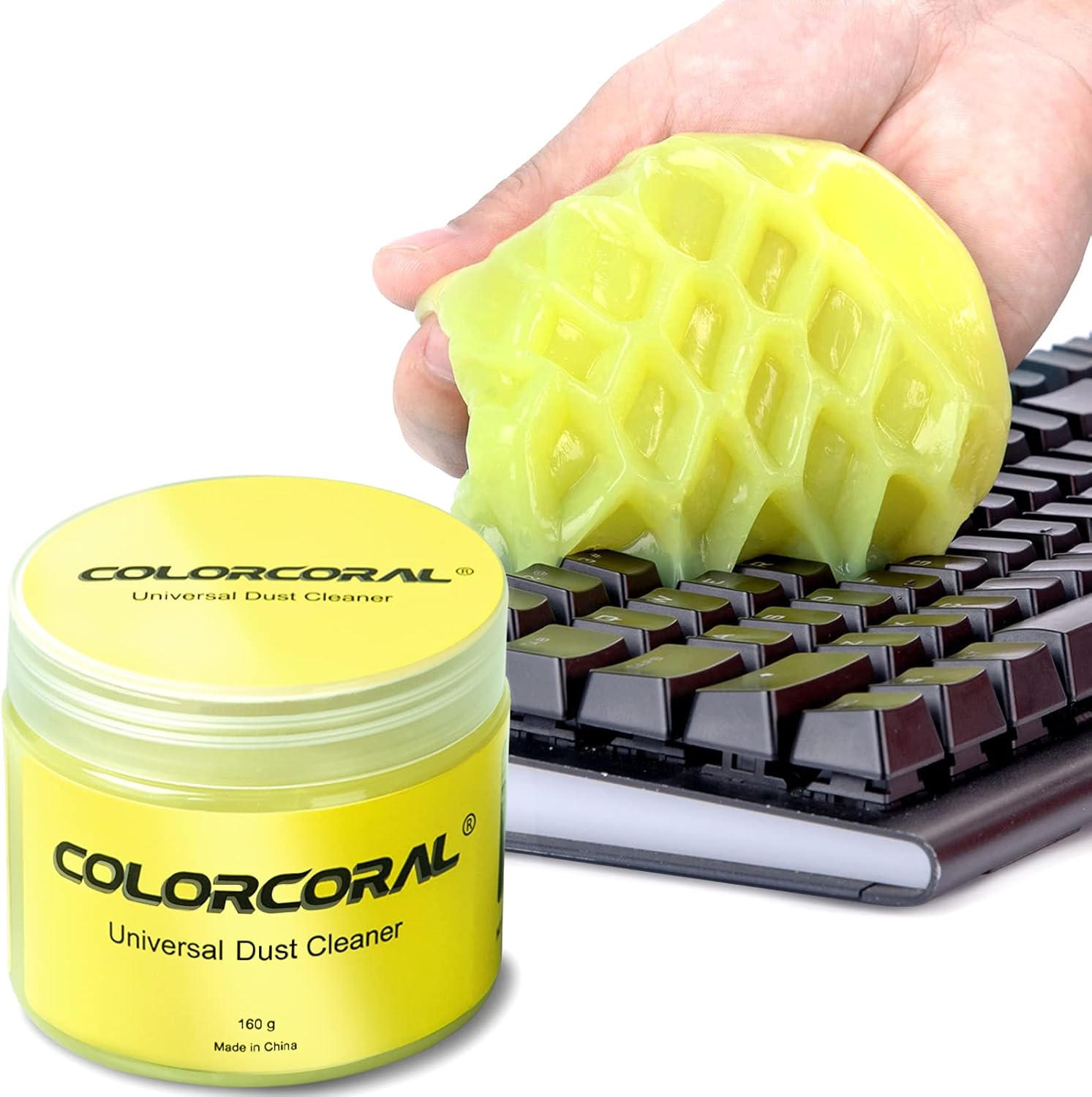
For PC gamers who spend hours at their desk, a clean keyboard isn't just about looks — it directly affects performance and longevity. The ColorCoral Cleaning Gel offers a simple, effective way to keep your gaming keyboard free of dust, crumbs, and debris that can interfere with key presses. This reusable gel is especially useful for mechanical keyboards with raised keycaps, where dirt often accumulates in hard-to-reach spots.
The cleaning process is straightforward and mess-free. You take a small piece of gel, knead it into a ball, then press it slowly into your keyboard or other textured surfaces. When you pull it out, the gel carries away dust and dirt with it. The gel is made from natural materials, so it's not sticky to hands and has a mild lemon scent. It's gentle enough for daily use and won't damage sensitive electronics.
Beyond keyboards, this gel is versatile enough for car vents, cameras, printers, speakers, and other electronics around your gaming setup or home office. Many users find it handy for keeping their streaming gear, monitor edges, and desk corners clean. The gel comes in a compact, sealed container that's easy to store and perfect for travel or dorm rooms.
Build quality is solid for a cleaning product. The gel holds its shape well and can be used repeatedly until its color darkens significantly or it becomes sticky. At that point, you simply discard it and start a fresh piece. The container keeps the gel clean and prevents it from drying out when stored properly in a cool place.
One realistic limitation is that the gel works best for loose dust and debris, not for sticky residues or liquid spills. For heavily soiled keyboards, you may need multiple passes or a more thorough cleaning method. Also, it's important to store the gel away from heat to keep it at the right consistency.
Overall, the ColorCoral Cleaning Gel is a practical, affordable addition to any gamer's maintenance kit. Whether you're a casual player, a competitive esports enthusiast, or a streamer who wants a clean setup on camera, this gel makes it easy to keep your keyboard and desk area free of dust. It's a small investment that helps prolong the life of your peripherals and keeps your gaming experience smooth.
Frequently Asked Questions
Do powered USB hubs prevent input latency for PC peripherals?
Yes, dedicated USB hubs with stable chipsets maintain reliable data transfer without noticeable delay for standard peripherals. The Acer 4-port hub features a GL3510 controller handling 5Gbps speeds across connected mice, keyboards, and flash drives. An extra 5V USB-C power port provides supplemental current when transferring data through external hard drives. This external power helps prevent intermittent device disconnects during heavy operational loads.
Can cleaning gel damage mechanical keyboards?
No, specialized cleaning gel is formulated to pick up loose dust without leaving greasy residue on keycaps or switches. The ColorCoral cleaning compound presses between key stems to lift crumbs and pet hair. Keep hands dry during application to avoid altering the gel consistency. Replace the compound once it darkens, and never wash the material in water.
Are ergonomic wrist pads necessary for compact gaming desks?
Yes, wrist supports promote neutral joint angles that alleviate desk edge pressure during long sessions. The Vaydeer wrist rest set supplies a 17.32-inch keyboard cushion alongside a 5.94-inch mouse rest, both lined with anti-skid rubber. These dimensions fit standard mechanical boards while staying anchored during rapid mouse adjustments. Evaluating your desk footprint helps determine if separate pads or full desk mats fit your available space.
How do programmable macro pads streamline daily PC tasks?
Programmable keypads assign multi-step commands and application launches to single physical triggers. The VSD M18 macro pad features 15 LCD visual keys and three buttons compatible with OBS, Twitch, and office software. Users can display custom icons and run sequential shortcuts across Windows and macOS platforms. Content creators benefit from switching scenes or firing in-game combos with a single tap.
Will screen cleaner sprays strip anti-glare monitor coatings?
Alcohol-free formulas are specifically formulated to preserve delicate anti-glare layers on gaming monitors. The iO CLEAN spray utilizes a biodegradable, ammonia-free solution safe for OLED, LED, and LCD panels. Using the included microfiber cloth prevents micro-scratches while lifting oils and fingerprints from the display. Regular cleaning maintains sharp image clarity across curved or flat displays.
Which setup accessories deliver the most value for Best Pc Accessories in 2026?
High-utility maintenance tools, reliable port expanders, and ergonomic pads deliver immediate daily improvements without demanding huge budgets. Expanding peripheral connections with reliable hardware from trusted names, like examining if an Acer peripheral setup matches your hardware ecosystem, ensures smooth connectivity. Investing in durable desk protection and programmable shortcut surfaces keeps your battlestation organized throughout 2026.



Write Your Review
No reviews yet. Be the first to share your experience!