


Desk real estate often dictates hardware choices, leaving many players frustrated by bulky chassis that overwhelm modest workstations. Balancing a tight physical footprint against dedicated graphics power and sufficient ventilation requires careful attention to internal dimensions. Searching for the best small form gaming pc means weighing compact volume against cooling performance, component expandability, and everyday connectivity. Unlike traditional desktop gaming computers that offer expansive clearance, smaller enclosures demand efficient component layouts and strategic airflow to maintain manageable temperatures during intensive workloads.
Chassis designs in this category range from pocketable mini PCs with integrated graphics to dense towers and three-liter cases packing high-end dedicated mobile or desktop graphics cards. If you intend to set up a compact gaming PC for TV setups or clear up room on a dorm desk, evaluating port selections, memory slot accessibility, and manufacturer cooling configurations helps avoid post-purchase compromises. Stated hardware specifications provide clear insight into whether a system prioritizes portable light gaming, modular storage expansion, or heavy AAA visuals in a streamlined package.

Pros
- High-end specs at a competitive price point for a pre-built desktop.
- Excellent thermal management with four fans and an ARGB air cooler.
- Generous 32GB DDR5 RAM and 2TB NVMe SSD provide ample speed and storage.
- User-friendly RGB customization through MSI Center software.
- Compact tower design (16 x 8.38 x 19 inches) fits well on most desks.
Cons
- Limited upgradeability due to potential proprietary components common in pre-built systems.
- No mention of integrated Wi-Fi or Bluetooth in the specifications - may require a USB adapter.
- RGB lighting may not appeal to users who prefer a minimalist or stealth look.
The MSI Codex Z2 (model A8NVP-436US) is a pre-built gaming desktop that brings together a potent combination of components for PC gamers, competitive players, streamers, and content creators. At its core, it features an AMD Ryzen 7-8700F processor and an NVIDIA GeForce RTX 5070 graphics card, paired with 32GB of DDR5 RAM and a 2TB NVMe SSD. This setup is designed to tackle modern games at high settings, handle streaming workloads, and support virtual reality experiences right out of the box.
When it comes to real-world gaming performance, the RTX 5070 and Ryzen 7-8700F deliver strong results for 1440p and even 4K gaming in many titles. The 32GB of DDR5 memory ensures smooth multitasking whether you are gaming, streaming, or running creative applications. The 2TB NVMe SSD provides lightning-fast load times for games and applications, reducing downtime and keeping you in the action. As a VR-ready system, it is also well-suited for immersive experiences like Half-Life: Alyx or Beat Saber.
Cooling is handled by an ARGB air cooler paired with four system fans: three in the front pulling in cool air and one in the rear exhausting heat. This configuration helps maintain stable temperatures during long gaming sessions, which is critical for both performance and component longevity. The built-in RGB lighting can be cycled using the MSI LED button on the chassis or customized further through MSI Center software, allowing you to match the look of your gaming desk setup.
Build quality is solid for a pre-built system. The case dimensions (16 x 8.38 x 19 inches) are relatively compact for a desktop with these components, and the 21.3-pound weight makes it manageable to move if needed. Setup is straightforward: connect your monitor, keyboard, mouse, and power, and Windows 11 Home is ready to go. The inclusion of a USB-C port provides modern connectivity for peripherals and external drives. Cable management inside the case appears tidy based on the product description, but as with many pre-built PCs, some users may find internal access limited for future upgrades.
One realistic limitation is that pre-built desktops often use proprietary motherboards, power supplies, or cooling mounts, which can make it harder to upgrade individual parts down the line. The product data does not specify wireless networking, so users who need Wi-Fi or Bluetooth may need to add a USB adapter or PCIe card. Additionally, the RGB lighting is present but is not as extensive as fully customizable RGB setups in enthusiast-level cases.
Overall, the MSI Codex Z2 is a strong recommendation for gamers who want high performance without the hassle of building a PC. It works well for competitive gaming (thanks to the fast CPU and GPU), casual gaming, streaming, and even light content creation. If you value convenience, strong out-of-box performance, and a cohesive aesthetic, this desktop is worth considering for your gaming setup.
The combination of the AMD Ryzen 7-8700F and NVIDIA RTX 5070 provides excellent gaming performance for both competitive and single-player titles. In games like Call of Duty: Warzone, Fortnite, and Apex Legends, you can expect high frame rates at 1440p with medium to high settings. The 32GB of DDR5 memory helps prevent stutters during intense scenes or when running background apps like Discord or streaming software. The 2TB NVMe SSD ensures maps and levels load quickly, giving you an edge in fast-paced games. For ray tracing and DLSS supported titles, the RTX 5070 delivers crisp visuals while maintaining smooth gameplay.
The MSI Codex Z2 uses a four-fan cooling setup with an ARGB air cooler on the CPU. Three front intake fans draw cool air across the components, while one rear exhaust fan pushes hot air out. This design helps keep temperatures manageable even during extended gaming sessions. The ARGB cooler adds a touch of style while ensuring the processor stays within safe operating limits. Users who plan to push the system hard may still want to monitor CPU and GPU temperatures, but the overall airflow configuration is effective for a pre-built system in this class.

Pros
- Powerful Ryzen 7 processor for its size, offering strong multi-core performance for productivity and gaming.
- Ample 32GB RAM and 1TB SSD out of the box, with upgrade options for future needs.
- Excellent connectivity with dual 2.5GbE LAN and WiFi 6E, ensuring lag-free online experiences.
- Triple 4K display support enhances productivity and allows for immersive gaming setups.
- Compact footprint fits easily on a desk or behind a monitor, ideal for space-constrained gamers and streamers.
Cons
- Integrated Radeon graphics limit gaming to esports and less demanding titles at lower settings; not suitable for AAA gaming at high details.
- Only one USB-C port, which may require a hub for users with multiple USB-C peripherals.
- Limited internal expansion due to small form factor; storage upgrades may require removing the bottom panel.
The GMKtec M5 Plus is a mini PC that packs a serious punch for its size, targeting PC gamers, streamers, content creators, and anyone who needs a compact yet capable desktop. Powered by the AMD Ryzen 7 5825U (an upgraded version of the 7430U), this little machine offers 8 cores and 16 threads with a boost clock up to 4.50GHz, making it suitable for multitasking, light gaming, and even running virtual machines or a home server.
For casual gamers and esports enthusiasts, the integrated AMD Radeon graphics can handle titles like League of Legends, CS:GO, and Minecraft at 1080p with decent frame rates. It's not meant for AAA gaming at max settings, but it's a solid choice for a secondary gaming rig or a living room PC. Streamers will appreciate the dual 2.5GbE LAN ports and WiFi 6E for stable, low-latency connections during broadcasts, though dedicated streaming PCs might still want a discrete GPU.
The 32GB of dual-channel DDR4 RAM and 1TB PCIe 3.0 SSD ensure snappy boot times and smooth app switching. The ability to upgrade to 64GB RAM and 4TB SSD means this mini PC can grow with your needs. Connectivity is a highlight: two USB 3.2 ports, two USB 2.0 ports, HDMI 2.0, DisplayPort, and a USB-C port that supports Power Delivery and DisplayPort allow you to run three 4K displays simultaneously, perfect for content creators juggling timelines or gamers wanting a multi-monitor battlefield.
Build quality feels solid with a space-black metal enclosure that dissipates heat efficiently. The compact dimensions (10 x 2 x 2.7 inches) make it easy to tuck away or mount behind a monitor, freeing up desk space. Setup is straightforward: plug in power, connect peripherals, and install your OS. The BIOS offers power-saving quiet mode and performance mode, letting you balance noise and power. Maintenance is minimal, though upgrading storage requires removing screws and the bottom cover.
One realistic limitation is the integrated GPU performance. If you're a competitive gamer who needs high frame rates in demanding titles, you'll want an eGPU or a full-sized gaming desktop. Also, the single USB-C port might be a bottleneck for users with multiple USB-C devices, though a hub can solve that. The fan can become audible under load, but it's not intrusive.
Overall, the GMKtec M5 Plus is an excellent buy for college gamers, work-from-home gamers, and streamers who need a space-efficient system that handles productivity, light gaming, and media consumption with ease. Its networking features make it a standout for anyone running a home server or needing reliable LAN connections. For the price, it offers great value for a versatile mini PC that fits a variety of gaming and professional scenarios.


Pros
- Compact size saves desk space without sacrificing performance
- Oculink port offers future eGPU upgrade path for extra graphics power
- Plentiful connectivity including dual 2.5GbE, USB4, HDMI 2.1
- Quiet cooling with RGB customization
- Excellent multitasking capability with 32GB DDR5
Cons
- Integrated Radeon 780M may struggle with demanding AAA titles at high settings without eGPU
- No dedicated PCIe slot for internal GPU upgrades; relies on Oculink for external
- Limited storage out of box (512GB) though expandable
The GMKtec K12 is a compact gaming mini PC that brings serious performance to a small form factor. Powered by the Ryzen 7 H255 processor (an upgraded 8745HS) and Radeon 780M integrated graphics, this system is well-suited for PC gamers, streamers, and content creators who need a powerful yet space-efficient desktop. Its small footprint makes it a great fit for dorm rooms, home offices, or any desk where every inch counts.
For gaming, the Radeon 780M handles esports titles like Valorant, CS2, and Fortnite at 1080p with high frame rates, and thanks to FSR support, you can push newer games to playable levels. The 32GB of DDR5 memory ensures smooth multitasking, whether you're streaming on Twitch, running Discord, or editing videos. The Oculink port is a standout feature, letting you connect an external GPU for a major boost in graphics performance when you need it.
The K12's build quality is solid with a metal chassis and dual cooling fans that keep the system quiet - just 35dB in Quiet Mode - even under load. The 13 RGB lighting modes add a personalized touch to your setup. Connectivity is generous: dual 2.5GbE LAN ports for fast networking, WiFi 6E, Bluetooth 5.2, USB4, and HDMI 2.1 supporting up to 8K displays. The four display outputs let you run a multi-monitor configuration for productivity or immersion.
Setting up the K12 is straightforward: plug in peripherals, connect to power, and you're ready to go. The three M.2 slots make storage expansion simple - just pop in an additional SSD. The compact design also makes cable management easier than a full tower, keeping your desk clean. The included warranty from GMKtec covers defects for a year.
One limitation is that the integrated graphics, while capable, won't match a dedicated GPU for high-end gaming at max settings. The Oculink eGPU solution adds cost and external hardware. Additionally, the 512GB SSD may fill up quickly, especially if you install multiple modern games - but the expansion slots mitigate that. For gamers on a budget who want a tiny powerhouse with future upgrade potential, the K12 is a compelling choice.
Pros
- Affordable price point for a complete gaming PC with modern CPU and fast SSD.
- Upgradable platform with AMD AM4 socket and DDR4 memory for future improvements.
- Includes keyboard and mouse, plus lifetime tech support from CyberPowerPC.
- Compact tower design fits well on most desks without taking up too much space.
Cons
- Only 8GB of RAM may limit multitasking in demanding games and streaming scenarios.
- Radeon RX 6500 XT lacks hardware encoding, which can impact streaming quality.
- Limited to 4GB VRAM may struggle with newer AAA titles at higher settings.
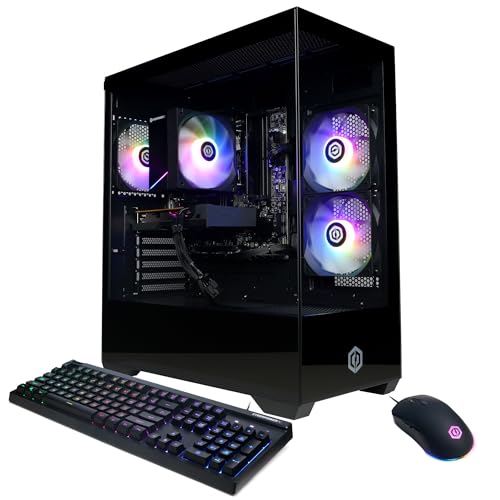
The CyberPowerPC Gamer Master GMA3100A3 is a pre-built gaming desktop aimed at gamers who want a ready-to-play system without the hassle of building their own. Powered by the AMD Ryzen 5 5500 processor and Radeon RX 6500 XT graphics, this rig is designed for smooth 1080p gaming in popular titles like Fortnite, Valorant, League of Legends, and CS2. It's a smart choice for casual gamers, college students dorm-room warriors, and anyone stepping into PC gaming for the first time.
In real-world use, the Ryzen 5 5500 handles everyday tasks and gaming with ease, offering responsive performance for both work and play. The 500GB PCIe 4.0 NVMe SSD ensures games and Windows load quickly, cutting down on waiting times. However, the 8GB of DDR4 RAM is a limiting factor — you may want to upgrade to 16GB soon if you plan to keep multiple browser tabs, Discord, and a game open at once. The RX 6500 XT is capable at 1080p medium settings in most esports titles, but its 4GB VRAM can be a bottleneck in newer AAA releases or when trying to push higher textures.
The system comes in a compact black tower with a tempered glass side panel and customizable RGB lighting. This makes it easy to show off your build, and the included keyboard and mouse help you get started right out of the box. Connectivity is solid with four USB-A 3.2 ports, four USB-A 2.0 ports, HDMI and DisplayPort outputs, WiFi 5, and Bluetooth 5.0. The lack of USB-C on the front panel is a minor inconvenience, but most peripherals will work fine with the available ports.
One realistic drawback is the RX 6500 XT's lack of hardware encoding, which means streaming via OBS or Discord may suffer in quality compared to Nvidia or higher-tier AMD cards. If streaming is a priority, you might want to consider a system with a better GPU. Also, the 8GB RAM is entry-level by today's standards — upgrading to 16GB is highly recommended for smoother multitasking and better performance in memory-intensive games.
Build quality is typical for a budget prebuilt: the case is sturdy enough, cable management is decent, and the cooling solution keeps temperatures in check during long gaming sessions. The 500W power supply is adequate for this configuration, but leaves limited headroom for major GPU upgrades later. If you're comfortable with basic upgrades, adding another 8GB stick of DDR4 is a simple and cost-effective improvement.
Overall, the CyberPowerPC Gamer Master GMA3100A3 is a solid entry-level gaming PC for those who want to jump into PC gaming without building from scratch. It's especially well-suited for esports players, casual gamers, and students on a budget. For more demanding AAA gaming or streaming, you may want to look at higher-tier configurations. But as a first gaming PC or a secondary system for a dorm room, it offers good value and room to grow.

Frequently Asked Questions
How do small form factor gaming PCs manage heat and airflow?
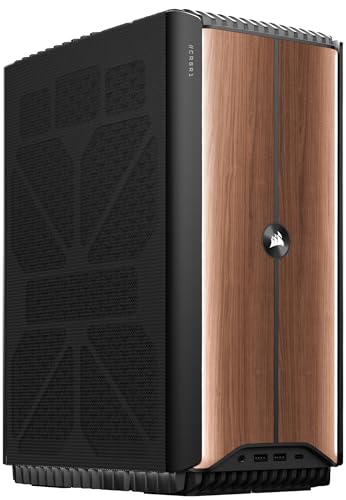
Small form factor systems use specialized cooling mechanisms like vapor chambers, multi-fan arrays, or closed-loop liquid coolers to manage thermals. The Corsair ONE i600 employs dual 240mm liquid coolers, while the ROG NUC 16 incorporates triple fans and a dual vapor chamber within its compact 3-liter chassis. Desktop models like the KOTIN tower utilize multiple ARGB fans and copper heat pipes to support stable airflow across confined interior spaces.
Can you upgrade the RAM and storage in a compact Best Small Form Gaming Pc?
Upgrade capability depends strictly on the chassis design and motherboard configuration of each machine. Several compact desktops, such as the GMKtec K12, provide three M.2 2280 slots and removable DDR5 SO-DIMM modules, whereas systems like the ACEMAGIC K1 feature soldered onboard LPDDR5 memory alongside open expansion slots for secondary SSDs. Checking the manufacturer specifications before purchase ensures the motherboard supports your intended storage or memory growth.
What graphics options are available in small form factor gaming systems?
Available graphics hardware ranges from integrated processors to full-scale discrete GPUs. Compact mini PCs like the GMKtec M5 Plus rely on AMD Radeon integrated graphics, while more powerful builds such as the msi Codex Z2 feature dedicated GeForce RTX 5070 desktop cards. Some mini units like the GMKtec K12 also supply dedicated Oculink ports to connect external graphics cards over high-speed PCIe lanes.
Is a small gaming desktop suitable for competitive 1080p and 1440p gaming?
Yes, models equipped with dedicated modern GPUs are engineered to support smooth 1080p and 1440p gaming workloads. The KOTIN desktop pairs an AMD Ryzen 7 8700F with a GeForce RTX 5060 Ti 8GB, explicitly listing support for 1080p, 1440p, ray tracing, and DLSS 4. Buyers comparing budget prebuilt gaming desktops should verify GPU memory and processor clock speeds to match their intended monitor resolution.
Do these compact systems support multiple monitor setups?
Most compact gaming desktops provide extensive multi-display support through HDMI, DisplayPort, and multi-function USB-C ports. The GMKtec K12 supports up to four displays with 4K or 8K video output, while the ACEMAGIC K1 and GMKtec M5 Plus support triple-screen 4K configurations. Connecting your primary display directly to the designated GPU display ports ensures full video processing performance.








Write Your Review
No reviews yet. Be the first to share your experience!