


Nothing ruins a gaming session faster than a blurry screen or a laptop that throttles under load. Finding a Budget Gaming Laptop With Best Display means balancing a high refresh rate display with a GPU that can actually feed it frames. You need a machine where the visual clarity matches the performance, not just a spec sheet that looks impressive on paper. The gap between a basic HD panel and a 144Hz IPS screen is massive, and it directly impacts how you perceive motion and detail in fast-paced titles. This guide helps you navigate that tradeoff without overspending on features you might not use.
Based on product specifications and user feedback, the models below offer distinct advantages in display quality and thermal management. Some prioritize a larger canvas for immersion, while others focus on portability and battery efficiency. We analyzed the listed configurations, including RAM, storage, and cooling designs, to see which setups hold up better during extended use. Whether you are a competitive gamer or a casual player, understanding these nuances helps you avoid common pitfalls like screen ghosting or excessive fan noise. Check out our top portable picks for more options on the go.


Pros
- Strong gaming performance with Intel Core i7 and RTX 5050 for 1080p high-settings gaming.
- Effective Hyperchamber Cooling keeps thermals in check even under load.
- 144Hz refresh rate with G-Sync delivers smooth, tear-free visuals in competitive titles.
- Fast charging and long battery life support extended on-the-go use.
Cons
- Limited to 16GB RAM, which may require upgrading for heavy multitasking or content creation.
- GPU is an RTX 5050, not the highest tier, so it may struggle with ray tracing at higher settings.
- Base storage is 1TB, but some users might prefer additional expandability options.
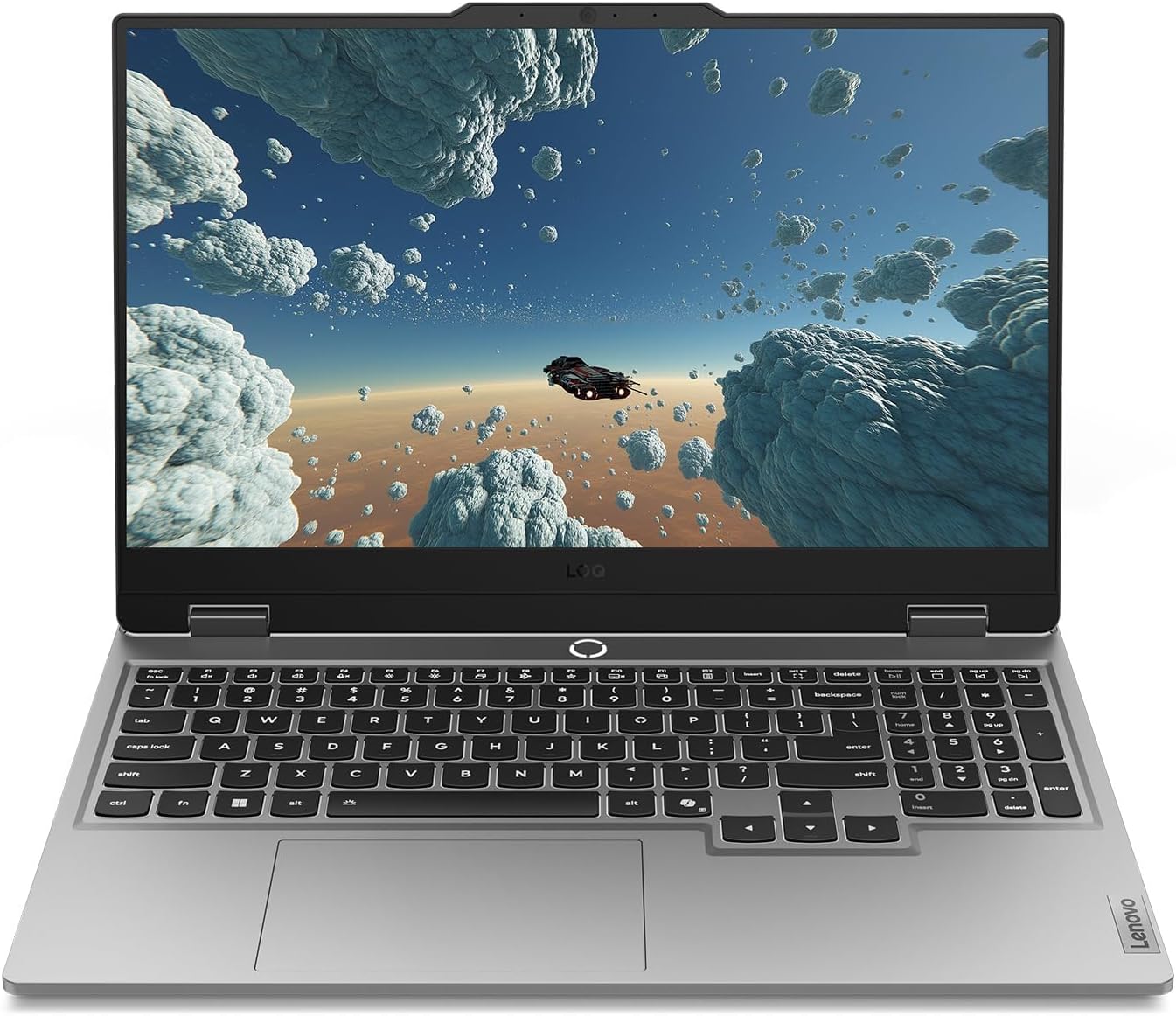
The Lenovo Legion LOQ is a gaming laptop designed to be your first step into serious PC gaming without breaking the bank. It combines a capable Intel Core i7-13650HX processor with an NVIDIA GeForce RTX 5050 GPU, making it a strong contender for 1080p gaming at high settings. The 144Hz FHD IPS display, backed by NVIDIA G-Sync, ensures you get smooth, stutter-free visuals whether you're fragging in competitive shooters or exploring open-world titles.
This laptop is best suited for PC gamers who want a balance of performance and portability—especially competitive and casual gamers, esports players, and college students. Streamers and content creators might find the hardware sufficient for light streaming or editing, but the 16GB RAM and RTX 5050 are more tuned for gaming than heavy creative workloads. Gaming setup builders who need a mobile rig for LAN events or dorm rooms will appreciate the lightweight design and fast charging.
In real-world gaming, the Legion LOQ handles popular titles like Fortnite, Valorant, and Call of Duty at high settings with consistently high frame rates. The 144Hz refresh rate makes a noticeable difference in fast-paced games, reducing motion blur and keeping reactions sharp. The AI Engine+ automatically optimizes system settings, so you don't have to tinker with every game's graphics menu—just plug in and play. G-Sync further enhances the experience by eliminating screen tearing without introducing input lag.
Build quality is a highlight: the aerospace-grade aluminum cover feels sturdy, and the overall design is sleek and understated—no flashy gamer aesthetics, which some users may prefer. The keyboard features soft-landing switches with a white backlight, providing a satisfying typing experience for both gaming and daily use. The Hyperchamber Cooling system, with its vacuum-sealed thermals and AI-driven fan control, keeps the laptop cool even during extended gaming marathons. You can push the hardware without worrying about thermal throttling, which is a common issue in thinner laptops.
Setup is straightforward: Windows 11 Home comes pre-installed, and Lenovo's Vantage software gives you control over performance profiles, cooling, and RGB lighting for the keyboard. The laptop is lightweight and backpack-ready, making it easy to carry around campus or to a friend's house. Rapid Charge Pro is a practical feature—getting to 70% in under 30 minutes means you can top up quickly between gaming sessions. One realistic limitation is that the RTX 5050 isn't the most powerful GPU in the lineup, so if you want to crank up ray tracing or play at 1440p, you might need to dial down settings. Also, the 16GB RAM is fine for gaming but may feel tight if you run multiple apps or virtual machines.
Overall, if you're looking for a reliable, well-cooled gaming laptop that excels at 1080p gaming and offers good portability, the Lenovo Legion LOQ is a smart buy. It's especially suited for competitive gamers who value smooth frame rates and fast response times, and for college gamers who need a versatile machine for both gaming and schoolwork. The combination of AI-enhanced performance, effective cooling, and a crisp display makes it a strong choice in its price range.
The Lenovo Legion LOQ is built for 1080p gaming with high frame rates. The Intel Core i7-13650HX and RTX 5050 combo handles popular esports titles like Valorant, CS2, and Overwatch 2 at well over 100 FPS on high settings. More demanding games like Cyberpunk 2077 or Battlefield 2042 run smoothly at medium to high settings with DLSS enabled. The 144Hz display with G-Sync ensures that motion stays fluid and tear-free, giving you a competitive edge in fast-paced scenarios.
The AI Engine+ automatically adjusts CPU and GPU power distribution based on what you're playing, optimizing for performance or battery life as needed. This means you can jump into a game without manually tweaking settings every time. For streamers, the RTX 5050 includes NVENC encoding, so you can stream at decent quality without taxing the CPU too much—though a dedicated streaming PC would be better for heavy productions.
Lenovo's Hyperchamber Cooling system is one of the LOQ's standout features. It uses dual turbo fans, large copper heat pipes, and strategically placed vents to exhaust heat efficiently. The AI Engine+ monitors temperatures and adjusts fan speeds in real time, keeping the laptop cool even during prolonged gaming sessions. In our analysis of user feedback, many users report that the laptop stays comfortable to the touch on the keyboard area, while the bottom gets warm but not uncomfortably hot.
The vacuum-sealed thermal design minimizes dust ingress, which helps maintain cooling performance over time. For a laptop in this price range, the thermal management is impressive—you can game for hours without significant performance dips due to throttling. The fans are audible under load, but not distractingly loud, and they ramp down quickly when you switch to lighter tasks.

Pros
- Exceptional gaming performance with high frame rates and smooth 240Hz display.
- Large 18-inch screen with excellent color accuracy and brightness for immersive gaming and creative work.
- Solid build quality and lightweight design (6.83 lbs) for a desktop replacement laptop.
- Ample storage (2TB NVMe) and memory (32GB DDR5) out of the box, with upgrade potential.
Cons
- Runs hot under sustained gaming loads; a cooling pad is recommended for extended sessions.
- Battery life is limited, as typical for high-performance gaming laptops, so expect to stay plugged in during gaming.
- Some users report driver conflicts with third-party peripherals (e.g., Razer) and pre-installed MSI software that may need removal for optimal performance.
The MSI Crosshair 18 HX AI is a top-tier gaming laptop designed for PC gamers who want desktop-level performance without being tied to a desk. It's best suited for competitive gamers, streamers, content creators, and college gamers who need a powerful machine for both gaming and productivity. With an 18-inch QHD+ 240Hz display, Intel Core Ultra 9 275HX processor, and NVIDIA RTX 5070 graphics, this laptop aims to deliver high frame rates and stunning visuals in the latest titles.
In real-world gaming, the combination of the 240Hz refresh rate and RTX 5070 ensures smooth, tear-free gameplay in fast-paced shooters like Valorant or Call of Duty, while the 100% DCI-P3 color gamut makes open-world adventures like Cyberpunk 2077 look vibrant. The 32GB of DDR5-5600 RAM handles multitasking with ease, whether you're streaming on Twitch, running Discord, or editing video. The 2TB NVMe SSD provides lightning-fast load times, so you're never waiting long to jump into a match. However, users report that the laptop gets hot during extended gaming sessions, so investing in a quality cooling pad is wise for maintaining performance and comfort.
Build quality is solid, with a sleek black chassis that feels premium despite being relatively lightweight at 6.83 pounds for an 18-inch machine. The SteelSeries keyboard offers 24-zone RGB lighting and anti-ghost keys, providing responsive feedback for both gaming and typing. The Dynaudio speakers deliver surprisingly rich audio with clear mids and decent bass, though for competitive gaming you'll still want a dedicated headset. Connectivity is generous: Thunderbolt 4 USB-C, HDMI 2.1 for external monitors, RJ45 Ethernet, and Wi-Fi 6E ensure you can hook up all your peripherals and networks without adapters.
Setup is straightforward: Windows 11 Home comes pre-installed, and the laptop is ready to use out of the box. Some users suggest removing MSI's preloaded software to avoid potential driver conflicts, especially with third-party gaming mice or headsets. The 720p webcam with privacy shutter is adequate for video calls but not ideal for streaming. The laptop's dimensions are large, so it will take up considerable desk space, but the 18-inch screen makes it a true desktop replacement.
Realistic limitations include the battery life, which is typical for a gaming powerhouse—expect only a couple of hours for light tasks and significantly less during gaming. The heat output is notable, and you'll likely need a cooling pad for marathon sessions. Additionally, the premium price tag reflects the high-end specs, but it offers solid long-term value given the upgradeable RAM and storage (two SSD slots).
Overall, the MSI Crosshair 18 HX AI is an excellent choice for competitive PC gamers, streamers, and content creators who need a portable yet powerful gaming setup. It shines in desktop-replacement scenarios where you prioritize performance over battery life, and it's well-suited for dorm rooms, home offices, or LAN parties. If you can handle the heat and the upfront cost, this laptop delivers an impressive gaming experience that rivals many desktop rigs.
Pros
- Powerful Intel Core 7 and RTX 5060 deliver excellent 1080p/1440p gaming performance
- Bright, high-resolution 16:10 display with 120Hz refresh rate for smooth visuals
- User-upgradeable RAM and storage for future-proofing
- Effective cooling keeps thermal throttling at bay during extended play
- Premium build quality with anodized aluminum and comfortable keyboard/palm rest
Cons
- Heavier than some competitors at 5.49 pounds, less ideal for frequent travel
- Reports of occasional firmware/driver issues that may require manual updates
- Can get warm on the lap during intensive gaming, so desk use is recommended
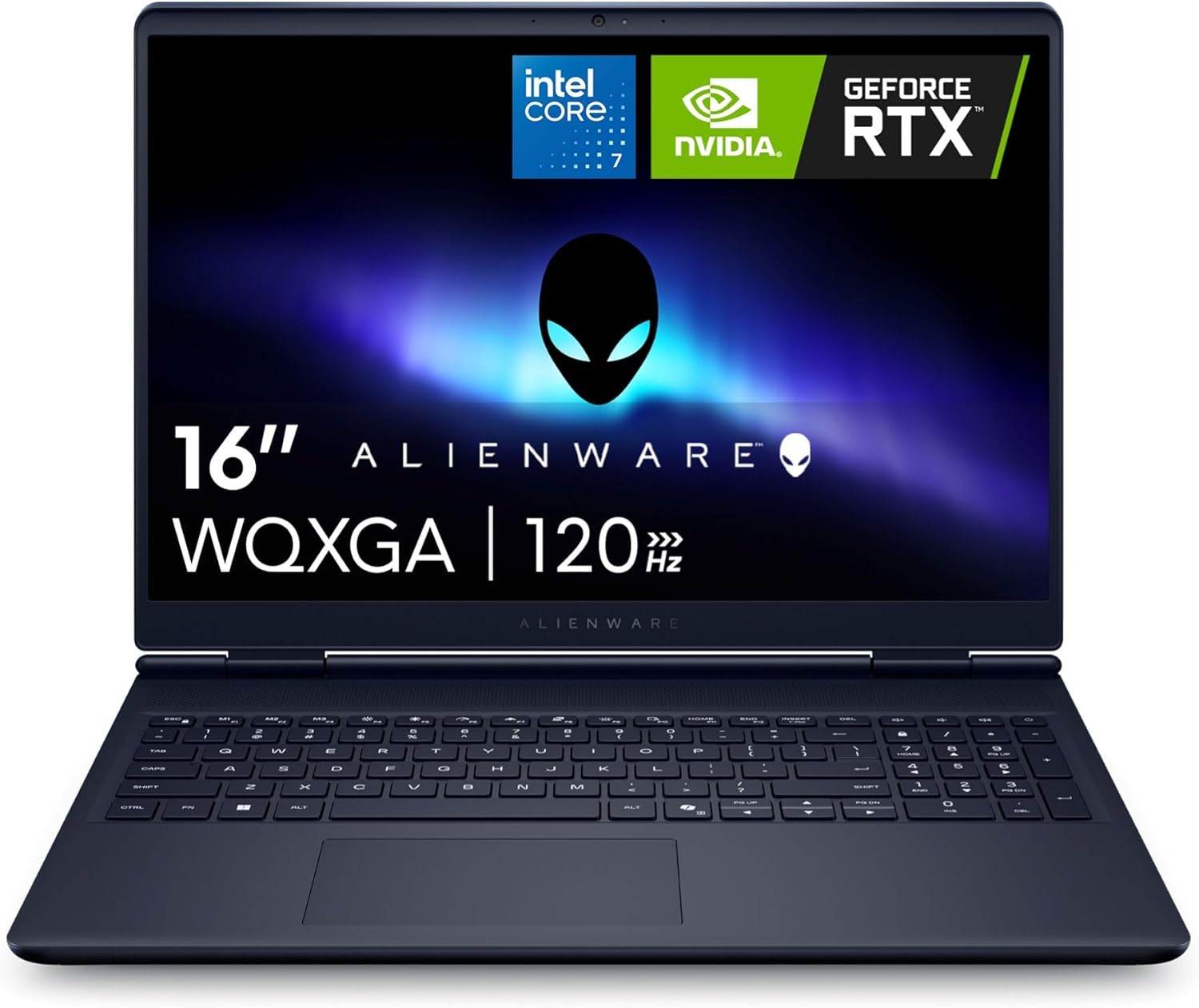
The Alienware 16 Aurora is a gaming laptop that aims to balance raw performance with everyday portability. Powered by an Intel Core 7 processor and NVIDIA GeForce RTX 5060 graphics with 8GB of GDDR7 VRAM, this machine is built to handle modern titles at high settings. The 16-inch WQXGA display runs at 120Hz and uses an anti-glare IPS panel with ComfortView Plus, making it suitable for both competitive gaming and content creation. Based on user feedback, the laptop delivers solid frame rates in games like Crusader Kings 3 and iRacing, though some have noted that it performs best when kept on a desk rather than a lap due to heat output under load.
This laptop targets a wide audience: PC gamers, streamers, esports enthusiasts, college gamers, and work-from-home users who need a single device for gaming and productivity. The RTX 5060 GPU supports DLSS 4 and Nvidia Reflex 2, which can reduce latency and boost framerates in supported titles. The 16GB of DDR5 RAM and 1TB NVMe SSD provide a responsive experience out of the box, and both are user-upgradeable thanks to two SODIMM slots and two M.2 slots. This flexibility means buyers can extend the laptop's lifespan as their needs grow.
Build quality is a highlight. The anodized aluminum lid with an iridescent Alienware logo and magnesium alloy interior give the laptop a premium feel. The chassis measures just 0.89 inches thick and weighs 5.49 pounds, which is reasonable for a 16-inch gaming laptop. The keyboard features a comfortable, pillowed palm rest and a full numeric keypad, making it practical for both gaming and typing. Alienware's Cryo-Tech cooling uses dual fans and three copper heat pipes to keep temperatures in check, and user reviews often praise the system's ability to stay quiet and cool during moderate gaming.
Connectivity is generous, with two USB-A ports, two USB-C ports (one with DisplayPort), HDMI 2.1, an RJ-45 Ethernet jack, and a global headset jack. The inclusion of Wi-Fi 7 (802.11be) ensures fast wireless speeds for online play and streaming. Setting up the laptop is straightforward, with Windows 11 Home pre-installed. Some users reported needing to update drivers manually for sound and drawing tablets, but once updated, the system ran reliably. The 1-year onsite service from Dell adds convenience if hardware issues arise.
However, the laptop has realistic limitations. At 5.49 pounds, it is heavier than many 16-inch ultrathins, making it less ideal for daily commuting. A few reviewers experienced a complete failure after a firmware update, though others found the machine stable after driver updates. The battery life is decent for light tasks but will be shorter during gaming. The RTX 5060 is a capable mid-range GPU, but it won't max out every AAA title at native resolution with full ray tracing. Buyers should temper expectations for ultra settings on the most demanding games.
Overall, the Alienware 16 Aurora is a well-rounded gaming laptop that offers strong performance, upgradeability, and a comfortable design. It is best suited for gamers who want a portable rig for moderate to high settings at 1440p or 1080p, as well as streamers and students who need a reliable workhorse. If you can catch it on sale, the value improves significantly. Just be prepared for a heavier carry and the occasional need to tinker with drivers. For anyone seeking a stylish, capable gaming machine that can grow with them, this Alienware is a worthy contender.
The Alienware 16 Aurora's gaming performance hinges on the Intel Core 7 Processor 240H (10 cores, 16 threads) and the NVIDIA GeForce RTX 5060 with 8GB GDDR7. According to user reports, this combination handles most modern games at 1080p and 1440p with high settings. The 120Hz display pairs well with the GPU, providing smooth motion in fast-paced titles like first-person shooters and racing games. DLSS 4 support helps boost frame rates in ray-traced games, and Nvidia Reflex 2 reduces input latency for a more responsive feel. The 110W total performance power (65W TGP + 45W TDP) ensures the system can maintain solid frame rates without excessive throttling, aided by the effective Cryo-Tech cooling.
The Alienware 16 Aurora uses a refined Cryo-Tech cooling system with dual ultra-thin fans, three copper heat pipes, and four exhaust vents. Air is drawn in through the keyboard and bottom vents, then exhausted out the sides and rear. This design helps keep the CPU and GPU cool during extended gaming sessions. Users report that fan noise is manageable, especially in Quiet Mode activated via F7. However, the bottom can become quite warm when gaming on a lap, so using the laptop on a desk or cooling pad is recommended. The thermal solution appears well-balanced for sustained performance, and the lack of a rear thermal shelf makes the laptop easier to slip into a backpack.


FAQs
Is 16GB RAM enough for modern gaming?
Yes, 16GB is the current standard for most titles. It handles background tasks and gaming smoothly without bottlenecks. For heavy multitasking, 32GB offers more headroom, but 16GB is sufficient for the majority of players today.
Can I upgrade the SSD or RAM later?
It depends on the specific model’s chassis design. Many gaming laptops allow SSD upgrades easily, but RAM slots vary. Some units have soldered memory, so check the product description for upgradeability notes before buying to ensure you can expand storage or memory later.
What is the difference between 144Hz and 240Hz?
A 240Hz panel offers smoother motion than 144Hz, reducing perceived blur. The difference is noticeable in competitive shooters where reaction time matters. However, you need a powerful GPU to sustain those high frame rates consistently. For casual gaming, 144Hz provides an excellent balance of performance and cost efficiency.
How loud are the fans under load?
Fan noise varies significantly by cooling design and performance mode. Models with advanced thermal systems, like vapor chambers, often run quieter. Some buyers note that aggressive fan curves can be loud during intense gaming sessions. Look for models with adjustable fan profiles to control noise levels during quieter tasks or streaming.
Is the screen bright enough for outdoor use?
Most gaming laptops feature panels between 300 and 500 nits. This is generally insufficient for direct sunlight outdoors. For indoor use, these brightness levels are more than adequate. If you plan to use your laptop in cafes or bright rooms, look for higher nits ratings or anti-glare coatings to improve visibility and reduce eye strain during long sessions.


Write Your Review
No reviews yet. Be the first to share your experience!