


Affordable Chassis Solutions for Modern PC Builds
Choked intake panels and suffocating internal temperatures can quickly ruin any budget-friendly desktop build. Squeezing modern multi-fan graphics cards into an entry-level frame turns into an uphill battle when component clearances fall short by just a few millimeters. Striking the right balance between low cost and reliable cooling requires checking airflow pathways, radiator mounts, and rear tray space. Finding the cheapest pc case shouldn’t force you into a cramped metal box that throttles your system. If you want to compare different budget tiers, browsing the best gaming pc cases under 100 provides great context on cooling performance.
A reliable budget computer chassis must handle thick power cables while offering ample headroom for CPU tower coolers. Many builders struggle with non-removable drive cages crowding power supply cables or top radiators colliding with memory modules. After carefully analyzing the manufacturer specifications, chassis dimensions, and builder feedback, we find that entry-level cases offer impressive versatility. You can easily find tempered glass side panels, dedicated cable channels, and pre-installed intake fans that keep costs low while elevating your setup, much like picking a clean white chassis for a modern aesthetic.

Pros
- Excellent 270-degree visibility for showcasing hardware.
- Smart A/B cooling layout enhances airflow and reduces heat buildup.
- Includes three fans for immediate cooling out of the box.
- Compact size fits easily on desks or in tight spaces.
- Magnetic dust filter is easy to remove and clean.
Cons
- Limited to micro-ATX boards, no full ATX support.
- Only includes basic fans; may want to upgrade for high-end builds.
- Cable management might be tight in such a compact case.
The MOROVOL V3 MATX PC Case is a micro-ATX tower that packs a visual punch with its 270-degree panoramic tempered glass panels. For U.S. PC gamers, streamers, and setup builders, this case offers an affordable way to showcase your build without sacrificing desk space. It's designed to fit compact gaming rigs while still supporting standard components like full-size GPUs and ATX power supplies.
This case is best suited for gamers who want a clear view of their hardware, especially those building RGB-heavy systems or themed setups. Whether you're a casual gamer, an esports player, or a college gamer setting up a dorm desk, the V3's small footprint (just over 13 inches tall) makes it easy to integrate into almost any workspace. The three pre-installed fans provide decent airflow for modest builds, and the A/B division cooling layout separates the power supply and hard drive zone from the motherboard area, which helps keep temps lower during long gaming sessions or streaming on Twitch.
Build quality is solid for the price point. The tempered glass panels feel sturdy, and the steel chassis offers enough rigidity for daily use. The magnetic top dust filter is a nice touch, letting you clean without tools. The IO panel includes one USB 3.0 and one USB 2.0 port, which is basic but functional for connecting a gaming mouse, keyboard, or headset. Cable management is doable but requires some patience due to the compact interior, and the included fans are basic 3-pin units, so upgrading to PWM fans would improve noise and control.
Setup is straightforward: the case accommodates standard M-ATX motherboards, and the power supply mounts behind the motherboard tray, which keeps the main chamber clean. However, if you're using a large CPU cooler or a long GPU, check clearance first based on the dimensions. The case supports up to 7 fans total, so you can add more for better cooling if needed. Maintenance is easy thanks to the removable dust filter and tool-free side panels.
A realistic limitation is that the case is only for micro-ATX or smaller boards. If you plan to upgrade to a full ATX motherboard later, you'll need a different case. Also, while the panoramic glass looks great, it does show fingerprints and dust quickly, so expect to wipe it down regularly. For the price, though, the MOROVOL V3 delivers impressive aesthetics and adequate cooling for mid-range gaming PCs, making it a strong choice for budget-conscious builders.
Overall, if you're a PC gaming enthusiast building a compact M-ATX system and want a stylish case that lets your components shine, the MOROVOL V3 is a solid bet. It's not for hardcore overclockers with massive cooling needs, but for everyday gaming, streaming, or workstation use, it offers great value and a clean, modern look that fits right in on any desktop or under a desk.
The MOROVOL V3 uses an A/B division cooling layout that separates the power supply and hard drive area from the motherboard and GPU chamber. This design helps reduce heat soak and keeps the main cavity cooler. The case includes three basic 3-pin fans (one rear exhaust and two top intake or exhaust depending on setup) and supports up to seven 120mm fans total. The top, rear, and bottom mesh areas provide plenty of ventilation. The magnetic dust filter on the top panel is easy to remove for cleaning. For best cooling performance, consider adding one or two front-mounted intake fans, as the case supports them. The included fans are adequate for entry-level to mid-range builds, but enthusiasts may want to upgrade to PWM fans with higher static pressure for better airflow through tight spaces.
The case features a steel frame with large tempered glass panels on the front and left side, giving a 270-degree view. The glass is thick and feels sturdy, though it does attract fingerprints. The chassis is surprisingly rigid for its lightweight design (about 10.7 pounds). The IO ports (one USB 3.0, one USB 2.0) are mounted on the top front edge, easy to access. The magnetic dust filter is well-designed and stays in place. The interior layout is clean, with the power supply mounted behind the motherboard tray to hide cables. However, the cable management space is limited, so using modular PSUs and slim cables is recommended. Overall, the build quality is impressive for a sub-$50 case, offering good value for budget-conscious gamers.

Pros
- Excellent airflow thanks to the perforated design on all sides, ideal for gaming sessions.
- Modular I/O panel offers multiple placement options for desk and setup flexibility.
- Magnetic dust filters are easy to remove and clean, keeping the interior dust-free.
- Compact size fits well on desks or in tight spaces while still supporting large GPUs and coolers.
- Transparent side panel lets you show off your gaming components and RGB lighting.
Cons
- The case includes only one pre-installed fan, so additional fans are recommended for optimal cooling.
- Cable management space is limited due to the compact size, requiring careful routing.
- The side panel is acrylic (not tempered glass), which may be less scratch-resistant over time.
The Cooler Master MasterBox Q300L is a Micro-ATX PC case designed for PC gamers, setup builders, and anyone looking to create a compact but capable gaming rig. It supports Micro-ATX and Mini-ITX motherboards, making it a versatile choice for both budget and mid-range builds. Whether you are a competitive gamer, casual player, or streamer, this case offers a solid foundation for a performance-focused gaming PC.
For gaming performance, the Q300L emphasizes airflow and cooling. Its perforated design on all sides promotes excellent heat dissipation, which is crucial for maintaining low temperatures during intense gaming sessions. The case can accommodate a 240mm liquid cooler and up to five fans, allowing you to build a system that stays cool even under heavy loads. The open thermal design helps reduce heat buildup, which can improve the longevity and stability of your components.
Build quality is practical and functional. The case features a sturdy steel frame with a transparent acrylic side panel, letting you show off your gaming hardware and RGB lighting. The magnetic dust filters are a nice touch, adding a distinctive look while keeping dust out, which reduces cleaning frequency. The modular I/O panel is a standout feature, allowing you to reposition it to the front, top, or bottom on either side. This flexibility is great for desk setups where cable routing or access needs vary.
Setup and maintenance are straightforward. The compact size (15.4 x 9.1 x 15 inches) means it fits well on desks or in tight spaces, though cable management can be a bit challenging due to limited space behind the motherboard tray. The case includes one pre-installed 120mm fan, but you will likely want to add more fans or a liquid cooler for optimal airflow. The magnetic dust filters are easy to remove and clean, making regular maintenance simple.
One realistic limitation is the single pre-installed fan, which may not be sufficient for high-heat gaming builds without additional cooling. Also, the acrylic side panel is more prone to scratches than tempered glass, so careful handling is recommended. The compact design also means less room for cable management, so plan your build accordingly.
Overall, the Cooler Master MasterBox Q300L is a practical choice for PC gamers, setup builders, and anyone building a compact gaming PC on a budget. It offers good airflow, modular I/O, and a clean look that fits well in most gaming setups. If you prioritize cooling flexibility and a compact footprint, this case is worth considering for your next gaming build.
The Cooler Master MasterBox Q300L is designed with an open thermal approach, featuring perforated panels on all sides to maximize airflow. This design helps dissipate heat effectively, keeping your gaming components cool during long sessions. The case supports a 240mm liquid cooler at the front and up to five 120mm fans, giving you plenty of options to customize your cooling setup. While it comes with one pre-installed 120mm fan, adding more fans or a liquid cooler is recommended for high-performance builds. The magnetic dust filters on the top and front panels add a distinctive look while preventing dust buildup, reducing maintenance frequency.
The MasterBox Q300L features a steel frame with a transparent acrylic side panel, offering a balance of durability and visibility. The acrylic panel is lighter than tempered glass but may be more susceptible to scratches, so handle with care. The case has a compact footprint (15.4 x 9.1 x 15 inches) and weighs just over a pound, making it easy to move or place on a desk. The magnetic dust filters are well-designed and easy to remove for cleaning. The modular I/O panel is a practical addition, allowing you to reposition the power button, USB ports, and audio jacks to suit your setup. Overall, the build quality is solid for its price point, with a focus on functionality and airflow.

Pros
- Excellent value with four included RGB fans
- Good airflow design with mesh front
- Tempered glass side panel for aesthetics
- Supports multiple motherboard sizes
- Cost-effective for entry-level gaming builds
Cons
- RGB lighting is fixed, not addressable (no customization)
- CPU cooler height limited to 155mm may restrict some air coolers
- No included fan hub or PWM splitter; fans may run at full speed
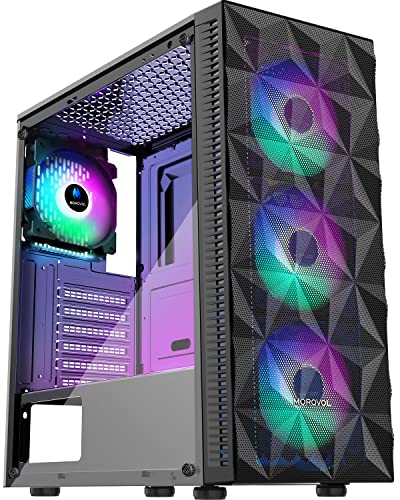
The MOROVOL 621-N4 is a mid-tower ATX PC case that aims to deliver solid cooling and a clean aesthetic without breaking the bank. It comes pre-installed with four 120mm RGB fans, a diamond-shaped mesh front panel, and a tempered glass side window. This combination makes it an appealing option for PC gamers, gaming setup builders, and budget-conscious enthusiasts looking for a straightforward case that includes fans out of the box.
This case is best suited for first-time builders, casual gamers, or anyone assembling an entry-level to mid-range gaming PC. Its support for ATX, Micro-ATX, and Mini-ITX motherboards provides flexibility, while the 300mm GPU clearance fits most modern graphics cards. Streamers or esports players on a tight budget might also appreciate the low upfront cost, though they should note the fixed RGB lighting lacks the customization of addressable fans.
In terms of performance, the mesh front panel allows for good airflow, helping to keep components cool during extended gaming sessions. However, the pre-installed fans are non-PWM and run at a constant speed, which may result in higher noise levels than controllable fans. The fixed RGB lighting adds a dash of color but cannot be synced with other RGB components. According to product specifications, the CPU cooler height limit of 155mm may restrict some larger air coolers, so users should check compatibility.
Build quality is decent for the price point. The tempered glass panel feels sturdy and offers a clear view of the interior, making it easy to show off your components. The I/O panel includes one USB 3.0 port, two USB 2.0 ports, and HD audio jacks - convenient for connecting peripherals. Cable management space is adequate, though not generous; some user feedback suggests routing cables neatly may require patience, especially with non-modular power supplies.
Setup is straightforward thanks to the pre-installed fans and removable side panel. Cleaning the mesh front periodically is recommended to maintain airflow. A realistic limitation is the inability to control fan speeds or RGB patterns, which may disappoint those seeking a fully customizable setup. Overall, the MOROVOL 621-N4 is a practical choice for gamers and builders who want a functional case with included RGB fans at a very low cost, but it is not ideal for enthusiasts demanding advanced features like addressable lighting or fan control.
Frequently Asked Questions
Can the cheapest pc case fit a full-size ATX motherboard in 2026?
Yes, many low-cost models support standard ATX motherboards, but interior compatibility varies by design. Options like the Bgears b-Voguish and MOROVOL 621 accommodate ATX boards easily, whereas compact choices like the Cooler Master MasterBox Q300L support only Micro-ATX and Mini-ITX form factors. Always check motherboard standoff positions before completing your build.
Do budget PC cases support 240mm AIO liquid cooling radiators?
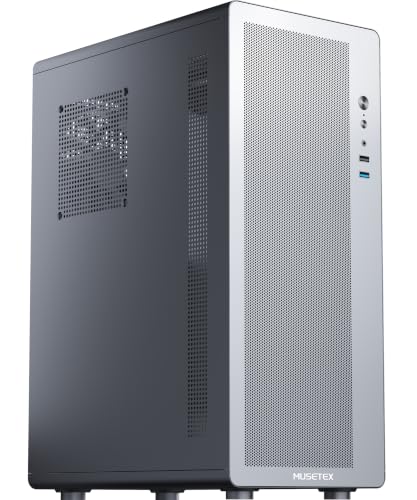
Yes, several affordable cases accommodate a 240mm liquid cooling radiator along the top or front mounts. The Cooler Master MasterBox Q300L supports 240mm liquid coolers, whereas ultra-compact models like the MUSETEX M2 focus entirely on air cooling layouts. Verify fan clearance against your RAM heatsinks before mounting radiators to avoid physical overlap.
How much GPU length clearance do affordable PC enclosures offer?
Most budget enclosures offer between 265mm and 370mm of GPU length clearance. The Bgears b-Voguish handles extended graphics cards up to 370mm, while more compact options like the MUSETEX M2 cap card length at 265mm. Checking your graphics card length against the chassis frame prevents unexpected installation headaches.
Does a cheap computer case include cooling fans out of the box?
No, fan configurations vary widely across entry-level models. The MOROVOL 621 comes equipped with four pre-installed 120mm RGB fans, whereas the Bgears b-Voguish requires you to purchase fans separately. Securing proper airflow is vital when housing high-draw hardware, especially if you pair your chassis with a powerful chip from the best CPU for PC recommendations.
How manageable is cable routing in a compact budget chassis?
Cable management requires deliberate planning in budget cases due to limited clearance behind the motherboard tray. Dual-chamber designs like the MOROVOL V3 isolate the power supply in a separate compartment, making cable concealment straightforward. Using flat power supply cables and built-in tie-down loops ensures the side panel shuts smoothly.


Write Your Review
No reviews yet. Be the first to share your experience!