


Balancing Everyday Portability and Processing Muscle
High heat, loud fan noise, and rapid battery drain often catch buyers off guard when they purchase a heavy performance machine for everyday use. Many users need reliable processing power for office multitasking, school projects, and content creation, but they do not want the weight or aggressive aesthetic of a dedicated rig. Exploring a capable gaming laptop alternative helps balance multi-core performance, responsive memory, and versatile integrated or entry-level discrete graphics for daily routines. Shoppers who prioritize mobility can compare these options against compact portable machines that retain everyday travel convenience.
Hardware choices across this category vary widely, ranging from budget-friendly machines with integrated graphics to mid-tier systems equipped with modern dedicated processors. Laptops featuring chips like the AMD Ryzen 7 or Intel Core series handle heavy tab loads and office software, while integrated solutions such as Radeon graphics tackle casual media editing. Dedicated systems like those running modern discrete GPUs provide superior 3D rendering for demanding users, though they also consume more power. Evaluating your exact software needs ensures you avoid paying for unnecessary thermal overhead, especially if you also monitor budget-focused value builds.




Pros
- Strong gaming and multitasking performance with RTX 5060 and Intel Core 7 processor.
- Large 17.3-inch 144Hz display offers smooth motion clarity for competitive gaming.
- Thin and light design for a 17-inch laptop, easy to carry between rooms or classes.
- Fast DDR5 memory and NVMe SSD improve load times and system responsiveness.
- Effective cooling system helps maintain performance during extended gaming sessions.
Cons
- 1080p resolution may not satisfy users wanting higher pixel density on a 17-inch screen.
- Graphics card listed as RTX 4060 in specs could cause confusion; verify exact model.
- Battery life may be limited under heavy gaming loads typical for gaming laptops.
The MSI Cyborg 17 B2RWFKG-074US is a 17.3-inch gaming laptop built for gamers who want a big screen without carrying a heavy rig. It balances performance and portability, making it a solid pick for PC gamers, competitive players, streamers, and content creators who need power they can move between home, dorm, or office. The translucent black design adds a unique visual flair that RGB enthusiasts may appreciate.
At the heart of this laptop is an Intel Core 7-240H processor paired with an NVIDIA GeForce RTX 5060 graphics card. This combo handles modern titles at high settings, with the 144Hz FHD display ensuring smooth motion in fast-paced games like FPS and MOBA titles. DLSS 4 support helps boost frame rates without sacrificing image quality, which is useful for both competitive play and visually demanding open-world games. The 16GB of DDR5 RAM and 1TB NVMe SSD provide fast load times and enough space for a growing game library, plus room for creative projects or school files.
Build quality is practical for a portable gaming machine. At 0.83 inches thick and 5.5 pounds, it is relatively slim for a 17-inch laptop. The Cooler Boost thermal system uses a shared-pipe design to manage heat from both CPU and GPU, which helps maintain performance during long gaming sessions without excessive fan noise. The keyboard area features a translucent finish that aligns with the laptop's cyberpunk-inspired aesthetic, and the backlit keys are easy to use in low-light gaming environments.
Connectivity is well-rounded for a gaming setup. It includes USB-C, USB-A, HDMI, and RJ45 ports, along with Wi-Fi 6E for low-latency online gaming and fast file transfers. This makes it easy to connect to external monitors, gaming mice, headsets, and other peripherals. The laptop runs Windows 11 Home and includes Microsoft Copilot, which can assist with productivity tasks like content creation or research.
One realistic limitation is the 1080p resolution on a 17-inch panel. While 144Hz refresh rate is excellent for competitive gaming, some users may prefer a higher resolution for creative work or media consumption. Additionally, the spec sheet lists the graphics card as both RTX 5060 and RTX 4060 in different places, so buyers should confirm the exact model before purchase. Battery life on gaming laptops is typically limited under heavy load, so this unit is best used plugged in for gaming sessions.
Overall, the MSI Cyborg 17 is a strong choice for gamers who prioritize a large screen, solid performance, and portability in one package. It suits competitive and casual gamers alike, and also works well for streamers or content creators needing a mobile rig. For anyone building a gaming setup that requires a laptop that can handle both play and productivity on the go, this model delivers reliable performance without being a burden to carry.


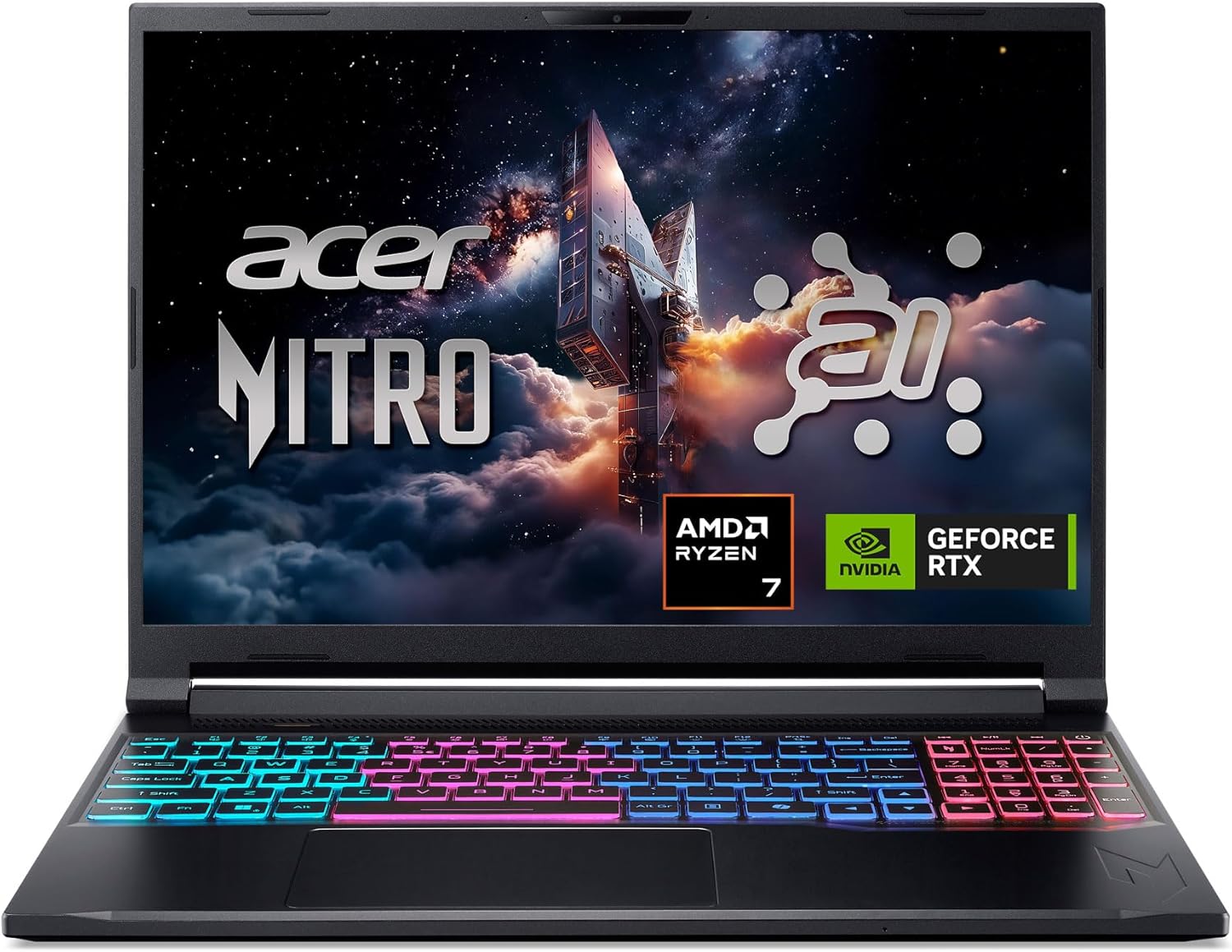
Pros
- Powerful AI-optimized CPU and GPU combination for demanding games and creative apps
- Excellent 32GB DDR5 RAM and fast 1TB Gen 4 SSD out of the box reduce need for upgrades
- High 180Hz refresh rate with good color accuracy enhances visual clarity and responsiveness
- Compact and relatively lightweight chassis (4.63 lbs) makes it portable for gamers on the go
- Robust cooling solution with quad air intakes and dual fans keeps thermals under control during intense sessions
Cons
- Maximum RAM is 32GB with no expansion slots available after purchase, limiting future upgrade potential
- Battery life may be typical for a gaming laptop and could require frequent charging during extended unplugged use
- Integrated webcam quality not specified; users may want an external camera for streaming
The Acer Nitro V 16S AI is a mid-range gaming laptop built around the latest AMD Ryzen 7 260 processor and NVIDIA GeForce RTX 5060 GPU. It's designed for PC gamers who want a balance of performance and portability, as well as content creators and streamers who can leverage the AI capabilities for tasks like upscaling, background effects, and faster encoding. With a 16-inch 180Hz display and 32GB of DDR5 RAM, this laptop aims to deliver smooth gameplay and efficient multitasking right out of the box.
When it comes to real-world gaming performance, the RTX 5060 with DLSS 4 and full ray tracing support gives you high frame rates in modern titles at 1080p or 1200p resolution. The 180Hz refresh rate makes fast action in FPS and racing games feel buttery smooth, while the 100% sRGB coverage ensures vibrant colors for open-world adventures. The AMD Ryzen 7 260's AI TOPS also help with background tasks, voice commands, and optimizing settings in supported software, giving an edge in competitive scenarios.
Build quality is typical for the Nitro line: a black plastic chassis with a clean, understated look. At 4.63 pounds, it's slim enough to slip into a backpack for college or LAN parties. The dual-fan quad-intake cooling keeps temperatures reasonable under load, though you'll still hear the fans ramp up during extended gaming sessions. The keyboard includes a backlit numeric keypad, and the touchpad is responsive for everyday use. Port selection is solid with USB4, two USB 3.2 Gen 2, HDMI 2.1, and Ethernet, making external monitor or dock setups easy.
Setting up the laptop is straightforward: it runs Windows 11 Home, and the pre-installed NitroSense software gives you control over fan speeds, power profiles, and system monitoring. The Acer PurifiedView and PurifiedVoice 2.0 features handle webcam background blur and noise reduction during Discord calls or streams. There are two M.2 SSD slots (one free) for storage expansion, but note that the RAM is soldered and maxes out at 32GB, so choose your capacity wisely at purchase.
One realistic limitation is that while the laptop includes a USB4 port, you'll need an external GPU dock if you ever want more graphics power - but for most users the RTX 5060 is plenty. Battery life is average for a gaming laptop; expect around four to five hours of light use. Also, the 1080p webcam isn't specified, but many laptops in this range offer only basic 720p or 1080p sensors, so external webcams are still recommended for professional streaming.
Overall, the Acer Nitro V 16S AI is a well-rounded portable gaming machine that hits a sweet spot for price-conscious PC gamers, esports players, and content creators. If you value high-refresh-rate gaming, AI-assisted performance, and decent portability without breaking the bank, this laptop is worth considering. It also comes with a three-month PC Game Pass trial to get you started with hundreds of games on day one.
The RTX 5060 laptop GPU with 572 AI TOPS and DLSS 4 Multi Frame Generation provides a significant boost in supported games. You can expect high settings at 1080p with smooth frame rates in titles like Call of Duty, Fortnite, and Cyberpunk 2077. The 180Hz display minimizes motion blur and screen tearing, while the AMD Ryzen 7 260 processor handles CPU-intensive simulations and background tasks without stutter. Gamers who play competitive esports titles will appreciate the low-latency response and Killer Ethernet for stable online play.
Despite being a slim 0.79-inch profile, the Nitro V 16S AI packs a dual-fan, quad-intake, quad-exhaust cooling system. This design pushes heat out efficiently, keeping the CPU and GPU within safe operating temperatures during long gaming sessions. The chassis is made of durable plastic with a matte finish that resists fingerprints. The hinge feels sturdy, and the weight of 4.63 pounds makes it manageable for daily carry. The backlit keyboard has a numeric keypad and decent key travel, suitable for both gaming and typing.

Frequently Asked Questions
Can an everyday laptop handle casual gaming as a gaming laptop alternative?
Yes, modern processors with capable integrated graphics can handle casual games and light creative tasks. Chips featuring AMD Radeon or Intel graphics run lighter titles and older games smoothly at modest visual settings. They also run cooler and consume less power than dedicated graphics cards, making them practical for office and school environments.
What is the main benefit of choosing a gaming laptop alternative over a traditional rig?
Superior battery efficiency and lighter portability represent the primary advantages for most buyers. Traditional performance machines require heavy power bricks and run through battery charge rapidly due to high-wattage components. A balanced multipurpose computer allows you to attend meetings or classes without constant tethering to a wall outlet.
How much RAM is recommended for everyday productivity and multitasking?
A minimum of 16GB of system memory is recommended for smooth multitasking in 2026. Having 16GB allows your operating system to manage numerous browser tabs, video calls, and productivity applications simultaneously without sluggish performance. Configurations with 32GB of RAM provide even greater headroom for intensive data tasks and creative projects.
How does screen refresh rate affect everyday computing and media use?
Higher refresh rates deliver smoother cursor movement, fluid scrolling, and cleaner video playback. Displays running at 144Hz or higher reduce motion blur, which benefits fast-paced navigation as well as fast-motion media. Buyers seeking interactive input can also review the tradeoffs in our touchscreen display guide to see if panel flexibility fits their routine.
Does a gaming laptop alternative provide adequate cooling for extended workloads?
Yes, multipurpose machines generally produce less heat because they lack high-wattage graphics silicon. Dual-fan setups or efficient heat pipes keep standard mobile processors within stable operating temperatures during prolonged document editing or streaming sessions. Lower thermal output also results in quieter fan profiles in public spaces.
Are budget options with integrated graphics sufficient for modern software?
Entry-level models easily handle standard office suites, web browsing, and video streaming. Processors with base multi-core architectures execute routine calculations and media playback without lag. They will, however, struggle with high-end 3D rendering or modern blockbuster games that strictly demand a dedicated GPU.


Write Your Review
No reviews yet. Be the first to share your experience!