


Balancing Optical Media Needs and Modern Notebook Portability
Most modern laptops eliminate internal optical disc drives to maximize battery space, enhance cooling, and reduce overall chassis thickness. When you need to install legacy software, rip audio CDs, or play physical movie discs, this shift creates a practical challenge. Evaluating a laptop with dvd drive vs external dvd drive comparison helps clarify whether searching for an outdated, heavy notebook makes sense or if pairing a slim computer with a portable USB drive is better. Internal optical bays have vanished from modern retail lineups because manufacturers prioritize solid-state storage and dedicated graphics hardware. Whether you use an office machine or a modern budget gaming laptop, an external optical drive gives you access to discs without adding daily travel bulk.
External optical drives connect through standard USB 3.0 or USB Type-C ports, offering transfer speeds up to 5 Gbps across Windows, macOS, and Linux systems. Product specifications for models from Rioddas, Amicool, ORIGBELIE, and Xadioei highlight reading speeds up to 8x for DVDs and 24x for CDs. Certain options even incorporate built-in SD card readers and extra USB ports. Using a standalone optical drive lets you enjoy modern laptop portability and battery life without sacrificing your disc library.

Pros
- Easy plug-and-play setup with no driver installation needed on most systems
- High-speed USB 3.0 ensures fast data transfer and smooth disc reading/burning
- Built-in USB and card reader ports add extra convenience for transferring files
- Compact and lightweight design fits easily into a laptop bag for on-the-go use
Cons
- Not compatible with tablets, TVs, Chromebooks, or Blu-ray/4K discs
- SD and TF cards cannot be used at the same time, limiting simultaneous access
- Limited to standard DVD and CD formats; no support for high-capacity Blu-ray media
The Xadioei External CD/DVD Drive is a practical accessory for PC gamers, streamers, and content creators who still rely on physical media. While many modern games are digital downloads, there are plenty of classic titles, old software discs, and media collections that require an optical drive. This 8-in-1 portable drive fills that gap without taking up much desk space.
Built for versatility, it works as a disc reader, CD/DVD burner, writer, and ripper. It also includes two USB-A ports, two Type-C ports, and slots for SD and TF cards (though not simultaneously). That makes it a handy hub for transferring photos, videos, or files from cameras or memory cards while you use the drive. Gamers installing a retro game from a disc can also plug in a mouse or flash drive without reaching for another port.
Performance is solid for a USB-powered drive. The USB 3.0 connection delivers up to 5 Gbps transfer speeds, with DVD read/write at 8X and CD at 24X. That means installing a game from a DVD takes only a few minutes, and ripping audio CDs is quick. The drive also features error correction and anti-skip technology, keeping operation quiet and reliable during long gaming sessions or when burning backups.
Setup couldn't be easier. Just plug it into any USB port on a Windows PC (11/10/8.1/7/Vista/XP/98) or Mac (all versions) and it's ready to go. No drivers needed. The slim, lightweight design with a built-in cable makes it easy to store in a laptop bag or drawer. The eject button and disc tray operate smoothly, and the non-slip rubber padding keeps it stable on a desk or lap.
That said, this drive has limitations. It doesn't support Blu-ray or 4K discs, so it's strictly for DVDs and CDs. It's also not compatible with tablets, smartphones, Chromebooks, or car stereos. If your gaming setup is all-digital, you might not need it. But for those who occasionally need to access old software, install classic games, or rip music CDs, it's a cost-effective solution.
Overall, the Xadioei External CD/DVD Drive is a reliable, portable option for PC gamers, streamers, and work-from-home users who want a simple way to handle physical media. Its multi-port hub adds extra convenience, and the plug-and-play nature means you can start using it immediately. If you have a stack of old game discs or need to burn a quick backup, this drive delivers without fuss.
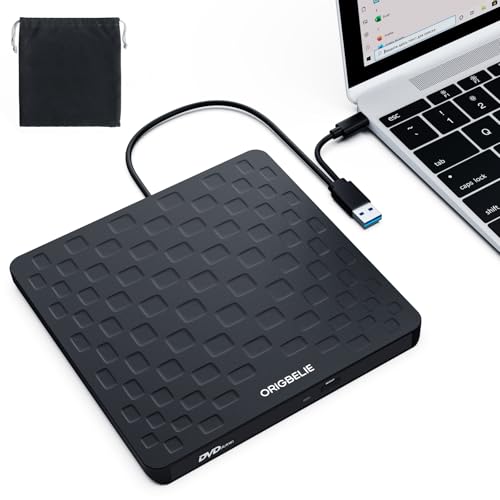
Pros
- Truly plug-and-play on Windows and Mac - no driver installation needed, just insert the disc
- USB Type-C and Type-A connectors included, compatible with modern ultrabooks and older PCs alike
- Included charging cable solves power issues on some laptops and desktop front ports, ensuring reliable disc reading
- Compact and lightweight - fits easily in a laptop bag for on-the-go use at dorm rooms or gaming events
Cons
- Does not support Blu-ray discs - only standard CD and DVD formats, so not suitable for Blu-ray movies or games
- Not compatible with game consoles like PS4/5, Xbox, or Switch - strictly for PC and Mac use
- Some users may need the extra power cable for computers with weak USB ports, adding a slight cable management hassle
The ORIGBELIE External CD DVD Drive is a straightforward optical drive designed for users who still rely on physical media. While it may not seem like a typical gaming accessory, it is an incredibly useful tool for PC gamers, especially those who own older games on CD or DVD, need to install classic titles from disc, or want to watch movies on a laptop without a built-in drive. It is also a solid choice for college gamers who need to access course materials or software distributed on disc, and for home office gamers who want to backup data or burn playlists.
Performance-wise, the drive supports USB 3.0 with data transfer speeds up to 5 Gbps, though actual read/write speeds are limited to 8x for DVDs and 24x for CDs. This is sufficient for installing games or watching movies without noticeable lag or distortion. The drive also boasts strong error correction and noise reduction, which helps when reading scratched discs. Gamers who still enjoy classics like 'Diablo II' or 'StarCraft' from disc will appreciate the reliability.
Build quality is decent for its price point. The slim 13mm profile and lightweight 0.2kg construction make it highly portable, and the integrated data cable prevents the common issue of losing cables. The anti-skid bottom ensures stability during use. The included charging cable is a thoughtful addition, as many modern laptops (especially ultrabooks) have limited USB power output, so providing extra juice via a 5V charger or power bank can resolve read failures.
Setup is as simple as it gets: plug the USB Type-A or Type-C connector into your computer, insert a disc, and the drive is recognized automatically on Windows and most Linux distributions. Mac users need to insert a disc for the icon to appear, but after that it works normally. No software installation is required for basic functions, though you may need third-party software (like VLC) for video playback or CD burning apps. The drive is compatible with Windows 11/10/8/7, Linux, and Mac OS 10.6 and above, but not with Chromebooks or Ubuntu systems without workarounds.
Realistic limitations include the lack of Blu-ray support, so it won't read Blu-ray movies or games. It also won't work with game consoles, tablets, or phones, so its use case is strictly PC and Mac. Some users may find the extra power cable adds clutter, but it's a necessary evil for compatibility with low-power ports. Overall, this is a no-nonsense, cost-effective solution for anyone who needs occasional access to optical discs.
If you are a PC gamer who still has a collection of disc-based games, or a streamer who occasionally needs to rip audio CDs for background music, this ORIGBELIE drive is a worthwhile addition to your desk setup. Its slim form factor means it can be stored in a drawer and taken out when needed. For users who have completely moved to digital downloads, it is unnecessary. But for those hybrid scenarios, it offers reliable performance at a low cost.

Pros
- USB 3.0 and USB-C dual interface offers fast 5Gbps data transfer and broad compatibility
- Plug-and-play design requires no extra drivers, making setup effortless for any user
- Slim and lightweight build with integrated cable enhances portability for gamers on the go
- Supports multiple disc formats including DVD+R, DVD-R, CD-R, and CD-RW for versatile use
Cons
- Does not support Blu-ray discs or DVD-RAM, limiting high-definition media playback
- Not compatible with TVs, game consoles like PlayStation or Xbox, or car stereos, reducing versatility for some users
- Requires direct connection to a computer USB port for stable power; USB hubs may cause issues
The Amicool External DVD Drive is a slim, portable optical drive designed for users who still need CD or DVD functionality in their modern gaming or productivity setup. While many PC gamers have moved to digital downloads, there are still plenty of scenarios where a physical disc drive comes in handy - whether it's installing an older game from a disc, watching a DVD movie during a break, or burning backup files for a streaming project. This drive connects via USB 3.0 or USB-C, offering plug-and-play simplicity that works with most Windows, macOS, and Linux systems.
For PC gamers and gaming setup builders, this drive is best suited as a secondary accessory rather than a core component. It's ideal for college gamers who might need to install software from discs in a dorm room, or for streamers and content creators who occasionally work with physical media for archival or production purposes. The drive's compact size and built-in cable make it easy to toss into a laptop bag for LAN parties or travel, though it's not designed for high-speed gaming peripherals - it's purely for disc reading and burning.
Performance-wise, the drive supports data transfer speeds up to 5Gbps via USB 3.0, with maximum DVD read speed at 8x and CD read/write at 24x. This is adequate for standard disc tasks, but don't expect lightning-fast loading for game installs - it's more about convenience than speed. The intelligent error correction and anti-shock technology help maintain reliable reads and burns, which is useful when dealing with older or scratched discs. However, the drive does not support Blu-ray or DVD-RAM, so it won't handle high-definition movie discs or certain proprietary formats.
Build quality is practical for its price point. The matte black plastic body feels sturdy enough for occasional travel, and the integrated cable eliminates the need for a separate cord, reducing clutter in a gaming desk setup. The pop-up button for disc ejection is straightforward, and the drive's slim profile (about 0.67 inches thick) means it won't take up much space in a backpack or on a desk. That said, the plastic construction isn't premium, and the drive may feel lightweight compared to more rugged external enclosures.
Setup is genuinely hassle-free - just plug it into a USB port on your computer, and it's recognized without additional drivers. For desktop PCs, connecting to a rear motherboard USB port is recommended for stable power, as USB hubs or extension cables can cause connectivity issues. This is a minor inconvenience but worth noting for users with complex cable management setups. The drive is also compatible with Windows 11, 10, 8.1, 7, macOS, and Linux, though some macOS versions may require system settings adjustments for full functionality.
Overall, the Amicool External DVD Drive is a practical, budget-friendly option for PC gamers, streamers, and setup builders who need occasional disc access without sacrificing desk space or portability. It's not a must-have for everyone, but if you have a stack of old game discs, DVD movies, or need to burn backups for content creation, this drive gets the job done without fuss. Just keep in mind its limitations with Blu-ray and console compatibility, and you'll find it a reliable addition to your gaming or productivity toolkit.
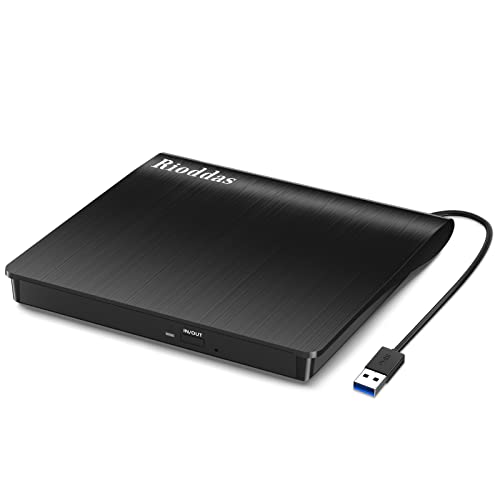
Pros
- True plug-and-play – no driver installation or external power adapter needed for most devices
- Reliable USB 3.0 connection with backward compatibility to USB 2.0, ensuring broad support
- Built-in USB cable stays attached, reducing clutter and the chance of losing the cable
- Physical eject button adds convenience and solves a common frustration with stuck discs
- Compact and lightweight, easy to toss in a laptop bag for on-the-go use
Cons
- Not compatible with ChromeOS, smartphones, tablets, TVs, or Blu-ray/4K discs – limited to standard CD/DVD formats
- Performance may vary when connected to lower-power USB ports on some laptops; rear motherboard USB ports recommended for desktops
- Some users may experience initial connection issues that require trying a different USB port
The Rioddas External CD/DVD Drive is a practical, no-fuss peripheral for PC gamers and content creators who still rely on physical media. In an era where many laptops and even some desktops omit optical drives, this USB 3.0 disc reader/writer fills a specific but valuable need. Whether you're installing classic PC games from DVD, ripping audio CDs for a streaming background playlist, or burning backup copies of project files, this drive delivers reliable performance without requiring a dedicated power brick or complicated setup.
For competitive and casual gamers alike, this drive shines when you need to access game discs that aren't available digitally or simply prefer physical ownership. It works seamlessly with Windows 11/10/8.1/7 and macOS, so it's equally suitable for a high-end gaming rig or a college dorm laptop. The USB 3.0 interface ensures decent transfer speeds for disc reading and writing, and the backward compatibility with USB 2.0 means it'll work with older machines too. Streamers and content creators who occasionally need to ingest media from CDs or DVDs will appreciate the quick plug-and-play nature – just connect it to an available USB port, and you're ready to go without diving into driver downloads.
Build quality is straightforward but sensible. The brushed texture shell gives it a modern look, and the embedded cable design is a standout feature for desk organization. The cable stays neatly tucked when not in use, which means no rummaging through drawers for a loose USB cord. The physical eject button is a thoughtful addition – if your computer fails to detect the disc, you can still remove it manually, avoiding the frustration of a stuck disc. Weighing under half a pound and measuring just 6.5 x 6.4 inches, it’s compact enough to toss into a backpack without adding bulk. For gamers with a minimalist desk setup, this drive won’t hog space.
That said, there are limitations to keep in mind. This drive is strictly for CD and DVD formats; it does not support Blu-ray or 4K discs, so it won't play the latest UHD movies. It's also not compatible with ChromeOS, smartphones, tablets, TVs, projectors, or car systems – it’s designed for computers only. Some users might need to experiment with different USB ports, especially on desktops where connecting to the rear motherboard ports ensures optimal power delivery. For most laptops, the standard side USB port works fine, but if you encounter hiccups, trying another port usually resolves the issue.
For the practical PC gamer or streamer who values convenience and compatibility, the Rioddas External CD/DVD Drive is a cost-effective tool to have on hand. It's not a high-performance gaming accessory like a mouse or keyboard, but a utility that solves a real problem – accessing and writing discs on a modern system. College gamers, work-from-home users, and anyone with a disc collection will find it useful. If you need a simple, portable optical drive without extra bells and whistles, this is a solid choice that gets the job done.
Frequently Asked Questions
Do any modern laptops come with an internal DVD drive?
No, virtually all modern consumer and gaming laptops no longer include an internal DVD drive. Manufacturers eliminated optical bays to make laptops thinner, lighter, and capable of housing larger batteries alongside quiet cooling systems. Anyone needing disc capabilities can plug a portable USB drive into a modern notebook running Windows, macOS, or Linux.
Is an external DVD drive as fast as an internal optical drive?
Yes, external DVD drives match the read and write speeds of internal laptop disc drives. Standard external USB 3.0 models deliver read speeds up to 8x for DVDs and 24x for CDs, reaching the standard limits of portable optical media. High-speed USB connectivity prevents data bottlenecks during disc burning or playback.
Can I power an external DVD drive directly from my laptop USB port?
Yes, most portable DVD drives draw power directly from your laptop USB-A or USB Type-C port. Some models like the ORIGBELIE drive provide an extra 5V power cable for systems with lower USB power output. Connecting directly to the computer ensures steady power delivery and prevents playback stutter.
Does an external DVD drive work for PC gaming and installing older software?
Yes, external optical drives can install older disc-based games and run classic software packages. Modern machines, including performance gaming laptops, immediately recognize plug-and-play USB drives without complex driver installations. This gives you easy access to legacy media without demanding dedicated internal drive space.
What should I check before buying an external DVD drive in 2026?
Check operating system compatibility and the physical USB connection types before buying in 2026. Listed specifications for drives from Xadioei, Amicool, and Rioddas confirm support across Windows, macOS, and Linux, though they do not support Blu-ray discs or ChromeOS. Built-in cable storage and shock protection also improve everyday reliability.





Write Your Review
No reviews yet. Be the first to share your experience!