


Setting up a dedicated gaming station often forces players to weigh immediate convenience against expansive hardware customization. While dedicated home systems and portable handhelds provide seamless plug-and-play access to game libraries, desktop computers offer modular upgrade paths and extensive control over rendering settings. Anyone asking What Are The Best Gaming Consoles must first evaluate whether their priority lies in self-contained convenience, pocket-friendly mobility, or high-frame-rate television playback. Exploring a budget desktop build guide demonstrates how personal computers approach hardware assembly, whereas dedicated consoles prioritize standardized hardware configurations to minimize setup friction.
Dedicated hardware ranges widely from modern digital home consoles capable of high-definition output to compact handheld devices engineered for classic emulation. Choosing between these diverse options requires understanding processor architectures, display technologies, storage media, and wireless controller configurations. Some players seek quick multiplayer sessions on a living room television, while others prefer dedicated handhelds with integrated rechargeable batteries for gaming on the move. By examining manufacturer specifications and system architectures, buyers can easily determine which dedicated console format best matches their entertainment preferences.


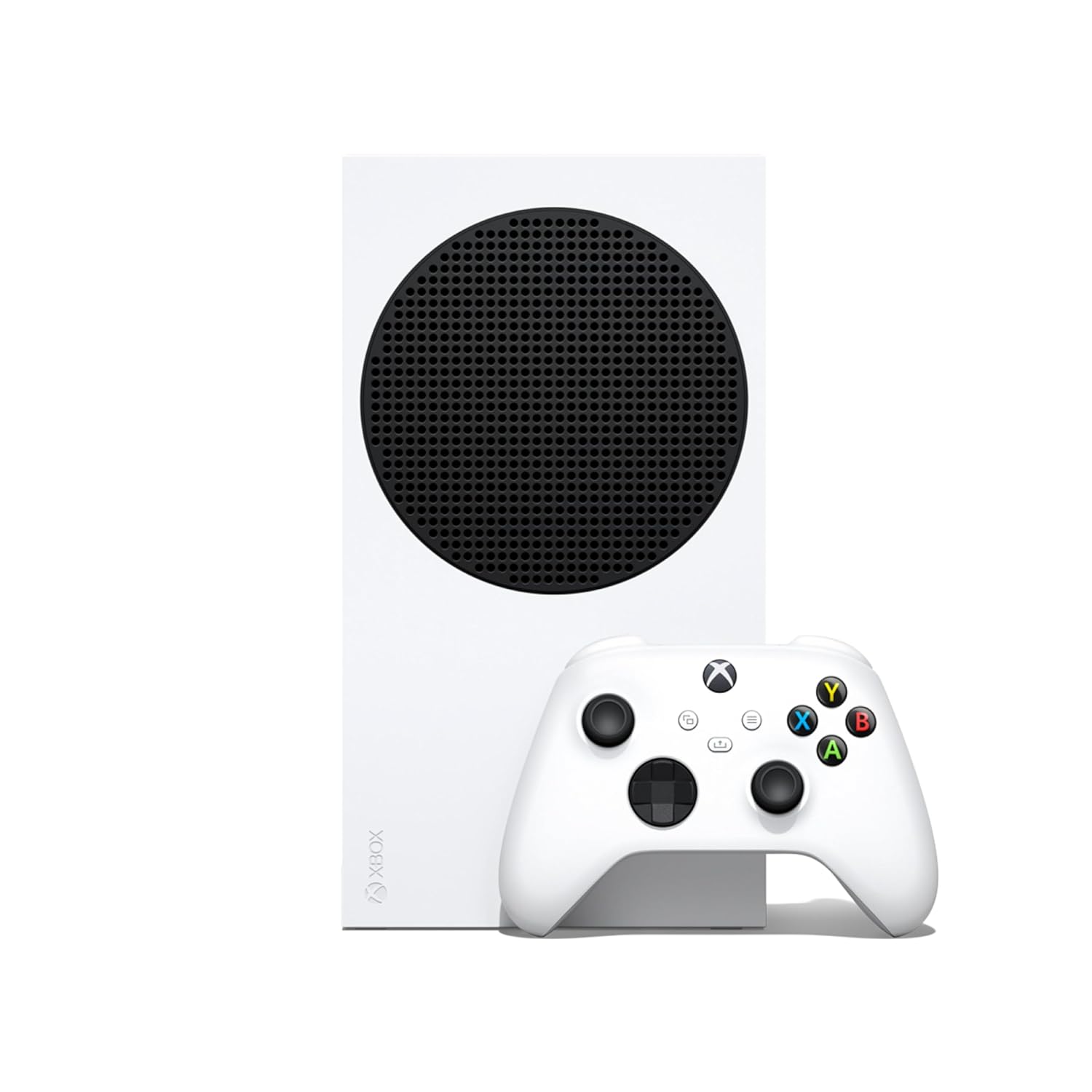
Pros
- 120FPS support delivers smooth, responsive gameplay for competitive and casual titles.
- Quick Resume feature saves time and keeps you in the action across multiple games.
- Backward compatibility with thousands of games from four Xbox generations adds huge value.
- Compact, lightweight design is easy to place in tight desk setups or travel with.
- Game Pass Ultimate integration provides a vast library of games for a low monthly cost.
Cons
- 512GB SSD fills up quickly with modern games; an external drive may be needed.
- All-digital design requires a stable internet connection for game downloads and updates.
- No disc drive limits access to physical game sales and used games.
The Xbox Series S is a compact, all-digital gaming console designed for gamers who want high performance without breaking the bank. It's a great fit for casual gamers, college students, and anyone building a budget-friendly gaming setup who still wants smooth 120FPS gameplay and fast load times. The console's small footprint makes it easy to slide into a desk setup or entertainment center, and its robot white finish looks clean in any room.
Performance-wise, the Series S delivers up to 120FPS in supported titles, which is a big deal for competitive games like Call of Duty or racing sims where every frame counts. The Quick Resume feature is a standout - you can jump between multiple games instantly without waiting for loading screens. Load times are lightning fast thanks to the custom SSD, so you're in the action within seconds. Backward compatibility with four generations of Xbox games means you can play older favorites, and many titles get visual and performance boosts when optimized for Series S.
Build quality is solid for a console in this price range. The unit feels sturdy, and the included wireless controller has a comfortable ergonomic design with responsive buttons and triggers. The controller uses standard AA batteries, which some may prefer for easy replacement, though rechargeable packs are available separately. The console runs quietly and stays cool even during long sessions, which is a plus for dorm rooms or shared spaces.
Setup is straightforward: plug in the HDMI cable, power cord, and connect to Wi-Fi. The interface is clean and easy to navigate, and Game Pass integration is seamless. One limitation is the 512GB SSD - after system files, you have around 364GB for games. Modern titles can take 50-100GB each, so you'll likely need to manage storage or add an external drive. Also, since it's all-digital, you need a stable internet connection for downloads and updates.
For streamers or content creators, the Series S can capture gameplay clips and stream via Twitch, but it lacks the raw power of a gaming PC for heavy multitasking. It's best as a dedicated gaming machine for those who prioritize value and convenience. Casual gamers, college students, and families will appreciate the low entry price and Game Pass library.
Overall, the Xbox Series S is a smart buy for anyone wanting a modern console experience without the high cost. It's perfect for quick gaming sessions, multiplayer with friends, and exploring hundreds of games through Game Pass. Just be ready to manage storage and rely on digital purchases.


Hardware Architectures and Ecosystems Across Modern Gaming Consoles
Determining What Are The Best Gaming Consoles requires examining how distinct hardware designs address different gaming habits and environments. Modern gamers can choose from dedicated living room appliances, open Android handhelds, streamlined Linux portables, and compact HDMI television sticks. Each format balances processing power, storage architecture, battery capacity, and controller responsiveness in unique ways. Understanding how these hardware components function together ensures that your selected device delivers a reliable and engaging gaming experience.
Modern Digital Home Consoles Versus Living Room PCs
Dedicated home consoles like the Xbox Series S – All Digital Gaming Console provide a standardized approach to living room gaming. This system includes a 512GB solid-state drive that accelerates game boot times and powers Quick Resume, allowing players to switch between multiple titles smoothly. The hardware targets frame rates up to 120 FPS over HDMI, removing the need for manual graphics setting adjustments. By utilizing digital storefronts and subscription platforms like Xbox Game Pass, this hardware maintains a straightforward environment for modern interactive entertainment.
Comparing dedicated consoles with personal computers highlights fundamental trade-offs between hardware simplicity and customization. An entry-level gaming desktop analysis illustrates how personal computers allow users to upgrade individual components, such as graphics cards and power supplies. A home console operates as an integrated appliance with fixed hardware specifications, eliminating internal component swaps while guaranteeing consistent software optimization. This consistency provides seamless backward compatibility across multiple software generations without requiring custom driver configurations or hardware troubleshooting.
Storage management represents an important consideration on all-digital living room platforms. With the internal 512GB solid-state drive hosting both operating files and full game installations, larger titles can quickly fill the drive. Players often manage local storage by archiving inactive games to external storage drives or streaming titles directly via cloud services. This self-contained setup appeals to users who value plug-and-play reliability over the expansive file management and physical drive customization associated with traditional desktop setups.
Portable Handheld Systems: Linux Versus Open Android Architectures
Portable gaming consoles divide primarily into lightweight Linux devices and versatile Android systems. Products like the Anbernic RG40XX H Retro Handheld Game Consoles incorporate a quad-core ARM Cortex-A53 processor, PowerVR SGX544MP graphics, and 1GB of system RAM. Running a customized 64-bit Linux distribution, these handhelds channel hardware resources directly into emulation cores without background operating system overhead. This specialized setup delivers fast boot times from external memory cards while extending battery longevity during travel.
Conversely, open portable platforms like the Retroid Pocket Classic Retro Handheld Game utilize the Android 14 operating system alongside 6GB of RAM and 128GB of internal storage. Android integration grants direct access to the Google Play Store, enabling users to download individual emulators, modern mobile releases, and cloud streaming tools. While Android requires additional system memory compared to minimal Linux builds, it provides responsive touchscreen navigation and flexible application management. This open architecture requires initial software setup, but it delivers unmatched flexibility for varied gaming workloads.
Chassis dimensions and thermal efficiency heavily influence user comfort during extended handheld gaming sessions. The RG34XX Retro Handheld Game Consoles Classic Retro weighs roughly 188 grams, pairing an H700 quad-core processor with a pocket-friendly form factor. Meanwhile, the RG40XX H weighs around 200 grams, incorporating integrated vibration motors and customizable RGB joystick rings. Because these portable devices rely primarily on passive cooling, their low-power processors maintain comfortable operating temperatures without producing intrusive fan noise.
Plug-and-Play HDMI Sticks for Direct Television Entertainment
For players seeking simple family entertainment without large equipment, HDMI game sticks provide a direct solution. Hardware options such as the Kulivloa Retro Gaming Console and the LIUWEI New Retro Gaming Console & Game Stick Pro connect directly to an open HDMI port on a television or projector. These compact devices utilize preloaded memory cards that support classic console and arcade emulation engines. Users simply supply USB power, change the television input channel, and begin playing without undergoing complex software installations or network configurations.
Wireless connectivity is a core strength of HDMI game sticks, as each system includes dual 2.4GHz wireless gamepads for local multiplayer gaming. This 2.4GHz wireless protocol operates independently from home Wi-Fi networks, providing responsive button registration up to 40 feet away. Because the bundled wireless controllers rely on standard AAA batteries, keeping replacements nearby avoids unexpected interruptions during gaming sessions. Eliminating trailing controller cables creates an organized living room setup that suits casual family play and party entertainment.
Consistent performance on HDMI sticks requires clean and continuous electrical power through the micro-USB connection. If a television USB port fails to provide sufficient electrical current, users might encounter blank screen boots or system freezes during game loading. Connecting the stick directly to a dedicated wall power adapter ensures steady voltage regulation and eliminates unexpected crashes. In addition, powering down the device properly protects the external memory card against corrupted game saves and broken directory indexes.
Display Technologies, Screen Aspect Ratios, and Video Output
Display quality strongly influences the visual appeal of handheld gaming consoles, where panel technology and resolution vary significantly. The Retroid Pocket Classic features a 3.92-inch AMOLED screen delivering a 1240×1080 resolution at 60Hz. Because AMOLED displays produce true black levels by disabling individual pixels, they offer rich contrast that enhances both retro pixel art and modern games. In comparison, IPS panels on devices like the RG40XX H offer full viewing angles and 640×480 resolution, using fully laminated glass to reduce reflections.
Screen aspect ratios also dictate how accurately vintage games render on portable displays without visual distortion. The GAMINJA Handheld Game Console employs a 4-inch display with a 720×720 resolution, creating a 1:1 square canvas that scales vertical arcade and classic handheld titles naturally. Handhelds featuring a 720×480 resolution, such as the RG34XX, provide a 3:2 aspect ratio that matches classic portable systems cleanly. Selecting a screen geometry suited to your preferred software prevents awkward image stretching and maintains crisp pixel borders.
External display connectivity adds versatility to portable systems by allowing them to function on televisions and monitors. The RG40XX H and RG34XX feature dedicated mini-HDMI outputs, while the Retroid Pocket Classic supports video out via USB Type-C. On desktop systems, reading a dedicated graphics card selection guide helps PC builders evaluate multi-monitor setups and high-refresh panels. For consoles and handhelds, HDMI connections output standardized 720p, 1080p, or upscaled 4K signals, letting users transition from portable play to living room gaming effortlessly.
Storage Architecture, File Organization, and Memory Expansion
A console’s storage architecture determines game loading speeds, library capacity, and file accessibility. Modern living room consoles depend on high-speed internal solid-state drives that stream data rapidly to support high-fidelity graphics and quick resume features. In contrast, portable emulation systems and HDMI game sticks rely on external TF and microSD flash cards ranging from 64GB to 256GB. These removable cards hold the compressed game files and emulator configuration folders, enabling straightforward file transfers when connected to a computer.
Formatting rules must be followed carefully when expanding storage on budget handheld consoles and game sticks. The GAMINJA handheld requires secondary storage cards to be formatted with the FAT32 file system for the operating system to recognize them. Because storage cards larger than 32GB often format as exFAT by default on personal computers, third-party formatting tools may be required to prepare larger cards. Maintaining correct directory paths ensures that the built-in emulator cores detect game files without missing titles or display errors.
Built-in internal storage on Android platforms offers notable benefits for users managing modern applications and cloud-synced files. The Retroid Pocket Classic provides 128GB of onboard storage alongside an expandable microSD slot, letting users keep system apps on fast internal storage while archiving retro libraries externally. Unlike systems preloaded with thousands of uncurated titles, open Android consoles arrive without preloaded games, giving users complete control over their game library. This approach takes more setup effort, but it avoids duplicate files and corrupted game copies.
Battery Capacities, Power Delivery, and Thermal Longevity
Battery capacity determines portable runtimes, charging intervals, and long-term durability in handheld consoles. The Retroid Pocket Classic houses a 5000mAh rechargeable battery, supplying the substantial energy needed for its AMOLED screen and multi-core processor. Linux handhelds utilize slightly smaller batteries, including the 3500mAh cell in the RG34XX and GAMINJA, or the 3200mAh pack inside the RG40XX H. These internal batteries typically deliver between four and eight hours of continuous play, depending on screen brightness, audio output, and emulation demands.
Modern handheld systems rely on USB Type-C charging ports for convenient power delivery from wall adapters and external battery packs. Most handhelds recharge their internal batteries in approximately two hours under standard charging conditions. However, connecting small retro consoles to high-wattage fast chargers without proper power negotiation can place unnecessary electrical stress on internal charging circuitry. Following manufacturer guidelines regarding charging adapters protects internal lithium-ion cells against excessive heat and premature capacity loss over time.
Thermal management strategies differ significantly between home consoles and compact portable gaming devices. The Xbox Series S uses an internal cooling fan and heatsink assembly to channel heat away through dedicated ventilation openings. Conversely, handheld emulators and HDMI sticks rely on passive heat spreaders and natural air circulation to maintain safe operating temperatures. Keeping device vents clean and unobstructed prevents thermal throttling, ensuring stable frame rates during long gaming sessions without annoying fan noise.
Controller Ergonomics, Input Mechanisms, and Signal Transmission
Physical ergonomics and input responsiveness fundamentally shape how comfortably players control their games. Handhelds like the GAMINJA incorporate dual 360-degree Hall rocker joysticks alongside an ergonomic curved chassis. Hall effect sensors use magnetic fields rather than mechanical friction to detect joystick position, effectively eliminating the physical wear that leads to stick drift over time. Responsive shoulder buttons and tactile directional pads provide crisp input feedback, ensuring accurate inputs during fast-paced platformers and precision action titles.
Visual accents and customizable controls also contribute to modern handheld design and user comfort. The Anbernic RG40XX H includes 16-million color RGB lighting rings around its joysticks, supporting multiple effects such as breathing, rainbow cycles, and static illumination. Players can adjust color schemes and brightness levels within system menus to suit their preferences or conserve battery power. Integrated vibration motors offer tactile rumble feedback during gameplay, adding physical immersion that mirrors the experience of traditional home console controllers.
Wireless communication standards dictate input response times and connection stability for both TV sticks and home consoles. While HDMI game sticks rely on dedicated 2.4GHz RF wireless adapters, home consoles use proprietary wireless links or Bluetooth for low-latency gamepad communication. Bluetooth 5.1 on the Retroid Pocket Classic also enables connections with wireless headphones and external gamepads. Reliable wireless connections ensure that every button press registers without delay, whether you are playing in handheld mode or relaxing across the room.
Matching Console Hardware to Your Space and Entertainment Style
Selecting the best console hardware requires matching technical capabilities to your living space, mobility needs, and software preferences. Players looking for modern digital titles, high frame rates, and smooth cloud integration will find dedicated digital home systems best suited to their living room setups. Mobile gamers who prioritize classic console emulation during daily commutes benefit from compact Linux handhelds that deliver long battery life and pocket-sized portability. Users who prefer custom app configurations, touch controls, and Android gaming will appreciate the flexibility of open platforms like the Retroid Pocket Classic.
Meanwhile, casual players and families seeking fast multiplayer fun on a living room television can achieve great convenience through plug-and-play HDMI sticks. These self-contained sticks remove complex setup steps while supplying dual wireless controllers and large classic game libraries out of the box. By carefully evaluating display quality, battery performance, controller ergonomics, and storage expansion, you can make an informed hardware choice. Focusing on these practical technical factors guarantees that your chosen gaming console delivers reliable entertainment tailored to your personal play style.








Write Your Review
No reviews yet. Be the first to share your experience!