


Setting up a desktop computer for interactive play often involves deciding between mouse aiming and analog thumbstick control. While racing titles, action adventures, and third-person platformers often feel more natural with a gamepad, many players still wonder what gaming controllers work on pc before buying extra hardware. The Windows platform supports an exceptionally wide range of peripherals, but controller standards determine whether a device connects immediately or requires third-party configuration software. Matching your input hardware to a capable budget gaming desktop build ensures that your system registers trigger pulls, directional inputs, and button presses without unnecessary latency.
Modern desktop systems primarily interact with controllers through two main application interfaces known as XInput and DirectInput. Native support for official Xbox hardware makes Microsoft-standard controllers the most straightforward choice for desktop setups, but third-party options from brands like Logitech, EasySMX, and GameSir also provide reliable performance across modern releases. Exploring connection types such as wired USB, dedicated 2.4GHz wireless dongles, and Bluetooth helps identify which peripherals operate smoothly on your desktop. Understanding these communication protocols allows PC gamers to select comfortable hardware that functions reliably across digital storefronts and game launchers.

Pros
- Comfortable ergonomic design with improved contours for extended play
- Hybrid D-pad offers excellent directional input for fighting and platform games
- Textured grip on triggers, bumpers, and back-case enhances handling during intense matches
- Multi-platform support via Xbox Wireless and Bluetooth works great with Windows PCs and mobile devices
- Long 40-hour battery life reduces downtime between charges
Cons
- Uses AA batteries; a rechargeable pack is not included and must be purchased separately
- USB-C cable not included, so wired use requires an additional purchase
- Lacks back paddles or programmable buttons found on some pro controllers
The Xbox Wireless Controller (2025) in Deep Pink is a refined take on Microsoft's iconic gamepad, designed to offer a modernized feel with improved ergonomics and connectivity. This controller is compatible with Xbox Series X/S, Xbox One, Windows PC, Android, and iOS devices, making it a versatile choice for PC gamers who also enjoy console or mobile gaming. The standout Deep Pink color adds a vibrant touch to any gaming setup.
For PC gamers and streamers, this controller delivers solid performance with low-latency wireless connectivity via Xbox Wireless or Bluetooth. The hybrid D-pad combines a traditional cross shape with a circular dish for precise diagonal inputs, ideal for fighting games or platformers. Textured grips on the triggers, bumpers, and back-case provide a secure hold during intense sessions, reducing hand fatigue. The 40-hour battery life ensures you can game for days without worrying about charging, though note it uses AA batteries rather than a built-in rechargeable pack.
Build quality is typical of Xbox controllers – durable plastic with a comfortable weight (0.85 lbs). The sculpted surfaces and refined geometry fit naturally in most hand sizes, making it suitable for long gaming sessions on your desktop or couch. The share button lets you quickly capture screenshots or clips, which is handy for streamers or content creators looking to share highlights without interrupting gameplay.
Setting up the controller on a Windows PC is straightforward: pair via Bluetooth or use a USB-C cable (not included) for a wired connection. The 3.5mm headset jack allows you to plug in any compatible headset for game audio and chat, simplifying your desk setup. While it doesn't offer the extra customization of pro controllers (no back paddles or remappable buttons via software), the standard layout works fine for most PC games, from shooters to racing titles.
One limitation is the lack of a rechargeable battery pack and USB-C cable in the box. Many PC gamers prefer a built-in battery or a rechargeable kit, but you can always use standard AA batteries or buy a separate play-and-charge kit. Also, if you rely on Xbox Wireless for lower latency on PC, you may need a separate Xbox Wireless Adapter (sold separately), as Bluetooth can introduce slight lag depending on your system.
Overall, the Xbox Wireless Controller (2025) Deep Pink is a solid choice for PC gamers, casual players, and streamers who want a reliable, comfortable controller that works across multiple platforms. Its vibrant color and improved ergonomics make it a great addition to any gaming setup, especially for those who enjoy both PC and Xbox gaming. If you're looking for a no-fuss wireless gamepad with great battery life and broad compatibility, this is a practical pick.


Pros
- Quiet-press buttons are a game-changer for noise-sensitive environments like dorm rooms or shared living spaces.
- Hall effect joysticks ensure no drift over time, outperforming traditional potentiometer-based controllers.
- 1000Hz polling rate provides incredibly responsive input, ideal for competitive gaming.
- Comfortable ergonomic design with soft-touch grip reduces fatigue during long gaming sessions.
- Long-lasting 1000mAh battery keeps you playing for hours without frequent recharging.
Cons
- Not compatible with Xbox or PlayStation consoles, limiting its use for console-only gamers.
- Bluetooth mode offers only 125Hz polling, which may feel less responsive for competitive play.
- Programmable buttons are placed on top, which may take some getting used to if you prefer rear paddles.
The EasySMX X05Pro Wireless PC Controller is a well-rounded gaming accessory designed for PC gamers, streamers, and casual players who value quiet operation and responsive controls. Based on the product specifications, this controller stands out with its Hall effect joysticks that eliminate the dreaded stick drift common in many controllers, making it a reliable choice for long-term use. The 1000Hz polling rate in wired and 2.4G wireless modes ensures low-latency input, which is crucial for competitive gaming in FPS, MOBA, or racing titles.
One of the standout features is the quiet-press buttons, rebuilt with silicone dampers to significantly reduce noise. This makes the X05Pro perfect for late-night gaming sessions in dorm rooms or shared living spaces where you don’t want to disturb others. The dual-stage impulse triggers with adjustable travel and dual rumble motors provide immersive feedback, whether you’re drifting in a racing game or feeling recoil in an FPS. The two programmable top buttons are a thoughtful addition, offering extra functionality without the accidental press issues common with back paddles.
In terms of build quality, the controller features a soft-touch silicone coating that provides a secure, sweat-resistant grip even during intense gaming marathons. The 8-way D-pad with dome switches ensures precise diagonal inputs, making it a solid option for fighting and retro games. The built-in 1000mAh battery offers extended playtime, reducing the need for frequent charging. Setup is straightforward: simply connect via USB, 2.4G dongle, or Bluetooth, and the controller is recognized by Windows, Switch, Android, and iOS without additional software.
While the X05Pro excels in many areas, there are a few limitations to consider. It is not compatible with Xbox or PlayStation consoles, so it’s strictly for PC and mobile/tablet gamers. Additionally, Bluetooth mode operates at 125Hz, which may feel slightly less snappy than the 1000Hz wired/wireless modes – but for casual gaming or mobile use, it’s perfectly adequate. The top-mounted programmable buttons are a slight departure from the common rear paddle design, but they are positioned to avoid accidental presses, and many users will appreciate the intuitive placement.
Overall, the EasySMX X05Pro is an excellent value for PC gamers looking for a quiet, drift-free controller with high responsiveness. It’s particularly well-suited for competitive gamers who need low latency, streamers who want minimal background noise, and college gamers who game in shared spaces. The multi-platform compatibility adds versatility, making it a great addition to any gaming setup. If you’re in the market for a reliable PC controller without breaking the bank, this is a strong contender.
The EasySMX X05Pro delivers impressive gaming performance thanks to its Hall effect joysticks and 1000Hz polling rate. In wired or 2.4G wireless mode, inputs register almost instantly, making it ideal for fast-paced FPS games like Call of Duty or Overwatch. The adjustable trigger locks allow you to switch between long and short travel, perfect for racing games that need precise throttle control or shooters that benefit from quicker trigger pulls. The dual rumble motors provide tactile feedback, enhancing immersion in action games. The 8-way D-pad also handles fighting games well, with smooth diagonal inputs and responsive directional control.
The EasySMX X05Pro feels solid and well-constructed. The soft-touch silicone coating on the grips offers a comfortable, non-slip hold that resists sweat during long gaming sessions. The Hall effect joysticks are a major durability upgrade over traditional analog sticks, as they are less prone to wear and drift. The buttons have a satisfying, quiet feel thanks to the silicone dampers, and the D-pad uses dome switches for a crisp response. The controller weighs just under 0.86 pounds, giving it a substantial but not heavy feel. Overall, the build quality is impressive for its price point.


Pros
- Low latency wired and wireless connections ensure responsive gameplay on PC and console.
- Ergonomic sculpted design with textured grip reduces hand fatigue during long gaming or streaming sessions.
- Cross-platform compatibility simplifies use across multiple devices without extra adapters.
- Customizable button mapping adapts to different game genres and personal preferences.
- Included USB-C cable provides a reliable wired option and charges the controller while playing.
Cons
- No rechargeable battery pack included (uses AA batteries; 40-hour life), so you may need to buy rechargeables separately.
- On-board memory for custom profiles is limited; you may need the Xbox Accessories app on Windows each time to switch mappings.
- Not compatible with Xbox Series X|S or older Xbox One consoles? Actually it is compatible, but the product data doesn't specify Series X|S; it says Xbox Wireless Controller, so likely compatible, but no explicit mention of Series X|S support.
The Xbox Wireless Gaming Controller + USB-C Cable (2025) in Carbon Black is a refined version of a classic gaming peripheral that many PC gamers, streamers, and competitive players already know and trust. This controller is designed to deliver responsive, low-latency performance whether you're playing on a gaming PC, Xbox console, Android device, or even a smart TV. The included 9-foot USB-C cable lets you go wired for the most stable connection or rely on Xbox Wireless or Bluetooth for a clutter-free setup.
Who is this controller for? It's a great option for PC gamers who prefer a controller for certain genres like racing games, platformers, or fighting games. Streamers and content creators will appreciate the easy capture and share button, which allows them to grab clips without leaving the game. Esports players and competitive gamers may still favor mouse and keyboard for FPS titles, but the hybrid D-pad and textured grip offer precise control for games like FIFA, Forza, or fighting games. Casual gamers will find the ergonomic design comfortable for long sessions, and the 40-hour battery life means less frequent swapping of AA batteries.
In terms of gaming performance, the controller offers responsive inputs with very low latency, especially when used wired via USB-C. The wireless connection via Xbox Wireless or Bluetooth is also solid for most gaming scenarios, though competitive players might still want the wired option for absolute consistency. The new hybrid D-pad feels crisp and directional, great for fighting game combos. The textured triggers and bumpers provide a secure grip, which helps during intense moments. The controller's weight (1.02 pounds) is balanced and not too heavy, reducing fatigue during extended play.
Build quality is typical of Xbox controllers: durable plastic construction with a matte finish that resists fingerprints. The carbon black color is understated and fits well in any gaming setup. The USB-C port is a welcome upgrade for modern connectivity. The 3.5mm headset jack allows you to plug in any gaming headset for audio and voice chat. While the controller doesn't come with a rechargeable battery pack, using standard AA batteries gives you the flexibility to swap in fresh ones instantly. Many users may prefer rechargeable AA batteries for a greener solution.
Setup is straightforward: pair via Bluetooth with Windows 10/11, or use the Xbox Wireless Adapter for a more robust connection. The Xbox Accessories app on Windows lets you remap buttons, adjust stick sensitivity, and create custom profiles. Some users might find the app a bit limited compared to high-end third-party controllers, but it covers the essentials. The controller's compatibility with Android, iOS, Fire TV, and VR headsets means it can serve as a universal gaming peripheral for multiple devices, reducing clutter on your desk.
Realistic limitations include the reliance on AA batteries (though battery life is excellent), the lack of paddles or extra buttons out of the box, and the need to use the app on PC for customization. If you're a hardcore competitive player who uses back paddles, you might want to look at pro controllers. But for the price of $59, this controller offers excellent value for most PC gamers, streamers, and gaming setup builders. It's a practical, reliable choice that will serve you well across many platforms and gaming scenarios.
Understanding PC Controller Compatibility, Connection Standards, and Hardware Options
Determining which gamepads function properly on a computer requires understanding how modern operating systems process input signals. Unlike dedicated home consoles that accept only certified proprietary accessories, Windows desktop environments can recognize nearly any peripheral with a USB connector or Bluetooth chip. The primary difference lies in how seamlessly a game recognizes those inputs without requiring manual mapping or emulation tools. Selecting the right hardware ensures your control schemes remain responsive and consistent across different gaming titles.
The Core Controller Protocols: XInput Versus DirectInput
Software developers communicate with gamepads primarily using two distinct application programming interfaces on Windows. DirectInput represents the older legacy protocol that supported a diverse range of flight sticks, steering wheels, and early PC gamepads. It allows for a wide array of customized button layouts, but modern games rarely configure DirectInput controllers automatically. Players using older hardware often find that modern game menus fail to detect their analog sticks or assign buttons erratically without software intervention.
Microsoft introduced XInput alongside the Xbox 360 to standardize gamepad inputs across desktop computers and consoles. XInput defines a strict controller layout featuring two analog sticks, a directional pad, four primary face buttons, two shoulder bumpers, and two analog triggers. Because contemporary PC games expect this specific button configuration, XInput-compliant gamepads work immediately upon connection in almost every modern release. Most third-party controllers designed for Windows utilize XInput firmware to deliver that instant plug-and-play convenience.
Official Xbox Controllers as the Windows Native Standard
Official Microsoft hardware remains the benchmark for seamless compatibility on Windows gaming systems. Peripherals such as the Xbox Wireless Gaming Controller (2025) integrate directly with the Windows operating system without needing extra driver installations. These models feature refined sculpted ergonomics, textured trigger surfaces, and a dedicated hybrid directional pad designed for precise directional inputs. Furthermore, battery life can reach up to 40 hours depending on usage patterns and headset connections, making them dependable for extended sessions.
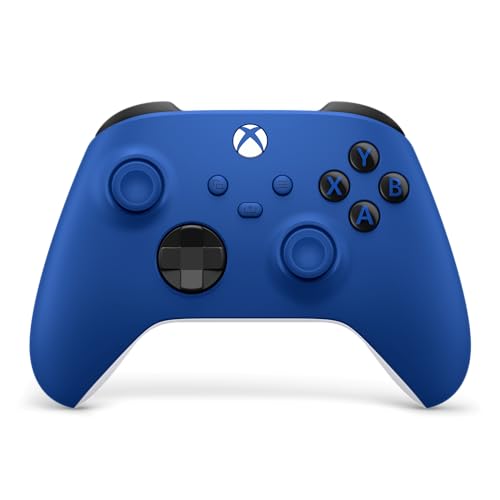
Desktop gamers who favor colorful desk aesthetics often look at variants like the XBOX Wireless Gaming Controller | Shock Blue, which shares identical internal firmware and cross-device functionality. For players who want a dedicated wired connection out of the box, the Xbox Wireless Gaming Controller + USB-C® Cable package supplies a lengthy nine-foot cable alongside the standard gamepad. Connecting via USB-C provides zero wireless interference and eliminates the need to swap AA batteries during competitive matches. These official controllers also allow button remapping and profile adjustments through the built-in Windows Xbox Accessories application.
Legacy Input and Dual-Mode Wired Gamepads
Budget-conscious players and fans of classic PC titles often prefer utilitarian wired gamepads that support multiple input protocols. The Logitech G F310 Wired Gamepad Controller Console represents a classic example of this flexible hardware approach. It includes a physical hardware toggle switch on the back that shifts the controller between DirectInput and XInput modes. This dual-mode capability makes it equally capable of handling vintage PC games from decades past and modern releases launched through digital distribution platforms.
The F310 features a traditional floating directional pad resting on four individual switches rather than a single central pivot point, which helps reduce unintended diagonal presses. A six-foot USB cable provides ample slack to connect to a desktop tower resting under a desk or behind a monitor. For older games that lack native controller support entirely, Logitech Profiler software allows users to bind mouse movements and keyboard strokes directly to the gamepad buttons. This flexibility proves especially helpful when revisiting older role-playing games or strategy titles that never received modern gamepad patches.
Modern Hall Effect Sensors and High Polling Rate Controllers
Recent hardware innovations have introduced magnetic Hall Effect sensors into third-party PC controllers to eliminate potentiometer stick drift. The GameSir Nova Lite 2 Wireless PC Controller Hall incorporates these non-contact magnetic joysticks alongside anti-friction rings to ensure smooth recentering over long-term use. In addition to durable sticks, the Nova Lite 2 features a mechanical circular directional pad, dual asymmetric vibration motors, and two customizable rear macro buttons. Its PC connection supports a 1000Hz polling rate to minimize input delay during fast-paced competitive gameplay.
Another standout device utilizing magnetic sensors is the EasySMX X05Pro Wireless PC Controller, which is designed specifically for multi-platform PC and mobile setups. It features high-precision 11-bit Hall Effect sensors that provide drift-free tracking and also supports a 1000Hz polling rate across wired and 2.4GHz wireless connections. The controller includes dual-stage impulse triggers with physical locks, allowing users to toggle between deep analog travel for racing games and hair-trigger actuation for first-person shooters. Rebuilt silicone dampers beneath the face buttons also provide quiet operation during late-night gaming sessions.
Both of these third-party controllers include companion software or onboard key combination shortcuts that allow users to fine-tune stick deadzones and trigger travel. Using the GameSir Connect application on Windows, players can run firmware updates, test button response times, and modify motor vibration strength. The EasySMX X05Pro houses a built-in 1000mAh rechargeable battery, eliminating ongoing battery replacement expenses for everyday desktop gaming. These feature-rich third-party alternatives demonstrate that PC players no longer need to sacrifice advanced custom features when looking beyond first-party console gamepads.
Evaluating Connection Methods: USB Wired, 2.4GHz Wireless, and Bluetooth
Connecting a gamepad to a desktop computer involves weighing latency, connection stability, and cable management against your preferred play style. Direct USB wired connections remain the gold standard for latency-sensitive games because physical cables avoid radio frequency interference entirely. A wired connection also supplies continuous power, removing worries about battery depletion during critical multiplayer moments. When pairing high-speed controllers with a powerful desktop graphics card setup, minimizing input latency ensures that high visual frame rates translate directly into immediate on-screen reactions.
Dedicated 2.4GHz wireless connections represent the second major connectivity category, typically requiring a proprietary USB dongle plugged into the computer. Controllers that use 2.4GHz wireless protocols, like the wireless modes found on modern GameSir or EasySMX gamepads, deliver responsiveness that rival wired cables. These proprietary wireless adapters transmit dedicated data packets without the bandwidth sharing issues common to standard Bluetooth networks. For gamers whose desktop cases sit several feet away from their chairs, a 2.4GHz dongle provides wireless freedom without sacrificing connection reliability.
Standard Bluetooth offers the greatest convenience for multi-device pairing, but it can present occasional quirks on Windows desktops. Many desktop motherboards lack robust external Bluetooth antennas, which can lead to dropped inputs or signal latency if the tower is positioned behind a solid desk. Furthermore, connecting multiple wireless controllers via a single motherboard Bluetooth adapter can occasionally saturate available bandwidth. While Bluetooth works well for casual gaming from a sofa, connecting an external antenna to your desktop motherboard usually improves wireless gamepad stability considerably.
Steam Input and Controller Reconfiguration Tools
Steam Input has transformed how Windows handles alternative gamepads by acting as a universal translation layer between hardware and game engines. When Steam Input is active, the software can recognize PlayStation DualShock and DualSense controllers, Nintendo Switch Pro gamepads, and generic DirectInput devices. The client automatically translates those inputs into standard XInput calls that modern PC games interpret without difficulty. This system allows players to use controllers that lack native Windows drivers without buying specialized third-party adapter dongles.
In addition to basic protocol translation, Steam Input provides complete button remapping, gyro aiming configuration, and custom deadzone adjustments for any connected gamepad. Players can configure action sets that change button functions dynamically when aiming down weapon sights or driving vehicles. You can also import community-created control configurations for games that were originally designed strictly for keyboard and mouse control. Even games purchased through non-Steam storefronts can benefit from these features simply by adding the executable file as an external title within your Steam library.
Audio Passthrough and Headset Jack Compatibility
Integrated 3.5mm headphone jacks on modern gamepads offer convenient voice chat and game audio, but compatibility varies depending on your PC connection. When an official Xbox controller connects via a USB cable or the official Xbox Wireless Adapter for Windows, the 3.5mm stereo jack functions normally. Windows detects the gamepad as an independent USB audio playback and recording device in the Windows Sound control panel. This setup allows you to plug your favorite gaming headset directly into the controller without running long audio cables to the back of your desktop case.
Audio passthrough generally stops working when official Xbox controllers are connected to a PC via standard Bluetooth. Standard Bluetooth bandwidth profiles prioritize control input latency over bi-directional high-definition audio streaming. If you rely on the 3.5mm jack on your controller for voice chat and audio, you must use either a wired USB-C connection or the dedicated proprietary wireless adapter. Keeping this technical limitation in mind helps prevent unexpected audio troubleshooting when organizing your desktop gaming peripheral setup.
Custom Firmware and Desktop Software Configuration
Dedicated desktop companion applications provide valuable calibration options for modern third-party and official controllers alike. The Microsoft Xbox Accessories app lets users adjust stick response curves, swap trigger assignments, and invert analog axes directly within Windows. Third-party manufacturers similarly offer dedicated software suites, such as the GameSir Connect application for PC, to unlock advanced hardware capabilities. These tools allow players to program rear macro buttons, configure vibration intensity, and adjust trigger sensitivity to match specific gaming genres.
Calibrating stick deadzones within software is especially useful for competitive shooting and driving simulations. Controllers featuring Hall Effect sensors often allow users to configure zero-deadzone settings without introducing cursor drift or wandering crosshairs. Regular firmware updates delivered through these companion applications also resolve minor compatibility conflicts that can emerge following major Windows operating system updates. Checking for firmware patches when first unboxing any new controller ensures that you receive optimal hardware responsiveness and stability.
Balancing Gamepad Selection with Desktop System Requirements
Choosing the right controller also involves considering the physical layout and expansion ports available on your desktop computer. Modern gamepads frequently require USB Type-A or Type-C ports to connect charging cables, wireless dongles, or wired interfaces. If you are configuring a compact desktop or an entry level gaming desktop, verify that your chassis front panel or motherboard rear I/O has enough accessible ports for all your peripherals. Using unpowered external USB hubs can occasionally cause latency spikes or intermittent disconnects if multiple high-polling peripherals draw power simultaneously.
Ergonomics and hand size also play a substantial role in long-term comfort during extended play sessions. Asymmetrical stick layouts, favored by Xbox, Logitech, GameSir, and EasySMX designs, align the left thumb in a relaxed resting position that many players find comfortable for thumbstick-heavy games. Symmetrical layouts common on PlayStation hardware appeal to players who primarily navigate menus or retro platformers using the directional pad. Evaluating both your preferred game genres and your physical desktop workspace ensures that your chosen controller complements your overall gaming experience.
Practical Takeaways for Selecting a PC Gamepad
Virtually any modern controller can function on a Windows gaming computer, but XInput-compliant models offer the most dependable out-of-the-box experience. First-party Xbox gamepads deliver native driver integration and extensive compatibility across Microsoft services and third-party stores. Meanwhile, third-party options from brands like GameSir and EasySMX provide compelling innovations, including Hall Effect anti-drift sticks, 1000Hz polling rates, and physical trigger locks. Wired options like the Logitech F310 remain valuable choices for players seeking reliable dual-mode DirectInput and XInput functionality.
Before finalizing your peripheral purchase, review how you intend to connect the controller to your desktop system. If you choose wireless operation, determine whether your motherboard includes reliable Bluetooth antennas or if you need a controller supplied with a 2.4GHz USB wireless dongle. Verifying your available desktop USB ports and taking advantage of software like Steam Input or vendor companion tools guarantees that your controller performs reliably across your entire gaming catalog. Taking these practical steps ensures that your PC setup delivers responsive control and lasting gaming comfort.








Write Your Review
No reviews yet. Be the first to share your experience!