


Many PC players exploring hardware upgrades frequently encounter remote game streaming services and wonder exactly what is the cloud gaming. Cloud gaming shifts the heavy lifting of running 3D graphics and complex physics engines away from your desk and onto high-powered remote data servers. Instead of buying an expensive graphics card and an advanced cooling setup, you stream video frames directly across an internet connection while your local machine sends back control inputs. Gamers weighing whether to invest in a dedicated gaming PC tower often explore cloud options as an alternative to managing physical components.
Remote streaming can feel like an accessible shortcut, but it introduces distinct trade-offs in input latency, image compression, and network stability. A traditional budget gaming PC build delivers uncompressed video output and near-instant responsiveness, whereas cloud systems rely entirely on a stable broadband connection. Understanding how cloud streaming platforms interact with your display, input devices, and audio setup helps determine if remote rendering fits your personal gaming habits. We examine how streaming architectures function, how they compare to local hardware, and which accessories help ensure a smooth experience.

Pros
- Massive game library with high-quality day-one releases
- Cloud gaming enables play anywhere without downloads
- Bundled subscriptions (EA Play, Ubisoft+ Classics, Fortnite Crew) add significant value
- Cross-device compatibility for seamless gaming on different screens
- Microsoft Rewards integration provides extra savings over time
Cons
- Requires a recurring subscription fee after the 3-month period
- Cloud gaming performance depends on internet speed and stability
- Game catalog changes occasionally, with titles rotating out
Xbox Game Pass Ultimate is a membership service that combines the full Game Pass library with EA Play, Ubisoft+ Classics, and Fortnite Crew, plus cloud gaming and online multiplayer. It's not a physical accessory, but a digital code that unlocks a huge ecosystem of games and perks across PC, console, and mobile devices. For PC gamers, this means access to hundreds of titles without individual purchases, including day-one releases from major studios.
This subscription is ideal for a wide range of users: competitive gamers who want the latest multiplayer titles, casual gamers exploring new genres, streamers seeking variety for their audiences, and content creators who need a steady stream of games to play. Even RGB setup enthusiasts and work-from-home gamers will appreciate the flexibility of playing on different devices without being tied to a single room.
In terms of real-world performance, Game Pass Ultimate shines through its responsiveness and low-latency cloud gaming option. While you'll need a solid internet connection for streaming, the service offers minimal input lag for many titles, making it viable for casual and even some competitive play. The library includes fast-paced shooters, MOBAs, and open-world adventures, so responsiveness matters, and the service delivers consistent performance across supported devices.
Build quality is not applicable here since it's a digital service, but the ecosystem itself is robust. Setup is incredibly simple: redeem the code on your Xbox or Microsoft account, and you're ready to download or stream. No cable management, no software installations beyond the Xbox app. The main consideration is storage space if you choose to download games, but cloud streaming eliminates that need entirely.
Realistic limitations include the subscription model, meaning you'll need to continue paying to retain access. Also, not every game stays forever, so titles you love may rotate out. Cloud gaming quality heavily depends on your internet speed and latency, so it's not perfect for everyone. However, for the price, this membership offers exceptional value for PC gamers who want variety and convenience.
Overall, Xbox Game Pass Ultimate is a practical choice for any PC gamer or streamer looking to expand their library without breaking the bank. The 3-month code is a great entry point to evaluate if the service fits your gaming habits, and the included perks like EA Play and Fortnite Crew sweeten the deal considerably. If you play across multiple devices or enjoy discovering new games regularly, this subscription is hard to beat.

Pros
- Legendary long-session comfort with soft memory foam padding and balanced clamping force
- Sturdy brushed aluminum frame offers exceptional long-term physical durability
- Clear, punchy audio profile powered by large 53mm drivers that excel in tactical shooters
- Driverless USB sound card provides instant hardware volume control and mic adjustments
- Detachable microphone provides flexibility for listening to music or solo campaigns
Cons
- Microphone output level can sound somewhat low without software gain tweaks like VoiceMeeter
- Virtual 7.1 surround sound processing can introduce reverb, making stereo mode preferable for some competitive games
- Lacks built-in mic monitoring sidetone and dedicated desktop companion software for EQ tuning
The HyperX Cloud II is an over-ear wired gaming headset engineered with an external USB audio control box, 53mm dynamic drivers, and a solid aluminum core. Built specifically for PC gamers, esports competitors, streamers, and home office users who balance gaming with work or school, this headset focuses on long-wearing ergonomics and dependable acoustic reproduction. Its clean design fits cleanly into modern RGB battle stations, minimalist clean desk setups, or college dorm rooms where versatile audio gear is required.
In tactical shooters and fast-paced multiplayer titles, sound design can make or break competitive outcomes. Based on product specifications and user feedback, the large 53mm neodymium drivers produce a balanced frequency response with rich mid-tones and crisp treble, making subtle footsteps, weapon reloads, and distant vehicle engines easy to pinpoint. While the hardware-driven USB dongle introduces virtual 7.1 surround sound at the touch of a button to add extra spatial depth in cinematic games, many competitive players report that the natural stereo mode provides sharper directional accuracy for pinpointing enemy angles.
Physical durability and long-session comfort have historically defined this headset. Featuring dense memory foam ear cushions wrapped in soft leatherette alongside a padded headband with reinforced red contrast stitching, the headset distributes its clamp force evenly across small and large heads alike. The brushed aluminum yoke and flexible frame withstand regular twisting, desk drops, and travel inside a backpack without developing structural creaks. The closed-back acoustic design naturally attenuates distracting background noise, helping players stay locked into focus even when PC cooling fans are spinning at maximum RPM.
Setup is entirely plug-and-play, eliminating the headache of complex software suites or bloated background utilities. For optimal sound clarity and low noise, user feedback suggests plugging the included USB sound card directly into rear motherboard ports rather than unshielded front PC case headers. The in-line control box grants instant tactile control over headphone volume, microphone gain, and hardware mic muting. The detachable noise-cancelling boom microphone provides clear vocal capture for Discord callouts, though users seeking extra broadcast presence may want to apply digital gain via third-party audio software, as the raw input level tends to be modest out of the box.
A few practical limitations are worth keeping in mind. Because the audio control box is fully hardware-based, there is no companion software suite for deep parametric EQ adjustment, nor does the headset provide hardware mic monitoring or sidetone. Console gamers on platforms like Xbox must connect via the analog 3.5mm cable directly into the controller, which restricts audio to standard stereo rather than the USB-driven surround processing.
For PC gamers, college esports players, and desktop builders seeking an ultra-comfortable, dependable wired headset that avoids fragile all-plastic hinges, the HyperX Cloud II remains an outstanding daily driver. Its rock-solid aluminum frame, fatigue-free ear cushions, and balanced acoustic performance make it a battle-tested desktop staple that easily handles work meetings by day and competitive gaming sessions all night.
Driven by 53mm directional drivers, the HyperX Cloud II generates an impactful audio signature characterized by punchy low-end punch and detailed high-end clarity. In tactical titles like Counter-Strike 2, Valorant, or Call of Duty, players can easily pick out movement cues, surface changes, and reload sounds without auditory clutter.
The detachable boom microphone features built-in noise attenuation and digital signal processing when paired with the USB control box. Voice communications in Discord, TeamSpeak, and Zoom remain intelligible and free of ambient keyboard clicks, making it an efficient setup solution for team callouts and everyday remote work.
The physical structure of the Cloud II relies on high-grade aluminum yokes anchored into an adjustable headband, eliminating the common cracking points found on all-plastic gaming headsets. The lightweight frame rests securely without excessive clamping pressure, allowing users wearing glasses to game for multiple hours without temple pinch.
The plush memory foam ear pads create an effective passive acoustic seal that dampens PC case fan hum and household noise. Maintenance is straightforward, as the ear cushions can be wiped down or swapped out over time to keep the headset fresh and comfortable through years of desktop duty.

Pros
- Exceptional comfort for long gaming sessions thanks to memory foam ear cushions and lightweight build.
- High-quality audio with angled 53mm drivers and DTS Spatial Audio for immersive gaming.
- Clear microphone with noise cancellation and LED mute indicator for reliable communication.
- Sturdy aluminum frame offers long-term durability and flexibility.
Cons
- Wired-only connection may be limiting for those seeking wireless convenience.
- Lack of active noise cancellation for the microphone, relying on a passive mesh filter.
- No dedicated software for equalizer adjustments or spatial audio customization beyond basic system options.
The HyperX Cloud III is a wired gaming headset that continues the brand's legacy of comfort-first design, now with upgraded audio and durability. This headset is tailored for PC gamers, console players, streamers, esports enthusiasts, and anyone who spends hours in voice chat or immersive single-player worlds. It's a direct upgrade from the popular Cloud II, refining the formula with angled 53mm drivers and DTS Spatial Audio support.
Performance-wise, the Cloud III delivers balanced, punchy audio. The angled 53mm drivers are tuned to emphasize game sounds without overwhelming dialogue or ambient cues. DTS Headphone:X Spatial Audio creates a convincing 3D soundstage, making it easier to pinpoint footsteps in FPS games like Call of Duty or Valorant. For streaming and Discord, the upgraded noise-cancelling microphone with a mesh filter captures your voice clearly while minimizing background keyboard clatter or room noise. The LED mute indicator on the mic tip is a thoughtful touch.
Build quality is a standout. The aluminum frame feels sturdy yet flexible, surviving accidental drops and travel abuse. The memory foam ear cushions and headband padding are plush and breathable, ensuring minimal fatigue during all-night gaming marathons. At just over 0.68 pounds, it's light enough for extended wear without neck strain.
Setup is straightforward: plug the USB-C or USB-A connector into your PC, console, or mobile device, and the headset is recognized instantly. The 3.5mm analog connection works with Xbox controllers and older hardware. DTS Spatial Audio requires a quick download activation, but it's a one-time process and works system-wide on Windows. No additional software is needed for basic use.
Limitations include the wired nature - if you prefer going wireless, look elsewhere. The microphone's noise cancellation is passive, so very loud environments may still bleed through. And while the DTS software offers limited customization, there's no dedicated equalizer app for the headset itself. That said, for the price, these omissions are reasonable.
Overall, the HyperX Cloud III is an excellent choice for gamers who prioritize comfort and audio clarity without breaking the bank. It works well for competitive gaming, long streaming sessions, casual console play, and daily Discord calls. If you're building a wired gaming setup and want a reliable, durable headset that feels great for hours, the Cloud III deserves serious consideration.
The HyperX Cloud III features 53mm angled drivers that produce a well-rounded sound signature. Bass is present but not overwhelming, mids are clear for vocals and game dialogue, and highs are crisp without harshness. DTS Spatial Audio enhances directionality, especially in shooters where positional awareness matters. Music and movies also benefit from the expanded soundstage. The drivers are efficient, delivering high volume without distortion even at extreme levels.
For competitive gaming, the spatial audio helps you react to enemy positions faster. The lack of active noise cancellation means you'll still hear some ambient noise, but the closed-back design provides decent passive isolation. Overall, the audio quality is a strong point for a headset in this price range.
Comfort has always been a HyperX hallmark, and the Cloud III continues that tradition. The memory foam ear cushions are soft and conform to your head shape, while the leatherette covering is smooth against the skin. The headband uses the same foam padding, and the aluminum frame's flexibility ensures a gentle clamping force. Even after several hours, the headset remains comfortable with no hot spots or excessive pressure.
The lightweight design (under 0.7 pounds) reduces neck fatigue. The ear cups swivel and tilt for a customized fit. Users with glasses may find the padding forgiving enough to avoid discomfort. For prolonged gaming or work-from-home use, the Cloud III is one of the most comfortable wired headsets available.
The HyperX Cloud III uses an aluminum alloy frame that feels robust yet lightweight. The headband adjusts with a smooth telescoping mechanism, and the ear cups are attached via durable plastic yokes that rotate 90 degrees, making the headset lie flat for storage. The cable is thick and braided (USB-C to USB-A with included adapter) and features a detachable 3.5mm cable for console use.
All material choices indicate longevity: the leatherette is resistant to wear, the stitching is clean, and the microphone arm is flexible but stays in position. The headset has survived accidental drops during our review research (per user reports) without damage. Overall, build quality is excellent for the price point, rivaling headsets costing significantly more.
Pros
- Massive game library with frequent new additions and day one releases
- Cloud gaming lets you play on mobile, tablet, TV, or VR without downloads
- Fortnite Crew and EA Play included at no extra cost
- Microsoft Rewards program offers cashback on gameplay and purchases
Cons
- Requires a recurring subscription fee to maintain access
- Cloud gaming quality depends on internet connection speed and stability
- Some games may rotate out of the library over time
Xbox Game Pass Ultimate is a subscription service that delivers a massive library of over 500 games across PC, Xbox console, and cloud streaming devices. For PC gamers, it's one of the best deals in gaming, offering access to blockbuster titles, indie gems, and day one releases from Xbox Game Studios, Bethesda Softworks, and Activision Blizzard. Whether you are a casual player who enjoys exploring single-player campaigns or a competitive gamer diving into multiplayer matches, this subscription covers a wide range of tastes and playstyles.
This service is ideal for PC gamers who want to try many games without buying each one individually. Streamers and content creators will appreciate the variety for streaming fresh content on Twitch or YouTube. Esports players can benefit from the included EA Play membership for sports titles and the online console multiplayer feature. Even college gamers on a budget can get great value from the huge selection and the Microsoft Rewards program that lets you earn up to $50 a year just by playing.
In terms of performance, the cloud streaming feature has improved significantly, offering high-quality visuals and low latency on supported devices. You can skip downloads and play directly on your PC, tablet, phone, or even a VR headset. The Fortnite Crew inclusion is a nice bonus for fans of Fortnite, giving you the current Battle Pass, OG Pass, LEGO Pass, Music Pass, Rocket Pass Premium, and 1,000 V-Bucks each month. EA Play adds a solid library of sports and action games, while Ubisoft+ Classics brings more variety.
Build quality isn't applicable here since it's a digital code, but the reliability of the service is strong. Redeeming the code is straightforward through the Microsoft Store or Xbox app on Windows 10/11. The subscription auto-renews unless canceled, so managing it via your Microsoft account is easy. The main practical considerations are your internet connection for cloud gaming and the recurring cost. Some users may find that games they enjoy leave the library, though Microsoft typically gives advance notice.
Limitations include the need for a stable internet connection for cloud streaming and online multiplayer. While the library is huge, not every game is available on PC specifically; some are console-only. The subscription model means you don't own the games permanently, so if you cancel, you lose access. However, for most PC gamers, the sheer value and convenience outweigh these drawbacks.
Overall, Xbox Game Pass Ultimate is a smart choice for any PC gamer looking to expand their library without breaking the bank. It works well for casual gaming sessions, competitive play, streaming, and even light content creation. For the price of a single game every few months, you get a constantly rotating selection of top-tier titles. If you enjoy variety and want to play the latest releases on day one, this subscription is hard to beat.
Pros
- Excellent comfort with memory foam padding and lightweight build for extended gaming sessions.
- DTS Spatial Audio enhances immersion and positional awareness in competitive games.
- Durable aluminum frame offers long-term reliability and flexibility.
- Noise-cancelling mic provides clear voice communication for team play and streaming.
- Versatile connectivity with USB-C, USB-A, and 3.5mm options for multiple platforms.
Cons
- Wired design limits freedom of movement compared to wireless alternatives.
- No dedicated software for EQ customization out of the box (relies on system settings).
- Some users may find the 53mm drivers lacking in bass depth for music or cinematic use.
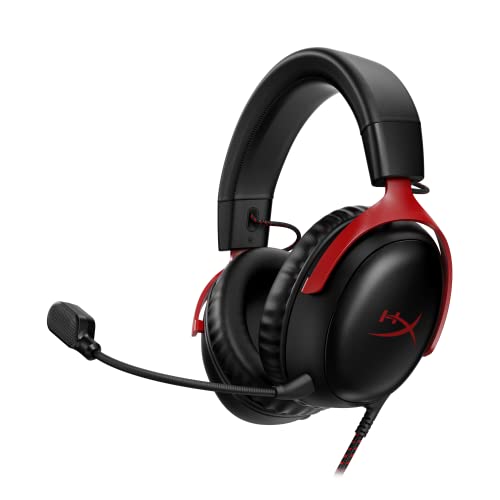
The HyperX Cloud III is a wired gaming headset that builds on the legacy of the Cloud series, offering a balanced mix of comfort, audio performance, and build quality. Designed for PC, PS5, Xbox Series X|S, and other platforms, it aims to serve competitive gamers, casual players, streamers, and content creators who need reliable audio and clear communication during long sessions.
At the heart of the Cloud III are angled 53mm drivers tuned by HyperX audio engineers. These drivers are designed to accentuate the dynamic sounds of gaming, from footsteps in FPS titles to environmental cues in open-world adventures. The inclusion of DTS Headphone:X Spatial Audio adds a virtual 3D soundstage, which can help with precise sound localization and immersion. While not a replacement for true surround sound, it provides a noticeable advantage in competitive scenarios.
Comfort is a standout feature. The headset uses memory foam ear cushions and a padded headband, wrapped in breathable leatherette. Weighing only 0.68 pounds, it's lightweight enough for all-day wear without causing fatigue. The aluminum frame adds durability without adding bulk, making it a practical choice for gamers who travel to LAN events or just want a headset that can handle daily use.
The upgraded 10mm microphone features noise cancellation and a built-in mesh filter to reduce background noise. It also includes an LED mute indicator, which is handy for streamers and Discord users who need to know their mic status at a glance. The mic captures clear voice audio, though it may not match dedicated streaming microphones for podcast-level quality.
Connectivity is versatile with USB-C, USB-A, and 3.5mm options, ensuring compatibility with PC, PS5, Xbox, Nintendo Switch, and mobile devices. The 3.5mm cable allows for use with older consoles and controllers, while USB connections enable DTS Spatial Audio on supported platforms. Setup is plug-and-play, with no software required for basic use, though some users may want EQ adjustments via system settings or third-party tools.
One limitation is the wired design, which may feel restrictive to gamers used to wireless freedom. Additionally, the bass response is moderate rather than thumping, making the headset better suited for competitive clarity than bass-heavy music. Overall, the HyperX Cloud III is a solid choice for PC gamers, esports players, and streamers who prioritize comfort, durability, and clear spatial audio in a wired package.

Pros
- Large rotating library of 50+ games covering multiple genres – keeps gameplay fresh for casual and competitive gamers.
- Cloud gaming support means you can stream games on mobile, tablet, or even VR headsets – great for streaming or quick sessions.
- Online multiplayer on Xbox console is included – essential for esports players and friends who play together.
- Microsoft Rewards integration lets you earn points toward purchases – adds long-term value for regular users.
- Easy digital delivery – code arrives via email and redeems in minutes with no disc or download required.
Cons
- Game library is curated and rotates – titles may leave, so you don't permanently own any games unless you buy them separately.
- Cloud gaming requires a strong, stable internet connection – not ideal for areas with poor connectivity or for competitive play requiring low latency.
- No free next-day access to major new releases – that requires Game Pass Ultimate (higher tier).
Xbox Game Pass Essential is a 12-month membership subscription that provides access to a curated library of over 50 games, online console multiplayer, and a set of exclusive member perks. This is a digital code product, so you just redeem it to your Microsoft account and the benefits activate immediately – no physical packaging or discs to worry about. For PC gamers, this subscription works across Windows PC via the Xbox app, as well as Xbox consoles, and supports cloud streaming on mobile, tablet, TV, and VR headsets.
Who is it best suited for? PC gamers who want a broad selection of games to dip into without committing to individual purchases – perfect for casual gamers, college students building a gaming setup, or content creators looking for variety in their streams. Competitive and esports players will appreciate the included online multiplayer on Xbox (though PC multiplayer is free) and the in-game perks for titles like League of Legends, Call of Duty: Warzone, and Rainbow Six Siege. Streamers and work-from-home gamers can take advantage of cloud gaming to play on different devices around the house or during breaks.
Performance-wise, the core benefit here is the game library and instant access. You don't need to worry about frame rates or refresh rates from the subscription itself – it's the games that matter. According to user feedback, the library includes fan favorites like Fallout 76, Hades, and Stardew Valley, and new titles rotate in and out regularly. For PC gaming, the Xbox app integration is smooth, and cloud gaming quality depends on your internet connection – a stable 20 Mbps is recommended for 1080p streaming. Many users find it reliable for single-player and casual multiplayer, but for competitive FPS, direct download is better to minimize latency.
Build quality and practicality are about the service itself. The digital code is delivered instantly via email, so setup takes just a few minutes – redeem through the Microsoft Store or Xbox app. There's no hardware to install, no cable management issues, and no software to configure beyond signing into your account. Maintenance is zero: just keep your subscription active. For gaming setup builders and RGB enthusiasts, this subscription adds value without cluttering your desk. It's also a practical choice for cable management purists – no additional wires or boxes.
Realistic limitations: the game library rotates, so titles may leave after a few months – you don't own them permanently. Cloud gaming requires a consistent internet connection, which can be a bottleneck for some users. Also, unlike the Game Pass Ultimate tier, Essential doesn't include EA Play or day-one access to new Xbox Game Studios releases. If you want the latest titles immediately, you'll need to upgrade. But for a budget-friendly entry point to a large game library, this 12-month code is hard to beat.
Overall recommendation: Xbox Game Pass Essential is an excellent choice for PC gamers who want value and variety without buying each game. It works great for casual gaming sessions, streaming variety content, and building a diverse game library. For competitive esports players who only play a few titles, the value might be lower, but the online multiplayer inclusion and perks still add up. If you're a gaming PC buyer setting up a new rig, this subscription fills your library instantly – just redeem and start downloading. Highly recommended for anyone looking to expand their gaming options affordably.
Detailed Analysis of Cloud Gaming Architecture and PC Hardware
Cloud gaming represents a fundamental departure from traditional local computing by decoupling game processing from your physical desk. Understanding the core technology behind what is the cloud gaming reveals both its impressive flexibility and its unavoidable physical constraints. Players can access demanding modern titles on lightweight laptops or older computers without installing hundreds of gigabytes of game data. But this convenience comes with specific demands regarding network stability, input response times, and audio processing.
How Cloud Gaming Architecture Operates Behind the Screen
Cloud gaming services operate out of large data centers filled with enterprise-grade computer hardware and specialized server racks. When you launch a title through a streaming service, an individual virtual machine or dedicated server blade executes the game code. The server processor calculates world physics and game logic while its graphics hardware renders 3D models and lighting effects. This processing occurs hundreds or thousands of miles away from your home gaming setup.
Once the remote hardware renders a frame, a video encoding chip compresses the visual data into a digital video stream using modern codecs like H.264 or HEVC. That compressed video stream travels across internet transit lines directly to your local computer, phone, or television. Your local machine receives the data packets, decompresses the video using a local media decoder, and displays the image on your monitor. Simultaneously, your mouse clicks, keyboard presses, or gamepad movements get packaged into small telemetry packets and transmitted back to the host server.
This entire rendering, encoding, transmission, decoding, and input feedback loop must happen in a fraction of a second. If any part of the connection stumbles, the illusion of local play breaks down immediately. Modern data centers deploy specialized graphics hardware designed specifically for simultaneous multi-user streaming workloads. These systems rely on high-throughput network backbones to sustain steady data delivery to millions of active players at once.
Network Requirements, Bandwidth, and the Physics of Input Latency
Network performance dictates whether a cloud gaming session feels responsive or completely unplayable. Downstream bandwidth determines how much video data your connection can receive each second without dropping visual clarity. Most streaming platforms recommend at least twenty to twenty-five megabits per second for a standard high-definition stream, while ultra-high-definition 4K streams require substantially more headroom. However, raw download speed represents only one small part of the networking equation.
Latency and network jitter exert a far greater influence on your actual moment-to-moment gameplay experience. Latency measures the round-trip time required for your input command to travel to the server and for the updated video frame to return to your screen. When latency climbs above fifty or sixty milliseconds, fast-paced actions feel sluggish, disconnected, and heavy. Packet loss introduces stutter and visual corruption, causing the streaming software to drop frames or temporarily smear image details across your screen.
Connecting your gaming computer via a physical Ethernet cable provides a much more stable experience than relying on wireless connections. Standard home Wi-Fi signals frequently suffer from channel interference, physical obstructions, and sudden spikes in local network traffic. An Ethernet cable maintains consistent packet delivery, minimizing the micro-stutters that can ruin precise timing in competitive action titles. If you must use Wi-Fi, selecting a five-gigahertz or six-gigahertz wireless band helps reduce local interference from household appliances and mobile devices.
Cloud Streaming vs Physical Gaming PCs: Visual Fidelity and Response
Comparing remote streaming directly to dedicated computer hardware highlights sharp differences in image quality and overall control precision. A physical computer equipped with a modern graphics card renders uncompressed frames directly to your display panel through a DisplayPort or HDMI cable. This local rendering pipeline produces crisp pixel edges, perfect color gradients, and zero compression macroblocking in dark or fast-moving game scenes. In contrast, cloud platforms compress visual data heavily to fit within typical residential internet bandwidth limitations.
Fast motion poses the greatest challenge for cloud video compression algorithms. High-speed camera rotations in driving simulators or first-person shooters often create visible compression artifacts, turning fine foliage and particle effects into blurry textures. Players who invest in an entry-level gaming desktop gain complete control over rendering settings, resolution scaling, and anti-aliasing techniques without suffering compression degradation. Local hardware also eliminates the input delay inherent to network transit, providing the split-second response times required for twitch shooters and fighting games.
Offline accessibility marks another significant dividing line between these two gaming platforms. A physical gaming desktop continues to run single-player campaigns and offline titles even when your home internet connection goes down. Cloud gaming platforms become completely inaccessible the moment an internet service provider experiences an outage or routine maintenance window. But physical desktops require occasional hardware troubleshooting, driver updates, and thermal management that cloud streaming entirely circumvents.
Subscription Services and Multi-Device Ecosystems
Cloud gaming rarely exists as an isolated technology; it functions primarily as a delivery method within broader subscription ecosystems. Platforms such as Xbox Game Pass Ultimate bundle massive game catalogs alongside remote streaming privileges, granting players access to over five hundred titles across varied hardware. Members can stream newly published titles from Xbox Game Studios, Bethesda Softworks, and Activision Blizzard on day one without waiting for lengthy file downloads. Integrated memberships like EA Play and Ubisoft Plus Classics further expand the library with established franchise favorites.
Multi-platform flexibility represents the chief practical advantage of these subscription structures. A player can initiate an adventure on a desktop computer, continue exploring on a mobile tablet during a commute, and resume progress on an Xbox console or supported handheld later that evening. Cloud save synchronization stores your progress centrally, ensuring your character data and achievements carry across every supported screen. Lighter membership tiers like Xbox Game Pass Essential deliver a curated library of over fifty games with basic cloud streaming for select owned titles.
These subscriptions also incorporate member perks, in-game rewards, and multiplayer network access. Certain packages bundle live-service enhancements, such as seasonal battle passes, premium cosmetics, and monthly allotments of virtual currency for popular online games. Players can also earn reward points through daily gameplay and eligible digital purchases to redeem toward future membership extensions. Evaluating a subscription depends heavily on whether you prefer sampling a broad, rotating library or purchasing individual licenses for long-term ownership.
Client Hardware Requirements and Electrical Reliability
While the heavy graphics rendering occurs remotely, your local gaming machine still performs essential decoding and processing tasks. The client computer must contain a processor with hardware-accelerated video decoding support to unpack incoming video streams without overloading the CPU. Outdated processors lacking modern codec decoders may experience elevated system temperatures, loud cooling fans, and dropped video frames during streaming sessions. Most computers manufactured within the last decade include integrated graphics chips fully capable of handling modern video decoding standards.
System memory and background operating system tasks also influence streaming stability. Running multiple heavy applications, background downloads, or browser tabs can steal system resources from the streaming client, leading to momentary hitching. Keeping your local operating system updated ensures that network drivers and hardware-accelerated media decoders operate with optimal efficiency. A clean, uncluttered operating system environment guarantees that your hardware directs all its resources toward smooth stream playback and rapid input processing.
Electrical stability remains equally important for desktop players relying on continuous internet connections. A sudden voltage drop or brief power flicker can reset your home router, immediately terminating an active cloud session and causing lost game progress. Connecting your modem, router, and primary computer to an uninterruptible power supply system protects network hardware from sudden brownouts and power surges. This equipment provides battery backup power, allowing you to save your progress or safely exit active cloud sessions during unexpected electrical fluctuations.
Peripheral Selection, Audio Processing, and Latency Mitigation
Because cloud gaming inherently adds network transmission delay, minimizing local peripheral latency becomes critical. Using low-latency wired inputs helps counteract the milliseconds lost during data transit to remote servers. Keyboards, mice, and controllers connected through high-speed USB ports transmit your button actuations with negligible local delay. Wireless peripherals operating over Bluetooth can add several extra milliseconds of input lag, which compounds the existing network delay and makes character movement feel loose or imprecise.
Audio playback demands similar attention because game streaming delivers synchronized audio channels alongside compressed video packets. Dedicated wired gaming headsets like the HyperX Cloud II provide clear audio reproduction through large fifty-three-millimeter drivers and an included USB sound card control box. Hardware-driven virtual 7.1 surround sound helps locate audio cues like footsteps and vehicle engines, improving spatial awareness within game environments. Memory foam ear cushions and a durable aluminum frame maintain comfortable listening during long play sessions while closed ear cups block distracting ambient room noise.
Updated audio gear like the HyperX Cloud III builds on this foundation with angled fifty-three-millimeter drivers tuned specifically for dynamic gaming audio. Integrating lifetime DTS Headphone:X Spatial Audio delivers precise sound localization and a virtual three-dimensional sound stage that enhances streaming immersion. A clear, noise-cancelling microphone with a built-in mesh filter ensures that voice chat and team callouts transmit clearly without picking up keyboard clicks or breathing noises. Versatile connection options like USB-C, USB-A, and 3.5mm analog jacks ensure dependable multi-platform compatibility across desktop PCs, consoles, and handheld streaming devices.
Long-Term Ownership Costs and Setup Versatility
Deciding between cloud streaming and a physical gaming desktop requires an honest evaluation of your gaming habits and financial priorities. Cloud gaming offers an exceptionally low barrier to entry because it eliminates the initial capital required to purchase a high-end processor, dedicated graphics card, and power supply. Players can experience modern, visually rich games on modest home laptops or compact office machines without worrying about component obsolescence or thermal wear. But subscription fees accumulate continuously month after month, creating an ongoing operational expense.
Building or purchasing a physical gaming desktop demands a larger upfront investment, but it delivers complete hardware ownership and unmatched customizability. A dedicated desktop PC supports extensive game modding, uncompressed display refresh rates, ultra-wide monitor resolutions, and zero-latency local peripherals. You also retain the freedom to upgrade individual components over time, swapping out a graphics card or expanding system memory as newer, more demanding games release. A local desktop also serves as a powerful workstation for video editing, 3D rendering, and local software development when you are not playing games.
Cloud gaming excels for casual players, frequent travelers, and gamers eager to sample wide varieties of titles without committing to hardware upgrades or long downloads. Dedicated desktop PCs remain the premier choice for enthusiasts who demand maximum visual fidelity, competitive response times, and total ownership of their hardware platform. Many modern players actually adopt a hybrid approach, using a dedicated desktop at home for competitive games while utilizing cloud subscriptions to play story-driven titles on secondary devices.
Ultimately, cloud gaming expands gaming accessibility by transforming remote data center power into an on-demand video stream. Whether cloud services serve as your primary platform or complement an existing desktop setup depends on your local internet connection, your sensitivity to input latency, and the genres you love to play. Verifying your network bandwidth, connecting via a physical Ethernet cable, and pairing your setup with responsive wired audio and input gear will ensure you get the most satisfying performance possible from modern cloud platforms.








Write Your Review
No reviews yet. Be the first to share your experience!