


Essential Neck Support for Extended Gaming Sessions
Sitting upright through long gaming sessions or back-to-back work calls often puts unwanted tension on your upper spine. Standard computer seats frequently lack dedicated upper back support, leaving your neck unsupported when leaning back between matches. Adding the best gaming chair with headrest to your desk space maintains balanced upper body alignment while giving your head dedicated support. Some players also compare budget-friendly gaming chairs to keep desk upgrades affordable without sacrificing basic adjustability. A well-placed neck pillow helps keep you relaxed throughout extended computing marathons.
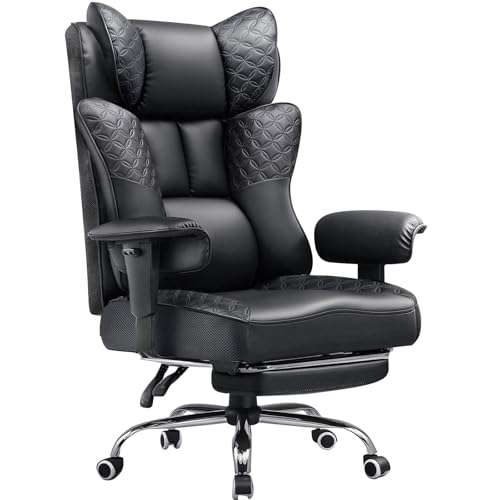
A proper desk chair needs to match your physical space and daily routine just as much as your sitting preferences. Features like synchronized linkage armrests, extendable footrests, and tilt mechanisms provide flexibility whether you’re typing documents or relaxing with a controller. If your seat cushion feels too firm over time, pairing your setup with extra gaming seat padding provides customized softness. Checking dimensions like seat width and height adjustment ensures your new chair slides under your desktop smoothly.





Frequently Asked Questions
How do removable and built-in headrests differ?
Removable pillows offer flexible strap adjustments, whereas integrated headrests provide a fixed shape built into the backrest. A strap-mounted cushion lets you shift the support higher or lower along the backrest to match your height. Chairs like the Homall Gaming Chair, Ergonomic Faux Leather include removable pillows that you can detach whenever you prefer a flatter profile.
What seat dimensions matter most for a proper desk fit?
Seat width, seat depth, and the total height adjustment range determine how comfortably a chair fits your workspace. Always measure the clearance under your desk to ensure the armrests slide beneath the tabletop without scraping. Reviewing mid-range gaming seats can help you compare common seat heights between 17 and 21 inches.
How do linkage armrests work during recline?
Linkage armrests pivot automatically with the backrest, keeping your forearms supported at every angle. Chairs like the OS MOTOR Gaming Chair with Headrest and Footrest use this connected mechanism so your elbows stay supported when leaning back. Fixed armrests, on the other hand, remain stationary regardless of how far you recline.
What is the benefit of a footrest on a Best Gaming Chair With Headrest?
A retractable footrest pulls out from beneath the seat cushion to support your legs during breaks. This feature pairs with recline angles ranging from 135 to 180 degrees for lounging between matches. When you return to keyboard work, the footrest slides away neatly beneath the seat.
How can you protect delicate floors from chair wheels?
Hard casters can mark sensitive hardwood floors or snag carpet over time. Adding a protective floor mat prevents scratches and keeps rolling motion quiet and smooth. Regular cleaning also prevents dirt from jamming the caster wheels.





Write Your Review
No reviews yet. Be the first to share your experience!