


Building or upgrading a desktop gaming setup often leads to difficult budget decisions, especially when allocating funds between graphics performance and the system foundation. Many builders quickly discover that figuring out how much is a gaming motherboard requires looking closely at platform generations, expansion slots, and power delivery rather than just aesthetics. A reliable board connects every essential component, from the central processor to high-speed storage, making it a critical piece of any stable gaming rig. Choosing the right tier ensures your graphics card and system memory perform reliably without inflating the overall system expense.
Depending on whether you target older socket designs or modern architectures, board costs vary dramatically from entry-level options to feature-packed premium models. Exploring realistic expectations for budget desktop gaming builds can prevent you from overspending on features you might never actually use. In this breakdown, we examine what separate pricing brackets offer in connectivity, memory standards, and cooling solutions. By understanding these distinctions, you can select a motherboard that fits your performance targets and budget comfortably.

Pros
- Excellent compatibility with modern AMD Ryzen processors for upgrade path
- High memory overclocking support up to 4600MHz for responsive gaming
- Affordable price point perfect for budget gaming builds or esports setups
- M.2 slot with PCIe 3.0 x4 for fast NVMe storage performance
- Compact micro-ATX size ideal for small form factor cases and tidy cable management
Cons
- Limited to PCIe 3.0, not PCIe 4.0, which may affect future GPU bandwidth potential
- Only two memory slots, restricting maximum RAM capacity for heavy multitasking
- No built-in Wi-Fi or Bluetooth, requiring separate adapter for wireless connectivity
The MSI A520M-A PRO Gaming Motherboard is a compact micro-ATX board designed for budget-conscious PC gamers who want a reliable foundation for their gaming rig. It supports AMD Ryzen 5000 and 4000 G-Series desktop processors, making it an excellent choice for builders looking to pair a cost-effective CPU like the Ryzen 5 5600 with a no-frills motherboard. This board is best suited for casual gamers, esports enthusiasts, and college gamers who prioritize value without sacrificing essential features.
In terms of gaming performance, the A520M-A PRO delivers responsive gameplay thanks to its support for DDR4 memory up to 4600MHz when overclocked. This helps reduce load times and improve frame stability in fast-paced titles like Call of Duty or Valorant. The Turbo M.2 slot running at PCIe Gen3 x4 allows for high-speed NVMe SSDs, ensuring your games and operating system boot up quickly. While it lacks PCIe 4.0, the real-world impact on gaming is minimal for most budget to mid-range graphics cards.
Build quality is typical for the A520 chipset: a solid, no-nonsense design with reinforced PCIe slots and a sleek black PCB. The Audio Boost technology provides clear, studio-grade sound, which is a nice bonus for immersive gaming and Discord chats. The micro-ATX footprint makes it easy to install in smaller cases, and the layout is clean for cable management. However, there are only two DIMM slots, so plan for a 2x16GB kit if you need 32GB of RAM later.
Setup is straightforward with the AM4 socket and clear documentation. The Dragon Center software gives you control over system monitoring, fan curves, and basic RGB lighting, though the board itself has minimal onboard lighting. Connectivity includes USB 3.2 Gen 1 ports, DVI and HDMI outputs for integrated graphics, and four SATA 6Gb/s ports for storage. Maintenance is minimal, and the BIOS is user-friendly for beginners.
A realistic limitation is the absence of PCIe 4.0, which means future high-end GPUs may not reach full potential, but for most gamers on a budget, this is a non-issue. Also, you will need a dedicated Wi-Fi card if you want wireless internet. Overall, this motherboard is a smart buy for PC gamers who want a stable, affordable foundation for a Ryzen-based gaming PC. It is particularly recommended for esports players, casual gamers, and anyone building a compact rig for school, work, and play.


Pros
- Excellent networking suite with WiFi 6E and 2.5Gb LAN for competitive gaming and streaming
- Robust 12+2 power stage design handles high-end Ryzen 5000 processors with ease
- PCIe 4.0 support on both M.2 slots and primary GPU slot for fast storage and graphics
- Comprehensive RGB ecosystem with Aura Sync and addressable Gen 2 header
- BIOS Flashback and user-friendly UEFI make updates and overclocking straightforward
Cons
- No PCIe 5.0 support, limiting future-proofing for next-gen GPUs and SSDs
- DDR4 memory only, which may disappoint users looking to move to DDR5 platforms
- Premium pricing for a B550 board; some budget alternatives offer similar core features
The ASUS ROG Strix B550-F Gaming WiFi II is an ATX motherboard built around the AMD B550 chipset, designed for PC gamers and gaming setup builders who want a solid foundation for a Ryzen-based rig. It supports AMD Ryzen 3000 and 5000 series processors (including G-series), making it a versatile choice for both current-gen and last-gen CPUs. The board comes packed with features that appeal to competitive gamers, streamers, and RGB enthusiasts alike.
Performance-wise, the motherboard delivers where it matters most. With PCIe 4.0 support on the primary PCIe x16 slot and both M.2 slots, you can run the latest graphics cards and NVMe SSDs at full speed, reducing load times and improving gaming responsiveness. The 12+2 teamed power stages, paired with a ProCool power connector and high-quality alloy chokes, ensure stable power delivery even under heavy CPU loads. That means smoother gameplay in CPU-intensive titles and stable overclocking potential for those who like to push their Ryzen 5000 chips.
Connectivity is a standout feature. The integrated WiFi 6E (802.11ax) module provides ultra-low latency wireless networking, ideal for online gaming and streaming without the clutter of Ethernet cables. For wired setups, the Intel 2.5Gb Ethernet port with ASUS LANGuard offers reliable, high-speed connections. The rear I/O also includes HDMI 2.1 and DisplayPort 1.2 outputs, which can drive high-resolution monitors directly from an APU or as secondary displays. Bluetooth v5.2 is included for wireless peripherals.
Build quality and ease of setup are well thought out. The board features a clean layout with clearly labeled headers, including an addressable Gen 2 RGB header for custom lighting control via Aura Sync. The BIOS Flashback button lets you update the BIOS without a CPU or RAM installed, which is a lifesaver when upgrading to a newer Ryzen processor. The UEFI BIOS dashboard is intuitive, offering both basic and advanced tuning options. Cable management is straightforward thanks to well-placed connectors and a sleek black PCB with subtle ROG styling.
That said, there are a few realistic limitations. The B550 chipset lacks PCIe 5.0 support, so if you're planning to use future GPUs or SSDs that leverage Gen5 speeds, you'll need to step up to an X570 or newer platform. Also, this board uses DDR4 memory, which is still excellent for gaming but may feel less future-proof as DDR5 becomes more mainstream. Finally, the price point is on the higher side for a B550 board, though the feature set justifies the cost for many builders.
Overall, the ASUS ROG Strix B550-F Gaming WiFi II is a strong recommendation for PC gamers, streamers, and gaming setup builders who want a reliable, feature-rich AM4 motherboard. It excels in networking, power delivery, and RGB customization, making it a great match for a Ryzen 5000-based gaming PC. If you're building a new rig or upgrading from an older platform and don't need PCIe 5.0 or DDR5, this board offers excellent value and performance for years of gaming enjoyment.

Understanding Gaming Motherboard Pricing and Platform Value
Determining how much is a gaming motherboard comes down to understanding the distinct hardware tiers available on the market today. Board prices naturally separate into entry-level solutions designed for fundamental operation, mainstream mid-range boards packed with reliable gaming connectivity, and premium enthusiast platforms built for high-end expansion. The specific platform generation you choose also plays a major role in overall component expenses. By examining what each bracket includes, builders can decide exactly how much investment makes sense for their performance targets.
A motherboard serves as the communication highway for every device installed inside your gaming computer. While a premium board cannot magically boost frame rates on its own, a board that lacks adequate power delivery or thermal management can hold back your processor and storage. Modern platforms must support modern graphical demands alongside high-speed solid-state drives. Planning your purchase around the specific requirements of your favorite titles ensures that every dollar spent actively supports system stability.
Entry-Level Motherboards and What Budget Boards Deliver
The most accessible tier of gaming motherboards focuses strictly on essential functionality and core system stability. Options in this category, such as the MSI A520M-A PRO Gaming Motherboard, generally utilize compact micro-ATX layouts and cost-effective chipsets. These boards provide basic socket connectivity, such as the established AM4 socket, paired with standard DDR4 memory support. They strip away excessive visual flair, complex lighting headers, and oversized cooling shields in order to keep platform costs as low as possible.
For players assembling entry level gaming desktop configurations, these budget boards handle standard esports titles and everyday computing tasks without issue. You will typically find a single PCIe 3.0 x16 slot for your graphics card alongside one high-speed M.2 slot for an NVMe solid-state drive. Connectivity on the rear panel remains functional, offering basic USB ports, standard audio codecs, and integrated video outputs for processors featuring integrated graphics. These boards work exceptionally well with power-efficient six-core processors that do not place heavy demands on voltage regulation modules.
However, choosing an entry-level motherboard does involve clear trade-offs that buyers should weigh carefully. Most budget models feature only two memory slots, which can limit future RAM expansion if you start with two smaller modules. Power delivery systems on these boards typically lack large metal heatsinks, meaning they are not intended for heavy processor overclocking or power-hungry flagship chips. If your goal is to build a reliable 1080p gaming machine on a tight overall budget, an entry-level board offers remarkable value without wasting money on unused features.
Mid-Range Gaming Motherboards: The Mainstream Sweet Spot
The mid-range bracket represents where the vast majority of PC gamers find the best balance of features, performance, and cost. Boards in this category often feature popular enthusiast chipsets such as AMD B550 or B650 in full ATX dimensions. Products like the Asus ROG Strix B550-F Gaming WiFi II AMD AM4 and the MSI B550 Gaming WIFI6E Motherboard, ATX showcase what makes this tier so appealing to custom builders. You receive reinforced primary PCIe 4.0 expansion slots, multiple M.2 storage slots with dedicated metal heatsinks, and four memory channels for straightforward future upgrades.
Connectivity also takes a massive leap forward once you transition into this mainstream tier. Most boards incorporate built-in Wi-Fi 6E modules and high-speed 2.5Gb Ethernet controllers, eliminating the need to purchase separate wireless add-in cards. Audio hardware receives substantial upgrades with isolated circuitry and superior audio capacitors designed to minimize electrical interference during intense gaming sessions. Furthermore, mid-range boards provide generous fan headers and addressable RGB connections, making chassis cooling management far more straightforward.
Thermal design and voltage delivery are the primary technical reasons to choose a mid-range motherboard over a bare-bones alternative. Boards in this segment feature heavy aluminum heatsinks covering robust multi-phase power delivery systems, such as 8+2 or 12+2 teamed power stages. This enhanced electrical stability allows mid-range platforms to comfortably run popular eight-core and twelve-core gaming processors under sustained gaming loads. When planning a balanced build that can handle modern titles at 1440p resolution, investing in a solid mid-range board prevents unexpected thermal throttling.
Premium Platforms and Bundled Enthusiast Options
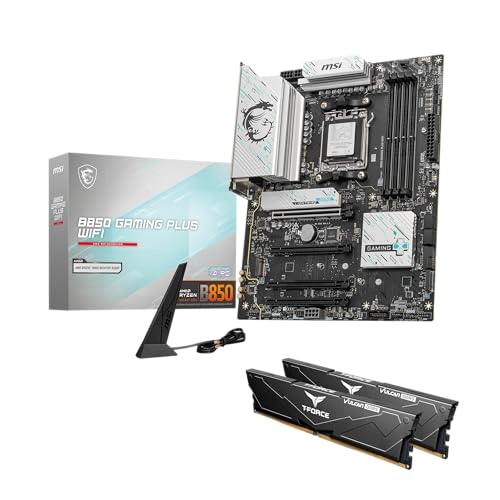
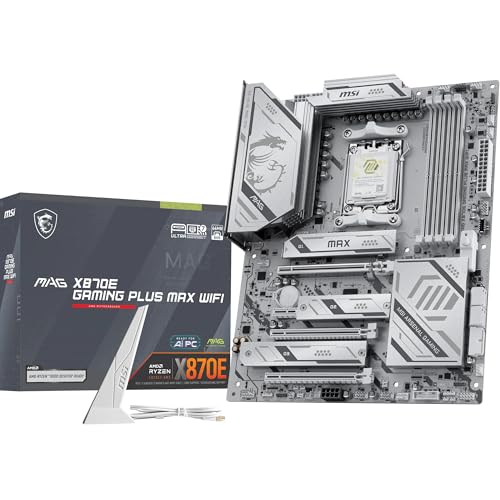
Enthusiast-grade motherboards sit at the top of the price hierarchy, delivering cutting-edge connectivity and uncompromising power delivery. This category includes modern chipsets like AMD B850 and X-series platforms designed for newer processor architectures. Offerings such as the MSI B850 GAMING PLUS WIFI Motherboard,ATX-Supports bundle pair the motherboard directly with high-speed DDR5 memory modules to ensure immediate compatibility out of the box. These platforms support memory overclocking speeds reaching well beyond standard specifications, catering to users who want maximum memory bandwidth.
Advanced interface standards are a defining hallmark of premium gaming motherboards. You will frequently find support for PCIe 5.0 lanes directed to both the primary graphics slot and next-generation M.2 solid-state storage bays. Networking hardware often pushes boundaries by incorporating Wi-Fi 7 wireless connectivity alongside 5G LAN ports for ultra-low latency local network transfers. Rear input panels feature high-bandwidth USB Type-C connections operating at 10Gbps or 20Gbps speeds, providing rapid data transfers for external capture cards and drives.
While the hardware capabilities of premium motherboards are impressive, they are primarily aimed at enthusiasts, content creators, and competitive overclockers. The substantial cost increase over mainstream boards yields diminishing returns for standard gaming workloads, where graphics cards and processor compute power dictate most frame rates. If you plan to run top-tier processors, multiple high-speed storage drives, and premium memory kits simultaneously, a high-end platform delivers the stability you need. Otherwise, mainstream platforms generally provide more than enough functionality for standard gaming rigs.
How Socket Longevity and Memory Standards Impact Long-Term Expense
Evaluating board expenses requires looking beyond the initial checkout total to consider platform longevity and memory generations. The mature AMD AM4 socket, supported by boards like the MSI B550 Gaming WIFI6E Motherboard, ATX, remains exceptionally affordable because it relies on widely available DDR4 system memory. DDR4 memory kits are economical, making AM4 builds remarkably cost-effective for gamers assembling complete systems on strict budgets. The trade-off is that AM4 represents an established platform with limited future processor releases on the horizon.
In contrast, newer sockets such as AMD AM5, featured on the MSI B650 Gaming Plus WiFi Gaming Motherboard, require modern DDR5 system memory. While both the motherboards and compatible DDR5 modules generally command higher price points than legacy parts, AM5 offers a clearer upgrade path for upcoming processor generations. Choosing an AM5 foundation allows a gamer to upgrade their central processor years down the line without replacing the motherboard or memory. That long-term flexibility can save builders substantial money across multiple hardware upgrade cycles.
Carefully calculating your expected upgrade timeline helps determine which generation offers superior financial value. If you tend to build a gaming computer and use it unchanged for four or five years, an affordable DDR4 platform offers unbeatable day-to-day value. If you prefer swapping components incrementally to maintain top-tier performance, investing in a modern socket architecture is well worth the extra upfront expense. Matching your upgrade habits to the motherboard platform prevents premature component obsolescence.
Key Hardware Features That Justify Stepping Up in Price
When comparing boards across different tiers, several specific hardware elements justify spending extra on a better model. Voltage regulator module cooling is easily the most critical internal factor for system longevity. Higher-tier boards employ thick aluminum heatsinks paired with high-efficiency thermal pads rated for superior heat dissipation around the processor socket. These cooling components ensure that power delivery stays cool during prolonged gaming sessions, preventing CPU downclocking under heavy computing loads.
Storage management is another major feature where moderate price increases provide tangible benefits for modern gaming setups. Modern open-world games feature massive file sizes, making fast NVMe drives essential for reducing load times and texture streaming delays. Premium and mid-range boards include integrated metal covers, such as MSI M.2 Shield Frozr, which protect fast drives from thermal throttling. Having multiple shielded M.2 slots allows builders to expand their game libraries without resorting to slower mechanical drives or cluttering the chassis with extra SATA cables.
Integrated convenience features also make higher-tier motherboards much easier to assemble and maintain over time. Tools like BIOS Flashback buttons allow you to update board firmware using only a USB flash drive, without needing an older compatible CPU installed. Pre-installed input-output shields save installation time and prevent accidental finger cuts during chassis assembly. Integrated diagnostic LEDs help users quickly troubleshoot memory or boot problems without guessing which component caused a failure.
How to Balance Motherboard Spending Against Your Overall PC Budget
A frequent mistake among first-time PC builders is allocating disproportionate funds toward an expensive motherboard at the expense of graphical power. In any dedicated gaming computer, the graphics processor determines the visual settings, resolution, and baseline frame rates you can achieve. Our comprehensive guide to desktop graphics card selection highlights how prioritizing GPU capability creates a noticeably better gaming experience. Ideally, your motherboard should account for a reasonable fraction of your total system budget rather than dominating the parts list.
Pairing components logically prevents bottlenecks and wasted investment across the entire build. Installing a budget processor on an elaborate flagship motherboard wastes money that could have funded a more capable GPU or larger solid-state storage. Conversely, placing a power-hungry twelve-core processor on a basic entry-level motherboard risks thermal throttling and system instability due to stressed power delivery. Balanced component selection ensures that each part operates within its intended thermal and electrical parameters.
Consider your personal gaming goals and workspace setup when finalizing your motherboard budget. If you play competitive multiplayer games at 1080p, an accessible board paired with a modest processor and fast graphics card provides exceptional performance. If you stream gameplay while running background voice software and recording footage, spending more on a mid-range board with abundant USB headers and robust networking makes practical sense. Aligning hardware spending with your actual workload ensures every dollar contributes to real-world capability.
Final Verification Steps Before Finalizing Your Motherboard Choice
Before completing your purchase, double-check that your selected motherboard physically fits within your chosen computer case. Standard ATX boards offer the greatest expansion options but require mid-tower or full-tower enclosures to fit properly. Micro-ATX motherboards fit into a broader range of compact cases while still offering essential expansion slots, making them versatile choices for space-conscious desks. Verifying chassis clearance for motherboard dimensions and rear port cutouts prevents frustrating assembly delays.
Power supply connections also require careful review to ensure smooth compatibility during the build process. Mainstream and enthusiast boards often require dual 8-pin CPU power connectors to support high-performance processors, whereas basic boards function with a single 8-pin connector. Make sure your chosen power supply includes the necessary modular cables and sufficient wattage to deliver stable power to the board and graphics card. Always consult manufacturer manuals for exact pinout instructions and safety practices when assembling your components.
Ultimately, answering the question of motherboard cost comes down to matching your performance targets with the right feature tier. Entry-level boards deliver reliable gaming foundations for budget-conscious players, while mid-range models offer the ideal balance of connectivity, cooling, and upgrade potential for most desktop builders. Premium platforms provide advanced standards like PCIe 5.0 and Wi-Fi 7 for those who demand maximum expansion. Focus on the core features your games require, and you will build a stable, cost-effective gaming PC that performs reliably for years to come.





Write Your Review
No reviews yet. Be the first to share your experience!